1
How is the Little Smart PC Mouse used?
In this section let’s learn how to play with the Little Smart PC MouseTM
learning toy.
1. Press the
key to turn on the unit.
2. The Little Smart PC MouseTM learning toy will show an opening
animation on the screen.
After the opening, an activity picture will be displayed on the screen.
The Little Smart PC MouseTM learning toy will invite you to play an
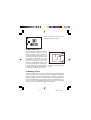
activity by saying “Pick an activity”. An activity can be chosen in 3 different ways:
a. Press the letter key with the activity icon representing the activity to
be played;
b. Use the mouse to click on the left or right arrows displayed on the
screen until the activity to be played appears. Then click on the
ENTER icon to confirm;
c. Press the left or right arrow keys on the keyboard to select an activity
and then press the ENTER key to confirm.
Activity picture which
is same as the icon
on keyboard
A tick represents
the game has
been played
Left and right arrow
buttons to choose
an activity
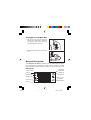
Keyboard Description and Function Keys
Now let’s learn about all the different keys on the keyboard and what the
roller ball mouse can be used for.
8
23600
8
3/28/02, 6:42 PM