1
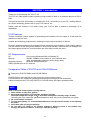
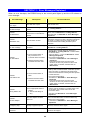
SECTION 11 : Error Messages Explained
NOTE
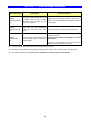
Error Message
Description
Corrective Action
ERROR
RBN-IMG Mismatch
(*1)
The type of ribbon installed in theP-55
is different from the type of ribbon
specified in the print data (*2) sent
from your computer.
Replace the current ribbon with the same type of
ribbon as the one specified in the print data (*2) and try
printing again.
ERROR
IMG Type too Old
(*1)
Print data (*2) with unidentifiable
ribbon type have been sent to the
P-55.
Create print data (*2) using the latest printer driver.
ERROR
Invalid Setdata
(*1)
Error occurred in the setdata that had
been internally looked up during the
printer startup.
You need to resend setdata to your P-55. To do so,
contact our service.
(For the contact details, see SECTION 20 : Contact
Information.)
To clear the error message, open and then close the
side door. The printer is back in “Ready.”
(*1)---This error is indicated by the firmware Ver51.34 or later versions only.
(*2)---Print data is the file (PRN file (*3)) created using the function “Print to file” or the data to be output to a printer.
(*3)---For details on PRN file, see 9) “Print to file” of SECTION 14 : Getting Label Print Job Started.
23