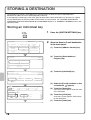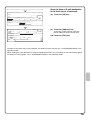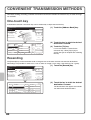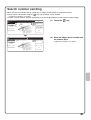
1
MODEL: MX-M363U
MX-M453U
MX-M503U
DIGITAL MULTIFUNCTIONAL SYSTEM
Quick Start Guide
Before using the machine
Functions of the machine and
procedures for placing originals and
loading paper.
Copying
Using the copy function.
Printing
Using the printer function.
Faxing
Using the fax function.
Scanning
Using the scan function.
Document filing
Storing jobs as files on the hard
drive.
System settings
Configuring settings to make the
machine easier to use.
Troubleshooting
Keep this manual close at hand for reference
whenever needed.
Frequently asked questions and
how to clear paper misfeeds.
OPERATION MANUALS AND HOW TO USE THEM
3 printed manuals and a manual in PDF format are provided with the machine.
Printed manuals
To learn the parts of the machine and how to use them
To load paper
Before using the machine (page 7)
Quick Start Guide
(this manual)
To make a copy
Copying (page 21)
To print a file
Printing (page 41)
To send a fax
This
manual
provides
easy-to-understand
explanations of the functions of
the machine in a single
manual.
Faxing (page 53)
To send a scanned image
To use Internet fax
Scanning (page 71)
The explanations in this manual
focus on frequently used
functions. For special functions,
troubleshooting, and detailed
procedures for using the
machine, see the manuals in
PDF format.
What is document filing?
What is it used for?
Document filing (page 87)
What are the system settings?
System settings (page 95)
Frequently asked questions and how to
clear paper misfeeds
Troubleshooting (page 101)
Please read before
using the machine.
Please read when the printer
expansion kit is installed.
Safety Guide
Software Setup
Guide
Contains important safety information
and the specifications of the machine.
Explains the procedures for installing the
printer driver and scanner driver.
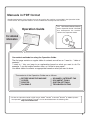
These manuals are combined for environmental protection.
Manuals in PDF format
Detailed explanations of the functions that can be used on the machine are provided in the Operation Guide
in PDF format. The Operation Guide is on the CD-ROM that accompanies the machine.
The "MX-M363U/M453U/M503U
Series Operation Guide" CD-ROM
that accompanies the machine
contains the Operation Guide.
Operation Guide
For detailed
information
Convenient methods for using the Operation Guide
The first page contains a regular table of contents as well as an "I want to..." table of
contents.
"I want to..." lets you jump to an explanation based on what you want to do. For
example, "I use the copier function often, so I'd like to save paper".
Use either table of contents as appropriate based on what you want to know.
The contents of the Operation Guide are as follows:
BEFORE USING THE MACHINE
COPIER
PRINTER
FACSIMILE
SCANNER / INTERNET FAX
DOCUMENT FILING
SYSTEM SETTINGS
TROUBLESHOOTING
* To view the Operation Guide in PDF format, Adobe® Reader® or Acrobat® Reader® of Adobe Systems
Incorporated is required. Adobe® Reader® can be downloaded from the following URL:
http://www.adobe.com/
1
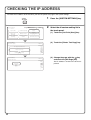
CHECKING THE IP ADDRESS
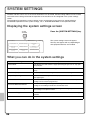
To check the IP address of the machine, print out the printer test page in the system settings.
SYSTEM
SETTINGS
System Settings
Admin Password
Total Count
Default Settings
List Print
(User)
Paper Tray
Settings
Address Control
Fax Data
Receive/Forward
Printer Condition
Settings
Document Filing
Control
USB-Device Check
Exit
1
Press the [SYSTEM SETTINGS] key.
2
Select the all custom setting list in
the touch panel.
(1) Touch the [List Print (User)] key.
(1)
(2) Touch the [Printer Test Page] key.
System Settings
OK
List Print (User)
1/2
All Custom Setting List
Printer Test Page
(2)
Sending Address List
(3) Change the page with the
key
and touch the [NIC Page] key.
System Settings
Printer Test Page
OK
2/2
NIC Page
(3)
2
The IP address is shown in the list that is
printed.
ACCESSING THE WEB SERVER IN THE
MACHINE
When the machine is connected to a network, the machine's built-in Web server can be accessed from a Web
browser on your computer.
Opening the Web pages
Access the Web server in the machine to open
the Web pages.
Start a Web browser on a computer that is
connected to the same network as the machine
and enter the IP address of the machine.
Recommended Web browsers
Internet Explorer: 6.0 or higher (Windows®)
Netscape Navigator: 9 (Windows®)
Firefox: 2.0 or higher (Windows®)
Safari: 1.5 or higher (Macintosh)
The Web page will appear.
The machine settings may require that user
authentication be performed in order to open the Web
page. Please ask the administrator of the machine for
the password that is required for user authentication.
3
TABLE OF CONTENTS
CHECKING THE IP ADDRESS. . . . . . . . . . . . . . . . . . . . . . . . . . . . . . . . . . . . . . . . . . . . . . . . . . . . . .2
ACCESSING THE WEB SERVER IN THE MACHINE . . . . . . . . . . . . . . . . . . . . . . . . . . . . . . . . . . . .3
Before using the machine
PART NAMES AND FUNCTIONS . . . . . . . . . . . . . . . . . . . . . . . . . . . . . . . . . . . . . . . . . . . . . . . . . . .8
OPERATION PANEL . . . . . . . . . . . . . . . . . . . . . . . . . . . . . . . . . . . . . . . . . . . . . . . . . . . . . . . . . . . .10
USING THE TOUCH PANEL . . . . . . . . . . . . . . . . . . . . . . . . . . . . . . . . . . . . . . . . . . . . . . . . . . . . . .12
USER AUTHENTICATION . . . . . . . . . . . . . . . . . . . . . . . . . . . . . . . . . . . . . . . . . . . . . . . . . . . . . . . .13
PLACING ORIGINALS . . . . . . . . . . . . . . . . . . . . . . . . . . . . . . . . . . . . . . . . . . . . . . . . . . . . . . . . . . .14
CHANGING PAPER IN A TRAY . . . . . . . . . . . . . . . . . . . . . . . . . . . . . . . . . . . . . . . . . . . . . . . . . . . .15
Copying
BASE SCREEN OF COPY MODE . . . . . . . . . . . . . . . . . . . . . . . . . . . . . . . . . . . . . . . . . . . . . . . . . .22
MAKING COPIES . . . . . . . . . . . . . . . . . . . . . . . . . . . . . . . . . . . . . . . . . . . . . . . . . . . . . . . . . . . . . . .23
2-SIDED COPYING (Automatic Document Feeder). . . . . . . . . . . . . . . . . . . . . . . . . . . . . . . . . . . .24
COPYING ON SPECIAL PAPER (Bypass Copy) . . . . . . . . . . . . . . . . . . . . . . . . . . . . . . . . . . . . . .25
SELECTING THE EXPOSURE AND IMAGE TYPE . . . . . . . . . . . . . . . . . . . . . . . . . . . . . . . . . . . . .27
FITTING THE COPY IMAGE TO THE PAPER (Automatic Ratio Selection) . . . . . . . . . . . . . . . . .28
ENLARGEMENT/REDUCTION (Preset Ratios / Zoom) . . . . . . . . . . . . . . . . . . . . . . . . . . . . . . . . .29
INTERRUPTING A COPY RUN (Interrupt Copy) . . . . . . . . . . . . . . . . . . . . . . . . . . . . . . . . . . . . . .30
STORING COPY OPERATIONS (Job Programs) . . . . . . . . . . . . . . . . . . . . . . . . . . . . . . . . . . . . . .31
SPECIAL MODES . . . . . . . . . . . . . . . . . . . . . . . . . . . . . . . . . . . . . . . . . . . . . . . . . . . . . . . . . . . . . . .33
SELECTING A SPECIAL MODE . . . . . . . . . . . . . . . . . . . . . . . . . . . . . . . . . . . . . . . . . . . . . . . . . . .34
CONVENIENT COPY FUNCTIONS . . . . . . . . . . . . . . . . . . . . . . . . . . . . . . . . . . . . . . . . . . . . . . . . .35
Printing
PRINTING . . . . . . . . . . . . . . . . . . . . . . . . . . . . . . . . . . . . . . . . . . . . . . . . . . . . . . . . . . . . . . . . . . . . .42
CANCELLING PRINTING (AT THE MACHINE) . . . . . . . . . . . . . . . . . . . . . . . . . . . . . . . . . . . . . . . .47
SELECTING PRINT SETTINGS . . . . . . . . . . . . . . . . . . . . . . . . . . . . . . . . . . . . . . . . . . . . . . . . . . . .48
CONVENIENT PRINTER FUNCTIONS. . . . . . . . . . . . . . . . . . . . . . . . . . . . . . . . . . . . . . . . . . . . . . .50
4
Faxing
BASE SCREEN OF FAX MODE . . . . . . . . . . . . . . . . . . . . . . . . . . . . . . . . . . . . . . . . . . . . . . . . . . . .54
SENDING A FAX. . . . . . . . . . . . . . . . . . . . . . . . . . . . . . . . . . . . . . . . . . . . . . . . . . . . . . . . . . . . . . . .55
CHANGING THE SIZE OF A FAX . . . . . . . . . . . . . . . . . . . . . . . . . . . . . . . . . . . . . . . . . . . . . . . . . .56
CHANGING THE EXPOSURE . . . . . . . . . . . . . . . . . . . . . . . . . . . . . . . . . . . . . . . . . . . . . . . . . . . . .57
CHANGING THE RESOLUTION. . . . . . . . . . . . . . . . . . . . . . . . . . . . . . . . . . . . . . . . . . . . . . . . . . . .58
STORING A FAX NUMBER . . . . . . . . . . . . . . . . . . . . . . . . . . . . . . . . . . . . . . . . . . . . . . . . . . . . . . .59
FORWARDING RECEIVED FAXES (Fax Data Forward) . . . . . . . . . . . . . . . . . . . . . . . . . . . . . . . .61
CONVENIENT DIALLING METHODS . . . . . . . . . . . . . . . . . . . . . . . . . . . . . . . . . . . . . . . . . . . . . . .62
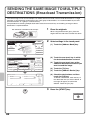
SENDING THE SAME FAX TO MULTIPLE DESTINATIONS (Broadcast Transmission). . . . . . .64
SPECIAL FAX MODES . . . . . . . . . . . . . . . . . . . . . . . . . . . . . . . . . . . . . . . . . . . . . . . . . . . . . . . . . . .66
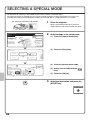
SELECTING A SPECIAL MODE . . . . . . . . . . . . . . . . . . . . . . . . . . . . . . . . . . . . . . . . . . . . . . . . . . .67
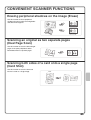
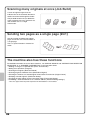
CONVENIENT FAX FUNCTIONS . . . . . . . . . . . . . . . . . . . . . . . . . . . . . . . . . . . . . . . . . . . . . . . . . . .68
Scanning
NETWORK SCANNER FUNCTION . . . . . . . . . . . . . . . . . . . . . . . . . . . . . . . . . . . . . . . . . . . . . . . . .72
BASE SCREEN OF SCAN MODE . . . . . . . . . . . . . . . . . . . . . . . . . . . . . . . . . . . . . . . . . . . . . . . . . .73
SCANNING AN ORIGINAL . . . . . . . . . . . . . . . . . . . . . . . . . . . . . . . . . . . . . . . . . . . . . . . . . . . . . . . .74
CHANGING THE EXPOSURE AND ORIGINAL IMAGE TYPE . . . . . . . . . . . . . . . . . . . . . . . . . . . .75
CHANGING THE RESOLUTION. . . . . . . . . . . . . . . . . . . . . . . . . . . . . . . . . . . . . . . . . . . . . . . . . . . .76
CHANGING THE FILE FORMAT . . . . . . . . . . . . . . . . . . . . . . . . . . . . . . . . . . . . . . . . . . . . . . . . . . .77
STORING A DESTINATION . . . . . . . . . . . . . . . . . . . . . . . . . . . . . . . . . . . . . . . . . . . . . . . . . . . . . . .78
CONVENIENT TRANSMISSION METHODS . . . . . . . . . . . . . . . . . . . . . . . . . . . . . . . . . . . . . . . . . .80
SENDING THE SAME IMAGE TO MULTIPLE DESTINATIONS (Broadcast Transmission) . . . .82
SPECIAL SCAN MODES . . . . . . . . . . . . . . . . . . . . . . . . . . . . . . . . . . . . . . . . . . . . . . . . . . . . . . . . .83
SELECTING A SPECIAL MODE . . . . . . . . . . . . . . . . . . . . . . . . . . . . . . . . . . . . . . . . . . . . . . . . . . .84
CONVENIENT SCANNER FUNCTIONS. . . . . . . . . . . . . . . . . . . . . . . . . . . . . . . . . . . . . . . . . . . . . .85
5
Document filing
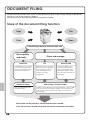
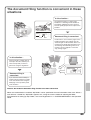
DOCUMENT FILING . . . . . . . . . . . . . . . . . . . . . . . . . . . . . . . . . . . . . . . . . . . . . . . . . . . . . . . . . . . . .88
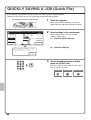
QUICKLY SAVING A JOB (Quick File) . . . . . . . . . . . . . . . . . . . . . . . . . . . . . . . . . . . . . . . . . . . . . .90
APPENDING INFORMATION WHEN STORING A FILE (File) . . . . . . . . . . . . . . . . . . . . . . . . . . . .91
SAVING A DOCUMENT ONLY (Scan to HDD) . . . . . . . . . . . . . . . . . . . . . . . . . . . . . . . . . . . . . . . .93
PRINTING A SAVED FILE . . . . . . . . . . . . . . . . . . . . . . . . . . . . . . . . . . . . . . . . . . . . . . . . . . . . . . . .94
System settings
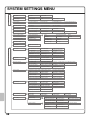
SYSTEM SETTINGS . . . . . . . . . . . . . . . . . . . . . . . . . . . . . . . . . . . . . . . . . . . . . . . . . . . . . . . . . . . . .96
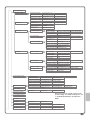
SYSTEM SETTINGS MENU . . . . . . . . . . . . . . . . . . . . . . . . . . . . . . . . . . . . . . . . . . . . . . . . . . . . . . .98
Troubleshooting
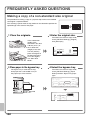
FREQUENTLY ASKED QUESTIONS. . . . . . . . . . . . . . . . . . . . . . . . . . . . . . . . . . . . . . . . . . . . . . .102
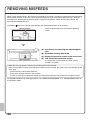
REMOVING MISFEEDS . . . . . . . . . . . . . . . . . . . . . . . . . . . . . . . . . . . . . . . . . . . . . . . . . . . . . . . . .106
6
Before using the machine
This section provides general information about the machine, including the
names and functions of the parts of the machine and its peripheral devices,
and the procedures for placing originals and loading paper.
X PART NAMES AND FUNCTIONS . . . . . . . . . . . . . . . . . . 8
X OPERATION PANEL . . . . . . . . . . . . . . . . . . . . . . . . . . . 10
X USING THE TOUCH PANEL . . . . . . . . . . . . . . . . . . . . . 12
X USER AUTHENTICATION . . . . . . . . . . . . . . . . . . . . . . . 13
X PLACING ORIGINALS. . . . . . . . . . . . . . . . . . . . . . . . . . 14
X CHANGING PAPER IN A TRAY . . . . . . . . . . . . . . . . . . 15
7
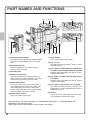
PART NAMES AND FUNCTIONS
(1)
(5)
(6)
(1) Automatic document feeder
This automatically feeds and scans multiple originals.
Both sides of 2-sided originals can be scanned at
once.
(2) Document feeder tray
Place the originals in this tray when using the
automatic document feeder.
(3) Operation panel
(4) Output tray (centre tray)
Copy jobs and print jobs are delivered to this tray.
(When a finisher or saddle stitch finisher is installed,
the output tray (centre tray) cannot be used.)
(5) Saddle Stitch Finisher*
This can be used to staple output. The machine is
also equipped with the staple function, which folds
paper and staples it at the centre, and the fold
function, which folds paper in half. A punch module
can be installed to punch holes in output.
(6) Finisher (large stacker)*
This can be used to staple output.
(7)
(2)
(8)
(3)
(4)
(9) (10) (11)
(12)
(7) Punch module*
This is used to punch holes in output.
(8) Tray 1 / Tray 2
Up to 500 sheets of paper (80 g/m2 (21 lbs.)) can be
loaded in each tray.
(9) Tray 3 (when a stand/1 x 500 sheet paper drawer
or stand/2 x 500 sheet paper drawer is installed)*
This holds paper. Up to 500 sheets (80 g/m2 (21 lbs.))
of paper can be loaded.
(10) Tray 4 (when a stand/2 x 500 sheet paper drawer
is installed)*
This holds paper. Up to 500 sheets (80 g/m2 (21 lbs.))
of paper can be loaded.
(11) Tray 5 (when a large capacity tray is installed)*
Up to 3500 sheets (80 g/m2 (21 lbs.)) of paper can be
loaded. When a stand/1 x 500 sheet paper drawer is
installed, this is tray 4.
(12) Finisher*
This can be used to staple output. A punch module
can be installed to punch holes in output.
* Peripheral device. For more information, see "PERIPHERAL DEVICES" in "1. BEFORE USING THE
MACHINE" in the Operation Guide.
Some options may not be available in some countries and regions.
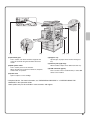
8
(13)
(14)
(15)
(13) Document glass
This is used to scan books and other originals that
cannot be scanned using the automatic document
feeder.
(14) Main power switch
This is used to power on the machine.
When using the fax or Internet fax functions, keep this
switch in the "on" position.
(16)
(17)
(18)
(16) Bypass tray
Special types of paper can be fed from the bypass
tray.
(17) Exit tray unit (right tray)*
When installed, output can be delivered to this tray.
(18) USB connector (type A)
This is used to connect a USB memory or other USB
device to the machine.
(15) Front cover
Open to replace a toner cartridge.
* Peripheral device. For more information, see "PERIPHERAL DEVICES" in "1. BEFORE USING THE
MACHINE" in the Operation Guide.
Some options may not be available in some countries and regions.
9
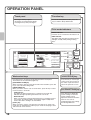
OPERATION PANEL
Touch panel
Function key
Messages and keys appear.
Operations are performed by directly
touching the keys with your fingers.
To use the Sharp OSA function, press this
key to switch to Sharp OSA mode.
Print mode indicators
READY indicator
Print data can be received when this indicator is lit.
DATA indicator
This blinks while print data is being received
and lights steadily while printing is taking
place.
Ready to scan for copy.
0
Original
Job Detail
Settings
A4
2-Sided Copy
A4
1.
2.
100%
Copy Ratio
3.
4.
A4
A4R
B4
A3
Special Modes
File
COPY
JOB STATUS
SYSTEM
SETTINGS
Quick File
Mode select keys
[JOB STATUS] key
Use these keys to change the mode displayed in the touch panel.
The indicator of the selected key lights up.
Press this key to view the job
status screen. You can check
the status of jobs and cancel
jobs in the job status screen.
[DOCUMENT FILING] key
When you wish to print or send a file stored on the hard drive, press this
key to select document filing mode.
[IMAGE SEND] key
When you wish to use the scan or fax functions, press this key to select
network scanner / fax mode.
· LINE indicator
This lights up during transmission or reception in fax mode. The
indicator also lights up during transmission in scan mode.
· DATA indicator
When a received fax cannot be printed because of a problem such as
out of paper, the indicator blinks. The indicator lights steadily when
there is data that is waiting to be transmitted.
[COPY] key
When you wish to use the copy function, press this key to select copy
mode. You can hold down the [COPY] key to check the total page count
and how much toner remains.
10
LINE
DATA
IMAGE SEND
Output
Plain
Auto
Exposure
PRINT
READY
DATA
DOCUMENT
FILING
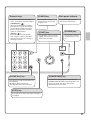
[SYSTEM SETTINGS] key
Press this key to display the
system settings screen. The
system settings can be
adjusted to make the machine
easier to use, such as
configuring paper tray settings
and storing addresses.
Numeric keys
These are used to enter the number of
copies, fax numbers, and other numbers.
[LOGOUT] key (
)
When user authentication is enabled,
press this key to log out after using the
machine. When using the fax function,
this key can be pressed to send tone
signals on a pulse dial line.
[#/P] key (
)
Press this key to use a job program
when using the copier function. When
using the fax function, press this key to
dial using a program.
[CLEAR] key
Main power indicator
Press this key to return
settings such as the number
of copies to "0".
This indicator lights when the
main power is switched on.
[START] key
[POWER] key
Use this key to copy or scan an
original. This key is also used to
send a fax in fax mode.
Use this key to turn the
machine power on and
off.
LOGOUT
[CLEAR ALL] key
[POWER SAVE] key
Press this key to redo an operation from
the beginning.
All settings will be cleared and
operation will return to the initial state.
Use this key to activate power save mode. The
[POWER SAVE] key blinks when the machine is in
power save mode. This key is also used to
deactivate power save mode.
[STOP] key
Press this key to stop a copy job or scanning of
an original.
11
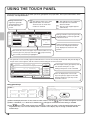
USING THE TOUCH PANEL
The touch keys that appear in the touch panel are grouped for easy operation. The layout and functions of the
touch keys are explained below.
Settings related to the
original are generally
grouped together on the
left side of the base
screen.
This appears when one or more
special modes are selected.
Touch the icon to check what
modes are selected.
Ready to scan for copy.
0
Original A4
Job Detail
Settings
1.
2.
100%
Copy Ratio
3.
4.
Settings related to output are generally
grouped together on the top right side
of the base screen.
2-Sided Copy
Plain
A4
Auto
Exposure
This indicates that an original has
been placed in the automatic
document feeder.
A4 The size of the original appears
automatically.
A4
A4R
B4
A3
Output
Special Modes
File
Advanced settings are grouped here.
You can have frequently used touch
keys displayed as shortcuts in this
position.
Quick File
This shows the status of the paper trays on the machine. You can
check the paper size, paper type and amount
of paper remaining.
The currently selected tray is highlighted.
The job status screen normally appears behind the base screen of the currently selected mode. Only the left edge of
the job status screen appears, and this can be touched to bring the screen to the front.
Job Queue
Sets / Progress
Spool
Status
1/1
A selected job can be given priority and
run ahead of other jobs, or a job
waiting in the queue can be cancelled.
Job Queue
Complete
1
Copy
020 / 001
Copying
2
Copy
020 / 000
Waiting
3
Computer01
020 / 000
Waiting
Priority
4
0312345678
002 / 000
Waiting
Stop/Delete
Detail
Print Job
Scan to
Fax Job
Jobs are displayed as a list of touch
keys. The job keys appear in the order
that they will be run. A job key can be
touched to select it.
Internet Fax
Using general keys
OK
Special Modes
System Settings
OK
Auto Clear Setting
2/4
Covers/Inserts
Transparency
Inserts
Multi Shot
Book Copy
Tab Copy
Card Shot
Set the time for auto clear.
60
(1)
(2)
Cancel Timer
(1) When the displayed screen is one of two or more screens, use the
(2) When a checkbox
is touched, a checkmark
(10~240)
sec.
(3)
keys to switch through the screens.
will appear to indicate that the setting is enabled.
(3) The
keys can be used to increase or decrease a value. To make a value change quickly, keep your
finger on the key. You can also directly touch a numeric value display key to change a number with the
numeric keys.
12
USER AUTHENTICATION
When user authentication is enabled in the system settings, you must log in before using the machine. User
authentication is initially disabled.
When you have finished using the machine, log out.
User authentication methods
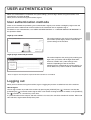
There are two methods for performing user authentication: login by user number and login by login name and
password. Ask the administrator of the machine for the information that is required to log in.
For details on user authentication, see "USER AUTHENTICATION" in "1. BEFORE USING THE MACHINE" in
the Operation Guide.
Login by user number
Enter your user number.
OK
This method requires that you log in by entering your
user number (5 to 8 digits), which is stored in the
system settings of the machine.
Admin Login
Login by login name and password*
Please enter your login name /
password.
User Authentication
Login Name
User Name
Password
Auth to:
Login Locally
OK
This method requires that you log in by entering your
login name, password, and the login destination,
which are stored in the system settings of the
machine. Depending on how the machine
administrator has configured the system settings, an
e-mail address may also be used for authentication.
* Does not appear when the printer expansion kit with hard drive is not installed.
Logging out
When you have finished using the machine, log out. Logging out prevents unauthorised use of the machine.
How to log out
You can log out from any mode of the machine by pressing the [LOGOUT] key ( ). However, note that the
[LOGOUT] key ( ) cannot be used to log out when a fax number is being entered in fax mode, as the [LOGOUT]
key ( ) functions as a numeric key at this time.
If a preset duration of time elapses after the machine is last used, the auto clear function will activate. When auto
clear activates, logout automatically takes place.
13
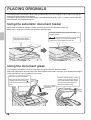
PLACING ORIGINALS
The automatic document feeder can be used to automatically scan many originals at once. This saves you the
trouble of manually feeding each original.
For originals that cannot be scanned using the automatic document feeder, such as a book or a document with
notes attached, use the document glass.
Using the automatic document feeder
When using the automatic document feeder, place the originals in the document feeder tray.
Make sure an original has not been placed on the document glass.
Place the originals face up with the edges
aligned evenly.
The indicator line indicates approximately
how many originals can be placed. The placed
originals must not be higher than this line.
Adjust the original guides
to the width of the originals.
Using the document glass
Take care that your fingers are not pinched when closing the automatic document feeder.
After placing the original, be sure to close the automatic document feeder. If left open, parts outside of the original
will be copied black, causing excessive use of toner.
Place the original face down.
To place a thick original such as
a book, push up the far edge of
the automatic document feeder
and then close the automatic
document feeder slowly.
Align the top left corner of the
original with the tip of the
mark in the far left corner of the
glass.
Place the original
face down.
14
CHANGING PAPER IN A TRAY
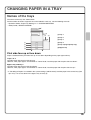
Names of the trays
The names of the trays are shown below.
For the number of sheets of paper that can be loaded in each tray, see the following manuals:
• Operation Guide, "Paper Tray Settings" in "7. SYSTEM SETTINGS"
• Safety Guide, "SPECIFICATIONS"
(6)
(5)
(1) Tray 1
(2) Tray 2
(3) Tray 3
(1)
(2)
(3)
(4)
(4) Tray 4
(5) Tray 5 (large capacity tray)
(6) Bypass tray
Print side face up or face down
Paper is loaded with the print side face up or face down depending on the paper type and tray.
Trays 1 to 4
Load the paper with the print side face up.
However, if the paper type is "Pre-Printed" or "Letter Head", load the paper with the print side face down*.
Bypass tray and tray 5
Load the paper with the print side face down.
However, if the paper type is "Pre-Printed" or "Letter Head", load the paper with the print side face up*.
* If "Disabling of Duplex" is enabled in the system settings (administrator), load the paper in the normal way (face
up in trays 1 to 4; face down in the bypass tray and tray 5).
15
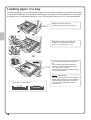
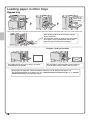
Loading paper in a tray
To change the paper in a tray, load the desired paper in the tray and then change the tray settings in the machine
to specify the loaded paper. The procedure for changing the tray paper size is explained below. As an example,
the paper in tray 1 is changed from B4 (8-1/2" x 14") size plain paper to A4 (8-1/2" x 11") size recycled paper.
Gently pull out the paper tray.
If paper remains in the tray, remove it.
Move the two guides on the tray. For
example, move the guides from B4
(8-1/2" x 14") to A4 (8-1/2" x 11").
Insert the paper with the print side face
up.
Fan the paper well before inserting it.
Otherwise, multiple sheets may feed at
once and cause a misfeed.
Insert the paper and then gently push the
tray into the machine.
Do not load as shown below.
16
Indicator line
The indicator line indicates the maximum
height of the paper that can be loaded in
the tray. When loading paper, make sure
that the stack is not higher than the
indicator line.
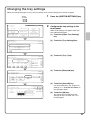
Changing the tray settings
When you change the paper in a tray, the tray settings in the system settings must also be changed.
SYSTEM
SETTINGS
System Settings
Admin Password
Exit
Total Count
Default Settings
List Print
(User)
Paper Tray
Settings
Address Control
Fax Data
Receive/Forward
Document Filing
Control
USB-Device Check
(1)
Printer Condition
Settings
1
Press the [SYSTEM SETTINGS] key.
2
Configure the tray settings in the
touch panel.
Some of the settings only appear when you
have administrator rights.
(1) Touch the [Paper Tray Settings]
key.
(2) Touch the [Tray Settings] key.
System Settings
OK
Paper Tray Settings
Tray Settings
(2)
Paper Type Registration
Auto Tray Switching
(3) Touch the [Tray 1] key.
System Settings
OK
Paper Tray Settings
Type / Size
Tray 1
Print
Copy
(3)I-Fax
Fax
1/6
Fixed Paper Side
Plain / Auto-AB
Disable Duplex
Doc.
Filing
Disable Staple
Disable Punch
(4) Touch the [Recycled] key.
System Settings
Cancel
Tray 1 Type/Size Setting
Select the paper type.
1/2
Plain
Pre-Printed
Recycled
Pre-Punched
Colour
(4)
Letter Head
Heavy Paper
1/3
2/3
(5) Touch the [Auto-AB] key.
System Settings
Type
Tray 1 Type/Size Setting
Type
Recycled
Size
Auto-Inch
11x17,812 x14,812 x11
812 x11R,714 x1012 R
Auto-AB
A3,A4,A4R,B4,B5
B5R,216x330(812 x13)
OK
(6)
Manual
For more information, see "Paper Tray
Settings" in "7. SYSTEM SETTINGS" in
the Operation Guide.
(6) Touch the [OK] key.
(5)
2/3
The above steps change the paper
settings for tray 1 to A4 (8-1/2" x 11")
recycled paper.
17
Loading paper in other trays
Bypass tray
The side to be
copied on must
be face down!
When loading A3W, A3 or B4 size paper, pull out
the tray extension.
The maximum number of sheets that can be loaded
in the bypass tray is approximately 100 for plain
paper and approximately 20 for envelopes.
Example: Loading an envelope
Place paper that is A5 (7-1/4" x 10-1/2") or smaller
in the horizontal orientation.
Only the address side of envelopes can be printed on.
Place envelopes with the address side face down.
Special types of paper that cannot be loaded in other trays can be loaded in the bypass tray.
For detailed information on the bypass tray, see "LOADING PAPER IN THE BYPASS TRAY" in "1. BEFORE
USING THE MACHINE" in the Operation Guide.
18
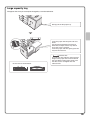
Large capacity tray
The paper size of tray 5 can only be changed by a service technician.
Gently pull out the paper tray.
Insert the paper with the print side face
down.
Fan the paper well before inserting it.
Otherwise, multiple sheets may feed at
once and cause a misfeed.
Insert the paper and then gently push the
tray into the machine.
Do not load as shown below.
Indicator line
The indicator line indicates the maximum
height of the paper that can be loaded in
the tray. When loading paper, make sure
that the stack is not higher than the
indicator line.
19
Copying
This section explains the basic procedures for using the copier function.
This section also introduces the various types of copying that can be
performed using the special modes.
X BASE SCREEN OF COPY MODE . . . . . . . . . . . . . . . . . 22
X MAKING COPIES. . . . . . . . . . . . . . . . . . . . . . . . . . . . . . 23
X 2-SIDED COPYING (Automatic Document Feeder) . . 24
X COPYING ON SPECIAL PAPER (Bypass Copy). . . . . 25
X SELECTING THE EXPOSURE AND IMAGE TYPE . . . 27
X FITTING THE COPY IMAGE TO THE PAPER
(Automatic Ratio Selection) . . . . . . . . . . . . . . . . . . . . . 28
X ENLARGEMENT/REDUCTION (Preset Ratios /
Zoom) . . . . . . . . . . . . . . . . . . . . . . . . . . . . . . . . . . . . . . . 29
X INTERRUPTING A COPY RUN (Interrupt Copy) . . . . . 30
X STORING COPY OPERATIONS (Job Programs) . . . . 31
X SPECIAL MODES . . . . . . . . . . . . . . . . . . . . . . . . . . . . . 33
X SELECTING A SPECIAL MODE . . . . . . . . . . . . . . . . . . 34
X CONVENIENT COPY FUNCTIONS . . . . . . . . . . . . . . . . 35
21
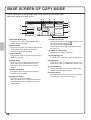
BASE SCREEN OF COPY MODE
Press the [COPY] key in the Operation panel to open the base screen of copy mode.
Select copy settings in the base screen.
(4) (5)
(6)
(7)
Ready to scan for copy.
(1)
(2)
0
Original
Job Detail
Settings
Auto
Exposure
Plain
A4
1.
2.
(3)
100%
Copy Ratio
A4
3.
4.
A4
A4R
B4
A3
5.
A4
Heavy
(8)
2-Sided Copy
(9)
Output
(10)
Special Modes
File
(11)
Quick File
(12)
(1) [Job Detail Settings] key
Touch this key to select original settings, paper
settings, and special modes.
(2) [Exposure] key
This shows the current copy exposure and exposure
mode settings. Touch this key to change the
exposure or exposure mode setting.
(3) [Copy Ratio] key
This shows the current copy ratio. Touch this key to
adjust the copy ratio.
(4) Output display
When one or more output functions such as sort,
group, staple sort, or saddle stitch have been
selected, this shows the icons of the selected
functions.
(5) Original feed display
This appears when an original is inserted in the
automatic document feeder.
(6) Original size display
This shows the size of the original.
When the original size is set manually, the display
shows "Manual". When an original is not placed,
nothing appears.
22
(7) Paper select display
This shows the size of paper loaded in each tray and
the amount of paper remaining
.
The selected tray is highlighted.
For the bypass tray, the paper type appears above
the paper size.
(8) Number of copies display
This shows the number of copies set.
(9) [2-Sided Copy] key
Touch this key to select the 2-sided copying function.
(10) [Output] key
Touch this to select an output function such as sort,
group, offset, staple sort, saddle stitch, punch, or fold.
(11) Customized keys
The keys that appear here can be changed to show
settings or functions that you prefer.
(12) [Heavy] display
This appears when one of trays 1 to 4 is selected and
the paper type set for that tray is "Heavy 1".
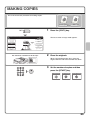
MAKING COPIES
This is the most basic procedure for making copies.
1-sided original
1
COPY
Ready to scan for copy.
2-Sided Copy
Plain
A4
Output
Special Modes
File
3.
A4
A4R
B4
4.
A3
Quick File
1.
2.
100%
Copy Ratio
Press the [COPY] key.
The base screen of copy mode appears.
0
Job Detail
Settings
Auto
Exposure
1-sided copy
The side to be scanned must be face up!
2
Place the originals.
When using the document glass, place the
original with the side to be scanned face down.
3
Set the number of copies and then
press the [START] key.
Correct sets
Cancel scanning
Cancel copying
23
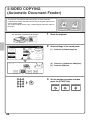
2-SIDED COPYING
(Automatic Document Feeder)
You can use the automatic document feeder to make automatic
2-sided copies without the bother of manually turning the originals over
and re-inserting them.
This section explains how to copy 1-sided originals onto both sides of
the paper.
1-sided original
The side to be scanned must be face up!
Ready to scan for copy.
0
Original A4
Job Detail
Settings
Plain
Auto
Exposure
A4
1.
2.
100%
Copy Ratio
3.
4.
A4
A4R
B4
A3
1
Place the originals.
2
Select settings in the touch panel.
2-Sided Copy
(1) Touch the [2-Sided Copy] key.
(1)
Output
Special Modes
File
Quick File
OK
2-Sided Copy
2-sided copy
(2) Touch the [1-Sided to 2-Sided] key.
(3)
Binding
Change
(3) Touch the [OK] key.
(2)
3
Set the number of copies and then
press the [START] key.
Correct sets
24
Cancel scanning
Cancel copying
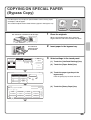
COPYING ON SPECIAL PAPER
(Bypass Copy)
Use the bypass tray to copy on special media such as heavy paper,
envelopes, and tab paper.
This section explains how to load A4 heavy paper in the bypass tray.
Original
1
The side to be scanned must be face up!
Copy on heavy paper
Place the originals.
When using the document glass, place the
original with the side to be scanned face down.
The side to be
copied on must
be face down!
Job Detail
Settings
2-Sided Copy
/2x11
Auto 81A4
Paper Select
Auto
Original
(1)
Auto
(2)
Special Modes
Output
Plain
A4
Insert paper in the bypass tray.
3
Select settings in the touch panel.
(1) Touch the [Job Detail Settings] key.
Special Modes
Exposure
2
(2) Touch the [Paper Select] key.
File
100%
Copy Ratio
Quick File
Paper Select
(3) Touch the paper type key of the
bypass tray.
OK
A4
1. A4
Plain
2. A4R
Plain
Plain
3. B4
Plain
(3)
4. A3
Plain
Here the [Plain] key has been touched.
(4) Touch the [Heavy Paper] key.
Copy Mode
Cancel
Bypass Tray Type/Size Setting
Select the paper type.
1/2
Plain
Pre-Printed
Recycled
Letter Head
Pre-Punched
Colour
Thin Paper
Labels
Heavy Paper
Transparency
Tab Paper
Envelope
(4)
1/3
25
Select settings in the touch panel.
(Continued)
Copy Mode
Type
Bypass Tray Type/Size Setting
Heavy Paper
Auto-Inch
Auto-AB
(5)
Custom Size
OK
(5) Touch the [Auto-AB] key.
(6)
Size
12x18,11x17,81/2x14
81/2x11,81/2x11R,51/2x8 1/2R
71/4x101/2R,A3,A4,B4,B5
A3W,A3,A4,A4R,A5R,B4
B5,B5R,216x330(81/2x13)
11x17,81/2x11
Type
Manual
(6) Touch the [OK] key.
X420 Y297
2/3
Paper Select
(7) Touch the bypass tray key.
OK
(8)
1. A4
Plain
A4
2. A4R
Plain
Heavy paper
Pre-Printed
3. B4
Plain
4. A3
Plain
(8) Touch the [OK] key.
(7)
4
Set the number of copies and then
press the [START] key.
Correct sets
Cancel scanning
Cancel copying
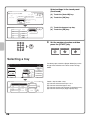
Selecting a tray
Ready to scan for copy.
0
2-sided Copy
Full colour
Colour mode
Auto
Exposure
Plain
A4
1.
2.
100%
Copy Ratio
3.
4.
A4
A4R
B4
A3
5.
26
Output
Special Modes
File
Quick File
(B)
Paper Select
(A)
A4
1. A4
Plain
2. A4R
Plain
3. B4
Plain
4. A3
Plain
To select paper, touch the [Paper Select] key or the
image of the machine in the base screen of copy
mode.
OK
A4
Plain
(C)
5.A4
Plain
(D)
Touch a key to select a tray.
(A) Touch to select one of trays 1 to 4.
(B) Touch to select the bypass tray.
(C) Touch to set the type of paper in the bypass tray.
(D) Touch to select tray 5 (large capacity tray).
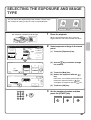
SELECTING THE EXPOSURE AND IMAGE
TYPE
You can specify the original image type to obtain a clearer copy.
The example of making a copy of a map is explained below.
Light original
1
The side to be scanned must be face up!
Exposure adjustment
Place the originals.
When using the document glass, place the
original with the side to be scanned face down.
Ready to scan for copy.
0
Original
Job Detail
Settings
2-Sided Copy
A4
Plain
A4
Auto
Exposure
1.
(1)
100%
2.
Copy Ratio
4.
3.
Output
A4
A4R
B4
A3
Manual
File
Quick File
(2) Use the
keys to switch through
the screens.
3
5
1/2
Text
Text/
Prtd.Photo
Text/Photo
Printed
Photo
Photo
Exposure
(2)
(3) Touch the [Map] key.
(4) Darken the exposure with the
key.
OK
(5)
2/2
Map
Manual
1
(1) Touch the [Exposure] key.
OK
Auto
3
(4)
5
Select exposure settings in the touch
panel.
Special Modes
Exposure
1
2
Nine levels are available for the exposure.
Darken the exposure with the
key,
and lighten the exposure with the
key.
(3)
Scan
Resolution
(5) Touch the [OK] key.
3
Set the number of copies and then
press the [START] key.
Correct sets
Cancel scanning
Cancel copying
27
FITTING THE COPY IMAGE TO THE
PAPER (Automatic Ratio Selection)
You can copy an original onto any size of paper using automatic
enlargement/reduction.
This section explains how to copy an A4 original onto A3 paper.
A4
1
The side to be scanned must be face up!
A3
Place the originals.
When using the document glass, place the
original with the side to be scanned face down.
Job Detail
Settings
Auto
Original
2-Sided Copy
Auto
A4
Paper Select
Plain
Special Modes 1/2A4
(2)
Auto
(1)
2
Output
Exposure
Special Modes
(1) Touch the [Job Detail Settings] key.
File
100%
Copy Ratio
Select automatic ratio selection in
the touch panel.
(2) Touch the [Paper Select] key.
Quick File
Paper Select
(3) Touch the tray that has the desired
paper size.
OK
1.A4
Plain
2.A4R
Plain
3.B4
Plain
4. A3
Plain
(4)
A4
(4) Touch the [OK] key.
Plain
(3)
Ready to scan for copy.
Original A4R
Job Detail
Settings
Plain
A4
Auto
(5)
Exposure
100%
Copy Ratio
(6)
1.
2.
3.
Auto
Image
(5) Touch the [Job Detail Settings] key
to close the job detail settings
screen.
0
4.
A4
A4R
B4
A3
2-Sided Copy
Output
(6) Touch the [Auto Image] key.
Special Modes
File
Quick File
3
Set the number of copies and then
press the [START] key.
Correct sets
28
Cancel scanning
Cancel copying
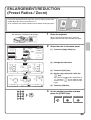
ENLARGEMENT/REDUCTION
(Preset Ratios / Zoom)
55%
For precise adjustment of the copy size, you can select a preset ratio
and/or adjust the ratio in increments of 1%.
As an example, this section explains how to reduce the image to 55%.
Original
1
The side to be scanned must be face up!
Ratio-specified copy
Place the originals.
When using the document glass, place the
original with the side to be scanned face down.
Ready to scan for copy.
0
Original
Job Detail
Settings
2-Sided Copy
A4
A4
1.
2.
100%
Copy Ratio
3.
4.
Select the ratio in the touch panel.
(1) Touch the [Copy Ratio] key.
Output
Plain
Auto
Exposure
2
Special Modes
A4
A4R
B4
A3
File
Quick File
(1)
Copy Ratio
B4
A3
B5
A4
70%
B5
B4
A5
A4
81%
A4
A3
B5
B4
86%
100
Zoom
100%
Auto Image
1
Menu
(2) Change the ratio menu.
OK
%
B5
B4
A4
A3 115%
A5
A4
B5
B4 122%
B5
A4
B4
A3 141%
(3) Touch the [50%] key.
XY Zoom
2
(4) Set the copy ratio to 55% with the
key.
(2)
Copy Ratio
OK
55 %
25%
Zoom
50%
(3)
Auto Image
200%
(4)
100%
Menu
The ratio can be adjusted in increments of
1%. Touch the
key to make the ratio
smaller, or the
key to make the ratio
larger.
(5)
400%
1
2
(5) Touch the [OK] key.
XY Zoom
3
Set the number of copies and then
press the [START] key.
Correct sets
Cancel scanning
Cancel copying
29
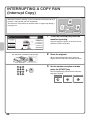
INTERRUPTING A COPY RUN
(Interrupt Copy)
When the machine is printing, you can temporarily interrupt the job and
perform a copy job that you wish to prioritize.
This feature is useful when you need to make an urgent copy during a
long copy run.
Original
Printing
Copies in progress from tray 1.
Ready to scan for next copy job.
Plain
A4
1.
2.
100%
Copy Ratio
1
2-Sided Copy
Job Detail
Settings
Auto
Exposure
5
Interrupt
3.
4.
A4
A4R
B4
A3
Interrupt
Touch the [Interrupt] key while the
machine is printing.
The [Interrupt] key appears in the base screen
while the machine is printing.
Output
Special Modes
File
Quick File
The side to be scanned must be face up!
2
Place the originals.
When using the document glass, place the
original with the side to be scanned face down.
3
Set the number of copies and then
press the [START] key.
The interrupted copy job will resume when the
copy job is finished.
Correct sets
30
Cancel scanning
Cancel copying
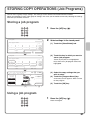
STORING COPY OPERATIONS (Job Programs)
You can store a group of copy settings. The settings can be retrieved and used whenever needed.
When you frequently use the same group of settings, this saves you the trouble of manually selecting the settings
each time you need to use them.
Storing a job program
Job Programs
Exit
Press program number.
1
2
3
4
5
6
7
8
Recall
1
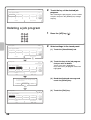
Press the [#/P] key (
2
Select settings in the touch panel.
).
1/6
(1) Touch the [Store/Delete] tab.
Exit
(2) Touch the key in which you want to
store a job program.
Store/Delete
(1)
Job Programs
Press program number.
2
3
4
5
(2)
6
7
8
Recall
Store/Delete
To store, make selections and press
[OK], to delete, press [Cancel].
Original
Job Detail
Settings
Auto
Exposure
(5)
Cancel
A4
(3) Select the copy settings that you
wish to store.
OK
2-Sided Copy
(4) Touch the [Program Name] key.
Output
Plain
A4
1.
2.
100%
Copy Ratio
Touch any key that is not highlighted.
Keys that have a job program stored are
highlighted.
1/6
1
3.
4.
A4
A4R
B4
A3
A text entry screen appears. Enter a name
for the program.
(5) Touch the [OK] key.
Program Name
(3)
(4)
Using a job program
1
Press the [#/P] key (
).
Place the original.
31
Job Programs
Exit
Press program number.
2
1/6
1
2
3
4
5
6
7
8
Recall
Touch the key of the desired job
program.
After selecting the job program, set the number
of copies and press the [START] key to begin
copying.
Store/Delete
Deleting a job program
Job Programs
Exit
Press program number .
1
2
3
4
5
6
7
8
Recall
1
Press the [#/P] key (
2
Select settings in the touch panel.
).
1/6
(1) Touch the [Store/Delete] tab.
Exit
(2) Touch the key of the job program
that you wish to delete.
Store/Delete
(1)
Job Programs
Press program number.
1/6
1
2
3
4
5
6
(2)
7
8
Recall
Touch a key that is highlighted.
Keys that have a job program stored are
highlighted.
Store/Delete
(3) Read the displayed message and
touch the [Delete] key.
A job program has been already stored
in this location.
Cancel
Delete
Store
(3)
Job Programs
Exit
(4)
Press program number.
2
3
4
5
6
7
8
Recall
32
1/6
1
Store/Delete
(4) Touch the [Exit] key.
SPECIAL MODES
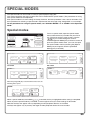
The special modes can be used for a variety of special-purpose copy jobs.
This section introduces the types of copies that can be made with the special modes. (The procedures for using
each special mode are not explained.)
Each special mode has its own settings and steps, however, the basic procedure is the same for all modes. The
basic procedure for selecting a special mode is explained on the next page using "Margin Shift" as an example.
For the procedures for using the special modes, see "SPECIAL MODES" in "2. COPIER" in the Operation
Guide.
Special modes
Ready to scan for copy.
0
2-Sided Copy
Job Detail
Settings
Output
Plain
A4
Auto
Exposure
2.
100%
Copy Ratio
Special Modes
A4
B5
A4R
B4
A3
1.
3.
4.
File
Quick File
1st screen
To use a special mode, open the special modes
menu and touch the key of mode that you wish to
use. The menu consists of four screens. Use the
keys to switch through the screens.
Touch the [Special Modes] key in the base screen to
open the special modes menu. (You can also open
the special modes menu by touching the [Special
Modes] key that appears after the [Job Detail
Settings] key is touched.)
2nd screen
OK
Special Modes
OK
Special Modes
1/4
Margin Shift
Pamphlet Copy
Erase
Job
Build
2/4
Dual Page
Copy
Covers/Inserts
Transparency
Inserts
Multi Shot
Tandem
Copy
Book Copy
Tab Copy
Card Shot
3rd screen
4th screen
OK
Special Modes
3/4
Stamp
Image Edit
Sharpness
File
Quick File
Proof Copy
OK
Special Modes
4/4
Original
Count
Mixed Size
Original
Slow Scan
Mode
When the [Image Edit] key is touched in the 3rd screen, the
following menu opens.
OK
Image Edit
Photo Repeat
A3
Full Bleed
Multi-Page
Enlargement
Mirror
Image
Centring
B/W
Reverse
When a special mode key encircled by
is touched, the key is highlighted and the setting is completed.
When any other special mode key is touched, a screen appears to let you select settings for that mode.
Note that the keys that appear will vary depending on what peripheral devices are installed.
The keys that appear vary by country and region and the peripheral devices that are installed.
33
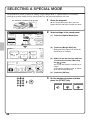
SELECTING A SPECIAL MODE
The procedure for selecting settings for "Adding margins (Margin Shift)" is explained below as an example.
Although the specific settings for each special mode vary, the general procedure is the same.
1
The side to be scanned must be face up!
Place the originals.
When using the document glass, place the
original with the side to be scanned face down.
Ready to scan for copy.
0
Original
Job Detail
Settings
2-Sided Copy
A4
Plain
A4
Auto
Exposure
1.
2.
100%
Copy Ratio
3.
4.
2
(1) Touch the [Special Modes] key.
Output
Special Modes
A4
A4R
B4
A3
File
(1)
Quick File
(2) Touch the [Margin Shift] key.
OK
Special Modes
Shifting the left margin by 15 mm will be
explained as an example.
1/4
Margin Shift
Dual Page
Copy
Erase
(2)
Tandem
Copy
Job
Build
Pamphlet Copy
(3) Select 15 mm for the front side and
15 mm for the reverse side using
the
keys.
OK
Special Modes
Cancel
Margin Shift
Side 1
Right
Left
Select settings in the touch panel.
Down
15
(4)
OK
The margin shift position is initially set to
"Right".
To change the position to "Left" or "Down",
touch the corresponding key.
Side 2
(0~20)
mm
15
(0~20)
mm
(3)
(4) Touch the [OK] key.
3
Set the number of copies and then
press the [START] key.
Correct sets
34
Cancel scanning
Cancel copying
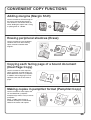
CONVENIENT COPY FUNCTIONS
Adding margins (Margin Shift)
Use this function to shift the image on
the copy to create binding margins.
This function is convenient when you
will be binding the copies with a string
or placing them in a binder.
Erasing peripheral shadows (Erase)
Use this function to erase peripheral
shadows that occur when making
copies of books and other thick
originals.
With erase
Without erase
Copying each facing page of a bound document
(Dual Page Copy)
Use this function to make separate
copies of the left and right pages of a
bound document such as a pamphlet.
In addition, two facing pages can be
copied to each side of one sheet of
paper.
Making copies in pamphlet format (Pamphlet Copy)
Use this function to make copies that
can be folded into a pamphlet.
Pamphlet copy makes it easy to create
pamphlets.
When a saddle stitch finisher is
installed, the output is automatically
folded at the centre and stapled.
4
1
2
3
4
6
8
5
7
5
2
1
3
5
7
7
35
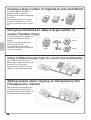
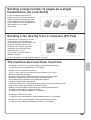
Copying a large number of originals at once (Job Build)
A stack of originals higher than the
indicator line on the automatic
document feeder cannot be fed through
the feeder.
The job build function lets you divide
the stack of originals into sets, feed
each set, and copy the sets as a single
job.
Using two machines to make a large number of
copies (Tandem Copy)
You can divide a copy job between two
machines connected to the same
network.
This saves considerable time when
running a large copy job.
To use this function, the tandem
connection setting must be configured
in the system settings.
2 sets
4 sets
2 sets
Using a different paper type for covers (Covers/Inserts)
This function enables you to use a
different type of paper for the front and
back covers of a set of copies.
A different type of paper can also be
added as an insert at specified pages.
Inser
t
Inser
t
Cove
r
Back
cove
r
Adding inserts when copying on transparency film
(Transparency Inserts)
When copying onto transparency film,
this function inserts sheets of paper
between the sheets of transparency film
to keep them from sticking together.
36
Pape
r
inser
t
Pape
r
inser
t
Pape
r inse
rt
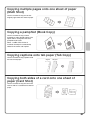
Copying multiple pages onto one sheet of paper
(Multi Shot)
Use this function to copy two or four
original pages onto one sheet of paper.
12
34
1 2
3 4
Copying a pamphlet (Book Copy)
Use this function to copy a book,
pamphlet, or other bound original. The
copies will be arranged in the same
pamphlet-style layout.
When a saddle stitch finisher is
installed, the output is automatically
folded at the centre and stapled.
1
3
5
7
1
3
5
7
Copying captions onto tab paper (Tab Copy)
Use this function to copy captions onto
the tabs of tab paper.
Original
Tab paper
INDEX
INDEX
Copying both sides of a card onto one sheet of
paper (Card Shot)
Use this function to copy the front and
reverse side of a card onto one sheet of
paper.
Front
Back
37
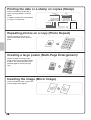
Printing the date or a stamp on copies (Stamp)
Date print
Stamp
Page number
CONFIDENTIAL
Text
Water mark
IA
L
04/04/2010
ID
2
EN
T
Planning Meeting
1
3
CO
NF
Use this function to print the date, a
stamp, the page number, or text on
copies.
In addition, specific text can be added
to a copy as a watermark.
Repeating photos on a copy (Photo Repeat)
Use this function to print up to 24
copies of one photo on one sheet of
paper.
Creating a large poster (Multi-Page Enlargement)
Use this function to enlarge a copy
image and print it using multiple sheets
of paper. The sheets of paper can be
attached together to form one large
copy.
Inverting the image (Mirror Image)
Use this function to make a copy that is
a mirror image of the original.
38
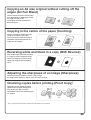
Copying an A3 size original without cutting off the
edges (A3 Full Bleed)
Use this feature to make a full-size copy
of an A3 original on A3W paper so that
the edges are not cut off.
The original must be placed on the
document glass.
Copying in the centre of the paper (Centring)
Use this function to position the copy
image at the centre of the paper.
This is convenient when the image is
reduced or copied onto paper that is
larger than the original.
Reversing white and black in a copy (B/W Reverse)
This function reverses black and white
in a copy to create a negative image.
Use this function to save toner when
copying an original with large black
areas.
Adjusting the sharpness of an image (Sharpness)
Use this function to sharpen or soften a copy image.
An image of this function is shown at the end of this manual.
Checking copies before printing (Proof Copy)*
Regardless of the number of copies
specified, this function initially prints
only the first set. After you have
checked the first set, the remaining sets
are printed.
5 sets
Check
1 set
4 sets
* Does not appear when the printer expansion kit with hard drive is not installed.
39
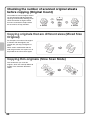
Checking the number of scanned original sheets
before copying (Original Count)
The number of scanned original sheets
can be counted and displayed before
copying is executed. By allowing you to
check the number of original sheets
that were scanned, this helps reduce
the occurrence of copy mistakes.
Scan
originals
4 sheets
4
sheets
4 sheets
Check
Copying originals that are different sizes (Mixed Size
Original)
For example, even when a B5 original
is mixed in with A4 originals, this
function lets you copy all originals at
once.
When used in combination with the
auto image function, the copies can all
be printed on the same size of paper.
B5
B5
A4
Copying thin originals (Slow Scan Mode)
This function lets you scan thin
originals, which are normally difficult to
handle, in the automatic document
feeder.
40
A4
Printing
This section explains the basic procedure for printing using the printer
driver of the machine. The settings that can be selected in the printer driver
are also introduced.
The explanations of screens and procedures are primarily for Windows
Vista® in Windows® environments, and Mac OS X v10.4 in Macintosh
environments. The window varies depending on the operating system
version, the printer driver version, and the application.
The printer expansion kit is required to use the printer function.
X PRINTING. . . . . . . . . . . . . . . . . . . . . . . . . . . . . . . . . . . . 42
X CANCELLING PRINTING (AT THE MACHINE) . . . . . . 47
X SELECTING PRINT SETTINGS. . . . . . . . . . . . . . . . . . . 48
X CONVENIENT PRINTER FUNCTIONS . . . . . . . . . . . . . 50
41
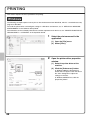
PRINTING
This section explains the basic procedures for printing.
Windows
The following example explains how to print an A4 size document from WordPad, which is a standard accessory
program in Windows.
To install the printer driver and configure settings in a Windows environment, see "2. SETUP IN A WINDOWS
ENVIRONMENT" in the Software Setup Guide.
For information on the available printer drivers and the requirements for their use, see "PRINTER FUNCTION OF
THE MACHINE" in "3. PRINTER" in the Operation Guide.
1
(1)
Select the print command in the
application.
(1) Open the [File] menu.
(2) Select [Print].
(2)
2
Open the printer driver properties
window.
(1) Select the printer driver of the
machine.
(2) Click the [Preferences] button.
(1)
(2)
42
In Windows 2000, the [Preferences]
button does not appear. Click the tabs in
the "Print" dialog box to adjust the
settings on the tabs.
In Windows 98/Me/NT 4.0, click the
[Properties] button.
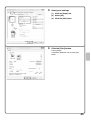
3
Select print settings.
(1) Click the [Paper] tab.
(1)
(2) Select [A4].
(3) Click the [OK] button.
(2)
(3)
4
Click the [Print] button.
Printing begins.
In Windows 98/Me/NT 4.0, click the [OK]
button.
43
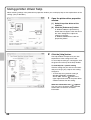
Using printer driver help
When selecting settings in the printer driver properties window, you can display Help to view explanations of the
settings. (Only in Windows)
1
Open the printer driver properties
window.
(1) Select the printer driver of the
machine.
(2) Click the [Preferences] button.
In Windows 2000, the [Preferences]
button does not appear. Click the tabs in
the "Print" dialog box to adjust the
settings on the tabs.
In Windows 98/Me/NT 4.0, click the
[Properties] button.
(1)
(2)
2
Click the [Help] button.
The Help window will open to let you view
explanations of the settings on the tab.
To view Help for settings in a dialog box, click
the green text at the top of the Help window.
To view Help for a specific setting
Click the setting that you wish to learn about
and press the [F1] key. Help for that setting
will appear.
* To view Help for a particular setting in
Windows 98/Me/NT 4.0/2000/XP/
Server 2003, click the
button in the
upper right-hand corner of the printer driver
window and then click the setting.
When the information icon ( ) appears
The icon can be clicked to show prohibited
combinations of functions and other
information.
44
Macintosh
The following example explains how to print an A4 size document from "TextEdit" ("SimpleText" in Mac OS 9),
which is a standard accessory program on Macintosh computers.
To print from a Macintosh, the PS3 expansion kit must be installed in the machine and the machine must be
connected to a network.
To install the printer driver and configure settings in a Macintosh environment, see "3. SETUP IN A MACINTOSH
ENVIRONMENT" in the Software Setup Guide.
Setting the paper size
Select paper settings in the printer driver before selecting the print command.
1
(1)
Open the page setup window in
TextEdit.
(1) Open the [File] menu.
(2) Select [Page Setup].
In Mac OS 9, select [Print] from the [File]
menu of SimpleText.
(2)
2
Select paper settings.
(1) Make sure the correct printer is
selected.
(1)
The machine name that appears in the
"Format for" menu is normally
[SCxxxxxx]. ("xxxxxx" is a sequence of
characters that varies depending on your
machine model.)
(2)
(2) Select [A4].
(3) Click the [OK] button.
(3)
45
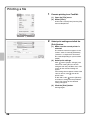
Printing a file
1
(1)
Execute printing from TextEdit.
(1) Open the [File] menu.
(2) Select [Print].
In Mac OS 9, select [Print] from the [File]
menu of SimpleText.
(2)
2
(1)
Select print settings and click the
[Print] button.
(1) Make sure the correct printer is
selected.
(2)
(3)
The machine name that appears in the
"Printer" menu is normally [SCxxxxxx].
("xxxxxx" is a sequence of characters
that varies depending on your machine
model.)
(2) Select print settings.
Click
next to [Copies & Pages] and
select each setting that you wish to
configure from the pull-down menu. The
screen for the selected setting will
appear.
If the settings do not appear in Mac OS X
v10.5 to 10.5.5, click
next to the
printer name.
In Mac OS 9, click
next to [General]
and select a setting from the pull-down
menu. The screen for the selected
setting will appear.
(3) Click the [Print] button.
Printing begins.
46
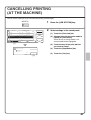
CANCELLING PRINTING
(AT THE MACHINE)
You can cancel a print job if you cancel before printing actually begins.
JOB STATUS
Job Queue
Sets / Progress
Spool
Status
1
Copy
020 / 001
Copying
2
Copy
020 / 000
Waiting
1/1
Job Queue
Complete
(2)
Detail
3
Computer01
020 / 000
4
0312345678
002 / 000
(3)
Print Job
Waiting
Priority
Waiting
Stop/Delete
Scan to
(4)
Fax Job
Internet Fax
(1)
1
Press the [JOB STATUS] key.
2
Select settings in the touch panel.
(1) Touch the [Print Job] tab.
(2) Change the print job status mode to
[Spool] or [Job Queue].
Touch this key to change modes. The
selected mode will be highlighted.
(3) Touch the key of the print job that
you wish to cancel.
(4) Touch the [Stop/Delete] key.
Delete the job?
Computer01
No
Yes
(5) Touch the [Yes] key.
(5)
47
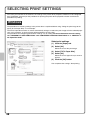
SELECTING PRINT SETTINGS
To use the print function of the machine, the settings in the printer driver properties window must be configured.
See "PRINTING" (page 42) for the procedure for opening the printer driver properties window and the basic
procedure for printing.
Windows
The procedure for selecting settings in the printer driver is explained below using "Fitting the print image to the
paper (Fit To Paper Size)" as an example.
The Fit To Paper Size function is used to automatically enlarge or reduce the print image to fit the selected paper
size. In this example, an A4 size image will be printed on A3 size paper.
The procedures for configuring printer driver settings vary by setting. For more information on each setting,
see "FREQUENTLY USED FUNCTIONS" and "CONVENIENT PRINTING FUNCTIONS" in "3. PRINTER" in
the Operation Guide.
Select print settings.
(1) Click the [Paper] tab.
(1)
(2) Select [A4].
Select the size of the print image.
(3) Select [Fit To Paper Size].
(2)
(4) Select [A3].
Select the size of paper that you want to
print on.
(3)
(5) Click the [OK] button.
(4)
(5)
48
This completes the settings. Start printing.
Macintosh
The procedure for selecting printer driver settings is explained below using "Printing multiple images on one page
(N-Up Printing)" as an example.
This function reduces the size of each page to let you print multiple pages on one sheet of paper. The example of
printing two pages on one sheet of paper with borderlines is explained.
The procedures for configuring printer driver settings vary by setting. For more information on each setting,
see "FREQUENTLY USED FUNCTIONS" and "CONVENIENT PRINTING FUNCTIONS" in "3. PRINTER" in
the Operation Guide.
Select print settings.
(1) Select [Layout].
(1)
(2) Select [2].
(2)
(3) Select the order of the pages.
(3)
(4) Select the desired type of
borderline.
(4)
49
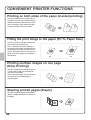
CONVENIENT PRINTER FUNCTIONS
Printing on both sides of the paper (2-sided printing)
Use this function to print on both sides of
the paper. You can use 2-sided printing to
reduce the number of printed sheets when
you are printing a large number of pages
or when you wish to conserve paper.
12
34
1 3
Fitting the print image to the paper (Fit To Paper Size)
Use this function to enlarge or reduce the
print image to fit the paper size.
This is convenient for such purposes as
enlarging an A4 or letter size document to
A3 or ledger size paper to make it easier
to view, and to print when the same size of
paper as the print image is not loaded in
the machine.
A4
A3
Printing multiple images on one page
(N-Up Printing)
Use this function to print multiple pages on
a single sheet of paper by reducing the
size of the print images.
This is convenient when you wish to show
an overall view of multiple pages or
conserve paper.
12
34
Stapling printed pages (Staple)
Use this function to staple printed output.
(When a saddle stitch finisher or finisher is
installed.)
50
1 2
3 4
Punching holes in output (Punch)
Use this function to punch holes in output.
(When a punch module and saddle stitch
finisher or finisher are installed.)
The machine also has these functions
For information on each of these functions, see "CONVENIENT PRINTING FUNCTIONS" in "3. PRINTER" in the
Operation Guide.
Convenient functions for creating pamphlets and posters
• Creating a pamphlet (Pamphlet/Pamphlet Staple)
• Increasing margin (Margin Shift)
• Creating a large poster (Poster Printing)
Functions to adjust the size and orientation of the image
• Rotating the image 180 degrees (Rotate 180 degrees)
• Enlarging/reducing the print image (Zoom / XY-Zoom)
• Adjusting line widths when printing (Line Widths Settings)
• Reversing the image (Mirror Image)
Image adjustment function
• Adjusting the brightness and contrast of the image (Image Adjustment)
• Printing faint text or lines in black (Text To Black/Vector To Black)
Functions to combine text and images
• Adding a watermark to printed pages (Watermark)
• Printing an image over the print data (Image Stamp)
• Creating overlays for print data (Overlays)
Print functions for special purposes
• Printing specified pages on different paper (Different Paper)
• Adding inserts when printing on transparency film (Transparency Inserts)
• Printing a carbon copy (Carbon Copy)
• Printing text on tabs of tab paper (Tab Printing)
• Printing so that a specific page is the front page when using two-sided printing (Chapter Inserts)
• Printing with the output folded in half (Fold)
Convenient printer functions
• Using two machines to print a large print job (Tandem Print)
• Saving and using print files (Retention/Document Filing)
51
Faxing
This section explains the basic procedures for using the fax function of the
machine. In addition, special modes that can be used with the fax function
are introduced.
The facsimile expansion kit is required to use the fax function.
X BASE SCREEN OF FAX MODE . . . . . . . . . . . . . . . .
54
X SENDING A FAX . . . . . . . . . . . . . . . . . . . . . . . . . . . .
55
X CHANGING THE SIZE OF A FAX . . . . . . . . . . . . . . .
56
X CHANGING THE EXPOSURE . . . . . . . . . . . . . . . . . .
57
X CHANGING THE RESOLUTION . . . . . . . . . . . . . . . .
58
X STORING A FAX NUMBER . . . . . . . . . . . . . . . . . . . .
59
X FORWARDING RECEIVED FAXES (Fax Data
Forward). . . . . . . . . . . . . . . . . . . . . . . . . . . . . . . . . . .
61
X CONVENIENT DIALLING METHODS . . . . . . . . . . . .
62
X SENDING THE SAME FAX TO MULTIPLE
DESTINATIONS
(Broadcast Transmission) . . . . . . . . . . . . . . . . . . . .
64
X SPECIAL FAX MODES . . . . . . . . . . . . . . . . . . . . . . .
66
X SELECTING A SPECIAL MODE . . . . . . . . . . . . . . . .
67
X CONVENIENT FAX FUNCTIONS . . . . . . . . . . . . . . .
68
53
BASE SCREEN OF FAX MODE
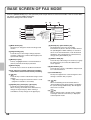
Press the [IMAGE SEND] key in the Operation panel to open the base screen of fax mode. If the fax screen does
not appear, touch the [Mode Switch] key.
Select fax settings in the base screen.
(6)
Ready to send.
(7)
(8)
Speaker
Resend
(1)
Fax
Mode Switch
Address Book
(9)
(2)
Image
Settings
Sub Address
(10)
(3)
(4)
Memory TX
Special Modes
Direct TX
File
(5)
Auto Reception
Fax Memory:100%
(11)
Quick File
(12) (13)
(1) [Mode Switch] key
(8) [Resend] key / [Next Address] key
The destinations of the most recent eight
transmissions by Scan to E-mail, fax and/or Internet
fax (including Direct SMTP address) are stored. To
select one of these destinations, touch the desired
destination. After a destination is selected, this key
changes to the [Next Address] key.
Use this key to change the mode of the image send
function.
(2) [Image Settings] key
Touch this key to select image settings (exposure,
resolution, original size, and two-sided original) and
special mode settings.
(3) [Memory TX] key
(9) [Address Book] key
Touch this key to dial using a one-touch key or group
key. When the key is touched, the address book
screen appears.
This key is highlighted when a normal transmission
(memory transmission mode) is performed.
(4) [Direct TX] key
(10) [Sub Address] key
Touch this key to send a fax by direct transmission.
(5) This shows the currently selected fax reception
mode and the amount of free memory remaining.
(6)
Touch this key to enter a sub-address and passcode
for F-code transmission.
(11) Customized keys
The keys that appear here can be changed to show
settings or functions that you prefer.
key
Touch this key to retrieve a destination using a search
number.*
* 4-digit number assigned to a destination when it is stored.
(3-digit when a hard drive is not installed.)
(12)
(7) [Speaker] key / [Pause] key / [Space] key
Touch this key to dial using the speaker.
When entering a fax number to be dialled, the key
changes to the [Pause] key. When entering a
sub-address, the key changes to the [Space] key.
54
key
When "Hold Setting for Received Data Print" or
"Received Data Image Check Setting" is enabled in
the system settings (administrator), this will appear
when a fax is received.
(13)
key
This key appears when a special mode or 2-sided
scanning is selected. Touch the key to display the
selected special modes.
SENDING A FAX
The basic procedure for sending faxes is explained below.
In fax mode, colour originals are sent as black and white images.
Transmission
Original
1
IMAGE SEND
Ready to send.
Speaker
Resend
Fax
Mode Switch
Address Book
Image
Settings
Sub Address
Memory TX
Special Modes
Direct TX
File
Auto Reception
Fax Memory:100%
Transmission result
Press the [IMAGE SEND] key.
The base screen of fax mode appears.
(When the fax function is not installed, the base
screen of scan mode appears.)
Quick File
The side to be scanned must be face up!
2
Place the originals.
When using the document glass, place the
original with the side to be scanned face down.
3
Enter the fax number of the receiving
fax machine and press the [START]
key.
Correct a mistake
Cancel scanning
55
CHANGING THE SIZE OF A FAX
The size of the original and the transmission size can be specified before transmission.
This is convenient when faxing an original that is small and difficult to read.
The procedure for faxing both sides of an A4 original at A3 size is explained below.
1
The side to be scanned must be face up!
Place the originals.
When using the document glass, place the
original with the side to be scanned face down.
Fax
Mode Switch
Image
Settings
(1)
Memory TX
Address Book
Auto
Exposure
Sub Address
Standard
Resolution
Auto
A4
Auto Reception Original
Fax Memory:100%
File
Special Modes
(2) Touch the [Original] key.
Quick File
(2)
Scan Size
Auto
A4
100%
Send Size
Auto
(3) Touch the [2-Sided Booklet] key.
OK
This key is used to send a 2-sided original.
(4)
2-Sided
Booklet
Select the original size settings in
the touch panel.
(1) Touch the [Image Settings] key.
Special Modes
Direct TX
Fax
Original
2
(4) Touch the [Send Size] key.
Image Orientation
(3)
2-Sided
Tablet
Fax
Original
AB
OK
Inch
(5) Touch the desired send size key
(example: A3).
Auto
A5
B5R
B4
(6)
216x340
Manual
A5R
A4
A3
216x343
(6) Touch the [OK] key.
B5
A4R
(5)
OK
(7) Touch the [OK] key.
A4
Fax
Original
Scan Size
Auto
2-Sided
Booklet
141%
A4
Send Size
A3
(7)
Image Orientation
2-Sided
Tablet
3
Enter the fax number of the first
destination and press the [START]
key.
Correct a mistake
56
Cancel scanning
CHANGING THE EXPOSURE
The exposure can be changed as appropriate for the darkness or lightness of the original.
The following example explains how to darken light colours in an original to make the image clearer.
1
The side to be scanned must be face up!
Place the originals.
When using the document glass, place the
original with the side to be scanned face down.
Fax
Mode Switch
Image
Settings
(1)
Memory TX
Address Book
Auto
Exposure
Special Modes
Direct TX
Special Modes
Select the exposure in the touch panel.
(1) Touch the [Image Settings] key.
Sub Address
(2)
Standard
Resolution
Auto
A4
Auto Reception Original
Fax Memory:100%
2
(2) Touch the [Exposure] key.
File
(3) Touch the [Manual] key.
Quick File
(4) Darken light colours with the
key.
Fax
Exposure
Five levels are available for the exposure.
Darken light originals with the
key,
and lighten dark originals with the
key.
OK
(5)
Auto
(3)
1
Manual
3
5
(5) Touch the [OK] key.
(4)
3
Enter the fax number of the receiving
fax machine and press the [START]
key.
Correct a mistake
Cancel scanning
57
CHANGING THE RESOLUTION
The resolution can be selected to match the characteristics of the original, such as text or photo, the size of the
text, and the darkness of the image.
The following example explains how to set the resolution to [Fine] and [Half Tone] when sending an original with
small text.
1
The side to be scanned must be face up!
Place the originals.
When using the document glass, place the
original with the side to be scanned face down.
Fax
Mode Switch
Image
Settings
(1)
Memory TX
Direct TX
2
(2)
Special Modes
(2) Touch the [Resolution] key.
File
Special Modes
(3) Touch the [Fine] key.
Quick File
The resolution increases in the following
order: [Standard], [Fine], [Super Fine],
[Ultra Fine].
OK
Standard
(4) Touch the [Half Tone] key.
(5)
Fine
Super Fine
(3)
Half Tone
Ultra Fine
(4)
Select the resolution in the touch panel.
(1) Touch the [Image Settings] key.
Sub Address
Standard
Resolution
Auto
A4
Auto Reception Original
Fax Memory:100%
Fax
Resolution
Address Book
Auto
Exposure
Select [Half Tone] for a photo or illustration
with shading to further improve the image.
[Half Tone] cannot be selected when
[Standard] is selected.
(5) Touch the [OK] key.
3
Enter the fax number of the receiving
fax machine and press the [START]
key.
Correct a mistake
58
Cancel scanning
STORING A FAX NUMBER
You can store fax numbers in one-touch keys.
Stored fax numbers can be retrieved quickly and easily.
If you frequently send faxes to the same group of fax machines, the
numbers of those fax machines can be stored as a group (multiple fax
numbers can be stored in one key).
One-touch keys
Group key
A Corp.
Storing an individual key
SYSTEM
SETTINGS
System Settings
Admin Password
Exit
Total Count
Default Settings
List Print
(User)
Paper Tray
Settings
Address Control
Fax Data
Receive/Forward
Printer Condition
Settings
Document Filing
Control
(1)
USB-Device Check
Press the [SYSTEM SETTINGS] key.
2
Store the fax number in the touch
panel.
(1) Touch the [Address Control] key.
System Settings
OK
Address Control
1
(2) Touch the [Direct Address /
Program] key.
Direct Address / Program
(2)
F-Code Memory Box
Custom Index
(3) Touch the [Individual] key.
System Settings
OK
Direct Address / Program
Store
Individual
Group
Program
Amend/Delete
(3)
59
Next
Direct Address / Individual
E-mail
Internet Fax
(4)
0001
Name
AAA AAA
Search Number
Initial
Exit
Direct SMTP
Fax
(4) Touch the [Name] key.
1/2
Index
A
A software keyboard appears. Enter initials
for the destination.
E-mail
Internet Fax
Search Number
Exit
Next
Direct Address / Individual
Initial
A software keyboard appears. Enter the
name of the destination.
(5) Touch the [Initial] key.
(5)
Fax No.
Name
Store the fax number in the touch
panel. (Continued)
Direct SMTP
(6) Touch the [Fax No.] key.
Fax
0001
1/2
AAA AAA
Index
A
User 1
Fax No.
(6)
Direct Address / Individual
Next
Exit
Cancel
OK
No.001
Fax No.
(8)
Enter the Fax No. via the 10-Key pad, then press [OK].
(7)
Pause
0120000000
To enter a hyphen, touch the [Pause] key.
To enter a slash ("/"), touch the [Sub
Address] key.
Sub Address
Next
Direct Address / Individual
E-mail
Internet Fax
Search Number
Name
(7) Enter the fax number that you wish
to store with the numeric keys.
0001
Direct SMTP
A
Fax No.
0120000000
Exit
Fax
(9)
Registration is completed.
(8) Touch the [OK] key.
(9) Touch the [Exit] key.
1/2
AAA AAA
Initial
Correct a mistake
Index
User 1
The items in the above step must be entered. For details on items entered, see "7. SYSTEM SETTINGS" in the
Operation Guide.
When sending the same document or image to multiple destinations, it is convenient to store a destination group.
For details on storing groups, see "7. SYSTEM SETTINGS" in the Operation Guide.
60
FORWARDING RECEIVED FAXES
(Fax Data Forward)
When the machine cannot print because it is out of paper or out of toner, received faxes can be forwarded to
another fax machine.
To use this function, the fax number of the destination machine must be stored in "Set the Telephone Number for
Data Forwarding" in the system settings (administrator).
SYSTEM
SETTINGS
System Settings
Admin Password
Total Count
Default Settings
List Print
(User)
Paper Tray
Settings
Address Control
Fax Data
Receive/Forward
Printer Condition
Settings
Document Filing
Control
USB-Device Check
Exit
1
Press the [SYSTEM SETTINGS] key.
2
Select fax forwarding in the touch
panel.
(1) Touch the [Fax Data
Receive/Forward] key.
(1)
(2) Touch the [Fax Data Forward] key.
System Settings
OK
Fax Data Receive/Forward
1/2
Fax Receive Settings
Fax Data Forward
(2)
Internet Fax Manual Reception
(3) Touch the [Yes] key.
Transfer the received data to another
device?
No
Yes
(3)
61
CONVENIENT DIALLING METHODS
Easy to use one-touch keys and the resend function can be used to prevent dialling errors and save time.
One-touch keys
A fax number stored in a one-touch key can be retrieved by a simple touch of the key.
A one-touch key for a group can be selected to automatically transmit to each of the destinations stored in the
group.
Ready to send.
Speaker
Scan
Fax
Mode Switch
Resend
Send
Address Book
A4
Auto
Image
Settings
Sub Address
Memory TX
Special Modes
(1)
Direct TX
File
Auto Reception
Fax Memory:100%
Quick File
Condition
Settings
Cc
To
AAA AAA
(3)
BBB BBB
Address Review
CCC CCC
DDD DDD
Global
FFF FFF
Sub Address
1/1
(2)
EEE EEE
Freq.
(1) Touch the [Address Book] key.
ABCD
EFGHI JKLMN OPQRST UVWXYZ etc.
(2) Touch the key of the desired
destination.
(3) Touch the [To] key.
Sort Address
Resending
The [Resend] key can be touched to transmit to one of the eight most recent destinations used for transmission.
Resending is not possible in some cases, such as when an image is sent using a one-touch key for a group.
Ready to send.
Fax
Mode Switch
Scan
Speaker
(1) Touch the [Resend] key.
Resend
(1)
Send
Address Book
A4
Auto
Image
Settings
Sub Address
Memory TX
Special Modes
Direct TX
File
Auto Reception
Fax Memory:100%
Quick File
Cancel
NO.01
AAA AAA
NO.02
EEE EEE
NO.03
BBB BBB
(2)
NO.04
FFF FFF
NO.05
CCC CCC
NO.06
GGG GGG
NO.07
DDD DDD
NO.08
HHH HHH
62
(2) Touch the key of the desired
destination.
The destinations that appear also include
Scan to E-mail and Internet fax
destinations.
Speed dialling
When you store an individual key or a group key, a 4-digit* search number is assigned to the key.
You can select a destination using the
key and the 4-digit* search number.
* 3-digit when a hard drive is not installed.
To check a search number, print the appropriate list in the sending address list menu in the system settings.
Ready to send.
Fax
Mode Switch
Scan
A4
Speaker
Send
Resend
key.
Address Book
Auto
(1)
Image
Settings
Memory TX
Sub Address
Special Modes
Direct TX
File
Auto Reception
Fax Memory:100%
Quick File
(2) Enter the 4-digit* search number with
the numeric keys.
Enter search number.(0001-1000)
Fax
Mode Switch
(1) Touch the
(2)
Scan
A4
Send
Address Book
Auto
Image
Settings
Sub Address
Memory TX
Special Modes
Direct TX
File
Auto Reception
Fax Memory:100%
*3-digit when a hard drive is not installed.
Quick File
Dialling using the speaker
When the speaker is used to dial, fax transmission is started after the number is dialled and the connection is
established. If a person answers, you will be able to hear his or her voice, but you will not be able to speak.
Telephone mode.
Fax
Mode Switch
Scan
Speaker
Resend
Send
Address Book
A4
Auto
Image
Settings
Fax Receive
Special Modes
Speaker Volume
File
Fax Memory:100%
Quick File
Touch the [Speaker] key.
You will hear the dial tone through the machine's
speaker.
Dial the fax number of the destination with the
numeric keys or with the [Address Book] key.
When the connection is established, press the
[START] key to send the fax.
63
SENDING THE SAME FAX TO MULTIPLE
DESTINATIONS (Broadcast Transmission)
The same document/image can be sent to multiple fax mode, scan
mode, and Internet fax mode destinations in a single operation. If you
frequently send documents/images to the same group of destinations,
it is recommended that you store those destinations as a group in a
one-touch key.
The following procedure explains how to enter a fax number with the
numeric keys and then select a destination that is stored in a
one-touch key.
The side to be scanned must be face up!
1
Transmission
Original
Broadcast
Place the originals.
When using the document glass, place the
original with the side to be scanned face down.
2
Enter the fax number of the first
destination.
Correct a mistake
Pause
0120000001
Fax
Mode Switch
Scan
Send
Next Address
Address Book
Auto
A4
Image
Settings
Sub Address
Memory TX
Special Modes
Quick File
CCC CCC
0120000000
Pause
To
Next Address
Condition
Settings
Cc
AAA AAA
(3)
BBB BBB
Memory
CCC CCCTX
DDD DDD
Global
FFF FFF
Sub Address
64
(1) Touch the [Address Book] key.
File
Auto Reception
Fax Memory:100%
(2)
Freq.
Select settings in the touch panel.
(1)
Direct TX
EEE EEE
3
ABCD
1/1
EFGHI JKLMN OPQRST UVWXYZ etc.
Address Review
(4)
Sort Address
(2) Touch the one-touch key in which
the desired destination is stored.
(3) Touch the [To] key.
(4) Touch the [Address Review] key.
Select settings in the touch panel.
(Continued)
OK
Address Review
001 0120000001
To
002 CCC CCC
(5) Check the destinations and then
touch the [OK] key.
(5)
To delete a destination, touch the key of
the destination that you wish to delete. A
message will appear to confirm the
deletion. Touch the [Yes] key.
Cc
4
Press the [START] key.
Cancel scanning
65
SPECIAL FAX MODES
The special modes can be used for a variety of special-purpose fax transmission jobs.
The following pages show the types of fax transmissions that can be performed. (The procedures for using each
special mode are not explained.)
Each special mode has its own settings and steps, however, the basic procedure is the same for all modes. The
basic procedure for selecting a special mode is explained on the next page using "Erase" as an example.
For the procedures for using the special modes, see "SPECIAL MODES" in "4. FACSIMILE" in the
Operation Guide.
Special modes
Ready to send.
Fax
Mode Switch
Scan
A4
Speaker
Resend
Send
Address Book
Auto
Image
Settings
Sub Address
Memory TX
Special Modes
Direct TX
To use a special mode, open the special modes
menu and touch the key of mode that you wish to
use. The menu consists of three screens. Use the
keys to switch between the screens.
Touch the [Special Modes] key in the base screen to
open the special modes menu.
File
Auto Reception
Fax Memory:100%
Quick File
1st screen
2nd screen
Fax/Special Modes
Fax/Special Modes
OK
OK
1/4
Program
Timer
Erase
2in1
Dual Page
Scan
Card Shot
2/4
Job
Build
Mixed Size
Original
Original
Count
File
Slow Scan
Mode
Quick File
3rd screen
Fax/Special Modes
Verif.
Stamp
Own Name
Select
OK
3/4
Transaction
Report
Memory Box
Polling
When a special mode key encircled by
is touched, the key is highlighted and the setting is completed.
When any other special mode key is touched, a screen appears to let you select settings for that mode.
The keys that appear vary by country and region and the peripheral devices that are installed.
66
SELECTING A SPECIAL MODE
The procedure for selecting a special mode for fax is explained below.
The settings that must be selected vary for each special mode, however, the general procedure is the same. The
procedure for erasing shadows at the edges of the image when sending a fax is explained below as an example.
1
The side to be scanned must be face up!
Place the originals.
When using the document glass, place the
original with the side to be scanned face down.
Ready to send.
Fax
Mode Switch
Scan
Speaker
Send
A4
Resend
2
(1) Touch the [Special Modes] key.
Address Book
Auto
Image
Settings
Sub Address
Memory TX
Special Modes
Direct TX
File
(1)
Auto Reception
Fax Memory:100%
Quick File
Fax
Special Modes
(2) Touch the [Erase] key.
OK
The erase settings will be configured to
erase a width of 15 mm around the edges
of the original.
1/3
Program
Dual Page
Scan
Erase
(2)
Timer
Select settings in the touch panel.
2in1
Card Shot
(3) Set the erasure width to 15 mm with
the
keys.
Erase
Edge
Erase
The erase area is set to "Edge Erase" by
default.
To select "Centre Erase", "Edge+Centre
Erase", or "Side Erase", touch the
appropriate key.
OK
Special Modes
Cancel
Edge+Centre
Erase
15
OK
(4)
Edge
(0~20)
mm
(4) Touch the [OK] key.
(3)
3
Enter the fax number of the receiving
fax machine and press the [START]
key.
Cancel scanning
67
CONVENIENT FAX FUNCTIONS
Erasing peripheral shadows (Erase)
Use this function to erase peripheral
shadows that occur when faxing books
and other thick originals.
Without erase
Transmission
Transmission
With erase
Sending the left and right pages of a bound
document as two separate pages (Dual Page Scan)
Use this function to send the left and right
pages of a pamphlet or other bound
document as two separate pages.
Transmission
Sending two original pages as a single page (2in1)
Use this function to reduce two original
pages to half their size and send them as
a single page.
12
34
Transmission
1 234
Sending the front and reverse sides of a card as a
single page (Card Shot)
Use this function to send the front and
reverse sides of a card as a single page in
a single transmission.
Front
Transmission
Back
68
Sending a large number of pages as a single
transmission job (Job Build)
A stack of originals higher than the
indicator line on the automatic document
feeder cannot be fed through the feeder.
The job build function lets you divide the
stack of originals into sets, feed each set,
and send the sets as a single
transmission.
Transmission
Sending a fax directly from a computer (PC-Fax)
A document on a computer can be sent
via the machine as a fax. Select the
PC-Fax driver as the printer driver on your
computer and then select the Print
command in the software application.
Image data for transmission will be
created and sent as a fax.
This function can only be used on a
Windows computer.
Transmission
For more information, see the Help file for the PC-Fax driver.
The machine also has these functions
• Forwarding a received fax to a network address (Inbound Routing Settings)
☞ Operation Guide "FAX RECEPTION" in "4. FACSIMILE"
• Sending a fax at a specified time (Timer)*
* Does not appear when the printer expansion kit with hard drive is not installed.
• Storing fax operations (Program)
• Changing the print settings for the transaction report (Transaction Report)
• Temporarily changing the sender information (Own Name Select)
• Transmitting originals of different sizes (Mixed Size Original)
• Faxing thin originals (Slow Scan Mode)
• Checking the number of scanned original sheets before transmission (Original Count)
• Calling a fax machine and initiating fax reception (Polling)
• Sending a fax when another machine polls your machine (Polling Memory)
• Stamping scanned originals (Verification Stamp)
☞ Operation Guide "SPECIAL MODES" in "4. FACSIMILE"
• Performing F-code communication
☞ Operation Guide "PERFORMING F-CODE COMMUNICATION" in "4. FACSIMILE"
• Connecting and using an existing phone (Extension Phone Connection)
☞ Operation Guide "USING AN EXTENSION PHONE" in "4. FACSIMILE"
69
Scanning
This section explains the uses of the network scanner function and the
basic procedure for using scan mode. In addition, special modes that can
be used with the network scanner function are introduced.
USB memory mode can be used without installing a peripheral device.
The network scanner expansion kit is required to use the network scanner function.
The Internet fax expansion kit and the Printer expansion kit with hard drive
is required to use the Internet fax function.
X NETWORK SCANNER FUNCTION . . . . . . . . . . . . . . . . 72
X BASE SCREEN OF SCAN MODE . . . . . . . . . . . . . . . . . 73
X SCANNING AN ORIGINAL . . . . . . . . . . . . . . . . . . . . . . 74
X CHANGING THE EXPOSURE AND ORIGINAL IMAGE TYPE . . . 75
X CHANGING THE RESOLUTION . . . . . . . . . . . . . . . . . . 76
X CHANGING THE FILE FORMAT . . . . . . . . . . . . . . . . . . 77
X STORING A DESTINATION. . . . . . . . . . . . . . . . . . . . . . 78
X CONVENIENT TRANSMISSION METHODS. . . . . . . . . 80
X SENDING THE SAME IMAGE TO MULTIPLE
DESTINATIONS (Broadcast Transmission) . . . . . . . . 82
X SPECIAL SCAN MODES . . . . . . . . . . . . . . . . . . . . . . . . 83
X SELECTING A SPECIAL MODE . . . . . . . . . . . . . . . . . . 84
X CONVENIENT SCANNER FUNCTIONS . . . . . . . . . . . . 85
71
NETWORK SCANNER FUNCTION
The network scanner function of the machine can be used to transmit scanned images by a variety of methods.
The network scanner function has the following modes.
USB memory mode
Scan modes
Use this mode to save an
image to USB memory
To send an image to
an e-mail address, use
Scan to E-mail
Internet fax mode
To upload an image to an FTP server, use
Scan to FTP
Scan the original,
and then...
Use this mode to send a fax via
the Internet
The machine supports Direct SMTP.
To send an image to a
shared folder on your
computer, use
Scan to Network Folder
Data entry mode
Use this mode for an applicationlinked document solution
To process an image in a
specific application, use
Scan to Desktop
• Modes that can be used will vary depending on your model and the expansion kits that are installed.
• The explanations in this manual are centred on the Scan to E-mail function of scan mode.
☞ Operation Guide "5. SCANNER / INTERNET FAX"
72
BASE SCREEN OF SCAN MODE
Press the [IMAGE SEND] key in the operation panel to open the base screen of scan mode. If the scan screen
does not appear, touch the [Mode Switch] key.
Select various scan settings in the base screen.
(4)
(5)
Ready to send.
(2)
Scan
Mode Switch
Image
Settings
(3)
Send Settings
(1)
Resend
Address Book
(6)
Address Entry
(7)
Special Modes
File
(8)
Quick File
(9)
(1) [Mode Switch] key
(6) [Address Book] key
Touch this key to use a one-touch key or a group key.
When the key is touched, the address book screen
appears.
Use this key to change the mode of the image send
function.
(2) [Image Settings] key
Touch this key to select scan settings (exposure,
resolution, original size, format, special modes)
(7) [Address Entry] key
Touch this key to manually enter a destination
address instead of using a one-touch key.
(3) [Send Settings] key
Touch this key to select or enter the subject, file
name, sender name, or message text, which have
been previously stored in the Web page.
(4)
key
Touch this key to specify a destination using a search
number*.
* 4-digit number assigned to a destination when it is
stored. (3-digit when a hard drive is not installed.)
(8) Customized keys
The keys that appear here can be changed to show
settings or functions that you prefer.
(9)
key
This key appears when a special mode or 2-sided
scanning is selected. Touch the key to display the
selected special modes.
(5) [Resend] key / [Next Address] key
The destinations of the most recent eight
transmissions by Scan to E-mail, fax and/or Internet
fax (including Direct SMTP address) are stored. To
select one of these destinations, touch the desired
destination. After a destination is selected, this key
changes to the [Next Address] key.
73
SCANNING AN ORIGINAL
The basic operation for scanning is explained below.
This section explains how to send a scanned file by e-mail.
Scan
transmission
Original
1
IMAGE SEND
Scanned image
Press the [IMAGE SEND] key.
The base screen of scan mode appears.
The side to be scanned must be face up!
2
Place the originals.
When using the document glass, place the
original with the side to be scanned face down.
Ready to send.
Scan
Mode Switch
Resend
Scan
Send
3
(1) Touch the [Address Entry] key.
Address Book
Auto
A4
Image
Settings
Address Entry
Send Settings
Special Modes
Select settings in the touch panel.
(1)
File
Quick File
(2) Touch the [E-mail] key.
Select the destination type.
(2)
E-mail
Network Folder
(3) Touch the [To] key.
Select addressee type.
To
A text entry screen will appear. Enter the
e-mail address of the recipient and touch
the [OK] key.
Cc
(3)
4
Press the [START] key.
Cancel scanning
74
CHANGING THE EXPOSURE AND
ORIGINAL IMAGE TYPE
Exposure and original image type settings can be selected as appropriate for the original.
The procedure for darkening the exposure and setting the original image type to "Text/Prtd. Photo" is explained
below.
1
The side to be scanned must be face up!
Place the originals.
When using the document glass, place the
original with the side to be scanned face down.
Scan
Mode Switch
Address Book
Auto
Exposure
Image
Settings
(1)
Auto
A4
Original
Select settings in the touch panel.
Address Entry
PDF
File Format
(1) Touch the [Image Settings] key.
Special Modes
(2) Touch the [Exposure] key.
Special Modes
File
(2)
200X200dpi
Resolution
Send Settings
2
Quick File
(3) Read the displayed message and
touch the [OK] key.
When Fax/I-Fax address is included,
exposure setting shared among Fax/
I-Fax/ Scanner mode is selected.
(4) Touch the [Manual] key.
OK
(5) Darken light colours with the
key.
(3)
Scan
Exposure
Auto
(4)
Manual
1
3
5 levels are available for the exposure.
Darken light originals with the
key,
and lighten dark originals with the
key.
OK
Moiré Reduction
(7)
Text/
Prtd.Photo
Text/Photo
(6)
Text
Photo
5
Printed
Photo
(6) Touch the [Text/Prtd. Photo] key.
Map
(7) Touch the [OK] key.
(5)
3
Select the destination and then press
the [START] key.
Cancel scanning
75
CHANGING THE RESOLUTION
You can select the resolution as appropriate for the original type.
This section explains how to set the resolution to "300X300dpi", which creates a clearer image than the default
resolution.
1
The side to be scanned must be face up!
Place the originals.
When using the document glass, place the
original with the side to be scanned face down.
Scan
Mode Switch
Image
Settings
(1)
Send Settings
Address Book
Auto
Exposure
200X200dpi
Resolution
(2)
Auto
A4
Original
2
Select settings in the touch panel.
Address Entry
PDF
File Format
(1) Touch the [Image Settings] key.
Special Modes
(2) Touch the [Resolution] key.
Special Modes
File
Quick File
Scan
Resolution
100X100dpi
OK
200X200dpi
(4)
(3) Touch the [300X300dpi] key.
(4) Touch the [OK] key.
300X300dpi
(3)
400X400dpi
600X600dpi
3
Select the destination and then press
the [START] key.
Cancel scanning
76
CHANGING THE FILE FORMAT
The file format (file type and compression method) for sending a scanned image is specified when the destination
is stored in a one-touch key; however, you can change the format at the time of transmission.
The procedure for sending a scanned image in TIFF format is explained below.
1
The side to be scanned must be face up!
Place the originals.
When using the document glass, place the
original with the side to be scanned face down.
Scan
Mode Switch
Image
Settings
(1)
Send Settings
200X200dpi
Resolution
Auto
A4
Original
2
Address Entry
Select format settings in the touch
panel.
PDF
File Format
Special Modes
(1) Touch the [Image Settings] key.
(2)Modes
Special
File
Address Book
Auto
Exposure
(2) Touch the [File Format] key.
Quick File
(3) Read the displayed message and
touch the [OK] key.
Select a file format to apply it to
all scan destinations.
OK
(3)
File Type
Compression Mode
OK
(6)
PDF
TIFF
None
Encrypt PDF
XPS
(4)
MH (G3)
Programmed
Specified Pages per File
(4) Touch the [TIFF] key.
(5) Touch the [MMR(G4)] key.
This sets the compression to high.
A higher compression ratio creates a
smaller file size.
MMR (G4)
(5)
(1-99)
(6) Touch the [OK] key.
3
Select the destination and press the
[START] key.
If the file type is set to [Encrypt PDF], you will be
prompted to enter a password when you start
transmission.
Cancel scanning
77
STORING A DESTINATION
The procedure for storing e-mail addresses in one-touch keys for Scan to E-mail is explained below.
Stored e-mail addresses can be retrieved quickly and easily.
If you frequently send images to the same group of destinations, those destinations can be stored as a group.
To store destinations for the other modes of the network scanner function, see "STORING DESTINATION
ADDRESSES FOR EACH SCAN MODE IN THE ADDRESS BOOK" in "5. SCANNER / INTERNET FAX" in the
Operation Guide.
Storing an individual key
SYSTEM
SETTINGS
System Settings
Admin Password
Exit
Total Count
Default Settings
List Print
(User)
Paper Tray
Settings
Address Control
Fax Data
Receive/Forward
Printer Condition
Settings
Document Filing
Control
(1)
USB-Device Check
Press the [SYSTEM SETTINGS] key.
2
Store the Scan to E-mail destination
in the touch panel.
(1) Touch the [Address Control] key.
(2) Touch the [Direct Address /
Program] key.
System Settings
OK
Address Control
1
Direct Address / Program
(2)
F-Code Memory Box
Custom Index
(3) Touch the [Individual] key.
System Settings
OK
Direct Address / Program
Store
Individual
Group
Program
Amend/Delete
(3)
(4) Select the [E-mail] checkbox so that
a checkmark
appears.
(4)
E-mail
Internet Fax
Search Number
Name
Initial
(6)
Address
Exit
Next
Direct Address / Individual
Direct SMTP
Fax
A text entry screen appears. Enter the name
of the destination.
0001
1/2
AAA AAA
A
(5)
(5) Touch the [Name] key.
Index
(7)
(6) Touch the [Initial] key.
A text entry screen appears. Enter initials
for the destination.
(7) Touch the [Index] key.
78
Next
Direct Address / Individual
Exit
Store the Scan to E-mail destination
in the touch panel. (Continued)
(8) Touch the [OK] key.
No.0001
OK
Index
Select the custom index where you register this address.
User 1
User 2
User 3
User 4
(8)
User 5
User 6
Do you register this address at the [Frequent Use], too?
Yes
No
Next
Direct Address / Individual
E-mail
Internet Fax
Search Number
Name
(9)
0001
Direct SMTP
Exit
(10)
Fax
Registration is completed.
1/2
AAA AAA
Initial
A
Address
[email protected]
Index
(9) Touch the [Address] key.
A text entry screen appears. Enter the
E-mail address that you want to store.
(10) Touch the [Exit] key.
User 1
The items in the above step must be entered. For details on items entered, see "7. SYSTEM SETTINGS" in the
Operation Guide.
When sending the same document or image to multiple destinations, it is convenient to store a destination group.
For details on storing groups, see "7. SYSTEM SETTINGS" in the Operation Guide.
79
CONVENIENT TRANSMISSION METHODS
One-touch sending, resending, and other convenient transmission functions that make it easy to send an image
are available.
One-touch key
A destination stored in a one-touch key can be retrieved by a simple touch of the key.
Ready to send.
Scan
Mode Switch
Resend
Scan
Send
(1) Touch the [Address Book] key.
Address Book
Auto
A4
Image
Settings
Address Entry
Send Settings
Special Modes
(1)
File
Quick File
(3)Cc
To
To
1/1
BBB BBB
AAA AAA
CCC CCC
Condition
Settings
(2)
Global
Address Search
DDD DDD
EEE EEE
Address Review
FFF FFF
Freq.
ABCD
EFGHI
JKLMN OPQRST UVWXYZ etc.
Sort Address
(2) Touch the key in which the desired
destination is stored.
(3) Touch the [To] key.
If an e-mail address is stored in the
one-touch key, select [To] or [Cc] to
specify the type of recipient after selecting
the key.
Resending
The [Resend] key can be touched to send an image to one of the most recent 8 transmission destinations.
Resending is not possible in some cases, such as when an image is sent using a one-touch key for a group.
Ready to send.
Scan
Mode Switch
Scan
A4
Resend
(1) Touch the [Resend] key.
(1)
Send
Address Book
Auto
Image
Settings
Address Entry
Send Settings
Special Modes
File
Quick File
Cancel
No.01
AAA AAA
No.02
BBB BBB
No.03
CCC CCC
No.04
DDD DDD
No.05
EEE EEE
(2)
No.06
FFF FFF
No.07
GGG GGG
No.08
HHH HHH
80
(2) Touch the key in which the desired
destination is stored.
The destinations that appear also include
fax and Internet fax destinations.
Search number sending
When you store an individual key or a group key, a 4-digit* search number is assigned to the key.
You can select a destination using the
key and the 4-digit* search number.
* 3-digit when a hard drive is not installed.
To check a search number, print the appropriate list in the sending address list menu in the system settings.
Ready to send.
Scan
Mode Switch
Scan
A4
Resend
Send
Auto
Image
Settings
Send Settings
(1) Touch the
key.
Address Book
(1)
Address Entry
Special Modes
File
Quick File
(2) Enter the 4-digit* search number with
the numeric keys.
Enter search number.(0001-1000)
Scan
Mode Switch
(2)
Address Book
Image
Settings
Address Entry
Send Settings
Special Modes
*3-digit when a hard drive is not installed.
File
Quick File
81
SENDING THE SAME IMAGE TO MULTIPLE
DESTINATIONS (Broadcast Transmission)
The same image can be sent to multiple scan mode, Internet fax mode, and fax mode destinations in a single
operation. If you frequently send images to the same group of destinations, it is recommended that you store
those destinations as a group in a one-touch key.
The procedure for selecting multiple destinations stored in one-touch keys and sending an image to those
destinations is explained below.
1
The side to be scanned must be face up!
Place the originals.
When using the document glass, place the
original with the side to be scanned face down.
Ready to send.
Scan
Mode Switch
Resend
Scan
Send
2
(1) Touch the [Address Book] key.
Address Book
Auto
A4
Image
Settings
Address Entry
Send Settings
Special Modes
Select settings in the touch panel.
(1)
File
Quick File
DDD DDD
[email protected]
Condition
Settings
(4)Cc
To
AAA AAA
CCC CCC
1/1
BBB BBB
(2)
Freq.
FFF FFF
ABCD
(5)
(3)
EFGHI JKLMN OPQRST UVWXYZ etc.
To
(4) Touch the [To] key.
Sort Address
(5) Touch the [Address Review] key.
(6) Check the destinations and then
touch the [OK] key.
OK
Address Review
001 AAA AAA
(3) Touch the one-touch keys of the
additional destinations to which you
want to send the image.
Address Review
Global
Address Search
DDD DDD
EEE EEE
(2) Touch the one-touch key in which
the desired destination is stored.
Next Address
002 DDD DDD
(6)
To delete a destination, touch the key of
the destination that you wish to delete. A
message will appear to confirm the
deletion. Touch the [Yes] key.
Cc
3
Press the [START] key.
Cancel scanning
82
SPECIAL SCAN MODES
The special modes can be used for a variety of special-purpose scan send jobs.
The following pages show the types of scan send jobs that can be performed. (The procedures for using each
special mode are not explained.)
Each special mode has its own settings and steps, however, the basic procedure is the same for all modes. The
basic procedure for selecting a special mode is explained on the next page using "Erase" as an example.
For the procedures for using the special modes, see "SPECIAL MODES" in "5. SCANNER / INTERNET
FAX" in the Operation Guide.
Ready to send.
Scan
Mode Switch
Scan
A4
Resend
Send
Address Book
Auto
Image
Settings
Address Entry
Send Settings
Special Modes
File
Quick File
To use a special mode, open the special modes
menu and touch the key of mode that you wish to
use.
The menu varies depending on whether scan mode,
Internet fax mode, or USB memory scan mode is
selected.
Touch the [Special Modes] key in the base screen to
open the special modes menu. (You can also open
the special modes menu by touching the [Special
Modes] key that appears after the [Image Settings]
key is touched.)
Scan mode
1st screen
2nd screen
Scan
Special Modes
Scan
Special Modes
OK
OK
2/3
1/3
Program
Timer
Erase
Job
Build
Dual Page
Scan
Original
Count
Card Shot
Mixed Size
Original
File
Slow Scan
Mode
Quick File
3rd screen
Scan
Special Modes
OK
3/3
Verif.
Stamp
When a special mode key encircled by
is touched, the key is highlighted and the setting is completed.
When any other special mode key is touched, a screen appears to let you select settings for that mode.
The keys that appear vary by country and region and the peripheral devices that are installed.
83
SELECTING A SPECIAL MODE
The procedure for selecting a special mode for the scanner function is explained below.
The settings that must be selected vary for each special mode, however, the general procedure is the same. The
procedure for selecting "Erasing peripheral shadows on the image (Erase)" is explained here as an example.
1
The side to be scanned must be face up!
Place the originals.
When using the document glass, place the
original with the side to be scanned face down.
Ready to send.
Scan
Mode Switch
Scan
Resend
Send
A4
2
(1) Touch the [Special Modes] key.
Address Book
Auto
Image
Settings
Address Entry
Send Settings
Special Modes
Select settings in the touch panel.
File
(1)
Quick File
Scan
Special Modes
(2) Touch the [Erase] key.
OK
1/2
Program
Timer
Dual Page
Scan
Erase
(2)
Card Shot
Erase
Edge
Erase
(3) Touch the desired erase mode.
OK
Special Modes
Cancel
Edge+Centre
Erase
OK
(5)
(4) Set the erasure width with the
keys.
Edge
10 (0~20)
mm
(5) Touch the [OK] key.
(3)
(4)
3
Select the destination and press the
[START] key.
Cancel scanning
84
CONVENIENT SCANNER FUNCTIONS
Erasing peripheral shadows on the image (Erase)
Use this function to erase peripheral
shadows that occur when scanning books
and other thick originals.
Scan
Without erase
Scan
With erase
Scanning an original as two separate pages
(Dual Page Scan)
Use this function to scan the left and right
pages of an open pamphlet or other
bound document as separate pages.
Scan
Scanning both sides of a card onto a single page
(Card Shot)
Use this function to scan the front and
back of a card as a single image.
Front
Scan
Back
85
Scanning many originals at once (Job Build)
A stack of originals higher than the
indicator line on the automatic document
feeder cannot be fed through the feeder.
The job build function lets you divide the
stack of originals into sets, feed each set,
and send the sets as a single
transmission.
Scan
Sending two pages as a single page (2in1)
Use this function to reduce two original
pages to half their size and send them as
a single page.
This is a special function in Internet fax
mode.
12
34
Scan
1 234
The machine also has these functions
For detailed information on each of these functions, see "SPECIAL MODES" and "INTERNET FAX RECEPTION
FUNCTIONS" in "5. SCANNER / INTERNET FAX" in the Operation Guide.
• Sending an image at a specified time (Timer Transmission)*
• Storing scan operations (Program)
• Scanning thin originals (Slow Scan Mode)
• Scanning originals of different sizes (Mixed Size Original)
• Checking the number of scanned original sheets before transmission (Original Count)
• Stamping scanned originals (Verification Stamp)
• Changing the print settings for the transaction report (Transaction Report)
• Forwarding a received Internet fax to a network address (Inbound Routing Settings)*
* Does not appear when the printer expansion kit with hard drive is not installed.
86
Document filing
The document filing function is used to store the document or print image
on the hard drive when performing a copy, print, or other job. A stored file
can be called up and used whenever needed.
This section introduces several of the document filing functions.
The printer expansion kit with hard drive is required to use this function.
X DOCUMENT FILING . . . . . . . . . . . . . . . . . . . . . . . . . . . . 88
X QUICKLY SAVING A JOB (Quick File) . . . . . . . . . . . . . 90
X APPENDING INFORMATION WHEN STORING A
FILE (File). . . . . . . . . . . . . . . . . . . . . . . . . . . . . . . . . . . . . 91
X SAVING A DOCUMENT ONLY (Scan to HDD). . . . . . . . 93
X PRINTING A SAVED FILE . . . . . . . . . . . . . . . . . . . . . . . . 94
87
DOCUMENT FILING
The document filing function allows you to save the document image of a copy or image send job, or the data of a
print job, as a file on the machine's hard drive.
The stored file can be retrieved and printed or transmitted as needed.
Uses of the document filing function
Copy
Fax
Print
Scan
Files that you want to store for later use
Store quickly
and easily
Store and manage
Quick File
File
Scan to HDD
Using Quick File, you can easily
copy or send a document and
store the document data on the
hard drive at the same time.
When File is used, a user name
and file name can be appended
to the stored file. You can also
select which folder the file is
stored in, for easy file
management.
Use Scan to HDD to store a
document on the hard drive
without performing printing or
transmission. Like File, a user
name, file name, and folder can
be specified.
Quick File Folder
Files saved with Quick File are
stored in this folder.
Main Folder / Custom Folder
If a folder is not specified when a file is saved with File or Scan to HDD,
the file is stored in the main folder. In addition to the main folder, files
can be saved in custom folders. Custom folders are created in the
system settings.
Stored files can be printed or transmitted whenever needed.
A file that has been stored using the printer driver cannot be transmitted.
88
The document filing function is convenient in these
situations
In this situation...
You prepared copies of a many-page
handout for a meeting, but the number of
participants suddenly increases and you
need to quickly prepare more copies of the
handout.
Ready to scan for copy.
0
2-Sided Copy
Job Detail
Settings
Plain
Auto
Exposure
A4
1.
2.
100%
Copy Ratio
3.
4.
A4
A4R
B4
A3
Output
Special Modes
File
Quick File
Document filing is convenient
It takes time to scan all of the pages of the
handout. And the copy settings must be
selected again. In this situation, there is no
need to panic. Simply print the file that you
stored using document filing. There is no
need to scan the originals or select the
copy settings again.
In this situation...
Forms for daily or weekly reports
are kept in the office, but they are
often used up and you have to
print more using the original file.
HDD Status
File Store
Scan to HDD
Search
File Retrieve
File
Folder
Quick File
Folder
External Data
Access
Document filing is
convenient
If you store the forms for daily or
weekly reports together in a folder,
users can obtain a form using the
Web page or the operation panel
of the machine.
Features that make the document filing function even more convenient
When user authentication is enabled, "My Folder" can be specified in the user information of the users. When a
user retrieves a stored file, "My Folder" appears first, saving the user the trouble of selecting the folder.
For information on setting up "My Folder", see "User Registration" in "7. SYSTEM SETTINGS" in the Operation
Guide.
89
QUICKLY SAVING A JOB (Quick File)
As an example, the procedure for using "Quick File" while copying is explained below.
Quick File is the easiest way to save a file using the document filing function.
1
The side to be scanned must be face up!
Place the originals.
When using the document glass, place the
original with the side to be scanned face down.
Ready to scan for copy.
0
Original
Job Detail
Settings
A4
Plain
Auto
Exposure
A4
1.
2.
100%
Copy Ratio
3.
4.
A4
A4R
B4
A3
2
Select settings in the touch panel.
Select settings in the same way as when
making a regular copy.
2-Sided Copy
Output
(1) Touch the [Quick File] key.
Special Modes
File
Quick File
(1)
(2) Touch the [OK] key.
Scanned data is automatically stored
in the quick file folder. Do not store
confidential data to the folder.
OK
(2)
3
Set the number of copies and then
press the [START] key.
The file is stored on the hard drive at the same
time as the copy is made.
Correct sets
90
Cancel scanning
Cancel copying
APPENDING INFORMATION WHEN
STORING A FILE (File)
As an example, the procedure for using "File" while copying is explained below. Unlike Quick File, a file name,
user name, and folder can be specified when saving a file.
1
The side to be scanned must be face up!
Place the originals.
When using the document glass, place the
original with the side to be scanned face down.
Ready to scan for copy.
0
Original
Job Detail
Settings
A4
2-Sided Copy
Plain
Auto
Exposure
A4
A4
A4R
B4
A3
1.
2.
100%
Copy Ratio
3.
4.
Confidential
(2)
Copy_04042010_134050
Stored to:
Main Folder
(3) Touch the [Name 1] key.
OK
(4) Touch the [OK] key.
(4)
Name 8
ABCD
EFGHI JKLMN OPQRST UVWXYZ etc.
Cancel
File Information
Confidential
(5)
(6)
(2) Touch the [User Name] key.
OK
Name 6
Name 7
All
(1)
Quick File
1
25
Name 4
Name 5
(1) Touch the [File] key.
File
Cancel
Name 2
(3)
Select settings in the same way as when
making a regular copy.
User Unknown
Select user name.
Name 3
Select settings in the touch panel.
Password
File Name
Name 1
Special Modes
Cancel
File Information
User Name
Output
2
Password
User Name
Name 1
File Name
file-01
Stored to:
Main Folder
User
ABC
OK
(5) Touch the [File Name] key.
A text entry screen appears. Enter a file
name.
(6) Touch the [Stored to:] key.
91
Select settings in the touch panel.
(Continued)
Select the folder.
Main Folder
User 1
(7)
User 6
User 7
User 8
ABCD
(8) Touch the [OK] key.
User 4
User 5
All Folders
(7) Touch the [User 1] key.
(8) 1/2
User 2
User 3
OK
EFGHI
JKLMN
OPQRST UVWXYZ
Cancel
File Information
Confidential
User Name
Name 1
File Name
file-01
Stored to:
User 1
Password
(9) Touch the [OK] key.
OK
(9)
3
Set the number of copies and then
press the [START] key.
The file is stored on the hard drive at the same
time as the copy is made.
Correct sets
92
Cancel scanning
Cancel copying
SAVING A DOCUMENT ONLY
(Scan to HDD)
You can save a document without performing a copy, print, or send job.
The procedure for storing a document in the main folder is explained below.
1
DOCUMENT
FILING
Press the [DOCUMENT FILING] key.
The base screen of document filing mode
appears.
HDD Status
Search
File Store
File Retrieve
Scan to HDD
File
Folder
Quick File
Folder
External Data
Access
2
The side to be scanned must be face up!
Place the originals.
When using the document glass, place the
original with the side to be scanned face down.
File Store
File Retrieve
Scan to HDD
File
Folder
3
Touch the [Scan to HDD] key.
Quick File
Folder
External Data
Access
The Scan to HDD base screen appears.
To specify a user name, file name, and folder,
touch the [File Information] key.
Ready to scan to HDD.
Press [Start] to scan original.
Auto
Exposure
Back
600x600dpi
Resolution
Auto
A4
Original
Special Modes
File
Information
4
Press the [START] key.
93
PRINTING A SAVED FILE
You can retrieve a file stored by document filing and print or transmit the file.
This section explains how to retrieve and print a file stored in the main folder.
DOCUMENT
FILING
File Store
File Retrieve
Scan to HDD
File
Folder
(1)
Quick File
Folder
External Date
Access
Search
Custom Folder
Main Folder
1
Date
User Name
File Name
Back
1
file-01
(2)
file-02
file-03
Filter by Job
Name 1
04/04/2010
Name 2
04/04/2010
Name 3
04/04/2010
1
Press the [DOCUMENT FILING] key.
2
Select the file in the touch panel and
print it.
(1) Touch the [File Folder] key.
When the [File Folder] key is touched,
either the [Main Folder] or the [Custom
Folder] will open, depending on which was
used last.
(2) Touch the key of the file that you
wish to call up.
Multi-File Print
All Files
Cancel
Job Settings
file-01
Name 1
(3) Touch the [Print] key.
B/W
A4
Select the job.
Print
Send
Property
Change
(3)
Move
Delete
Detail
Cancel
Job Settings / Print
file_01
Auto
Paper Select
Output
2-Sided
Special Modes
94
Name 1
A4
B/W
Number of Prints
1
(1~999)
(4)
Print and Delete the Data
Print and Save the Data
(4) Touch the [Print and Delete the
Data] key.
To delete the file after printing it, select
[Print and Delete the Data].
To keep the file after printing it, touch the
[Print and Save the Data] key.
System settings
The system settings let you adjust the operation of the machine to suit the
needs of your workplace. This section briefly introduces several of the
system settings.
For detailed explanations of the system settings, see "7. SYSTEM
SETTINGS" in the Operation Guide.
X SYSTEM SETTINGS . . . . . . . . . . . . . . . . . . . . . . . . . . . . 96
X SYSTEM SETTINGS MENU. . . . . . . . . . . . . . . . . . . . . . . 98
95
SYSTEM SETTINGS
The date and time can be set, fax and scan destinations can be stored, document filing folders can be created,
and various other settings related to the operation of the machine can be configured in the system settings
screen.
The procedure for opening the system settings screen and the items in the screen are explained below.
For detailed explanations of the system settings, see "7. SYSTEM SETTINGS" in the Operation Guide.
Displaying the system settings screen
Press the [SYSTEM SETTINGS] key.
SYSTEM
SETTINGS
System Settings
Admin Password
Total Count
Default Settings
List Print
(User)
Paper Tray
Settings
Address Control
Fax Data
Receive/Forward
Printer Condition
Settings
Document Filing
Control
USB-Device Check
Exit
The system settings screen will appear.
The keys that appear will vary depending on
what peripheral devices are installed.
What you can do in the system settings
Settings
Description
Total Count
This displays the total number of pages printed by job type such as copy jobs
and print jobs.
Default Settings
This lets you set the clock and change the software keyboard used for text
entry.
List Print (User)
This lets you print lists showing the machine status and settings.
Paper Tray Settings
This is used to set the type and size of paper used in each tray, and to store
new paper types.
Address Control
Destinations for the image send function can be stored in one-touch keys, and
settings can be stored in program keys.
Fax Data Receive/Forward
This is used to configure settings for receiving faxes and Internet faxes, and
settings for forwarding received faxes and Internet faxes.
Printer Condition Settings
This is used to configure settings for printing without using the printer driver
and settings for the printer function.
Document Filing Control
This is used to store, edit, and delete custom folders for the document filing
function.
USB-Device Check
This is used to check the connection status of a USB device.
96
System settings (administrator)
The system settings (administrator)* are system settings that can only be configured by the administrator of the
machine. To configure these settings, the administrator password must be entered.
However, when user authentication is enabled, users who log in with certain user rights may be able to configure
these settings without entering the administrator password. Check with your administrator.
* Although the manuals for the machine indicate system settings that require administrator rights as "system
settings (administrator)", this is only for convenience in explaining the settings. The word "administrator" does
not appear in the touch panel or elsewhere on the machine.
For the items of the system settings (administrator), see "7. SYSTEM SETTINGS" in the Operation Guide. (You
can also refer to the "SYSTEM SETTINGS MENU" on the next page.)
97
SYSTEM SETTINGS MENU
System Settings
Total Count
Job Count
Device Count
Default Settings
Display Contrast
Clock
Keyboard Select
List Print (User)
All Custom Setting List
Printer Test Page
Sending Address List
Document Filing Folder List
Paper Tray Settings
Tray Settings
Paper Type Registration
Auto Tray Switching
Custom Size Registration (Bypass)
Address Control
Direct Address/Program
F-Code Memory Box
Custom Index
Fax Data Receive/Forward
Fax Receive Settings
Fax Data Forward
Internet Fax Manual Reception Internet Fax Data Forward
Printer Condition Settings
Printer Default Settings
Document Filing Control
PCL Settings
PostScript Settings
USB-Device Check
User Control
Entering Administrator's Password
User Control
Copies
Disable Blank Page Print
Output
Orientation
Line Thickness
Quick File
Default Paper Size
2-Sided Print
Default Output Tray
N-Up Print
Default Paper Type
Fit To Page
Modify User Information
User Authentication Setting
User Count Display
Disable Printing by Invalid User
User Registration
User Count Reset
Default Network Authentication
Server Setting
Automatically print stored jobs
after login
Page Limit Group Registration User Information Print
Actions when the Limit of Pages
for Output Jobs
The Number of User Name
Displayed Setting
Display Usage Status after Login
Authority Group Registration A Warning when Login Fails Perform LDAP server access control.
Energy Save
Operation Settings
Device Control
Copy Settings
Toner Save in Printer Mode
Auto Power Shut-Off
Toner Save in Copy Mode
Auto Power Shut-Off Timer
Preheat Mode Setting
Keys Touch Sound
Default Display Settings
Auto Clear Setting
Disabling of Job Priority Operation Disabling of Covers/Inserts Mode Soft Keyboard Template Setting
Message Time Setting
Disabling of Bypass Printing Initial Original Count Setting
Display Language Setting
Key Operation Setting
Disabling of Clock Adjustment Remote Operation Settings
Set Keyboard Priority
Original Size Detector Setting Disabling of Tray Settings
Auto Paper Selection Setting
Disabling of Document Feeder Disabling of Finisher
Auto Switching of Finisher Trays
Original Feeding Mode
Disabling of Offset
Optimization of a Hard Disk
Disabling of Duplex
Disabling of Stapler
Tandem Connection Setting
Disabling of Large Capacity Cassette Saddle Stitch Position Adjust
Clear All Job Log Data
Disabling of Optional Paper Drawer Disabling of Punch
Fusing Control Settings
Initial Status Settings
Erase Width Adjustment
Disabling of Auto Paper Selection
Exposure Adjustment
Card Shot Settings
Auto Selection Setting of Tray that is
Supplied the Paper
Rotation Copy Setting
Automatic Saddle Stitch
600dpiX600dpi Scanning Mode for
Document Feeder
Add or Change Extra Preset Ratios Initial Tab Copy Setting
Quick Scan from Document Glass
Setting a Maximum Number of Copies Disabling Deletion of Job Programs
Network Settings
Printer Settings
Initial Margin Shift Setting
Disabling of Bypass-Tray in Duplex Copy
IPv4 Settings
Enable TCP/IP
Enable EtherTalk
Reset the NIC
IPv6 Settings
Enable NetWare
Enable NetBEUI
Ping Command
Default Settings
Prohibit Notice Page Printing Print Density Level
Prohibit Test Page Printing
Bypass Tray Settings
Disabling of USB Memory Direct Print
Disabling of Network Folder Direct Print
A4/Letter Size Auto Change Job Spool Queuing
Interface Settings
98
Hexadecimal Dump Mode
USB Port Emulation Switching Port Switching Method
I/O Timeout
Enable Network Port
Enable USB Port
Network Port Emulation Switching
Image Send Settings
Operation Settings
Must Input Next Address Key at
Broadcast Setting
Default Display Settings
Hold Setting for Received Data Print
Address Book Default Selection Scan Complete Sound Setting Default Verification Stamp
Own Name and Destination Set
Initial Resolution Setting
The Number of File Name/Subject/Body
Erase Width Adjustment
Keys Displayed Setting
The Number of Direct Address Keys Settings to Disable the Registration
Displayed Setting
of Destination
Default Exposure Settings Disable Switching of Display Order Settings to Disable Transmission
Scan Settings
Default Sender Set
Maximum Size of Data Attachments
(FTP/Desktop/Network Folder)
Initial File Format Setting
Default Address Setting
Pre-Setting Mail Signature
Compression Mode at Broadcasting Bcc Setting
Maximum Size of E-mail
Attachments (E-mail)
I-Fax Settings
I-Fax Default Settings
Disable Scan Function
Auto Wake Up Print
Original Print on Transaction Report Body Text Print Select Setting
Compression Setting
Transaction Report Print Select Setting Pre-Setting Mail Signature
I-Fax Speaker Volume Setting Activity Report Print Select Setting
I-Fax Send Settings
I-Fax Receive Settings
I-Fax Reception Report On/Off Setting
Maximum Size of E-mail Attachments
(E-mail)
Recall in Case of Line Busy
I-Fax Reception Report Request
Timeout Setting
Rotation Sending Setting
Recall in Case of Communication
Error
Number of Resend Times at
Reception Error
Printing Page Number at Receiver
Auto Receive Reduce Setting A3RX Reduce
Duplex Reception Setting POP3 Communication Timeout Setting
Set Address for Data Forwarding Reception Check Interval Setting
Letter Size RX Reduce Print
Allow/Reject Mail or Domain
Name Setting
Receiving Date & Time Print I-Fax Output Setting
Fax Settings
Fax Default Settings
Dial Mode Setting
Remote Reception Number Setting Distinctive Ring Detection
Auto Wake Up Print
Original Print on Transaction Report
Pause Time Setting
Transaction Report Print Select
Setting
Fax Dest. Confirmation Mode Activity Report Print Select Setting
Speaker Settings
Fax Send Settings
Fax Receive Settings
Fax Polling Security
Auto Reduction Sending Setting Printing Page Number at Receiver Recall in Case of Communication Error
Rotation Sending Setting
Date/Own Number Print Position Setting
Quick On Line Sending
Recall in Case of Line Busy
Number of Calls in Auto Reception
Set the Telephone Number for
Data Forwarding
Allow/Reject Number Setting
Duplex Reception Setting Letter Size RX Reduce Print Fax Output Settings
Auto Receive Reduce Setting Receiving Date & Time Print
Print Style Setting
Document Filing Settings
ECM
A3 RX Reduce
Default Mode Settings
Default Exposure Settings Disable Stamp for Reprinting Automatic Deletion of File Settings
Sort Method Setting
Initial Resolution Setting
Document Output Options Default Output Tray
Batch Print Settings
Erase Width Adjustment
Administrator Authority Setting Scan Complete Sound Setting Card Shot Settings
List Print (Administrator)
Default Storage Format Settings Delete All Quick Files
Setting for Print-Hold Disabling
Administrator Settings List Allow/Reject Number List
Inbound Routing List
Web Settings List
Image Sending Activity Report
Allow/Reject Mail & Domain
Name List
Document Admin List
Metadata Set List
SSL Settings
IPsec Settings
IEEE802.1X Setting
Security Settings
Enable/Disable Settings
* This menu shows the overall structure of the
system settings. For detailed setting items, see
"7. SYSTEM SETTINGS" in the Operation
Guide.
Change Administrator Password
Product Key
Data Backup
Storage Backup
Device Cloning
Storing/Calling of System Settings
Restore Factory Defaults
Store Current Configuration Restore Configuration
Sharp OSA Settings
Default Display Setting
External Account Setting
USB Driver Settings
99
Troubleshooting
This sections contains answers to frequently asked questions and explains
how to remove paper misfeeds.
X FREQUENTLY ASKED QUESTIONS . . . . . . . . . . . . . . 102
X REMOVING MISFEEDS . . . . . . . . . . . . . . . . . . . . . . . . . 106
101
FREQUENTLY ASKED QUESTIONS
Making a copy of a non-standard size original
The procedure for making a copy of a payment slip or other non-standard
size original is explained below.
The "Centring" special mode of copy mode can be selected to position the
copied image in the centre of the paper.
1 Place the originals.
If the X dimension
(width) of the
document is less than
140 mm (5-1/2") or
the Y dimension
(height) is less than
131 mm (5-5/32"),
place the original on
the document glass.
For a thin original,
use "Slow Scan
Mode".
3 Place paper in the bypass tray.
The bypass tray is used here to copy
onto paper that is not loaded in any of
the paper trays of the machine.
2 Enter the original size.
From the base screen of copy mode,
touch [Job Detail Settings], [Original]
then [Size Input].
Original
OK
AUTO
X
Y
432)
200 (25
mm
(25 297)
150 mm
Manual
Custom size
Size Input
Standard Size
4 Select the bypass tray.
From the base screen of copy mode,
touch [Job Detail Settings], [Paper
Select] and then "Bypass tray paper
type".
Copy Mode
Cancel
Bypass Tray Type/Size Setting
Select the paper type.
Plain
1/2
Letter Head
Pre-Printed
Recycled
Pre-Punched
Colour
Thin Paper
Labels
Heavy Paper
Transparency
Tab Paper
Envelope
1/3
Type : Recycled
Size : A4
102
Paper Select
OK
1. A4
Plain
2. B5
Plain
3. B4
Plain
4. A3
Plain
A4
Plain
Printing on an envelopes
The procedure for printing on an envelope is explained below. Only the
name and address side of an envelope can be printed on.
It is recommended that you do a test print to check the print result before
using an envelope.
For detailed information on how to set paper in the bypass tray, see
"LOADING PAPER IN THE BYPASS TRAY" in "1. BEFORE USING THE
MACHINE" in the Operation Guide.
1 Place paper in the bypass tray.
2 Tray Settings.
System Settings
OK
Paper Tray Settings
Size
Type
5 5
Envelope
Bypass Tray
Fixed Paper Side
DL
Disable Duplex
Print on the name
and address side
Print
Copy
Fax
I-Fax
Doc.
Filing
Disable Staple
Disable Punch
Type : Envelope
Size : Select the envelope size
3 Select settings in the printer driver.
(1) Click the [Paper] tab.
(1)
(2)
(3)
(2) Select the size of the envelope in
"Paper Size".
(3) Select "Bypass Tray" from "Paper
Source" in "Paper Selection".
(4)
(4) Select [Envelope] in "Paper Type".
If needed, select the "Rotate 180 degrees"
checkbox (
) in "Image Orientation" on the
[Main] tab.
(5) Click on the [OK] button.
(5)
103
Changing the paper size used for a print job
When the size of paper specified for a print job is not loaded in any of the
machine's paper trays, follow the steps below to change the paper size.
Paper Empty
1 Check details on the job.
Job Queue
1
Sets / Progress
Copy
020 / 001
Spool
Status
1
Copying
1
Job Queue
Complete
2
Computer01
020 / 000
Paper Empty
3
Copy
020 / 000
Waiting
Priority
4
1234567890
001 / 000
Waiting
Stop/Delete
Detail
Print Job
Detail
Computer01
Data
Scan to
Internet Fax
Paper Empty
Check the paper size specified for the job in the detail
screen, and touch the [Paper Select] key.
file01
A5
Plain
To delete the job, you can press the [Stop/Delete] key.
OK
020 / 000
2-Sided Print:
Storage Format: B/W
Paper:
Fax Job
Press the [JOB STATUS] key on the operation panel to
display the job status screen.
Select the job whose status is [Paper Empty] and touch
the [Detail] key.
Paper Select
1-Sided
Output:
2 Change the paper size used for the job.
Paper Select
104
OK
1 A4
Plain
2 B5
Plain
3 B4
Plain
4 A3
Plain
Plain
Select the paper size on which you wish to print the job
from the set paper sizes.
To avoid cutting off part of the image, select a paper size
that is larger than the paper size specified for the job.
Adjusting the volume of the ringer
If the ringing sound made when the machine receives a fax is too loud or too
soft, follow the steps below to adjust the volume.
The fax ringer volume is adjusted in the system settings (administrator).
Press the [SYSTEM SETTINGS] key on the operation panel,
touch [Image Send Settings] - [Fax Settings] - [Fax Default Settings] [Speaker Settings] - [Ringer Volume] in that order, and then select the
desired volume.
Checking the machine's communication record
To check the machine's record of communication using the image send
function, follow the steps below to print the image sending activity report.
The image sending activity report is printed from the system settings
(administrator).
Press the [SYSTEM SETTINGS] key on the operation panel,
and then touch [List Print (Administrator)] - [Image Sending Activity
Report] to print the report.
105
REMOVING MISFEEDS
When a paper misfeed occurs, the message "A misfeed has occurred." will appear in the touch panel and printing
and scanning will stop. In this event, touch the [Information] key in the touch panel. When the key is touched,
instructions for removing the misfeed will appear. Follow the instructions. When the misfeed is cleared, the
message will automatically clear.
The blinking
mark in the image at left indicates the approximate position of the misfeed.
Touch the [Information] key to display the following
screen.
Misfeed location
A misfeed has occurred.
Turning M/C off now causes data loss.
Information
OK
(D)
Exit
Misfeed Removal
Open the centre cover and remove the misfed paper.
(A)
(B) Animation showing what to do.
(B)
Back
(C) Display the previous screen or the next screen.
Next
(C)
(A) Instructions for removing the misfeed appear
here.
(D) This closes the information screen.
The information screen cannot be closed until the
misfeed is removed.
• While the message appears, printing and scanning cannot be resumed.
• If the message does not clear even after the misfeed has been removed, the causes below are possible. Check
once again.
- The misfeed was not correctly removed.
- A torn piece of paper remains in the machine.
- A cover or unit that was opened or moved to remove the misfeed was not returned to its original position.
For detailed procedures for removing misfeeds, see "REMOVING MISFEEDS" in "8. TROUBLESHOOTING" in
the Operation Guide.
106
Please note
• For information on your operating system, please refer to your operating system manual or the online Help function.
• The explanations of screens and procedures in a Windows environment are primarily for Windows Vista®. The screens may
vary depending on the version of the operating system or the software application.
• The explanations of screens and procedures in a Macintosh environment are based on Mac OS X v10.4 in the case of Mac OS
X. The screens may vary depending on the version of the operating system or the software application.
• Wherever "MX-xxxx" appears in this manual, please substitute your model name for "xxxx".
• Considerable care has been taken in preparing this manual. If you have any comments or concerns about the manual, please
contact your dealer or nearest authorised service representative.
• This product has undergone strict quality control and inspection procedures. In the unlikely event that a defect or other problem
is discovered, please contact your dealer or nearest authorised service representative.
• Aside from instances provided for by law, SHARP is not responsible for failures occurring during the use of the product or its
options, or failures due to incorrect operation of the product and its options, or other failures, or for any damage that occurs due
to use of the product.
• This manual contains references to the fax function. However, please note that the fax function is not available in some
countries and regions.
Warning
• Reproduction, adaptation or translation of the contents of the manual without prior written permission is prohibited, except as
allowed under copyright laws.
• All information in this manual is subject to change without notice.
Illustrations and the operation panel and touch panel shown in this manual
The peripheral devices are generally optional, however, some models include certain peripheral devices as standard equipment.
The explanations in this manual assume that a right tray and stand/2x500 sheet paper drawer are installed on the machine.
For some functions and procedures, the explanations assume that devices other than the above are installed.
The display screens, messages, and key names shown in the manual may differ from those on the actual
machine due to product improvements and modifications.
MX-M363U/MX-M453U/MX-M503U
Quick Start Guide
PRINTED IN FRANCE
TINSE4506GHZZ