1
Electrical Connection
SMA Solar Technology AG
5.3 Setting the Display Language
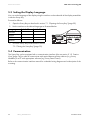
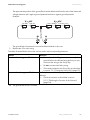
You can set the language of the display using the switches on the underside of the display assemblies
inside the Sunny Boy.
Proceed as follows:
1. Open the Sunny Boy as described in section 7.1 "Opening the Sunny Boy" (page 32).
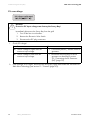
2. Set the switches to the desired language as illustrated below.
Language
German
English
French
Spanish
Switch S2
B
B
A
A
Switch S1
B
A
B
A
3. Close the Sunny Boy as described in section
7.2 "Closing the Sunny Boy" (page 33).
5.4 Communication
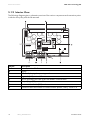
The Sunny Boy can be equipped with a communication interface (slot see section 5.1.2 "Interior
View" (page 16)) in order to communicate with special data acquisition devices (e. g. Sunny
WebBox) or a PC with appropriate software (e.g. Sunny Data Control).
Refer to the communication interface manual for a detailed wiring diagram and a description of the
mounting.
22
SB25_30-IEN092520
Installation Guide