1
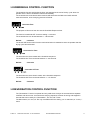
FAILURE 25: NO HUMIDITY SENSOR
HUMIDITY CONTROL ONLY
Failure 25 occurs when the humidity sensor doesn't give an analog electrical output signal to the dryer
computer. Example: connector not connected to dryer computer.
(At the „t“-menu you can switch off/on the Humidity Control function)
(Note : the humidity sensor needs 1 minute after switching on the power supply dryer to stabilise it’s analog
output signal)
(See 9.2 Monitoring Humidity values)
Failure 25 can occur when the dryer is running without linen inside. This should not be considered as a
system failure. Check correct dryer operation with a normal amount of wet linen.
! ATTENTION
THE HUMIDITY CONTROL SYSTEM IS NOT MADE TO RUN WITHOUT LOAD OR WITH A VERY SMALL
LOAD. THE SYSTEM CAN ONLY FUNCTION IN A NORMAL WAY WHEN THERE IS SUFFICIANT
EVAPORATION TO BE MEASURED BY THE AIR HUMIDITY SENSOR
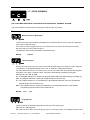
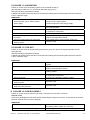
DIAGNOSE:
1. Check if the humidity sensor is connected
to the dryer computer.
2. Check the wiring.
3. Check the supply voltage humidity sensor.
4. Check the humidity sensor and amplifier.
5. Check the analog input signal.
(Inputs can be checked one by one in the
Service menu)
If the humidity sensor is not connected to the dryer
computer, connect the sensor
If the wiring is damaged, repair the wiring.
If there is no or wrong supply voltage replace the
dryer computer.
If the humidity sensor or amplifier is damaged
replace the humidity sensor and amplifier.
If for A3, the value at the Analog input menu = „0“
then the analog input signal is missing.
If the input of the controller board is not functional,
replace the controller board. (check first previous
items)
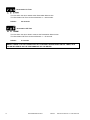
FAILURE 26: NO HUMIDITY SENSOR CAP
HUMIDITY CONTROL ONLY
Failure 26 occurs when the dust cap at the humidity sensor is missing.
When the dust cap is missing, due to the influence of the air flow in the dryer, the sensor will measure a too
big value which is out of range at normal operation.
(At the „t“-menu you can switch off/on the Humidity Control function)
(Note : the humidity sensor needs 1 minute after switching on the power supply dryer to stabilise it’s analog
output signal)
(See 9.2 Monitoring Humidity value)
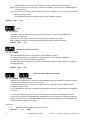
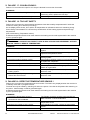
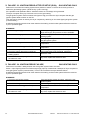
DIAGNOSE:
1. Check if the dust cap is mounted on the
sensor.
2. Check the wiring.
3. Check the supply voltage humidity sensor.
4. Check the humidity sensor and amplifier.
5. Check the analog input signal.
(Inputs can be checked one by one in the
Service menu)
516307 C
PUBLICATION DATE 31 JAN 2008.DOC
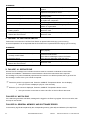
If the dust cap is missing or broken, put a new dust
cap on the humidity sensor.
If the wiring is damaged, repair the wiring.
If there is no or wrong supply voltage replace the
dryer computer.
If the humidity sensor or amplifier is damaged
replace the humidity sensor and amplifier.
If for A3, the value at the Analog input menu >
„800“ then the analog input signal is out of range.
If the input of the controller board is not functional,
replace the controller board. (check first previous
items)
PROGRAMMING MANUAL
49