1
8. Administering Your Seagate Central Device
Adding and Editing User Accounts
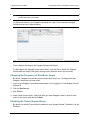
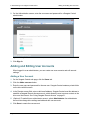
2. On the Authentication screen, enter the user name and password for a Seagate Central
administrator.
Figure 24:
Seagate Central Authentication Screen
3. Click Sign in.
Adding and Editing User Accounts
When logged in as an administrator, you can create new user accounts and edit account
settings.
Adding a User Account
1. On the Seagate Central web page, click the Users tab.
2. Click the Add a new user button.
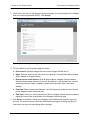
3. Enter the user name and password for the new user. Seagate Central creates a private folder
on the drive with this name.
4. In the Remote access field, enter a valid email address. Seagate Central uses this address to
establish a Seagate Remote Access account, which allows the user to access content on the
drive over the Internet. See “Using Seagate Remote Access” on page 31.
5. (Optional) To make this an administrator account, select Administrator. An administrator
account can change drive settings and add and edit user accounts.
6. Click Save to create the new account.
Seagate Central User Guide
37