1
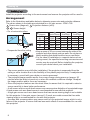
Setting up
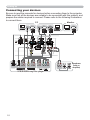
Connecting your devices
Be sure to read the manuals for devices before connecting them to the projector.
Make sure that all the devices are suitable to be connected with this product, and
prepare the cables required to connect. Please refer to the following illustrations
to connect them.
Monitor
PC
AUDIO OUT
RGB OUT
AUDIO OUT
RGB OUT
RS-232C
RGB IN
LAN
HDMI
Speakers
HDMI
S-VIDEO OUT
L
R
AUDIO OUT
VIDEO OUT
L
R
AUDIO OUT
L
R
AUDIO OUT
Y
CB/PB CR/PR
COMPONENT VIDEO OUT
VCR/DVD/Blu-ray Disc player
10
L
R
AUDIO IN
(with an
amplifier)