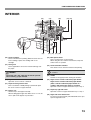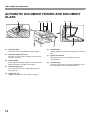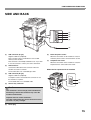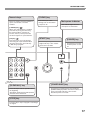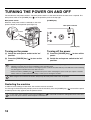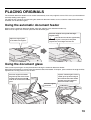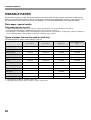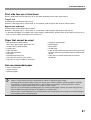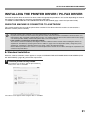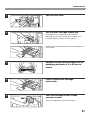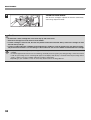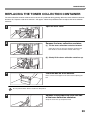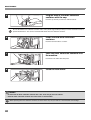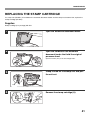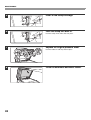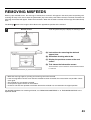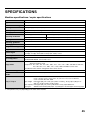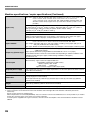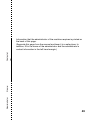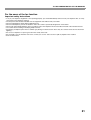
1
MODEL: MX-M282N MX-M362N MX-M452N MX-M502N DIGITAL MULTIFUNCTIONAL SYSTEM START GUIDE Keep this manual close at hand for reference whenever needed. Caution! For complete electrical disconnection, pull out the main plug. The socket-outlet shall be installed near the equipment and shall be easily accessible. Shielded interface cables must be used with this equipment to maintain compliance with EMC regulations. ➢➣➢➣➢➣➢➣➢➣➢➣➢➣➢➣➢➣➢➣➢➣➢➣➢➣➢➣➢➣➢➣➢➣➢➣➢➣➢➣➢➣➢➣➢➣➢➣➢➣➢➣➢ The equipment should be installed near an accessible socket outlet for easy disconnection. Notice for users in the UK MAINS PLUG WIRING INSTRUCTIONS The mains lead of this equipment is already fitted with a mains plug which is either a non-rewireable (moulded) or a rewireable type. Should the fuse need to be replaced, a BSI or ASTA approved fuse to BS1362 marked or and of the same rating as the one removed from the plug must be used. Always refit the fuse cover after replacing the fuse on the moulded plug. Never use the plug without the fuse cover fitted. In the unlikely event of the socket outlet in your home not being compatible with the plug supplied either cut-off the moulded plug (if this type is fitted) or remove by undoing the screws if a rewireable plug is fitted and fit an appropriate type observing the wiring code below. DANGER: The fuse should be removed from the cut-off plug and the plug destroyed immediately and disposed of in a safe manner. Under no circumstances should the cut-off plug be inserted elsewhere into a 13A socket outlet as a serious electric shock may occur. To fit an appropriate plug to the mains lead, follow the instructions below: IMPORTANT: The wires in this mains lead are coloured in accordance with the following code: GREEN-AND-YELLOW: Earth BLUE: Neutral BROWN: Live As the colours of the wires in this mains lead may not correspond with coloured markings identifying the terminals in your plug, proceed as follows: The wire which is coloured GREEN-AND-YELLOW must be connected to the terminal in the plug which is marked with the letter E, or by the safety earth symbol , or coloured green or greenand-yellow. The wire which is coloured BLUE must be connected to the terminal which is marked with the letter N or coloured black. The wire which is coloured BROWN must be connected to the terminal which is marked with the letter L or coloured red. If you have any doubt, consult a qualified electrician. WARNING: THIS APPARATUS MUST BE EARTHED. ➣➢➣➢➣➢➣➢➣➢➣➢➣➢➣➢➣➢➣➢➣➢➣➢➣➢➣➢➣➢➣➢➣➢➣➢➣➢➣➢➣➢➣➢➣➢➣➢➣➢➣➢➣➢➣➢ ➢➣➢➣➢➣➢➣➢➣➢➣➢➣➢➣➢➣➢➣➢➣➢➣➢➣➢➣➢➣➢➣➢➣➢➣➢➣➢➣➢➣➢➣➢➣➢➣➢➣➢➣➢➣➢ ➣➢➣➢➣➢➣➢➣➢➣➢➣➢➣➢➣➢➣➢➣➢➣➢➣➢➣➢➣➢➣➢➣➢➣➢➣➢➣➢➣➢➣➢➣➢➣➢➣➢➣➢➣➢➣ EMC (this machine and peripheral devices) Warning: This is a Class A product. In a domestic environment this product may cause radio interference in which case the user may be required to take adequate measures. This machine contains the software having modules developed by Independent JPEG Group. This product includes Adobe® Flash® technology of Adobe Systems Incorporated. Copyright© 1995-2007 Adobe Macromedia Software LLC. All rights reserved. For the users of the fax function FAX interface cable and Line cable: These special accessories must be used with the device. The Declaration of Conformity can be viewed at the following URL address. http://www.sharp.de/doc/MX-FXX2.pdf SOFTWARE LICENCE The SOFTWARE LICENCE will appear when you install the software from the CD-ROM. By using all or any portion of the software on the CD-ROM or in the machine, you are agreeing to be bound by the terms of the SOFTWARE LICENCE. Products that have earned the ENERGY STAR® are designed to protect the environment through superior energy efficiency. The products that meet the ENERGY STAR® guidelines carry the logo shown above. The products without the logo may not meet the ENERGY STAR® guidelines. Warranty While every effort has been made to make this document as accurate and helpful as possible, SHARP Corporation makes no warranty of any kind with regard to its content. All information included herein is subject to change without notice. SHARP is not responsible for any loss or damages, direct or indirect, arising from or related to the use of this operation manual. © Copyright SHARP Corporation 2010. All rights reserved. Reproduction, adaptation or translation without prior written permission is prohibited, except as allowed under copyright laws. 1 Contents CAUTIONS . . . . . . . . . . . . . . . . . . . . . . . . . . . . . . . . Symbols in this manual . . . . . . . . . . . . . . . . . . . . . Power notes . . . . . . . . . . . . . . . . . . . . . . . . . . . . . . Installation notes . . . . . . . . . . . . . . . . . . . . . . . . . . About consumables . . . . . . . . . . . . . . . . . . . . . . . . Handling precautions . . . . . . . . . . . . . . . . . . . . . . . Laser information . . . . . . . . . . . . . . . . . . . . . . . . . . 3 3 3 4 5 6 7 OPERATION MANUALS AND HOW TO USE THEM. . . 8 ACCESSING THE WEB SERVER IN THE MACHINE. . . 9 Opening the Web pages. . . . . . . . . . . . . . . . . . . . . 9 Downloading the Operation Guide . . . . . . . . . . . . . 9 CHECKING THE IP ADDRESS . . . . . . . . . . . . . . . 10 PART NAMES AND FUNCTIONS . . . . . . . . . . . . . EXTERIOR . . . . . . . . . . . . . . . . . . . . . . . . . . . . . . INTERIOR . . . . . . . . . . . . . . . . . . . . . . . . . . . . . . AUTOMATIC DOCUMENT FEEDER AND DOCUMENT GLASS . . . . . . . . . . . . . . . . . . . . . . SIDE AND BACK . . . . . . . . . . . . . . . . . . . . . . . . . 11 11 13 14 15 OPERATION PANEL . . . . . . . . . . . . . . . . . . . . . . . 16 TURNING THE POWER ON AND OFF . . . . . . . . . 18 PLACING ORIGINALS . . . . . . . . . . . . . . . . . . . . . . Using the automatic document feeder . . . . . . . . . Using the document glass . . . . . . . . . . . . . . . . . . USEABLE PAPER . . . . . . . . . . . . . . . . . . . . . . . . 19 19 19 20 LOADING PAPER IN A TRAY . . . . . . . . . . . . . . . . Names of the trays . . . . . . . . . . . . . . . . . . . . . . . . Loading paper in a tray. . . . . . . . . . . . . . . . . . . . . Changing the tray settings . . . . . . . . . . . . . . . . . . Loading paper in other trays. . . . . . . . . . . . . . . . . 22 22 22 23 24 BEFORE INSTALLING THE SOFTWARE . . . . . . . CD-ROMS AND SOFTWARE . . . . . . . . . . . . . . . VERIFYING SYSTEM REQUIREMENTS . . . . . . CONNECTING THE MACHINE . . . . . . . . . . . . . . 26 26 28 29 SETUP IN A WINDOWS ENVIRONMENT . . . . . . . 30 OPENING THE SOFTWARE SELECTION SCREEN (FOR ALL SOFTWARE). . . . . . . . . . . . 30 INSTALLING THE PRINTER DRIVER / PC-FAX DRIVER . . . . . . . . . . . . . . . . . . . . . . . . . . . . . . . . 31 MAINTENANCE . . . . . . . . . . . . . . . . . . . . . . . . . . . REGULAR MAINTENANCE . . . . . . . . . . . . . . . . . REPLACING THE TONER CARTRIDGES . . . . . REPLACING THE TONER COLLECTION CONTAINER . . . . . . . . . . . . . . . . . . . . . . . . . . . . REPLACING THE STAMP CARTRIDGE . . . . . . . 34 34 36 39 41 REMOVING MISFEEDS . . . . . . . . . . . . . . . . . . . . . 43 SUPPLIES. . . . . . . . . . . . . . . . . . . . . . . . . . . . . . . . 44 SPECIFICATIONS . . . . . . . . . . . . . . . . . . . . . . . . . 45 Machine specifications / copier specifications . . . 45 Continuous copying speeds . . . . . . . . . . . . . . . . . 47 Ambient environment . . . . . . . . . . . . . . . . . . . . . . 47 Chemical emission (measured according to RAL UZ-122: Edition Jan. 2006) . . . . . . . . . . . . . . . . . 47 Acoustic noise emission (measurement according to ISO7779) . . . . . . . . . 48 Reversing single feeder specifications (MX-RP11) . . . 48 Exit tray unit (right tray) specifications . . . . . . . . . 48 TO THE ADMINISTRATOR OF THE MACHINE . . . 50 Factory default passwords . . . . . . . . . . . . . . . . . . 50 Forwarding all transmitted and received data to the administrator (document administration function). . . .50 For the users of the fax function . . . . . . . . . . . . . . . . .51 Trademark acknowledgments . . . . . . . . . . . . . . . 53 Note: • The explanations in this manual assume that an automatic document feeder, right tray and stand/2 x 500 sheet paper drawer are installed on the MX-M502N. • The explanations in this manual assume that you have a working knowledge of your Windows or Macintosh computer. • For information on your operating system, please refer to your operating system manual or the online Help function. • The explanations of screens and procedures in this manual are primarily for Windows Vista® in Windows® environments. The screens may vary depending on the version of the operating system. • This manual contains references to the fax function. However, please note that the fax function is not available in some countries and regions. • This manual contains explanations of the PC-Fax driver and PPD driver. However, please note that the PC-Fax driver and PPD driver are not available and do not appear on the software for installation in some countries and regions. In this case, please install the English version if you want to use these drivers. • Considerable care has been taken in preparing this manual. If you have any comments or concerns about the manual, please contact your dealer or nearest authorised service representative. • This product has undergone strict quality control and inspection procedures. In the unlikely event that a defect or other problem is discovered, please contact your dealer or nearest authorised service representative. • Aside from instances provided for by law, SHARP is not responsible for failures occurring during the use of the product or its options, or failures due to incorrect operation of the product and its options, or other failures, or for any damage that occurs due to use of the product. 2 CAUTIONS Symbols in this manual To ensure safe use of the machine, this manual uses various safety symbols. The safety symbols are classified as explained below. Be sure you understand the meaning of the symbols when reading the manual. Symbol Meaning WARNING Indicates a risk of death or serious injury. CAUTION Indicates a risk of human injury or property damage. Meaning of the symbols Symbol Meaning CAUTION! HOT PINCH POINT KEEP CLEAR Meaning Symbol Symbol PROHIBITED ACTIONS Meaning MANDATORY ACTIONS DO NOT DISASSEMBLE Power notes WARNING Be sure to connect the power cord only to a power outlet that meets the specified voltage and current requirements. Also make certain the outlet is properly grounded. Do not use an extension cord or adapter to connect other devices to the power outlet used by the machine. Using an improper power supply may cause fire or electrical shock. *For the power supply requirements, see the name plate in the lower left corner of the left side of the machine. Do not damage or modify the power cord. Placing heavy objects on the power cord, pulling it, or forcibly bending it will damage the cord, resulting in fire or electrical shock. Do not insert or remove the power plug with wet hands. This may cause electrical shock. CAUTION When removing the power plug from the outlet, do not pull on the cord. Pulling on the cord may cause damage such as wire exposure and breakage, and may result in fire or electrical shock. When moving the machine, switch off the main power and remove the power plug from the outlet before moving. The cord may be damaged, creating a risk of fire or electrical shock. If you will not use the machine for a long time, be sure to remove the power plug from the outlet for safety. 3 CAUTIONS Installation notes CAUTION Do not install the machine on an unstable or slanted surface. Install the machine on a surface that can withstand the weight of the machine. When the machine is installed, the adjusters (4) must be lowered to the floor to secure the machine (prevent it from moving). Risk of injury due to the machine falling or toppling. If peripheral devices are to be installed, do not install on an uneven floor, slanted surface, or otherwise unstable surface. Danger of slippage, falling, and toppling. Install the product on a flat, stable surface that can withstand the weight of the product. (Weight when various peripheral devices are installed: approx. 95 kg (209.4 lbs.)) Rotate the adjusters in the locking direction until they are in firm contact with the floor. If you find it necessary to reposition the machine due to rearrangement of your office layout or other reason, retract the adjusters from the floor, turn off the power, and then move the machine. (After moving the Adjuster machine, lower the adjusters again to secure the machine.) Lock Release Do not install in a location with moisture or dust. Risk of fire and electrical shock. If dust enters the machine, dirty output and machine failure may result. Locations that are excessively hot, cold, humid, or dry (near heaters, humidifiers, air conditioners, etc.) Locations exposed to direct sunlight Plastic parts may become deformed and dirty output may result. Locations with ammonia gas Installing the machine next to a diazo copy machine may cause dirty output. The paper will become damp and condensation may form inside the machine, causing misfeeds and dirty output. ☞ Ambient environment (page 47) If the location has an ultrasonic humidifier, use pure water for humidifiers in the humidifier. If tap water is used, minerals and other impurities will be emitted, causing impurities to collect on the inside of the machine and create dirty output. 4 CAUTIONS Installation notes (continued) CAUTION Do not install the machine in a location with poor ventilation. Install so that exhaust from the machine does not directly contact people. A small amount of ozone is produced within the printer during operation. The emission level is insufficient to cause any health hazard. The present recommended long term exposure limit for ozone is 0.1 ppm (0.2 mg/m3) calculated as an 8 hr. time-weighted average concentration. However, since the small amount that is emitted may have an objectionable odor, it is advisable to place the copier in a ventilated area. Near a wall Be sure to allow the required space around the machine for servicing and proper ventilation. (The machine should be no closer than the distances indicated below from walls. The indicated distances are for the case when a saddle finisher and large capacity paper tray are not installed.) 30cm (11-13/16") 30cm (11-13/16") 45cm (17-23/32") Locations subject to vibration. A small amount of ozone is created inside the machine during printing. The amount of ozone created is not sufficient to be harmful; however, an unpleasant odor may be noticed during large copy runs, and thus the machine should be installed in a room with a ventilation fan or windows that provide sufficient air circulation. (The odor may occasionally cause headaches.) * Install the machine so that people are not directly exposed to exhaust from the machine. If installed near a window, ensure that the machine is not exposed to direct sunlight. Vibration may cause failure. The machine includes a built-in hard drive. Do not subject the machine to shock or vibration. In particular, never move the machine while the power is on. • The machine should be installed near an accessible power outlet for easy connection. • Connect the machine to a power outlet which is not used for other electric appliances. If a lighting fixture is connected to the same outlet, the light may flicker. About consumables CAUTION Do not throw a toner cartridge into a fire. Toner may fly and cause burns. Store a toner cartridge out of the reach of children. 5 CAUTIONS Handling precautions WARNING Do not place a container of water or other liquid, or a metal object that might fall inside, on the machine. If you notice smoke, a strange odor, or other abnormality, do not use the machine. If used in this condition, fire or electrical shock may result. Immediately switch off the main power and remove the power plug from the power outlet. Contact your dealer or nearest authorised service representative. If the liquid spills or the object falls into the machine, fire or electrical shock may result. Do not remove the machine casing. High-voltage parts inside the machine may cause electrical shock. If a thunder storm begins, switch off the main power and remove the power plug from the outlet to prevent electrical shock and fire due to lightning. Do not make any modifications to this machine. Doing so may result in personal injury or damage to the machine. If a piece of metal or water enters the machine, switch off the main power and remove the power plug from the power outlet. Do not use a flammable spray to clean the machine. Contact your dealer or nearest authorised service representative. Using the machine in this condition may result in electrical shock or fire. If gas from the spray comes in contact with hot electrical components or the fusing unit inside the machine, fire or electrical shock may result. CAUTION Do not look directly at the light source. Doing so may damage your eyes. Do not block the ventilation ports on the machine. Do not install the machine in a location that will block the ventilation ports. Blocking the ventilation ports will cause heat to build up in the machine, creating a risk of fire. The fusing unit and paper exit area are hot. When removing a misfeed, do not touch the fusing unit and paper exit area. Take care not to burn yourself. Fusing unit When loading paper, removing a misfeed, performing maintenance, closing the front and side covers, and inserting and removing trays, take care that your fingers are not pinched. The machine includes the document filing function, which stores document image data on the machine's hard drive. Stored documents can be called up and printed or transmitted as needed. If a hard drive failure occurs, it will no longer be possible to call up the stored document data. To prevent the loss of important documents in the unlikely event of a hard drive failure, keep the originals of important documents or store the original data elsewhere. With the exception of instances provided for by law, Sharp Corporation bears no responsibility for any damages or loss due to the loss of stored document data. 6 CAUTIONS Laser information Wave length 790 nm ± 10 nm Pulse times (North America and Europe) MX-M282N/MX-M362N: 11.9 µs ± 33.0 ns /7 mm MX-M452N/MX-M502N: 9.4 µs ± 25.6 ns /7 mm Output power Max 0.6 mW (LD1+ LD2) Caution Use of controls or adjustments or performance of procedures other than those specified herein may result in hazardous radiation exposure. This Digital Equipment is CLASS 1 LASER PRODUCT (IEC 60825-1 Edition 1.2-2001) SAFETY PRECAUTIONS This Digital Equipment is rated Class 1 and complies with 21 CFR 1040.10 and 1040.11 of the CDRH standards. This means that the equipment does not produce hazardous laser radiation. For your safety, observe the precautions below. • Do not remove the cabinet, operation panel or any other covers. • The equipment's exterior covers contain several safety interlock switches. Do not bypass any safety interlock by inserting wedges or other items into switch slots. "BATTERY DISPOSAL" THIS PRODUCT CONTAINS A LITHIUM PRIMARY MEMORY BACK-UP BATTERY THAT MUST BE DISPOSED OF PROPERLY. PLEASE CONTACT YOUR LOCAL SHARP DEALER OR AUTHORISED SERVICE REPRESENTATIVE FOR ASSISTANCE IN DISPOSING OF THIS BATTERY. Each instruction also covers the optional units used with these products. 7 OPERATION MANUALS AND HOW TO USE THEM Printed manuals and a manual in PDF format are provided with the machine. Printed manuals This section explains precautions to ensure safe usage, part names and functions, basic software installation, how to resolve paper jams, and daily maintenance procedures. Refer to the PDF instruction manual for instructions on how to use the machine. Start Guide (this manual) Manuals in PDF format The explanation of the functions that can be used on the machine are provided in the Operation Guide in PDF format. The Operation Guide can be downloaded from the Web pages in the machine. Download the Operation Guide from the Web pages in the machine. Operation Guide For the downloading procedure, see "Downloading the Operation Guide" (page 9). Convenient methods for using the Operation Guide The first page contains a regular table of contents as well as an "I want to..." table of contents. "I want to..." lets you jump to an explanation based on what you want to do. For example, "I use the copier function often, so I'd like to save paper". Use either table of contents as appropriate based on what you want to know. The contents of the Operation Guide are as follows: BEFORE USING THE MACHINE COPIER PRINTER FACSIMILE SCANNER / INTERNET FAX DOCUMENT FILING SYSTEM SETTINGS TROUBLESHOOTING * To view the Operation Guide in PDF format, Adobe® Reader® or Acrobat® Reader® of Adobe Systems ® ® Incorporated is required. Adobe Reader can be downloaded from the following URL: http://www.adobe.com/ 8 ACCESSING THE WEB SERVER IN THE MACHINE When the machine is connected to a network, the machine's built-in Web server can be accessed from a Web browser on your computer. Opening the Web pages 1 Access the Web server in the machine to open the Web pages. Start a Web browser on a computer that is connected to the same network as the machine and enter the IP address of the machine. Recommended Web browsers Internet Explorer: 6.0 or higher (Windows®) Netscape Navigator: 9 (Windows®) Firefox: 2.0 or higher (Windows®) Safari: 1.5 or higher (Macintosh) The Web page will appear. The machine settings may require that user authentication be performed in order to open the Web page. Please ask the administrator of the machine for the password that is required for user authentication. Downloading the Operation Guide The Operation Guide, which is a more detailed manual, can be downloaded from the machine's Web pages. 1 Downloading the Operation Guide. (1) Click [Operation Manual Download] in the menu of the Web page. (1) (2) Select the desired language. (2) (3) Click the [Download] button. The Operation Guide is downloaded. (3) 9 CHECKING THE IP ADDRESS To check the IP address of the machine, print out the all custom setting list in the system settings. 1 2 Press the [SYSTEM SETTINGS] key. SYSTEM SETTINGS System Settings Admin Password Total Count Default Settings List Print (User) Paper Tray Settings Address Control Fax Data Receive/Forward Printer Condition Settings Document Filing Control USB-Device Check Exit (1) (1) Touch the [List Print (User)] key. System Settings List Print (User) All Custom Setting List: Printer Test Page: PCL Symbol Set List Back Print (2) Print Sending Address List: Individual List Document Filling Folder List: 10 Print Print Select the all custom setting list in the touch panel. (2) Touch the [Print] key to the right of "All Custom Setting List". The IP address is shown in the list that is printed. PART NAMES AND FUNCTIONS EXTERIOR (1) (2) (3) (4) (5) (7) (6) When a finisher / saddle stitch finisher is not installed (8) When a finisher is installed (1) Document cover* (5) This is used to select functions and enter the number of copies. Place an original on the document glass and close the document cover before copying starts. (2) Automatic document feeder* This automatically feeds and scans multiple originals. Both sides of 2-sided originals can be automatically scanned. (3) Front cover Open this cover to switch the main power switch to "On" or "Off" or to replace a toner cartridge. (4) Operation panel (6) Exit tray unit (right tray)* When installed, output can be delivered to this tray. (7) Output tray (centre tray) Output is delivered to this tray. (8) Finisher* This can be used to staple output. A punch module can also be installed to punch holes in output. Paper pass unit* This transfers output to the finisher (large stacker) or saddle stitch finisher. * Peripheral device. 11 PART NAMES AND FUNCTIONS (9) (10) When a saddle stitch finisher is installed (11) (9) Punch module* This is used to punch holes in output. Requires a finisher (large stacker). (10) USB connector (A type) Supports USB 2.0 (Hi-Speed). This is used to connect a USB device such as USB memory to the machine. For the USB cable, use a shielded cable. (11) Saddle stitch finisher* This can be used to staple output. The saddle stitch function for folding and stapling output and the fold function for folding output in half are also available. A punch module can also be installed to punch holes in output. (12) Finisher (large stacker)* This can be used to staple output. * Peripheral device. 12 (12) (13) (14) (15) (16) (17) (13) Tray 1 This holds paper. (14) Tray 2 This holds paper. (15) Tray 3 (when a stand/1 x 500 sheet paper drawer or a stand/2 x 500 sheet paper drawer is installed)* This holds paper. (16) Tray 4 (when a stand/2 x 500 sheet paper drawer is installed)* This holds paper. (17) Tray 5 (when a large capacity tray is installed)* This holds paper. PART NAMES AND FUNCTIONS INTERIOR (18) (23) (24) (19) (20) (21) (22) (25) (26) (27) (28) (18) Toner cartridges These contain toner for printing. When the toner runs out in the cartridge, replace the cartridge with a new cartridge. (23) Main power switch (19) Fusing unit (24) Toner collection container Heat is applied here to fuse the transferred image onto the paper. Caution The fusing unit is hot. Take care not to burn yourself when removing a paper misfeed. (20) Right side cover Open this cover to remove a misfeed. (21) Paper reversing section cover This is used when 2-sided printing is performed. Open this cover to remove a paper misfeed. (22) Bypass tray Use this tray to feed paper manually. When loading paper larger than A4R or 8-1/2" x 11"R, be sure to pull out the bypass tray extension. This is used to power on the machine. When using the fax or Internet fax functions, keep this switch in the "on" position. This collects excess toner that remains after printing. Your service technician will collect the toner collection container. (25) Handle Pull this out and grasp it when moving the machine. (26) Right cover of stand/1 x 500 sheet paper drawer Right cover of stand/2 x 500 sheet paper drawer (when a stand/1 x 500 sheet paper drawer or a stand/2 x 500 sheet paper drawer is installed) Open this to remove a paper misfeed in tray 3 or tray 4. (27) Paper tray right side cover Open this to remove a paper misfeed in tray 1 or tray 2. (28) Right side cover release lever To remove a paper misfeed, pull and hold this lever up to open the right side cover. 13 PART NAMES AND FUNCTIONS AUTOMATIC DOCUMENT FEEDER AND DOCUMENT GLASS (1) (2) (3) (4) (5) (6) (7) (8) (1) Paper feed roller (6) This roller rotates to automatically feed the original. (2) (3) Document feeder tray Place originals in this tray. 1-sided originals must be placed face up. (5) Original exit tray Originals are delivered to this tray after scanning. 14 (7) Original size detector This detects the size of an original placed on the document glass. Original guides These help ensure that the original is scanned correctly. Adjust the guides to the width of the original. (4) Originals placed in the document feeder tray are scanned here. Document feeding area cover Open this cover to remove an original misfeed or clean the paper feed roller. Scanning area (8) Document glass Use this to scan a book or other thick original that cannot be fed through the automatic document feeder. PART NAMES AND FUNCTIONS SIDE AND BACK (1) (2) (3) (4) (5) (1) USB connector (A type) Supports USB 2.0 (Hi-Speed). This is used to connect a USB device such as USB memory to the machine. This connector is not initially available for use. If you wish to use the connector, contact your service technician. (2) Extension phone socket When the fax function of the machine is used, an extension phone can be connected to this socket. (7) Telephone line socket When the fax function of the machine is used, the telephone line is connected to this socket. LAN connector Connect the LAN cable to this connector when the machine is used on a network. For the LAN cable, use a shielded type cable. (3) (6) When the fax expansion kit is installed USB connector (B type ) Supports USB 2.0 (Hi-Speed). A computer can be connected to this connector to use the machine as a printer. For the USB cable, use a shielded cable. (6) (7) (4) Service-only connector Caution This connector is for use only by service technicians. Connecting a cable to this connector may cause the machine to malfunction. Important note for service technicians: The cable connected to the service connector must be less than 3 m (118") in length. (5) Power plug 15 OPERATION PANEL Image send indicators LINE indicator This lights up during transmission or reception in fax mode. The indicator also lights up during transmission in scan mode. DATA indicator When a received fax cannot be printed because of a problem such as out of paper, the indicator blinks. The indicator lights steadily when there is data that is waiting to be transmitted. Touch panel [JOB STATUS] key Print mode indicators Messages and keys appear in the LCD display. Operations are performed by touching the keys with your fingers. Press this key to view the job status screen. You can check the status of jobs and cancel jobs in the job status screen. READY indicator Print data can be received when this indicator is lit. COPY JOB STATUS DOCUMENT FILING IMAGE SEND DATA indicator This blinks while print data is being received and lights steadily while printing is taking place. Ready to scan for copy. 0 Job Status MFP Status Special Modes 020/015 2-Sided Copy SYSTEM SETTINGS Copying Plain A4 Exposure 1. 2. 3. 4. Auto A4 A4R B4 A3 Output 005/000 IMAGE SEND LINE DATA Waiting File Quick File 010/000 Waiting Copy Ratio Original Paper Select 100% Auto Auto A4 Plain A4 PRINT READY DATA HOME 010/000 Preview Waiting Tray1 [HOME] key [SYSTEM SETTINGS] key Press this key to display the system settings screen. The system settings can be adjusted to make the machine easier to use, such as configuring paper tray settings and storing addresses. 16 Touch this key to display the home screen. Keys of frequently used functions can be registered in this screen for quick access, making the machine easier to use. OPERATION PANEL Numeric keys [CLEAR] key These are used to enter the number of copies, fax numbers, and other numbers. Press this key to return settings such as the number of copies to "0". [LOGOUT] key ( ) When user authentication is enabled, press this key to log out after using the machine. When using the fax function, this key can be pressed to send tone signals on a pulse dial line. [#/P] key ( ) Press this key to use a job program when using the copier function. When using the fax function, press this key to dial using a program. [START] key Main power indicator This indicator lights when the main power is switched on. [POWER] key Use this key to copy or scan an original. This key is also used to send a fax in fax mode. Use this key to turn the machine power on and off. LOGOUT [CLEAR ALL] key Press this key to redo an operation from the beginning. All settings will be cleared and operation will return to the initial state. [POWER SAVE] key Use this key to activate power save mode. The [POWER SAVE] key blinks when the machine is in power save mode. This key is also used to deactivate power save mode. [STOP] key Press this key to stop a copy job or scanning of an original. 17 TURNING THE POWER ON AND OFF The machine has two power switches. The main power switch is at the lower left after the front cover is opened. The other power switch is the [POWER] key ( ) on the operation panel at the top right. Main power switch When the main power switch is switched on, the main power indicator on the operation panel lights up. [POWER] key Main power indicator "On" position "Off" position [POWER] key Turning on the power Turning off the power (1) Switch the main power switch to the "on" position. (1) Press the [POWER] key ( power. (2) Press the [POWER] key ( power. (2) Switch the main power switch to the "off" position. ) to turn on the ) to turn off the • Before switching off the main power switch, make sure that the DATA indicator for printing and the DATA and LINE indicators for image send are not lit or blinking on the operation panel. Switching off the main power switch or removing the power cord from the outlet while any of the indicators are lit or blinking may damage the hard drive and cause data to be lost. • Switch off both the [POWER] key ( ) and the main power switch and unplug the power cord if you suspect a machine failure, if there is a bad thunderstorm nearby, or when you are moving the machine. When using the fax or Internet fax function, always keep the main power switch in the "on" position. Restarting the machine In order for some settings to take effect, the machine must be restarted. If a message in the touch panel prompts you to restart the machine, press the [POWER] key ( and then press the key again to turn the power back on. ) to turn off the power In some states of the machine, pressing the [POWER] key ( ) to restart will not make the settings take effect. In this case, use the main power switch to switch the power off and then on. 18 PLACING ORIGINALS The automatic document feeder can be used to automatically scan many originals at once. This saves you the trouble of manually feeding each original. For originals that cannot be scanned using the automatic document feeder, such as a book or a document with notes attached, use the document glass. Using the automatic document feeder When using the automatic document feeder, place the originals in the document feeder tray. Make sure an original has not been placed on the document glass. Place the originals face up with the edges aligned evenly. Adjust the original guides to the width of the originals. The indicator line indicates approximately how many originals can be placed. The placed originals must not be higher than this line. Using the document glass Take care that your fingers are not pinched when closing the automatic document feeder. After placing the original, be sure to close the automatic document feeder. If left open, parts outside of the original will be copied black, causing excessive use of toner. Place the original face down. To place a thick original such as a book, push up the far edge of the automatic document feeder and then close the automatic document feeder slowly. Align the top left corner of the original with the tip of the mark in the far left corner of the glass. Place the original face down. 19 PLACING ORIGINALS USEABLE PAPER Various types of paper are sold. This section explains what plain paper and what special media can be used with the machine. For detailed information on the sizes and types of paper that can be loaded in each tray of the machine, see the specifications in this manual and "Paper Tray Settings" in "7. SYSTEM SETTINGS" of the Operation Guide. Plain paper, special media Plain paper that can be used • SHARP standard plain paper (80 g/m2 (21 lbs.)). For paper specifications, see the specifications in this manual. • Pain paper other than SHARP standard paper (60 g/m2 to 105 g/m2 (16 lbs. to 28 lbs.)) • Recycled paper, coloured paper and pre-punched paper must meet the same specifications as plain paper. Contact your dealer or nearest authorised service representative for advice on using these types of paper. Types of paper that can be used in each tray The following types of paper can be loaded in each tray. Tray 1/Tray 2 Tray 3/Tray 4 Bypass tray Tray 5 (large capacity tray) Plain paper Permitted Permitted Permitted Permitted Pre-printed Permitted Permitted Permitted Permitted Recycle Paper Permitted Permitted Permitted Permitted Letter head Permitted Permitted Permitted Permitted Pre-punched Permitted Permitted Permitted Permitted Colour Permitted Permitted Permitted Permitted Heavy paper *1 Permitted Permitted Permitted – Labels – – Permitted – Transparency film – – Permitted – Tab paper – – Permitted – Envelopes – – Permitted – Thin paper*2 – – Permitted – *1 Heavy paper up to 209 g/m2 (110 lbs.) can be used. *2 Thin paper from 56 g/m2 to 59 g/m2 (15 lbs. to 16 lbs.) can be used. 20 PLACING ORIGINALS Print side face up or face down Paper is loaded with the print side face up or face down depending on the paper type and tray. Trays 1 to 4 Load the paper with the print side face up. However, if the paper type is "Letter Head" or "Pre-Printed", load the paper with the print side face down*. Bypass tray and tray 5 Load the paper with the print side face down. However, if the paper type is "Letter Head" or "Pre-Printed", load the paper with the print side face up*. * If "Disabling of Duplex" is enabled in the system settings (administrator), load the paper in the normal way (face up in trays 1 to 4; face down in the bypass tray and tray 5). Paper that cannot be used • Special media for inkjet printers (fine paper, glossy paper, glossy film, etc.) • Carbon paper or thermal paper • Pasted paper • Paper with clips • Paper with fold marks • Torn paper • Oil-feed transparency film • Thin paper less than 56 g/m2 (15 lbs.) • Paper that is 210 g/m2 (80 lbs.) or heavier • Irregularly shaped paper • Stapled paper • Damp paper • Curled paper • Paper on which either the print side or the reverse side has been printed on by another printer or multifunction device. • Paper with a wave-like pattern due to moisture absorption Non-recommended paper • Iron-on transfer paper • Japanese paper • Perforated paper • Various types of plain paper and special media are sold. Some types cannot be used with the machine. Contact your dealer or nearest authorised service representative for advice on using these types of paper. • The image quality and toner fusibility of paper may change due to ambient conditions, operating conditions, and paper characteristics, resulting in image quality inferior to that of SHARP standard paper. Contact your dealer or nearest authorised service representative for advice on using these types of paper. • The use of non-recommended or prohibited paper may result in skewed feeding, misfeeds, poor toner fusing (the toner does not adhere to the paper well and can be rubbed off), or machine failure. • The use of non-recommended paper may result in misfeeds or poor image quality. Before using non-recommended paper, check if printing can be performed properly. 21 LOADING PAPER IN A TRAY Names of the trays The names of the trays are shown below. For the number of sheets of paper that can be loaded in each tray, see the following manuals: • Operation Guide, "Paper Tray Settings" in "7. SYSTEM SETTINGS" • Start Guide (this manual), "SPECIFICATIONS" Bypass tray Tray 1 Tray 2 Tray 3 (when a stand/1 x 500 sheet paper drawer or a stand/2 x 500 sheet paper drawer is installed) Tray 5 (when a large capacity tray is installed) Tray 4 (when a stand/2 x 500 sheet paper drawer is installed) Loading paper in a tray To change the paper in a tray, load the desired paper in the tray and then change the tray settings in the machine to specify the loaded paper. The procedure for changing the tray paper size is explained below. As an example, the paper in tray 1 is changed from B4 (8-1/2" x 14") size plain paper to A4 (8-1/2" x 11") size recycled paper. Gently pull out the paper tray. If paper remains in the tray, remove it. Move the two guides on the tray. For example, move the guides from B4 (8-1/2" x 14") to A4 (8-1/2" x 11"). Insert the paper with the print side face up. Fan the paper well before inserting it. Otherwise, multiple sheets may feed at once and cause a misfeed. Insert the paper and then gently push the tray into the machine. Do not load as shown below. 22 Indicator line The indicator line indicates the maximum height of the paper that can be loaded in the tray. When loading paper, make sure that the stack is not higher than the indicator line. LOADING PAPER IN A TRAY Changing the tray settings When you change the paper in a tray, the tray settings in the system settings must also be changed. 1 2 Press the [SYSTEM SETTINGS] key. SYSTEM SETTINGS Admin Password System Settings Total Count Default Settings List Print (User) Paper p Tray Settings Address Control Fax Data Receive/Forward (1) Document Filing Control USB-Device Check Printer Condition Settings Exit Configure the tray settings in the touch panel. (1) Touch the [Paper Tray Settings] key. (2) Touch the [Tray Settings] key. System Settings Back Paper Tray Settings Tray Settings (2) Paper Type Registration Auto Tray Switching Custom Size Registration (Bypass) Back Tray Settings (3) Touch the [Change] key in "Tray 1". Tray 1 Type Plain Change Size B4 (3) Paper Property Fixed Paper Side Disable Duplex Disable Staple Disable Punch Feeding Approved Job Copy Print Fax I-Fax Doc. Filing System Settings Cancel Tray Settings Tray: Type: Size: Auto-AB A3,A4,A4R,B4,B5,B5R, 216x330(8 1/2x13) Paper Property: (6) Tray 1 Recycled OK (4) (5) (4) Select [Recycled] from the "Type" select box. (5) Make sure that [Auto-AB] is selected in the "Size" select box. Print Copy I-Fax For more information, see "Paper Tray Settings" in "7. SYSTEM SETTINGS" in the Operation Guide. Fax (6) Touch the [OK] key. The above steps change the paper settings for tray 1 to A4 recycled paper. 23 LOADING PAPER IN A TRAY Loading paper in other trays Bypass tray The side to be copied on must be face down! When loading A3W, A3 or B4 size paper, pull out the tray extension. The maximum number of sheets that can be loaded in the bypass tray is approximately 100 for plain paper and approximately 20 for envelopes. Example: Loading an envelope Place paper that is A5 (7-1/4" x 10-1/2") or smaller in the horizontal orientation. Only the address side of envelopes can be printed on. Place envelopes with the address side face down. Special types of paper that cannot be loaded in other trays can be loaded in the bypass tray. For detailed information on the bypass tray, see "LOADING PAPER IN THE BYPASS TRAY" in "1. BEFORE USING THE MACHINE" in the Operation Guide. 24 LOADING PAPER IN A TRAY Large capacity tray The paper size of tray 5 can only be changed by a service technician. Gently pull out the paper tray. Insert the paper with the print side face down. Fan the paper well before inserting it. Otherwise, multiple sheets may feed at once and cause a misfeed. Insert the paper and then gently push the tray into the machine. Do not load as shown below. Indicator line The indicator line indicates the maximum height of the paper that can be loaded in the tray. When loading paper, make sure that the stack is not higher than the indicator line. 25 BEFORE INSTALLING THE SOFTWARE This chapter describes the software programs that allow you to use the printer and scanner functions of the machine, the CD-ROMs that contain the software, and the pages where the basic installation procedures can be found. For details on installation procedures, refer to Chapter 1 of the Operation Guide. CD-ROMS AND SOFTWARE The software that can be used with the machine is on the CD-ROMs that accompany the machine and the expansion kits. Before installing the software, make sure that your computer and the machine meet the system requirements described in "VERIFYING SYSTEM REQUIREMENTS" (page 28). SOFTWARE CD-ROM The "Software CD-ROM" that accompanies the machine contains the printer driver and other software. The "Software CD-ROM" consists of 2 discs. • The CD-ROM does not include software for Mac OS 9.0 to 9.2.2/X10.2.8/X10.3.9. Contact your dealer or nearest authorised service representative if you want software for Mac OS 9.0 to 9.2.2/X10.2.8/X10.3.9. • The CD-ROM does not include printer driver for PCL5e. Contact your dealer or nearest authorised service representative if you want printer driver for PCL5e. Disc 1 Software for Windows • Printer driver These allow the machine to be used as a printer. - PCL6 printer driver The machine supports the Hewlett-Packard PCL6 printer control languages. - PS printer driver The PS printer driver supports the PostScript 3 page description language developed by Adobe Systems Incorporated. - PPD driver The PPD driver enables the machine to use the standard Windows PS printer driver. ☞ WHEN THE MACHINE IS CONNECTED TO A NETWORK (page 31) ☞ WHEN THE MACHINE WILL BE CONNECTED WITH A USB CABLE (page 1-89 in the Operation Guide) • Printer Status Monitor (can only be used when the machine is connected to a network) This allows you to monitor the status of the machine on your computer screen. ☞ INSTALLING THE PRINTER STATUS MONITOR (page 1-99 in the Operation Guide) Software for Macintosh • PPD file This is the printer description file which enables the machine to be used as a PostScript 3 compatible printer. The PS3 expansion kit is required to use the machine in a Macintosh environment. ☞ MAC OS X (page 1-107 in the Operation Guide) ☞ MAC OS 9.0 - 9.2.2 (page 1-113 in the Operation Guide) • The PS3 expansion kit is required to use the machine as a printer in a Macintosh environment. In addition, the machine must be connected to a network. A USB connection cannot be used. • The scanner driver and PC-Fax driver cannot be used in a Macintosh environment. 26 BEFORE INSTALLING THE SOFTWARE Disc 2 Software for Windows • PC-Fax driver This enables you to send a file from your computer as a fax using the same procedure as when printing the file. (When the fax option is installed.) Even if the fax function is not installed, the PC-Fax driver can be updated using the CD-ROM in the Internet fax expansion kit to enable you to send a file from your computer as an Internet fax in the same way as you print a file. ☞ INSTALLING THE PRINTER DRIVER / PC-FAX DRIVER (page 31) • Scanner driver (TWAIN driver) (can only be used when the machine is connected to a network) This allows you to use the scanner function of the machine from a TWAIN-compliant software application. ☞ INSTALLING THE SCANNER DRIVER (page 1-100 in the Operation Guide) OTHER CD-ROMS "PRINTER UTILITIES" CD-ROM that accompanies the PS3 expansion kit (for Windows/Macintosh) This contains the display fonts that are used with the PS printer driver. (Install the PS printer driver and Macintosh PPD file from the "Software CD-ROM".) ☞ INSTALLING THE PS DISPLAY FONTS (page 1-102 in the Operation Guide) "PRINTER UTILITIES" CD-ROM that accompanies the Internet fax expansion kit (for Windows) This CD-ROM is used to update the PC-Fax driver on the "Software CD-ROM" so that it can be used to send Internet faxes (PC-I-Fax function). If you wish to use the PC-I-Fax function, first install the PC-Fax driver from the "Software CD-ROM" and then run the installer on this CD-ROM. If the PC-Fax driver is already installed, run only the installer. (There is no need to reinstall the PC-Fax driver.) ☞ INSTALLING THE PRINTER DRIVER / PC-FAX DRIVER (page 31) "Sharpdesk/Network Scanner Utilities" CD-ROM (for Windows) This contains software that helps you get the most out of the images that you scan on the machine. The software includes "Sharpdesk", a desktop document management application that enables integrated management of scanned images and files created using a variety of applications. To use the "Scan to Desktop" scanner function, the "Network Scanner Tool" must be installed from the CD-ROM. For the system requirements of the software, see the manual (PDF format) in the "Manual" folder or the Readme file on the CD-ROM. For the procedures for installing the software, see the "Information Guide". 27 BEFORE INSTALLING THE SOFTWARE VERIFYING SYSTEM REQUIREMENTS SYSTEM REQUIREMENTS Before installing the software described in this manual, make sure that your computer satisfies the following requirements. Windows*1 Macintosh*4 Operating system Windows 2000 Professional, Windows XP Professional*2, Windows XP Home Edition, Windows 2000 Server, Windows Server 2003*2, Windows Vista*2, Windows Server 2008*2, WIndows 7*2*3 Mac OS 9.0 to 9.2.2, Mac OS X v10.2.8, Mac OS X v10.3.9, Mac OS X v10.4.11, Mac OS X v10.5 to 10.5.8, Mac OS X v10.6 to 10.6.2 Computer type IBM PC/AT compatible computer Equipped with a 10Base-T/100Base-TX/1000Base-T LAN board or equipped standard with a USB 2.0/1.1*3 port. Display 1024 x 768 dots resolution and 16-bit colour or higher is recommended. An environment in which any of the operating systems listed above can fully operate (including Macintosh computers with an Intel processor). Other hardware requirements An environment that allows any of the above operating systems to fully operate. *1 The PCL5e printer driver will not run on any of the 64-bit editions of the Windows operating systems, Windows Server 2008, and Windows 7. *2 Includes the 64-bit edition. *3 Compatible with models preinstalled with Windows 2000 Professional, Windows XP Professional, Windows XP Home Edition, Windows 2000 Server, Windows Server 2003, Windows Vista, Windows Server 2008 or Windows 7, and which are equipped standard with a USB interface. *4 Cannot be used when the machine is connected with a USB cable. The PC-Fax driver and scanner driver cannot be used. • For users of Mac OS 9.0 to 9.2.2/X10.2.8/X10.3.9 The CD-ROM does not include software for Mac OS 9.0 to 9.2.2/X10.2.8/X10.3.9. Contact your dealer or nearest authorised service representative if you want software. • For users of Windows 2000/XP/Server 2003/Vista/Server 2008/7 To perform the procedures described in this manual such as installing the software and configuring settings after installation, administrator authority is required. SOFTWARE REQUIREMENTS The following requirements must be met to use the software described in this manual. Operating system environment*1 Windows Software PCL6 printer driver, PCL5e printer driver Can be used in the standard configuration PS printer driver, PPD driver PS3 expansion kit PC-Fax driver Facsimile expansion kit*2 Scanner driver Can be used in the standard configuration Printer Status Monitor Macintosh Required expansion kits Macintosh PPD file Type of connection*1 Network/ USB Network only*3 (cannot be used with a USB connection) Printer expansion kit PS3 expansion kit *1 For the types of computers and operating systems that can run the software, see "SYSTEM REQUIREMENTS" (page 28). *2 When the Internet fax expansion kit is installed, the PC-Fax driver can be updated using the "PRINTER UTILITIES" CD-ROM to enable the driver to be used as a PC-I-Fax driver. In this case, the driver can be used without the facsimile expansion kit. *3 The scanner driver and Printer Status Monitor cannot be used on an IPv6-only network. 28 BEFORE INSTALLING THE SOFTWARE CONNECTING THE MACHINE CONNECTING TO A NETWORK To connect the machine to a network, connect the LAN cable to the machine's network connector. Use a shielded LAN cable. After connecting the machine to a network, be sure to configure the IP address and other network settings before installing the software. (The factory default setting for the IP address is to receive the IP address automatically when the machine is used in a DHCP environment.) Network settings can be configured using "Network Settings" in the system settings (administrator) on the machine. • If the machine is used in a DHCP environment, the IP address of the machine may change. If this happens, printing will not be possible. This problem can be avoided by using a WINS server or by assigning a permanent IP address to the machine. • This manual explains how to set up the software in a Windows network environment. • To use the machine on an IPv6 network, the IPv6 setting must be enabled in "Network Settings" in the system settings (administrator). Checking the IP address of the machine You can check the IP address by pressing the [SYSTEM SETTINGS] key on the machine and printing out the "All Custom Setting List" from [List Print (User)]. CONNECTING THE MACHINE WITH A USB CABLE (Windows) The machine can be connected to a computer using a USB cable if the computer is a Windows computer. (The USB interface on the machine cannot be used in a Macintosh environment.) The machine and computer should be connected while the printer driver is being installed. If a USB cable is connected before the printer driver is installed, the printer driver will not be installed correctly. For the procedure for connecting a USB cable, see "WHEN THE MACHINE WILL BE CONNECTED WITH A USB CABLE" (page 1-89 in the Operation Guide). 29 SETUP IN A WINDOWS ENVIRONMENT This section explains how to install the software on a Windows computer. For more details regarding installation procedures and instructions for installation in Macintosh environments, see Chapter 1 of the Operation Guide. OPENING THE SOFTWARE SELECTION SCREEN (FOR ALL SOFTWARE) 1 Insert the "Software CD-ROM" into your computer's CD-ROM drive. • If you are installing the printer driver or printer status monitor, insert the "Software CD-ROM" that shows "Disc 1" on the front of the CD-ROM. • If you are installing the PC-Fax driver or scanner driver, insert the "Software CD-ROM" that shows "Disc 2" on the front of the CD-ROM. 2 5 Read the message in the "Welcome" window and then click the [Next] button. 6 The software selection screen appears. Before installing the software, be sure to click the [Display Readme] button and view the detailed information on the software. Click the [Start] button ( ), click [Computer], and then double-click the [CD-ROM] icon ( ). • In Windows XP/Server 2003, click the [start] button, click [My Computer], and then double-click the [CD-ROM] icon. • In Windows 2000, double-click [My Computer] and then double-click the [CD-ROM] icon. 3 Double-click the [Setup] icon ( ). In Windows 7, if a message screen appears asking you for confirmation, click [Yes]. In Windows Vista/Server 2008, if a message screen appears asking you for confirmation, click [Allow]. 4 The "SOFTWARE LICENCE" window will appear. Make sure that you understand the contents of the licence agreement and then click the [Yes] button. You can show the "SOFTWARE LICENCE" in a different language by selecting the desired language from the language menu. To install the software in the selected language, continue the installation with that language selected. 30 * The above screen appears when using the "Disc 1" CD-ROM. For the steps that follow, see the appropriate page below for the software that you are installing. INSTALLING THE PRINTER DRIVER / PC-FAX DRIVER • WHEN THE MACHINE IS CONNECTED TO A NETWORK* - Standard installation: page 31 - Installation by specifying the machine's address: page 1-84 in the Operation Guide - Printing using the IPP function and the SSL function: page 1-87 in the Operation Guide • WHEN THE MACHINE WILL BE CONNECTED WITH A USB CABLE: page 1-89 in the Operation Guide • USING THE MACHINE AS A SHARED PRINTER: page 1-94 in the Operation Guide INSTALLING THE PRINTER STATUS MONITOR: page 1-99 in the Operation Guide INSTALLING THE SCANNER DRIVER: page 1-100 in the Operation Guide * If the machine is being used on an IPv6 network, see "Installation by specifying the machine's address" (page 1-84 in the Operation Guide). SETUP IN A WINDOWS ENVIRONMENT INSTALLING THE PRINTER DRIVER / PC-FAX DRIVER To install the printer driver or the PC-Fax driver, follow the appropriate procedure in this section depending on whether the machine is connected to a network or connected by USB cable. ☞ WHEN THE MACHINE WILL BE CONNECTED WITH A USB CABLE (page 1-89 in the Operation Guide) WHEN THE MACHINE IS CONNECTED TO A NETWORK This section explains how to install the printer driver and the PC-Fax driver when the machine is connected to a Windows network (TCP/IP network). • The PS3 expansion kit is required to use the PS printer driver or the PPD driver. • To print to the machine over the Internet using the IPP function when the machine is installed in a remote location, or to print using the SSL (encrypted communication) function, see "Printing using the IPP function and the SSL function" (page 1-87 in the Operation Guide) and install the printer driver or the PC-Fax driver. • If the machine is connected to an IPv6-only network The software cannot be installed by detecting the machine's address from the installer. After installing the software as explained in "Installation by specifying the machine's address" (page 1-84 in the Operation Guide), change the port as explained in "Changing to a Standard TCP/IP Port" (page 1-105 in the Operation Guide). • The installation procedure in this section is for both the printer driver and the PC-Fax driver, although the explanations are centred on the printer driver. Standard installation When the software selection screen appears in step 6 of "OPENING THE SOFTWARE SELECTION SCREEN (FOR ALL SOFTWARE)" (page 30), perform the steps below. 1 Click the [Printer Driver] button. To install the PC-Fax driver, click the [PC-Fax Driver] button on the "Disc 2" CD-ROM. *The above screen appears when using the "Disc 1" CD-ROM. 31 SETUP IN A WINDOWS ENVIRONMENT 2 Click the [Standard installation] button. • If the machine is not found, make sure that the machine is powered on and that the machine is connected to the network, and then click the [Re-search] button. • You can also click the [Specify condition] button and search for the machine by entering the machine's name (host name) or IP address. ☞ Checking the IP address of the machine (page 29) When [Custom installation] is selected, you can change any of the items below. When [Standard installation] is selected, the installation will take place as indicated below. • Machine connection method: LPR Direct Print (Auto Search) • Set as default printer:Yes (excluding the PC-Fax driver) • Printer driver name: Cannot be changed • PCL printer display fonts: Installed If you selected [Custom installation], select [LPR Direct Print (Auto Search)] and click the [Next] button. If you selected other than [LPR Direct Print (Auto Search)], see the following pages in the Operation Guide: • LPR Direct Print (Specify Address): page 1-84 • IPP: page 1-87 • Shared printer: page 1-94 • Connected to this computer: page 1-89 3 32 Printers connected to the network are detected. Select the machine and click the [Next] button. 4 A confirmation window appears. Check the contents and then click the [Next] button. 5 When the printer driver selection window appears, select the printer driver to be installed and click the [Next] button. Click the checkbox of the printer driver to be installed so that a checkmark ( ) appears. • When the PC-Fax driver is being installed, this screen does not appear. Go to the next step. • The PS3 expansion kit is required to use the PS printer driver or the PPD driver. SETUP IN A WINDOWS ENVIRONMENT 6 When you are asked whether or not you want the printer to be your default printer, make a selection and click the [Next] button. If you are installing multiple drivers, select the printer driver to be used as the default printer. If you do not wish to set one of the printer drivers as the default printer, select [No]. If you clicked the [Custom installation] button in step 2, the following windows will appear. • Printer name window If you wish to change the printer name, enter the desired name and click the [Next] button. • Window confirming installation of the display fonts To install the display fonts for the PCL printer driver, select [Yes] and click the [Next] button. • When the PC-Fax driver is being installed, this screen does not appear. Go to the next step. • If you are not installing the PCL printer driver (you are installing the PS printer driver or the PPD driver), select [No] and click the [Next] button. 7 Follow the on-screen instructions. Read the message in the window that appears and click the [Next] button. Installation begins. 8 When the installation completed screen appears, click the [OK] button. 9 Click the [Close] button in the window of step 1. After the installation, a message prompting you to restart your computer may appear. If this message appears, click the [Yes] button to restart your computer. This completes the installation. • After installation, see "CONFIGURING THE PRINTER DRIVER FOR THE OPTIONS INSTALLED ON THE MACHINE" (page 1-96 in the Operation Guide) to configure the printer driver settings. • If you installed the PS printer driver or the PPD driver, the PS display fonts can be installed from the "PRINTER UTILITIES" CD-ROM that accompanies the PS3 expansion kit. See "INSTALLING THE PS DISPLAY FONTS" (page 1-102 in the Operation Guide). • If you are using the machine as a shared printer, see "USING THE MACHINE AS A SHARED PRINTER" (page 1-94 in the Operation Guide) to install the printer driver on each of the client computers. • If you are using Windows Vista/Server 2008/7 If a security warning window appears, be sure to click [Install this driver software anyway]. • If you are using Windows 2000/XP/Server 2003 If a warning message regarding the Windows logo test or digital signature appears, be sure to click the [Continue Anyway] or [Yes] button. 33 MAINTENANCE This section explains how to clean the machine and replace the toner cartridges and the toner collection container. REGULAR MAINTENANCE To ensure that the machine continues to provide top quality performance, periodically clean the machine. Warning Do not use a flammable spray to clean the machine. If gas from the spray comes in contact with hot electrical components or the fusing unit inside the machine, fire or electrical shock may result. • Do not use thinner, benzene, or similar volatile cleaning agents to clean the machine. These may degrade or discolour the housing. • Use a soft cloth to gently wipe off dirt from the area on the operation panel with a mirror-like finish (shown at right). If you use a stiff cloth or rub hard, the surface may be damaged. The area with a mirror-like finish is the area that is . CLEANING THE DOCUMENT GLASS AND AUTOMATIC DOCUMENT FEEDER If the document glass or document backplate sheet becomes dirty, the dirt will appear in the scanned image. Always keep these parts clean. Wipe the parts with a clean, soft cloth. If necessary, moisten the cloth with water or a small amount of neutral detergent. After wiping with the moistened cloth, wipe the parts dry with a clean dry cloth. Document glass Document backplate sheet Scanning area Examples of lines in the image If black or white lines appear in images scanned using the automatic document feeder, clean the scanning area (the thin long glass next to the document glass). To clean this area, use the glass cleaner that is stored in the automatic document feeder. After using the glass cleaner, be sure to return it to its storage position. Black lines 34 White lines MAINTENANCE 1 Open the automatic document feeder and remove the glass cleaner. 2 Clean the document scanning area on the document glass with the glass cleaner. 3 Replace the glass cleaner. CLEANING THE BYPASS FEED ROLLER CLEANING THE ORIGINAL FEED ROLLER If paper misfeeds frequently occur when feeding envelopes or heavy paper through the bypass tray, wipe the surface of the feed roller with a clean soft cloth moistened with water or a neutral detergent. If lines or other dirt appear on the scanned original when the automatic document feeder is used, wipe the surface of the roller with a clean soft cloth moistened with water or a neutral detergent. 35 MAINTENANCE REPLACING THE TONER CARTRIDGES Be sure to replace the toner cartridge when the message "Change the toner cartridge." appears. In copy mode Ready to scan for copy. Ready to scan for copy. (Prepare a new one.) Ready to scan for copy. (Toner supply is low.) When the message appears in the message display, replace the toner cartridge. If you continue to use the machine without replacing the cartridge, the following message will appear when the toner runs out. Change the toner cartridge. OK 36 MAINTENANCE 1 Open the front cover. 2 Pull the toner cartridge toward you. Gently pull the toner cartridge horizontally toward you. When pulling out the toner cartridge, pull it out gently. If the cartridge is pulled out abruptly, toner may spill out. Hold the toner cartridge with both hands as shown and pull it out of the machine. 3 Remove the new toner cartridge from its packaging and shake it 5 or 6 times as shown. 4 Insert the new toner cartridge horizontally. 5 Push the cartridge in until it locks securely in place. Push the cartridge firmly in until it clicks into place. 37 MAINTENANCE 6 Close the front cover. After the toner cartridge is replaced, the machine automatically enters image adjustment mode. Caution • Do not throw a toner cartridge into a fire. Toner may fly and cause burns. • Store toner cartridges out of the reach of small children. • If a toner cartridge is stored on end, the toner may harden and become unusable. Always store toner cartridges on their side with the top side up. • If a toner cartridge other than a SHARP-recommended toner cartridge is used, the machine may not attain full quality and performance and there is a risk of damage to the machine. Be sure to use a SHARP-recommended toner cartridge. • Keep the used toner cartridge in a plastic bag (do not discard it). Your service technician will collect the used toner cartridge. • To view the approximate amount of toner remaining, continually touch the [COPY] key during printing or when the machine is idle. The percentage of toner remaining will appear in the display while the key is touched. When the percentage falls to "25-0%", obtain a new toner cartridge and keep it ready for replacement. • Depending on your conditions of use, the colour may become faint or the image blurred. 38 MAINTENANCE REPLACING THE TONER COLLECTION CONTAINER The toner collection container collects excess toner that is produced during printing. When the toner collection container becomes full, "Replace used toner container." will appear. Follow the procedure below to replace the toner collection container. 1 Open the front cover. 2 Remove the toner collection container. (1) Tilt the toner collection container forward. Grasp the corners of the toner collection container with both hands as shown and tilt it forward until it stops. (2) Slowly lift the toner collection container up. 3 Place the box on a flat surface. Place a sheet of newspaper on the surface before placing the box. Do not point the holes down as used toner will spill out. 4 Remove the provided cap from the side of the toner collection container. Grasp the end of the cap and pull forward. 39 MAINTENANCE 5 Plug the hole in the toner collection container with the cap. Push the cap in firmly so that toner will not leak out. Do not discard the toner collection container. Place it in a plastic bag and keep it until your service technician comes to perform maintenance. Your service technician will collect the toner collection container. 6 Install the new toner collection container. Insert the box from above at a slant. 7 Push the toner collection container into the machine. Push the box in until it clicks into place. 8 Close the front cover. Caution • Do not throw the toner collection container into a fire. Toner may fly and cause burns. • Store the toner collection container out of the reach of small children. When replacing the toner collection container, be aware that it may soil your clothes or the immediate surroundings. 40 MAINTENANCE REPLACING THE STAMP CARTRIDGE If a stamp unit (AR-SU1) is installed on the automatic document feeder and the stamp has become faint, replace the stamp cartridge (AR-SV1). Supplies Stamp cartridge (2 in package) AR-SV1 1 Open the automatic document feeder. 2 Open the holders on the automatic document feeder that hold the original pressure sheet. Open the holders (two) on the left and right sides. 3 Grasp the tab on the stamp unit and pull the unit out. Tab 4 Remove the stamp cartridge (A). (A) 41 MAINTENANCE 5 Install a new stamp cartridge. 6 Push the stamp unit back in. Push the stamp unit in until it clicks into place. 7 Replace the original pressure sheet. Push the holders in until they click into place. 8 42 Close the automatic document feeder. REMOVING MISFEEDS When a paper misfeed occurs, the message "A misfeed has occurred." will appear in the touch panel and printing and scanning will stop. In this event, touch the [Information] key in the touch panel. When the key is touched, instructions for removing the misfeed will appear. Follow the instructions. When the misfeed is cleared, the message will automatically clear. The blinking mark in the image at left indicates the approximate position of the misfeed. 1 Touch the [Information] key to display the following screen. Misfeed location A misfeed has occurred. Turning M/C off now causes data loss. Information OK (D) Misfeed Removal Open the centre cover and remove the misfed originals. Exit (A) (A) Instructions for removing the misfeed appear here. (B) Animation showing what to do. (C) Display the previous screen or the next screen. (D) This closes the information screen. (B) Next Back The information screen cannot be closed until the misfeed is removed. (C) • While the message appears, printing and scanning cannot be resumed. • If the message does not clear even after the misfeed has been removed, the causes below are possible. Check once again. • The misfeed was not correctly removed. • A torn piece of paper remains in the machine. • A cover or unit that was opened or moved to remove the misfeed was not returned to its original position. For detailed procedures for removing misfeeds, see "REMOVING MISFEEDS" in "8. TROUBLESHOOTING" in the Operation Guide. 43 SUPPLIES Standard supplies for this product that can replaced by the user include paper, toner cartridges, and staple cartridges for the finisher. Be sure to use only SHARP-specified products for the toner cartridges, finisher staple cartridge, saddle stitch finisher staple cartridge, and transparency film. For best copying results, be sure to use only Sharp Genuine Supplies which are designed, engineered, and tested to maximize the life and performance of Sharp products. Look for the Genuine Supplies label on the toner package. GENUINE SUPPLIES Storage of supplies Proper storage 1. Store the supplies in a location that is: • clean and dry, • at a stable temperature, • not exposed to direct sunlight. 2. Store paper in the wrapper and lying flat. 3. Paper stored in packages standing up or out of the wrapper may curl or become damp, resulting in paper misfeeds. Storing toner cartridges Store a new toner cartridge box horizontally with the top side up. Do not store a toner cartridge standing on end. If stored standing on end, the toner may not distribute well even after shaking the cartridge vigorously, and will remain inside the cartridge without flowing out. Staple cartridge The finisher and saddle stitch finisher require the following staple cartridge: MX-SCX1 (for finisher and saddle stitch finisher) Approx. 5000 per cartridge x 3 cartridges AR-SC2 (for finisher (large stacker)) Approx. 5000 per cartridge x 3 cartridges AR-SC3 (for saddle stitch finisher only) Approx. 2000 per cartridge x 3 cartridges Supply of spare parts and consumables The supply of spare parts for repair of the machine is guaranteed for at least 7 years following the termination of production. Spare parts are those parts of the machine which may break down within the scope of the ordinary use of the product, whereas those parts which normally exceed the life of the product are not to be considered as spare parts. Consumables too, are available for 7 years following the termination of production. 44 SPECIFICATIONS Machine specifications / copier specifications Name Digital Multifunctional System MX-M282N/MX-M362N/MX-M452N/MX-M502N Type Desktop Photoconductive type OPC drum Printing method Electrophotographic system (laser) Developer system Dry-type two-component magnetic brush development Fusing system Heat rollers Scanning resolution Document glass 600 x 300 dpi (factory default values), 600 x 400 dpi, 600 x 600 dpi Automatic document feeder 600 x 300 dpi (factory default values), 600 x 400 dpi, 600 x 600 dpi Printing resolution 600 x 600 dpi Scanning gradation 256 levels Printing gradation Equivalent to 256 levels Original sizes / types Max. A3 (11" x 17") / sheets, bound documents Copy sizes Maximum: A3W (12" x 18") Minimum: A5R (5-1/4" x 5-3/4") Print margins Leading edge / trailing edge: total 8 mm (21/64") or less, near edge / far edge: total 4 mm ±2 mm (11/64" ±3/32") or less Warm-up time*1 20 seconds or less First-copy time*2 MX-M282N/MX-M362N: 4.6 seconds or less MX-M452N/MX-M502N: 3.9 seconds or less Copy ratios Variable: 25% to 400% in increments of 1%, total 376 increments (25% to 200% when the automatic document feeder is used) Fixed presets: 25%, 50%, 70%, 81%, 86%, 100%, 115%, 122%, 141%, 200% and 400% for AB sizes; 25%, 50%, 64%, 77%, 100%, 121%, 129%, 200% and 400% for inch sizes. Two reduction ratios and two enlargement ratios can be stored. Continuous copy 999 copies Automatic document feeder See "Automatic document feeder specifications". Paper sizes: Tray 1 / Tray 2 A3, B4, A4, A4R, B5, B5R, A5R, 11" x 17", 8-1/2" x 14", 8-1/2" x 13-1/2", 8-1/2" x 13-2/5", 8-1/2" x 13", 8-1/2" x 11", 8-1/2" x 11"R, 7-1/4" x 10-1/2"R, 5-1/2" x 8-1/2"R, 8K, 16K, 16KR Paper weight: Plain paper (60 g/m2 to 105 g/m2 (16 lbs. to 28 lbs.)), heavy paper (106 g/m2 to 209 g/m2 (28 lbs. bond to 110 lbs. index)) Paper capacity: Plain paper (80 g/m2 (21 lbs.)) 500 sheets, heavy paper 200 sheets Paper types: SHARP-recommended plain paper, recycled paper, coloured paper, and heavy paper *1 Warm-up time may vary depending on some environments. *2 First print time may vary depending on the status of the machine. 45 SPECIFICATIONS Machine specifications / copier specifications (Continued) Paper sizes: A3W, A3, B4, A4, A4R, B5, B5R, A5R, envelopes, 12" x 18", 11" x 17", 8-1/2" x 14", 8-1/2" x 13-1/2", 8-1/2" x 13-2/5", 8-1/2" x 13", 8-1/2" x 11", 8-1/2" x 11"R, 7-1/4" x 10-1/2"R, 5-1/2" x 8-1/2"R, 8K, 16K, 16KR (Includes automatic paper size detection function. Entry of paper sizes up to 297 mm x 432 mm (11-5/8" x 17") is possible.) Bypass tray Paper weights: Thin paper (56 g/m2 to 59 g/m2 (15 lbs. to 16 lbs.)), plain paper (60 g/m2 to 105 g/m2 (16 lbs. to 28 lbs.)), heavy paper (106 g/m2 to 209 g/m2 (28 lbs. bond to 110 lbs. index)), envelopes (75 g/m2 to 90 g/m2 (20 lbs. to 24 lbs.)) Paper capacity: Standard paper 100 sheets Paper types: SHARP-recommended plain paper, recycled paper, coloured paper, heavy paper, thin paper, transparency film, labels, tab paper, envelopes (Monarch, Com-10, DL, C5) Duplex module Paper sizes: A3, B4, A4, A4R, B5, B5R, A5R, 11" x 17", 8-1/2" x 14", 8-1/2" x 13-1/2", 8-1/2" x 13-2/5", 8-1/2" x 13", 8-1/2" x 11", 8-1/2" x 11"R, 5-1/2" x 8-1/2"R, 8K, 16K, 16KR Paper weight: Plain paper (60 g/m2 to 105 g/m2 (16 lbs. to 28 lbs.)), heavy paper (106 g/m2 to 209 g/m2 (28 lbs. bond to 110 lbs. index)) Paper types: SHARP-recommended plain paper, recycled paper, coloured paper, and heavy paper Output method: Face-down output (A3W and 12" x 18" paper can be output to right tray, finisher, or saddle stitch finisher) Output capacity: 400 sheets (using SHARP-recommended A4 or 8-1/2" x 11" paper) 1 Output tray (Centre tray)* (The maximum number of sheets that can be held varies depending on ambient conditions in the installation location, the type of paper, and the storage conditions of the paper.) Tray full sensor: Yes Interface port LAN connectivity: 10Base-T / 100Base-TX / 1000Base-T USB connectivity: Type A connector supports USB 2.0*2 Compatibility requirements of USB memory Memory capacity : Max. 32 GB Disk Format : FAT32 only Type B connector supports USB 2.0 (Hi speed) Required power supply Local voltage ±10% (For the power supply requirements, see the name plate in the lower corner of the left side of the machine.) Power consumption 1.84 kW (220-240 V) / 1.44 kW (100-127 V) Dimensions 645 mm (W) x 695 mm (D) x 953 mm (H) (25-25/64" (W) x 27-3/8" (D) x 37-33/64" (H)) (With the reversing single pass feeder installed) 645 mm (W) x 695 mm (D) x 833 mm (H) (25-25/64" (W) x 27-3/8" (D) x 32-51/64" (H)) (With the document cover installed) Weight Approx. 95 kg (209.4 lbs.) (With the reversing single pass feeder installed) Approx. 88 kg (194.0 lbs.) (With the document cover installed) Overall dimensions 986 mm (W) x 695 mm (D) (38-53/64" (W) x 27-3/8" (D)) (when bypass tray is extended) *1 Output tray (Centre tray) cannot be used when the finisher or saddle stitch finisher is installed. *2 Type A connectors are located on the front of the machine and on the right side of the machine at the back (total of two connectors). Do not use the connectors simultaneously. When a keyboard is not connected (MX-KBX2), only one connector can be used; simultaneous use is not possible. If you need to change the connector that is used, contact your service technician. To receive power supplied from a type A connector, the total current consumption of the connected device should not exceed 500 mA. 46 SPECIFICATIONS Continuous copying speeds* Model MX-M282N Copy ratio MX-M362N MX-M452N MX-M502N 100% / Reduced / Enlarged A3, 11" x 17", 8K 15 copies/min. 17 copies/min. 20 copies/min. 22 copies/min. B4, 8-1/2" x 14", 8-1/2" x 13-1/2", 8-1/2" x 13-2/5", 8-1/2" x 13" 17 copies/min. 20 copies/min. 23 copies/min. 25 copies/min. A4, B5, 8-1/2" x 11", 16K 28 copies/min. 36 copies/min. 45 copies/min. 50 copies/min. A4R, B5R, 8-1/2" x 11"R, 7-1/4" x 10-1/2"R, 16KR 20 copies/min. 25 copies/min. 30 copies/min. 30 copies/min. * Copy speed during output of the second copy and following copies when performing continuous one-sided copying of the same page (excluding offset output) using plain one-sided paper from a tray other than the bypass tray. Ambient environment (Humidity) 85% 60% 20% 10°C (54°F) 30°C 35°C (Temperature) (86°F) (91°F) Chemical emission (measured according to RAL UZ-122: Edition Jan. 2006) Ozone 1.5 mg/h or less Dust 4.0 mg/h or less Styrene 1.0 mg/h or less Benzene less than 0.05 mg/h TVOC 10 mg/h or less 47 SPECIFICATIONS Acoustic noise emission (measurement according to ISO7779) MX-M282N MX-M362N MX-M452N MX-M502N Printing mode (continuous printing) 6.4 B 6.6 B 6.7 B 6.8 B Standby mode 4.0 B 4.6 B 4.6 B 4.6 B Bystander positions 50 dB (A) 52 dB (A) 53 dB (A) 54 dB (A) Operator positions 51 dB (A) 52 dB (A) 53 dB (A) 53 dB (A) Bystander positions 27 dB (A) 32 dB (A) 32 dB (A) 32 dB (A) Operator positions 28 dB (A) 34 dB (A) 32 dB (A) 31 dB (A) Sound power level LwA Sound pressure level LpA (actual measurement) Printing mode Standby mode Reversing single feeder specifications (MX-RP11) Original sizes A3 to A5, 11" x 17" to 5-1/2" x 8-1/2", long paper (max. width 297 mm (11-5/8") x max. length 1000 mm*1 (39-23/64")) Original weight One-sided 35 g/m2 to 128 g/m2 (9 lbs. to 32 lbs.)*2 Two-sided 50 g/m2 to 105 g/m2 (13 lbs. to 28 lbs.) Capacity 100 sheets (80 g/m2 (21 lbs.)) Maximum stack height of 13 mm (1/2") *1 Scanning in mono 2 mode of one side only is possible in fax and scan send modes. However, when the resolution is 600 x 600 dpi in Internet fax mode, the maximum length is 800 mm (31-31/64"). When the resolution is 400 x 400 dpi or 600 x 600 dpi in scan mode, a long original cannot be scanned. *2 Paper weights from 35 g/m2 (9 lbs.) to 49 g/m2 (13 lbs.) require the use of slow scan mode. Exit tray unit (right tray) specifications Model MX-TRX2 Output method Face-down output Output capacity* 100 sheets (using SHARP-recommended A4 or 8-1/2" x 11" paper) Dimensions When tray is folded up: 314 mm (W) x 405 mm (D) x 52 mm (H) (12-23/64" (W) x 15-61/64" (D) x 2-3/64" (H)) When tray is extended: 444 mm (W) x 405 mm (D) x 52 mm (H) (17-31/64" (W) x 15-61/64" (D) x 2-3/64" (H)) Weight Approx. 0.93 kg (2 lbs.) * The maximum number of sheets that can be held varies depending on ambient conditions in the installation location, the type of paper, and the storage conditions of the paper. Envelopes and tab paper cannot be output. 48 ✂ Administrator Name: Contact at: Information that the administrator of the machine requires is printed on the back of this page. (Separate this page from the manual and keep it in a safe place. In addition, fill in the name of the administrator and the administrator's contact information in the left hand margin.) 49 TO THE ADMINISTRATOR OF THE MACHINE (Separate this page from the manual and keep it in a safe place.) Factory default passwords When accessing the system settings, the administrator password is required to log in with administrator rights. The system settings can be configured in the Web pages as well as on the operation panel. To access the system settings using the Web pages, a password is also required. Factory default administrator password Factory default setting: admin Store a new administrator password as soon as the machine is installed. Once the administrator password has been changed, the new password is required to restore the factory default password. Take care to remember the new password. Factory default passwords (Web pages) Factory default account Factory default password User users users Administrator admin admin Forwarding all transmitted and received data to the administrator (document administration function) This function is used to forward all data transmitted and received by the machine to a specified destination (Scan to E-mail address, Scan to FTP destination, Scan to Network Folder destination, or Scan to Desktop destination). This function can be used by the administrator of the machine to archive all transmitted and received data. To configure the document administration settings, click [Application Settings] and then [Document Administration Function] in the Web page menu. (Administrator rights are required.) • The format, exposure, and resolution settings of transmitted and received data remain in effect when the data is forwarded. • When forwarding is enabled for data sent in fax mode, • The [Direct TX] key does not appear in the touch panel. • Quick online transmission and dialling using the speaker cannot be used. 50 ✂ There are two factory default accounts: "Administrator" and "User". A person who logs in as an "Administrator" can configure all settings in the Web pages. In addition, an administrator can restrict access to other settings by enabling "User" accounts. The factory default passwords are shown below. TO THE ADMINISTRATOR OF THE MACHINE For the users of the fax function Important safety instructions • If any of your telephone equipment is not operating properly, you should immediately remove it from your telephone line, as it may cause harm to the telephone network. • The AC power outlet shall be installed near the equipment and shall be easily accessible. • Never install telephone wiring during a lightning storm. • Never install telephone jacks in wet locations unless the socket is specifically designed for wet locations. • Never touch uninsulated telephone wires or terminals unless the telephone line has been disconnected at the network interface. • Use caution when installing or modifying telephone lines. • Avoid using a telephone (other than a cordless type) during an electrical storm. There may be a remote risk of electric shock from lightning. • Do not use a telephone to report a gas leak in the vicinity of the leak. • Do not install or use the machine near water, or when you are wet. Take care not to spill any liquids on the machine. • Save the instructions. 51 INFORMATION ON DISPOSAL A. Information on Disposal for Users (private households) 1. In the European Union Attention: If you want to dispose of this equipment, please do not use the ordinary dust bin! Used electrical and electronic equipment must be treated separately and in accordance with legislation that requires proper treatment, recovery and recycling of used electrical and electronic equipment. Following the implementation by member states, private households within the EU states may return their used electrical and electronic equipment to designated collection facilities free of charge*. In some countries* your local retailer may also take back your old product free of charge if you purchase a similar new one. *) Please contact your local authority for further details. If your used electrical or electronic equipment has batteries or accumulators, please dispose of these separately beforehand according to local requirements. By disposing of this product correctly you will help ensure that the waste undergoes the necessary treatment, recovery and recycling and thus prevent potential negative effects on the environment and human health which could otherwise arise due to inappropriate waste handling. Attention: Your product is marked with this symbol. It means that used electrical and electronic products should not be mixed with general household waste. There is a separate collection system for these products. 2. In other Countries outside the EU If you wish to discard this product, please contact your local authorities and ask for the correct method of disposal. For Switzerland: Used electrical or electronic equipment can be returned free of charge to the dealer, even if you don't purchase a new product. Further collection facilities are listed on the homepage of www.swico.ch or www.sens.ch. B. Information on Disposal for Business Users. 1. In the European Union If the product is used for business purposes and you want to discard it: Please contact your SHARP dealer who will inform you about the take-back of the product. You might be charged for the costs arising from take-back and recycling. Small products (and small amounts) might be taken back by your local collection facilities. For Spain: Please contact the established collection system or your local authority for take-back of your used products. 2. In other Countries outside the EU If you wish to discard of this product, please contact your local authorities and ask for the correct method of disposal. • 52 INFORMATION ON DISPOSAL Trademark acknowledgments The following trademarks and registered trademarks are used in conjunction with the machine and its peripheral devices and accessories. • Microsoft®, Windows®, Windows® 2000, Windows® XP, Windows Server® 2003, Windows Vista®, Windows Server® 2008, Windows® 7 and Internet Explorer® are registered trademarks or trademarks of Microsoft Corporation in the U.S.A. and other countries. • PostScript is a registered trademark of Adobe Systems Incorporated. • Adobe and Flash are registered trademarks or trademarks of Adobe Systems Incorporated in the United States and other countries. • Adobe, the Adobe logo, Acrobat, the Adobe PDF logo, and Reader are registered trademarks or trademarks of Adobe Systems Incorporated in the United States and other countries. • Macintosh, Mac OS, AppleTalk, EtherTalk and LaserWriter are trademarks of Apple Inc., registered in the U.S. and other countries. • Netscape Navigator is a trademark of Netscape Communications Corporation. • Mozilla® and Firefox® are registered trademarks or trademarks of the Mozilla Foundation in the U.S.A. and other countries. • PCL is a registered trademark of the Hewlett-Packard Company. • IBM, PC/AT, and PowerPC are trademarks of International Business Machines Corporation. • Sharpdesk is a trademark of Sharp Corporation. • Sharp OSA is a trademark of Sharp Corporation. • RealVNC is a trademark of RealVNC Limited. • All other trademarks and copyrights are the property of their respective owners. Candid and Taffy are trademarks of Monotype Imaging, Inc. registered in the United States Patent and Trademark Office and may be registered in certain jurisdictions. CG Omega, CG Times, Garamond Antiqua, Garamond Halbfett, Garamond Kursiv, Garamond and Halbfett Kursiv are trademarks of Monotype Imaging, Inc. and may be registered in certain jurisdictions. Albertus, Arial, Coronet, Gill Sans, Joanna and Times New Roman are trademarks of The Monotype Corporation registered in the United States Patent and Trademark Office and may be registered in certain jurisdictions. Avant Garde, ITC Bookman, Lubalin Graph, Mona Lisa, Zapf Chancery and Zapf Dingbats are trademarks of International Typeface Corporation registered in the United States Patent and Trademark Office and may be registered in certain jurisdictions. Clarendon, Eurostile, Helvetica, Optima, Palatino, Stempel Garamond, Times and Univers are trademarks of Heidelberger Druckmaschinen AG, which may be registered in certain jurisdictions, exclusively licensed through Linotype Library GmbH, a wholly owned subsidiary of Heidelberger Druckmaschinen AG. Apple Chancery, Chicago, Geneva, Monaco and New York are trademarks of Apple Computer Inc. and may be registered in certain jurisdictions. HGGothicB, HGMinchoL, HGPGothicB and HGPMinchoL are trademarks of Ricoh Company, Ltd. and may be registered in some jurisdictions. Wingdings is a registered trademark of Microsoft Corporation in the United States and other countries. Marigold and Oxford are trademarks of Arthur Baker and may be registered in some jurisdictions. Antique Olive is a trademark of Marcel Olive and may be registered in certain jurisdictions. Hoefler Text is a trademark of Johnathan Hoefler and may be registered in some jurisdictions. ITC is a trademark of International Typeface Corporation registered in the United States Patent and Trademark Office and may be registered in certain jurisdictions. Agfa is a trademark of the Agfa-Gevaert Group and may be registered in certain jurisdictions. Intellifont, MicroType and UFST are trademarks of Monotype Imaging, Inc. registered in the United States Patent and Trademark Office and may be registered in certain jurisdictions. Macintosh and TrueType are trademarks of Apple Computer Inc. registered in the United States Patent and Trademark Office and other countries. PostScript is a trademark of Adobe Systems Incorporated and may be registered in some jurisdictions. HP, PCL, FontSmart and LaserJet are trademarks of Hewlett-Packard Company and may be registered in some jurisdictions. The Type 1 processor resident in Monotype Imaging's UFST product is under licence from Electronics For Imaging, Inc. All other trademarks are the property of their respective owners. SHARP ELECTRONICS (Europe) GmbH Sonninstraße 3, D-20097 Hamburg 53 MX-M282N/MX-M362N/MX-M452N/MX-M502N START GUIDE PRINTED IN FRANCE TINSE4814GHZZ