1
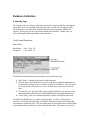
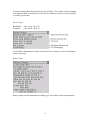
record number is contiguous unless fragmentation occurs within the file system. In this
case, the fragmentation occurs in one direction only (forward) but will wrap around to the
beginning of the address space once the end is reached.
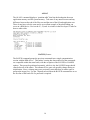
Byte 6-7: Unknown, appears to be address or offset. May be map to next fragment of
same record or a checksum.
Byte 8-10: Overhead footer, almost always FF FF 0A. This can be used to locate header.
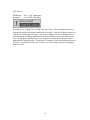
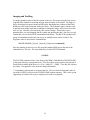
The information contained within each record will vary according what application uses
it for storage. As an example, an email record is easily readable between the binary. The
“From”, ”To”, and message body can be copied directly out of the hex file. Use the
record header information to ensure you have an entire record. As you will read later,
you may find partial email in “deleted” records. This is due to fragmentation and how
the messaging application tends to “regroup” email into one large block later in the file
system. When a partial email is found, as in more common file systems, the probability
that the other parts as well as the concatenated copy will be found depends on the level of
fragmentation and free space available. The “fragments” of email will be marked dirty
and as long as the RIM owner has not deleted the email, the concatenated or “whole”
version will be marked clean.
Simulator
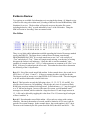
To get the most from your hex dump without handling the original unit, load the dump
file into the BlackBerry SDK Simulator. To accomplish this, rename the FILESYS.DMP
file according to the following build rules:
“FS”
“HH” if an 857/957 “Pgr” if an 850/950
“Mb” if Mobitex or “Dt” if Datatac
“.DMP”
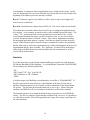
A Mobitex pager style BlackBerry would then have a load file of “FSPgrMb.DMP”. If
this file is placed in the same directory as the Simulator at the time of load, and all
ancillary Simulator options are set to match, it will be substituted for the default blank
file system. The file must not be marked read-only so use a copy. When exiting the
simulator, the DMP file will be overwritten to match the last state of the simulator
The Simulator must be set to match the Flash memory size to the size of the DMP file
exactly. The file size cannot be larger than the available Flash. However, it is possible to
use a file that is smaller; FFh will be appended to the image file to make it match the size
set in the simulator.
18