1
MADI Connections
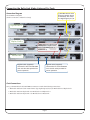
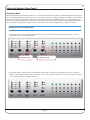
Use 50/125 µm multimode fibre cables with SC connectors to make the following connections:
• Alpha-Link 1 MADI to Delta-Link MADI port A
• Alpha-Link 2 MADI to Delta-Link MADI port B
MADI cables are normally paired, and the input and output connectors at each end are keyed and linked, so that it is
almost impossible to insert them the wrong way around into the MADI head. The connectors may also be marked or
colour-coded to distinguish cable 1 from cable 2. However, if the connectors are not linked, it is possible to insert them the
wrong way around! Please be especially careful if you use non-paired cables.
Digilink Connections
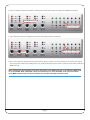
Use the supplied Digilink cables to make the following connections:
• Delta-Link primary port A to Pro Tools HD Core card
• Delta-Link primary port B to Pro Tools HD Accel card
The maximum allowable length of the DigiLink cables varies as follows according to the Sample rate being used:
• 192 kHz operation: 45 cm (1.5')
• 96 kHz operation: 90 cm (3')
• 48 kHz operation: 180 cm (6')
IMPORTANT
The 90 cm cables supplied by SSL can only be used at up to 96kHz! In this setup guide we are
configuring the system for 44.1 or 48kHz, so this limitation is not relevant. But make sure you
take it into account if you work at 192kHz later.
Power Connections
The Alpha-Links, Delta-Link and Pro Tools computer must also be connected to the mains power. However, please do not
power them up at this point. We want to start the Alpha-Links in diagnostics mode to change their connection mode,
which requires a special routine (useful to know if you want to change global settings later).
We’ll start the Delta-Link and Pro Tools system when the Alpha-Links are ready.
Page 3