1
5.3.2
Deleting an array
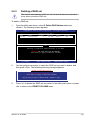
To delete a RAID set:
1.
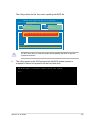
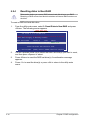
From the utility menu bar, select Delete on the top and press <Enter> and the
Delete array screen appears.
ENTER/SPACE:Select, ESC:Back/Exit
[Adapter]
[Create]
[Delete]
Delete array
ID Array Name Size
Level Status
0
2TB
RAID0 ONLINE
0
2TB
RAID0 ONLINE
NEXT
Stripe Members
64KB 0, 4
64KB 0, 4
Marvell BIOS Setup (c) 2006 Marvell Technology, Ltd.
2.
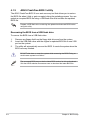
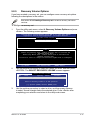
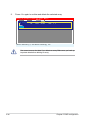
Select a desired array to delete and select NEXT. Press <Y> after the
confirmation screen appears.
Delete the array?[Y]
[Adapter]
[Create]
Delete array
ID Array Name Size
*0
2TB
NEXT
NEXT
[Delete]
Level
RAID0
Status
ONLINE
Stripe Members
64KB 0, 4
Marvell BIOS Setup (c) 2006 Marvell Technology, Ltd.
ASUS P7F-X Series
5-19