1
English
Make sure you are working in a well
lit area and use a flashlight to help
search for blockages.
Rotating
Brush
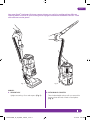
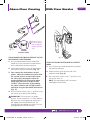
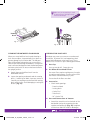
Fig. 27
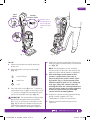
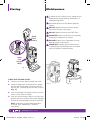
Fig. 28
CLEANING THE MOTORIZED FLOOR BRUSH
CHECKING FOR BLOCKAGES
When your motorized floor brush needs cleaning or
locks onto an object, it automatically shuts down to
prevent damage to your lifetime belt. The indicator
light will illuminate red warning you to turn off the
vacuum and clear blockage immediately. The light will
reset itself once blockage has been cleared and power
has been cycled on/off or vacuum has been locked in
the upright position.
Blockages may cause your vacuum to overheat and
shut down. To prevent this from happening, check
potential blockage areas after heavy use or if you
detect a loss of suction or poor cleaning performance.
1
Detach the motorized floor brush from the
detachable canister.
Pre-motor filters require washing every 3 months
for optimum performance. The post-motor HEPA
filter needs to be washed every 2 years.
2Inspect the opening underneath and the rotating
brush. If a build-up of debris is present, remove it.
Carefully cut anything wound around the rotating
brush with scissors. Avoid damaging or cutting the
bristles. (Fig. 27)
1
Dust Cup
Dust cup may be full. Empty dust cup.
2 Pre-Motor & Post-Motor Filters
Ensure that all the filters are clean.
3 Accessories
• Check intake openings:
- Extension Wand
- Dusting Brush
- Crevice Tool
- Turbo Brush
- 24” Crevice Tool
4 Hose and Connections to Vacuum
• D
etach the stretch hose from the back of the
detachable canister by squeezing the tabs
together and pulling up. (Fig. 28) Straighten
out the hose and look inside for blockages.
HELP LINE: 0844 873 0728
NV350UKMS_26_IM_ENG_120906_1.indd 15
15
12-09-06 2:59 PM