1
AXIS 241Q/S Blade - Rack Solution Installation Guide
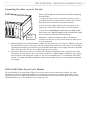
The Axis Video Server Rack can accommodate up to 12 rack-mounted Axis Video Servers (Blade Servers). This
installation guide describes the hardware installation of the Axis Rack Mounted Video Server Solution. The AXIS
241Q/S Video Server User’s Manual contains additional instructions on the following:
•
•
•
Installing the video server
Configuring the video server
Using the video server
•
•
•
Troubleshooting
Updating the software
Customizing the video server
Hardware Inventory - AXIS Video Server Rack
Please contact your dealer if anything is missing or damaged.
Qty
Item
Product Name/Title
1
Video server rack
AXIS Video Server Rack
5
Cover plates
Cover plate 12TE
1
Cover plate
Cover plate 6TE
2
Connectors
Terminal Connectors 6p
1
Power supply
Power Supply 19” 100W
1
Power Cable
Mains Cable IEC
1
Country-specific:
ensure that the correct adapter is used
Country
Europe
UK
US / Japan
Australia
Warranty Document
Hardware Inventory - Axis Blade Video Server
Please contact your dealer if anything is missing or damaged.
Qty
Item
Title/Variants
1
Video servers
AXIS 241Q Blade
AXIS 241S Blade
2
Connectors
1
Warranty Document
Terminal Connectors 14p
1
User’s Manual
AXIS 241Q/S User’s Manual
1
This Document
AXIS 241Q/S Blade - Rack Solution Installation Guide
Optional Accessory
ACC Y/C TO BNC CABLE (AXIS 241S Blade only)
AXIS 241Q/S Blade Video Server
Read the following information to familiarize yourself with the AXIS 241Q/S Blade video server, making
particular note of where the connectors and indicators are located.
3