1
Copyright © Rutgers Writing Program
Contact Barclay Barrios ([email protected])
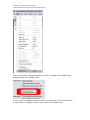
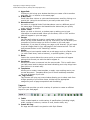
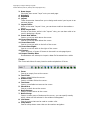
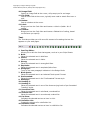
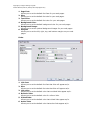
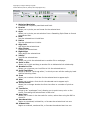
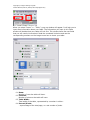
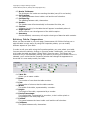
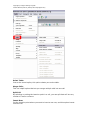
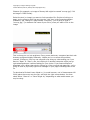
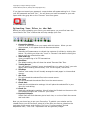
1. Minimize/Maximize:
Collapses the Properties panel back and forth.
2. Format:
Allows you to pick a pre-set format for the selected text.
3. Style:
Allows you to pick a pre-set selection from a Cascading Style Sheet to format
the selected text.
4. Bold:
Puts the selected text in bold face.
5. Italics:
Puts the selected text in italics.
6. Align Left:
Left-aligns the selected text.
7. Align Center:
Centers the selected text.
8. Right Align:
Right-aligns the selected text.
9. Justify:
Justifies the selected text.
10. Link:
Allows you to link the selected text to another file or web page.
11. Point to File:
Allows you to click-and-drag to another file to indicated a link relationship.
12. Browse for File:
Allows you to browse your local files to link the selected text to.
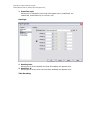
13. Quick Tag Editor:
Brings up a small “quick tag editor,” in which you can edit the coding by hand
without switching views.
14. Font:
Allows you to select a font face for the selected text to appear as/in.
15. Size:
Allows you to select a font size for the selected text to appear as/in.
16. Pixels/Points:
Allows you to change whether the font size refers to a number of pixels or
points.
17. Text Color:
Brings up an “eyedropper” tool, allowing you to point to any color on the
screen, formatting the selected text in that color.
18. Hex Color:
Allows you to enter in the hex code for a color, rather than using the GUI to
choose it.
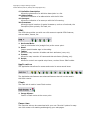
19. Unordered List:
Begins an unordered, bulleted list, or formats the selected text into one.
20. Ordered List:
Begins an ordered, numbered list, or formats the selected text into one.