1
Remote Transmitters
Remote Transmitter Description
LED
LED
Button 1
Button 2
Button 1
Button 2
Button 3
Button 4 Button 3
Button 4
Button 5
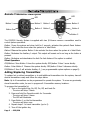
The G25/G20 Security System is supplied with two 5/4-button Remote Transmitters used to
control system operations.
Button 1 Arms the system and when held for 2 seconds, activates the system’s Panic feature.
Button 1 also locks the doors when the system is in Valet Mode.
Button 2 Disarms the system. Button 2 also unlocks the doors when the system is in Valet Mode.
Button 3 Activates the Auxiliary 1 output. This output will remain on for as long as the button is
pressed.
Button 4 Activates and deactivates the Anti Car-Jack feature if the option is enabled.
Silent Operation:
G20/Button 4 then Button 1 Arms the system silently. G25/button 5 then 1 arms silently.
Button 4 then Button 2 Disarms the system silently. G25/button 5 then 2 disarmes silently.
G25/Button 5 then 3 will activate Auxiliary 2, ( see programmable system options on page 8).
Adding/Replacing Transmitters
To replace lost or stolen transmitters or to add additional transmitters into the system, have all
desired transmitters ready and follow the steps below.
Note: Up to 4 transmitters can be programmed to operate the system. To erase any previously
stored transmitter codes, be sure to program all 4 transmitter memory locations.
To program the transmitter(s):
1. Turn on the ignition key On, Off, On, Off, and back On.
· The siren will chirp 3 times.
2. Press and hold the Override switch for 5 seconds.
· The siren will chirp 5 times.
· The LED will illuminate.
3. Press Button 1 on the first transmitter.
· The siren will chirp once.
4. Repeat steps 3 for each transmitter (up to 4).
5. Turn off the ignition key.
Page 2 - G25/G20