1
Converse 2015 ~ 4th Edition ~ 10th September ’02 ~ 4517
At a glance
Converse 2015 ~ 4th Edition ~ 10th September ’02 ~ 4517
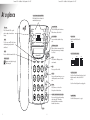
One touch memory buttons (M1-M8)
Each button dials a stored name and
number with just one press.
In use phone light
PIC socket
M5
M1
M2
M6
In use data light
M3
Used to access some BT Select Services
and when using your phone with a
switchboard.
M8
M4
Redial
ls
Converse 2015
Redial
R
Pause
AB
DE
ld
Ho
3
4
5
6
PQ
TU
WX
8
9
I
YZ
V
RS
7
Switch between Hi, Med and Lo.
Ringer
Hi Med Lo
Line 1 & Line 2/Data sockets
Line 2
Pause
Lets you insert a dialling pause into a
stored number.
Line 1
Data
Hold
cy
cre
Secrecy
Stops your caller from hearing you, so you
can talk privately to someone else in the
room.
O
MN
L
JK
GH
Ringer volume
Lets you put a caller on hold.
Se
2
Mes
F
C
1
e
m
lu
Vo
ndsfree
Ha
0
Volume
2
Line 1/Line 2 switch
Set to Line 1 if one telephone line is plugged in. (A
single line must be connected to the Line 1
socket)
Set to Line 2 if two telephone lines are plugged in.
Lets you increase or decrease the
loudspeaker or handset volume.
Handsfree and Handsfree indicator light
Lets you use the loudspeaker for making
and receiving calls. The handsfree
indicator light will come on when the
handsfree feature is in use.
Keypad
1
es
sag
Inductive coupler
Improves sound quality for people
with hearing aids.
Flashes to indicate an incoming call. Also
flashes when a new message is waiting to
be collected.
Cal
Press to redial the last number called.
Comes on when the data line is being
used.
Calls/Messages light
Dat
a
Recall
M7
Line
Lets you insert the PIC to copy the
phone’s settings or download new
settings.
Comes on when the phone line is in use.
Flashes when a caller is on hold.
Ring/MW1/MW2
Sets the calls/messages mode, see page 8.