1
A30317, SUK R-21AT O/M
B EFORE OPERATION
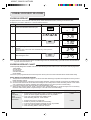
The operation of the oven is controlled by pressing the appropriate pads on the control panel.
A signal should be heard each time you press the control panel.
•
•
When you first connect the microwave oven to an
electrical socket, the digital display will show
.
Key pad entries can only be made when the door
is closed.
•
•
The programme or check mode is cancelled when
any pads are not pressed for more than 3 minutes.
will appear on the display after the time
reaches zero. It will disappear when the oven door
is opened or the STOP/CLEAR pad is pressed.
SOUND SETTING
•
There is a choice of 2 different sounds or no
sound on your oven.
•
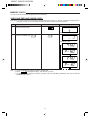
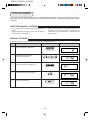
To set a signal, touch the SET pad twice within 2
seconds and then touch the SIGNAL pad continuously until you hear the tone required.
•
If you open the door during memory cooking, the
programme is cancelled.
If you want to cancel a programme during cooking, press the STOP/CLEAR pad twice.
If you want to clear a mistake during programming, press the STOP/CLEAR pad once.
STOPPING THE OVEN
•
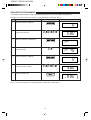
If you want to stop the oven during cooking, press
the STOP/CLEAR pad once or open the door (except memory cooking).
To start the oven again, close the door and press
the START pad within 1 minute.
•
•
6