1
MODEL: AR-5516
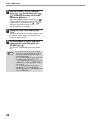
AR-5520
AR-5516D
AR-5520D
DIGITAL MULTIFUNCTIONAL SYSTEM
OPERATION GUIDE
CONTENTS
1
BEFORE USING THE MACHINE
3
PRINTER FUNCTIONS
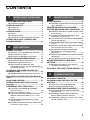
PART NAMES AND FUNCTIONS ..................... 4
BASIC PRINTING ............................................ 35
● OPERATION PANEL ........................................6
POWER ON AND OFF....................................... 8
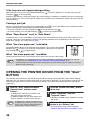
● OPENING THE PRINTER DRIVER FROM THE
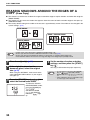
"Start" BUTTON ............................................. 36
● POWER ON ......................................................8
● POWER OFF ....................................................8
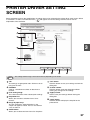
PRINTER DRIVER SETTING SCREEN .......... 37
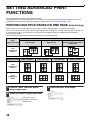
SETTING ADVANCED PRINT FUNCTIONS... 38
LOADING PAPER.............................................. 9
● PRINTING MULTIPLE PAGES ON ONE PAGE
(N-Up Printing) ............................................... 38
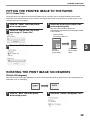
● FITTING THE PRINTED IMAGE TO THE
PAPER (Fit To Paper Size)............................ 39
● ROTATING THE PRINT IMAGE 180 DEGREES
(Rotate 180 degrees) ..................................... 39
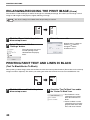
● ENLARGING/REDUCING THE PRINT IMAGE
(Zoom) ........................................................... 40
● PRINTING FAINT TEXT AND LINES IN BLACK
(Text To Black/Vector To Black) .................... 40
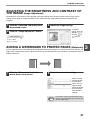
● ADJUSTING THE BRIGHTNESS AND
CONTRAST OF THE IMAGE (Image
Adjustment) .................................................... 41
● ADDING A WATERMARK TO PRINTED PAGES
(Watermark) .....................................................41
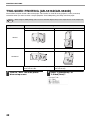
● TWO-SIDED PRINTING (AR-5516D/AR-5520D)....42
● PAPER..............................................................9
● LOADING PAPER...........................................10
● CHANGING A TRAY'S PAPER SIZE SETTING .... 12
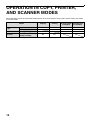
OPERATION IN COPY, PRINTER, AND
SCANNER MODES.......................................... 14
2
COPY FUNCTIONS
NORMAL COPYING ........................................ 15
● MAKING A COPY DARKER OR LIGHTER ....18
● SELECTING THE TRAY.................................18
● SETTING THE NUMBER OF COPIES ...........19
REDUCTION/ENLARGEMENT/ZOOM............ 19
● AUTOMATIC RATIO SELECTION .................19
● MANUAL RATIO SELECTION........................20
● SELECTING THE VERTICAL AND
HORIZONTAL COPY RATIOS SEPARATELY
(XY ZOOM Copying).......................................21
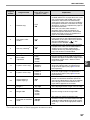
SAVING FREQUENTLY USED PRINT
SETTINGS ....................................................... 43
● SAVING SETTINGS AT THE TIME OF
PRINTING (User Settings) ............................. 43
OUTLINE OF THE PRINT STATUS WINDOW .... 44
AUTOMATIC TWO-SIDED COPYING (AR5516D/AR-5520D)............................................ 23
● IMAGE ROTATION IN DUPLEX COPYING ...25
TWO-SIDED COPYING USING THE BYPASS
TRAY................................................................ 26
DUAL PAGE COPYING................................... 27
INTERRUPTING A COPY RUN (Interrupt
Copying) .......................................................... 28
CONVENIENT COPY FUNCTIONS................. 29
● ROTATING THE IMAGE 90 DEGREES
(Rotation Copy)...............................................29
● SORT COPY/GROUP COPY .........................29
● COPYING MULTIPLE ORIGINALS ONTO A
SINGLE SHEET OF PAPER (2 IN 1 / 4 IN 1
Copy) ..............................................................31
● CREATING MARGINS WHEN COPYING
(Margin Shift) ..................................................33
● ERASING SHADOWS AROUND THE EDGES
OF A COPY (Erase Copy) ..............................34
4
SCANNER FUNCTIONS
SCANNING OVERVIEW.................................. 45
SCANNING USING THE KEYS ON THE
MACHINE......................................................... 46
● OUTLINE OF BUTTON MANAGER............... 47
● BUTTON MANAGER SETTINGS .................. 48
SCANNING FROM YOUR COMPUTER.......... 49
● SCANNING FROM A TWAIN-COMPLIANT
APPLICATION ..................................................49
● SCANNING FROM A WIA-COMPLIANT
APPLICATION (Windows XP/Vista)............... 53
● SCANNING FROM THE "Scanner and Camera
Wizard" (Windows XP)................................... 54
1
5
USER SETTINGS
ADJUSTING THE AUTOMATIC EXPOSURE
LEVEL .............................................................. 55
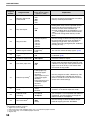
CUSTOMISING SETTINGS (System Settings)...... 56
8
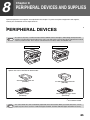
PERIPHERAL DEVICES AND SUPPLIES
PERIPHERAL DEVICES ................................. 85
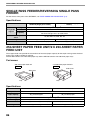
● SINGLE PASS FEEDER/REVERSING SINGLE
PASS FEEDER .............................................. 86
● 250-SHEET PAPER FEED UNIT/2 X 250SHEET PAPER FEED UNIT .......................... 86
● SYSTEM SETTINGS ......................................56
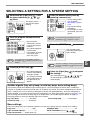
● SELECTING A SETTING FOR A SYSTEM
SETTING ........................................................59
STORAGE OF SUPPLIES............................... 87
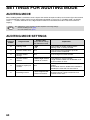
SETTINGS FOR AUDITING MODE................. 60
● PROPER STORAGE ..................................... 87
● AUDITING MODE ...........................................60
● AUDITING MODE SETTINGS ........................60
● SELECTING AUDITING MODE SETTINGS ......61
6
TROUBLESHOOTING
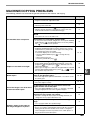
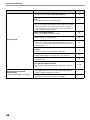
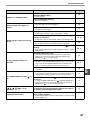
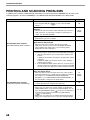
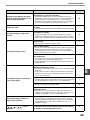
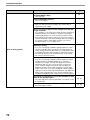
TROUBLESHOOTING ..................................... 64
● MACHINE/COPYING PROBLEMS.................65
● PRINTING AND SCANNING PROBLEMS .....68
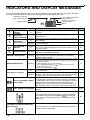
INDICATORS AND DISPLAY MESSAGES .... 72
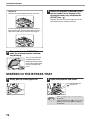
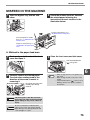
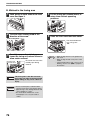
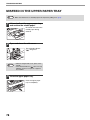
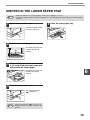
MISFEED REMOVAL....................................... 73
●
●
●
●
●
MISFEED IN THE SPF/RSPF.........................73
MISFEED IN THE BYPASS TRAY .................74
MISFEED IN THE MACHINE..........................75
MISFEED IN THE UPPER PAPER TRAY ......78
MISFEED IN THE LOWER PAPER TRAY .....79
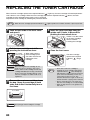
REPLACING THE TONER CARTRIDGE ........ 80
7
ROUTINE MAINTENANCE
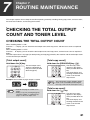
CHECKING THE TOTAL OUTPUT COUNT AND
TONER LEVEL ................................................ 81
● CHECKING THE TOTAL OUTPUT COUNT...81
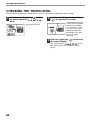
● CHECKING THE TONER LEVEL ...................82
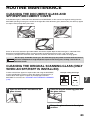
ROUTINE MAINTENANCE.............................. 83
● CLEANING THE DOCUMENT GLASS AND
SPF/RSPF/DOCUMENT COVER...................83
● CLEANING THE ORIGINAL SCANNING GLASS
(ONLY WHEN AN SPF/RSPF IS INSTALLED) ... 83
● CLEANING THE BYPASS TRAY PAPER FEED
ROLLER..........................................................84
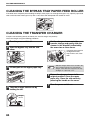
● CLEANING THE TRANSFER CHARGER ......84
2
INTRODUCTION
This manual describes the copier, printer, and scanner functions of the AR-5516/AR-5520 and
AR-5516D/AR-5520D digital multifunctional system.
Note
• Where "AR-XXXX" appears in this manual, please substitute the name of your model for "XXXX". For the name
of your model, see "DIFFERENCES BETWEEN MODELS" in the Start Guide.
• The screen images and procedures that appear in this manual are mainly for Windows Vista. With other
versions of Windows, some screen images may be different from those in this manual.
• For information on using your operating system, refer to your operating system's manual or online Help.
The display screens, messages, and key names shown in the manual may differ from those on the actual machine
due to product improvements and modifications.
3
1
Chapter 1
BEFORE USING THE MACHINE
This chapter contains basic information that should be read before using the machine.
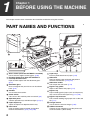
PART NAMES AND FUNCTIONS
1
2
2
7
6
3
4
4
10
16
5
8
11
15
9
1
2
3
4
5
6
7
8
4
Glass cleaner (when the SPF/RSPF is installed)
Use to clean the original scanning glass. (p.83)
Document feeder cover (when the SPF/RSPF is
installed) /document cover
Open to make copies from the document glass.
(p.15)
Document glass
Place an original that you wish to scan face down
here. (p.15)
Handles
Use to move the machine.
Power switch
Press to turn the machine power on and off. (p.8)
Operation panel
Contains operation keys and indicator lights. (p.6, p.7)
Paper output tray
Copies and prints are deposited to this tray.
Front cover
Open to remove paper misfeeds and perform
machine maintenance. (p.75, p.76, p.80)
9
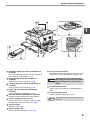
10
11
12
13
14
15
16
12
13
14
Paper trays
Each tray holds 250 sheets of paper. (p.10)
Side cover
Open to remove paper misfeeds and perform
machine maintenance. (p.74, p.75)
Side cover handle
Pull to open the side cover. (p.74)
Bypass tray guides
Adjust to the width of the paper. (p.11)
Bypass tray
Paper including special paper (such as transparency
film) can be fed from the bypass tray. (p.11, p.26)
Bypass tray extension
Pull out when feeding large paper such as B4 and
A3. (p.11)
Charger cleaner
Use to clean the transfer charger. (p.84)
USB 2.0 connector
Connect to your computer to use the printer and
scanner functions. (Start Guide)
BEFORE USING THE MACHINE
17 18
19
1
20
21
22
24
26
25
27
23
17
18
19
20
21
22
23
24
Document feeder tray (when the SPF/RSPF is
installed)
Place the original(s) that you wish to scan face up
here. Holds up to 40 originals. (p.17)
Original guides (when the SPF/RSPF is
installed)
Adjust to the size of the originals. (p.16)
Feeding roller cover (when the SPF/RSPF is
installed)
Open to remove misfed originals. (p.73)
Right side cover (when the SPF/RSPF is
installed)
Open to remove misfed originals. (p.73)
Exit area (when the SPF/RSPF is installed)
Originals exit the machine here after copying.
Toner cartridge lock release lever
To replace the toner cartridge, pull out the toner
cartridge while pushing on this lever. (p.80)
Toner cartridge
Contains toner. (p.80)
Roller rotating knob
Turn to remove misfed paper. (p.75, p.76)
25
Fusing unit release levers
To remove a paper misfeed from the fusing unit, push
down on these levers and remove the paper. (p.76)
The fusing unit is hot. Do not touch
Warning the fusing unit when removing misfed
paper. Doing so may cause a burn or
injury.
26
27
Photoconductive drum
Copy images are formed on the photoconductive
drum.
Fusing unit paper guide
Open to remove misfed paper. (p.77)
Note
The model name can be seen on the machines
front cover.
5
BEFORE USING THE MACHINE
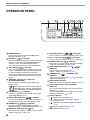
OPERATION PANEL
1
1
2
3
4
5
6
7
8
6
SCAN MENU key
Use to scan by means of the provided Button
Manager software. (p.48)
SCAN key (
) / indicator
Press to switch the machine to scanner mode and
scan by means of the provided Button Manager
software. (p.46) The indicator blinks during
scanning and transmission of the scanned data.
ON LINE key (
) / indicator
Press to toggle the machine between online and
off-line. The indicator lights up when the machine
is online, and goes off when the machine is
off-line. The indicator blinks while the machine is
receiving print data and while printing is paused.
(p.35)
ORIGINAL TO COPY key / indicators
(AR-5516D/AR-5520D)
Press to select one-sided and two-sided copy
modes. (p.24)
Two-sided copies from one-sided originals.
Two-sided copies from two-sided originals.
One-sided copies from two-sided originals.
XY-ZOOM key ( ) / indicator
Press to change the horizontal and vertical copy
ratios independently. (p.21)
DUAL PAGE COPY key (
) / indicator
Use to make individual copies of the two pages of
an open book or other two-page original. (p.27)
ERASE key (
/
) / indicators
Press to select the "EDGE ERASE", "CENTRE
ERASE" or "EDGE + CENTRE ERASE" mode. (p.34)
ORIGINAL DATA indicator ( DATA )
Blinks when the memory becomes full of scanned
original image data. (p.30, p.32)
9
10
11
12
13
14
15
16
2 3
4
5
6 7 8
9 10
11
SORT/GROUP key (
/
) / indicators
Press to select the "SORT" or "GROUP" mode. (p.29)
2 IN 1 / 4 IN 1 key (
/
) / indicators
Press to select the "2 IN 1" or "4 IN 1" mode. (p.31)
MARGIN SHIFT key (
) / indicator
Shifts text or image on the copy to leave a binding
margin on the edge of the copy. (p.33)
AUTO/TEXT/PHOTO key ( AUTO /
/
)/
indicators
Use to select the exposure mode:
"AUTO", "TEXT", or "PHOTO". (p.18)
ORIGINAL key (
) / ORIGINAL SIZE
indicators
Use to enter the original size. (p.12) The selected
original size will light up.
PAPER SIZE indicators
Light up to show the selected copy paper size. (p.12)
Paper feed location / misfeed location
indicators
The selected paper feed location is shown by a lit
indicator ( ). (p.15)
The general location of misfed paper is shown by a
blinking red indicator (
). (p.73)
Alarm indicators
[
] Maintenance indicator (p.72)
[
] Toner cartridge replacement required
indicator (p.72)
[
] Developer replacement required indicator
(p.72)
[
] Paper required indicator (p.72)
[
] Misfeed indicator (p.72)
BEFORE USING THE MACHINE
12
13
14
15
16
17
18
20
19
1
21
22
28
25 26 27
29 30 31
24
23 When there are two or more paper trays
17
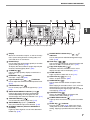
Display
Shows the set number of copies, as well as the copy
ratio, system setting function or setting code, or an
error code when an error occurs.
27
18
Numeric keys
Use to select the desired copy quantity or to make
system setting entries. (p.19)
To display the total number of pages output by the
machine, hold the [0] key down. (p.81)
CLEAR key (
)
Clears the copy quantity display or terminates a
copy run.
INTERRUPT key ( ) / indicator
Interrupts a copy run. (p.28)
Light and Dark keys (
,
) / indicators
Use to adjust the TEXT or PHOTO exposure level.
(p.18)
PAPER SELECT key (
)
Use to set the paper size in the paper trays. (p.12,
p.18)
AUTO PAPER SELECT indicator ( AUTO
)
Paper of the proper size will be automatically
selected depending on the original size and
selected copy ratio when this indicator is on. (p.17)
TRAY SETTING key (
)
Use to manually select a paper tray. (p.12)
AUTO IMAGE key ( AUTO % ) / indicator
Press for automatic copy ratio selection. (p.19)
SPF/RSPF indicator (when the SPF/RSPF is
installed)
Lights up when originals are set in the document
feeder tray. (p.16)
28
19
20
21
22
23
24
25
26
29
30
31
32
33
34
35
32
33
34
35
PRESET RATIO selector keys (
,
)/
indicators
Use to select preset reduction/enlargement copy
ratios. (p.20)
Zoom keys (
,
)
Use to select any reduction or enlargement copy ratio
from 25% to 400% in increments of 1%. (p.21)
Copy ratio display key (
)
Hold down when the machine is not in use to
display the copy ratio in the display. (p.21)
ZOOM indicator
Lights up when a zoom ratio is set. (p.21)
Audit clear key (
) ( ACC.#-C )
Closes an open account. (p.63)
READ-END key (
)
Use to check the total number of copies made.
(p.81)
When copying in sort mode and 2 in 1/4 in 1 from the
document glass, press this key when you have
finished scanning the original pages and are ready to
start copying. (p.30, p.31)
CLEAR ALL key (
)
Clears all selected settings and returns the
machine to the initial settings. (p.8)
POWER SAVE indicator ( )
Lights up when the machine is in a power save mode.
(p.8)
START key ( ) / indicator
Press to make a copy (p.15). Also press to exit
"Auto power shut-off" mode and to set a system
setting. Copying is possible when the indicator is
on.
7
POWER ON AND OFF
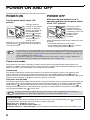
The power switch is located on the left side of the machine.
POWER ON
POWER OFF
Turn the power switch to the "ON"
position.
Make sure that the machine is not in
operation and then turn the power switch
to the "OFF" position.
It will take about 45
seconds for the machine
to warm up. While the
machine is warming up,
the POWER SAVE
indicator ( ) will blink.
(The POWER SAVE
indicator ( ) will go off
when the machine is
ready to copy.)
However, you can make desired settings and press
the [START] key ( ) during warm-up. Copying will
start after warm-up.
Note
If the power switch is
turned off while the
machine is in operation,
a misfeed may occur and
the job that was in
progress will be
cancelled.
Check the following to make sure the machine is not in
operation:
• The START indicator is lit. (Initial state)
• The POWER SAVE indicator ( ) is lit. ("Preheat
mode" or "Auto power shut-off" mode)
• The machine reverts to the initial settings when it is first turned on, when the [CLEAR ALL] key (
) is pressed,
or when no keys are pressed for the preset "Auto clear" time following the end of a copy job. When the machine
reverts to the initial settings, all settings and functions selected to that point are cancelled. The "Auto clear" time
can be changed in the user settings. (p.56)
• The machine is initially set to automatically enter power save mode if not used for copying or printing, for a
preset period of time. This setting can be changed in the system settings. (p.56)
Power save modes
The machine has two power save modes to reduce overall power consumption thereby reducing the cost of
operation. In addition, these modes conserve natural resources and help reduce environmental pollution. The two
power save modes are "Preheat mode" and "Auto power shut-off mode".
Preheat mode
This function automatically switches the machine to a low power consumption state if the set duration of time
elapses without the machine being used when the power is on. The POWER SAVE indicator ( ) lights up,
however, the keys on the operation panel can be used. Normal operation automatically resumes when a key on the
operation panel is pressed, an original is placed, or a print job is received.
Auto power shut-off mode
This function automatically switches the machine to a state that consumes even less power than preheat mode if the
set duration of time elapses without the machine being used when the power is on. All lights except the POWER
SAVE indicator ( ) and ON LINE indicator go off. To resume normal operation, press the [START] key ( ).
Normal operation also resumes automatically when a print job is received. While in auto power shut-off mode, no
keys (except the [START] key ( )) can be used.
Note
The preheat activation time and the "Auto power shut-off timer" can be changed using system settings. It is
suggested that you set times that are appropriate for your usage of the machine. (p.56)
Initial settings
The machine assumes the initial settings when it is first turned on, when the [CLEAR ALL] key (
) is pressed,
and approximately one minute after the last copy is made in any mode.
Copy ratio: 100%, Exposure: Automatic
Copy quantity: 0, All special copier modes: Off
Auto paper selection: On, Paper feed station: The tray selected in the "Default tray setting" in the system settings. (p.58)
8
LOADING PAPER
The paper required indicator (
) will light up when there is no copy paper in the selected paper feed tray, or when
the selected paper tray is not installed or is improperly installed.
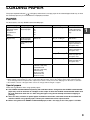
PAPER
For best results, use only SHARP recommended paper.
Paper tray type
Paper type
Paper tray
250-sheet paper
feed unit
2 x 250-sheet
paper
feed unit
Standard paper
Recycled paper
Bypass tray
Standard paper
Recycled paper
Size
A5*1
Weight
56
g/m2
to 90
g/m2 *2
B5
A4
B4
A3
A6R to A3
56 g/m2 to 90 g/m2
Transparency film
Labels
Thick paper
Capacity
250 sheets
(Load paper lower
than the line on the
tray)
1
100 sheets *3
Load one sheet of
paper each time on
the bypass tray.
A6R to A4
129 g/m2 to 200 g/m2 Load one sheet of
paper each time on
the bypass tray.
106 g/m2 to 128 g/m2 You can load multiple
sheets of paper on
the bypass tray.
A6R to A3
Envelopes
International DL
(110 mm x 220 mm)
International C5
(162 mm x 229 mm)
Commercial 9
(3-7/8" x 8-7/8")
Commercial 10
(4-1/8" x 9-1/2")
91 g/m2 to 105 g/m2
You can load multiple
sheets of paper on
the bypass tray.
5 sheets
*1 A5 can be used in the upper paper tray but cannot be used in other trays (including trays in optional paper feeding unit).
*2 When making a large number of copies or prints using 90 g/m2 paper, remove the output from the paper output tray when
about 100 pages have been printed. The output may not stack correctly if more than 100 pages are allowed to accumulate.
*3 The number of sheets of the paper which can be set changes with the weight of a paper.
Special papers
Follow these guidelines when using special papers.
● Use SHARP recommended transparency film and label sheets. Using other than SHARP recommended
paper may result in misfeeds or smudges on the output. If other than SHARP recommended media must
be used, feed each sheet one at a time using the bypass tray (do not attempt continuous copying or
printing).
● There are many varieties of special paper available on the market, and some cannot be used with this
machine. Before using special paper, contact your authorised service representative.
● Before using other than SHARP recommended paper, make a test copy to see if the paper is suitable.
9
BEFORE USING THE MACHINE
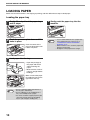
LOADING PAPER
Make sure that the machine is not copying or printing, and then follow these steps to load paper.
Loading the paper tray
1
Gently lift and pull out the paper tray
until it stops.
2
Push the pressure plate down until it
locks in place.
Push the centre of the
pressure plate down until
it locks into place.
3
Load paper into the tray.
• Open the package of
the paper and load it
without fanning the
paper.
• Make sure the stack of
paper is straight before
loading it.
Make sure that the paper
fits under the tabs on the
right side of the tray.
Note
10
• Do not load paper higher than the line on
the tray (up to 250 sheets).
• Do not add paper to the loaded paper. It
may cause multiple feed of paper.
• A5 can be used in the upper paper tray but
cannot be used in other trays (including
trays in optional paper feeding unit).
4
Gently push the paper tray into the
machine.
Note
• If you loaded a different size of paper than
was loaded previously in the tray, go to
"CHANGING A TRAY'S PAPER SIZE
SETTING" (p.12).
• When misfeed occurs, rotate the paper 180
degrees and reload it.
• Straighten curled paper before using it.
BEFORE USING THE MACHINE
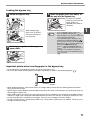
Loading the bypass tray
1
Unfold the bypass tray.
3
Insert the paper (print face down) all
the way into the bypass tray.
To prevent a misfeed,
verify once more that the
paper guides are
adjusted to the width of
the paper.
When feeding large
paper such as B4 and
A3, pull out the bypass
tray extension.
2
Note
Set the paper guides to the copy
paper width.
• If you loaded paper in the bypass tray,
press the [PAPER SELECT] key (
) to
select the bypass tray. The bypass tray will
not be selected automatically.
• If you load thick paper in the bypass tray,
hold down the [TRAY SETTING] key (
)
for more than 5 seconds, use the [PAPER
SELECT] key (
) to select the bypass tray,
and press the [AUTO IMAGE] key
( AUTO % ). When AUTO IMAGE indicator
( AUTO % ) lights up, the paper type is set to
thick paper. The setting is cleared when
"Auto clear" works or the [CLEAR ALL] key
(
) is pressed.
Important points when inserting paper in the bypass tray
• Up to 100 sheets of standard copy paper can be set in the bypass tray.
• Be sure to place A6 or A5 size paper or envelopes horizontally as shown in the following diagram (
Available
).
Not
available
• When loading envelopes, make sure that they are straight and flat and do not have loosely glued construction
flaps (not the closure flap).
• Special papers except SHARP recommended transparency film, labels, and envelopes must be fed one sheet at a
time through the bypass tray.
• When adding paper, first remove any paper remaining in the tray, combine it with the paper to be added and then
reload as a single stack. The paper to be added must be the same size and type as the paper already in the tray.
• Do not use paper that is smaller than the original. This may cause smudges or unclean images.
• Do not use paper that has already been printed on by a laser printer or plain paper fax machine. This may cause
smudges or unclean images.
11
1
BEFORE USING THE MACHINE
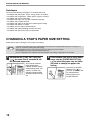
Envelopes
Do not use the following envelopes, as misfeeds will occur.
• Envelopes with metal tabs, clasps, strings, holes, or windows.
• Envelopes with rough fibres, carbon paper, or glossy surfaces.
• Envelopes with two or more flaps.
• Envelopes with tape, film, or paper attached to the flap.
• Envelopes with a fold in the flap.
• Envelopes with glue on the flap to be moistened for sealing.
• Envelopes with labels or stamps.
• Envelopes that are slightly inflated with air.
• Envelopes with glue protruding from the seal area.
• Envelopes with part of the seal area peeled off.
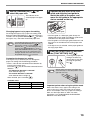
CHANGING A TRAY'S PAPER SIZE SETTING
Follow these steps to change a tray's paper size setting.
Note
1
• The paper size setting cannot be changed when the machine has stopped temporarily due to running out of
paper or a misfeed, or during interrupt copying.
• During printing (even in copy mode), the paper size setting cannot be changed.
• A5 size paper can only be selected in upper paper tray.
• Do not load paper that is a different size than the paper size setting. Copying will not be possible.
Hold down the [TRAY SETTING] key
(
) for more than 5 seconds to set
the selected paper size.
The currently selected
paper feed location
indicator will blink and the
corresponding paper size
(which is currently set)
indicator will light steadily.
All other indicators will go
out.
12
2
If the machine has two or more paper
trays, use the [PAPER SELECT] key
( ) to select the paper tray for which
you wish to change the paper size
setting.
Each time the [PAPER
SELECT] key ( ) is
pressed, a paper tray will
be indicated with a
blinking paper feed
location indicator.
BEFORE USING THE MACHINE
3
Use the [ORIGINAL] key (
select the paper size.
) to
4
The indicator of the
selected paper size lights
up.
Squeeze the lock lever of the front
guide and slide the front guide to
match the width of the paper, and
move the left guide to the appropriate
slot as marked on the tray.
Left guide
Changing bypass tray's paper size setting
To change the bypass tray's paper size setting, hold
down the [TRAY SETTING] key (
) for more than 5
seconds, use the [PAPER SELECT] key ( ) to select
the bypass tray, and select the desired paper size.
Note
If you load thick paper in the bypass tray, hold
down the [TRAY SETTING] key (
) for
more than 5 seconds, use the [PAPER
SELECT] key (
) to select the bypass tray,
and press the [AUTO IMAGE] key ( AUTO % ).
When AUTO IMAGE indicator ( AUTO % ) lights
up, the paper type is set to thick paper. The
setting is cleared when "Auto clear" works or
the [CLEAR ALL] key (
) is pressed.
• The front guide is a slide-type guide. Grasp the
locking knob on the guide and slide the guide to the
indicator line of the paper to be loaded.
• The left guide is an insert-type guide. Remove it and
then insert it at the indicator line of the paper to be
loaded.
• If the bypass tray is selected, set the paper guides to
the copy paper width.
5
Press the [START] key ( ) and then
the [TRAY SETTING] key (
).
To change the paper size
setting of another tray,
repeat steps 2 to 5 after
pressing the [START]
key ( ).
Customise the bypass tray setting
If the bypass tray is selected, you can change the
paper size setting with the following procedure.
• Enter a value for the horizontal/vertical direction by
pressing the numeric keys.
Press the [
] key to switch the horizontal/vertical
direction.
The horizontal direction is selected:
zoom indicator lights up
The vertical direction is selected:
zoom indicator does not light up
When finished, press and hold [
].
Available value
Direction
min. (mm)
max. (mm)
horizontal
100
297
vertical
139
420
1
Front guide
Note
Affix the paper size label for the paper size
selected in step 3 to the label position on the
right end of the tray.
Important points when using the printer mode
Make sure that the tray's paper size setting is the
same as the tray's paper size setting in the printer
driver. For example, if the tray's paper size setting is
A4R, set "Set Paper Size" to "A4R". For more
information, see "CONFIGURING THE PRINTER
DRIVER" in the Start Guide.
13
OPERATION IN COPY, PRINTER,
AND SCANNER MODES
Some operations cannot be performed simultaneously when the machine is being used in printer mode, copy mode,
or scanner mode.
Modes
Copy
Printer
Scanner
Copy key input
During copying
During printing
During scan preview/
during scanning
Copying
Printing
Yes
Yes
No
Yes*
No
Scanning from Scanning from
a computer
the machine
Yes
No
Yes
Yes
* During two-sided printing (AR-5516D/AR-5520D only), the copy job begins after the print job finishes.
14
No
No
Yes
2
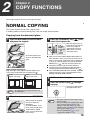
Chapter 2
COPY FUNCTIONS
This chapter explains how to use the copy functions.
NORMAL COPYING
This section explains how to make a regular copy.
If "Auditing mode" has been enabled (p.60), enter your 3-digit account number.
Copying from the document glass
1
Open the document cover/SPF/RSPF,
and place the original.
3
Press the [ORIGINAL] key (
select the original size.
) and
When the original size is
selected, the tray with the
same size of paper is
automatically selected.
(When there are two or
more paper trays)
Place the original face
down on the document
glass.
[How to place the original]
Align the edge of the original with the original size
scale, to be centred with the centring mark ( ).
mark
Original size scale
mark
Original size scale
● Make sure that the PAPER SIZE indicator lights up.
If the indicator is not lit, no tray has the same size of
paper as the original. Load paper of the required size
in a tray, or select the bypass tray with the [PAPER
SELECT] key ( ) and copy from the bypass tray.
● The bypass tray must be manually selected.
● To copy on paper of a different size than the original,
select the paper with the [PAPER SELECT] key ( ).
● If the ORIGINAL SIZE indicator is blinking, rotate the
original so that it is in the same orientation as the
blinking ORIGINAL SIZE indicator.
4
Set the number of copies.
5
Press the [START] key (
copying.
) to begin
The copy is delivered to
the paper output tray.
Note
2
An original up to A3 can be placed on the
document glass.
Close the document cover/SPF/RSPF.
After placing the original,
be sure to close the
document
cover/SPF/RSPF. If left
open, parts outside of the
original will be copied
black, causing excessive
use of toner.
Note
• The paper output tray can hold up to 250
sheets of paper.
• About one minute after copying ends, "Auto
clear" activates and restores the copy
settings to the initial settings. (p.8) The
setting for "Auto clear time" can be changed
in the system settings. (p.56)
• Press the [CLEAR] key (
) to stop
copying in the middle of a run.
15
COPY FUNCTIONS
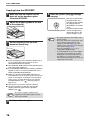
Copying from the SPF/RSPF
1
2
Make sure that an original has not
been left on the document glass.
Close the SPF/RSPF.
5
Press the [START] key (
copying.
The copy is delivered to
the paper output tray.
The default output mode
for copying from the
SPF/RSPF is sort mode
(p.29).
The default output mode
can be changed using
"Sort auto select" in the
system settings (p.58).
Adjust the original guides to the size
of the original(s).
Note
3
Set the original(s) face up in the
document feeder tray.
● Insert the original into the document feeder tray as
far as it will go. When the original is set, the
SPF/RSPF indicator will light up.
● The ORIGINAL SIZE indicator corresponding to the
size of the original lights up.
● If the ORIGINAL SIZE indicator is blinking, rotate the
original so that it is in the same orientation as the
blinking ORIGINAL SIZE indicator.
● Make sure that the PAPER SIZE indicator is lit.
If the indicator is not lit, no tray has the same size of
paper as the original. Load paper of the required
size in a tray, or select the bypass tray with the
[PAPER SELECT] key ( ) and copy from the
bypass tray.
● The bypass tray must be manually selected.
● To copy on paper of a different size than the
original, select the paper with the [PAPER
SELECT] key ( ).
Note
4
16
Do not place originals of different sizes
together in the document feeder tray. This
may cause misfeeds.
Set the number of copies.
) to begin
• The paper output tray can hold up to 250
sheets of paper.
• About one minute after copying ends, "Auto
clear" activates and restores the copy
settings to the initial settings. (p.8) The
setting for "Auto clear" time can be changed
in the system settings. (p.56)
• Press the [CLEAR] key (
) to stop
copying in the middle of a run.
• If you find it difficult to remove the original
from the document feeder tray, open the
feeding roller cover first and then remove
the original. If you remove the original
without opening the feeding roller cover, the
original may become dirty.
COPY FUNCTIONS
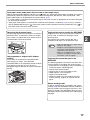
Auto paper select mode (when there are two or more paper trays)
When the AUTO PAPER SELECT indicator ( AUTO
) lights up, "Auto paper select mode" is enabled. This function
automatically selects the paper that is the same size as the original A5, B5, B5R, A4, A4R, B4, A3 paper. "Auto
paper select mode" can be disabled in the system settings. (p.57)
• If a zoom setting is selected after placing the original, the paper size that is appropriate for the zoom setting will
be automatically selected.
• "Auto paper select mode" is cancelled if the automatic ratio selection is enabled (p.19) or if a tray is selected
with the [PAPER SELECT] key ( ). Auto paper select resumes operation when the [CLEAR ALL] key (
) is
pressed or when "Auto clear time" activates.
Removing the document cover
Originals that can be used in the SPF/RSPF
To copy large originals like newspapers, remove the
document cover. To remove the cover, lift straight
up as shown. To replace the cover, do the reverse.
The SPF/RSPF cannot be removed.
Originals that are A5 to A3 and 56 g/m2 to 90 g/m2
can be used. A maximum of 40 pages can be
placed at once.
For originals that are B4 or larger (B4, A3), a
maximum of 30 pages can be placed at once.
Note
Copying books or originals with folds or
creases
Press down on the document cover/SPF/RSPF
while copying as shown. If the document
cover/SPF/RSPF is not completely closed, shadows
may appear on the copy or it may be fuzzy.
Straighten originals with folds or creases well before
placing.
• Make sure that there are no paper clips or
staples on the original.
• Straighten curled originals before placing
them in the document feeder tray. Curled
original may cause misfeeds.
• When you set multiple sheets of thick
original, if the original is not fed, reduce
the number of the set originals.
Originals that cannot be used in the
SPF/RSPF
The following originals cannot be used. These may
cause misfeeds or smudging and unclear images.
• Transparencies, tracing paper, other transparent or
translucent paper, and photographs.
• Carbon paper, thermal paper.
• Originals that are creased, folded, or torn.
• Glued originals, cut-out originals.
• Originals with binder holes.
• Originals printed using an ink ribbon (thermal
transfer printing), originals on thermal transfer
paper.
Stream feeding mode
If "Stream feeding mode" is enabled in the system
settings (p.56), the SPF/RSPF indicator will blink for
about 5 seconds after all originals are fed. If a new
original is placed in the SPF/RSPF during this time,
the original will be automatically fed in and copying
will begin.
17
2
COPY FUNCTIONS
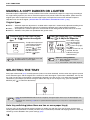
MAKING A COPY DARKER OR LIGHTER
Automatic exposure adjustment is initially enabled. This function automatically adjusts the copy image according to
the original being copied. If you wish to select the exposure level yourself, follow the steps below. (Select from two
original types and five exposure levels for each original type.) The exposure level used in automatic exposure
adjustment can also be changed. ("ADJUSTING THE AUTOMATIC EXPOSURE LEVEL" (p.55))
Original types
● AUTO ......Automatic exposure adjustment is enabled and the exposure is automatically adjusted according to the
original being copied. The exposure is lowered for coloured areas and background shadows.
● TEXT.......The exposure is raised for light areas and lowered for dark backgrounds to make text easier to read.
● PHOTO ...Halftones in the photo are reproduced with greater clarity.
1
Press the [AUTO/TEXT/PHOTO] key
( AUTO /
/ ) to select the original
type.
2
Press the [Light] key (
) or [Dark]
key (
) to adjust the exposure.
For a darker image,
press the [Dark] key
(
). For a lighter
image, press the [Light]
key (
).
If exposure level 2 or 4 is
selected, the two
indicators will light
simultaneously.
To adjust the exposure of
a text original manually,
press until the TEXT
indicator (
) lights.
To copy a photo, press
until the PHOTO
indicator (
) lights.
Note
To return to automatic adjustment, press until
the AUTO indicator ( AUTO ) lights.
Note
Exposure value guidelines
1 – 2 Dark originals like newspapers
3
Normal originals
4 – 5 Coloured text or text written in pencil
SELECTING THE TRAY
Auto paper select mode (p.17) normally operates (unless it has been disabled), and thus when the original is placed
on the document glass and the original size is selected, or when the original is placed in the SPF/RSPF, the tray with
the same size of paper as the original is automatically selected. If you wish to use a tray other than the automatically
selected tray (for example you wish to enlarge or reduce the copy or use the bypass tray), press the [PAPER
SELECT] key ( ) to select the desired tray.
Note
• If the desired PAPER SIZE indicator does not light up, change the paper in the tray to the desired paper size.
(p.12)
• Automatic ratio selection (p.19) does not operate when the bypass tray or a tray set for a special paper size is
selected.
Auto tray switching (when there are two or more paper trays)
If the tray runs out of paper during copying and there is another tray with the same size of paper and the same
feeding orientation (horizontal or vertical), the other tray is automatically selected and copying continues. "Auto tray
switching" can be disabled in the system settings (p.57).
18
COPY FUNCTIONS
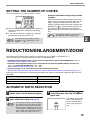
SETTING THE NUMBER OF COPIES
Press the numeric keys to set the number of copies.
Important note when making a large number
of copies
● The set number of copies appears in the display. A
maximum of 999 copies (factory default setting)
can be set.
● If you wish to make only a single copy, copying is
possible with the display showing "0".
Note
When the maximum number of pages (about 250
pages) that can be held in the paper output tray are
output, copying will temporarily stop. When this
happens, promptly remove the copies and press the
[START] key ( ) to resume copying. Copying will
also stop after about 500 pages and 750 pages.
Remove the pages and resume copying in the same
way.
Note
The maximum number of copies can be
changed in the system settings. (p.58)
2
If you enter the wrong number, press the
[CLEAR] key (
) and enter the correct
number.
REDUCTION/ENLARGEMENT/ZOOM
The zoom function enables precise copy ratio selection from 25% to 400% in increments of 1%.
There are three ways to enlarge and reduce copies, as explained below.
• Reduction and enlargement ratios can be selected automatically with the [AUTO IMAGE] key ( AUTO % ).
"AUTOMATIC RATIO SELECTION" (below)
• Reduction and enlargement ratios can be selected manually with the [PRESET RATIO] selector keys
(
,
) and/or the [ZOOM] keys (
,
).
"MANUAL RATIO SELECTION" (p.20)
• Separate settings can be selected for the vertical and horizontal ratios.
"SELECTING THE VERTICAL AND HORIZONTAL COPY RATIOS SEPARATELY (XY ZOOM Copying)" (p.21)
Ratios that can be selected will vary depending on whether the original is placed on the document glass or in the
SPF/RSPF.
Original position
Selectable ratios
Document glass
25% – 400%
SPF/RSPF
50% – 200%
AUTOMATIC RATIO SELECTION
1
Place the original(s) in the document
feeder tray or on the document glass.
2
If the original is placed on the document
glass, select the original size. (p.15)
Note
• Automatic ratio selection can be used when
the original size is A5, B5, B5R, A4, A4R,
B4, A3. It cannot be used for other sizes.
• After placing the original, be sure to close
the document cover/SPF/RSPF. If left open,
parts outside of the original will be copied
black, causing excessive use of toner.
3
Use the [PAPER SELECT] key ( ) to
select the paper tray with the desired
paper size.
This feature will not work
when using copy paper
of non-standard size or
when using the bypass
tray.
19
COPY FUNCTIONS
4
5
Press the [AUTO IMAGE] key ( AUTO % ).
The AUTO IMAGE
indicator ( AUTO % ) lights
up and the appropriate
ratio for the original size
and paper size is
selected. (The indicator
of the selected ratio will
light up.)
Note
Set the number of copies and other
copy settings, and then press the
[START] key ( ).
The copy will be delivered to the paper output
tray.
Note
To cancel automatic ratio selection, press the
[AUTO IMAGE] key ( AUTO % ) again.
• If the ORIGINAL SIZE indicator blinks,
change the orientation of the placed original.
• If the copy is made when a PRESET RATIO
selector indicator is blinking, the copied
image may run off the page.
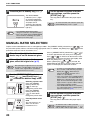
MANUAL RATIO SELECTION
Copies can be reduced down to 25% or enlarged up to 400%. The [PRESET RATIO] selector keys (
be pressed to quickly select a ratio from among eight preset ratios. In addition, the [Zoom] keys (
,
pressed to select the ratio in increments of 1%.
1
Place the original(s) in the document
feeder tray or on the document glass.
2
If the original is placed on the document
glass, select the original size. (p.15)
Note
3
After placing the original, be sure to close the
document cover/SPF/RSPF. If left open, parts
outside of the original will be copied black,
causing excessive use of toner.
Fine adjustment of the
ratio
Any ratio from 25% to
400% can be set in
increments of 1%.
20
) can
) can be
Press a [PRESET RATIO] selector key (
or
)
to set the approximate ratio, then press the [Zoom]
keys (
or
) to increase or decrease the ratio.
To decrease or increase the zoom ratio rapidly, hold
down the [Zoom] keys (
or
).
When a [Zoom] key (
or
) is pressed, the
ZOOM indicator will light up and the zoom ratio will
appear in the display for about two seconds.
Note
Use the [PRESET RATIO] selector
keys (
,
) and [Zoom] keys (
,
) to select the desired copy ratio.
Selecting a preset ratio
Press the [PRESET
RATIO] selector key
(
) to move up
through the preset ratios.
Press the [PRESET
RATIO] selector key
(
) to move down
through the preset ratios.
,
4
• To verify a zoom setting without changing
the zoom ratio, Hold down the [Copy ratio
display] key (
). When the key is
released, the display will return to the
number of copies display.
• If the copy is made when a PRESET RATIO
selector indicator or the ZOOM indicator is
blinking, the copied image may run off the
page. To ensure that the image fits on the
page, lower the copy ratio until the indicator
stops blinking and lights steadily.
• If the PAPER SIZE indicator is not lit, there
is no appropriate paper. Load appropriate
paper in a paper tray. (p.10)
Set the number of copies and other
copy settings, and then press the
[START] key ( ).
The copy will be delivered to the paper output
tray.
Note
To return the ratio to 100%, press the
[PRESET RATIO] selector key (
or
until the 100% indicator lights up.
)
COPY FUNCTIONS
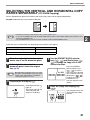
SELECTING THE VERTICAL AND HORIZONTAL COPY
RATIOS SEPARATELY (XY ZOOM Copying)
The XY ZOOM feature allows the horizontal and vertical copy ratios to be changed independently.
Example: Reduction only in the horizontal direction.
Original
Note
Copy
• This feature cannot be used with the 2 IN 1 or 4 IN 1 feature. (p.31)
• To use the XY ZOOM feature with the DUAL PAGE COPY feature, set the DUAL PAGE COPY feature first and
then the XY ZOOM feature.
• The XY ZOOM feature cannot be used in combination with the AUTO IMAGE function.
Ratios that can be selected will vary depending on the position of the original.
Original position
Selectable ratios
Document glass
25% – 400%
SPF/RSPF
50% – 200%
1
Place the original(s) in the document
feeder tray or on the document glass.
2
If the original is placed on the
document glass, select the original
size. (p.15)
Note
3
4
Press the [PRESET
RATIO] selector keys
(
,
) to select a
ratio close to the desired
ratio, and then press the
[Zoom] keys (
,
)
to adjust the ratio in
increments of 1%.
The ratio appears in the
display.
After placing the original, be sure to close the
document cover/SPF/RSPF. If left open, parts
outside of the original will be copied black,
causing excessive use of toner.
Press the [XY-ZOOM] key ( ).
XY-ZOOM Indicator ( )
lights up.
The current value for the
vertical direction will
appear in the display.
Use the [PRESET RATIO] selector
keys (
,
) and [Zoom] keys (
,
) to change the copy ratio in the
vertical direction.
5
Press the [Copy ratio display] key
(
).
The selected ratio for the
vertical direction will be
entered.
21
2
COPY FUNCTIONS
6
Use the [PRESET RATIO] selector
keys (
,
) and [Zoom] keys (
,
) to change the copy ratio in the
horizontal direction.
Press the [PRESET RATIO] selector keys (
,
) to select a ratio close to the desired ratio,
and then press the [Zoom] keys (
,
) to
adjust the ratio in increments of 1%.
The ratio appears in the display.
7
Press the [Copy ratio display] key
(
).
The selected ratio for the horizontal direction will
be entered and the display will change to the
number of copies display.
8
Set the number of copies and other
copy settings, and then press the
[START] key ( ).
The copy will be delivered to the paper output
tray.
Note
22
• To verify the copy ratios, press and hold
down the [Copy ratio display] key (
).
The vertical and horizontal ratios will be
alternately displayed.
• If you need to change the ratios, press the
[PRESET RATIO] selector keys (
,
,
) to
) and the [Zoom] keys (
reset the ratios, beginning with the vertical
ratio. (step 4)
• To cancel XY ZOOM copy, press the
[XY-ZOOM] key ( ). The XY-ZOOM
indicator ( ) will go off, indicating that the
function is cancelled.
AUTOMATIC TWO-SIDED COPYING
(AR-5516D/AR-5520D)
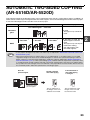
Two originals placed on the document glass can be copied onto each side of a single sheet of paper. In addition, an
RSPF can be used to copy two originals onto one sheet of paper, or one two-sided original onto two sheets of paper,
or one two-sided original onto each side of one sheet of paper.
Original → Paper
Usable paper
One-sided original → Two sides
A5 to A3
• The bypass tray cannot be
used.
Document
glass
One-sided original
→ Two sides
Two-sided original
→ One side
Two-sided original
→ Two sides
RSPF
• To use paper in the bypass tray, make a two-sided copy as explained in "TWO-SIDED COPYING USING THE
BYPASS TRAY" (p.26).
• When performing automatic two-sided copying of a one-sided original, or one-sided copying of a two-sided
original, the image on the back can be rotated 180 degrees to reverse the top and bottom (Image rotation in
duplex copying). To rotate the image 180 degrees, enable the setting as explained in "IMAGE ROTATION IN
DUPLEX COPYING" (p.25) or in the system settings (p.56), and then follow the steps below. In particular, when
a one-sided vertical (portrait) original is placed in a horizontal orientation (B4 or A3 size) for two-sided copying,
the top and bottom of the images on the front and back of the paper will be reversed, and thus this function can
be conveniently used to make the top and bottom of the images agree.
B4 or A3
portrait original
Normal automatic
two-sided copying
If the orientation of
two-sided copying
is changed
2
Note
A5, B5, B5R, A4, A4R, B4, A3
• Special paper cannot be
used.
• The bypass tray can only be
used when making
one-sided copies from
two-sided originals.
1
1
2
Orientation of the
placed original
The top and bottom of
the images on the front
and back are reversed.
The top and bottom of the
images on the front and
back are the same.
23
2
COPY FUNCTIONS
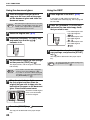
Using the document glass
1
Place the original that you wish to
copy onto the front side of the paper
on the document glass and close the
document cover.
Note
After placing the original, be sure to close the
document cover/SPF/RSPF. If left open, parts
outside of the original will be copied black,
causing excessive use of toner.
2
Select the original size. (p.15)
3
Press the [ORIGINAL TO COPY] key,
and make sure that the
indicator is lit.
Using the RSPF
1
Place originals in the RSPF. (p.16)
If you place an odd number of originals for
one-sided to two-sided copying, the last page will
be one-sided.
2
Press the [ORIGINAL TO COPY] key
and select the two-sided copy mode
that you wish to use.
• Two-sided copies from
one-sided originals
• Two-sided copies from
two-sided originals
• One-sided copies from
two-sided originals
3
Set the number of copies and other
copy settings, and press the [START]
key ( ).
The copy will be delivered to the paper output
tray.
4
Set the number of copies and other settings,
and then press the [START] key ( ).
The display blinks, and the original is scanned
into memory.
Note
5
• If you need to clear the data scanned into
memory, press the [CLEAR] key (
).
• If you wish to cancel two-sided copying and
just make a copy of the first original, press
the [READ-END] key (
).
When the start indicator lights, remove
the first original and then place the
original that you wish to copy onto the
back side of the paper on the document
glass. Close the document cover.
Place the second original
in the same orientation
as the first original.
1
2
The first original The second original
6
Press the [START] key (
).
The copy will be delivered to the paper output
tray.
24
Note
To cancel automatic two-sided copying, press
the [CLEAR ALL] key (
).
COPY FUNCTIONS
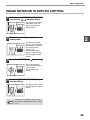
IMAGE ROTATION IN DUPLEX COPYING
This function is used to invert the top and bottom of the image on the front side of the paper during two-sided copying.
1
Hold down the [ORIGINAL TO COPY]
key until the
indicator blinks.
The currently set setting
code blinks in the first
digit of the number of
copies display.
2
2
Press a numeric key to enter the
setting code.
To enable the setting,
press [1] key. To disable
the setting, press [0] key.
The factory default
setting is "0".
The entered number
appears in the first digit
of the number of copies
display.
3
Press the [START] key (
).
The selected setting
code stops blinking and
lights steadily.
This completes the
setting.
4
Press the [ORIGINAL TO COPY] key to
exit the setting.
The display returns to the
normal number of copies
display.
Note
"Image rotation in duplex copying" can also
be enabled or disabled in the system settings.
(p.57)
25
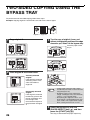
TWO-SIDED COPYING USING THE
BYPASS TRAY
To perform manual two-sided copying, follow these steps.
Example: Copying originals A and B onto each side of one sheet of paper
Original A
1
Copy
Original B
3
Copy original A.
Turn the copy of original A over, and
without changing the position of the edge
closest to you, insert it in the bypass tray.
Insert the paper all the
way in.
1
1
1
Copied original A
1
2
Original A
Copied
original A
Original B
2
1
1
1
1
Copied original A
Original A
Original B
2
Copied
original A
Place original B as shown below.
Vertically-oriented
original:
If the original is oriented
vertically, place it in the
same orientation as
original A.
2
Original B
2
Note
Original B
Horizontally-oriented
original:
If the original is oriented
horizontally, place it with
the top and bottom and
left and right sides
reversed with respect to
the placement of original
A.
4
• Copies made on the back side of paper
should always be made one sheet at a time
using the bypass tray.
• Straighten curled or wavy paper before
using it. Curled paper may cause misfeeds,
creases, or a poor-quality image.
• After placing the original, be sure to close
the document cover/SPF/RSPF. If left open,
parts outside of the original will be copied
black, causing excessive use of toner.
Select the bypass tray with the
[PAPER SELECT] key ( ), and then
press the [START] key ( ).
The copy is delivered to the paper output tray.
26
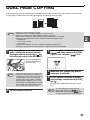
DUAL PAGE COPYING
A dual page original can be automatically separated into two pages during copying. This feature is convenient for
making copies of books and other dual page originals on individual sheets of paper.
Copy
Original
Note
1
•
•
•
•
•
A4 paper is used for dual page copying.
When rotation copy is enabled, A4R paper can also be used.
Dual page copying can be enabled when Sort/Group copy (p.29).
When used in combination with XY ZOOM copying, enlargement is not possible.
Dual page copying cannot be used in combination with the following functions:
• Enlargement
• 2 IN 1 / 4 IN 1 copying
• Centre erase
• Automatic ratio selection cannot be used when dual page copying is used.
• Dual page copying cannot be selected when an original is placed in the SPF/RSPF.
Place the original on the document
glass, aligning the division between
the pages with the size marker ( A4).
Close the document cover SPF/RSPF.
2
3
Press the [DUAL PAGE COPY] key
(
) and make sure that the DUAL
PAGE COPY indicator (
) is lit.
4
Make sure that a paper tray with A4
size paper is selected.
5
Set the number of copies and other
copy settings, and press the [START]
key ( ).
Copying will begin from
the page to the right of
the size marker.
A4
Note
2
• To keep the copies in the correct page order
when performing dual page copying over
multiple pages, make sure that the original
is always placed on the document glass
with the smaller page number to the right.
• After placing the original, be sure to close
the document cover/SPF/RSPF. If left open,
parts outside of the original will be copied
black, causing excessive use of toner.
Set the original size to A3.
The copy will be delivered to the paper output
tray.
Note
To cancel dual page copying, press the
[DUAL PAGE COPY] key (
). The
DUAL PAGE COPY indicator (
) will go
off, indicating that the function is cancelled.
27
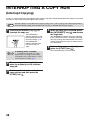
INTERRUPTING A COPY RUN
(Interrupt Copying)
A copy run can be temporarily interrupted to allow another copy job to be performed. When the other job is finished,
the copy run will resume using the original copy settings.
Note
1
Interrupt copying is not possible when sort/group copying, 2 IN 1 / 4 IN 1 copying, or two-sided copying is being
performed. System settings and scanning function are also not available when interrupt copying.
Press the [INTERRUPT] key (
interrupt the copy run.
) to
The INTERRUPT
indicator will light up and
the machine will revert to
the initial settings. (p.8)
The INTERRUPT
indicator will blink until
the current copy run
stops.
Note
If "Auditing mode" is enabled:
"- - -" will appear in the number of copies
display. Enter your 3-digit account number.
Copying will not be possible unless a correct
account number is entered. (p.57)
2
Remove the previous original(s) and
place the original(s) of the interrupt
copy job.
3
Set the number of copies and other
copy settings and then press the
[START] key ( ).
28
4
When the copy job is finished, press
the [INTERRUPT] key ( ) and remove
the original(s).
The INTERRUPT indicator will go off, indicating
that the interrupt function is no longer operating.
The copy settings will automatically revert to the
settings selected for the copy run before the run
was interrupted.
5
Replace the previous original(s) and
press the [START] key ( ).
The interrupted copy run will resume.
CONVENIENT COPY FUNCTIONS
This section explains major convenient copy functions.
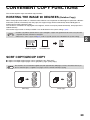
ROTATING THE IMAGE 90 DEGREES (Rotation Copy)
When "Auto paper select mode" or "automatic ratio selection" are in operation and the original is placed in a different
orientation (vertical or horizontal) than the paper, the original image will be automatically rotated 90 degrees to
enable correct copying onto the paper.
This function is convenient for copying B4 or A3 originals, which can only be placed horizontally, onto paper that is
loaded vertically.
The rotation copy function is initially enabled. It can be disabled in the system settings. (p.57)
Note
• Rotation copy will not operate when a copy is enlarged to a paper size greater than A4. In this case, place the
original in the same orientation as the paper.
• When 2 IN 1 / 4 IN 1 copy is used (p.31), rotation copy will operate even if disabled in the system settings.
2
Orientation of
the placed original
Orientation of
the loaded paper
Copy
SORT COPY/GROUP COPY
● Copies of multiple original pages can be sorted into sets. (Sort copy)
● Copies of multiple original pages can be grouped by page. (Group copy)
Note
The machine can scan standard originals (A4) with approximately 160 pages, however, the number will vary for
photos and other types of originals. Less pages can be scanned for interrupt copying.
Sort copy
Group copy
29
COPY FUNCTIONS
Using the document glass
1
Place the first original. (p.15)
2
Select the original size. (p.15)
3
Press the [SORT/GROUP] key
(
/
) to select the desired
mode.
The modes are selected
in the order "SORT"
(
), "GROUP"
(
), "Off".
4
When the start indicator lights,
replace the original with the next
original, and then press the [START]
key ( ).
Repeat step 5 until all originals have been
scanned into memory.
Note
6
1
Place the originals. (p.16)
Sort mode is normally the default output mode,
and thus the SPF/RSPF and SORT indicators
light up.
Note
2
To clear the data in memory, press the
).
[CLEAR] key (
When all originals have been
scanned, and then press the
[READ-END] key ( ).
The copies are delivered to the paper output tray.
Note
• To cancel the Sort/Group copy job, press
the [CLEAR] key (
).
• To cancel Sort or Group mode, press the
[SORT/GROUP] key (
/
)
repeatedly until the SORT/GROUP
indicators (
/
) are both off.
• If "Sort auto select" has been set to "1:
OFF" in the system settings, follow the
steps below to select sort mode.
• "Sort auto select" can also be used to
change the default output mode (p.58).
Press the [SORT/GROUP] key
(
/
) to select the desired
mode.
The modes are selected
in the order
"SORT"(
),
"GROUP" (
), "Off".
Set the number of copies and other
settings, and then press the [START]
key ( ).
The ORIGINAL DATA indicator ( DATA ) blinks,
and the original is scanned into memory.
5
Using the SPF/RSPF
3
Set the number of copies and other
settings, and then press the [START]
key ( ).
The copies are delivered to the paper output tray.
Note
• To cancel the Sort/Group copy job, press
).
the [CLEAR] key (
• To cancel Sort or Group mode, press the
[SORT/GROUP] key (
/
)
repeatedly until the SORT/GROUP
indicators (
/
) are both off.
If the memory becomes full
• If the memory becomes full while scanning the
originals, the ORIGINAL DATA indicator ( DATA )
will blink, "FUL" will appear in the display, and the
machine will stop copying.
• To copy the originals that have been scanned up
to that point, press the [START] key ( ).
• To clear the data that has been scanned into
memory, press the [CLEAR ALL] key (
) or the
[CLEAR] key (
).
If the paper output tray becomes full
When the maximum number of pages (about 250
pages) that can be held in the paper output tray
are output, copying will temporarily stop. When this
happens, promptly remove the copies and press
the [START] key ( ) to resume copying.
30
COPY FUNCTIONS
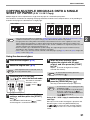
COPYING MULTIPLE ORIGINALS ONTO A SINGLE
SHEET OF PAPER (2 IN 1 / 4 IN 1 Copy)
Multiple originals can be copied onto a single sheet of paper in a selected layout pattern.
This function is convenient for compiling multi-page reference materials into a compact format, or for providing an
overview of all pages of a document on a single page.
4 IN 1 COPY
2 IN 1 COPY
Pattern 1
Pattern 2
Pattern 1
Note
Pattern 2
Pattern 3
Pattern 4
• First select the layout pattern as explained in "Setting the layout pattern" (p.32), and "Border line for 2 IN 1 / 4 IN 1"
(solid line or broken line) in the system settings (p.56). When finished, follow the steps below.
• An appropriate ratio setting will be automatically selected based on the size of the originals, the size of the
paper, and the selected number of originals. When using the document glass, reduction is possible to 25%.
When using the SPF/RSPF, reduction is possible to 50%. Certain combinations of original size, paper size, and
number of images may result in images being cut off.
• Even if "Rotation copy" is disabled in the system settings, the original images may be rotated if necessary
depending on their orientation and the orientation of the paper.
• 2 IN 1 / 4 IN 1 copy cannot be used in combination with dual page copying (p.27), XY Zoom (p.21), margin shift
(p.33), or erase copy. (p.34)
Using the document glass
1
Place the first original. (p.15)
2
Select the original size. (p.15)
Note
5
When the start indicator lights,
replace the original with the next
original, and then press the [START]
key ( ).
Repeat step 5 until all originals have been
scanned into memory.
If the original size was not selected, 2 IN 1 / 4
IN 1 copy cannot be used.
Note
3
Press the [2 IN 1 / 4 IN 1] key
(
/
) to select the desired mode.
The mode is selected in
the order "2 IN 1"
(
), "4 IN 1" (
),
"Off".
6
When all originals have been scanned,
press the [READ-END] key ( ).
The copy is delivered to the paper output tray.
Note
4
Set the number of copies and other
settings, and then press the [START]
key ( ).
The ORIGINAL DATA indicator ( DATA ) blinks,
and the original is scanned into memory.
To clear the data in memory, press the
).
[CLEAR] key (
• To cancel 2 IN 1 / 4 IN 1 copying, press the
[CLEAR] key (
).
• To cancel 2 IN 1 / 4 IN 1 copy mode, press
the [2 IN 1 / 4 IN 1] key (
/
)
repeatedly until the 2 IN 1 / 4 IN 1 indicators
(
/
) are both off.
Using 2 IN 1 / 4 IN 1 copy in combination with
sort copy
Sort copy can be used if the original is placed on the
document glass. Press the [SORT/GROUP] key
(
/
) to select sort copy and then perform
steps 1 through 6. The 2 IN 1 / 4 IN 1 copies will be
sorted.
31
2
COPY FUNCTIONS
Using the SPF/RSPF
1
Place the originals. (p.16)
2
Press the [2 IN 1 / 4 IN 1] key
(
/
) to select the mode.
Note
The mode is selected in
the order "2 IN 1"
(
), "4 IN 1" (
),
"Off".
3
Set the number of copies and other
settings, and press the [START] key (
).
• To cancel 2 IN 1 / 4 IN 1 copying, press the
[CLEAR] key (
).
• To cancel 2 IN 1 / 4 IN 1 copy mode, press
the [2 IN 1 / 4 IN 1] key (
/
)
repeatedly until the 2 IN 1 / 4 IN 1 indicators
(
/
) are both off.
If the memory becomes full
• If the memory becomes full while scanning the
originals, the ORIGINAL DATA indicator ( DATA )
will blink, "FUL" will appear in the display, and the
machine will stop copying.
• To copy the originals that have been scanned up
to that point, press the [START] key ( ).
• To clear the data that has been scanned into
memory, press the [CLEAR ALL] key (
) or the
[CLEAR] key (
).
The copy is delivered to the paper output tray.
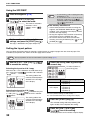
Setting the layout pattern
You can select the layout pattern for copying 2 original pages or 4 original pages onto one sheet of paper. The
available layout patterns are shown on the first page of this section.
Note
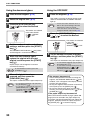
1
The layout pattern can also be selected in the system settings. (p.57)
Use the [2 IN 1 / 4 IN 1] key (
to access the setting.
/
)
2
Select the setting code by pressing a
numeric key.
To select "Pattern 2",
press the [2] key.
Selecting the layout for 2 IN 1 copy
With the 2 IN 1 / 4 IN 1 indicators off, hold down the [2
IN 1 / 4 IN 1] key (
/
) until the 2 IN 1 indicator
(
) blinks.
The setting code of the
currently selected pattern
will blink in the first digit
of the display.
Function
2 IN 1 layout
4 IN 1 layout
Selecting the layout for 4 IN 1 copy
With the 2 IN 1 indicator lit (
), hold down the [2 IN
1 / 4 IN 1] key (
/
) until the 4 IN 1 indicator
(
) blinks.
The setting code of the
currently selected pattern
will blink in the first digit
of the display.
Setting code (p.57)
* 1 (Pattern 1)
2 (Pattern 2)
* 1 (Pattern 1)
2 (Pattern 2)
3 (Pattern 3)
4 (Pattern 4)
See page 31 for layout pattern.
The factory default settings are indicated by " * ".
The entered number blinks in the first digit of the display.
3
Press the [START] key (
).
The selected setting code stops blinking and
lights steadily. This completes the setting.
4
Press the [2 IN 1 / 4 IN 1] key
(
/
) to exit the setting.
The display returns to the number of copies display.
32
COPY FUNCTIONS
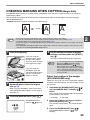
CREATING MARGINS WHEN COPYING (Margin Shift)
The MARGIN SHIFT feature, in its initial setting, automatically shifts the text or image to increase the margin by
approximately 10mm.
The location of the margin to be increased can be selected to be either at the left edge or the top of the page
(AR-5516D/5520D only).
Example: Model that supports automatic two-sided copying
Margin
A
A
Margin
Original
This feature cannot be used with the 2 IN 1 / 4 IN 1 feature or rotation copy feature.
You can also switch between the left margin and the top margin in the system settings. (p.57)
The margin width can be changed in the system settings. (p.57)
Note that a margin is created by shifting the image, and thus if the image is shifted too far, the edge of the image
may be cut off.
• If the ORIGINAL SIZE indicator blinks when margin shift is selected, rotate the original so that it is in the same
orientation as the blinking ORIGINAL SIZE indicator.
4
Place the original(s).
If you are using the
document glass, place
the side of the original
where you wish to create
the margin on the right.
1
If you are using the
SPF/RSPF, place the
side of the original where
you wish to create the
margin on the left.
2
If the original is placed on the
document glass, select the original
size. (p.15)
Press the [MARGIN SHIFT] key (
Set the number of copies and other
settings, and then press the [START]
key ( ).
The copy is delivered to the paper output tray.
Note
• To cancel margin shift, press the [MARGIN
SHIFT] key (
) repeatedly until the
MARGIN SHIFT indicator (
) is off.
• When margin shift is used in combination
with automatic two-sided copying, a margin
is also created automatically on the back
side of the paper directly behind the margin
on the front side.
Select the location of the margin
(AR-5516D/5520D only)
Follow this step if you are using a model that supports
automatic two-sided copying. On other models, skip to
the next step.
When using the SPF/RSPF, make sure that the
same ORIGINAL SIZE indicator as your original
size lights up.
3
Top Edge
•
•
•
•
Note
1
Left Edge
A
).
The MARGIN SHIFT
indicator (
) lights up.
1 Hold down the [MARGIN SHIFT] key (
until the MARGIN SHIFT indicator (
blinks.
)
)
The currently selected setting code for the margin
position blinks in the display.
1: Left edge
2: Top edge
2 Press the [1] key or the [2] key, and then
press the [START] key (
).
The selected setting code for the margin position
lights.
3 Press the [MARGIN SHIFT] key (
The MARGIN SHIFT indicator (
blinking.
).
) stops
33
2
COPY FUNCTIONS
ERASING SHADOWS AROUND THE EDGES OF A
COPY (Erase Copy)
● This feature is used to erase shadows that appear around the edges of copies of books and other thick originals.
(EDGE ERASE)
● The feature can also erase the shadow that appears down the centre of books and other originals that open up.
(CENTRE ERASE)
● The factory default setting for the width of the erasure is approximately 10 mm. The width can be changed in the
system settings. (p.57)
EDGE ERASE
EDGE + CENTRE ERASE
Original
Copy
CENTRE ERASE
Original
Original
Note
•
•
•
•
Copy
Centre erase cannot be used in combination with dual page copy.
Erase copy cannot be used in combination with 2 IN 1 / 4 IN 1 copy. (p.31)
Erase copy cannot be used when the paper is a special size or copying from the bypass tray.
Note that if the width of the erasure is too large, the edge of the image may be partially erased.
1
Place the original(s). (p.15)
2
If the original is placed on the
document glass, select the original
size. (p.15)
4
When using the SPF/RSPF, make sure that the
same ORIGINAL SIZE indicator as your original
size lights up.
3
Press the [ERASE] key (
/
select the desired erase mode.
) to
To select the "EDGE +
CENTRE ERASE" mode,
press the [ERASE] key
(
/
)
until both the EDGE
(
) and CENTRE
indicators (
) light
up.
34
Copy
Set the number of copies and other
settings, and then press the [START]
key ( ).
The copy is delivered to the paper output tray.
Note
• To cancel erase copy, press the [ERASE]
key (
/
) repeatedly until the
ERASE indicators (
/
) are both
off.
• If the original size was not selected in step
2, erase copy cannot be used.
3
Chapter 3
PRINTER FUNCTIONS
This chapter explains how to use the printer functions.
The procedure for loading paper is the same as for loading copy paper. See "LOADING PAPER" (p.9).
Note
• Print jobs received while the machine is copying or scanning will be stored in memory. When the copy job is
finished, the print jobs will begin printing.
• Printing is not possible when the front or side cover is opened for machine maintenance, or when a misfeed
occurs or the machine runs out of paper or toner, or when the drum cartridge reaches its replacement time.
• If an original misfeed occurs in the SPF/RSPF, printing will not be possible until the misfed original is removed
and the SPF/RSPF is restored to a usable state.
BASIC PRINTING
The following example explains how to print a document from WordPad.
Before printing, make sure that the correct size of paper for your document has been loaded in the machine.
1
Make sure that the ON LINE indicator
on the operation panel is lit.
4
If you need to change any print settings, click the
"Preferences" button to open the printer driver
setup screen.
If the ON LINE indicator is
not lit, press the [ON
LINE] key (
).
When the indicator is:
• Lit, the machine is online and ready to print, or is
printing.
• Blinking, the machine is processing print data in
memory or printing has been paused.
• Off, the machine is off-line and cannot print.
2
Start WordPad and open the
document that you wish to print.
The printer driver
setup screen will
appear.
Windows 2000 does not have the "Preferences" button
in this dialog box. Select settings as needed on each
of the tabs in the setup screen and click the "OK"
button.
"PRINTER DRIVER SETTING SCREEN" (p.37)
"SETTING ADVANCED PRINT FUNCTIONS" (p.38)
5
3
Select "Print" from the application's
"File" menu.
The "Print" dialog box will appear.
Make sure that "SHARP AR-XXXX" is
selected as the printer.
Click the "Print" button.
Printing begins. When printing begins, the Print
Status Window automatically opens.
"OUTLINE OF THE PRINT STATUS WINDOW"
(p.44)
The print job will be delivered to the output tray.
35
PRINTER FUNCTIONS
If the tray runs out of paper during printing
Add paper to the tray or press the [PAPER SELECT] key ( ) to select a different tray, and then press the [ON
LINE] key (
) to resume printing.
Note that if the "Auto tray switching" setting in the system settings is enabled on a model that has two or more paper
trays and there is the same size of paper in another tray, the machine will automatically switch to the other tray and
continue printing.
Pausing a print job
To pause a print job during printing, press the [ON LINE] key (
) on the operation panel to switch the machine
off-line. Printing will be paused and the ON LINE indicator will blink.
• To cancel a print job, press the [CLEAR] key ( ) or the [CLEAR ALL] key ( ).
• To resume printing, press the [ON LINE] key (
) to switch the machine online.
When "Paper Source" is set to "Auto Select"
If "Paper Source" is set to "Auto Select" in the "Paper" tab of the printer driver setup screen and the correct size of
paper for a print job is not loaded in the machine, the printing procedure will vary depending on the "Use Close
Paper Size" setting in the system settings (p.58).
When "Use close paper size" is disabled
The PAPER SIZE indicator on the operation panel will blink. You can press the [PAPER
SELECT] key ( ) to select a tray manually, or load paper in the bypass tray and press
the [ON LINE] key (
) to begin printing.
When "Use close paper size" is enabled
Printing will take place using a size of paper that is close to the size of the print image.
Note
• For limitations on copying in print mode, scanner mode limitations, and print mode limitations in copy and
scanner mode, see "OPERATION IN COPY, PRINTER, AND SCANNER MODES" (p.14).
• The print image is automatically rotated to fit the paper in the event that the paper is loaded in an orientation
different from the print image.
OPENING THE PRINTER DRIVER FROM THE "Start"
BUTTON
You can open the printer driver and change the printer driver settings from the Windows "Start" button. Settings
adjusted in this way will be the initial settings when you print from an application. (If you change the settings from the
printer driver setup screen at the time of printing, the settings will revert to the initial settings when you quit the
application.)
1
Click the "Start" button and select
"Control Panel" and then select
"Printer".
2
Click the "SHARP AR-XXXX" printer
driver icon.
• In Windows XP, click the "start" button, and
then click "Printers and Faxes".
• In Windows 2000, click the "Start" button and
point to "Settings", and then select "Printers".
3
Select "Properties" from the
"Organize" menu.
In Windows XP/2000, select "Properties" from the
"File" menu.
•
Note
36
In Windows XP, if "Printers and Faxes" does
not appear in the "start" menu, select "Control
Panel", select "Printers and Other Hardware",
and then select "Printers and Faxes".
4
Click the "Printing Preferences"
button in the "General" tab.
The printer driver setup screen will appear.
"PRINTER DRIVER SETTING SCREEN" (p.37)
PRINTER DRIVER SETTING
SCREEN
Some restrictions exist on the combinations of settings that can be selected in the printer driver setup screen. When
a restriction is in effect, an information icon (
) will appear next to the setting. Click the icon to view an
explanation of the restriction.
1
2
3
3
4
5
6
8
7
Note
1
2
3
4
5
6
9
10
The settings and the image of the machine will vary depending on the model.
Tab
The settings are grouped on tabs. Click on a tab to
bring it to the front.
Checkbox
Click on a checkbox to activate or deactivate a
function.
Print setting image
This shows the effect of the selected print settings.
Drop-down list
Allows you to make a selection from a list of
choices.
Image of paper trays
The tray selected in "Paper Selection" in the
"Paper" tab appears in blue. You can also click on
a tray to select it.
Check button
Allows you to select one item from a list of options.
7
8
9
10
"OK" button
Click this button to save your settings and exit the
dialog box.
"Cancel" button
Click this button to exit the dialog box without
making any changes to the settings.
"Apply" button
Click to save your settings without closing the
dialog box.
"Help" button
Click this button to display the help file for the
printer driver.
37
SETTING ADVANCED PRINT
FUNCTIONS
This section explains major advanced print functions.
The explanations assume that the paper size and other basic settings have already been selected. For the basic
procedure for printing and the steps for opening the printer driver, see "BASIC PRINTING" (p.35).
PRINTING MULTIPLE PAGES ON ONE PAGE (N-Up Printing)
This function can be used to reduce the print image and print multiple pages on a single sheet of paper.
This is convenient when you want to print multiple images such as photos on a single sheet of paper, and when you
want to conserve paper. This function can also be used in combination with two-sided printing for maximum
conservation of paper.
The following print results will be obtained, depending on the order selected.
Print results
N-Up
(Pages per sheet)
Left To Right
Right To Left
Top To Bottom
(when the print orientation is
landscape)
2-Up
(2 pages per
sheet)
N-Up
(Pages per sheet)
Right, and Down
Down, and Right
Left, and Down
Down, and Left
4-Up
(4 pages per
sheet)
6-Up
(6 pages per
sheet)
1
Click the "Main" tab in the printer
driver setup screen.
2
Select the number of pages per sheet.
If you wish to print
borderlines, check the
"Border" box.
38
3
Select the order of the pages.
PRINTER FUNCTIONS
FITTING THE PRINTED IMAGE TO THE PAPER
(Fit To Paper Size)
The printer driver can adjust the size of the printed image to match the size of the paper loaded in the machine.
Follow the steps shown below to use this function. The explanation below assumes that you intend to print an A3
size document on A4 size paper.
1
2
Click the "Paper" tab in the printer
driver setup screen.
4
Select the actual size of paper to be
used for printing (A4).
The size of the printed image will be
automatically adjusted to match the paper loaded
in the machine.
Select the original size (A3) of the
print image in "Paper Size".
Paper Size: A3
Fit To Paper Size: A4
3
3
Check the "Fit To Paper Size" button.
A3 size
document
(Paper Size)
A4 size paper
(Fit To Paper
Size)
ROTATING THE PRINT IMAGE 180 DEGREES
(Rotate 180 degrees)
The feature rotates the image 180 degrees so that it can be printed correctly on paper that can only be loaded in one
orientation (such as envelopes).
ABCD
1
Click the "Main" tab in the printer
driver setup screen.
ABCD
2
Check the "Rotate 180 degrees" box.
39
PRINTER FUNCTIONS
ENLARGING/REDUCING THE PRINT IMAGE (Zoom)
This function is used to enlarge or reduce the image to a selected percentage. This allows you to enlarge a small
image or add margins to the paper by slightly reducing an image.
Note
The "Zoom" setting is not available when "N-Up Printing" is selected.
1
Click the "Paper" tab in the printer
driver setup screen.
2
Select "Zoom" and click the
"Settings" button.
3
Select the zoom ratio.
Directly enter a number or
click the
button to
change the ratio in
increments of 1%.
The actual paper size to be
used for printing can be
selected from the pop-up
menu.
PRINTING FAINT TEXT AND LINES IN BLACK
(Text To Black/Vector To Black)
When printing a colour image, colour text and lines that are faint can be printed in black. (Raster data such as bitmap
images cannot be adjusted.) This allows you to bring out colour text and lines that are faint and difficult to see.
ABCD
ABCD
1
Click the "Advanced" tab in the printer
driver setup screen.
2
Check the "Text To Black" box and/or
the "Vector To Black" box.
• "Text To Black" can be
selected to print all text
other than white text in
black.
• "Vector To Black" can be
selected to print all vector
graphics other than white
lines and areas in black.
40
PRINTER FUNCTIONS
ADJUSTING THE BRIGHTNESS AND CONTRAST OF
THE IMAGE (Image Adjustment)
The brightness and contrast can be adjusted in the print settings when printing a photo or other image. These
settings can be used for simple corrections when you do not have image editing software installed on your
computer.
1
Click the "Advanced" tab in the printer
driver setup screen.
2
Click the "Image Adjustment" button.
3
Adjust the image settings.
To adjust a
setting, drag the
slide bar
or
click the
or
button.
ADDING A WATERMARK TO PRINTED PAGES (Watermark)
Faint shadow-like text can be added to the background of the printed image as a watermark. The size, density, and
angle of the watermark text can be adjusted. The text can be selected from a pre-stored list, or entered to create an
original watermark.
1
Click the "Watermarks" tab in the
printer driver setup screen.
2
Select the watermark settings.
Select a stored
watermark from
the pull-down
menu. You can
click the "Edit"
button to edit the
font and select
other detailed
settings.
Note
If you wish to create a new watermark, enter
the text of the watermark in the "Text" box and
click the "Add" button.
41
3
PRINTER FUNCTIONS
TWO-SIDED PRINTING (AR-5516D/AR-5520D)
The machine can print on both sides of the paper. This function is useful for many purposes, and is particularly
convenient when you want to create a simple pamphlet. Two-sided printing also helps conserve paper.
Note
When using two-sided printing, select a source other than "Bypass Tray" for the "Paper Source" in the "Paper" tab.
Paper orientation
Printing result
2-Sided (Book)
2-Sided (Tablet)
2-Sided (Book)
2-Sided (Tablet)
The pages are printed so that they can be
bound at the side.
The pages are printed so that they can be
bound at the top.
Vertical
Horizontal
1
42
Click the "Main" tab in the printer
driver setup screen.
2
Select "2-Sided(Book)" or
"2-Sided(Tablet)".
SAVING FREQUENTLY USED PRINT
SETTINGS
Settings configured on each of the tabs at the time of printing can be saved as user settings. Saving frequently used
settings or complex colour settings under an assigned name makes it easy to select those settings the next time you
need to use them.
SAVING SETTINGS AT THE TIME OF PRINTING
(User Settings)
Settings can be saved from any tab of the printer driver properties window. Settings configured on each tab are
listed at the time of saving, allowing you to check the settings as you save them.
For the steps for opening the printer driver, see "BASIC PRINTING" (p.35).
1
Configure print settings on each tab
and click the "Save" button on any
tab.
2
After checking the displayed settings,
enter a name for the settings
(maximum of 20 characters).
3
Note
3
• Up to 30 sets of user settings can be saved.
• A watermark that you created cannot be
saved in user settings.
Click the "OK" button.
Using saved settings
Select the user settings that you wish to use on any tab.
Deleting saved settings
Select the user settings that you want to delete in "Using saved settings" (above), and click the "Delete" button.
43
OUTLINE OF THE PRINT STATUS
WINDOW
When printing begins, the Print Status Window automatically opens.
The Print Status Window is a utility that monitors the machine and shows the name of the document being printed
and any error messages that occur.
1
2
3
4
5
6
7
1
2
Status window
Provides information on the current status of the
printer.
Status icon
The status icons appear to alert you to printer
errors. Nothing appears when printing is taking
place normally.
The icons are explained below. Follow the
instructions in the status window to solve the
problem.
Icon
4
5
Print Status
6
An error has occurred that requires
immediate attention.
7
An error has occurred that requires
attention soon.
44
3
Tab
Click a tab to bring it to the front. The "Options" tab
allows you to select display options for the Print
Status Window.
Document Name
Shows the name of the document currently being
printed.
"Cancel Job" button
Printing can be cancelled by clicking this button
before the machine receives the job.
"Help" button
Click this button to display the help file for the Print
Status Window.
"Close" button
Click this button to close the Print Status Window.
Chapter 4
4
SCANNER FUNCTIONS
This chapter explains how to use the scanner functions.
Note
• Scan jobs received while the machine is copying or printing will be stored in memory. When the copy job is
finished, the scan jobs will begin.
• Scanning is not possible when the front or side cover is opened for machine maintenance, or when a misfeed
occurs or the machine runs out of paper or toner, or when the drum cartridge reaches its replacement time.
• If an original misfeed occurs in the SPF/RSPF, scanning will not be possible until the misfed original is removed
and the SPF/RSPF is restored to a usable state.
SCANNING OVERVIEW
The flow chart shown below provides an overview of scanning.
Scanning from the machine*1
Scanning from a
TWAIN*2-compliant or
WIA*3-compliant application
Scanning from the "Scanner
and Camera Wizard"
(Windows XP)
Place the original in the scanning position
For more information, refer to "SCANNING USING THE KEYS ON THE MACHINE" (p.46).
Change the machine to
scanner mode and select the
scan menu. (ScanMenu SC1
to ScanMenu SC6)
Set the scan preferences
(only if the preferences are set
to appear)
Scanning
"OUTLINE OF BUTTON
MANAGER" (p.47)
Start up a Twain-compliant
or WIA-compliant
application, and select the
machine's scanner driver.
Start up the "Scanner
and Camera Wizard"
from "Control Panel" in
your computer.
Set the scan preferences
Scanning
"SCANNING FROM A TWAIN-COMPLIANT
APPLICATION" (p.49)
"SCANNING FROM A
WIA-COMPLIANT APPLICATION
(Windows XP/Vista)" (p.53)
Scanning
"SCANNING FROM THE
"Scanner and Camera
Wizard" (Windows XP)"
(p.54)
*1 To scan using the machine's operation panel, you must first install Button Manager and establish the appropriate
settings in the Control Panel. For details, see "SETTING UP BUTTON MANAGER" in the Start Guide.
*2 TWAIN is an international interface standard for scanners and other image acquisition devices. By installing a
TWAIN driver on your computer, you can scan and work with images using a variety of TWAIN-compliant
applications.
*3 WIA (Windows Imaging Acquisition) is a Windows function that allows a scanner, digital camera or other imaging
device to communicate with an image processing application. The WIA driver for this machine can only be used
in Windows XP/Vista.
45
SCANNING USING THE KEYS ON
THE MACHINE
When scanning is performed by this method, the application that has been set in Button Manager will automatically
start and the scanned image will be pasted into the application. For the steps to allocate applications using the
Button Manager or other settings, see "BUTTON MANAGER SETTINGS" (p.48).
Note
If the machine is in copy mode, press the [SCAN] key (
set copy settings.
) to switch to scanner mode and clear the previously
Scanning from the operation panel of the machine
1
Press the [SCAN] key (
).
3
Press the [SCAN MENU] key to begin
scanning.
Scanning will start and the
scanned data will be
transferred to the
application.
The target application can
be selected by the [SCAN
MENU] key.
For the default application
allocated to each key, see
"BUTTON MANAGER
SETTINGS" (p.48).
When the SCAN indicator
lights up, the machine
enters scanner mode.
2
Place the original(s) that you wish to
scan on the document
glass/SPF/RSPF.
The display will show the
number of the [SCAN
MENU] key that you
pressed, and the number
will light and the SCAN
indicator will be blinking.
[When scanning from the document glass]
mark
Original size scale
Place the original face
down on the document
glass. Align the edge of
the original with the
original size scale, to be
centred with the centring
mark ( ).
[When scanning from the SPF/RSPF]
Set the original(s) face up
in the document feeder
tray.
46
Note
• To return to copy mode from scanner mode,
press the [SCAN] key (
) or [CLEAR
ALL] key (
).
• For limitations on copying and printing in
scanner mode, and scanner mode while
copying or printing, see "OPERATION IN
COPY, PRINTER, AND SCANNER
MODES" (p.14).
SCANNER FUNCTIONS
OUTLINE OF BUTTON MANAGER
Button Manager is a software utility that allows you to use the scanner function at the machine. Button Manager
allows you to configure six sets of scanning settings as a scan menu on the machine.
To view Help for a setting, click the
button in the upper right-hand corner of the window and then click the
setting.
To begin scanning using the machine's operation panel, settings must be established in the Control Panel after
Button Manager is installed. For information on installing Button Manager and establishing the Control Panel
settings, see "SETTING UP BUTTON MANAGER" in the Start Guide. For information on scanning using the
machine's operation panel, see "SCANNING USING THE KEYS ON THE MACHINE" (p.46).
You can use Button Manager to select and change the functions of the six scan menus. Refer to "BUTTON
MANAGER SETTINGS" (p.48).
1
2
3
4
4
5
1
2
3
4
Tab
Click to set scan menu options. Each tab contains
scan settings for the scan menu.
"Application Selection" area
Select the start-up application here.
"Show TWAIN setting screen when scanning"
Checkbox
You can select whether or not the TWAIN screen is
shown. When the checkbox is selected, the TWAIN
screen appears when scanning is executed to let
you adjust the scanning conditions.
"Scan Setup" area
Set the scan conditions.
Note
5
6
7
8
6
7
8
"OK" button
Click to save your settings and exit the dialog box.
"Cancel" button
Click this button to exit the dialog box without
making any changes to the settings.
"Apply" button
Click to save your settings without closing the
dialog box.
"Help" button
Click this button to display the help file for Button
Manager.
Some applications may limit your choice of
settings.
47
SCANNER FUNCTIONS
BUTTON MANAGER SETTINGS
Once installed, Button Manager normally runs in the background in the Windows operating system. If you need to
change Button Manager settings, follow the steps below.
For details on Button Manager settings, see Button Manager Help.
"OUTLINE OF BUTTON MANAGER" (p.47)
1
Right-click the Button Manager icon
(
) on the task bar, and select
"Settings" from the pop-up menu.
The setting screen of
Button Manager will open.
4
Set up the "Colour Mode", "Edge" and
other scan settings in the "Scan
Setup" area.
5
Click the "OK" button.
This completes the settings.
Note
If the Button Manager icon does not appear
on the task bar, click the "Start" button, select
"All Programs" ("Programs" in Windows
2000), select "Sharp Button Manager U", and
then click "Button Manager" to start Button
Manager.
2
Click the tab of the scan menu that
you want to set up.
3
Select the start-up application in the
"Application Selection" area.
Note
When the "Show TWAIN setting screen when
scanning" checkbox is selected, the scan
setting screen appears when scanning is
executed to let you adjust the scanning
conditions.
Button Manager scan menu (factory
default)
Display/Button
Manager menu
Application that starts
ScanMenu SC1
Sharpdesk
ScanMenu SC2
Email
ScanMenu SC3
FAX
ScanMenu SC4
OCR
ScanMenu SC5
Microsoft Word
ScanMenu SC6
Filing
Note
48
The start-up application must be installed
before using.
SCANNING FROM YOUR
COMPUTER
The machine supports the TWAIN standard, making it possible to scan from TWAIN-compliant applications. The
machine also supports WIA (Windows Image Acquisition), making it possible to scan from WIA-compliant
applications and the "Scanner and Camera Wizard" in Windows XP. For information on TWAIN and WIA settings,
see the help file for the scanner driver or Windows Help.
SCANNING FROM A TWAIN-COMPLIANT
APPLICATION
The SHARP scanner driver is compatible with the TWAIN standard, allowing it to be used with a variety of
TWAIN-compliant applications.
1
Place the original(s) that you wish to
scan on the document
glass/SPF/RSPF.
5
In the "Scanning Source" menu,
select the location where you placed
the original in Step 1.
For information on setting an original for
scanning, refer to "SCANNING USING THE
KEYS ON THE MACHINE" (p.46).
2
Note
3
4
After starting TWAIN-compliant
application, click the "File" menu and
select a menu to scan.
• If you placed a one-sided original in the
SPF/RSPF, select "SPF (Simplex)".
Only when using the RSPF:
• If you placed a two-sided original in the RSPF,
select "SPF (Duplex-Book)" or "SPF
(Duplex-Tablet)" according to the binding
position of the original.
The method for accessing the menu to select
the scanner depends upon the application.
For more information, refer to the manual or
the help file of your application.
Select "SHARP MFP TWAIN U", and
click the "Select" button.
Note
• If you are using Windows XP/Vista, you can
also select "WIA-SHARP AR-XXXX" to
scan using the WIA driver.
"SCANNING FROM A WIA-COMPLIANT
APPLICATION (Windows XP/Vista)" (p.53)
• Depending on your system, "SHARP MFP
TWAIN U 1.0 (32-32)" and "WIA-SHARP
AR-XXXX 1.0 (32-32)" may appear in the
above "Select Source" screen.
Note
6
Click the "Preview" button.
The preview image will appear.
Note
4
Select the menu to acquire an image
from the application’s "File" menu.
The scanner driver setup screen will appear.
"Scanner driver settings" (p.51)
If you selected "SPF (Duplex-Book)" or "SPF
(Duplex-Tablet)" in the "Scanning Source"
menu, select whether the orientation of the
placed original is "Right edge is fed first" or
"Top edge is fed first".
• If the angle of the image is not correct, reset
the original, and click the "Preview" button
again.
• If the preview image is not oriented
correctly, click the "Rotate" button in the
preview screen. This rotates the preview
image 90 degrees clockwise, allowing you
to correct the orientation without resetting
the original. "Preview screen" (p.52)
• If you set multiple pages in the SPF/RSPF,
the machine previews only the top page of
the originals, and then sends it to the
original exit area. Return the previewed
original to the SPF/RSPF before starting
the scanning job.
49
SCANNER FUNCTIONS
7
Specify the scanning area and set the
scan preferences.
For information on specifying the scan area and
setting the scan preferences, see scanner driver
Help.
"Scanner driver settings" (p.51)
Scanning a large area at high resolution
Caution results in a large quantity of data and a
prolonged scanning time. It is recommended
that you set appropriate scanning preferences
for the type of original being scanned, i.e.,
Web page (monitor), Photo, FAX, or OCR.
8
When you are ready to begin
scanning, click the "Scanning"
button.
To cancel a scanning job after clicking the
"Scanning" button, press the [Esc] key on your
keyboard.
50
SCANNER FUNCTIONS
Scanner driver settings
The scanner driver setup screen consists of the "Set-up screen", which lets you select scan settings, and the
"Preview screen", which shows the scanned image. For details on the scan settings, click the "Help" button in the
preview screen to display Help.
Set-up screen
1
2
3
4
4
5
6
7
1
2
3
4
"Scanning Source" menu
Select the location where the original is placed.
Selections are "Platen" (document glass), "SPF
(Simplex)", "SPF (Duplex-Book)" or "SPF
(Duplex-Tablet)".
"SCANNING FROM A TWAIN-COMPLIANT
APPLICATION" (p.49)
Scan side menu
If you placed a two-sided original in the RSPF,
select "Right edge is fed first" or "Top edge is fed
first" from the scan side menu according to the
orientation of the placed original.
"Scanning Mode" menu
Select "Standard" or "Professional" for the
scanning mode. For details on the settings, click
the "Help" button in the preview screen to display
Help.
"Zoom Preview" Checkbox
When this is selected, the selected part of the
preview image will be enlarged when the "Preview"
button is clicked. To return to the regular view,
remove the checkmark.
Note
5
"Preview" button
Previews the document.
Note
6
"Scanning" button
Click to scan an original using the selected
settings. Before clicking the "Scanning" button,
make sure the settings are correct.
Note
7
If "Preview" is cancelled by immediately
pressing the [Esc] key on your keyboard, or
the [CLEAR] key (
) or [CLEAR ALL] key
(
) on the machine, nothing will appear in
the preview screen.
To cancel a scanning job after clicking the
"Scanning" button, press the [Esc] key on
your keyboard, or the [CLEAR] key (
) or
[CLEAR ALL] key (
) on the machine.
"Close" button
Click to close the scanner driver setup screen.
"Zoom Preview" can be used when "Platen" is
selected in the "Scanning Source" menu.
51
SCANNER FUNCTIONS
Preview screen
1
2
3
4
5
1
2
3
Preview screen
Click the "Preview" button in the Set-up screen to
display the scanned image. You can specify the
scanning area by dragging the mouse inside the
window. The inside of the frame that is created
when you drag the mouse will be the scanning
area. To cancel a specified scanning area and
clear the frame, click anywhere outside the frame.
"Rotate" button
Click to rotate the preview image 90 degrees
clockwise. This allows the orientation to be
corrected without resetting the original. Upon
scanning, the image file is created in the
orientation shown in the preview screen.
"Image Size" button
Click to open a dialog box that allows you to
specify the scanning area by entering numbers.
Pixels, mm, or inches can be selected for the units
of the numbers. By initially specifying a scanning
area, numbers can be entered to change that area
relative to the top left corner as a fixed origin.
52
4
"Auto Scan Area Judgement" button
Click when the preview screen is displayed to
automatically set the scanning area to the entire
preview image.
Click the "Auto Scan Area
Judgement" button to
automatically set the
scanning area to the entire
preview image.
Preview image
Preview screen
5
"Help" button
Click to display the help file for the scanner driver.
SCANNER FUNCTIONS
SCANNING FROM A WIA-COMPLIANT APPLICATION
(Windows XP/Vista)
If you are using Windows XP/Vista, you can use the WIA driver to scan from Paint and other WIA-compliant
applications. The procedure for scanning using Paint is explained in the following.
1
Place the original that you wish to
scan on the document
glass/SPF/RSPF.
3
Select the paper source and picture
type, and click the "Preview" button.
The preview image will
appear.
If you placed the original
on the document glass,
select "Flatbed" for the
"Paper source".
If you placed the original in
the SPF/RSPF, select
"Document Feeder" for the
"Paper source" and specify
the original size in "Page
size".
For information on setting an original for
scanning, refer to "SCANNING USING THE
KEYS ON THE MACHINE" (p.46).
2
Start Paint and then click the "File"
menu and select "From Scanner or
Camera".
The scan screen of the
WIA driver will appear.
Note
Note
If you have WIA drivers for other devices
installed in your computer, the "Select Device"
screen will open. Select "SHARP AR-XXXX"
and click the "OK" button.
4
• If you select "Document Feeder" for the
"Paper source" and click the "Preview"
button, the top original in the SPF/RSPF is
previewed. The previewed original is sent to
the original exit area, so you will need to
return it to the SPF/RSPF before starting
the scanning job.
• In Windows XP, you can view Help for a
setting. Click the
button in the upper
right-hand corner of the window and then
click the setting.
Click the "Scan" button.
Scanning begins and the image is acquired into
Paint.
Use "Save" in your application to specify a file
name and folder for the scanned image, and save
the image.
To cancel a scanning job after clicking the "Scan"
button, click the "Cancel" button.
53
4
SCANNER FUNCTIONS
SCANNING FROM THE "Scanner and Camera Wizard"
(Windows XP)
The procedure for scanning with the "Scanner and Camera Wizard" in Windows XP is explained here. The "Scanner
and Camera Wizard" lets you scan an image without using a WIA-compliant application.
1
Place the original that you wish to
scan on the document
glass/SPF/RSPF.
For information on setting an original for
scanning, refer to "SCANNING USING THE
KEYS ON THE MACHINE" (p.46).
2
Click the "start" button, click "Control
Panel", click "Printers and Other
Hardware", and then click "Scanners
and Cameras".
3
Click the "SHARP AR-XXXX" icon and
then click "Get pictures" in "Imaging
Tasks".
The "Scanner and
Camera Wizard" will
appear.
4
Note
6
7
54
When scanning ends, the following
screen will appear. Select the next
task that you wish to perform, and
then click the "Next" button.
If you are ready to end
the session, click
"Nothing. I'm finished
working with these
pictures".
Click the "Next" button.
Select the "Picture type" and click the
"Next" button.
Specify a group name, format and
folder for saving the image, and
then click the "Next" button.
JPG, BMP, TIF or PNG
can be selected for the
format. To begin
scanning, click the "Next"
button.
8
5
To adjust the resolution, picture type,
brightness and contrast settings, click the
"Custom settings" button.
Click the "Finish" button.
The "Scanner and
Camera Wizard" closes
and the scanned image is
saved in the specified
folder.
5
Chapter 5
USER SETTINGS
This chapter explains how to set the automatic exposure level and the system settings, which are custom settings
that control fine points of the machine's operation.
ADJUSTING THE AUTOMATIC
EXPOSURE LEVEL
The exposure level used in automatic exposure adjustment, which automatically adjusts the copy exposure
according to the original, can be adjusted. If copies tend to be too dark or too light when automatic exposure
adjustment is used, follow the steps below to adjust the automatic exposure level.
The automatic exposure level can be adjusted separately for the document glass and the SPF/RSPF.
Note
1
The copy, scanner and printer functions cannot be used while the automatic exposure level is being adjusted.
To adjust the automatic exposure
level in the SPF/RSPF, place the
original in the SPF/RSPF. (p.16)
4
Press the [Light] key (
) or [Dark]
key (
) to lighten or darken the
automatic exposure level as desired.
5
Press the [AUTO/TEXT/PHOTO] key
( AUTO /
/
) to complete the
setting.
Make sure that the SPF/RSPF indicator is lit.
Note
2
3
To adjust the automatic exposure level for
copies made from originals placed on the
document glass, proceed to step 2.
Press the [AUTO/TEXT/PHOTO] key
( AUTO /
/
) to select "PHOTO"
(
).
Hold down the [AUTO/TEXT/PHOTO]
key ( AUTO /
/
) until the AUTO
indicator ( AUTO ) blinks.
The exposure level
indicators show the
current setting.
The AUTO indicator ( AUTO ) stops blinking and
lights steadily.
Note
After adjusting the automatic exposure level, it
is recommended that you make a test copy to
check the new level.
55
CUSTOMISING SETTINGS (System Settings)
The system settings allow you to customise the machine to match your needs.
SYSTEM SETTINGS
Program
number
1
Program name
Auto clear time
Preheat mode
1: 1 min.
2: 5 min.
3: 30 min.
4: 60 min.
5: 120 min.
6: 240 min.
3
Auto power shut-off
timer
1: 5 min.
2: 30 min.
3: 60 min.
4: 120 min.
5: 240 min.
4
Stream feeding mode*1
0: OFF
1: ON
5
Auto power shut-off
setting
0: OFF
1: ON
6
Border line for 2 IN 1 /
4 IN 1
1: OFF
2: Solid line
3: Broken line
2
*1 When the SPF/RSPF is installed.
56
Setting codes
(factory default setting
appears in bold)
1: OFF
2: 10 sec.
3: 20 sec.
4: 60 sec.
5: 90 sec.
6: 120 sec.
Explanation
• "Auto clear time" automatically returns the
copy settings to the initial settings (p.8) when a
certain period of time elapses after a copy is
made. This program is used to select the
period of time. "Auto clear time" can also be
disabled.
• This function automatically switches the
machine to a low power consumption state if
the set duration of time elapses without the
machine being used when the power is on.
The POWER SAVE indicator ( ) lights up,
however, the keys on the operation panel can
be used. Normal operation automatically
resumes when a key on the operation panel is
pressed, a print job is received or an original is
placed.
• This function automatically switches the
machine to a state that consumes even less
power than preheat mode if the set duration of
time elapses without the machine being used
when the power is on. All lights except the
POWER SAVE indicator ( ) and ON LINE
indicator go off. To resume normal operation,
press the [START] key ( ).
Normal operation also resumes automatically
when a print job is received. While in auto
power shut-off mode, no keys (except the
[START] key ( )) can be used.
• When copying using the SPF/RSPF, during the
period of time that the SPF/RSPF indicator
blinks after an original has been scanned
(about 5 seconds), a subsequent original can
be placed and automatically fed into the
machine.
• Use this setting to enable or disable auto
power shut-off.
• When copying multiple originals onto a single
sheet of paper (2 IN 1 / 4 IN 1 copy), this
function can be used to print a solid or broken
borderline around each original image.
USER SETTINGS
Program
number
Program name
Setting codes
(factory default setting
appears in bold)
7
Rotation copy
0: OFF
1: ON
8
Auto paper select
mode*2
0: OFF
1: ON
9
Auto tray switching*2
0: OFF
1: ON
10 to 15
Auditing mode
–
Erase width
adjustment
1: 0 mm
2: 5 mm
3: 10 mm
4: 15 mm
5: 20 mm
Layout in 2 IN 1 copy
1: Pattern 1
2: Pattern 2
18
Layout in 4 IN 1 copy
1: Pattern 1
2: Pattern 2
3: Pattern 3
4: Pattern 4
20
Image rotation in
duplex copying*3
0: OFF
1: ON
21
Location of the
margin*3
22
Margin width
1: Left edge
2: Top edge
1: 0 mm
2: 5 mm
3: 10 mm
4: 15 mm
5: 20 mm
16
17
23
Resolution in Auto/Text 1: 300 dpi
mode
2: 600 dpi
Explanation
• When the auto paper select function is
enabled and there is no paper that is the same
size as the original and loaded in the same
orientation, this function will automatically
select paper of the same size that is loaded in
the opposite orientation, and rotate the image
90 degrees so that it is copied on the paper in
the correct orientation.
• When the auto ratio select function is
operating and the original and paper are
loaded in opposite orientations, this function
rotates the image so that it is copied on the
paper in the correct orientation.
• This function automatically selects paper that
is the same size as the original placed in the
SPF/RSPF, or the same size as that selected
with the [ORIGINAL] key (
). The
function can be disabled.
• If the paper runs out during printing and there
is paper of the same size and orientation in
another tray, this function automatically
switches to that tray (excluding the bypass
tray). The function can be disabled.
See "AUDITING MODE SETTINGS" (p.60).
• Use this setting to set the width of erasure of
shadows that appear around the edges and at
the binding margin when a book or similar
original is copied.
• Use this setting to select the layout pattern
when two original pages are copied onto a
single sheet of paper (see page 32 for the
layout patterns).
• Use this setting to select the layout pattern
when four original pages are copied onto a
single sheet of paper (see page 32 for the
layout patterns).
• When a one-sided vertical (portrait) original is
placed in a horizontal orientation (B4 or A3
size) for two-sided copying, the top and bottom
of the images on the front and back of the
paper will be opposite to each other.
• Use this setting to switch between the margin
at the top edge and the margin at the left edge.
• Use this setting to set the margin width.
• This setting is used to change the copy
resolution in AUTO and TEXT mode from 600
x 300 dpi to 600 x 600 dpi (high-quality mode).
Scanning is slower when high-quality mode is
used.
*2 When there are two or more paper trays.
*3 On models with automatic two-sided copying (when the RSPF is installed).
57
5
USER SETTINGS
Program
number
Program name
24
Memory allocated to
printer mode
25
26
27
28
29
30
Key auto repeat
Setting codes
(factory default setting
appears in bold)
1: 30%
2: 40%
3: 50%
4: 60%
5: 70%
0: OFF
1: ON
1: Minimum
(current response
speed)
2: 0.5 sec.
Key press time
3: 1.0 sec.
4: 1.5 sec.
5: 2.0 sec.
1: Short beep
Audible signals volume 2: Long beep
3: OFF
Base setting beep
0: OFF
signal
1: ON
1: 99 copies
Number of copies limit
2: 999 copies
Use close paper size
setting*4
0: OFF
1: ON
1: Upper paper tray
2: Lower paper tray
3: 250-sheet paper
feed unit/
Upper paper tray of 2
x 250-sheet paper
feed unit
4: Lower paper tray of 2
x 250-sheet paper
feed unit
5: Bypass tray
1: AUTO
2: TEXT
3: PHOTO
Explanation
• Use this to change the proportion of machine
memory used for printer mode.
• Use this setting to select whether or not
holding down a key causes repeated input of
the key. For keys that normally cause a set
value to increase when held down (for
example, holding down the [ZOOM] key (
,
)), this program can be used to have the
set value not change when the key is held
down.
• Use this setting to select how long a key must
be pressed for the input to be accepted. By
selecting a longer time, you can prevent
settings from being changed by the accidental
pressing of a key.
• This sets the volume of beep signals. (p.59)
• Use this to sound a beep when a base setting
is selected. (p.59)
• Use this setting to select 99 or 999 for the
maximum number of copies.
• When this function is enabled, printing in
printer mode will automatically continue using
a different size of paper if the specified size of
paper runs out in all trays. This feature does
not function in copy mode.
• Use this program to select a default tray. This
tray is automatically selected each time the
power is turned on or each time the machine
reverts to the initial settings.
31
Default tray
32
Default exposure
mode
33
USB 2.0 mode
switching
1: Full-Speed
2: Hi-Speed
• This sets the USB 2.0 data transfer speed. If
your computer is not compatible with USB 2.0
(Hi-Speed), use this program to change the
USB 2.0 mode to "Full-Speed".
34
Sort auto select*1
1: OFF
2: Sort
3: Group
• Use this setting to select the default output
mode for copying from the SPF/RSPF.
• Use this program to set "AUTO", "TEXT", or
"PHOTO" as the default exposure mode.
*1 When the SPF/RSPF is installed.
*4 AR-5516/AR-5516D is as follows:
1: Upper tray (factory default),
2: 250-sheet paper feed unit/Upper paper tray of 2 x 250-sheet paper feed unit,
3: Lower paper tray of 2 x 250-sheet paper feed unit,
5: Bypass tray
58
USER SETTINGS
SELECTING A SETTING FOR A SYSTEM SETTING
1
Hold down the [Light] key (
the alarm indicators ( ,
,
) blink.
) until
,
,
4
Enter the desired setting code by
pressing a numeric key.
• For the setting codes,
see "SYSTEM
SETTINGS". (p.56 to
p.58)
• The selected setting
code blinks.
• For example, to select
90 seconds, press the
[5] key.
The display shows "- -"
with the left hyphen
blinking.
2
Enter the program number with the
numeric keys.
• See "SYSTEM
SETTINGS" (p.56 to
p.58) for the program
numbers.
• The selected program
number blinks.
• For example, to select
"Auto clear timer",
press the [1] key.
Note
Note
5
Press the [START] key (
).
The selected setting
code stops blinking and
lights steadily.
If you enter the wrong number, press the
[CLEAR] key (
) and then enter the correct
number.
Note
3
If you enter the wrong number, press the
[CLEAR] key (
) and return to step 2.
Press the [START] key (
).
• The selected program
number stops blinking
and lights steadily.
• The currently selected
setting code blinks on
the right side of the
display.
6
To select a setting for another system setting,
press the [CLEAR] key (
) and then return
to step 2.
Press the [Light] key (
the settings.
) to complete
The alarm indicators ( ,
,
,
,
) go
off and the display returns to the number of
copies display.
Audible signals (key entry beep, invalid key beep, base setting beep)
The machine sounds three different types of beep signals: a key entry beep that sounds when a valid key is
pressed, an invalid key beep that sounds when an invalid key is pressed, and a base setting beep that sounds
when a setting is the same as the base setting (base settings are explained below). The base setting beep is
initially disabled. If you wish to enable the base setting beep, see "Base setting beep signal" on page 58. If you
wish to change the volume of the beep signals or disable them, see "Audible signals volume" on page 58.
The beep patterns of each type of beep signal are as follows:
Key entry beep ......................... One beep
Invalid key beep ......................Two beeps
Base setting beep ................ Three beeps
Base settings
The base settings are preset standard selections for each copy setting. The base settings are as follows:
Copy ratio ........................................ 100%
Light and Dark indicator........................ 3
Paper feed location ....... Upper paper tray
ORIGINAL SIZE........................................A4
AUTO/TEXT/PHOTO ( AUTO /
/
)
............................................................ AUTO
59
5
SETTINGS FOR AUDITING MODE
AUDITING MODE
When "Auditing mode" is enabled, a count is kept of the number of copies made by each account (up to 20 accounts
can be established), and the counts can be displayed and totalled as necessary. In "Auditing mode", the display
shows "- - -", and this indicates that a 3-digit account number must be entered in order to use the machine for
copying.
Note
The administrator of the machine should complete the following settings:
• Enable "Auditing mode" (p.62)
• Account number entry (p.62)
AUDITING MODE SETTINGS
Program
number
60
Program name
Setting codes
(factory default settings
are indicated in bold)
Explanation
10
Auditing mode
0: OFF
1: ON
Use to enable or disable "Auditing mode".
"Auditing mode" is initially disabled.
11
Account number entry
None
Use to set up account numbers. Up to 20
accounts can be established.
12
Account number
change
None
Use to change an account number.
13
Account number
deletion
Use to delete an account number.
0: Delete single account
A single account number can be deleted, or all
1: Delete all accounts
account numbers at once.
14
Number of copies per
account
None
This displays the number of copies made by each
account.
The maximum count is 49,999. If this number is
exceeded, the count will start over from 0.
15
Resetting account
0: Reset single account
1: Reset all accounts
Use to reset the copy count of an account to 0.
The copy count of a single account or of all
accounts can be reset.
USER SETTINGS
SELECTING AUDITING MODE SETTINGS
1
Hold down the [Light] key (
the alarm indicators ( ,
,
) blink.
) until
,
,
The display shows "- -"
with the left hyphen
blinking.
2
5
Press the [Light] key (
the settings.
) to complete
The alarm indicators ( ,
,
,
,
) go
off and the display returns to the number of
copies display.
Enter the program number with the
numeric keys.
• See "AUDITING MODE
SETTINGS" (p.60) for
the program numbers.
• The selected program
number blinks.
• For example, to select
"Auditing mode", enter
"10".
Note
3
If you enter the wrong number, press the
[CLEAR] key (
) and then enter the correct
number.
Press the [START] key (
5
).
• The selected program
number stops blinking
and lights steadily.
• The currently selected
setting code blinks on
the right side of the
display.
4
Enter the desired setting code for the
program as explained in the detailed
procedures on the following pages.
For the setting codes, see "AUDITING MODE
SETTINGS" (p.60).
Note
• If you enter the wrong number, press the
[CLEAR] key (
) and return to step 2.
• If "E" (error code) blinks in the first digit of
the display, press the [CLEAR] key (
)
and return to step 2.
61
USER SETTINGS
Auditing mode
Account number deletion
(program No.10)
(program No.13)
1 Press the [1] key to enable "Auditing
mode" or the [0] key to disable it, and then
press the [START] key ( ).
Use this procedure to delete account numbers. A
single account number can be deleted, or all account
numbers at once.
If no account numbers have been established, the
error code "13E" will appear in the display.
Note
After enabling "Auditing mode", use "Account
number entry" to establish account numbers
for each account (up 20 accounts can be
established).
2 Press the [CLEAR] key (
).
All account numbers will be deleted.
Account number entry
(program No.11)
If 20 accounts have already been established, the
error code "11E" will appear in the display.
1 Use the numeric keys to enter a 3-digit
number (any number except "000") and
then press the [START] key ( ).
Note
• If you enter "000" or a number that has
already been stored, the number will blink
in the display. Enter a different number. (Up
to 20 accounts can be established.)
• Repeat the same procedure to enter any
other account numbers that you wish to
establish.
• Keep a record of what group is using each
account number (account names cannot be
stored, so keep a record to prevent
confusion when totalling account values).
2 Press the [CLEAR] key (
[Deleting all accounts at once]
Press the [1] key and then press the [START]
key ( ).
).
Account number change
(program No.12)
Use this procedure to change an account number. If
no account numbers have been established, the error
code "12E" will appear in the display.
1 Press the [Copy ratio display] key (
) to
select the account number that you wish to
change, and then press the [START] key
( ).
[Deleting a single account]
1 Press the [0] key, and then press the
[START] key ( ).
2 Select the account number to be deleted
with the [Copy ratio display] key (
) and
then press the [START] key ( ).
Note
To delete another account number, enter the
program number (13) for account number
deletion and then repeat the procedure for
"Deleting a single account".
Number of copies per account
(program No.14)
Use this procedure to display the copy count of each
account. If no account numbers have been
established, the error code "14E" will appear in the
display.
1 Select the account number with the [Copy
ratio display] key (
).
2 Hold down the [0] key.
The copy count of the selected account will appear in
the display while you hold down the [0] key. The count
is displayed sequentially as shown below.
Example: 12,345 copies
The display will show 3 blinking hyphens "- - -".
2 Press the numeric keys to enter a new
account number (any 3-digit number
except "000"), and then press the [START]
key ( ).
Note
• If you enter "000" or a number that has
already been stored, the number will blink
in the display. Enter a different number.
• To change another account number, repeat
steps 1 and 2.
3 When finished, press the [CLEAR] key
( ).
62
Note
• Each A3 size page is counted as two
pages.
• To view the copy count of another account,
repeat steps 1 and 2.
3 When finished, press the [CLEAR] key
( ).
USER SETTINGS
Resetting account
(program No.15)
The copy count of a single account or all accounts can
be reset to 0. If no account numbers have been
established, the error code "15E" will appear in the
display.
Copying when "Auditing mode" is
enabled
When "Auditing mode" is enabled, "- - -" appears in the
display.
[Resetting all accounts]
Press the [1] key and then press the [START]
key ( ).
The copy counts of all accounts will be deleted.
[Resetting a single account]
1 Press the [0] key, and then press the
[START] key ( ).
2 Select the account number to be reset with
the [Copy ratio display] key (
) and
then press the [START] key ( ).
Note
1
Enter your 3-digit account number
with the numeric keys.
When you enter your account number, "0"
appears in the display to indicate that copying is
possible.
To reset another account number, enter the
program number (15) for account number
deletion and then repeat the procedure for
"Resetting a single account".
Note
2
Follow the appropriate steps to make
the copy.
Note
3
If you enter an incorrect number, press the
[CLEAR] key (
) and then enter the correct
number.
If you are performing an interrupt copy (p.28),
be sure to press the [INTERRUPT] key (
)
when finished to exit interrupt mode.
When finished, press the [
( ACC.#-C ).
Note
] key
If a misfeed occurs or the paper runs out
during copying, your session will not end even
if the [
] key ( ACC.#-C ) is pressed.
63
5
6
Chapter 6
TROUBLESHOOTING
This chapter describes troubleshooting and misfeed removal.
TROUBLESHOOTING
If you experience difficulty using the machine, check the following troubleshooting guide before calling for service.
Many problems can be easily resolved by the user. If you are unable to solve the problem using the troubleshooting
guide, turn off the power switch and unplug the machine, and contact your authorised service representative.
MACHINE/COPYING PROBLEMS
The machine does not operate. ................................................................................................................. 65
Copies are too dark or too light.................................................................................................................. 65
Blank copies............................................................................................................................................... 65
Part of the image is cut off or there is too much blank space. ................................................................... 65
Wrinkles appear in the paper or the image disappears in places. ............................................................. 65
Paper misfeed............................................................................................................................................ 66
Original size not selected automatically. (When the SPF/RSPF is installed.)............................................ 66
Copies are smudged or dirty...................................................................................................................... 67
White or black lines appear on copies. ...................................................................................................... 67
Paper size for a paper tray cannot be set. ................................................................................................. 67
A copy job stops before it is finished.......................................................................................................... 67
The POWER SAVE indicator ( ) is lit. .................................................................................................... 67
Any one of the alarm indicators ( ,
, ,
,
) is lit or blinking. ..................................................... 67
Lighting fixture flickers. .............................................................................................................................. 67
PRINTING AND SCANNING PROBLEMS
The machine does not print. (ON LINE indicator does not blink.) .............................................................. 68
The machine does not print. (ON LINE indicator was blinking.) ................................................................ 68
A Notice Page (NP-001) has been printed, but the print data has not been printed completely................ 69
Printing is slow. .......................................................................................................................................... 69
The printed image is light and uneven. ...................................................................................................... 69
The printed image is dirty........................................................................................................................... 69
The printed image is skewed or it runs off the paper. ................................................................................ 69
The printed image is darker or lighter than expected................................................................................. 69
Any one of the alarm indicators ( ,
,
,
,
) is lit or blinking. ................................................... 69
Poor scanning quality................................................................................................................................. 70
Unable to scan the image. ......................................................................................................................... 71
Scanner transfer speed is slow.................................................................................................................. 71
INDICATORS AND DISPLAY MESSAGES.................................................. 72
MISFEED REMOVAL .................................................................................... 73
REPLACING THE TONER CARTRIDGE...................................................... 80
64
TROUBLESHOOTING
MACHINE/COPYING PROBLEMS
The following problems are related to the general operation of the machine and copying.
Problem
Cause and solution
The machine is not plugged into a power outlet.
→ Plug the machine into a grounded outlet.
Power switch OFF.
–
8
→ Turn the power switch ON.
The POWER SAVE indicator (
Page
) is blinking.
→ Indicates that the machine is warming up. Copies cannot be
made until the machine has finished warming up.
The front cover or the side cover is not completely
closed.
8
–
→ Close the front cover or the side cover.
The machine does not operate.
The machine is in auto power shut-off mode.
→ In auto power shut-off mode, all lights are off except the POWER
SAVE indicator (
) and ON LINE indicator. Press the [START]
key (
) to resume normal operation.
8
PAPER SIZE indicator is blinking.
→ A blinking PAPER SIZE indicator means that the size of paper
loaded in the tray is different from the paper size setting for the
tray. Change the paper size setting.
To clear the display, do one of the following:
• Use the [PAPER SELECT] key (
) to change the tray
selection.
• Open and close the tray.
• Press the [CLEAR ALL] key (
).
12, 18
Select the correct original type for the original.
Copies are too dark or too light.
Blank copies.
→ Select AUTO with the [AUTO/TEXT/PHOTO] key or press the
[Light] key (
) and [Dark] key (
) to manually select an
appropriate exposure.
→ If the copy is too light or too dark even though AUTO was selected
/
), adjust
with the [AUTO/TEXT/PHOTO] key ( AUTO /
the automatic exposure level.
The original is not placed face up in the SPF/RSPF or face
down on the document glass.
→ Place the original face up in the SPF/RSPF or face down on the
document glass.
The original was not placed in the correct position.
→ Place the original correctly.
Part of the image is cut off or there
is too much blank space.
An appropriate ratio was not used for the size of the
original and the size of the paper.
→ Press the [AUTO IMAGE] key ( AUTO % ) to have the copy made
using the appropriate ratio for the original and paper.
The size of paper loaded in the tray was changed without
changing the tray's paper size setting.
→ Be sure to change the tray's paper size setting whenever you
change the size of paper loaded in the tray.
The paper is outside of the specified size and weight
range.
18
55
6
15, 16
15, 16
19
12
9
→ Use copy paper within the specified range.
Wrinkles appear in the paper or
the image disappears in places.
Paper curled or damp.
→ Do not use curled or crimped paper. Replace with dry copy paper.
During periods when the machine is not used for a long time,
remove the paper from the tray and store it in a dark place in a
bag to prevent moisture absorption.
–
65
TROUBLESHOOTING
Problem
Cause and solution
Misfeed occurs.
→ To remove the misfeed, see "MISFEED REMOVAL".
The paper is outside of the specified size and weight
range.
Page
73
9
→ Use copy paper within the specified range.
Paper curled or damp.
→ Do not use curled or crimped paper. Replace with dry copy paper.
During periods when the machine is not used for a long time,
remove the paper from the tray and store it in a dark place in a
bag to prevent moisture absorption.
Paper is not loaded properly.
→ Make sure the paper is properly installed.
Pieces of paper inside machine.
→ Remove all pieces of misfed paper.
Paper misfeed.
–
10
73
Too much paper is loaded in the tray.
→ If the stack of paper is higher than the indicator line on the tray,
remove some of the paper and reload so that the stack does not
exceed the line.
The guides on the bypass tray do not match the width of
the paper.
10
11
→ Adjust the guides to match the width of the paper.
The bypass tray extension is not pulled out.
→ When loading a large size of paper, pull out the extension.
The bypass paper feed roller is dirty.
→ Clean the roller.
A5 paper is loaded in lower paper tray or in the 250-sheet
or 2 x 250-sheet paper feed unit.
→ A5 size paper must be loaded in upper paper tray or the bypass
tray.
11
84
9, 10
Original(s) curled.
Original size not selected
automatically.
(When the SPF/RSPF is installed.)
→ The original size cannot be correctly detected if the original is
curled or folded. Straighten the original.
The machine is directly exposed to sunlight.
→ Install in a location that is not exposed to sunlight.
66
–
–
TROUBLESHOOTING
Problem
Cause and solution
Page
The document glass or the underside of the document
cover/SPF/RSPF is dirty.
83
→ Clean regularly.
Copies are smudged or dirty.
Original smudged or blotchy.
–
→ Use a clean original.
The scanner glass for the SPF/RSPF is dirty.
83
→ Clean the long, narrow scanning glass.
White or black lines appear on
copies.
The transfer charger is dirty.
84
→ Clean the transfer charger.
Copying or printing is performed.
→ Set the paper size after copying or printing is complete.
The machine has stopped temporarily due to running out
of paper or a misfeed.
Paper size for a paper tray cannot
be set.
–
10, 73
→ Load paper or remove the misfeed, and then set the paper size.
An interrupt copy job is in progress.
→ Set the paper size after the interrupt copy job is finished.
The display or the ORIGINAL DATA indicator (
blinking.
28
DATA ) is
→ Data is being held in memory. Print the data in memory or clear it
from memory.
30, 32
The paper output tray is full.
→ Long copy runs are automatically paused every 250 copies.
Remove the copies in the paper output tray and press the
[START] key (
) to resume copying.
A copy job stops before it is
finished.
19
"FUL" appear in the display.
→ The memory became full during sort/group copy or 2 IN 1 / 4 IN 1
copy. Copy only the originals that have been scanned to that
point, or cancel the job and clear the data from memory.
The tray is out of paper.
30, 32
10
→ Load paper.
6
Any other indicators are lit.
→ If other indicators are lit, the machine is in "Preheat mode". Press
any key on the operation panel to resume normal operation.
The POWER SAVE indicator (
lit.
) is
The POWER SAVE indicator (
are only lit.
) and ON LINE indicator
→ If only the POWER SAVE indicator (
) and ON LINE indicator
are lit, the machine is in auto power shut-off mode. Press the
[START] key (
) to resume normal operation.
Any one of the alarm indicators
( ,
, ,
,
) is lit or
blinking.
Lighting fixture flickers.
8
See "INDICATORS AND DISPLAY MESSAGES" to check
the meaning of the alarm indicator and error message in
the display, and take appropriate action.
The same power outlet being used is for the lighting
fixture and the machine.
→ Connect the machine to a power outlet which is not used for other
electric appliances.
8
72
–
67
TROUBLESHOOTING
PRINTING AND SCANNING PROBLEMS
In addition to this section, troubleshooting information can also be found in the README files for each of the
software programs. To view a README file, see "INSTALLING THE SOFTWARE" in the Start Guide.
Problem
Cause and solution
Page
The machine is set to off-line mode.
→ Press the [ON LINE] key (
indicator.
) to turn on the ON LINE
The machine is not correctly connected with your
computer.
→ Check both ends of the printer cable and make sure you have a
solid connection. Try a known good cable. For information on
cables, see "SPECIFICATIONS".
Copy job is performed.
→ Wait until the copy job is complete.
The machine does not print.
(ON LINE indicator does not blink.)
35
Start
Guide
–
Your machine is not selected correctly in the current
application for the print job.
→ When choosing "Print" from the "File" menu located in
applications, be sure you have selected "SHARP AR-XXXX"
(where XXXX is the model name of your machine) printer
displayed in the "Print" dialog box.
–
The printer driver has not been installed properly.
→ Follow these steps to check and see if the printer driver is installed.
1 Click the "Start" button, click "Control Panel", and then click
"Printer".
In Windows XP, click the "start" button, and then click "Printer
and Faxes".
In Windows 2000, click the "Start" button, select "Settings"
and then click "Printers".
2 If the "SHARP AR-XXXX" printer driver icon is shown but you
still cannot print, the printer driver may not have been installed
correctly. In this case, delete the software and then reinstall it.
–
The tray size settings are not the same on the machine
and in the printer driver.
→ Make sure that the same tray paper size is set on the machine
and in the printer driver. To change the tray's paper size setting on
the machine, see "CHANGING A TRAY'S PAPER SIZE
SETTING"or see "CONFIGURING THE PRINTER DRIVER " in
the Start Guide to change it in the printer driver.
The machine does not print.
(ON LINE indicator was blinking.)
The specified size of paper has not been loaded.
→ Load the specified size of paper in the paper tray.
12,
Start
Guide
10
The PAPER SIZE indicator is blinking.
→ When "Use close paper size (system setting)" is disabled, the
PAPER SIZE indicator on the operation panel will blink. You can
press the [PAPER SELECT] key (
) to select a tray manually, or
load paper in the bypass tray and press the [ON LINE] key
(
) to begin printing.
→ When "Use close paper size" is enabled, printing will take place
using a size of paper that is close to the size of the print image.
68
12, 18
–
TROUBLESHOOTING
Problem
Cause and solution
Page
A print job containing more data than can be held in the
print memory is sent to the machine.
A Notice Page (NP-001) has been
printed, but the print data has not
been printed completely.
Printing is slow.
→ Disable the ROPM function on the "Configuration" tab of the
printer driver setup screen. If you need to use the ROPM function,
divide the pages of the print data into two or more print jobs.
→ The memory allocated to the printer function can be changed in
the system setting "Memory allocated to printer mode".
Simultaneous use of two or more application software
programs.
58
–
→ Start printing after quitting all unused application software programs.
The printed image is light and
uneven.
The paper is loaded so that printing takes place on the
back side of the paper.
→ Some paper types have a front and back side. If the paper is
loaded so that printing takes place on the back side, toner will not
adhere well to the paper and a good image will not be obtained.
You are using paper that is outside the specified size and
weight range.
10
9
→ Use copy paper within the specified range.
Paper curled or damp.
The printed image is dirty.
→ Do not use curled or crimped paper. Replace with dry copy paper.
During periods when the machine is not used for a long time,
remove the paper from the tray and store it in a dark place in a
bag to prevent moisture absorption.
–
You did not set sufficient margins in the paper settings of
your application.
→ The top and bottom of the paper may be dirty if the margins are
set outside of the specified print quality area.
→ Set the margins in the software application within the specified
print quality area.
–
The paper loaded in the tray is not the same size as that
specified in the printer driver.
→ Check if the "Paper Size" options suit the size of the paper loaded
in the tray.
→ If the "Fit To Paper Size" setting is activated, make sure that the
paper size selected from the drop-down list is the same as the
size of the loaded paper.
The printed image is skewed or it
runs off the paper.
6
–
The orientation of document setting is not correct.
→ Click the "Main" tab in the printer driver setup screen, and verify if
the "Image Orientation" option is set to your requirements.
Paper is not loaded properly.
→ Make sure the paper is properly loaded.
–
10
You did not correctly specify the margins for the
application in use.
→ Check the layout of the document margins and the paper size
settings for the application you are using. Also check if the print
settings are specified correctly to suit the paper size.
–
The setting for the print density is not appropriate.
The printed image is darker or
lighter than expected.
Any one of the alarm indicators
(
,
,
,
,
) is lit or
blinking.
→ You can adjust the print density on the printer driver. Click the
"Advanced" tab in the printer driver setup screen, and click the
"Compatibility" button. Select the "Print Density Level" from
1 (light) to 5 (dark).
See "INDICATORS AND DISPLAY MESSAGES" to check
the meaning of the alarm indicator and error message in
the display, and take appropriate action.
–
72
69
TROUBLESHOOTING
Problem
Cause and solution
The document glass or the underside of the document
cover/SPF/RSPF is dirty.
Page
83
→ Clean regularly.
Original smudged or blotchy.
→ Use a clean original.
–
You have not specified a suitable resolution.
→ Make sure that the resolution setting in the scanner driver is
appropriate for the original.
–
You are scanning a large area (for example an entire A3)
at high resolution.
→ If you attempt to scan a large area at high resolution and there is
insufficient memory in the machine to hold the scanned data,
scanning will take place at a lower resolution and the scanner
driver will enhance the data to make up for the lower resolution.
However, the quality of the enhanced image will not be as high as
if scanning took place at the higher resolution. Use a lower
resolution setting, or scan a smaller area.
–
You have not specified a suitable value for the "B/W
Threshold" setting.
Poor scanning quality.
→ If you are scanning with a TWAIN-compliant application, make
sure that a suitable value is specified for the "B/W Threshold"
setting. A larger threshold value makes your output darker, while
a small threshold value makes it lighter. To adjust the threshold
automatically, click the "Auto Threshold" button on the "Image"
tab of the "Professional" screen.
–
The brightness and contrast settings are not suitable.
→ If you are scanning with a TWAIN-compliant application and the
resulting image has unsuitable brightness or contrast (for
example it is too bright), click the "Auto Brightness/Contrast
Adjustment" button on the "Colour" tab of the "Professional"
screen. Click the "Brightness/Contrast" button to adjust the
brightness and the contrast while viewing the scanned output
image on the screen. If you are scanning with a WIA-compliant
application or the "Scanner and Camera Wizard", click "Adjust the
quality of the scanned picture" or the "Custom settings" button,
and adjust the brightness and contrast in the screen that appears.
The original is not placed face up in the SPF/RSPF or face
down on the document glass.
→ Place the original face up in the SPF/RSPF or face down on the
document glass.
The original was not placed in the correct position.
→ Place the original correctly.
70
–
15, 16
15, 16
TROUBLESHOOTING
Problem
Cause and solution
Page
If scanning is not possible, shut down your computer,
turn off the machine’s power switch, and unplug the
machine’s power cord. Next, start your computer, restore
power to the machine, and try scanning again. If scanning
is still not possible, check the following items.
–
Your application is not TWAIN/WIA compliant.
→ If your application is not TWAIN/WIA compliant, scanning will not
be possible. Make sure your application is TWAIN/WIA compliant.
Unable to scan the image.
You have not selected the scanner driver of the machine
in your application.
→ Make sure that the machine’s scanner driver is selected in your
TWAIN/WIA-compliant application.
–
–
You have not specified all scanning preferences
appropriately.
→ Scanning a large area at high resolution results in a large amount
of data and extended scanning times. The scanning preferences
should be set appropriately for type of original to be scanned, i.e.,
Text, Text/Graphics, Photograph.
–
There is not enough machine memory.
→ The scan resolution will vary depending on the scanning area and
how much memory in the machine is free.
Your computer does not meet the system requirements
for the USB 2.0 interface (Hi-Speed mode).
Scanner transfer speed is slow.
→ See "System requirements for USB 2.0 (Hi-Speed mode)" in the
Start Guide to configure your system as required for USB 2.0,
and check if "Hi-Speed" is set.
–
Start
Guide,
58
6
71
INDICATORS AND DISPLAY MESSAGES
If one of the following indicators lights up or one of the following messages appears in the display, check the
meaning of the indicator or message in the following table and take appropriate action.
Maintenance indicator
Paper required indicator
Toner cartridge replacement
required indicator
Developer replacement
required indicator
Misfeed indicator
Display
Indication
Maintenance
indicator
Developer
replacement
required indicator
Toner cartridge
replacement
required indicator
Steadily
lit
Cause and solution
Service by an authorised SHARP service technician is
required.
Steadily
lit
Developer is required. Contact your authorised service
representative.
–
Steadily
lit
Replacement of toner cartridge will be needed soon. Prepare a
new cartridge.
–
Blinking
• Toner cartridge must be replaced. Replace it with a new one.
• Toner is being fed.
Paper required
indicator
Steadily
lit
Misfeed indicator
Blinking
ORIGINAL SIZE indicator
PAPER SIZE indicator
Blinking
Blinking
Steadily
lit
[CH] appears in display
Blinking
Letters and numbers appear
in the display
"FUL" appears in the display
The tray is out of paper. Load paper. It is also possible that the
tray is not inserted completely into the machine. Make sure it is
inserted correctly.
A paper misfeed has occurred. Remove the misfeed as
explained in "MISFEED REMOVAL".
The original is not placed in the correct orientation. Rotate the
original so that it is in the same orientation as the blinking
ORIGINAL SIZE indicator.
A blinking PAPER SIZE indicator means that the size of paper loaded
in the tray is different from the paper size setting for the tray. Change
the paper size setting.
To clear the display, do one of the following:
• Use the [PAPER SELECT] key (
) to change the tray selection.
• Open and close the tray.
• Press the [CLEAR ALL] key (
).
The front cover or the side cover is open. Close the front cover
or the side cover.
The toner cartridge is not installed correctly. Reinstall the toner
cartridge. If [CH] still blinks in the display after reinstalling the toner
cartridge, contact your authorised service representative.
Turn off the power switch, wait about 10 seconds, and then turn on
the switch again. If this does not clear the message, write down
the code (Main code and sub code exists.) that appears and then
unplug the power cord and contact your authorised service
representative. Tell your authorised service representative what
code appeared and the circumstances under which it appeared.
Page
–
80
10
73
15,16
12
–
80
–
Data is being held in memory. Print the data or clear it from
memory.
30, 32
Press the [PAPER SELECT] key ( ) to manually select the
tray and then press the [ON LINE] key (
). Printing will
begin. If you are selecting the bypass tray, load paper in the
bypass tray.
36
The side cover of the 2 x 250-sheet/250-sheet paper feed unit
is open. Close the side cover.
–
When "Use close paper size" is disabled
Misfeed location indicator lights up at
the optional 2 x 250-sheet/250-sheet
paper feed unit
72
MISFEED REMOVAL
When a misfeed occurs, the misfeed indicator ( ) and a misfeed location indicator ( ) will blink and the machine
will automatically stop.
Check the blinking misfeed location indicator to identify the location of the misfeed and remove it.
Note
The paper may tear when you remove a misfeed. In this event, be sure to remove all torn pieces of paper from the
machine, taking care not to touch the photoconductive drum (the green part). Any scratches or damage to the
surface of the drum will cause dirty copies.
(p.73)
(p.74)
(p.78)
(p.79)
MISFEED IN THE SPF/RSPF
1
Remove the misfed original.
Check sections A, B, and
C in the left shows the
illustration (see the next
page), and remove the
misfed original.
Section B
Open the SPF/RSPF and rotate the two release
rollers in the direction of the arrow to feed the
original out. Close the SPF/RSPF and then
remove the original.
6
Roller
Section A
Open the feeding roller cover and remove the
misfed original from the document feeder tray.
Close the feeding roller cover.
Feeding roller cover
If a small original (A5 etc.) is misfed, open the
right side cover and remove the original. Close
the right side cover.
Right side cover
73
TROUBLESHOOTING
Section C
Remove the misfed original from the exit area.
3
Return the originals indicated by the
minus number in the display to the
document feeder tray and press the
[START] key ( ).
Copying will resume from the originals that still
remained when the misfeed occurred.
If the misfed original cannot be easily removed
from the exit area, open the moveable part of the
document feeder tray and remove the original.
2
Open and close the SPF/RSPF to
make the misfeed location indicator
stop blinking.
You can also make the
misfeed indicator stop
blinking by opening and
closing the feeding roller
cover or the right side
cover.
MISFEED IN THE BYPASS TRAY
1
Gently pull the misfed paper out.
2
Open and close the side cover.
The misfeed indicator
(
) will go out.
Note
74
• When closing the side cover, press down on
the handle.
• If the misfeed indicator (
) does not stop
blinking, check for torn pieces of paper in
the machine.
TROUBLESHOOTING
MISFEED IN THE MACHINE
1
Open the bypass tray and the side
cover.
2
Check the misfeed location. Remove
the misfed paper following the
instructions for each location in the
illustration below.
If paper is misfed here, go to
"B. Misfeed in the fusing area".
If the misfed paper is visible
here, go to "C. Misfeed in the
transport area".
If paper is misfed here, go to
"A. Misfeed in the paper feed
area".
A. Misfeed in the paper feed area
1
Push gently on both ends of the front
cover and open it.
3
Close the front cover and side cover.
The misfeed indicator
(
) will go out.
6
2
Carefully remove the misfed paper.
Turn the roller rotating knob in the
direction of the arrow to assist in
removing it.
Roller rotating knob
Be careful not to tear the
misfed paper during
removal.
Note
• When closing the front cover, gently hold
both ends.
• When closing the side cover, press on the
handle.
• If the misfeed indicator (
) does not stop
blinking, check for torn pieces of paper in
the machine.
The fusing unit is hot. Do not touch
Warning the fusing unit when removing misfed
paper. Doing so may cause a burn or
injury.
Do not touch the photoconductive drum
Caution (green portion) when removing the misfed
paper. Doing so may damage the drum and
cause smudges on copies.
75
TROUBLESHOOTING
B. Misfeed in the fusing area
1
Push gently on both ends of the front
cover and open it.
2
Turn the roller rotating knob in the
direction of the arrow.
4
Lift the fusing unit release levers, to
return them to their operating
positions.
5
Close the front cover and side cover.
Roller rotating knob
The misfeed indicator
(
) will go out.
3
Carefully remove the misfed paper.
Lower the fusing unit release levers to
allow easier removal.
Fusing unit
release lever
Be careful not to tear the
misfed paper during
removal.
The fusing unit is hot. Do not touch
Warning the fusing unit when removing misfed
paper. Doing so may cause a burn or
injury.
Caution
76
• Do not touch the photoconductive drum
(green portion) when removing the misfed
paper. Doing so may damage the drum and
cause smudges on copies.
• Be careful about unfixed toner on the
misfed paper not to soil your hands or
clothes.
Note
• When closing the front cover, gently hold
both ends.
• When closing the side cover, press on the
handle.
• If the misfeed indicator (
) does not stop
blinking, check for torn pieces of paper in
the machine.
TROUBLESHOOTING
C. Misfeed in the transport area
1
Open the fusing paper guide by
pressing down the green-labeled
projection on the guide and remove
the misfed paper.
Be careful not to tear the
misfed paper during
removal.
The fusing unit is hot. Do not touch
Warning the fusing unit when removing misfed
paper. Doing so may cause a burn or
injury.
2
If the misfed paper cannot be removed
by the previous step but is visible in
the paper output area, remove the
paper by pulling it into the paper
output area.
Be careful not to tear the
misfed paper during
removal.
3
6
Close the side cover.
The misfeed indicator
(
) will go out.
Note
• When closing the side cover, press on the
handle.
• If the paper was torn, make sure that no
torn pieces remain in the machine.
• If the misfeed indicator (
) does not stop
blinking, check for torn pieces of paper in
the machine.
77
TROUBLESHOOTING
MISFEED IN THE UPPER PAPER TRAY
Note
1
Make sure that there is no misfed paper in the tray before pulling it out. (p.75)
Lift and pull out the upper paper tray
and remove the misfed paper.
Be careful not to tear the
misfed paper during
removal.
2
Open and close the side cover.
The misfeed indicator
(
) will go out.
Note
3
• When closing the side cover, press on the
handle.
• If the misfeed indicator (
) does not stop
blinking, check for torn pieces of paper in
the machine.
Close the upper paper tray.
Push the upper paper
tray in completely.
78
TROUBLESHOOTING
MISFEED IN THE LOWER PAPER TRAY
Note
1
• Make sure that there is no misfed paper in the tray before pulling it out. (p.75)
• Use the following procedure to remove misfeeds that occur in the 250-sheet paper feed unit/2 x 250-sheet paper
feed unit.
Open the lower side cover.
5
Close the lower paper tray.
Grasp the handle to open
the lower side cover.
2
Remove the misfed paper.
Be careful not to tear the
misfed paper during
removal.
3
If the misfed paper is not seen in step
2, lift and pull out the lower paper tray
and remove the misfed paper.
6
Be careful not to tear the
misfed paper during
removal.
4
Close the lower side cover.
The misfeed indicator
(
) will go out.
Note
If the misfeed indicator (
) does not stop
blinking, check for torn pieces of paper in the
machine.
79
REPLACING THE TONER CARTRIDGE
When the toner cartridge replacement required indicator (
) lights up, the toner cartridge will need replacement
soon. Obtain a new cartridge. When the toner cartridge replacement required indicator ( ) blinks, the toner
cartridge must be replaced before copying can be resumed.
Replace the toner cartridge by following the procedure below.
Note
1
When the toner cartridge replacement indicator (
Push on both ends of the front cover
and open it.
) lights up, little toner remains and thus copies may be faint.
4
Insert the toner cartridge along the
guides until it locks in place while
pushing the lock release lever.
If there is any dirt or dust
on the toner cartridge,
remove it before
installing the cartridge.
2
Pull the toner cartridge out while
pressing the lock release lever.
Toner cartridge
lock release lever
5
Close the front cover.
When pulling out the
toner cartridge, place
your other hand on the
indentation of the
cartridge.
The toner cartridge
replacement required
indicator (
) will go
out.
After removing the toner cartridge, do not
Caution shake it or tap on it. Doing so may cause
toner to leak from the cartridge. Put the old
cartridge immediately in the bag contained in
the box of the new cartridge. Dispose of the
old toner cartridge in accordance with local
regulations.
3
Remove the new toner cartridge from
the bag. Grasp the cartridge on both
sides and shake it horizontally four or
five times.
4 or 5 times
Caution Grasp the grip when holding the cartridge.
80
Note
• Even after a new toner cartridge is
installed, the toner cartridge replacement
required indicator (
) may still light up,
indicating that copying cannot be resumed
(toner is not fed sufficiently). In this case,
open and close the front cover. The
machine will feed toner again for about two
minutes and then copying can be resumed.
• Before closing the front cover, make sure
that the toner cartridge is correctly installed.
• When closing the front cover, gently hold
both ends.
7
Chapter 7
ROUTINE MAINTENANCE
This chapter explains how to keep the machine operating smoothly, including viewing copy count, and scan count,
the toner level indicator, and cleaning the machine.
CHECKING THE TOTAL OUTPUT
COUNT AND TONER LEVEL
CHECKING THE TOTAL OUTPUT COUNT
When "Auditing mode" is "ON":
From the "- - -" display, you can check the total output count, total copy count, and total scan count as explained
below.
When "Auditing mode" is "OFF":
From the " 0" display, you can check the total output count, total copy count, and total scan count as explained
below.
The total output count is all pages (for both printing and copying) printed by the machine and the total output count
can be counted up to 999,999.
[Total output count]
[Total copy count]
Hold down the [0] key.
Hold down the [READ-END] key (
The total output count
appears sequentially in
two parts while you hold
down the [0] key.
).
The total copy count
appears in the display
while you hold down the
key.
The count display and
counting method are the
same as for the total
output count.
Example: Total number of pages output is 12,345.
Note
The total number of pages printed in printer
mode can be calculated by subtracting the
total copy count from the total output count.
[Total scan count]
Note
• Each A3 size page is counted as two
pages.
• During a copy run, pressing the [0] key
shows the number of completed copy
pages, not the total output count.
Hold down the [
] key.
The total scan count
appears in the display
while you hold down the
key.
The count display and
counting method are the
same as for the total
output count.
81
ROUTINE MAINTENANCE
CHECKING THE TONER LEVEL
The toner level is indicated by a 6-level display. Use it as a guideline for replacing the toner cartridge.
1
Hold down the [Light] key (
the alarm indicators ( , ,
blink.
) until
,
, )
2
Hold down the [Copy ratio display] key
(
) for more than 5 seconds.
The approximate quantity
of toner remaining will be
indicated in the display
as a percentage. ("100",
"75", "50", "25", "10" is
displayed.) When the
percentage is less than
10%, "LO" will be
displayed.
The display will show
"- -".
3
Press the [Light] key (
the normal display.
) to return to
The alarm indicators ( , , ,
,
) go off.
The display returns to the number of copies
display.
82
ROUTINE MAINTENANCE
CLEANING THE DOCUMENT GLASS AND
SPF/RSPF/DOCUMENT COVER
If the document glass, underside of the document cover/SPF/RSPF, or the scanner for originals coming from the
SPF/RSPF (the long narrow glass surface on the right side of the document glass) become dirty, the dirt may appear
on copies. Always keep these parts clean.
Stains or dirt on the document glass/SPF/RSPF will also be copied. Wipe the document glass, underside of the
document cover/SPF/RSPF and the scanning window on the document glass with a soft, clean cloth.
If necessary, dampen the cloth with water. Do not use thinner, benzene, or similar volatile cleaning agents.
Do not spray flammable cleaner gas. Gas from the spray may come in contact with the internal
Warning electrical components or high-temperature parts of the fusing unit, creating a risk of fire or
electrical shock.
CLEANING THE ORIGINAL SCANNING GLASS (ONLY
WHEN AN SPF/RSPF IS INSTALLED)
If white or black lines appear in copies made with using the SPF/RSPF,
use the provided glass cleaner to clean the original scanning glass. (If
white or black lines appear in copies or printed pages when the
SPF/RSPF is not used, see "CLEANING THE TRANSFER CHARGER"
(p.84).
Example of dirty print image
7
Black lines
1
Open the SPF/RSPF and take out the
glass cleaner.
White lines
2
Clean the original scanning glass with
the glass cleaner.
3
Return the glass cleaner to its original
position.
83
ROUTINE MAINTENANCE
CLEANING THE BYPASS TRAY PAPER FEED ROLLER
If misfeeds occur frequently when feeding envelopes, thick paper, etc. through the bypass tray, wipe the paper feed
roller at the feed slot of the bypass tray with a soft, clean cloth dampened with alcohol or water.
Paper feed roller
CLEANING THE TRANSFER CHARGER
If copies start becoming streaky or blotchy, the transfer charger may be dirty.
Clean the charger using the following procedure.
1
Turn the power switch off.
2
Open the bypass tray and the side
cover.
3
4
Take the charger cleaner out by
holding the tab.
Set the charger cleaner onto the
transfer charger and gently slide the
cleaner in the direction indicated by
the arrow two or three times.
If the white sheet metal is
smudged with toner,
wipe it with a soft, clean
cloth.
Note
Lift and pull out the upper paper tray.
Charger
cleaner
84
5
Slide the charger cleaner from one end to the
other end along the groove of the transfer
charger. If the cleaner is stopped on the way,
smudges on copies may occur.
6
Return the charger cleaner to its
original position. Close the upper
paper tray. Close the side cover by
pressing the handle on the cover.
7
Turn the power switch on.
8
Chapter 8
PERIPHERAL DEVICES AND SUPPLIES
Optional equipment and supplies are explained in this chapter. To purchase optional equipment and supplies,
contact your authorised service representative.
PERIPHERAL DEVICES
Note
As a part of our policy of continuous improvement, SHARP reserves the right to make design and specification
changes for product improvement without prior notice. The performance specification figures indicated are nominal
values of production units. There may be some deviations from these values in individual units.
AR-5520/AR-5520D
AR-5516/AR-5516D
Options that can be installed on both models
250-sheet paper feed unit
(AR-D34)
Single pass feeder
(AR-SP10)*1
2 x 250-sheet paper feed unit
(AR-D35)
Reversing Single pass feeder
(AR-RP10)*2
*1 AR-5516/AR-5520
*2 AR-5516D/AR-5520D
Note
You cannot attach two units of 250-sheet paper feed unit to the machine. When you need to attach two or more
paper trays, be sure to use the 2 x 250-sheet paper feed unit, and then 250-sheet paper feed unit if necessary.
85
PERIPHERAL DEVICES AND SUPPLIES
SINGLE PASS FEEDER/REVERSING SINGLE PASS
FEEDER
For the names of the parts of the SPF/RSPF, see "PART NAMES AND FUNCTIONS" (p.4).
Specifications
AR-RP10 (Reversing single pass
feeder)
AR-SP10 (Single pass feeder)
Weight
56 g/m2 to 90 g/m2
Size
A5 to A3
Capacity
Up to 40 sheets (Thickness 4 mm and below)
For B4 and larger sizes, up to 30 sheets
Acceptable
original
Detectable original
sizes*
A5, B5, B5R, A4, A4R, B4, A3
Weight
Approx. 5.3 kg
Dimensions
Approx. 5.4 kg
586 mm (W) x 440 mm (D) x 132 mm (H)
250-SHEET PAPER FEED UNIT/2 X 250-SHEET PAPER
FEED UNIT
These paper feed units provide the convenience of increased paper capacity for the copier and a greater choice of
paper sizes readily available for copying.
The AR-D34 contains one 250-sheet paper tray and the AR-D35 contains two 250-sheet paper trays.
Part names
250-sheet paper feed unit
2 x 250-sheet paper feed unit
AR-D34
AR-D35
Side cover
Side cover
Trays
Tray
Specifications
AR-D34
Paper size
Paper capacity
AR-D35
B5 to A3
One tray with capacity for 250 sheets of
90 g/m2 bond paper
Two trays with capacity for 250 sheets of
90 g/m2 bond paper
Paper weight
56 g/m2 to 90 g/m2
Power supply
Drawn from the machine
Dimensions
590 mm (W) x 478 mm (D) x 96 mm (H)
590 mm (W) x 478 mm (D) x 182 mm (H)
Weight
Approx. 4.9 kg
Approx. 9.7 kg
86
STORAGE OF SUPPLIES
Standard supplies for this product that are to be replaced by the user are paper and toner cartridge.
For best copying results, be sure to use only SHARP products.
Only genuine SHARP consumables carry the Genuine Supplies label.
GENUINE SUPPLIES
PROPER STORAGE
● Store the supplies in a location that is:
clean and dry,
at a stable temperature,
not exposed to direct sunlight.
● Store paper in the wrapper and lying flat.
Paper stored out of the wrapper or in packages
standing on end may curl or get damp, resulting in
paper misfeeds.
Supply of spare parts and consumables
The supply of spare parts for repair of the machine is guaranteed for at least 7 years following the termination of
production. Spare parts are those parts of the machine which may break down within the scope of the ordinary
use of the product, whereas those parts which normally exceed the life of the product are not to be considered as
spare parts. Consumables too, are available for 7 years following the termination of production.
8
87
OPERATION GUIDE
AR5520D-GB3