1
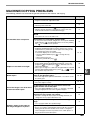
TROUBLESHOOTING
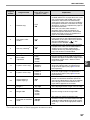
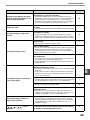
Problem
Cause and solution
Page
The document glass or the underside of the document
cover/SPF/RSPF is dirty.
83
→ Clean regularly.
Copies are smudged or dirty.
Original smudged or blotchy.
–
→ Use a clean original.
The scanner glass for the SPF/RSPF is dirty.
83
→ Clean the long, narrow scanning glass.
White or black lines appear on
copies.
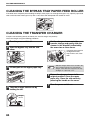
The transfer charger is dirty.
84
→ Clean the transfer charger.
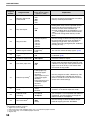
Copying or printing is performed.
→ Set the paper size after copying or printing is complete.
The machine has stopped temporarily due to running out
of paper or a misfeed.
Paper size for a paper tray cannot
be set.
–
10, 73
→ Load paper or remove the misfeed, and then set the paper size.
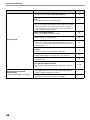
An interrupt copy job is in progress.
→ Set the paper size after the interrupt copy job is finished.
The display or the ORIGINAL DATA indicator (
blinking.
28
DATA ) is
→ Data is being held in memory. Print the data in memory or clear it
from memory.
30, 32
The paper output tray is full.
→ Long copy runs are automatically paused every 250 copies.
Remove the copies in the paper output tray and press the
[START] key (
) to resume copying.
A copy job stops before it is
finished.
19
"FUL" appear in the display.
→ The memory became full during sort/group copy or 2 IN 1 / 4 IN 1
copy. Copy only the originals that have been scanned to that
point, or cancel the job and clear the data from memory.
The tray is out of paper.
30, 32
10
→ Load paper.
6
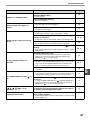
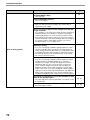
Any other indicators are lit.
→ If other indicators are lit, the machine is in "Preheat mode". Press
any key on the operation panel to resume normal operation.
The POWER SAVE indicator (
lit.
) is
The POWER SAVE indicator (
are only lit.
) and ON LINE indicator
→ If only the POWER SAVE indicator (
) and ON LINE indicator
are lit, the machine is in auto power shut-off mode. Press the
[START] key (
) to resume normal operation.
Any one of the alarm indicators
( ,
, ,
,
) is lit or
blinking.
Lighting fixture flickers.
8
See "INDICATORS AND DISPLAY MESSAGES" to check
the meaning of the alarm indicator and error message in
the display, and take appropriate action.
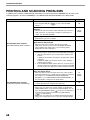
The same power outlet being used is for the lighting
fixture and the machine.
→ Connect the machine to a power outlet which is not used for other
electric appliances.
8
72
–
67