1
3 - 40
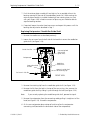
Rotary Hook
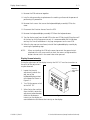
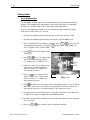
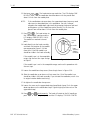
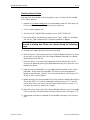
32. Next press
. The head rotates one revolution. The LCD displays ONE
REVOLUTION 110.0. The needle bar should be down with the presser foot
about 1/4 inch from the needle plate.
NOTE:
If the needle does not come down the upper dead stop clamp may need
adjustment as described later in this procedure. For now, however,
complete the needle depth adjustment by grasping the presser foot and
pulling down until the needle bar catches securely. At this time the
presser foot will be about 1/4 inch from the needle plate.
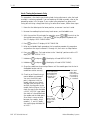
33. Press
. The head rotates to
the ‘‘needle depth’’ position and the
LCD displays: NEEDLE DEPTH 180.0.
The needle has reached its lowest
point.
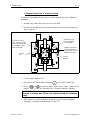
needle
eye
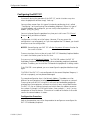
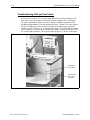
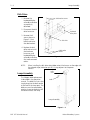
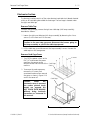
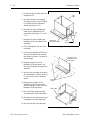
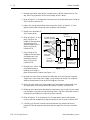
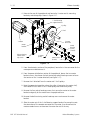
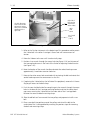
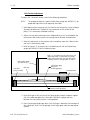
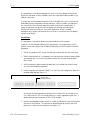
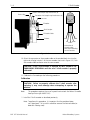
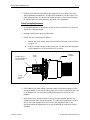
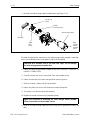
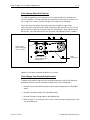
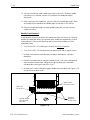
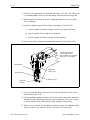
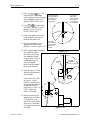
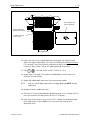
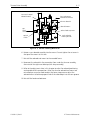
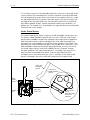
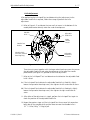
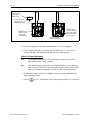
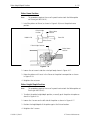
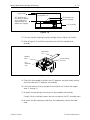
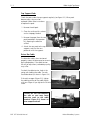
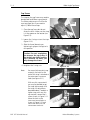
34. Look directly into the hook assembly
and check the location of the needle’s
eye compared to Figure 3-38. Not
more than 1/8 of the needle’s eye
should be visible in the hook assembly.
If the needle’s eye is in the acceptable
range, skip the next few steps and go
to Step 43.
needle
hook
assembly
(bobbin
removed)
Figure 3 - 38
If the needle’s eye is not in the acceptable range, continue this procedure with
the next step.
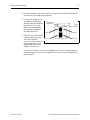
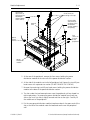
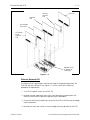
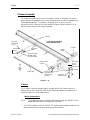
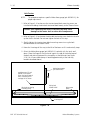
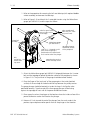
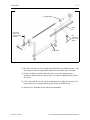
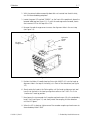
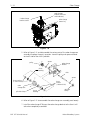
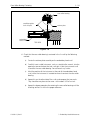
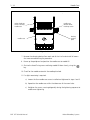
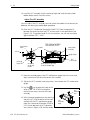
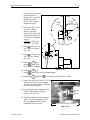
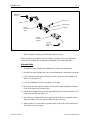
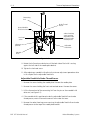
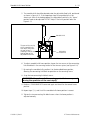
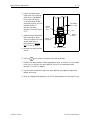
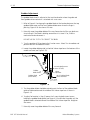
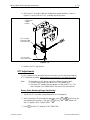
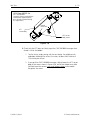
35. Loosen the needle bar clamp screw (silver clamp) shown in Figure 3-39.
36. Slide the needle bar up or down until not more than 1/8 of the needle’s eye
should be visible in the hook assembly. If you twisted the needle bar, return it to
its original rotation before continuing.
37. Re-tighten the needle bar clamp screw.
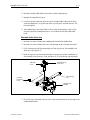
38. Loosen the screw on the upper-dead-stop clamp (black clamp). Push the upper
dead stop down to the needle bar clamp. Tighten slightly (but do not turn the
upper dead stop).
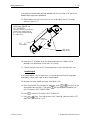
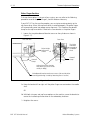
39. Press
and
simultaneously. The head will rotate to the full needle up
position (needle at its highest point) and the LCD displays TOP DEAD CENTER.
EMT 10T Technical Manual
Melco Embroidery Systems