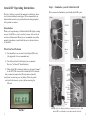
1
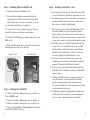
Step 2 – Installing Batteries and SD Card
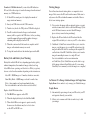
Step 4 – Attaching Attack IR to a Tree
1) Turn the rotary knob to the OFF position.
1)
2)
2) Loosen the battery thumb screw and open the battery
compartment door. Install four brand new alkaline D cell
batteries. Make sure to observe correct polarity. Close the door and tighten the thumb screw completely.
3) You may notice a series of numbers displayed. These are
Attack IR’s hardware and software version numbers.
4) Wait until the LCD display goes blank and the green and red LEDs are off.
5) Install your SD card. Be sure to observe the correct polarity with clipped corner on the card to the right.
Battery Install
SD Card Install
Bottom View
Step 3 – Setting up the Attack IR
3
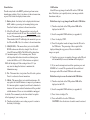
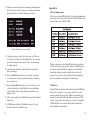
1) Turn the rotary knob to Time position, press A and B to set. Time is AM/PM format.
2) Turn the rotary knob to Date position, press A and B to set.
3) Turn the rotary knob to Year position, press A and B to set.
4) Later you will read Step 8 – More Features for information on the USB and MENU positions.
We recommend you first try your Attack IR at home. In this case, set Attack IR on a table instead of mounting it to a tree.
For optimum detection of deer-sized animals we recommend mounting Attack IR about 30 to 36 inches off the ground (this is about waist high to slightly higher).
3)
For best image quality, install Attack IR about 10 to 15 feet from where animals are expected. Attack IR will detect
animals at distances from directly in front of the camera to about 50 feet. Note that detection distance varies greatly with air temperature, animal size, and the speed the animal is moving.
4) Attack IR features our new Genius Mounting System. This system allows you to attach the bracket to a tree and then slide Attack IR on and off the bracket as needed. Use the included strap to attach the tree bracket. You can also use screws (not supplied) to attach the bracket to a tree.
5)
6)
Once the tree bracket is attached to the tree, make sure
both thumb screws on the back of Attack IR are tightened completely. Then slide Attack IR onto the bracket.
It is best to remove any vegetation and obstructions from
Attack IR’s field-of-view that may interfere with Attack IR’s sensor or camera.
7)
8)
Aim/align Attack IR to make sure it is pointed where you
expect the animals to be. Aim Attack IR level with the ground to maximize detection range and performance.
You can use Attack IR’s test feature (explained next) to help
you determine the detection area.
Cuddeback has optional mounting methods available, such as tilt-brackets, bear-resistant boxes, and mounting posts.
See your retailer or www.cuddeback.com for details.
4