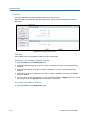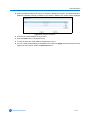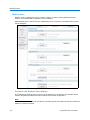
1
Configuration and User Guide
VideoEdge® IP SpeedDome Camera
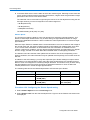
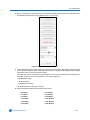
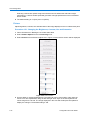
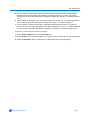
Version 1.0
Part Number 8200-2613-01 C0
Notice
The information in this manual was current when published. The manufacturer reserves the right to revise and improve its
products. All specifications are therefore subject to change without notice.
Copyright
Under copyright laws, the contents of this manual may not be copied, photocopied, reproduced, translated or reduced to
any electronic medium or machine-readable form, in whole or in part, without prior written consent of Tyco International
Ltd. © Copyright 2009 and its Respective Companies. All Rights Reserved,
Customer Service
Thank you for using American Dynamics products. We support our products through an extensive worldwide network of
dealers. The dealer through whom you originally purchased this product is your point of contact if you need service or
support. Our dealers are empowered to provide the very best in customer service and support. Dealers should contact
American Dynamics at (800) 507-6268 or (561) 912-6259 or on the Web at www.americandynamics.net.
Trademarks
Windows® is a registered trademark of Microsoft Corporation. PS/2® is a registered trademark of International Business
Machines Corporation.
Trademarked names are used throughout this manual. Rather than place a symbol at each occurrence, trademarked
names are designated with initial capitalization. Inclusion or exclusion is not a judgment on the validity or legal status of the
term.
License Information
Your use of this product is governed by certain terms and conditions. Please see the detailed license information at the end
of this manual.
ii
Configuration and User Guide
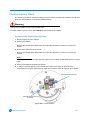
Warning
To Reduce Risk of electric shock, do not remove cover. No user serviceable parts inside. Refer servicing to qualified
service personnel.
Do not expose this appliance to rain or moisture.
Do not install this product in hazardous areas where highly combustible or explosive products are
stored or used.
The lightning flash/arrowhead symbol, within an equilateral triangle, alerts the user to the presence
of a shock hazard within the product’s enclosure.
IT E161302
Underwriters Laboratories Inc. (“UL”) has not tested the performance or reliability of the security or
signaling aspects of this product. UL has only tested for fire, shock or casualty hazards as outlined
in the UL's Standard for Safety UL 60950-1. UL Certification does not cover the performance
or reliability of the security or signaling aspects of this product. UL makes no
representations, warranties or certifications whatsoever regarding the performance or
reliability of any security or signaling related functions of this product.
Note to Camera System Installer - This reminder is provided to call the camera systems
installer's attention to Section 820.93 of the National Electrical Code, ANSI/NFPA 70: 2005, which
provide guidelines for proper grounding and, in particular, specify that the coaxial cable shield shall
be connected to the grounding system of the building, as close to the point of cable entry as
practical.
This equipment has been tested and found to comply with the limits for a Class “A” digital device,
pursuant to part 15 of the FCC Rules. These limits are designed to provide reasonable protection
against harmful interference when the equipment is operated in a commercial environment. This
equipment generates, uses and can radiate radio frequency energy and, if not installed and used
in accordance with the instruction manual, may cause interference to radio communications.
Operation of this equipment in a residential area is likely to cause harmful interference in which
case the user will be required to correct the interference at their own expense.
Changes or modifications not expressly approved by Sensormatic the party responsible for FCC
compliance, could void the user’s authority to operate the equipment.
Certified Limited Power Required. This installation should be made by a qualified service person
and should conform to all local codes. For outdoor installations use liquid-tight conduit or liquidtight pipe.
This class A digital apparatus complies with Canadian ICES-003.
Cet appareil numérique de la classe A est conforme à la norme NMB-003 du Canada.
Refer to the Configuration and User Guide contained on the CD for more information.
iii
iv
Configuration and User Guide
Table of Contents
Introduction
1
Overview . . . . . . . . . . . . . . . . . . . . . . . . . . . . . . . . . . . . . . . . . . . . . . . . . . . . . . . . . 1-1
Features . . . . . . . . . . . . . . . . . . . . . . . . . . . . . . . . . . . . . . . . . . . . . . . . . . . . . . . . . .
ACC compression . . . . . . . . . . . . . . . . . . . . . . . . . . . . . . . . . . . . . . . . . . . . . . . .
Frame Rates . . . . . . . . . . . . . . . . . . . . . . . . . . . . . . . . . . . . . . . . . . . . . . . . . . . .
Resolutions . . . . . . . . . . . . . . . . . . . . . . . . . . . . . . . . . . . . . . . . . . . . . . . . . . . . .
Video loss detection . . . . . . . . . . . . . . . . . . . . . . . . . . . . . . . . . . . . . . . . . . . . . .
Bandwidth Throttling . . . . . . . . . . . . . . . . . . . . . . . . . . . . . . . . . . . . . . . . . . . . . .
Web Configuration. . . . . . . . . . . . . . . . . . . . . . . . . . . . . . . . . . . . . . . . . . . . . . . .
Installation
Minimum System Requirements . . . . . . . . . . . . . . . . . . . . . . . . . . . . . . . . . . . . .
Mounts. . . . . . . . . . . . . . . . . . . . . . . . . . . . . . . . . . . . . . . . . . . . . . . . . . . . . . . . .
Installation Process . . . . . . . . . . . . . . . . . . . . . . . . . . . . . . . . . . . . . . . . . . . . . . .
Install and Detect the IP Dome . . . . . . . . . . . . . . . . . . . . . . . . . . . . . . . . . . . . . .
Installation using DHCP and Bonjour for Windows . . . . . . . . . . . . . . . . . . . . .
Installation without a DCHP Server using a Static IP Address . . . . . . . . . . . .
ActiveX Installation . . . . . . . . . . . . . . . . . . . . . . . . . . . . . . . . . . . . . . . . . . . . . . .
Web Configuration
Log in to the IP Dome . . . . . . . . . . . . . . . . . . . . . . . . . . . . . . . . . . . . . . . . . . . . .
User Accounts . . . . . . . . . . . . . . . . . . . . . . . . . . . . . . . . . . . . . . . . . . . . . . . . .
Administrator. . . . . . . . . . . . . . . . . . . . . . . . . . . . . . . . . . . . . . . . . . . . . . . . .
Recorder . . . . . . . . . . . . . . . . . . . . . . . . . . . . . . . . . . . . . . . . . . . . . . . . . . . .
User . . . . . . . . . . . . . . . . . . . . . . . . . . . . . . . . . . . . . . . . . . . . . . . . . . . . . . .
Checking Camera Feed using the Live Viewing function . . . . . . . . . . . . . . . . . .
Controlling dome cameras on the Live Viewing page . . . . . . . . . . . . . . . . . . .
Dome Camera Controls . . . . . . . . . . . . . . . . . . . . . . . . . . . . . . . . . . . . . . . .
Controlling the Pan-Tilt Control via Mouse . . . . . . . . . . . . . . . . . . . . . . . . . .
Zoom via Mouse Scroll Wheel . . . . . . . . . . . . . . . . . . . . . . . . . . . . . . . . . . .
Live Viewing Menu
1-2
1-2
1-2
1-2
1-2
1-2
1-3
2
2-1
2-1
2-2
2-3
2-3
2-4
2-5
3
3-2
3-2
3-3
3-4
3-5
3-6
3-7
3-7
3-9
3-9
4
Video . . . . . . . . . . . . . . . . . . . . . . . . . . . . . . . . . . . . . . . . . . . . . . . . . . . . . . . . . . 4-1
Presets . . . . . . . . . . . . . . . . . . . . . . . . . . . . . . . . . . . . . . . . . . . . . . . . . . . . . . . . 4-3
Using Preset as Home Position . . . . . . . . . . . . . . . . . . . . . . . . . . . . . . . . . . . . 4-6
Patterns . . . . . . . . . . . . . . . . . . . . . . . . . . . . . . . . . . . . . . . . . . . . . . . . . . . . . . . . 4-7
Using Pattern as Home Position . . . . . . . . . . . . . . . . . . . . . . . . . . . . . . . . . . 4-10
Scans/Sequences . . . . . . . . . . . . . . . . . . . . . . . . . . . . . . . . . . . . . . . . . . . . . . . 4-12
v
Table of Contents
Scans . . . . . . . . . . . . . . . . . . . . . . . . . . . . . . . . . . . . . . . . . . . . . . . . . . . . . . .
Using Scan as Home Position . . . . . . . . . . . . . . . . . . . . . . . . . . . . . . . . . . . .
Sequences . . . . . . . . . . . . . . . . . . . . . . . . . . . . . . . . . . . . . . . . . . . . . . . . . . .
Using Sequence as Home Position . . . . . . . . . . . . . . . . . . . . . . . . . . . . . . . .
Privacy Zones . . . . . . . . . . . . . . . . . . . . . . . . . . . . . . . . . . . . . . . . . . . . . . . . . .
Privacy Zone Settings . . . . . . . . . . . . . . . . . . . . . . . . . . . . . . . . . . . . . . . . . .
Stored Audio . . . . . . . . . . . . . . . . . . . . . . . . . . . . . . . . . . . . . . . . . . . . . . . . . . .
Audio File Requirements . . . . . . . . . . . . . . . . . . . . . . . . . . . . . . . . . . . . . . . .
Camera Adjust. . . . . . . . . . . . . . . . . . . . . . . . . . . . . . . . . . . . . . . . . . . . . . . . . .
Electronic Image Stabilization and Wide Dynamic Range . . . . . . . . . . . . . . .
Wide Dynamic Range . . . . . . . . . . . . . . . . . . . . . . . . . . . . . . . . . . . . . . . . . .
Focus and Iris Control . . . . . . . . . . . . . . . . . . . . . . . . . . . . . . . . . . . . . . . . . .
De-Interlacing. . . . . . . . . . . . . . . . . . . . . . . . . . . . . . . . . . . . . . . . . . . . . . . . .
Automatic White Balance. . . . . . . . . . . . . . . . . . . . . . . . . . . . . . . . . . . . . . . .
Infra Red Features . . . . . . . . . . . . . . . . . . . . . . . . . . . . . . . . . . . . . . . . . . . . .
IR Mode . . . . . . . . . . . . . . . . . . . . . . . . . . . . . . . . . . . . . . . . . . . . . . . . . . .
Day/Night Mode . . . . . . . . . . . . . . . . . . . . . . . . . . . . . . . . . . . . . . . . . . . . .
North Position . . . . . . . . . . . . . . . . . . . . . . . . . . . . . . . . . . . . . . . . . . . . . . . .
Shutter Limit. . . . . . . . . . . . . . . . . . . . . . . . . . . . . . . . . . . . . . . . . . . . . . . . . .
Automatic Gain Control. . . . . . . . . . . . . . . . . . . . . . . . . . . . . . . . . . . . . . . .
Shutter Speed . . . . . . . . . . . . . . . . . . . . . . . . . . . . . . . . . . . . . . . . . . . . . . .
Picture . . . . . . . . . . . . . . . . . . . . . . . . . . . . . . . . . . . . . . . . . . . . . . . . . . . . . .
Camera Menu
4-12
4-13
4-14
4-14
4-17
4-17
4-24
4-24
4-28
4-28
4-29
4-30
4-31
4-33
4-36
4-36
4-37
4-39
4-40
4-40
4-42
4-44
5
PTZ Configuration . . . . . . . . . . . . . . . . . . . . . . . . . . . . . . . . . . . . . . . . . . . . . . . . 5-1
Automatic Flip . . . . . . . . . . . . . . . . . . . . . . . . . . . . . . . . . . . . . . . . . . . . . . . . . 5-2
Zoom Stop . . . . . . . . . . . . . . . . . . . . . . . . . . . . . . . . . . . . . . . . . . . . . . . . . . . . 5-2
22X Camera Dome . . . . . . . . . . . . . . . . . . . . . . . . . . . . . . . . . . . . . . . . . . . . 5-2
35X Camera Dome . . . . . . . . . . . . . . . . . . . . . . . . . . . . . . . . . . . . . . . . . . . . 5-3
Freeze Frame . . . . . . . . . . . . . . . . . . . . . . . . . . . . . . . . . . . . . . . . . . . . . . . . . 5-3
Return Settings . . . . . . . . . . . . . . . . . . . . . . . . . . . . . . . . . . . . . . . . . . . . . . . . 5-4
Return to Auto Focus/Auto Iris . . . . . . . . . . . . . . . . . . . . . . . . . . . . . . . . . . . 5-4
Return to Previous . . . . . . . . . . . . . . . . . . . . . . . . . . . . . . . . . . . . . . . . . . . . 5-4
Current Home Position. . . . . . . . . . . . . . . . . . . . . . . . . . . . . . . . . . . . . . . . . . . 5-4
Overlay Settings . . . . . . . . . . . . . . . . . . . . . . . . . . . . . . . . . . . . . . . . . . . . . . . . . 5-6
Camera Name . . . . . . . . . . . . . . . . . . . . . . . . . . . . . . . . . . . . . . . . . . . . . . . . . 5-6
Camera Status . . . . . . . . . . . . . . . . . . . . . . . . . . . . . . . . . . . . . . . . . . . . . . . . . 5-7
Dome Names . . . . . . . . . . . . . . . . . . . . . . . . . . . . . . . . . . . . . . . . . . . . . . . . . . 5-7
Time/Direction Indicators . . . . . . . . . . . . . . . . . . . . . . . . . . . . . . . . . . . . . . . . . 5-7
Text Attributes . . . . . . . . . . . . . . . . . . . . . . . . . . . . . . . . . . . . . . . . . . . . . . . . . 5-8
Areas . . . . . . . . . . . . . . . . . . . . . . . . . . . . . . . . . . . . . . . . . . . . . . . . . . . . . . . . . 5-10
Areas List . . . . . . . . . . . . . . . . . . . . . . . . . . . . . . . . . . . . . . . . . . . . . . . . . . . . 5-10
Alarms . . . . . . . . . . . . . . . . . . . . . . . . . . . . . . . . . . . . . . . . . . . . . . . . . . . . . . . . 5-13
Alarm Actions. . . . . . . . . . . . . . . . . . . . . . . . . . . . . . . . . . . . . . . . . . . . . . . . . 5-13
Add Sequence. . . . . . . . . . . . . . . . . . . . . . . . . . . . . . . . . . . . . . . . . . . . . . . . . . 5-16
Sequence Names . . . . . . . . . . . . . . . . . . . . . . . . . . . . . . . . . . . . . . . . . . . . . 5-16
vi
Configuration and User Guide
Table of Contents
Scheduled Tasks. . . . . . . . . . . . . . . . . . . . . . . . . . . . . . . . . . . . . . . . . . . . . . . .
Task Details . . . . . . . . . . . . . . . . . . . . . . . . . . . . . . . . . . . . . . . . . . . . . . . . . .
Video . . . . . . . . . . . . . . . . . . . . . . . . . . . . . . . . . . . . . . . . . . . . . . . . . . . . . . . . .
Audio . . . . . . . . . . . . . . . . . . . . . . . . . . . . . . . . . . . . . . . . . . . . . . . . . . . . . . . . .
Networking Menu
5-19
5-19
5-22
5-24
6
Date Time . . . . . . . . . . . . . . . . . . . . . . . . . . . . . . . . . . . . . . . . . . . . . . . . . . . . . . 6-1
Date Time Format . . . . . . . . . . . . . . . . . . . . . . . . . . . . . . . . . . . . . . . . . . . . . . 6-1
Setting Camera Time . . . . . . . . . . . . . . . . . . . . . . . . . . . . . . . . . . . . . . . . . . . . 6-2
TCP/IP. . . . . . . . . . . . . . . . . . . . . . . . . . . . . . . . . . . . . . . . . . . . . . . . . . . . . . . . . 6-4
DHCP Configuration . . . . . . . . . . . . . . . . . . . . . . . . . . . . . . . . . . . . . . . . . . . . 6-4
IP Address Configuration . . . . . . . . . . . . . . . . . . . . . . . . . . . . . . . . . . . . . . . . . 6-4
DNS Configuration . . . . . . . . . . . . . . . . . . . . . . . . . . . . . . . . . . . . . . . . . . . . . . 6-5
Users . . . . . . . . . . . . . . . . . . . . . . . . . . . . . . . . . . . . . . . . . . . . . . . . . . . . . . . . . . 6-6
User Administration . . . . . . . . . . . . . . . . . . . . . . . . . . . . . . . . . . . . . . . . . . . . . 6-6
SMTP Settings . . . . . . . . . . . . . . . . . . . . . . . . . . . . . . . . . . . . . . . . . . . . . . . . . . 6-8
Email Settings . . . . . . . . . . . . . . . . . . . . . . . . . . . . . . . . . . . . . . . . . . . . . . . . . 6-8
Email Test . . . . . . . . . . . . . . . . . . . . . . . . . . . . . . . . . . . . . . . . . . . . . . . . . . . . 6-9
FTP Settings . . . . . . . . . . . . . . . . . . . . . . . . . . . . . . . . . . . . . . . . . . . . . . . . . . . 6-10
FTP Settings . . . . . . . . . . . . . . . . . . . . . . . . . . . . . . . . . . . . . . . . . . . . . . . . . 6-10
Firewall . . . . . . . . . . . . . . . . . . . . . . . . . . . . . . . . . . . . . . . . . . . . . . . . . . . . . . . 6-12
Maintenance . . . . . . . . . . . . . . . . . . . . . . . . . . . . . . . . . . . . . . . . . . . . . . . . . . . 6-14
HTTPS Certificate . . . . . . . . . . . . . . . . . . . . . . . . . . . . . . . . . . . . . . . . . . . . . 6-16
Advanced . . . . . . . . . . . . . . . . . . . . . . . . . . . . . . . . . . . . . . . . . . . . . . . . . . . . . 6-18
Bandwidth Throttling . . . . . . . . . . . . . . . . . . . . . . . . . . . . . . . . . . . . . . . . . . . 6-19
Bonjour. . . . . . . . . . . . . . . . . . . . . . . . . . . . . . . . . . . . . . . . . . . . . . . . . . . . . . 6-19
Zero Configuration Networking . . . . . . . . . . . . . . . . . . . . . . . . . . . . . . . . . . 6-20
Implementation . . . . . . . . . . . . . . . . . . . . . . . . . . . . . . . . . . . . . . . . . . . . . . 6-20
Address Assignment . . . . . . . . . . . . . . . . . . . . . . . . . . . . . . . . . . . . . . . . . . 6-20
Service Discovery . . . . . . . . . . . . . . . . . . . . . . . . . . . . . . . . . . . . . . . . . . . . 6-20
Information Menu
7
Model. . . . . . . . . . . . . . . . . . . . . . . . . . . . . . . . . . . . . . . . . . . . . . . . . . . . . . . . . . 7-1
Statistics . . . . . . . . . . . . . . . . . . . . . . . . . . . . . . . . . . . . . . . . . . . . . . . . . . . . . . . 7-2
Environmental . . . . . . . . . . . . . . . . . . . . . . . . . . . . . . . . . . . . . . . . . . . . . . . . . . . 7-4
System Log . . . . . . . . . . . . . . . . . . . . . . . . . . . . . . . . . . . . . . . . . . . . . . . . . . . . . 7-5
Boot Log . . . . . . . . . . . . . . . . . . . . . . . . . . . . . . . . . . . . . . . . . . . . . . . . . . . . . . . 7-6
Current Faults . . . . . . . . . . . . . . . . . . . . . . . . . . . . . . . . . . . . . . . . . . . . . . . . . . . 7-7
Fault Details . . . . . . . . . . . . . . . . . . . . . . . . . . . . . . . . . . . . . . . . . . . . . . . . . . . 7-8
DIOM (Digital Input Output Monitor) Faults. . . . . . . . . . . . . . . . . . . . . . . . . . 7-8
ENVM (Environmental Monitor) Faults . . . . . . . . . . . . . . . . . . . . . . . . . . . . . 7-8
ENVM Card Upgrade Progress. . . . . . . . . . . . . . . . . . . . . . . . . . . . . . . . . . . 7-8
Change Password . . . . . . . . . . . . . . . . . . . . . . . . . . . . . . . . . . . . . . . . . . . . . . . . 7-9
vii
Table of Contents
Camera Recovery . . . . . . . . . . . . . . . . . . . . . . . . . . . . . . . . . . . . . . . . . . . . . . . . . . 8-1
Physical Factory Reset . . . . . . . . . . . . . . . . . . . . . . . . . . . . . . . . . . . . . . . . . . . . . . 8-3
Technical specification
9
Technical Specifications . . . . . . . . . . . . . . . . . . . . . . . . . . . . . . . . . . . . . . . . . . .
Camera Specifications . . . . . . . . . . . . . . . . . . . . . . . . . . . . . . . . . . . . . . . . . . . .
Compression . . . . . . . . . . . . . . . . . . . . . . . . . . . . . . . . . . . . . . . . . . . . . . . . . . . .
CODEC Combinations . . . . . . . . . . . . . . . . . . . . . . . . . . . . . . . . . . . . . . . . . . . .
Alarm Buffering . . . . . . . . . . . . . . . . . . . . . . . . . . . . . . . . . . . . . . . . . . . . . . . . . .
Certification and Regulations . . . . . . . . . . . . . . . . . . . . . . . . . . . . . . . . . . . . . . .
9-1
9-2
9-3
9-3
9-3
9-5
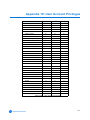
User Account Privileges
10
Site Maps
11
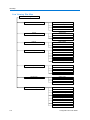
Live Viewing Site Map . . . . . . . . . . . . . . . . . . . . . . . . . . . . . . . . . . . . . . . . . . . .
Camera Site Map . . . . . . . . . . . . . . . . . . . . . . . . . . . . . . . . . . . . . . . . . . . . . . .
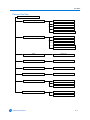
Networking Site Map . . . . . . . . . . . . . . . . . . . . . . . . . . . . . . . . . . . . . . . . . . . . .
Information Site Map . . . . . . . . . . . . . . . . . . . . . . . . . . . . . . . . . . . . . . . . . . . . .
11-2
11-3
11-4
11-5
List of Figures
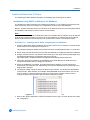
Bonjour displaying IP devices found on the network. . . . . . . . . . . . . . . . . . . . . . 2-3
Install ActiveX Control . . . . . . . . . . . . . . . . . . . . . . . . . . . . . . . . . . . . . . . . . . . . . 2-5
Sign in page . . . . . . . . . . . . . . . . . . . . . . . . . . . . . . . . . . . . . . . . . . . . . . . . . . . . 3-2
Live Viewing Screen . . . . . . . . . . . . . . . . . . . . . . . . . . . . . . . . . . . . . . . . . . . . . . 3-3
Live Viewing Logged in as Recorder. . . . . . . . . . . . . . . . . . . . . . . . . . . . . . . . . . 3-4
Live Viewing Logged in as User . . . . . . . . . . . . . . . . . . . . . . . . . . . . . . . . . . . . . 3-5
Live image with Cursor Origin Mark and Direction cursor displayed. . . . . . . . . . 3-9
Video screen . . . . . . . . . . . . . . . . . . . . . . . . . . . . . . . . . . . . . . . . . . . . . . . . . . . . 4-1
Add Preset screen. . . . . . . . . . . . . . . . . . . . . . . . . . . . . . . . . . . . . . . . . . . . . . . . 4-4
Select Preset . . . . . . . . . . . . . . . . . . . . . . . . . . . . . . . . . . . . . . . . . . . . . . . . . . . . 4-5
Delete Preset. . . . . . . . . . . . . . . . . . . . . . . . . . . . . . . . . . . . . . . . . . . . . . . . . . . . 4-6
Add Pattern screen . . . . . . . . . . . . . . . . . . . . . . . . . . . . . . . . . . . . . . . . . . . . . . . 4-7
Add Pattern with active Add and Cancel button . . . . . . . . . . . . . . . . . . . . . . . . . 4-8
Add Pattern with progress bar displayed. . . . . . . . . . . . . . . . . . . . . . . . . . . . . . . 4-9
Select Pattern . . . . . . . . . . . . . . . . . . . . . . . . . . . . . . . . . . . . . . . . . . . . . . . . . . 4-10
Delete Pattern . . . . . . . . . . . . . . . . . . . . . . . . . . . . . . . . . . . . . . . . . . . . . . . . . . 4-11
Scan Limits section . . . . . . . . . . . . . . . . . . . . . . . . . . . . . . . . . . . . . . . . . . . . . . 4-12
Select Scan screen . . . . . . . . . . . . . . . . . . . . . . . . . . . . . . . . . . . . . . . . . . . . . . 4-13
Select Sequence . . . . . . . . . . . . . . . . . . . . . . . . . . . . . . . . . . . . . . . . . . . . . . . . 4-14
Delete Sequence. . . . . . . . . . . . . . . . . . . . . . . . . . . . . . . . . . . . . . . . . . . . . . . . 4-15
Shortcut to Add Sequence . . . . . . . . . . . . . . . . . . . . . . . . . . . . . . . . . . . . . . . . 4-16
viii
Configuration and User Guide
Table of Contents
Adding a Privacy Zone screen . . . . . . . . . . . . . . . . . . . . . . . . . . . . . . . . . . . . . 4-18
Privacy Zone being selected . . . . . . . . . . . . . . . . . . . . . . . . . . . . . . . . . . . . . . . 4-19
Privacy Zone Selected . . . . . . . . . . . . . . . . . . . . . . . . . . . . . . . . . . . . . . . . . . . 4-20
Privacy Zone confirmed. . . . . . . . . . . . . . . . . . . . . . . . . . . . . . . . . . . . . . . . . . . 4-21
Select Zone . . . . . . . . . . . . . . . . . . . . . . . . . . . . . . . . . . . . . . . . . . . . . . . . . . . . 4-21
Delete Zone. . . . . . . . . . . . . . . . . . . . . . . . . . . . . . . . . . . . . . . . . . . . . . . . . . . . 4-22
Toggle Zone . . . . . . . . . . . . . . . . . . . . . . . . . . . . . . . . . . . . . . . . . . . . . . . . . . . 4-22
Add Audio screen . . . . . . . . . . . . . . . . . . . . . . . . . . . . . . . . . . . . . . . . . . . . . . . 4-25
Audio clips cannot be uploaded . . . . . . . . . . . . . . . . . . . . . . . . . . . . . . . . . . . . 4-25
Select Audio . . . . . . . . . . . . . . . . . . . . . . . . . . . . . . . . . . . . . . . . . . . . . . . . . . . 4-26
Delete Audio . . . . . . . . . . . . . . . . . . . . . . . . . . . . . . . . . . . . . . . . . . . . . . . . . . . 4-26
Camera Adjust screen. . . . . . . . . . . . . . . . . . . . . . . . . . . . . . . . . . . . . . . . . . . . 4-28
EIS/WDR . . . . . . . . . . . . . . . . . . . . . . . . . . . . . . . . . . . . . . . . . . . . . . . . . . . . . . 4-29
Auto Focus/Iris . . . . . . . . . . . . . . . . . . . . . . . . . . . . . . . . . . . . . . . . . . . . . . . . . 4-31
De-Interlacing disabled . . . . . . . . . . . . . . . . . . . . . . . . . . . . . . . . . . . . . . . . . . . 4-32
De-Interlacing enabled . . . . . . . . . . . . . . . . . . . . . . . . . . . . . . . . . . . . . . . . . . . 4-32
De-Interlacing section . . . . . . . . . . . . . . . . . . . . . . . . . . . . . . . . . . . . . . . . . . . . 4-33
Automatic White Balance . . . . . . . . . . . . . . . . . . . . . . . . . . . . . . . . . . . . . . . . . 4-34
White Balance . . . . . . . . . . . . . . . . . . . . . . . . . . . . . . . . . . . . . . . . . . . . . . . . . . 4-35
Red and Blue balance . . . . . . . . . . . . . . . . . . . . . . . . . . . . . . . . . . . . . . . . . . . . 4-36
IR/Day Night Mode section . . . . . . . . . . . . . . . . . . . . . . . . . . . . . . . . . . . . . . . . 4-38
North Position . . . . . . . . . . . . . . . . . . . . . . . . . . . . . . . . . . . . . . . . . . . . . . . . . . 4-39
Shutter Setting off . . . . . . . . . . . . . . . . . . . . . . . . . . . . . . . . . . . . . . . . . . . . . . . 4-40
Shutter Setting on . . . . . . . . . . . . . . . . . . . . . . . . . . . . . . . . . . . . . . . . . . . . . . . 4-41
Shutter Setting at openshutter. . . . . . . . . . . . . . . . . . . . . . . . . . . . . . . . . . . . . . 4-43
Picture section. . . . . . . . . . . . . . . . . . . . . . . . . . . . . . . . . . . . . . . . . . . . . . . . . . 4-44
PTZ Configuration screen . . . . . . . . . . . . . . . . . . . . . . . . . . . . . . . . . . . . . . . . . . 5-1
Overlay Settings screen . . . . . . . . . . . . . . . . . . . . . . . . . . . . . . . . . . . . . . . . . . . 5-6
Screen locations for Direction Indicators. . . . . . . . . . . . . . . . . . . . . . . . . . . . . . . 5-8
Examples of text attributes . . . . . . . . . . . . . . . . . . . . . . . . . . . . . . . . . . . . . . . . . 5-9
Areas screen . . . . . . . . . . . . . . . . . . . . . . . . . . . . . . . . . . . . . . . . . . . . . . . . . . . 5-10
An example of areas . . . . . . . . . . . . . . . . . . . . . . . . . . . . . . . . . . . . . . . . . . . . . 5-11
Alarms screen . . . . . . . . . . . . . . . . . . . . . . . . . . . . . . . . . . . . . . . . . . . . . . . . . . 5-13
Edit Alarms screen . . . . . . . . . . . . . . . . . . . . . . . . . . . . . . . . . . . . . . . . . . . . . . 5-14
FTP Details screen . . . . . . . . . . . . . . . . . . . . . . . . . . . . . . . . . . . . . . . . . . . . . . 5-15
Sequence Names screen . . . . . . . . . . . . . . . . . . . . . . . . . . . . . . . . . . . . . . . . . 5-16
Add Sequence Screen . . . . . . . . . . . . . . . . . . . . . . . . . . . . . . . . . . . . . . . . . . . 5-17
Sequence Details screen . . . . . . . . . . . . . . . . . . . . . . . . . . . . . . . . . . . . . . . . . 5-18
Scheduled Tasks screen . . . . . . . . . . . . . . . . . . . . . . . . . . . . . . . . . . . . . . . . . . 5-19
Schedule/Edit a Task . . . . . . . . . . . . . . . . . . . . . . . . . . . . . . . . . . . . . . . . . . . . 5-20
Video screen . . . . . . . . . . . . . . . . . . . . . . . . . . . . . . . . . . . . . . . . . . . . . . . . . . . 5-22
Audio screen . . . . . . . . . . . . . . . . . . . . . . . . . . . . . . . . . . . . . . . . . . . . . . . . . . . 5-24
Date Time screen . . . . . . . . . . . . . . . . . . . . . . . . . . . . . . . . . . . . . . . . . . . . . . . . 6-1
TCP/IP screen . . . . . . . . . . . . . . . . . . . . . . . . . . . . . . . . . . . . . . . . . . . . . . . . . . . 6-4
Users Administration screen . . . . . . . . . . . . . . . . . . . . . . . . . . . . . . . . . . . . . . . . 6-6
User Details screen . . . . . . . . . . . . . . . . . . . . . . . . . . . . . . . . . . . . . . . . . . . . . . . 6-6
SMTP Settings screen. . . . . . . . . . . . . . . . . . . . . . . . . . . . . . . . . . . . . . . . . . . . . 6-8
ix
Table of Contents
FTP Settings screen . . . . . . . . . . . . . . . . . . . . . . . . . . . . . . . . . . . . . . . . . . . . . 6-10
Firewall Settings screen . . . . . . . . . . . . . . . . . . . . . . . . . . . . . . . . . . . . . . . . . . 6-12
Address List section . . . . . . . . . . . . . . . . . . . . . . . . . . . . . . . . . . . . . . . . . . . . . 6-13
Maintenance screen . . . . . . . . . . . . . . . . . . . . . . . . . . . . . . . . . . . . . . . . . . . . . 6-14
Advanced screen. . . . . . . . . . . . . . . . . . . . . . . . . . . . . . . . . . . . . . . . . . . . . . . . 6-18
Camera Friendly Name displayed in VideoEdge® banner . . . . . . . . . . . . . . . . 6-19
Model Information screen . . . . . . . . . . . . . . . . . . . . . . . . . . . . . . . . . . . . . . . . . . 7-1
Statistics screen . . . . . . . . . . . . . . . . . . . . . . . . . . . . . . . . . . . . . . . . . . . . . . . . . 7-2
Environmental screen . . . . . . . . . . . . . . . . . . . . . . . . . . . . . . . . . . . . . . . . . . . . . 7-4
System Log screen . . . . . . . . . . . . . . . . . . . . . . . . . . . . . . . . . . . . . . . . . . . . . . . 7-5
Boot Log screen . . . . . . . . . . . . . . . . . . . . . . . . . . . . . . . . . . . . . . . . . . . . . . . . . 7-6
Current Faults screen with no faults displayed . . . . . . . . . . . . . . . . . . . . . . . . . . 7-7
Faults displayed in the View Fault Table. . . . . . . . . . . . . . . . . . . . . . . . . . . . . . . 7-7
Change Password screen . . . . . . . . . . . . . . . . . . . . . . . . . . . . . . . . . . . . . . . . . . 7-9
Camera Recovery screen . . . . . . . . . . . . . . . . . . . . . . . . . . . . . . . . . . . . . . . . . . 8-1
The Camera Base . . . . . . . . . . . . . . . . . . . . . . . . . . . . . . . . . . . . . . . . . . . . . . . . 8-3
List of Procedures
Installing the IP Dome using Bonjour for Windows . . . . . . . . . . . . . . . . . . . . . . . 2-3
Installing the IP Dome using DHCP Server Logs . . . . . . . . . . . . . . . . . . . . . . . . 2-4
Installing the IP Dome when a DHCP Server is not available . . . . . . . . . . . . . . . 2-4
Logging in to the IP Dome. . . . . . . . . . . . . . . . . . . . . . . . . . . . . . . . . . . . . . . . . . 3-2
Starting the Live Web Video feed . . . . . . . . . . . . . . . . . . . . . . . . . . . . . . . . . . . . 3-6
Checking camera feed using the Live Viewing function . . . . . . . . . . . . . . . . . . . 3-6
Controlling the camera via the Live Web Video pane . . . . . . . . . . . . . . . . . . . . . 3-8
Controlling Pan and Tilt via a mouse using the Live Web Video pane . . . . . . . . 3-9
Zooming via the mouse scroll wheel using the Live Web Video pane . . . . . . . . 3-9
Selecting a Pattern via the Camera Control Overlay. . . . . . . . . . . . . . . . . . . . . 3-10
Add a Pattern via the Camera Control Overlay . . . . . . . . . . . . . . . . . . . . . . . . . 3-10
Selecting a Preset via the Camera Control Overlay . . . . . . . . . . . . . . . . . . . . . 3-11
Defining a Preset via the Camera Control Overlay . . . . . . . . . . . . . . . . . . . . . . 3-12
Configuring the Video settings . . . . . . . . . . . . . . . . . . . . . . . . . . . . . . . . . . . . . . 4-1
Adding a Preset. . . . . . . . . . . . . . . . . . . . . . . . . . . . . . . . . . . . . . . . . . . . . . . . . . 4-3
Selecting a Preset . . . . . . . . . . . . . . . . . . . . . . . . . . . . . . . . . . . . . . . . . . . . . . . . 4-4
Editing a Preset . . . . . . . . . . . . . . . . . . . . . . . . . . . . . . . . . . . . . . . . . . . . . . . . . . 4-5
Using a Preset as a Home Position. . . . . . . . . . . . . . . . . . . . . . . . . . . . . . . . . . . 4-6
Delete a Preset . . . . . . . . . . . . . . . . . . . . . . . . . . . . . . . . . . . . . . . . . . . . . . . . . . 4-6
Adding a Pattern . . . . . . . . . . . . . . . . . . . . . . . . . . . . . . . . . . . . . . . . . . . . . . . . . 4-7
Selecting a Pattern . . . . . . . . . . . . . . . . . . . . . . . . . . . . . . . . . . . . . . . . . . . . . . . 4-9
Using a Pattern as a Home Position . . . . . . . . . . . . . . . . . . . . . . . . . . . . . . . . . 4-10
Delete a Pattern . . . . . . . . . . . . . . . . . . . . . . . . . . . . . . . . . . . . . . . . . . . . . . . . 4-10
Setting Scan Limits . . . . . . . . . . . . . . . . . . . . . . . . . . . . . . . . . . . . . . . . . . . . . . 4-12
Activating a Scan. . . . . . . . . . . . . . . . . . . . . . . . . . . . . . . . . . . . . . . . . . . . . . . . 4-12
Using a Scan as a Home Position. . . . . . . . . . . . . . . . . . . . . . . . . . . . . . . . . . . 4-13
Selecting a Sequence . . . . . . . . . . . . . . . . . . . . . . . . . . . . . . . . . . . . . . . . . . . . 4-14
x
Configuration and User Guide
Table of Contents
Using a Sequence as a Home Position. . . . . . . . . . . . . . . . . . . . . . . . . . . . . . . 4-15
Delete a Sequence . . . . . . . . . . . . . . . . . . . . . . . . . . . . . . . . . . . . . . . . . . . . . . 4-15
Add Sequence. . . . . . . . . . . . . . . . . . . . . . . . . . . . . . . . . . . . . . . . . . . . . . . . . . 4-15
Defining Privacy Zones . . . . . . . . . . . . . . . . . . . . . . . . . . . . . . . . . . . . . . . . . . . 4-18
Selecting a Privacy Zone. . . . . . . . . . . . . . . . . . . . . . . . . . . . . . . . . . . . . . . . . . 4-21
Delete a Privacy Zone . . . . . . . . . . . . . . . . . . . . . . . . . . . . . . . . . . . . . . . . . . . . 4-22
Toggle Privacy Zones . . . . . . . . . . . . . . . . . . . . . . . . . . . . . . . . . . . . . . . . . . . . 4-22
Add Audio . . . . . . . . . . . . . . . . . . . . . . . . . . . . . . . . . . . . . . . . . . . . . . . . . . . . . 4-24
Selecting Audio . . . . . . . . . . . . . . . . . . . . . . . . . . . . . . . . . . . . . . . . . . . . . . . . . 4-26
Deleting Audio . . . . . . . . . . . . . . . . . . . . . . . . . . . . . . . . . . . . . . . . . . . . . . . . . . 4-26
Configuring the Electronic Image Stabilization . . . . . . . . . . . . . . . . . . . . . . . . . 4-28
Configuring Wide Dynamic Range . . . . . . . . . . . . . . . . . . . . . . . . . . . . . . . . . . 4-30
Configuring the Auto Iris setting . . . . . . . . . . . . . . . . . . . . . . . . . . . . . . . . . . . . 4-30
Configuring the Auto Focus setting . . . . . . . . . . . . . . . . . . . . . . . . . . . . . . . . . . 4-31
Configuring the De-Interlacing setting . . . . . . . . . . . . . . . . . . . . . . . . . . . . . . . . 4-32
Configuring the Automatic White Balance. . . . . . . . . . . . . . . . . . . . . . . . . . . . . 4-34
Configuring the Red and Blue Settings . . . . . . . . . . . . . . . . . . . . . . . . . . . . . . . 4-35
Configuring the IR Mode setting . . . . . . . . . . . . . . . . . . . . . . . . . . . . . . . . . . . . 4-37
Configuring the Day/Night Mode setting . . . . . . . . . . . . . . . . . . . . . . . . . . . . . . 4-38
Set North Position . . . . . . . . . . . . . . . . . . . . . . . . . . . . . . . . . . . . . . . . . . . . . . . 4-39
Configuring the AGC/Shutter Setting . . . . . . . . . . . . . . . . . . . . . . . . . . . . . . . . 4-40
Configuring the MAX Gain setting . . . . . . . . . . . . . . . . . . . . . . . . . . . . . . . . . . . 4-41
Configuring the Shutter Speed setting . . . . . . . . . . . . . . . . . . . . . . . . . . . . . . . 4-42
Changing the Brightness, Contrast, Hue and Saturation . . . . . . . . . . . . . . . . . 4-44
Restore Picture Defaults . . . . . . . . . . . . . . . . . . . . . . . . . . . . . . . . . . . . . . . . . . 4-45
Configuring the Automatic Flip setting. . . . . . . . . . . . . . . . . . . . . . . . . . . . . . . . . 5-2
Configuring the 22X Camera Zoom Stop settings. . . . . . . . . . . . . . . . . . . . . . . . 5-2
Configuring the 35X Camera Zoom Stop settings. . . . . . . . . . . . . . . . . . . . . . . . 5-3
Configuring the Freeze Frame function. . . . . . . . . . . . . . . . . . . . . . . . . . . . . . . . 5-3
Configuring the Return Settings . . . . . . . . . . . . . . . . . . . . . . . . . . . . . . . . . . . . . 5-4
Display Current Home Position . . . . . . . . . . . . . . . . . . . . . . . . . . . . . . . . . . . . . . 5-5
Clear the Current Home Position . . . . . . . . . . . . . . . . . . . . . . . . . . . . . . . . . . . . 5-5
Display the Camera Name . . . . . . . . . . . . . . . . . . . . . . . . . . . . . . . . . . . . . . . . . 5-6
Configuring the Camera Status display. . . . . . . . . . . . . . . . . . . . . . . . . . . . . . . . 5-7
Configuring the Dome Names . . . . . . . . . . . . . . . . . . . . . . . . . . . . . . . . . . . . . . . 5-7
Configuring the Time and Direction Indicators . . . . . . . . . . . . . . . . . . . . . . . . . . 5-8
Configuring the attributes of displayed text . . . . . . . . . . . . . . . . . . . . . . . . . . . . . 5-9
Programming Areas . . . . . . . . . . . . . . . . . . . . . . . . . . . . . . . . . . . . . . . . . . . . . 5-11
Editing Areas . . . . . . . . . . . . . . . . . . . . . . . . . . . . . . . . . . . . . . . . . . . . . . . . . . . 5-12
Deleting Areas. . . . . . . . . . . . . . . . . . . . . . . . . . . . . . . . . . . . . . . . . . . . . . . . . . 5-12
Configuring Alarm Actions. . . . . . . . . . . . . . . . . . . . . . . . . . . . . . . . . . . . . . . . . 5-14
FTP Details for Alarm . . . . . . . . . . . . . . . . . . . . . . . . . . . . . . . . . . . . . . . . . . . . 5-15
Add a Sequence . . . . . . . . . . . . . . . . . . . . . . . . . . . . . . . . . . . . . . . . . . . . . . . . 5-16
Editing a Sequence . . . . . . . . . . . . . . . . . . . . . . . . . . . . . . . . . . . . . . . . . . . . . . 5-17
Delete a Sequence . . . . . . . . . . . . . . . . . . . . . . . . . . . . . . . . . . . . . . . . . . . . . . 5-18
Creating a Scheduled Task . . . . . . . . . . . . . . . . . . . . . . . . . . . . . . . . . . . . . . . . 5-19
Editing a Scheduled Task . . . . . . . . . . . . . . . . . . . . . . . . . . . . . . . . . . . . . . . . . 5-20
xi
Table of Contents
Deleting a Scheduled Task . . . . . . . . . . . . . . . . . . . . . . . . . . . . . . . . . . . . . . . . 5-20
Configuring the Web GUI ACC Frame Rate . . . . . . . . . . . . . . . . . . . . . . . . . . . 5-22
Configuring Alarm Video Settings . . . . . . . . . . . . . . . . . . . . . . . . . . . . . . . . . . . 5-22
Setting RSTP Timeout. . . . . . . . . . . . . . . . . . . . . . . . . . . . . . . . . . . . . . . . . . . . 5-23
Configuring Audio Input. . . . . . . . . . . . . . . . . . . . . . . . . . . . . . . . . . . . . . . . . . . 5-24
Configuring Audio Out . . . . . . . . . . . . . . . . . . . . . . . . . . . . . . . . . . . . . . . . . . . . 5-24
Configuring the Time format 24-Hour . . . . . . . . . . . . . . . . . . . . . . . . . . . . . . . . . 6-1
Configuring the Date Time Format . . . . . . . . . . . . . . . . . . . . . . . . . . . . . . . . . . . 6-2
Configuring the Time Zone and Daylight Savings . . . . . . . . . . . . . . . . . . . . . . . . 6-2
Setting the Camera Time . . . . . . . . . . . . . . . . . . . . . . . . . . . . . . . . . . . . . . . . . . 6-2
Configuring the DHCP. . . . . . . . . . . . . . . . . . . . . . . . . . . . . . . . . . . . . . . . . . . . . 6-4
Configuring the IP Address settings . . . . . . . . . . . . . . . . . . . . . . . . . . . . . . . . . . 6-4
Configuring the DNS . . . . . . . . . . . . . . . . . . . . . . . . . . . . . . . . . . . . . . . . . . . . . . 6-5
Add a User . . . . . . . . . . . . . . . . . . . . . . . . . . . . . . . . . . . . . . . . . . . . . . . . . . . . . 6-6
Delete a User . . . . . . . . . . . . . . . . . . . . . . . . . . . . . . . . . . . . . . . . . . . . . . . . . . . 6-7
Configuring the Email Settings . . . . . . . . . . . . . . . . . . . . . . . . . . . . . . . . . . . . . . 6-8
Testing the SMTP configuration . . . . . . . . . . . . . . . . . . . . . . . . . . . . . . . . . . . . . 6-9
Configuring Remote Settings and Authentication . . . . . . . . . . . . . . . . . . . . . . . 6-10
Testing FTP Settings. . . . . . . . . . . . . . . . . . . . . . . . . . . . . . . . . . . . . . . . . . . . . 6-10
Configuring Basic Filtering . . . . . . . . . . . . . . . . . . . . . . . . . . . . . . . . . . . . . . . . 6-12
Address Filtering . . . . . . . . . . . . . . . . . . . . . . . . . . . . . . . . . . . . . . . . . . . . . . . . 6-12
Backup Camera Settings. . . . . . . . . . . . . . . . . . . . . . . . . . . . . . . . . . . . . . . . . . 6-14
Restore Camera Settings . . . . . . . . . . . . . . . . . . . . . . . . . . . . . . . . . . . . . . . . . 6-15
Upgrade Server . . . . . . . . . . . . . . . . . . . . . . . . . . . . . . . . . . . . . . . . . . . . . . . . . 6-15
Add a HTTPS Certificate . . . . . . . . . . . . . . . . . . . . . . . . . . . . . . . . . . . . . . . . . . 6-16
Delete an HTTPS Certificate . . . . . . . . . . . . . . . . . . . . . . . . . . . . . . . . . . . . . . . 6-16
Restore Factory Defaults. . . . . . . . . . . . . . . . . . . . . . . . . . . . . . . . . . . . . . . . . . 6-16
Reboot the Camera . . . . . . . . . . . . . . . . . . . . . . . . . . . . . . . . . . . . . . . . . . . . . . 6-17
Setting the Camera Name. . . . . . . . . . . . . . . . . . . . . . . . . . . . . . . . . . . . . . . . . 6-18
Set Bandwidth Throttling . . . . . . . . . . . . . . . . . . . . . . . . . . . . . . . . . . . . . . . . . . 6-19
Set Session Timeout . . . . . . . . . . . . . . . . . . . . . . . . . . . . . . . . . . . . . . . . . . . . . 6-19
Enable or Disable Bonjour. . . . . . . . . . . . . . . . . . . . . . . . . . . . . . . . . . . . . . . . . 6-21
Enable or Disable SSH Secure Shell . . . . . . . . . . . . . . . . . . . . . . . . . . . . . . . . 6-21
Update System Log. . . . . . . . . . . . . . . . . . . . . . . . . . . . . . . . . . . . . . . . . . . . . . . 7-5
System Log Filter Search . . . . . . . . . . . . . . . . . . . . . . . . . . . . . . . . . . . . . . . . . . 7-5
Update Boot Log . . . . . . . . . . . . . . . . . . . . . . . . . . . . . . . . . . . . . . . . . . . . . . . . . 7-6
Boot Log Filter Search. . . . . . . . . . . . . . . . . . . . . . . . . . . . . . . . . . . . . . . . . . . . . 7-6
Changing an existing password . . . . . . . . . . . . . . . . . . . . . . . . . . . . . . . . . . . . . 7-9
Using Camera Recovery . . . . . . . . . . . . . . . . . . . . . . . . . . . . . . . . . . . . . . . . . . . 8-1
Retry Main System Boot . . . . . . . . . . . . . . . . . . . . . . . . . . . . . . . . . . . . . . . . . . . 8-2
Physical Factory Reset . . . . . . . . . . . . . . . . . . . . . . . . . . . . . . . . . . . . . . . . . . . . 8-3
List of Tables
Frame Rates . . . . . . . . . . . . . . . . . . . . . . . . . . . . . . . . . . . . . . . . . . . . . . . . . . . . 1-2
Resolutions . . . . . . . . . . . . . . . . . . . . . . . . . . . . . . . . . . . . . . . . . . . . . . . . . . . . . 1-2
xii
Configuration and User Guide
Table of Contents
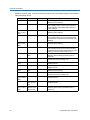
Corresponding IR Switching with IR Illumination at 850nM . . . . . . . . . . . . . . . 4-37
IR Mode Parameters . . . . . . . . . . . . . . . . . . . . . . . . . . . . . . . . . . . . . . . . . . . . 4-37
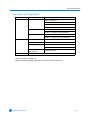
AGC and Open Shutter relationship . . . . . . . . . . . . . . . . . . . . . . . . . . . . . . . . . 4-42
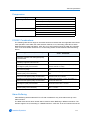
Technical Specifications . . . . . . . . . . . . . . . . . . . . . . . . . . . . . . . . . . . . . . . . . . . 9-1
Camera Specifications . . . . . . . . . . . . . . . . . . . . . . . . . . . . . . . . . . . . . . . . . . . . 9-2
Video Codec Combinations . . . . . . . . . . . . . . . . . . . . . . . . . . . . . . . . . . . . . . . . 9-3
Alarm Buffering . . . . . . . . . . . . . . . . . . . . . . . . . . . . . . . . . . . . . . . . . . . . . . . . . . 9-4
Certification and Regulations . . . . . . . . . . . . . . . . . . . . . . . . . . . . . . . . . . . . . . . 9-5
User Account Privileges . . . . . . . . . . . . . . . . . . . . . . . . . . . . . . . . . . . . . . . . . . 10-1
xiii
Introduction
Overview
The VideoEdge® IP SpeedDome Camera (hereafter referred to as IP Dome) operates across an IP
network, e.g. the Internet, a LAN or WAN. The video output from the camera is compressed and
sent across the network using IP transport mechanisms. PTZ camera control outputs from IPconnected controllers will be passed to the dome control electronics, allowing complete
functionality as existing domes at a remote location connected by any kind of IP network.
A built-in web server provides web pages to configure the domes and streams the video using a
customer-selected set of protocols with a standardized transport stream. This will also support
other metadata and audio as required. Emails and movie clips (avi) may be sent across the
network in response to alarms. The IP Dome can operate as a stand alone camera on a network
however it is intended to be integrated into sophisticated security solutions.
The IP Dome is available in four models:
• 35X PAL
• 35X NTSC
• 22X PAL
• 22X NTSC
The IP Dome can be used with a proprietary Network Video Recording device, for example the
VideoEdge® NVR or Intellex IP.
The maximum number of streams currently supported is four. When using Intellex Direct Protocol
(IDP) a maximum of two streams are supported, running ACC from the WebGUI or ACC from an
network video recording device. When using Real Time Streaming Protocol (RTSP) a maximum of
two streams are supported running MJPEG and MPEG4 or H.264.
1-1
Introduction
Features
The following provides information on the features of the IP Dome.
ACC compression
Three quality levels (Super, Normal, and Extended Record) are available on the camera.
Two sensitivity levels (Normal and High) are available on the camera.
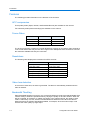
Frame Rates
CIF
NTSC
PAL
4CIF
30 IPS
25 IPS
2CIF
30 IPS
25 IPS
1CIF
30 IPS
25 IPS
Table 1-1 — Frame Rates
The IP Dome supports a maximum or 30/25 (NTSC/PAL) images per second per video channel at
4 CIF. Actual frame rates may be less due to high motion. Multiple Ethernet connections can limit
the maximum available IPS rate per connection.
Resolutions
The following table displays the resolutions for NTSC and PAL
NTSC
PAL
QVGA (320 x 240)
QVGA (320 x 240)
1 CIF (352 x 240)
1 CIF (352 x 288)
HVGA (640 x 240)
HVGA (640 x 240)
2CIF (704 x 240)
2CIF (704 x 288)
VGA (640 x 480)
VGA (640 x 480)
4CIF (704 x 480)
4CIF (704 x 576)
Table 1-2 — Resolutions
Video loss detection
In the event of video loss, an alarm is generated. The alarm is automatically cleared when the
video is restored.
Bandwidth Throttling
When bandwidth throttling is turned on, the camera will attempt to restrict the total bandwidth of all
camera activity to within the specified limits by varying the quality of all video streams. When the
limit is exceeded, for example, by sudden movement in the captured image, the quality of each
codec is reduced by one unit, until the total bandwidth lies below the limit. When the camera
detects that there is sufficient bandwidth available, for example, when the motion stops, it will
increase the video quality by single steps.
1-2
Configuration and User Guide
Introduction
This may continue until the total bandwidth reaches 85% of the upper limit, in order to prevent
instability due to continuous throttling. The video quality cannot be increased beyond the original
user configured quality.
The throttling is not carried out on any MJPEG codec if it is only being used for the alarm buffer,
since this is not being streamed over the network.
When bandwidth throttling is turned off, all affected codecs' quality is restored to the original
configured value.
Web Configuration
The IP Dome’s web configuration feature allows you to access the configuration and setting details
for the camera. Depending on user access you can view Live video and control the camera
through PTZ controls as well as changing the settings for the camera environment.
1-3
Introduction
1-4
Configuration and User Guide
Installation
Detailed installation instructions can be found in the printed Quick Start Guide provided with the IP
Dome.
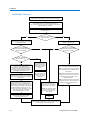
The installation process is documented using a flowchart in the Quick Installation Guide provided
with the IP Dome and is also found in this manual as the Installation Process.
For detailed installation instructions refer to Install and Detect the IP Dome.
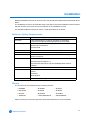
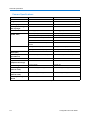
Minimum System Requirements
Component
Minimum Requirement
Processor
1 GHz Intel Pentium 4 or Celeron processor or equivalent
processor that supports streaming SIMD extensions (SSE)
Operating System
Windows XP Home
Windows XP Professional
Microsoft Vista
RAM
512MB
Monitor
800 × 600 resolution and capable of displaying 16-bit color
Video Card
AGP or PCI Express X8 graphics card with 64MB memory and
DirectX 8.0 support
Browser
Microsoft Internet Explorer 6.x
Microsoft Internet Explorer 7.x
Microsoft Internet Explorer 8 (IE7Compatibility Mode must be
enabled)
Network Card
Ethernet 10/100 NIC
Add-ons
QuickTime
ActiveX
JavaScript
Adobe Reader
Miscellaneous
Mouse or other pointing device.
Mounts
The IP Dome can be installed using the following mounts:
• ROENDC
• RHIUIBM
• RHOPN
• RHIU2X2P
• RHIUCM
• RHOSW
• RHOLW
• RHOWCA
• RHOWPA
• ADSDICM
• ADVESDHRDCLG
• ADVESDBASE
Please contact your American Dynamics Sales Representative for more information.
2-1
Installation
Installation Process
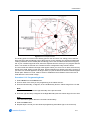
Remove the camera and make note of the serial number and MAC
address located on the side of the box or base of the camera.
Ensure that the IP Dome is connected to the computer or network
which will be used for the configuration and power on.
The camera will begin its initial boot up sequence which will take
approximately 1 to 2 minutes.
The IP Dome will perform three attempts to obtain an IP Address from
the DHCP Server.
DHCP Server found and IP
Address allocated?
YES
NO
The camera will automatically be assigned
a Network IP address.
The IP Dome will be assigned a Static IP
address of 192.168.0.80
Are you using a proprietary
Network Video Recorder (NVR) to
configure the IP Dome?
YES
Are you using a proprietary
Network Video Recorder (NVR) to
configure the IP Dome?
YES
NO
Do you have access to the
DHCP Server Logs?
NO
Using a computer which is connected to the
Internet, go to the Apple website
(www.apple.com) and download the Bonjour
for Windows discovery tool from http://
www.apple.com/downloads/macosx/apple/
windows/bonjourforwindows.html.
Follow the directions provided by the
installation file to install Bonjour for Windows
on the computer that will be used to configure
the IP Dome.
Open Microsoft Internet Explorer. To open the
Bonjour toolbar click on the Bonjour icon.
Alternatively you may also enable Bonjour by
selecting View > Explorer Bar > Bonjour. The
Bonjour toolbar will be displayed. The Bonjour
toolbar will list all IP devices found on the
network. The IP Dome is identified as ‘Product
Code - MAC Address’, for example
‘ADVEIPSD22N-00:30:46:01:05:AA'
Double click the required IP Dome from
Bonjour toolbar list to open the Web
Configuration Sign In page.
NO
YES
View the DHCP Server
system logs and make
note of the IP address
assigned to the IP
Dome.
Open Microsoft Internet Explorer and enter the
URL of the IP Dome as https://192.168.0.80
NOTE: The computer being used to configure
the IP Dome must have an IP address on the
same subnet.
Open Microsoft Internet
Explorer and enter the
URL of the IP Dome as
shown in the DHCP
Server logs.
NOTE: Bonjour can also be used to discover
the IP Dome on a static network. Refer to the
Configuration and User guide for more
detailed information.
Refer to the NVR manual for
information on how to locate
the IP Dome on the network.
NOTE: We recommend that the the cameras
IP Address is changed so that conflicts can be
avoided when using the same Static IP
Address.
NOTE: The NVR being used to
configure the IP Dome must
have an IP address on the
same subnet.
Select the IP
Dome.
Refer to the Web Configuration chapter in the Configuration
and User guide for details on how to log in to the IP Dome
and modify the IP Dome configuration.
2-2
Configuration and User Guide
Installation
Install and Detect the IP Dome
The following provides detailed information for installing and accessing the IP Dome.
Installation using DHCP and Bonjour for Windows
The following provides information for installing the IP Dome on your network using the Zeroconf
service discovery protocol and Apple Inc.'s application discovery tool, called Bonjour.
Bonjour, enables automatic discovery of devices on IP networks and is the recommended method
for installation and detection of the IP Dome on the network.
Note
A known limitation of Bonjour for Windows is that it is not always able to maintain an up-to-date list
of IP devices. If Bonjour fails to connect to an IP Dome after the IP Address has been changed,
please restart Microsoft Internet Explorer and re-select the IP Dome in the Bonjour toolbar.
Procedure 2-1 Installing the IP Dome using Bonjour for Windows
1 Using the Quick Start Guide install and connect the IP Dome to the computer or network which
will be used for the configuration and power on.
The camera will begin its initial boot up sequence which will take approximately 1 to 2 minutes.
2 When using a DHCP Server the IP Dome will automatically be assigned a Network IP Address.
3 Using a computer which is connected to the Internet, go to the Apple website (www.apple.com)
and download the Bonjour for Windows discovery tool from
http://www.apple.com/downloads/macosx/apple/windows/bonjourforwindows.html.
4 Follow the directions provided by the installation file to install Bonjour for Windows on the
computer that will be used to configure the IP Dome.
5 When the installation is complete, open Microsoft Internet Explorer. To open the Bonjour
toolbar click on the Bonjour icon. Alternatively you may also enable Bonjour by selecting View >
Explorer Bar > Bonjour.
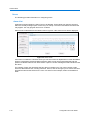
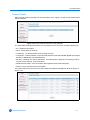
6 The Bonjour toolbar will list all IP devices found on the network. The IP Dome is identified as
‘Product Code - MAC Address’ for example ‘ADVEIPSD22N-00:30:46:01:05:AA’, this can be
seen in Figure 2-1 Bonjour displaying IP devices found on the network. Double click the
required IP Dome from this list to open the Web Configuration pages.
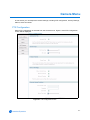
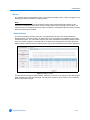
Figure 2-1 Bonjour displaying IP devices found on the network
7 Refer to the Web Configuration chapter for details on how to log in to the IP Dome and modify
the configuration.
2-3
Installation
Procedure 2-2 Installing the IP Dome using DHCP Server Logs
1 Using the Quick Start Guide install and connect the IP Dome to the computer or network which
will be used for the configuration and power on.
The camera will begin its initial boot up sequence which will take approximately 1 to 2 minutes.
2 When using a DHCP Server the IP Dome will automatically be assigned a Network IP Address.
3 View the DHCP Server system logs and make note of the IP address assigned to the IP Dome.
4 Open Microsoft Internet Explorer and enter the URL of the IP Dome as shown in the DHCP
Server log.
Note
The computer being used to configure the IP Dome must have an IP address on the same
subnet.
5 Refer to the Web Configuration chapter for details on how to log in to the IP Dome and modify
the configuration.
Installation without a DCHP Server using a Static IP Address
The following provides information for installing the IP Dome on your network when no DHCP
Server is available. In this situation the IP Dome will be assigned a Static IP Address.
Note
We recommend that once you are logged into the Web Configuration pages you change the Static
IP Address of the camera so that conflicts can be avoided when using the same Static IP Address
to setup additional cameras. Refer to IP Address Configuration for information on changing the IP
address of the IP Dome.
Procedure 2-3 Installing the IP Dome when a DHCP Server is not available
1 Using the Quick Start Guide install and connect the IP Dome to the computer or network which
will be used for the configuration and power on.
The camera will begin its initial boot up sequence which will take approximately 1 to 2 minutes.
2 The IP Dome will attempt to obtain an IP Address from the DHCP Server. When no DHCP
Server is available the IP Dome will be assigned a Static IP address of 192.168.0.80.
3 Open Microsoft Internet Explorer and enter the URL of the IP Dome as https://192.168.0.80
Note
The computer being used to configure the IP Dome must have an IP address on the same
subnet.
Note
Bonjour for Windows can also be used to discover the IP Dome when using a Static IP
Address. Refer to Procedure 2-1 Installing the IP Dome using Bonjour for Windows and begin
at Step 3.
4 Refer to the Web Configuration chapter for details on how to log in to the IP Dome and modify
the configuration.
2-4
Configuration and User Guide
Installation
ActiveX Installation
When using Internet Explorer to access the IP Dome the browser may need to download and
install selected ActixeX plug-ins.
The web browser uses the following ActiveX controls:
• Sensormatic Electronics Corporation - to display live video and enable privacy zones.
• Apple Quick Time - to enable audio.
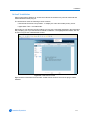
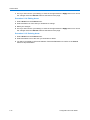
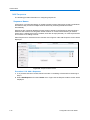
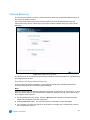
Depending on your browser security settings you may see a message displayed in the information
bar prompting you to proceed with an automatic installation. The highlighted information bar can
be seen in Figure 2-2 Install ActiveX Control.
Figure 2-2 Install ActiveX Control
Right-click the information bar and select “Install ActiveX Control” the ActiveX plug-in will be
installed.
2-5
Installation
2-6
Configuration and User Guide
Web Configuration
This section details how to configure the IP Dome using the built-in Web Configuration feature.
Depending on user access you can view Live video and control the camera through PTZ controls
as well as changing the settings for the camera environment.
Some items supplement similar features that may be available through your controller.
Note
To view the Live Web Video pane the latest versions of JavaScript, ActiveX and QuickTime must
be installed and enabled on the computer running the browser session.
Note
Adobe Reader must be installed to view the online help.
Note
Web Configuration sessions timeout after a period of inactivity.
Note
Only users with administrative rights can access all the areas of the Web Configuration pages.
3-1
Web Configuration
Log in to the IP Dome
Procedure 3-4 Logging in to the IP Dome
1 Refer to the Installation chapter for details on how to connect to the IP Dome on your network
or computer.
2 When the IP Dome is selected Figure 3-1 the IP Dome Sign In page will be displayed.
Figure 3-1 Sign in page
3 Select your preferred language from the drop-down menu in the right hand corner. The sign in
page will be updated to display the selected language.
4 Enter the appropriate user name and password, then select the Log in button.
Depending on the access rights of the user, there may be specific camera functions that are
unavailable. All camera functions are described on the following pages.
Note
The default username is admin and the default password is admin. To maintain security we
recommend that the password on the admin account is changed, refer to Procedure 7-60
Changing an existing password for further information.
User Accounts
There are three types of user account that can be used to access the camera functions these are
administrator, recorder and user.
• Refer to Procedure 6-36 Add a User for information on creating user accounts.
• Refer to Appendix 10: User Account Privileges which provides an overview of user accounts.
Note
The default user accounts for ‘admin’ and ‘recorder’ cannot be deleted. To maintain security we
recommend that the password on these accounts are changed, refer to Procedure 7-60 Changing
an existing password for further information.
3-2
Configuration and User Guide
Web Configuration
Administrator
When an Administrator has logged in Figure 3-2 the Live Viewing screen will be displayed. An
‘admin’ account has full access to all of the cameras functions and information. The default
Figure 3-2 Live Viewing Screen
The options available to the Administrator are:
• Live Viewing - allows access to live video and camera controls. It also allows the
configuration of video, presets, patterns, scans/sequences, privacy zones, audio and camera
settings.
• Camera - allows configuration of the PTZ functionality, overlay settings, areas within the field
of view, alarms, sequences, scheduled tasks, video settings and further audio.
• Networking - allows configuration of camera date and time, TCP/IP, user rights, SMTP, FTP,
firewall, general maintenance and advanced settings.
• Information - provides information on the camera model, PTZ statistics, environmental
readings, system log, boot log, current faults and provides a password changing function.
• Help - opens a window with help information.
• Logoff - exit the application.
3-3
Web Configuration
Recorder
When a Recorder user has logged inFigure 3-3 the Live Viewing screen will be displayed. A
‘recorder’ account has limited access to the camera functions and information.
Figure 3-3 Live Viewing Logged in as Recorder
The options available to the Recorder are:
• Live Viewing - allows access to live video and camera controls. It also allows the
configuration of video, presets, patterns, scans/sequences, privacy zones, audio and camera
settings.
• Camera - allows configuration of the PTZ functionality and sequences.
• Information - provides information on the camera model, PTZ statistics, environmental
readings, current faults and provides a password changing function.
• Help - opens a window with help information.
• Logoff - exit the application.
3-4
Configuration and User Guide
Web Configuration
User
When a User user has logged in Figure 3-4 the Live Viewing screen will be displayed. A ‘user’
account has limited access to the camera functions and information.
Figure 3-4 Live Viewing Logged in as User
The options available to the user are:
• Live Viewing - allows access to live video and camera controls. Also allows the selection of
presets, patterns, scans/sequences, audio and privacy zones.
• Information - provides data on the camera model and provides a password changing
function.
• Help - opens a window with help information.
• Logoff - exit the application.
3-5
Web Configuration
Checking Camera Feed using the Live Viewing function
The Live Viewing page provides a simple way to test the video inputs from the IP Dome. This Live
Viewing page is not intended to be the primary way of viewing the video on the IP Dome; this
should be performed using the Network Video Recording device.
The Live Web Video is accessible to any authorized user.
Procedure 3-5 Starting the Live Web Video feed
Note
To view the Live Web Video pane the latest versions of JavaScript, Active X and QuickTime must
be installed and enabled on the computer running the browser session.
1 Log in to the IP Dome using an appropriate user name and password, for more details refer to
Procedure 3-4 Logging in to the IP Dome. Figure 3-2 the Live Viewing page is displayed.
2 Select the Live Web Video Start and Stop button, located to start and stop the live video feed.
The live web Video pane will display the video feed.
Note
Displaying live video may affect other video streams.
Procedure 3-6 Checking camera feed using the Live Viewing function
Note
Changing the Quality, Sensitivity, Resolution or Volume settings only affects what is being
displayed on the Live Viewing page. Changing these settings does not affect the video being sent
by the IP Dome to the Network Video Recording device.
Note
When Apply is selected it may take a few seconds to update the Live Web Video feed.
1 Log in to the IP Dome using an appropriate user name and password, refer to Procedure 3-4
Logging in to the IP Dome. Figure 3-2 the Live Viewing page is displayed.
2 Follow Procedure 3-5 Starting the Live Web Video feed.
3 Select the Quality setting from the drop-down menu and select the Apply button.
• Extended
• Normal
• Super
The default Quality is set to Normal.
4 Select the Sensitivity from the drop-down menu and select the Apply button.
• Normal
• High
The default Sensitivity is set to Normal.
5 Select the Resolution from the drop-down menu and select the Apply button.
• 1CIF (320)
• 1CIF (352)
• 2CIF (640)
3-6
Configuration and User Guide
Web Configuration
• 2CIF (704)
• 4CIF (640)
• 4CIF (704)
The default Resolution is set to 2CIF (640).
6 To adjust the volume use the slider, or the mute button. The slider bar can be moved left or right
using the mouse or for fine adjustments using the left and right arrow keys on the PC keyboard.
The default volume is set to 50 and the mute button will be enabled.
7 Select a different tab to exit the screen, or Logoff to exit the application.
Controlling dome cameras on the Live Viewing page
The IP Dome camera may be controlled using the on-screen controls in the live web Video pane.
Dome Camera Controls
The following information details the various controls that are available for the on-screen dome
control.
Note
It is possible for two users to access Live Viewing at the same time however only one user may
control the camera at any time. If a new user opens a camera control session on the same camera
using a different browser the original user will lose their camera control session.
The dome control symbol
appears in the lower right hand corner.
3-7
Web Configuration
Procedure 3-7 Controlling the camera via the Live Web Video pane
Note
Scheduled tasks, alarms and manual dome camera control will always begin when they are
selected or scheduled to start. None of these camera actions have a priority over the other. If a
camera action is in progress and a new action is selected or activated the previous action will stop
before the new action is started.
1 Follow Procedure 3-5 Starting the Live Web Video feed.
2 Select Dome Control
in the Live Web Video pane.
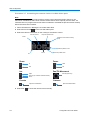
3 Select the camera control item on the overlay to activate the control.
Pan/Tilt control
Flips the camera 180°
Zoom
Close the dome control overlay
(Exit)
Opens the pattern menu
Iris
Focus
Opens the preset menu
.
Zoom
Focus
In
Near
Out
Far
Iris
Pan/Tilt Movement
Open
Auto Iris (on cameras with this feature)
Close
Presets
Patterns
Open the Preset Menu
4 Select Exit
3-8
Pan/Tilt (outer rim)
Open the Pattern Menu
to close the camera control overlay.
Configuration and User Guide
Web Configuration
Controlling the Pan-Tilt Control via Mouse
Controlling the camera using the mouse will allow you to move slowly which will provide maximum
accuracy.
Procedure 3-8 Controlling Pan and Tilt via a mouse using the Live Web Video pane
1 Follow Procedure 3-5 Starting the Live Web Video feed.
2 Select Dome Control
displayed.
in the live web Video pane. The camera control overlay will be
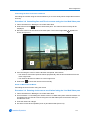
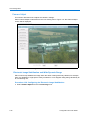
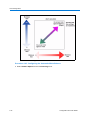
3 Move the cursor over the center of the video pane. The Cursor Origin Mark
shown in Figure 3-5.
appears as
Figure 3-5 Live image with Cursor Origin Mark and Direction cursor displayed
4 Click and drag the cursor to set the direction and speed, then release.
• The camera’s movement speed increases proportionally with the arrow’s distance from the
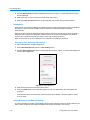
cursor origin mark.
• The camera’s direction is relative to cursor origin mark.
5 Select Exit
to close the camera control overlay.
Zoom via Mouse Scroll Wheel
Controlling the zoom function using the mouse
Procedure 3-9 Zooming via the mouse scroll wheel using the Live Web Video pane
1 Follow Procedure 3-5 Starting the Live Web Video feed.
2 Use Procedure 3-7 Controlling the camera via the Live Web Video pane or/and Procedure 3-8
Controlling Pan and Tilt via a mouse using the Live Web Video pane to locate the area you
would like to zoom.
3 Point the camera at a target.
4 Scroll the mouse wheel upwards (zoom in) and downwards (zoom out).
3-9
Web Configuration
5 Select Exit
to close the camera control overlay.
Procedure 3-10 Selecting a Pattern via the Camera Control Overlay
Note
It is also possible to select a pattern using the Pattern menu, refer to Procedure 4-21 Selecting a
Pattern for more information.
1 Follow Procedure 3-5 Starting the Live Web Video feed.
2 Select Dome Control
displayed.
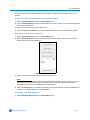
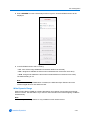
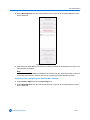
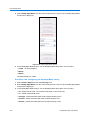
3 Select Pattern
will be displayed:
in the Live Web Video pane. The camera control overlay will be
in the camera control overlay to open the pattern menu. The pattern menu
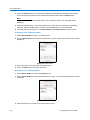
4 Select a pattern number from the drop-down menu.
5 Select
to run the pattern.
The pattern will run continuously until interrupted by a camera command, pattern, scan or
alarm.
6 Select Exit
to close the pattern menu.
7 Select Exit
to close the camera control overlay.
Procedure 3-11 Add a Pattern via the Camera Control Overlay
Note
For best results we recommend that you use the Pattern menu to define a new pattern, refer to
Procedure 4-20 Adding a Pattern for more information.
1 Follow Procedure 3-5 Starting the Live Web Video feed.
2 Select Dome Control
displayed.
in the Live Web Video pane. The camera control overlay will be
Click the dome icon, use the camera overlay controls to locate the pattern starting point. See
Procedure 3-7 Controlling the camera via the Live Web Video pane and Procedure 3-8
Controlling Pan and Tilt via a mouse using the Live Web Video pane for further details.
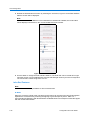
3 Select Pattern
in the camera control overlay to open the pattern menu. The pattern menu
will be displayed:
3-10
Configuration and User Guide
Web Configuration
4 Select a pattern slot number from the drop-down menu, the new pattern will be saved to this
slot number. Select Define Pattern
the pattern definition menu will be displayed:
Note
If the selected pattern slot number has been assigned to a pattern it will be replaced without
warning. This also applies to any pattern that is associated with a Home Position, Alarm Action
or Scheduled task. The original pattern will be replaced by the new pattern.
Note
The apple peel pattern as a default will be saved to pattern slot numbers 1 and 16. If these
pattern slot numbers are selected when defining a pattern the apple peel pattern will be
replaced by the new pattern. To restore the apple peel pattern you must follow Procedure 6-49
Restore Factory Defaults.
5 Select Start
to begin programming the pattern. Use the camera control overlay to define
the pattern’s behavior.
Note
A pattern can contain a maximum of 97 steps with an unlimited duration.
Note
A diagonal pan or tilt move will use 4 steps.
6 The white progress bar provides a visual representation of the number of steps remaining in
the pattern. As steps are added to the pattern this progress bar will decrease.
When the progress bar reaches the left side, no more steps will be saved for the pattern.
7 Select Stop
. to end the pattern recording. The Replace Pattern dialog will appear prompting
you to confirm that the pattern should be saved. Select Yes to save or No to cancel.
The camera settings you have configured will be used for the pattern. Refresh the page.
8 Select Exit
to close the pattern’s definition menu.
9 To test the new pattern, select the pattern number from the drop-down menu and select
.
The pattern will run continuously until interrupted by a camera command, pattern, scan or
alarm.
10 Select Exit
to close the Pattern menu.
11 Select Exit
to close the Primary Camera Control menu.
Procedure 3-12 Selecting a Preset via the Camera Control Overlay
Note
It is also possible to select a preset using the Preset menu, refer to Procedure 4-16 Selecting a
Preset for more information.
1 Follow Procedure 3-5 Starting the Live Web Video feed.
3-11
Web Configuration
2 Select Dome Control
displayed.
in the Live Web Video pane. The camera control overlay will be
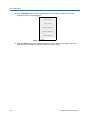
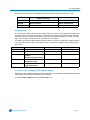
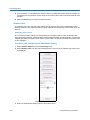
3 Select Preset
in the camera control overlay to open the preset menu. The preset menu
will be displayed:
4 Select a preset slot number from the drop-down menu.
5 Select
to run the preset.
The preset will run continuously until interrupted by a camera command, pattern, scan or alarm.
6 Select Exit
to close the preset menu.
7 Select Exit
to close the camera control overlay.
Procedure 3-13 Defining a Preset via the Camera Control Overlay
Note
For best results we recommend that you use the Preset menu to add a new preset, refer to
Procedure 4-15 Adding a Preset for more information.
1 Follow Procedure 3-5 Starting the Live Web Video feed.
2 Select Dome Control
displayed.
in the Live Web Video pane. The camera control overlay will be
Click the dome icon, use the camera overlay controls to locate the preset scene. See
Procedure 3-7 Controlling the camera via the Live Web Video pane and Procedure 3-8
Controlling Pan and Tilt via a mouse using the Live Web Video pane for further details.
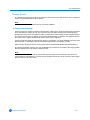
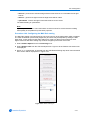
3 Select
in the camera control overlay to open the preset menu. The preset menu will be
displayed:
4 Select a preset slot number from the drop-down menu, the new preset will be saved to this slot
number.
Note
If the selected preset slot number has been assigned to a preset it will be replaced without
warning. This also applies to any preset that is associated with a Sequence, Home Position,
Alarm Action or Scheduled task. The original preset will be replaced by the new preset.
5 Select Define Preset
the Replace Preset dialog will appear prompting you to confirm that
the preset should be saved. Select Yes to save or No to cancel.
The camera settings you have configured on the camera will be used for the preset. Refresh
the page.
6 To test the new preset, select the preset number from the drop-down menu and select
.
The preset will run continuously until interrupted by a camera command, pattern, scan or alarm.
3-12
7 Select
to close the preset menu.
8 Select
to close the camera control overlay.
Configuration and User Guide
Live Viewing Menu
Video
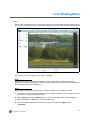
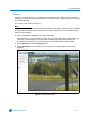
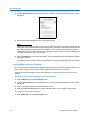
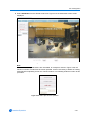
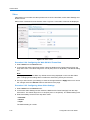
When Video is selected from the Live Viewing menu and Live Web Video has been started, (refer
to Procedure 3-5 Starting the Live Web Video feed) Figure 4-6 the Video screen will be displayed.
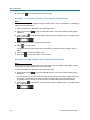
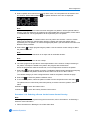
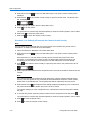
Figure 4-6 Video screen
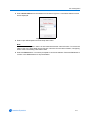
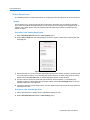
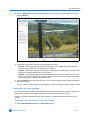
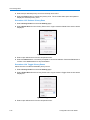
Procedure 4-14 Configuring the Video settings
Note
Changing the Quality, Sensitivity, Resolution or Volume settings only affects what is being
displayed on the Live Viewing page. Changing these settings does not affect the video being sent
by the Network Video Recording device.
Note
When Apply is selected it may take a few seconds to update the Live Web Video feed.
1 Log in to the IP Dome using an appropriate user name and password, for more details refer to
Procedure 3-4 Logging in to the IP Dome.
2 Select Video from the Live Viewing menu. Figure 4-6 the Video screen will be displayed.
3 Follow Procedure 3-5 Starting the Live Web Video feed.
4 Select the Quality setting from the drop-down menu and select the Apply button.
• Extended
4-1
Live Viewing Menu
• Normal
• Super
The default Quality is set to Normal.
5 Select the Sensitivity from the drop-down menu and select the Apply button.
• Normal
• High
The default Sensitivity is set to Normal.
6 Select the Resolution from the drop-down menu and select the Apply button.
When using PAL, the resolution options are:
• QVGA (320 x 240)
• 1 CIF (352 x 288)
• HVGA (640 x 240)
• 2CIF (704 x 288)
• VGA (640 x 480)
• 4CIF (704 x 576)
The default PAL resolution is set to 2CIF (704 x 288).
When using NTSC, the resolution options are:
• QVGA (320 x 240)
• 1 CIF (352 x 240)
• HVGA (640 x 240)
• 2CIF (704 x 240)
• VGA (640 x 480)
• 4CIF (704 x 480)
The default NTSC resolution is set to 2CIF (704 x 240).
7 To adjust the volume use the slider, or the mute button. The slider bar can be moved left or right
using the mouse or for fine adjustments using the left and right arrow keys on the PC keyboard.
The default volume is set to 50 and the mute button will be enabled.
8 Select a different tab to exit the screen, or Logoff to exit the application.
4-2
Configuration and User Guide
Live Viewing Menu
Presets
A Preset is a pre-positioned camera scene that you program for cameras installed with pan/tilt and
motorized lens capability. Up to 96 presets can be programmed from the Live Viewing screen.
Procedure 4-15 Adding a Preset
Note
This procedure is the recommended method for adding a new preset, however It is also possible
to add a preset using the camera overlay control, refer to Procedure 3-13 Defining a Preset via the
Camera Control Overlay.
1 Follow Procedure 3-5 Starting the Live Web Video feed.
2 Make the necessary camera adjustments.
The following controls can be modified and saved as part of the preset. The pan, tilt and zoom
can be accessed using Procedure 3-7 Controlling the camera via the Live Web Video pane.
The remaining controls can be accessed via the Camera Adjust menu.
• Pan, Tilt and Zoom.
• Focus Mode and Iris Mode
Note
Additional controls can also be saved as part of the preset. Complete this procedure then refer
to Procedure 4-17 Editing a Preset to add the additional controls.
3 Select Presets from the Live Viewing menu.
4-3
Live Viewing Menu
4 Select Add Preset from the Presets menu. Figure 4-7 the add Preset screen will be displayed.
Figure 4-7 Add Preset screen
5 Enter the Preset Name in the text box.
6 Select a Preset Slot Number from the drop-down menu.
A free preset slot number will have the slot number displayed, for example, ‘12)’. If the slot
number has been pre-defined, the slot number and preset name will be displayed, for example,
‘10) Main Entrance’.
If you select a preset slot number that has been pre-defined will be prompted to overwrite the
existing preset. Select OK to continue or Cancel to select an alternative preset slot number.
7 Select the Add button. The camera settings you have configured on the camera will be used
for the preset.
The preset will now appear on the Select Preset and Delete Preset drop-down menus.
Procedure 4-16 Selecting a Preset
Note
It is also possible to select a preset using the camera overlay control, refer to Procedure 3-12
Selecting a Preset via the Camera Control Overlay.
1 Follow Procedure 3-5 Starting the Live Web Video feed.
2 Select Presets from the Live Viewing menu.
4-4
Configuration and User Guide
Live Viewing Menu
3 Choose Select Preset from the Presets menu. Figure 4-8 the Select Preset section will be
displayed.
Figure 4-8 Select Preset
4 Select the pre-defined preset from the drop-down menu.
5 Select the Goto button to activate the preset. The Live Web Video pane will update to display
the selected preset.
The preset will run continuously until interrupted by a camera command, pattern, scan or alarm.
Procedure 4-17 Editing a Preset
1 Select Presets from the Live Viewing menu.
2 Choose Select Preset from the Presets menu. Figure 4-8 the Select Preset section will be
displayed.
3 Select a pre-defined preset from the drop-down menu. Select the Goto button to activate the
preset.
4 Make the necessary camera adjustments.
The following controls can be modified and saved as part of the preset. The pan, tilt and zoom
can be accessed using Procedure 3-7 Controlling the camera via the Live Web Video pane.
The remaining controls can be accessed via the Camera Adjust menu.
• Pan, Tilt and Zoom
• Focus Mode and Iris Mode
• Electronic Image Stabilization and Wide Dynamic Range
• White Balance
• Infrared Mode and Day Night Mode
• Shutter Limit and Gain
• Brightness, Contrast, Hue and Saturation
Select Presets from the Live Viewing menu when you have finished the camera adjustments.
5 Select the Set button when you have finished any modifications. You will be prompted to
confirm the update.Select the OK button to confirm or the Cancel button to stop the update.
The camera settings you have configured on the camera will be used for the preset.
4-5
Live Viewing Menu
Using Preset as Home Position
The home position runs after a designated period of dome inactivity. Select a home position if you
want to keep a specific area under surveillance whenever the dome is not moving.
Follow Procedure 5-6 Display Current Home Position to change the return time for the home
position.
Procedure 4-18 Using a Preset as a Home Position
1 Select Presets from the Live Viewing menu.
2 Choose Select Preset from the Presets menu. Figure 4-8 the Select Preset section will be
displayed.
3 Select a pre-defined preset from the drop-down menu.
4 Select the Use as Home button to set the selected preset as the camera home position.
Procedure 4-19 Delete a Preset
1 Select Presets from the Live Viewing menu.
2 Select Delete Preset from the Presets menu. Figure 4-8 the Delete Preset section will be
displayed.
Figure 4-9 Delete Preset
3 Select a pre-defined preset from the drop-down menu.
Note
You cannot delete a preset while it is associated with another camera function. To remove the
preset refer to the associated camera function, Editing a Sequence, Clear the Current Home
Position, Configuring Alarm Actions and Editing a Scheduled Task.
4 Select the Delete button. You will be prompted to confirm the deletion. Select the OK button to
confirm or the Cancel button to stop the deletion.
4-6
Configuration and User Guide
Live Viewing Menu
Patterns
A pattern is a series of pan, tilt, zoom and focus movements which can be saved to the dome. A
maximum of 16 patterns can be programmed for the IP Dome each containing up to 97 steps with
an unlimited duration.
Procedure 4-20 Adding a Pattern
Note
This procedure is the recommended method for adding a new pattern, however It is also possible
to add a pattern using the camera overlay control, refer to Procedure 3-11 Add a Pattern via the
Camera Control Overlay.
1 Follow Procedure 3-5 Starting the Live Web Video feed.
Click the dome icon, use the camera overlay controls to locate the pattern starting point. See
Procedure 3-7 Controlling the camera via the Live Web Video pane and Procedure 3-8
Controlling Pan and Tilt via a mouse using the Live Web Video pane for further details.
2 Select Patterns from the Live Viewing menu.
3 Select Add Pattern from the Patterns menu. Figure 4-10 the Add Pattern screen will be
displayed.
Figure 4-10 Add Pattern screen
4-7
Live Viewing Menu
4 Enter the Pattern Name in the text box and select the Define button. The Add Pattern section
will update with an Add and Cancel button. See Figure 4-11.
Figure 4-11 Add Pattern with active Add and Cancel button
Use the camera overlay controls to configure the required pattern settings. See Procedure 3-7
Controlling the camera via the Live Web Video pane and Procedure 3-8 Controlling Pan and
Tilt via a mouse using the Live Web Video pane for further details.
Note
A pattern can contain a maximum of 97 steps with an unlimited duration.
Note
A diagonal pan or tilt move will use 4 steps.
The following controls can also be modified and saved as part of the pattern. These can be
accessed via the Camera Adjust menu.
• Focus Mode
• Iris Mode
4-8
Configuration and User Guide
Live Viewing Menu
5 The white progress bar provides a visual representation of the number of steps remaining in
the pattern, this can be seen in Figure 4-12 Add Pattern with progress bar displayed. As steps
are added to the pattern this progress bar will decrease.
Figure 4-12 Add Pattern with progress bar displayed
When the progress bar reaches the left side, no more steps will be saved for the pattern.
6 Select the Add button when you have finished. The camera settings you have configured will
be used for the pattern. Select the Cancel button to cancel the configuration.
The pattern will now appear on the Select Pattern and Delete Pattern drop-down menus.
Procedure 4-21 Selecting a Pattern
Note
It is also possible to select a pattern using the camera overlay control, refer to Procedure 3-10
Selecting a Pattern via the Camera Control Overlay.
1 Select Patterns from the Live Viewing menu.
4-9
Live Viewing Menu
2 Choose Select Pattern from the Patterns menu. Figure 4-8 the Select Pattern section will be
displayed.
Figure 4-13 Select Pattern
3 Select the pre-defined pattern from the drop-down menu.
Note
Apple Peel is a predefined pattern stored on the camera by default. This pattern slowly tilts and
rotates the camera through 360 degrees starting at the ceiling line. When the IP Dome reaches
the lowest tilt point it will perform three revolutions. The IP Dome will then follow the tilt and
rotate pattern to return to the starting point. The pattern will run continuously until interrupted by
a camera command, preset, scan or alarm.
4 Select the Start button to activate the pattern. The Live Web Video pane will update to display
the selected pattern.
The pattern will run continuously until interrupted by a camera command, preset, scan or alarm.
Using Pattern as Home Position
The home position runs after a designated period of dome inactivity. Select a home position if you
want to keep a specific area under surveillance whenever the dome is not moving.
Follow Procedure 5-6 Display Current Home Position to change the return time for the home
position.
Procedure 4-22 Using a Pattern as a Home Position
1 Select Patterns from the Live Viewing menu.
2 Choose Select Pattern from the Patterns menu. Figure 4-8 the Select Pattern section will be
displayed.
3 Select a pre-defined pattern from the drop-down menu.
4 Select the Use as Home button to set the selected pattern as the camera home position.
Procedure 4-23 Delete a Pattern
1 Select Patterns from the Live Viewing menu.
4-10
Configuration and User Guide
Live Viewing Menu
2 Select Delete Pattern from the Patterns menu button. Figure 4-14 the Delete Pattern section
will be displayed.
Figure 4-14 Delete Pattern
3 Select a pre-defined pattern from the drop-down menu.
Note
You cannot delete a pattern while it is associated with another camera function. To remove the
pattern refer to the associated camera function, Clear the Current Home Position, Configuring
Alarm Actions and Editing a Scheduled Task.
4 Select the Delete button. You will be prompted to confirm the deletion. Select the OK button to
confirm or the Cancel button to stop the deletion.
4-11
Live Viewing Menu
Scans/Sequences
The following section provides information on configuring Scans and Sequences for the IP Dome.
Scans
A scan allows you to program left and right scan limits to automate your surveillance activities.
Once these scan limits are programmed you can choose to run a smooth scan, stepped scan, or
random scan. When active, the scan repeats until interrupted by a camera command, preset,
pattern or alarm.
Procedure 4-24 Setting Scan Limits
1 Select Scans/Sequences from the Live Viewing menu.
2 Select Scan Limits from the Scans/Sequences menu. Figure 4-8 the Scan Limits section will
be displayed.
Figure 4-15 Scan Limits section
3 Click the dome icon on the Live Web Video pane and use the camera controls to locate the left
scan limit. See Procedure 3-7 Controlling the camera via the Live Web Video pane for further
details. Select the Set Left button to set the displayed position as the left limit.
4 Use the camera controls to locate the right scan limit. See Procedure 3-7 Controlling the
camera via the Live Web Video pane for further details. Select the Set Right button to set the
displayed position as the right limit.
5 Follow Procedure 4-25 Activating a Scan. The Live Web Video pane will run the scan within the
selected scan limits.
Procedure 4-25 Activating a Scan
1 Follow Procedure 4-24 Setting Scan Limits before starting a scan.
2 Select Scans/Sequences from the Live Viewing menu.
4-12
Configuration and User Guide
Live Viewing Menu
3 Choose Select Scan from the Scans/Sequences menu. Figure 4-16 the Select Scan screen
will be displayed.
Figure 4-16 Select Scan screen
4 Select the type of scan to perform from the drop-down menu:
• smooth - slowly pans between the left and right scan limits, starting at the left scan limit.
When the right scan limit is reached, the scan reverses.
• stepped - pans slowly, pausing briefly every 10° between the left and right scan limits. Once
the right scan limit is reached, the scan reverses.
• random - pans randomly between the left and right scan limits. For example, the scan may
start at 10°, then pan right 40° and pause, pan right 20° and pause, pan left 30° and pause,
and pan right until it reaches the right scan limit.
5 Select the Start button to activate the scan. The Live Web Video pane will update and display
the selected scan.
The scan will run continuously until interrupted by a camera command, pattern, preset or alarm.
Using Scan as Home Position
The home position runs after a designated period of dome inactivity. Select a home position if you
want to keep a specific area under surveillance whenever the dome is not moving.
Follow Procedure 5-6 Display Current Home Position to change the return time for the home
position.
Procedure 4-26 Using a Scan as a Home Position
1 Select Scans/Sequences from the Live Viewing menu.
4-13
Live Viewing Menu
2 Choose Select Scan from the Scans/Sequences menu. Figure 4-16 the Select Scan screen
will be displayed.
3 Select the type of scan to perform from the drop-down menu.
4 Select the Use as Home button to set the selected scan as the camera home position.
Sequences
A Sequence is a sequential display of multiple camera Presets. Sequences provide a methodical
and effective way to monitor multiple areas of interest by switching to different Presets
automatically.
Sequences are created by identifying Preset views to include in the Sequence and specifying a
dwell time that controls how long each Preset remains on-screen before switching to another
Preset. Up to 16 Sequences can be created, each with 16 steps (Presets).
Refer to Procedure 5-18 Add a Sequence for information on adding a sequence.
Procedure 4-27 Selecting a Sequence
1 Follow Procedure 5-18 Add a Sequence.
1 Select Scans/Sequences from the Live Viewing menu.
2 Choose Select Sequence from the Scans/Sequences menu. Figure 4-17 the Select Sequence
section will be displayed.
Figure 4-17 Select Sequence
3 Select the sequence from the drop-down menu.
4 Select the Start button to activate the sequence.The Live Web Video pane will display the
sequence.
The sequence will run continuously until interrupted by a camera command, pattern, preset,
scan or alarm.
Using Sequence as Home Position
The home position runs after a designated period of dome inactivity. Select a home position if you
want to keep a specific area under surveillance whenever the dome is not moving.
4-14
Configuration and User Guide
Live Viewing Menu
Follow Procedure 5-6 Display Current Home Position to change the return time for the home
position.
Procedure 4-28 Using a Sequence as a Home Position
1 Select Scans/Sequences from the Live Viewing menu.
2 Choose Select Sequence from the Scans/Sequences menu. Figure 4-17 the Select Sequence
section will be displayed.
3 Select a sequence from the drop-down menu.
4 Select the Use as Home button to set the selected sequence as the camera home position.
Procedure 4-29 Delete a Sequence
1 Select Scans/Sequences from the Live Viewing menu.
2 Select Delete Sequence from the Scans/Sequences menu button. Figure 4-18 the Delete
Sequence section will be displayed.
Figure 4-18 Delete Sequence
3 Select a pre-defined sequence from the drop-down menu.
Note
You cannot delete a sequence while it is associated with another camera function. To remove
the sequence refer to the associated camera function, Clear the Current Home Position,
Configuring Alarm Actions and Editing a Scheduled Task.
4 Select the Delete button. You will be prompted to confirm the deletion. Select the OK button to
confirm or the Cancel button to stop the deletion.
Procedure 4-30 Add Sequence
1 Select Scans/Sequences from the Live Viewing menu.
4-15
Live Viewing Menu
2 Select Add Sequence from the Scans/Sequences menu button. Figure 4-18 the Add
Sequence section will be displayed.
Figure 4-19 Shortcut to Add Sequence
3 Select the Add button to open the Add Sequence screen. Refer to Procedure 5-18 Add a
Sequence for information on adding a sequence, begin at step 4.
4-16
Configuration and User Guide
Live Viewing Menu
Privacy Zones
The following provides information on configuring Privacy Zones for the IP Dome. Up to 32 privacy
zones can be established for the IP Dome.
Note
Ensure that you have the latest version of ActiveX installed.
Privacy Zone Settings
Privacy Zones are “masked” sections of the dome’s viewing area. These masks prevent operators
of the surveillance system who do not have access to the dome password from viewing these
designated zones. Each zone has four sides, and the zones may overlap to form irregular shapes.
The Privacy Zones move in relation to the dome pan/tilt position. In addition, the apparent size of
the Privacy Zone adjusts automatically as the zoom level is adjusted.
Privacy Zones are useful for high security areas. For example, you might establish a privacy Zone
around a safe’s combination, but still view people approaching or opening the safe.
When Privacy Zones are active, the dome's firmware automatically disables text transparency.
The dome’s firmware prevents you from establishing a zone that is too small or too large (greater
than 90-degrees pan or tilt from the starting point).
Note
Areas of the Privacy Zone may be exposed during rapid pan / tilt movements of the dome. To
compensate for this limitation, you may want to program the Privacy Zone to be 20 to 25% larger
than the area you want to mask.
4-17
Live Viewing Menu
Procedure 4-31 Defining Privacy Zones
1 Select Privacy Zones from the Live Viewing page.
2 Select Add Zone from the Privacy Zones menu. Figure 4-20 the Adding a Privacy Zone screen
will be displayed.
Figure 4-20 Adding a Privacy Zone screen
3 Click on the dome icon, and use the camera controls to position the camera so that the area to
be obscured is in the centre of the live viewing pane. See Procedure 3-7 Controlling the
camera via the Live Web Video pane for further details.
4 Enter the Privacy Zone name in the text box, and select the Draw button. The image will freeze
and a still image will be displayed.
The Add Zone section will update with an Add and Cancel button.
4-18
Configuration and User Guide
Live Viewing Menu
5 Using the cursor locate the start point for the privacy zone then click and drag on the still image
to define the area. As you move the cursor an outline will appear on the image which highlights
the privacy zone as seen in Figure 4-21.
Figure 4-21 Privacy Zone being selected
4-19
Live Viewing Menu
6 Release the mouse button. The selected area will turn black as seen in Figure 4-22.
Figure 4-22 Privacy Zone Selected
Note
Areas of the Privacy Zone may be exposed during rapid pan/tilt movements of the dome. To
compensate for this limitation, you may want to program the Privacy Zone to be 20 to 25%
larger than the area you want to mask.
Note
When creating a small Privacy Zone it is recommended to use a low zoom level, preferably
between 1x and 10x. Creating a small privacy zone at a higher zoom level will be less effective
as when panning and tilting the camera the zone may appear slightly out of place from the
original created position.
7 To reselect an alternative area for the privacy zone repeat steps 5 and 6.
4-20
Configuration and User Guide
Live Viewing Menu
8 Select the Add button to save the selected privacy zone. The black rectangle will change to
grey to confirm that the privacy zone has been saved. Alternatively select the Cancel button to
clear the privacy zone name and selection.
Figure 4-23 Privacy Zone confirmed
The privacy zone will now appear on the Select Zone and Delete Zone drop-down menus.
Procedure 4-32 Selecting a Privacy Zone
1 Select Privacy Zones from the Live Viewing page.
2 Choose Select Zone from the Privacy Zones menu. Figure 4-24 the Select Zone section will be
displayed
Figure 4-24 Select Zone
4-21
Live Viewing Menu
3 Select the pre-defined privacy zone from the drop-down menu.
4 Select the Goto button to activate the privacy zone. The Live Web Video pane will update to
display the selected privacy zone.
Procedure 4-33 Delete a Privacy Zone
1 Select Privacy Zones from the Live Viewing page.
2 Select Delete Zone from the Privacy Zones menu. Figure 4-25 the Delete Zone section will be
displayed
Figure 4-25 Delete Zone
3 Select a pre-defined zone from the drop-down menu.
4 Select the Delete button. You will be prompted to confirm the deletion. Select the OK button to
confirm or the Cancel button to stop the deletion.
Procedure 4-34 Toggle Privacy Zones
Allows the user to enable and disable privacy zones.
1 Select Privacy Zones from the Live Viewing page.
2 Select Toggle Zone from the Privacy Zones menu. Figure 4-26 the Toggle Zone section will be
displayed
Figure 4-26 Toggle Zone
3 Select a pre-defined zone from the drop-down menu.
4-22
Configuration and User Guide
Live Viewing Menu
4 Select the Toggle button. If the zone is currently disabled it will be enabled. Select the Toggle
button again to disable the privacy zone.
Note
Disabled Privacy Zones are followed with an ‘*’.
5 Repeat steps 3 and 4 to enable or disable further privacy zones.
4-23
Live Viewing Menu
Stored Audio
The IP Dome is capable of playing back stored audio. The dome supports one channel of bidirectional audio, streamed as uncompressed data. Audio 'frames' are time stamped to allow the
synchronization of audio and video playback. This is part of the normal program stream protocol.
Note
Audio can only be used if a Micro SD Card has been installed. Refer to the printed Quick Start
Guide for information on how to install the micro SD card.
Note
A maximum of three audio files can be uploaded and used by the IP Dome.
Audio File Requirements
When uploading an audio file it must meet the following requirements.
• The filename cannot contain spaces.
• It must be a ‘wav’ file with a ‘.wav’ extension.
• A single channel mono file with a bit depth of 16kHz.
• The sample rate must be 8kHz.
• The duration must be no longer than 20 seconds.
Procedure 4-35 Add Audio
Note
The audio volume can be adjusted by following Procedure 3-6 Checking camera feed using the
Live Viewing function step 6.
1 Select Stored Audio from the Live Viewing page.
4-24
Configuration and User Guide
Live Viewing Menu
2 Select Add Audio from the Stored Audio menu. Figure 4-27 the Add Audio screen will be
displayed.
Figure 4-27 Add Audio screen
Note
If the Browse and Upload buttons are unavailable, an example is shown in Figure 4-28, the
maximum number of audio files have been uploaded. It will be necessary to delete an existing
audio file before uploading a new one. Follow Procedure 4-37 Deleting Audio then return to this
procedure.
Figure 4-28 Audio clips cannot be uploaded
4-25
Live Viewing Menu
3 Select the Browse button. The Choose file dialog will be displayed, navigate to the location
where the audio file has been saved. Select the audio file then select the Open button.
Note
The audio filename cannot contain spaces. An ‘Invalid item name’ error message will be
displayed.
4 Select the Upload button. You will be prompted to confirm that you would like to upload the
audio file. Select the OK button to confirm or the Cancel button to stop the upload.
5 The audio file will now appear on the Select Audio and Delete Audio drop-down menus.
Procedure 4-36 Selecting Audio
1 Select Stored Audio from the Live Viewing menu.
2 Choose Select Audio from the Stored Audio menu. Figure 4-8 the Select Audio section will be
displayed.
Figure 4-29 Select Audio
3 Select the Audio clip to play from drop-down menu.
4 Select the Start button to activate the audio.
Procedure 4-37 Deleting Audio
1 Select Stored Audio from the Live Viewing menu.
2 Select Delete Audio from the Stored Audio menu. Figure 4-30 the Delete Audio section will be
displayed.
Figure 4-30 Delete Audio
3 Select the audio clip to delete from the drop-down menu.
4-26
Configuration and User Guide
Live Viewing Menu
4 Select the Delete button to delete the audio clip. You will be prompted to confirm the deletion.
Select the OK button to confirm or the Cancel button to stop the deletion.
4-27
Live Viewing Menu
Camera Adjust
This section describes how to adjust the camera’s settings.
When Camera Adjust is selected from the Live Viewing menu. Figure 4-31 the Camera Adjust
screen will be displayed.
Figure 4-31 Camera Adjust screen
Electronic Image Stabilization and Wide Dynamic Range
EIS is used to help stabilize the image when the dome is being externally vibrated, for example,
when it is situated on a light pole in windy conditions or on a dropped ceiling being vibrated by an
air conditioning unit.
Procedure 4-38 Configuring the Electronic Image Stabilization
1 Select Camera Adjust from the Live Viewing menu.
4-28
Configuration and User Guide
Live Viewing Menu
2 Select EIS/WDR from the Camera Adjust menu. Figure 4-32 the EIS/WDR section will be
displayed.
Figure 4-32 EIS/WDR
3 In the EIS/WDR section select a setting:
• Off - turns off the image stabilization and allows WDR to be selected)
• 5Hz - designed to stabilize the dome when unwanted dome movements are at 5Hz)
• 10Hz - designed to stabilize the dome when unwanted dome movements are at 10Hz)
The default setting is ‘off’.
Note
When Electronic Image Stabilization is enabled, the WDR and Open Shutter cannot be
enabled. Digital Zoom is also limited to 64X.
Wide Dynamic Range
Wide Dynamic Range (WDR) is a feature that allows clear viewing of both bright and low light
areas in a scene. Use this feature if you need to view both indoor and outdoor lighting conditions
simultaneously.
Note
The Wide Dynamic Range feature is only available on 35X camera domes.
4-29
Live Viewing Menu
Procedure 4-39 Configuring Wide Dynamic Range
1 Select Camera Adjust from the Live Viewing menu.
2 Select EIS/WDR from the Camera Adjust menu. Figure 4-32 the EIS/WDR section will be
displayed.
3 Select Off in the EIS Setting.
Note
When Electronic Image Stabilization is enabled, the WDR feature cannot be enabled.
4 Select the check box in the Wide Dynamic Range section to enable or disable the function. The
default setting is disabled.
Focus and Iris Control
Auto iris lenses enable reliable monitoring in areas where light levels are unpredictable. These
lenses offer high contrast, fast signal response, color corrected optics, and low geometric
distortion.
Manual iris lenses provide a solution for situations where scene and lighting requirements are
relatively stable.
Procedure 4-40 Configuring the Auto Iris setting
1 Select Camera Adjust from the Live Viewing menu.
4-30
Configuration and User Guide
Live Viewing Menu
2 Select Auto Focus/Iris from the Camera Adjust menu. Figure 4-33 the Auto Focus/Iris section
will be displayed.
Figure 4-33 Auto Focus/Iris
3 Select the Auto Iris check box to enable or disable the Auto Iris function. The default setting is
enabled.
Procedure 4-41 Configuring the Auto Focus setting
1 Select Camera Adjust from the Live Viewing menu.
2 Select Auto Focus/Iris from the Camera Adjust menu. Figure 4-33 the Auto Focus/Iris section
will be displayed
3 Select the Auto Focus check box to enable or disable the Auto Focus function. The default
setting is enabled.
De-Interlacing
De-Interlacing is the process of improving the picture quality of an image that implements
interlaced video. Interlace video standards require individual frames to be captured from a camera
as two separate images. A video frame is divided into an odd and even field, where the odd field
captures all the odd lines of the image and sends those pixels to the display first, then the even
field captures all the even lines and sends those pixels to the display. The two fields are captured
at separate points in time from the camera, and are later interlaced, or woven together, to form a
complete frame at the display.
It is this capturing of fast motion images at separate points in time that cause artifacts in the video.
These artifacts are removed with the De-Interlacing Processing Block, providing enhanced visual
4-31
Live Viewing Menu
quality, reduce the workload for down stream image compression techniques and also save
storage space on a network video recorder.
The effectiveness of de-interlacing is clearly visible on Figure 4-34 and Figure 4-35. In Figure 4-34
de-interlacing has been disabled, this results in an unclear image. In Figure 4-35 de-interlacing
has been enabled and a clear image is visible.
Figure 4-34 De-Interlacing disabled
Figure 4-35 De-Interlacing enabled
For best results it is recommended that de-interlacing should always be enabled on the IP Dome.
Procedure 4-42 Configuring the De-Interlacing setting
1 Select Camera Adjust from the Live Viewing menu.
4-32
Configuration and User Guide
Live Viewing Menu
2 Select De-Interlacing from the Camera Adjust menu. Figure 4-36 the De-Interlacing section
will be displayed.
Figure 4-36 De-Interlacing section
3 Select the De-Interlacing check box to enable or disable the De-Interlacing function. The
default setting is enabled.
Note
It is recommended that de-interlacing should always be enabled on the IP Dome.
Automatic White Balance
White balance is normally compensated for by the automatic white balance gain control. In some
lighting conditions, you may need to adjust the red and blue settings manually for optimal viewing.
When Automatic White Balance is enabled, the red and blue setting values are based on feedback
from the camera. When Automatic White Balance is disabled, the camera uses the red and blue
setting values to control the white balance. When Automatic White Balance is first switched from
On to Off, the red and blue values displayed are based on the current feedback from the camera.
The red and blue values range from 1 to 511.
Note
Auto White Balance must be set to Off to modify the Red and Blue settings manually.
Figure 4-37 illustrates the relationship of the red and blue settings to the white balance.
4-33
Live Viewing Menu
Figure 4-37 Automatic White Balance
Procedure 4-43 Configuring the Automatic White Balance
1 Select Camera Adjust from the Live Viewing menu.
4-34
Configuration and User Guide
Live Viewing Menu
2 Select White Balance from the Camera Adjust menu. Figure 4-38 the White Balance section
will be displayed.
Figure 4-38 White Balance
3 Select the Auto White Balance check box to enable or disable the White Balance function. The
default setting is enabled.
Note
When Automatic White Balance is disabled, the camera uses the red and blue setting values to
control the white balance. See Procedure 4-44 Configuring the Red and Blue Settings.
Procedure 4-44 Configuring the Red and Blue Settings
1 Select Camera Adjust from the Live Viewing menu.
2 Select White Balance from the Camera Adjust menu. Figure 4-38 the White Balance section
will be displayed.
4-35
Live Viewing Menu
3 Disable the White Balance function by selecting the check box, Figure 4-39 the Red and Blue
balance section will be displayed.
Note
When Automatic White Balance is first switched from disabled to enabled, the red and blue
values displayed are based on the current feedback from the camera.
Figure 4-39 Red and Blue balance
4 Use the slider to change the Red and Blue balance. The slider bar can be moved left or right
using the mouse or for fine adjustments using the left and right arrow keys on the PC keyboard.
The red and blue values range from 0 to 511.
Infra Red Features
Note
Infra Red features are only available on 35X camera domes.
IR Mode
When the camera is in B/W mode, sensitivity and focusing can be improved using IR Illumination.
Optimize the camera block by matching the lighting to get a sharper IP picture. Table 4-3 —
Corresponding IR Switching with IR Illumination at 850nM below is an example of what will happen
with the incorrect illumination.
4-36
Configuration and User Guide
Live Viewing Menu
Zoom tracing is the process of maintaining auto focus as the zoom lens moves in or out.
IR Curve
Focusing status after switching
IR On from IR Off
Zoom tracing
Visible
Not in focus
Won’t be zoom traced
850nM
Will be focused
Will be zoom traced
950nM
Not in focus
Won’t be zoom traced
Table 4-3 — Corresponding IR Switching with IR Illumination at 850nM
Day/Night Mode
The IP Dome provides a black-and-white (B/W) mode to improve camera performance when the
light level falls below certain thresholds. This allows clear images to be obtained under low-light
conditions. This is referred to as IR Mode. There are five IR Mode settings: Off, nM On, nM Auto
High, nM Auto Mid, and nM Auto Low. nM stands for nano meters.
The table below lists the approximate lux values when the camera is expected to switch between
color and B/W modes. Actual values depend on the current zoom setting of the camera and the
light source.
IR Mode Setting
Camera Performance
B/W Mode Activates
B/W Mode Deactivates
Off
No B/W capabilities
N/A
N/A
nM On
Full-time B/W mode
N/A
N/A
nM Auto High
Cleanest possible
picture
No field integration effect
~30 lux
~135–155 lux
nM Auto Mid
Minimizes field
integration effect
~3 lux
~20–25 lux
nM Auto Low
Maximizes color lowlight performance
~0.5 lux
~10–12 lux
Table 4-1 — IR Mode Parameters
Procedure 4-45 Configuring the IR Mode setting
Switching to black-and-white (B/W) mode when the light level falls below certain thresholds allows
clear images to be obtained under low-light conditions.
1 Select Camera Adjust from the Live Viewing menu.
4-37
Live Viewing Menu
2 Select IR/Day Night Mode from the Camera Adjust menu. Figure 4-40 the IR/Day Night Mode
section will be displayed.
Figure 4-40 IR/Day Night Mode section
3 In the IR/DayNight Mode section, use the DayNight Mode drop-down menu to select:
• visible - no special lighting
• 850nm
• 950nm
The default setting is ‘visible’.
Procedure 4-46 Configuring the Day/Night Mode setting
1 Select Camera Adjust from the Live Viewing menu.
2 Select IR/Day Night Mode from the Camera Adjust menu. Figure 4-40 the IR/Day Night Mode
section will be displayed
3 In the IR/DayNight Mode section, use the DayNight Mode drop-down menu to select:
• off - disable the IR mode. The camera will operate in color mode only.
• on - enable full-time B/W mode.
• autohigh - enable automatic B/W mode at approximately 30 lux.
• automid - enable automatic B/W mode at approximately 3 lux.
• autolow - enable automatic B/W mode at approximately 0.5 lux.
4-38
Configuration and User Guide
Live Viewing Menu
The default setting is ‘automid’.
Note
If EIS is enabled autolow and automid will be unavailable.
Note
If AGC/Shutter Setting is set to openshutter autohigh will be unavailable.
North Position
Direction Indicators permit you to understand the approximate pointing position of the dome to an
established reference point. This reference point is called “North” and may correspond to magnetic
north (if it is known) or some other landmark or fixture. When the dome is initially installed, “North”
defaults to a pre-defined position (0° pan/tilt). You may program the “North” position to be any point
along the dome's pan axis.
Procedure 4-47 Set North Position
1 Follow Procedure 3-5 Starting the Live Web Video feed.
2 Select Camera Adjust from the Live Viewing menu.
3 Select North Position from the Camera Adjust menu. Figure 4-41 the North Position section
will be displayed.
Figure 4-41 North Position
4-39
Live Viewing Menu
4 Use Procedure 3-7 Controlling the camera via the Live Web Video pane or/and Procedure 3-8
Controlling Pan and Tilt via a mouse using the Live Web Video pane to locate the desired north
position.
5 Select the Set button to confirm the North Position.
Shutter Limit
The Shutter Limit value sets the video update time in fractions of a second. Depending on the
lighting conditions, the video information may be updated more frequently, but no slower than the
limit set.
Automatic Gain Control
The IP Dome provides settings for compensating for low-light scenes in color: Automatic Gain
Control and Open Shutter. Automatic Gain Control (AGC) amplifies the video signal in scenes with
minimal light. Many low-light scenes result in picture noise. As gain is increased, the picture noise
is also amplified.
Procedure 4-48 Configuring the AGC/Shutter Setting
1 Select Camera Adjust from the Live Viewing menu.
2 Select Shutter Limit from the Camera Adjust menu. Figure 4-42 the Shutter Limit section will
be displayed.
Figure 4-42 Shutter Setting off
3 Select an AGC/Shutter Setting from the drop-down menu:
4-40
Configuration and User Guide
Live Viewing Menu
• AGC off - produces the cleanest image with the least noise but is not suitable for low light
scenes.
• AGC on - good for low light scenes but slight noise will be visible.
• openshutter - best for low light scenes but will show a lot of noise.
The default setting is ‘openshutter’.
Note
If you require “Real Time” video this feature must be turned off to ensure that the resulting
video quality is acceptable for prosecution purposes.
Procedure 4-49 Configuring the MAX Gain setting
The Max Gain setting is an upper limit for how much gain can be increased when AGC is enabled.
The trade-off between picture level (brightness) and noise may be adjusted by setting the Max
Gain value. Lower values for Max Gain setting may result in a darker picture with less noise.
Higher values for Max Gain setting may result in a brighter picture with more noise.
1 Select Camera Adjust from the Live Viewing menu.
2 Select Shutter Limit from the Camera Adjust menu. Figure 4-43 the Shutter Limit section will
be displayed.
3 When ‘on’ or ‘openshutter’ is selected from the AGC/Shutter Setting drop-down menu the MAX
Gain section will be displayed as in Figure 4-43.
Figure 4-43 Shutter Setting on
4-41
Live Viewing Menu
4 In the MAX Gain section use the slider to select the maximum gain. Selecting a lower value will
give a cleaner image but reduced low light performance, a higher value will give better low light
performance but a more noise will be visible.
The slider bar can be moved left or right using the mouse or for fine adjustments using the left
and right arrow keys on the PC keyboard. The values range from:
• 10-32 (35X NTSC)
• 10-32 (35X PAL)
• 0-28 (22X PAL/NTSC)
The default setting is 26 (35x) / 27 (22x).
Shutter Speed
The IP Dome provides the ability to view color images from extremely low light situations. This
feature is called Open Shutter and is only in effect during low light situations where an image
would not be obtainable otherwise. It does not affect the camera performance in normal or bright
light situations.
When the Open Shutter is enabled and the scene illumination is too low to obtain a clear image at
the normal video rate, the camera collects luminance information from multiple fields. As it does
so, the current video information is retransmitted until new information is available from the
camera. Under these conditions, moving objects will appear blurred, and still images may appear
blurred, choppy, and with more static than video obtained under normal lighting conditions.
The Shutter Limit value sets the video update time in fractions of a second. Depending on the
lighting conditions, the video information may be updated more frequently, but no slower than the
limit set.
In addition to the AGC settings, you may also adjust the Open Shutter settings to improve dome
performance in low light situations. When using the Open Shutter feature it is possible for the IP
Dome to view color images from extremely low light situations. This feature is only in effect during
low light situations where an image would not be obtainable otherwise. It does not affect the
camera performance in normal or bright light situations.
The following table shows the relationship between AGC and the Open Shutter.
AGC/Shutter Setting
Max Gain
Limit
AGC Off
N/A
N/A
AGC On
0–28 dB (NTSC)
0–29 dB (PAL)
N/A
Open Shutter
0–28 dB (NTSC)
0–29 dB (PAL)
1/2–1/60 (NTSC)
2/3–1/50 (PAL)
Table 4-2 — AGC and Open Shutter relationship
Procedure 4-50 Configuring the Shutter Speed setting
1 Select Camera Adjust from the Live Viewing menu.
2 Select Shutter Limit from the Camera Adjust menu. Figure 4-43 the Shutter Limit section will
be displayed.
4-42
Configuration and User Guide
Live Viewing Menu
3 When ‘openshutter’ is selected from the AGC/Shutter Setting drop-down menu the MAX Gain
and Shutter Speed section will be displayed as in Figure 4-44.
Figure 4-44 Shutter Setting at openshutter
4 In the MAX Gain section use the slider to select the maximum gain. Selecting a lower value will
give a cleaner image but reduced low light performance, a higher value will give better low light
performance but a more noise will be visible.
The slider bar can be moved left or right using the mouse or for fine adjustments using the left
and right arrow keys on the PC keyboard. The values range from:
• 10-32 (35X NTSC)
• 10-32 (35X PAL)
• 0-28 (22X PAL/NTSC)
The default setting is 26 (35x) / 27 (22x).
5 Select the Shutter Speed from the drop-down menu.
• 2/3 (PAL)
• 1/2 (NTSC)
• 1/3 (PAL)
• 1/4 (NTSC)
• 1/6 (PAL)
• 1/8 (NTSC)
• 1/12 (PAL)
• 1/15 (NTSC)
• 1/25 (PAL)
• 1/30 (NTSC)
• 1/25 (PAL)
• 1/60 (NTSC)
4-43
Live Viewing Menu
Selecting a fast shutter speed will give the least amount of artifacts but reduced low light
performance, a slower shutter speed will give better low light performance but more artifacts
will be visible.
6 The default setting is 1/3 (PAL) and 1/4 (NTSC).
Picture
Adjust brightness, contrast, hue and saturation of the image displayed in the Live Web Video pane.
Procedure 4-51 Changing the Brightness, Contrast, Hue and Saturation
1 Follow Procedure 3-5 Starting the Live Web Video feed.
2 Select Camera Adjust from the Live Viewing menu.
3 Select Picture from the Camera Adjust menu. Figure 4-45 the Picture section will be displayed.
Figure 4-45 Picture section
4 Use the slider to change the Brightness. The slider bar can be moved left or right using the
mouse or for fine adjustments using the left and right arrow keys on the PC keyboard. The
values range from 0 to 255. The image displayed in the Live Web Video pane will update to
display the changes. The default setting is 128.
4-44
Configuration and User Guide
Live Viewing Menu
5 Use the slider to change the Contrast. Contrast changes shades between the lightest and
darkest areas of the Live Web Video display. The values range from 0 to 255. The image
displayed in the Live Web Video pane will update to display the changes. The default setting is
128.
6 Use the slider to change the Hue. The values range from -128 to 127. The image displayed in
the Live Web Video pane will update to display the changes. The default setting is 0.
7 Use the slider to change the Saturation. Saturation determines how intense or vibrant the
colors are on the live video web display. The values range from 0 to 255. The image displayed
in the Live Web Video pane will update to display the changes. The default setting is 128.
Procedure 4-52 Restore Picture Defaults
1 Select Camera Adjust from the Live Viewing menu.
2 Select Picture from the Camera Adjust menu. Figure 4-45 the Picture section will be displayed.
3 Select the Defaults button to restore the Live Web Video picture default settings.
4-45
Live Viewing Menu
4-46
Configuration and User Guide
Camera Menu
In this section you can adjust the camera settings, including PTZ configuration, Overlay Settings,
Alarms, Video and Audio.
PTZ Configuration
When PTZ Configuration is selected from the Camera menu. Figure 5-1the PTZ Configuration
screen will be displayed.
Figure 5-1 PTZ Configuration screen
5-1
Camera Menu
Automatic Flip
Use the automatic (proportional) “flip” feature when you need to track someone who walks directly
under the dome and continues on the other side. You start the flip by moving the tilt control to its
lower limit and holding for a brief period. When the flip engages, the dome automatically rotates
180°. You may then continue to track the person as long as the tilt control stays in its lower limit.
Once the tilt control is released, the dome resumes normal operation.
Procedure 5-1 Configuring the Automatic Flip setting
1 Select PTZ Configuration from the Camera menu.
2 In the Automatic Flip section select the check box to enable or disable Automatic Flip. The
default setting is enabled.
3 Once you have chosen your settings, to save the changes select the Apply button or to cancel
the changes select the Refresh button at the bottom of the page.
Zoom Stop
Zoom stop settings define how the zoom function is partitioned. Depending on the current zoom
level, the camera will either stop at the first zoom stop setting or continue to the maximum zoom
setting.
Note
The Zoom Stop will not be used if EIS is turned enabled to either 5Hz or 10Hz.
22X Camera Dome
The IP Dome 22X includes a 22X optical zoom camera with 12X digital zoom capability. The
maximum possible zoom is 264X.
The following example explains how 22X camera zoom stop settings work.
The default 22X camera settings are 33X for the first zoom stop setting and 88X for the maximum
zoom setting. If the current zoom level is less than 33X, pressing Zoom In continuously causes the
zoom to stop at 33X. If the zoom level is 33X or greater, pressing Zoom In continuously causes the
zoom to stop at the maximum zoom setting of 88X. The second zoom stop remains in effect until
the zoom function is reduced to less than the first zoom stop setting (33X) and the zoom button is
released for one second or longer. To achieve higher zoom levels, change the maximum zoom
setting.
2X is the margin of error for the zoom stop settings.
Procedure 5-2 Configuring the 22X Camera Zoom Stop settings
1 Select PTZ Configuration from the Camera Menu.
2 In the Zoom Stops section use the slider to change the First Zoom Stop setting. The slider bar
can be moved left or right using the mouse or for fine adjustments using the left and right arrow
keys on the PC keyboard. The default first zoom setting is 33X.
• Move the slider to 22 to set the first zoom stop to 22X magnification.
• Move the slider to 33 to set the first zoom stop to 33X magnification.
3 Use the slider to change the Max Zoom setting. The Max Zoom setting should always be higher
than the First Zoom setting. The default maximum zoom setting is 88X.
4 Once you have chosen your settings, to save the changes select the Apply button or to cancel
the changes select the Refresh button at the bottom of the page.
5-2
Configuration and User Guide
Camera Menu
35X Camera Dome
The IP Dome 35X camera dome includes a 35X optical zoom camera with 12X digital zoom
capability. The maximum possible zoom is 420X.
The following example explains how 35X camera zoom stop settings work.
The default camera settings are 52X for the first zoom stop setting and 140X for the maximum
zoom setting. If the current zoom level is less than 52X, pressing Zoom In continuously causes the
zoom to stop at 52X. If the zoom level is 52X or greater, pressing Zoom In continuously causes the
zoom to stop at the maximum zoom setting of 140X. The second zoom stop remains in effect until
the zoom function is reduced to less than the first zoom stop setting (52X) and the zoom button is
released for one second or longer. To achieve higher zoom levels, change the maximum zoom
setting.
Procedure 5-3 Configuring the 35X Camera Zoom Stop settings
1 Select PTZ Configuration from the Camera menu.
2 In the Zoom Stops section use the slider to change the First Zoom Stop setting. The slider bar
can be moved left or right using the mouse or for fine adjustments using the left and right arrow
keys on the PC keyboard. The default first stop zoom setting is 52X.
• Select 35 to set the first zoom stop to 35X magnification.
• Select 52 to set the first zoom stop to 52X magnification.
3 Use the slider to change the Max Total Zoom X setting. The Max Zoom setting should always
be higher than the First Zoom setting. The default maximum zoom setting is 140X.
4 Once you have chosen your settings, to save the changes select the Apply button or to cancel
the changes select the Refresh button at the bottom of the page.
Freeze Frame
If you need to maintain a static image when calling automatic functions, such as presets or
patterns, use the Freeze Frame setting. This prevents the dome movement and lens adjustments
being displayed on-screen while the preset or pattern is being found.
When the Freeze Frame setting is enabled, the scene currently displayed on the monitor will be
preserved (frozen) on-screen until the pattern or preset is ready for display. The image then
switches smoothly to the new scene. You may want to use this setting if using a digital video
recorder.
The Freeze Frame feature allows the current image to be maintained on-screen when switching to
a preset or pattern. If presets or patterns are included as part of a sequence or tour, the total
movement and lens adjustment time should be included as part of the dwell time to ensure that the
scene will be displayed before moving to the next scene.
Procedure 5-4 Configuring the Freeze Frame function
This prevents the display of the dome movement and lens adjustments from being displayed onscreen while the preset or pattern is being found.
1 Select PTZ Configuration from the Camera menu.
2 In the Freeze Frame section select the check box to enable or disable the function. The default
setting is disabled.
3 Once you have chosen your settings, to save the changes select the Apply button or to cancel
the changes select the Refresh button at the bottom of the page.
5-3
Camera Menu
Return Settings
When calling a Preset, the dome adopts the settings (both only available on 35X cameras)
uniquely created for that Preset. When an operator moves the dome from its Preset position, the
dome can return to global settings only if programmed to do so through the Return to Auto screen.
Return to Auto Focus/Auto Iris
The automatic focus will keep the scene displayed in focus and will make the necessary changes
to ensure this is maintained. Sometimes, however, it may be necessary to disable the automatic
focus and use manual focus to bring a subject or area into greater clarity. When manual focus is
enabled by the user the automatic focus is disabled.
As long as the camera continues to view the same scene, no change is made to the auto focus.
However, when the camera viewpoint moves away (about half a screen width, and more than a
few seconds) from the point at which the focus was manually adjusted, when return to auto focus
is enabled the system software automatically switches auto focus back on.
Return to Previous
Return to previous is similar to return to Auto Focus and Auto Iris but is associated with presets
and sequences.
When a preset is selected the various settings that have been determined for that preset are also
used, this can include, white balance, shutter limit, brightness and contrast to name a few. Just as
with Return to Auto Focus, the camera saves various camera settings when it is about to go start a
preset. Once the viewpoint moves away from the preset position by a sufficient amount (about half
a screen width, and more than a few seconds), the saved settings are restored, the display will
return to the way it was before the preset was selected.
The same situation applies when a sequence is run. The camera settings before the first preset is
started are saved. When the user interrupts the sequence by moving the camera manually, the
saved settings are reapplied.
Procedure 5-5 Configuring the Return Settings
Reinstate global camera settings after viewing a preset.
1 Select PTZ Configuration from the Camera menu.
2 In the Return Settings section select the check boxes to either enable or disable each function
as the global camera default:
• Return to Auto Focus
• Return to Auto Iris
• Return to Previous
The default setting of these functions is enabled.
3 Once you have chosen your settings, to save the changes select the Apply button or to cancel
the changes select the Refresh button at the bottom of the page.
Current Home Position
The home position is a preset, pattern or scan/sequence that automatically runs after a designated
period of dome inactivity. Use this option if you want to keep a specific area under surveillance
when the dome is not moving.
5-4
Configuration and User Guide
Camera Menu
If a home position has been set on the camera the information will be displayed. You also have the
option to clear the current home position.
Procedure 5-6 Display Current Home Position
1 Select PTZ Configuration from the Camera menu.
2 If a home position has been set the details will be displayed in the Current Home Position
section. If no home position has been set the text boxes will be empty.
3 Use the slider bar to select the Return Time in minutes. The slider bar can be moved left or right
using the mouse or for fine adjustments using the left and right arrow keys on the PC keyboard.
The default setting is 5 minutes.
4 Once you have chosen your settings, to save the changes select the Apply button or to cancel
the changes select the Refresh button at the bottom of the page.
Procedure 5-7 Clear the Current Home Position
1 Select PTZ Configuration from the Camera menu.
2 In the Current Home Position select the Clear Home check box to clear the home settings.
3 Use the Apply or Refresh button at the bottom of the page to either save or cancel the
settings.
5-5
Camera Menu
Overlay Settings
Use this section to display dome status information, enable or disable the display of all name
information and display direction information about where the dome is pointing.
When Overlay Settings is selected from the Camera menu. Figure 5-1 the Overlay Settings screen
will be displayed.
Figure 5-1 Overlay Settings screen
Camera Name
Choose whether or not to display the camera name in the on-screen display.
Procedure 5-8 Display the Camera Name
1 Select Overlay Settings from the Camera menu.
5-6
Configuration and User Guide
Camera Menu
2 In the Camera Name section select the Display Camera Name to enable or disable the camera
name display. The default setting is disabled.
The Camera Name is defined in Procedure 6-51 Setting the Camera Name.
3 Once you have chosen your settings, to save the changes select the Apply button or to cancel
the changes select the Refresh button at the bottom of the page.
Camera Status
You can choose to display the status of the zoom setting, auto iris, and auto focus. This
information appears in the upper left corner of the monitor. The information only appears when
there is a change in the status of any item and remains on the screen for five seconds. If “D”
appears next to the zoom factor, the digital zoom is active.
Note
If Display Camera Name has been disabled, the status information still appears if Status Display
has been enabled.
Procedure 5-9 Configuring the Camera Status display
1 Select Overlay Settings from the Camera menu.
2 In the Camera Status section select the check box to enable or disable the status display. The
default setting is disabled.
3 Once you have chosen your settings, to save the changes select the Apply button or to cancel
the changes select the Refresh button at the bottom of the page.
Dome Names
You can choose to display the area, preset, pattern and alarm names on the dome when they are
active.
Procedure 5-10 Configuring the Dome Names
1 Select Overlay Settings from the Camera menu.
2 In the Dome Names section select the check boxes to enable or disable the following functions
when they are active:
• Area name
• Preset name
• Pattern name
• Alarm name
The default setting for these functions is disabled.
3 Once you have chosen your settings, to save the changes select the Apply button or to cancel
the changes select the Refresh button at the bottom of the page.
Time/Direction Indicators
Display the time, and the approximate direction the dome is pointing in relation to its established
“North”. The north position is defined using Procedure 4-47 Set North Position.
When enabled, the Direction Indicators appear along the top edge of the display. In addition, a tilt
elevation indicator also appears along the left edge of the display. The value of the tilt elevation
5-7
Camera Menu
indicator is relative to the “virtual horizon” of 0° tilt. Figure 5-2 illustrates the locations of the
Direction Indicators on the display.
Figure 5-2 Screen locations for Direction Indicators
In this example, the current pointing position is 60° from North. The tilt elevation is 12° above the
virtual horizon. Panning to the left points the dome towards the Northeast. Panning to the right
points the dome towards the East. If you tilt below the virtual horizon, the negative values will be
displayed along the left edge (for example -25°). The elevation values range from +22° to -90°.
Procedure 5-11 Configuring the Time and Direction Indicators
1 Select Overlay Settings from the Camera menu.
2 In the Time/Direction Indicators section select the check boxes to enable or disable the
following functions:
• Time display
• Direction Indicator display
The default setting for these functions is disabled.
3 Once you have chosen your settings, to save the changes select the Apply button or to cancel
the changes select the Refresh button at the bottom of the page.
Text Attributes
Choose whether to display text as translucent (slightly clear) or solid, and with or without outlines.
If the video background is light, enable character outlines. If on-screen text obscures the video
being displayed, enable translucent names. Character outlines and translucent names may be
used together to best suit your video environment.
Figure 5-3 illustrates the type of text attributes available.
5-8
Configuration and User Guide
Camera Menu
Figure 5-3 Examples of text attributes
Procedure 5-12 Configuring the attributes of displayed text
1 Select Overlay Settings from the Camera menu.
2 In the Text Attributes section select the check boxes to enable or disable the characteristics of
the displayed text. Choose whether to display text as translucent (slightly clear) or solid, with or
without outlines.
• Character Outline
• Translucent
The default setting for these functions is disabled.
3 Once you have chosen your settings, to save the changes select the Apply button or to cancel
the changes select the Refresh button at the bottom of the page.
5-9
Camera Menu
Areas
The following provides information on configuring Areas.
Areas List
Areas allow sections within the field of view to be labeled. These labels may then be turned on
within the Overlay Settings option. Areas may not overlap. The zoom level affects the size areas
may appear. You may program from two to 16 areas.
When Areas is selected from the Camera menu. Figure 5-4 the Areas screen will be displayed.
Figure 5-4 Areas screen
If the dome is installed in a location where you can see numerous departments or other identifiable
objects, programming area boundaries might be useful. Areas are programmed start and end
points of a camera's field of view. Each area is a part of a circular viewing area that extends around
the dome.
For example, Figure 5-5 represents the floor plan of a break room. The room includes a main
entrance, tables with chairs, vending machines, lockers, and an emergency exit. Areas have been
programmed around the fixtures in the room. As shown in this example, areas can be different
sizes.
5-10
Configuration and User Guide
Camera Menu
Figure 5-5 An example of areas
The ending point of one area is the starting point for the next area. The ending point of the last
area cannot go past the starting point of the first area. In this example, the area that includes the
vending machines cannot extend past the starting point of the area that includes the emergency
exit. If your controller supports areas, these are separate from the areas you can program with the
dome. You should not use both the controller and the configuration utility to define areas.
The zoom level also affects how large areas appear. When you zoom in to an area, the area may
appear to be small. When you pan the dome, area boundaries may appear to be close. However, if
you zoom out, the area appears to be larger. When you pan the dome, the area boundaries appear
further apart. With this in mind, it will be easier to establish area boundaries if the zoom level is
small than if the zoom level is large.
Procedure 5-13 Programming Areas
1 Select Areas from the Camera menu.
2 Enter a name of the area you are programming in the Name text box.
3 Enter the left boundary, in degrees, in the Left Boundary text box. Values range from 0 to 359.
Note
This must not be less than the right boundary of the previous area.
4 Enter the right boundary in degrees in the Right Boundary text box.Values range from 0 to 359.
Note
This must not be greater than the next area’s left boundary.
5 Select the Add button.
6 Repeat steps 2–5 until you have finished programming boundaries (up to 16 can be set).
5-11
Camera Menu
7 Once you have chosen your settings, to save the changes select the Apply button or to cancel
the changes select the Refresh button at the bottom of the page.
Procedure 5-14 Editing Areas
1 Select Areas from the Camera menu.
2 Select the Edit icon of the area you would like to change.
3 Make your changes.
4 Once you have chosen your settings, to save the changes select the Apply button or to cancel
the changes select the Refresh button at the bottom of the page.
Procedure 5-15 Deleting Areas
1 Select Areas from the Camera menu.
2 Select the Delete icon of the area you would like to delete.
3 You will be prompted to confirm the deletion. Select the OK button to confirm or the Cancel
button to stop the deletion.
5-12
Configuration and User Guide
Camera Menu
Alarms
The camera can be commanded to carry out a specified operation when a alarm is triggered. The
following provides information on setting Alarms.
Note
Scheduled tasks, alarms and manual dome camera control will always begin when they are
selected or scheduled to start. None of these camera actions have a priority over the other. If a
camera action is in progress and a new action is selected or activated the previous action will stop
before the new action is started.
Alarm Actions
The dome provides four alarm inputs. By connecting alarm devices, such as smoke alarms,
twilight sensors, or motion sensors, to these inputs, you can enhance the usability of your video
surveillance system. You can further improve your video surveillance by assigning a dome action,
such as a preset or pattern, to start whenever an alarm input changes from normal to abnormal.
When Alarms is selected from the Camera menu. Figure 5-6 the Alarms screen will be displayed.
Figure 5-6 Alarms screen
Use this screen to assign a preset, pattern, sequence or scan to occur whenever the alarm's input
state changes from normal to abnormal. You may also choose to have no action occur when the
alarm's input state changes.
5-13
Camera Menu
Alarms can be processed internally by the dome, externally by the controller, or both. If the
changes in input state are sent to the host controller, the host actions have higher priority than the
associated dome actions.
Note
An active internal alarm only resets when the input state changes to “normal.” A manual reset is
not available.
Note
Enabling Email or FTP of video or pictures requires a MJPEG video stream. One will be started if a
suitable stream does not already exist, which may affect the performance of other video streams.
Note
A Micro SD Card must be inserted to send video files and images from triggered alarms.
Procedure 5-16 Configuring Alarm Actions
1 Select Alarms from the Camera menu.
2 Select the Edit icon for the alarm you would like to configure. Figure 5-7 the Edit Alarm screen
will be displayed.
Figure 5-7 Edit Alarms screen
3 From here you can edit the:
• Priority - select a priority from 1 to 4, 1 has the highest priority and 4 has the lowest. If two
alarms happen at the same time, priority 1 will take precedence over priority 2.
• Name - a name for the alarm condition
• Normal Condition - make a selection from: open or closed
• Action – make a selection from: preset, pattern, sequence, scan or none.
5-14
Configuration and User Guide
Camera Menu
• Parameter - only selectable if an action has been selected. Choose the preset, pattern,
sequence or scan to run when the alarm has been triggered.
• Output – check box to activate the digital output as a action. For example, this digital output
could be linked to a electrical device, i.e. a security light or siren.
• Email – check box to send an email to the user configured in STMP Settings.
Refer to Procedure 6-38 Configuring the Email Settings if SMTP settings have not been
defined.
• FTP - check box to send a file to the FTP details configured in FTP Settings.
Refer to Procedure 6-40 Configuring Remote Settings and Authentication if FTP settings
have not been defined.
Refer to Procedure 5-17 FTP Details for Alarm to determine the type of file to be sent.
4 Once you have chosen your settings, to save the changes select the Apply button or to cancel
the changes select the Refresh button at the bottom of the page.
Procedure 5-17 FTP Details for Alarm
Note
AVI clips can only be sent via FTP if a Micro SD Card has been installed. Refer to the printed
Quick Start Guide for information on how to install a micro SD card.
When FTP is enabled in the Alarm Details section. Figure 5-8 the FTP Details section screen will
be displayed. Use this screen to edit the details of the alarm file to be sent via FTP.
Figure 5-8 FTP Details screen
1 Select your Data Format by checking one of the radio buttons:
• Video (AVI) - a playable movie containing MJPEG video. Refer to Procedure 5-25
Configuring Alarm Video Settings to modify the settings for the video (avi) file.
• Audio/Video (AVI) - a playable movie containing MJPEG video and WAV audio.
2 Select the Pre Event duration in seconds from the drop-down menu. Values range from 0 to 10.
The default setting is 5 seconds.
3 Select the Post Event duration in seconds from the drop-down menu. Values range from 0 to
10. The default setting is 5 seconds.
4 Select Apply to keep your choices.
5 Once you have chosen your settings, to save the changes select the Apply button or to cancel
the changes select the Refresh button at the bottom of the page.
5-15
Camera Menu
Add Sequence
The following provides information on configuring sequences.
Sequence Names
A Sequence is a sequential display of multiple camera Presets. Sequences provide a methodical
and effective way to monitor multiple areas of interest by switching to different Presets
automatically.
Sequences are created by identifying Preset views to include in the Sequence and specifying a
dwell time that controls how long each Preset remains on-screen before switching to another
Preset. Up to 16 Sequences can be created, each with 16 steps (Presets). To create a preset refer
to Procedure 4-15 Adding a Preset.
When Sequences is selected from the Camera menu.Figure 5-9 the Add Sequence screen will be
displayed.
Figure 5-9 Sequence Names screen
Procedure 5-18 Add a Sequence
1 If no presets have been created, follow Procedure 4-15 Adding a Preset before continuing to
step 2.
2 Select Add Sequence from the Camera menu. Figure 5-9 the Sequence Name screen will be
displayed.
5-16
Configuration and User Guide
Camera Menu
3 Select the Add Sequence button. Figure 5-10 the Add Sequence Screen will appear.
Figure 5-10 Add Sequence Screen
4 Enter a Sequence Name in the text box.
5 Select a preset from the Preset Name drop-down menu.
6 Enter a Dwell Time in seconds in the text box. The values range from 5 to 600 seconds.
7 Select the Add button. The preset is now listed as part of the sequence.
8 Repeat steps 5 and 6 to add further presets to the sequence.
Note
Up to 16 presets can be added to a sequence.
9 Once you have finished, use the Apply or Refresh button at the bottom of the page to either
save or cancel the settings.
The sequence will now appear on the Select Sequence and Delete Sequence drop-down
menus.
Procedure 5-19 Editing a Sequence
1 Select Sequences from the Camera menu. Figure 5-9 the Sequences Name screen will be
displayed.
5-17
Camera Menu
2 Select the Edit icon of the sequence you would like to edit. Figure 5-11 the Sequence Details
screen will be displayed which shows details of the presets included within the sequence.
Figure 5-11 Sequence Details screen
3 You can now make any necessary changes to the sequence.
• To edit an existing preset select the edit icon of the preset you would like to edit. You are now
able to select a different Preset Name and change the Dwell Time.
• To add a new preset, move to the next available free slot and select a preset from the Preset
Name drop-down menu and enter a Dwell Time.
Select the Add button to confirm the change.
4 Repeat step 3 to make further edits to the sequence.
5 Once you have finished, use the Apply or Refresh button at the bottom of the page to either
save or cancel the settings.
Procedure 5-20 Delete a Sequence
1 Select Sequences from the Camera menu. Figure 5-9 the Sequences Name screen will be
displayed.
2 Select the Delete icon of the sequence you would like to delete.
3 You will be prompted to confirm the deletion. Select the OK button to confirm or the Cancel
button to stop the deletion.
5-18
Configuration and User Guide
Camera Menu
Scheduled Tasks
Schedule tasks to include specific situations or events; you can set up a regular schedule or a
custom schedule. For example, you could set the same schedule for all cameras, every day of the
week, or set custom schedules for weekday, weekend, and holiday operation for each camera.
Note
Changing the schedule can affect the recording’s duration. Use defaults when possible.
Note
Scheduled tasks, alarms and manual dome camera control will always begin when they are
selected or scheduled to start. None of these camera actions have a priority over the other. If a
camera action is in progress and a new action is selected or activated the previous action will stop
before the new action is started.
Task Details
When you select Scheduled Tasks from the Camera menu. Figure 5-12 the Scheduled Tasks
screen will be displayed.
Figure 5-12 Scheduled Tasks screen
Procedure 5-21 Creating a Scheduled Task
1 Select Scheduled Tasks from the Camera menu.
5-19
Camera Menu
2 Select the New Task button. Figure 5-13 the Schedule/Edit Task screen will be displayed.
Figure 5-13 Schedule/Edit a Task
3 Enter a Name for the task in the text box.
4 Select the start time of the task, use the 24hr clock: hh:mm.
5 Select the task frequency, select from every day, week days or days of month.
If week days has been selected you will be required to choose the days on which days the task
will run. Select the check box beside the day to add that day to the task frequency.
If days of month has been selected you will be required to enter the a numerical value for the
day separated by a comma. For example, to run on the 4th, 10th, 21st and 25th days of the
month enter 4,10,21,25.
6 Select the action, choose none or a programmed preset, pattern, sequence or scan.
If an action is selected choose the type from the Parameter drop-down menu.
7 Once you have chosen your settings, to save the changes select the Apply button or to cancel
the changes select the Refresh button at the bottom of the page.
Procedure 5-22 Editing a Scheduled Task
1 Select Scheduled Tasks from the Camera menu.
2 Select the Edit icon of a task you would like to edit. Figure 5-13 the Schedule/Edit Task screen
will be displayed.
3 Here you can edit:
• Name
• Task Start Time (use 24hr clock: hh:mm)
• Task Frequency
• Which days the task should run
• Action: Preset, Pattern, Sequence or Scan.
4 Once you have chosen your settings, to save the changes select the Apply button or to cancel
the changes select the Refresh button at the bottom of the page.
Procedure 5-23 Deleting a Scheduled Task
1 Select Scheduled Tasks from the Camera menu.
5-20
Configuration and User Guide
Camera Menu
2 Select the Delete icon of the scheduled task you would like to delete.
3 You will be prompted to confirm the deletion. Select the OK button to confirm or the Cancel
button to stop the deletion.
5-21
Camera Menu
Video
Video allows you to select the video preferences for ACC Frame Rate, Alarm Video Settings and
RTSP Timeout.
When Video is selected from the Camera menu. Figure 5-14 the Video screen will be displayed.
Figure 5-14 Video screen
Procedure 5-24 Configuring the Web GUI ACC Frame Rate
1 Select Video from the Camera menu.
2 In the Web GUI ACC Frame Rate section select the Default ACC Frame Rate (ips) from the
drop-down menu. The values range from 1 to 25 (PAL) and 1 to 30 (NTSC). The default setting
is 7.
Note
Changing the ACC Frame Rate only affects what is being displayed on the Live Web Video
pane. Changing these settings does not affect the video being sent by the IP Dome.
3 Once you have chosen your settings, to save the changes select the Apply button or to cancel
the changes select the Refresh button at the bottom of the page.
Procedure 5-25 Configuring Alarm Video Settings
1 Select Video from the Camera menu.
2 In the Alarm Video Settings section select the Default ACC Frame Rate (ips) from the dropdown menu. The values range from 1 to 25 (PAL) and 1 to 30 (NTSC). The default setting is 25.
3 Select the Quality Level from the drop-down menu.
• Extended
• Normal
• Super
The default setting is ‘normal’.
5-22
Configuration and User Guide
Camera Menu
4 Select the Resolution from the drop-down menu.
When using PAL, the resolution options are:
• QVGA (320 x 240)
• 1 CIF (352 x 288)
• HVGA (640 x 240)
• 2CIF (704 x 288)
• VGA (640 x 480)
• 4CIF (704 x 576)
• D1 (720x576)
The default PAL resolution is set to 2CIF (704 x 288).
When using NTSC, the resolution options are:
• QVGA (320 x 240)
• 1 CIF (352 x 240)
• HVGA (640 x 240)
• 2CIF (704 x 240)
• VGA (640 x 480)
• 4CIF (704 x 480)
• D1 (720x480)
The default NTSC resolution is set to 2CIF (704 x 240).
5 Once you have chosen your settings, to save the changes select the Apply button or to cancel
the changes select the Refresh button at the bottom of the page.
Procedure 5-26 Setting RSTP Timeout
1 Select Video from the Camera menu.
2 In the RTSP Timeout section use the slider to select the RTSP Timeout in seconds. The slider
bar can be moved left or right using the mouse or for fine adjustments using the left and right
arrow keys on the PC keyboard. The values range from 10 to 300. The default setting is 60.
3 Once you have chosen your settings, to save the changes select the Apply button or to cancel
the changes select the Refresh button at the bottom of the page.
5-23
Camera Menu
Audio
Audio allows you to configure the Audio Input and Audio Out.
When Audio is selected from the Camera menu. Figure 5-15 the Audio screen will be displayed.
Figure 5-15 Audio screen
Procedure 5-27 Configuring Audio Input
1 Select Audio from the Camera menu.
2 In the Audio Input section use the check box to enable or disable the Input enable function. The
default setting is disabled.
3 Use the slider to select the Input gain. The slider bar can be moved left or right using the mouse
or for fine adjustments using the left and right arrow keys on the PC keyboard. The values
range from 1 to100. The default setting is 100.
4 Use the slider to select the Input Volume. The values range from 1 to 100. The default volume
is set to 50.
5 Use the drop-down menu to select the Supported audio codec formats.
• PCM
• G711 A
• G711 U
The default setting is ‘PCM’.
6 Once you have made your changes, use the Apply or Refresh button at the bottom of the
page to either save or cancel the settings.
Procedure 5-28 Configuring Audio Out
1 Select Audio from the Camera menu.
2 In the Audio Out section use the check box to enable or disable the Output enable function.
The default setting is disabled.
5-24
Configuration and User Guide
Camera Menu
3 Use the slider to select the Output Volume. The slider bar can be moved left or right using the
mouse or for fine adjustments using the left and right arrow keys on the PC keyboard. The
values range from 1 to 100. The default volume is set to 50.
4 Once you have made your changes, use the Apply or Refresh button at the bottom of the
page to either save or cancel the settings.
5-25
Camera Menu
5-26
Configuration and User Guide
Networking Menu
Date Time
Set the camera’s time and date format.
When Date Time is selected from the Networking menu. Figure 6-16 the Date Time screen will be
displayed.
Figure 6-16 Date Time screen
Date Time Format
Set the format of the date and time.
Procedure 6-29 Configuring the Time format 24-Hour
1 Select Date Time from the Networking menu.
2 In the Date Time Format section, check the Camera Time. If it is incorrect it can be altered
using Procedure 6-32 Setting the Camera Time.
3 Use the check box to enable or disable the Time Format 24-Hour. The default setting is
enabled.
6-1
Networking Menu
4 Once you have chosen your settings, to save the changes select the Apply button or to cancel
the changes select the Refresh button at the bottom of the page.
Note
If either Synchronize with computer or Synchronize with NTP Server have been selected in the
Setting camera time section it will be necessary to confirm the change settings and reboot the
camera. You will have to log back in to the IP Dome when it restarts, Follow Procedure 3-4
Logging in to the IP Dome.
Procedure 6-30 Configuring the Date Time Format
1 Select Date Time from the Networking menu.
2 In the Date Time Format section, check the Camera Time. If it is incorrect it can be altered
using Procedure 6-32 Setting the Camera Time.
3 To change the format use the Date Display Format drop-down menu:
• DD/MM/YYYY
• MM/DD/YYYY
• YYYY/MM/DD
The default setting is DD/MM/YYYY.
4 Once you have chosen your settings, to save the changes select the Apply button or to cancel
the changes select the Refresh button at the bottom of the page.
Note
If either Synchronize with computer or Synchronize with NTP Server have been selected in the
Setting camera time section it will be necessary to confirm the change settings and reboot the
camera. You will have to log back in to the IP Dome when it restarts, Follow Procedure 3-4
Logging in to the IP Dome.
Procedure 6-31 Configuring the Time Zone and Daylight Savings
1 Select Date Time from the Networking menu.
2 In the Time Zone section use the check box to enable or disable Automatic Daylight Savings.
The default setting is disabled.
3 Select the Time Zone from the drop-down menu. The default is ‘(GMT) Greenwich Mean Time’.
4 Once you have chosen your settings, to save the changes select the Apply button or to cancel
the changes select the Refresh button at the bottom of the page.
5 When Apply is selected you will be prompted to confirm the change settings and reboot the
camera. Select the OK button to confirm or the Cancel button to stop the change and reboot.
If OK was selected you will have to log back in to the IP Dome when it restarts, Follow
Procedure 3-4 Logging in to the IP Dome.
Setting Camera Time
Use this section to set the time on the camera.
Procedure 6-32 Setting the Camera Time
1 Select Date Time from the Networking menu.
2 In the Setting Camera Time section select your method of setting the time by checking one of
the radio buttons:
6-2
Configuration and User Guide
Networking Menu
• Set manually
• Synchronize with computer.
• Synchronize with NTP Server.
The default is ‘Set manually’
3 If you select Set manually:
• Enter the date into the text box
• Enter the time into the text box.
4 If you select Synchronize with computer the date and time will be entered automatically.
5 If you select Synchronize with NTP Server, enter the NTP Server Name in the text box.
6 Once you have chosen your settings, to save the changes select the Apply button or to cancel
the changes select the Refresh button at the bottom of the page.
7 When Apply is selected you will be prompted to confirm the change settings and reboot the
camera. Select the OK button to confirm or the Cancel button to stop the change and reboot.
If OK was selected you will have to log back in to the IP Dome when it restarts, Follow
Procedure 3-4 Logging in to the IP Dome.
6-3
Networking Menu
TCP/IP
Configure the DHCP, the IP address and the DNS in this section.
When TCP/IP is selected from the Networking menu. Figure 6-17 the TCP/IP screen will be
displayed.
Figure 6-17 TCP/IP screen
DHCP Configuration
When a DHCP server is running on the network enabling DHCP on the camera will allow an IP
address to be automatically assigned to the camera. DHCP on the IP Dome is defaulted to
enabled. This ensures that when the camera is connected to a DHCP network the server will
automatically assign an IP address for the camera. If DHCP is disabled the IP settings must be
configured manually.
Procedure 6-33 Configuring the DHCP
1 Select TCP/IP from the Networking menu.
2 In the DHCP Configuration section use the check box to enable or disable this function. The
default setting is enabled.
3 Once you have chosen your setting, use the Apply or Refresh button at the bottom of the
page.
IP Address Configuration
When DHCP is disabled the IP settings can be configured manually. This allows you to manually
set the IP address, the subnet mask and the default router.
Procedure 6-34 Configuring the IP Address settings
1 Select TCP/IP from the Networking menu.
2 In the IP Address Configuration section enter the IP address in the text box.
6-4
Configuration and User Guide
Networking Menu
3 Enter the Subnet Mask in the text box.
4 Enter the Default Router address in the text box.
5 Once you have chosen your settings, to save the changes select the Apply button or to cancel
the changes select the Refresh button at the bottom of the page.
Note
If you are using Bonjour for Windows a known limitation is that it is not always able to maintain
an up-to-date list of IP devices. If Bonjour fails to connect to an IP Dome after the IP Address
has been changed, please restart Microsoft Internet Explorer and re-select the IP Dome in the
Bonjour toolbar.
DNS Configuration
Set the Domain Name System information in this section.
Procedure 6-35 Configuring the DNS
1 Select TCP/IP from the Networking menu.
2 In the DNS Configuration section enter the address of the Primary DNS Server.
3 Enter the address of the Secondary DNS Server into the text box.
4 Once you have chosen your settings, to save the changes select the Apply button or to cancel
the changes select the Refresh button at the bottom of the page.
6-5
Networking Menu
Users
In this section you are able to add and delete user accounts for the IP Dome. There are three
levels of access: Admin, Recorder, and User.
Refer to User Accounts for more information on the access rights of each.
When Users is selected from the Networking menu. Figure 6-18 the Users screen will be
displayed.
Figure 6-18 Users Administration screen
User Administration
In the User Administration section you can Add, edit or delete user accounts.
Procedure 6-36 Add a User
1 Select Users from the Networking menu. Figure 6-18 the Users screen will be displayed.
2 In the Users Administration section select the Add User button. Figure 6-19 the User Details
screen will be displayed.
Figure 6-19 User Details screen
3 Enter a Name in the text box. This must contain string characters with a length of between 4
and 16 characters.
4 The drop-down menu under Role has three options, refer to User Accounts for more detailed
information on access rights:
• Admin - has full access to the camera and settings.
6-6
Configuration and User Guide
Networking Menu
• Recorder – has limited access to the camera and settings.
• User – can view Information and Live Viewing menus.
5 Enter a Password in the text box. The password is case sensitive and can contain
alphanumeric characters with a length of between 4 and 20 characters.
6 Enter the same password in the Confirm Password text box.
7 Select the Add User button to save the account. The User Administration screen will be
displayed.
Procedure 6-37 Delete a User
1 Select Users from the Networking menu. Figure 6-18 the Users screen will be displayed.
2 Locate the user in the User Administration table and click the trashcan icon to delete the
account.
Note
The default account for ‘admin’ and ‘recorder’ cannot be deleted.
3 You will be prompted to confirm the deletion. Select the OK button to confirm or the Cancel
button to stop the deletion.
6-7
Networking Menu
SMTP Settings
Configure the SMTP settings to send e-mail alerts in this section.
When SMTP Settings is selected from the Networking menu. Figure 6-20 the SMTP Settings
screen will be displayed.
Figure 6-20 SMTP Settings screen
Email Settings
Set up the mail server which will be used when sending details of triggered alarms.
Note
SMTP must be configured to enable email alerts when using alarms.
Procedure 6-38 Configuring the Email Settings
1 Select SMTP Settings from the Networking menu.
2 In the Email Settings section enter the IP address of the mail server in the text box.
3 Enter the Server Port number in the text box.
4 Enter From Address in the text box.
5 Enter the Send Email To email address in the text box.
6 Select the check box to enable or disable the Use authentication to log on to server.
If authentication is required a Username and Password text box will be displayed, enter the
details to authenticate the server.
7 Once you have chosen your settings, to save the changes select the Apply button or to cancel
the changes select the Refresh button at the bottom of the page.
6-8
Configuration and User Guide
Networking Menu
Email Test
Check that your SMTP settings are functioning correctly.
Procedure 6-39 Testing the SMTP configuration
1 Select SMTP Settings from the Networking menu.
When Procedure 6-38 Configuring the Email Settings has been followed the Email Test section
will be visible.
2 In the Email Test section select the Test button.
A test email will be sent to the email address specified in Email Settings. It will contain the
following message.
Receipt of this email confirms that your email settings have been correctly configured.
Camera IP:
Camera MAC:
Date:
Time:
3 If the test email is not received follow procedure Procedure 6-38 Configuring the Email Settings
and ensure that the correct details have been entered.
6-9
Networking Menu
FTP Settings
Configure the FTP settings for the FTP server in this section.
When FTP Settings is selected from the Networking menu. Figure 6-17 the FTP Settings screen
will be displayed.
Figure 6-21 FTP Settings screen
FTP Settings
Set the Remote Settings and Authentication for the FTP Server.
Note
FTP must be configured to enable FTP alerts when using alarms.
Procedure 6-40 Configuring Remote Settings and Authentication
1 Select FTP Settings from the Networking menu.
2 Enter the FTP Server IP number in the text box.
3 Enter the Port in the text box. The default setting is 21.
4 For Use authentication to log on to server, select the check box to enable or disable this
function. The default setting is disabled.
If authentication is required a Username and Password text box will be displayed, enter the
details to authenticate the server.
5 Once you have chosen your settings, to save the changes select the Apply button or to cancel
the changes select the Refresh button at the bottom of the page.
Procedure 6-41 Testing FTP Settings
1 Select FTP Settings from the Networking menu.
2 In the FTP Test section select the Test button.
A test text file will be sent to the FTP Server address specified in the FTP Settings containing
the following information.
Camera Name:
IP Address:
Mac Address:
6-10
Configuration and User Guide
Networking Menu
Date:
Time:
Receipt of this text file proves that the ftp settings are correct for this camera.
6-11
Networking Menu
Firewall
Configure the Basic Filtering and Address Filtering for the Firewall.
When Firewall is selected from the Networking menu. Figure 6-22 the Firewall screen will be
displayed.
Figure 6-22 Firewall Settings screen
Firewall
Set the Basic Filtering and Address Filtering for the Firewall here.
Procedure 6-42 Configuring Basic Filtering
1 Select Firewall from the Networking menu.
2 Select the ICMP Blocking check box to enable or disable this function. The default setting is
disabled.
3 Select the RP Filtering check box to enable or disable this function. The default setting is
enabled.
4 Select the SYN Cookie verification check box to enable or disable this function. The default
setting is disabled.
5 Once you have chosen your settings, to save the changes select the Apply button or to cancel
the changes select the Refresh button at the bottom of the page.
Procedure 6-43 Address Filtering
1 Select Firewall from the Networking menu.
6-12
Configuration and User Guide
Networking Menu
2 Select the Address Filtering check box to enable or disable this function. The default setting is
disabled. If Address Filtering is enabled. Figure 6-23 the Address List section will be displayed.
Figure 6-23 Address List section
3 Enter the IP or MAC Address in the text box.
4 Select the Add button to accept the entry.
5 To enter another IP or MAC Address repeat steps 3 and 4.
6 Once you have finished adding to the Address List, select the Apply button at the bottom of the
page to save the entries. Select the Refresh button to.
6-13
Networking Menu
Maintenance
Backup, restore, upgrade the server, perform a reboot or return to factory defaults from this
section. You are also able to upload a HTTPS certificate.
When Maintenance is selected from the Networking menu. Figure 6-24 the Maintenance screen
will be displayed.
Figure 6-24 Maintenance screen
Procedure 6-44 Backup Camera Settings
The configuration settings of the IP Dome can be backed up to a data file. The data file can be
saved to a specified location and used to restore the IP Dome configuration.
Note
A backed up data file created on a IP Dome is camera specific and cannot be used to restore the
settings on another IP Dome.
6-14
Configuration and User Guide
Networking Menu
1 Select Maintenance from the Networking menu.
2 In the Backup Camera section select the Backup button. The File Download dialog will be
displayed and you will be prompted to save the backup file to disk.
3 Select the Save button, the Save As dialog will be displayed. If required enter a new File Name
for the backup file in the text box.
Note
The filename must end with’.bin’.
4 Browse to the location where you would like to save the backup file. Select the Save button to
save the backup file to the location specified.
Procedure 6-45 Restore Camera Settings
The IP Dome has the ability to restore its configuration from a previously saved configuration file.
Note
A backed up data file created on a IP Dome is camera specific and cannot be used to restore the
settings on another IP Dome.
1 Select Maintenance from the Networking menu.
2 In the Restore Camera Settings section select the Browse button. The Choose file dialog will
be displayed, navigate to the location where the backup file was saved.
3 Select the backup file you would like to load to the camera. Select the Open button.
Note
The filename must end with ‘.bin’.
4 Select the Restore button.
Procedure 6-46 Upgrade Server
The IP Dome can be upgraded using firmware provided by American Dynamics.
Caution
You should only use firmware that has been provided by American Dynamics. Using any other
firmware may cause a malfunction and damage the IP Dome.
Note
All existing camera settings are maintained when the firmware is upgraded.
1 Select Maintenance from the Networking menu.
2 In the Upgrade Server selection select the Browse button. Browse to a saved Firmware Image
File (provided by American Dynamics).
3 Select the Upgrade button.
Do not disconnect power to the unit during the upgrade. The IP Dome will restart automatically
after the upgrade has completed (approximately 15 minutes).
6-15
Networking Menu
HTTPS Certificate
The IP Dome has the ability to use a HTTPS Certificate.
Procedure 6-47 Add a HTTPS Certificate
1 Select Maintenance from the Networking menu.
2 In the HTTPS Certificate section select the Browse button. The Choose file dialog will be
displayed, navigate to the location where the HTTPS Certificate has been saved.
Note
Note the certificate needs to match the camera ‘host name’.
3 Select the file you would like to load to the camera then select the Open button.
4 Select the Upload button. The Camera will upload the HTTPS Certificate.
Procedure 6-48 Delete an HTTPS Certificate
1 Select Maintenance from the Networking menu.
2 In the HTTPS Certificate section select the Delete Certificate button. You will be prompted to
confirm that you would like to remove the existing SSL Certificate.
3 Select the OK button to confirm the deletion. If the Cancel button is selected the delete will not
occur.
Note
The existing certificate will be replaced by a temporary substitute. The current browser session
will be lost and you will be required to log back in to the Web Configuration pages.
Procedure 6-49 Restore Factory Defaults
Reset all parameters to the original factory default settings.
Caution
Only one camera with the default IP Address should exist on the network at any one time. If more
than one camera exists on the network with the default IP Address you may not be able to log in
and configure these cameras.
1 Select Maintenance from the Networking menu.
2 In the Administrative Options section select the Factory Defaults button. You will be prompted
to confirm that you would like to reset the camera.
3 Select the OK button to confirm the reset or select the Cancel button to stop the reset.
4 If the OK button has been selected, the camera will begin the restore procedure.
Wait for the camera to complete its initial boot up sequence which will take approximately 1 to 2
minutes. Upon completion of the initial boot up sequence the camera will be horizontal (0°).
5 Wait an additional 20 seconds (approximately) after the initial boot up sequence for the camera
to recognize the reset state.
The camera head will point straight down (-90°) and carry out two 180° pan spins. The camera
will then automatically reboot using the original factory default settings.
6-16
Configuration and User Guide
Networking Menu
6 Follow Procedure 3-4 Logging in to the IP Dome to confirm that the camera has been restored
to the factory default settings.
Procedure 6-50 Reboot the Camera
Will perform a reboot of the camera.
1 Select Maintenance from the Networking menu.
2 In the Administrative Options section select the Reboot button. You will be prompted to confirm
that you would like to reboot the camera.
3 Select the OK button to confirm the reboot or select the Cancel button to stop the reboot.
4 If the OK button is selected, the camera will begin the reboot procedure.
Wait for the camera to complete its initial boot up sequence which will take approximately 1 to 2
minutes. Upon completion of the initial boot up sequence the camera will be horizontal (0°).
5 Follow Procedure 3-4 Logging in to the IP Dome to confirm that the camera has been returned
to the factory default settings.
6-17
Networking Menu
Advanced
Advanced settings allows you to set the camera name, bandwidth throttling, session timeout and
Bonjour settings.
When Advanced is selected from the Networking menu. Figure 6-25 the Advanced screen will be
displayed.
Figure 6-25 Advanced screen
Procedure 6-51 Setting the Camera Name
The camera friendly name will be shown on the VideoEdge® banner and on the on-screen display
(OSD) if the option is selected.
1 Select Advanced from the Networking menu.
2 In the Camera Name section enter a user friendly name in the text box, this will make the
camera easier to identify on the network.
The characters must be alphanumeric. It is also possible to use a blank space a minis ‘-’ and
forward slash ‘/’. A maximum of 24 characters are permitted.
3 Once you have chosen your settings, to save the changes select the Apply button or to cancel
the changes select the Refresh button at the bottom of the page.
6-18
Configuration and User Guide
Networking Menu
4 The VideoEdge® banner will update to display the camera friendly name as seen in Figure 626.
Figure 6-26 Camera Friendly Name displayed in VideoEdge® banner
Bandwidth Throttling
Set the bandwidth throttling for the IP Dome. Refer to Bandwidth Throttling for more information.
Procedure 6-52 Set Bandwidth Throttling
1 Select Advanced from the Networking menu.
2 Use the check box to enable or disable the bandwidth throttling function. The default setting is
disabled.
3 If bandwidth throttling has been enabled enter a bandwidth cap in the text box in kilobytes per
second. It must be numeric and within the range of 100 to 12500.
4 Once you have chosen your settings, to save the changes select the Apply button or to cancel
the changes select the Refresh button at the bottom of the page.
Procedure 6-53 Set Session Timeout
Specifies the number of minutes that a web session can remain idle before it is automatically
terminated.
1 Select Advanced from the Networking menu.
2 In the Session Timeout section use the slider to select the number of minutes. The slider bar
can be moved left or right using the mouse or for fine adjustments using the left and right arrow
keys on the PC keyboard. The values range from 0 to 240. The default setting is 5 minutes.
3 Once you have chosen your settings, to save the changes select the Apply button or to cancel
the changes select the Refresh button at the bottom of the page.
Bonjour
Bonjour is the preferred discovery method of the camera and the only method supported natively
by the IP Dome.
Bonjour, enables automatic discovery of computers, devices, and services on IP networks.
Bonjour uses industry standard IP protocols to allow devices to discover each other automatically,
without the need to enter IP addresses or configure DNS servers. In order to provide a true zeroconfiguration experience, Bonjour requires that devices implement three essential things. These
devices must be able to:
• Allocate IP addresses without a DHCP server
• Translate between names and addresses without a DNS server
• Locate or advertise services without using a directory server.
When started, the Bonjour discovery server will broadcast device information across the network
at regular intervals. In addition on shutdown the camera will announce the camera's removal from
the network to any interested Bonjour clients.
By default the camera will make the following information available to discovery clients:
6-19
Networking Menu
• IP address
• Host name
• Domain name
• Friendly name
• AD Defined Custom Data:
• Camera model
• Camera serial number
• MAC address
• VideoEdge API version
• VideoEdge URL
• IDP port.
Zero Configuration Networking
Zero configuration networking (or Zeroconf) is a set of techniques for automatically creating IP
networks. Apple's Bonjour protocol is one of the most common implementations of Zeroconf.
Zeroconf will provide:
• Address assignment
• Name resolution
• Service discovery.
Implementation
To facilitate development a third party implementation of the Bonjour protocol provided by Apple
will be used to provide Bonjour discovery functionality in the camera.
Address Assignment
This will be handled by OS services.The camera will attempt to obtain an address from a DHCP
server. If this fails the IP Dome will be assigned a Static IP Address of 192.168.0.80.
Service Discovery
In order to advertise services via the Bonjour protocol, the service types must first be registered
via Apple in the Service Type Registry. American Dynamics has registered the following service
types:
• ve-encoder
• ve-recorder
• ve-decoder
• ntlx-video
• ntlx-ent
• ntlx-arch
The camera will advertise the following services:
• _ve-encoder._tcp
• _http._tcp
6-20
Configuration and User Guide
Networking Menu
• _ntlx-video._tcp
Procedure 6-54 Enable or Disable Bonjour
Allows IP Dome to be located on the network using Bonjour.
1 Select Advanced from the Networking menu.
2 In the Bonjour section use the check box to enable or disable the Bonjour function. The default
setting is enabled.
Note
It is recommended to keep Bonjour enabled.
3 Once you have chosen your settings, to save the changes select the Apply button or to cancel
the changes select the Refresh button at the bottom of the page.
Procedure 6-55 Enable or Disable SSH Secure Shell
Enables Secure Shell access into the IP Dome, if remote access is permitted by the camera
network, to enable Level 3 Technical Support to diagnose any problems on the IP Dome.
1 Select Advanced from the Networking menu.
2 In the SSH Secure Shell section use the check box to enable or disable the SSH Enable
function. The default setting is disabled.
Note
It is recommended to keep SSH Enable disabled. You should only enable this function when it
is requested by Level 3 Technical Support.
3 Once you have chosen your settings, to save the changes select the Apply button or to cancel
the changes select the Refresh button at the bottom of the page.
6-21
Networking Menu
6-22
Configuration and User Guide
Information Menu
In this section information can be obtained on the camera, the configured settings, its physical
state and any faults that have been found. It is also possible to change your password.
Model
When Information is selected. Figure 7-27 the Model Information screen will be displayed.
Figure 7-27 Model Information screen
Here you can find information on the following:
• Camera Name - as defined by Procedure 6-51 Setting the Camera Name
• Firmware Version - software/firmware version number
• Unit Model - factory programmed unit model
• Unit Serial Number - factory programmed serial number
• Unit Manufacture Date - factory programmed manufactured date
• Camera Model - denotes camera zoom model, either 22 or 35
• Video Standard - either PAL or NTSC
• MAC Address - factory default MAC Address
• Interface Name - name of ethernet interface
• Speed - speed of ethernet interface.
• Duplex - communication mode of ethernet interface
7-1
Information Menu
Statistics
When Statistics is selected from the Information menu. Figure 7-28 the Statistics screen will be
displayed.
Figure 7-28 Statistics screen
General Information will display details of the following:
• Operating Time - total running time of the camera
• Time Since Reboot - total time since the last reboot of the camera
• Total ROM - total flash size in MB
• Total RAM - total RAM size in MB
• Free RAM - free RAM size in MB
• User Resets - total user requested resets
• Power Resets - total user requested power resets
PTZ Summary will display timing and count information for the following:
• Pan Rights
• Pan Lefts
• Tilt Down
• Tilt Up
• Zoom Out
7-2
Configuration and User Guide
Information Menu
• Zoom In
Select the Refresh button to refresh the page for the most up-to-date information.
7-3
Information Menu
Environmental
When Environmental is selected from the Information menu. Figure 7-29 the Environmental screen
will be displayed
Figure 7-29 Environmental screen
Readings will provide information on the following:
• Internal Temperature
• Humidity
• Blower 1
• Blower 2
• Heater
• Firmware Version
Select the Refresh button to refresh the page for the most up-to-date information.
7-4
Configuration and User Guide
Information Menu
System Log
When System Log is selected from the Information menu. Figure 7-30 the System Log screen will
be displayed
Figure 7-30 System Log screen
The system log gives the most recent messages from the unix /var/log/messages file. Information
will include the following:
• Informational messages about system behavior such as process startup/shutdown.
• Warnings about recoverable problems that processes encounter.
• Error messages where processes encounter problems they cannot fix; note that this does not
mean that the process will not continue to work, only that it encountered an issue it could do
nothing about.
Procedure 7-56 Update System Log
Select the Refresh button to refresh the log for the most up-to-date information.
Procedure 7-57 System Log Filter Search
1 Select System Log from the Information menu.
2 Enter the number of lines of the log file you would like to view in the Lines text box.
3 Enter the word or phrase that you would like to search for in the Filter text box.
4 Select the Refresh button.
If the word or phrase has been found the System Log will update and display the relevant
information. If the System Log is empty no relevant information has been found.
7-5
Information Menu
Boot Log
When Boot Log is selected from the Information menu. Figure 7-31 the Boot Log screen will be
displayed.
Figure 7-31 Boot Log screen
The Boot log is a log of the Linux operating system boot processes and will only be useful to AD
engineers who require additional information on the device.
Procedure 7-58 Update Boot Log
Select the Refresh button to refresh the page for the most up-to-date information.
Procedure 7-59 Boot Log Filter Search
1 Select Boot Log from the Information menu.
2 Enter the number of lines of the log file you would like to view in the Lines text box.
3 Enter the word or phrase that you would like to search for in the Filter text box.
4 Select the Refresh button.
If the word or phrase has been found the Boot Log will update and display the relevant
information. If the Boot Log is empty no relevant information has been found.
7-6
Configuration and User Guide
Information Menu
Current Faults
When Current Faults is selected from the Information menu. Figure 7-32 the Current Faults screen
will be displayed.
Figure 7-32 Current Faults screen with no faults displayed
The Fault Table will display information on any faults that your camera is currently experiencing.
• No - details the fault index.
• Fault - a description of the fault.
• Created On - the time and date when the fault occurred.
• Component - internal software component that raised the fault either DIOM (Digital Input Output
Monitor) or ENVM (Environmental Monitor).
• Severity - indicates how serious the fault is. The following are supported, in increasing order of
severity, Clear, Warning, Critical and Error.
• Additional Information - extra information that supplements the fault description.
• Delete -remove the fault from the fault table.
If any faults have been found the View Fault Table will update and display the faults as shown in
Figure 7-33
Figure 7-33 Faults displayed in the View Fault Table
7-7
Information Menu
Fault Details
DIOM (Digital Input Output Monitor) Faults
The following faults can be raised by the DIOM component:
• DigitalAlarmInForce
• DigitalRaiseInputAlarm1
• DigitalRaiseInputAlarm2
• DigitalRaiseInputAlarm3
• DigitalRaiseInputAlarm4
ENVM (Environmental Monitor) Faults
If an environmental card is used the following faults can be raised by the ENVM component:
• BlowerConditionFaulty (Error)- the blower condition may be GOOD or FAIL. Since the
environmental card hardware contains two blowers, the reported condition is the worst for both
blowers. Therefore, if one blower fails, but the other works correctly, the condition will be
reported as “Fail”.
• TemperatureTooHigh (Warning)- this fault is raised when the internal temperature of the
enclosure is equal to or exceeds the value MAX_TEMPERATURE held in ENVM.conf. Once an
alarm is generated and the temperature drops to a level 1 degree below the
MAX_TEMPERATURE value the fault is then automatically cleared. This is to avoid transient
changes in temperature around the threshold.
• TemperatureTooLow (Warning) - a fault is raised when the internal temperature of the
enclosure is equal to or is below the value MIN_TEMPERATURE held in ENVM.conf. Once an
alarm is generated and the temperature drops to a level 1 degree above the
MIN_TEMPERATURE value the fault is then automatically cleared. This is to avoid transient
changes in temperature around the threshold.
• HumidityTooHigh (Warning) - a fault is raised when the humidity of the enclosure is equal to or
above the value MAX_HUMIDITY held in ENVM.conf. Once an alarm is generated and the
humidity drops to a level 1% below the MAX_HUMIDITY value the fault is then automatically
cleared. This is to avoid transient changes in temperature around the threshold.
• TemperatureOrHumiditySafeMode (Error)- the “Safe ON” and “Safe OFF” operational modes
indicate that the environmental card software detected a failure in the temperature or humidity
sensor and turned the blowers and heaters to the safe default state. The blower safe default
state is “Safe ON”. The heater safe default state is “Safe OFF”.
ENVM Card Upgrade Progress
When an environmental card is being updated with new software the following faults can be raised
by the EnvLoadSofwareFile component:
• LoadSoftwareFile (Critical) - this is generated if the software load fails. It is given a critical
severity as the environmental card may be rendered inoperable. If this error occurs it may be
necessary to reprogram the environmental card with the boot loader.
• LoadSoftwareFile (Error) - this is generated if the software file is not standardised or has a
version number that is older than the current version installed. To prevent this error ensure that
all software is provided by American Dynamics.
7-8
Configuration and User Guide
Information Menu
Change Password
When Change Password is selected from the Information menu. Figure 7-34 the Change
Password screen will be displayed.
Figure 7-34 Change Password screen
Procedure 7-60 Changing an existing password
1 Select Change Password from the Information menu.
2 Select your username from the Name drop-down menu.
3 Enter your Current Password in the text box.
4 Enter your New Password in the text box. The password is case sensitive and can contain
alphanumeric characters with a length of between 4 and 20 characters.
5 Enter your new password in the Confirm New Password text box.
6 Select Change to apply the password change.
7-9
Information Menu
7-10
Configuration and User Guide
Camera Recovery
The IP Dome has a built in recovery process which will allow you to upload the latest firmware if
the camera is unable to restart.
If the camera encounters three unsuccessful restarts in a row it will automatically enter the
Camera Recovery section. When this occurs Figure 8-35 the Camera Recovery screen will be
displayed.
Figure 8-35 Camera Recovery screen
The IP Dome can be recovered using firmware provided by American Dynamics or rebooted using
the Main System boot files.
Procedure 8-61 Using Camera Recovery
This procedure will restore all settings on the IP Dome including the IP address and all user
accounts and passwords to the factory default settings.
Note
Only one camera with the default IP Address should exist on the network at any one time. If more
than one camera exists on the network with the default IP Address you may not be able to log in
and configure these cameras.
1 On the Camera Recovery screen, select the Browse button. Browse to a saved Firmware
Image File (provided by American Dynamics).
2 Select the Recover button. The Camera Recovery confirmation screen will appear.
3 The restoration process may take up to 30 minutes to complete. Do not disconnect power to
the unit during the process.
8-1
4 When the process is complete.
The camera will begin its initial boot up sequence which will take approximately 1 to 2 minutes.
5 Follow Procedure 3-4 Logging in to the IP Dome to confirm that the camera has been returned
to the factory default settings.
Procedure 8-62 Retry Main System Boot
This procedure will maintain all current camera settings including the IP address and all user
accounts and passwords.
1 On the Camera Recovery screen in the Retry Main System Boot section select the Reboot
button.
2 You will be prompted to confirm the reboot.Select the OK button to confirm or the Cancel
button to stop the reboot.
3 If OK was selected the Camera Rebooting Progress bar will appear and the IP Dome will
reboot.
4 When the process is complete.
The camera will begin its initial boot up sequence which will take approximately 1 to 2 minutes.
5 Follow Procedure 3-4 Logging in to the IP Dome.
Note
If Figure 8-35 Camera Recovery screen appears the reboot has been unsuccessful and this
procedure may have to be repeated. Alternatively follow Procedure 8-61 Using Camera
Recovery to restore the firmware on the IP Dome.
8-2
Configuration and User Guide
Physical Factory Reset
The following procedure restores all settings on the IP Dome including the IP address and all user
accounts and passwords to the factory default settings.
Warning
24VAC are accessible on the Environmental Card.
Procedure 8-63 Physical Factory Reset MUST be performed by an Installer.
Procedure 8-63 Physical Factory Reset
1 Remove power from the camera.
2 Remove the bubble.
Refer to the printed Quick Start Guide and follow the directions in reverse to remove the
bubble.
3 Remove the camera from the mount.
Refer to the printed Quick Start Guide and follow the directions in reverse to remove the
camera.
Note
When removing the camera proceed with caution as the cables are still attached to the camera
base.
4 Remove and dispose the desiccant packet.
5 If using the camera with an environmental card it will be necessary to disconnect the
environmental connector leads from the base of the camera. Refer to Figure 8-36 for details.
Environmental Connector
Physical Reset Connector
in storage
Figure 8-36 The Camera Base
8-3
6 Locate the physical reset connector stored on the base of the camera. Refer to Figure 8-36.
If there is no physical reset connector, replace the camera into the mount and contact Technical
Support.
7 Attach the physical reset connector to the environmental connector on the base of the camera.
Refer to Figure 8-36.
8 Replace the camera into the mount. Tighten the screws.
9 Reapply power to the camera.
The camera will begin its initial boot up sequence which will take approximately 1 to 2 minutes.
Upon completion of the initial boot up sequence the camera will be horizontal (0°).
10 Wait an additional 20 seconds (approximately) after the initial boot up sequence for the camera
to recognize the reset state.
Upon recognition, the camera head will point straight down (-90°) and carry out two 180° pan
spins. The camera will then automatically reboot using the original factory default settings.
11 The camera will begin its initial boot up sequence which will take approximately 1 to 2 minutes.
Upon completion of the initial boot up sequence the camera will be horizontal (0°).
12 Remove power from the camera.
13 Remove the camera from the mount.
14 Remove the physical reset connector from the environmental connector on the base of the
camera.
15 Return the physical reset connector to its storage place on the base of the camera. Refer to
Figure 8-36.
16 If using the camera with an environmental card it will be necessary to reconnect the connector
leads to the base of the camera. Refer to Figure 8-36.
17 Attach a new desiccant packet to the camera.
18 Replace the camera into the mount. Tighten the screws.
19 Reapply power to the camera.
The camera will begin its initial boot up sequence which will take approximately 1 to 2 minutes.
Upon completion of the initial boot up sequence the camera will be horizontal (0°).
20 Follow Procedure 3-4 Logging in to the IP Dome to confirm that the camera has been returned
to the factory default settings.
8-4
Configuration and User Guide
Technical specification
This section details the environmental and operating specifications of the IP Dome.
Technical Specifications
Category
Power
Specification
Supply voltage
Details
12Vdc, PoE (Indoor) 12.95W max
PoE (Indoor) 802.3af compliant, 12.95W
max
Operating
Temperature
Environment
Indoor IP Dome Operating
Temperature: -14°F to 122°F (-10°C to
50°C)
Outdoor IP Dome Housing Operating
Temperature: -40°F to 122°F (-40°C to
50°C)
Safety
EMC
Humidity
95% non condensing at 122oF (50oC)
Storage Temperature
-20oF to 149oF (-20oC to 65oC)
USA and Canada
Indoor* UL60950-1/CSA C22.2.60950-1
Outdoor** UL1950/CSA C22.2 No. 950
and UL50 (Type 4)
European Union
Indoor* EN60950-1
Outdoor** EN60950-1/EN60950-22 and
EN60529 IP 66
USA
FCC Part 15 class A
Canada
ICES-003/NMB-003 class A
Europe
EN55022 class A
EN50130-4
Australia/New
Zealand
AS/NZS CISPR22 class A
RoHS
Complies with European directive
2002/95/EC
Table 9-3 — Technical Specifications
* Indoor: ADVEIPSD35N, ADVEIPSD35P,ADVEIPSD22N, ADVEIPSD22P. Regulatory Type: VP
SDUIP.
** Outdoor signifies separate certification for outdoor housing enclosure. Regulatory Type: SV
SDUO.
Certified Limited Power Required.
This installation should be made by a qualified service person and should conform to all local
codes. For outdoor installations use liquid-tight conduit or liquid-tight pipe.
For outdoor installations, use Class 3 wiring techniques, liquid-tight conduit, or liquid-tight pipe.
9-1
Technical specification
Camera Specifications
35x
22x
Horizontal Resolution
540 Lines
470 Lines
Imager
Interline transfer 1/4-inch CCD array
Interline transfer 1/4-inch CCD array
Scanning System
2:1 interface
2:1 interface
Wide Dynamic Range,
EIS, Day/Night
Yes
No
tS/N Ratio
>50 dB (typical)
>50 dB (typical)
Minimum Illumination
(20IRE, AGC)
0.24 lux (Color); 0.028 lux
0.3 lux (Color)
(Color with 1/4 sec open shutter)
0.02 lux (Color with 1/4 sec open shutter)
0.021 lux (B/W IR Mode)
0.00041 lux
(B/W IR Mode with 1/2 sec open
shutter
Through the Lens (TTL) Automatic
Through the Lens (TTL) Automatic
Tracing White Balance (ATW)
Tracing White Balance (ATW)
1/2 - 1/30,000 (1/1.5 - 1/30,000)
1/2 - 1/30,000 (1/1.5 - 1/30,000)
f1.4
f1.6
Focal Length
3.4 to 119 mm
4 to 88 mm
Wide Angle
3.4 mm/55.8 (H) x 41.8 (V)
4 mm/47.0 (H) x 35.2 (V)
119 mm/1.7 (H) x 1.3 (V)
88 mm/4.0 (H) x 3.0 (V)
420x/35x/12x
264x/22x/12x
White Balance
NTSC (PAL)
Shutter Speed
(Auto/Manual)
Lens
Aperture
(Aspherical Design)
(field of view)
Telephoto
(field of view)
Total/Optical/Digital
Zoom
Table 9-4 — Camera Specifications
9-2
Configuration and User Guide
Technical specification
Compression
Category
Video Compression
Details
MJPEG up to 30/25 ips in all resolutions
MJPEG4 up to 30/25 ips in all resolutions
ACC up to 30/25 ips in all resolutions
H.264
Resolutions
704x576 - 320x240
Audio Compression
PCM
G711 A
G711 U
CODEC Combinations
The following table shows single or dual video streams scenarios that are supported at the frame
rates specified. In this table, the video streams could be a Live, Recording, Web GUI or Alarm
Buffering Stream (always MJPEG). ‘ACC GUI’ is an ACC stream used in the Web GUI, whereas
‘ACC’ is an ACC stream used as a Live or Recording stream via the Network Video Recording
device.
Primary (Live Stream) D1-30/25 fps
Secondary Stream (Recorded Stream)
2CIF - 30-25 FPS
MJPEG or MPEG4 at the highest resolution
supported, full frame rate and highest quality
recommended
-
ACC at the highest resolution, quality and
sensitivity supported, full frame rate
-
MJPEG at 4CIF(704) resolution, full frame rate
and highest quality recommended
ACC GUI with default parameters (2CIF (640),
Normal, Normal at 7 FPS)
MPEG4 at 4CIF(704) resolution, full frame rate
and “normal” quality
ACC GUI at 2CIF (640), Normal, Normal at 4
FPS
ACC at 4CIF(704) resolution, full frame rate and
normal quality, normal sensitivity
ACC GUI at 2CIF (640), Normal, Normal at 4
FPS
MJPEG at the highest resolution supported, full
frame rate and highest quality recommended
MJPEG with the exact same resolution, quality
and frame rate as 1st stream
MJPEG at the highest resolution supported, full
frame rate and highest quality recommended
MJPEG with resolution <= 2CIF and quality <=
normal, full frame rate
MPEG4 at 2CIF (640) resolution, full frame rate
and highest quality recommended
MJPEG with resolution <= 2CIF(640), quality <=
normal and frame rate <=13 FPS
ACC at 4CIF (704) resolution, full frame rate and
normal quality, normal sensitivity
MJPEG at 2CIF (640), normal quality and frame
rate <= 10 FPS
Table 9-5 — Video Codec Combinations
Alarm Buffering
Alarm Buffering will be enabled if FTP or Email is enabled for any of the alarms set up in the
Alarms section.
The table below shows which stream will be used for Alarm Buffering in different scenarios. The
streams might be Live, Recording or a WebGUI stream. ‘ACC GUI’ is an ACC stream used in the
9-3
Technical specification
WebGUI, whereas ‘ACC’ is an ACC stream used as a Live or Recording stream via the Network
Video Recording device.
1st Stream
2nd Stream
3rd Stream
Alarm Buffering
-
-
-
YES: Using the Minimum Requested Alarm
Buffering Video Settings
MJPEG
-
-
YES: Using the best MJPEG stream settings
from existing stream (codec would be shared)
and the Minimum Requested Alarm Buffering
Video Settings
MPEG4,
ACC or ACC
GUI
-
-
YES: Using the Minimum Requested Alarm
Buffering Video Settings
MJPEG
ACC GUI
-
YES: Using the best MJPEG stream settings
from existing stream (codec would be shared)
and Minimum Requested Alarm Buffering Video
Settings
MPEG4,
ACC or ACC
GUI
ACC GUI
-
YES: Using the Minimum Requested Alarm
Buffering Video Settings
ACC GUI
MJPEG
-
YES: Using the best MJPEG stream settings
from existing stream (codec would be shared)
and Minimum Requested Alarm Buffering Video
Settings (separate codec would be run)
ACC GUI
MPEG4 or
ACC
-
YES: Using the Minimum Requested Alarm
Buffering Video Settings (separate codec is
required)
MJPEG
MJPEG
-
YES: Sharing the codec with the best MJPEG
stream from the two existing ones
MPEG4,
ACC
MJPEG
-
YES: Sharing the codec with the existing
MJPEG Stream
MJPEG
MPEG4, ACC
-
YES: Sharing the codec with the existing
MJPEG Stream
MPEG4 or
ACC
MPEG4 or
ACC
-
YES: Using the Minimum Requested Alarm
Buffering Video Settings
MJPEG
MJPEG
ACC GUI
YES: Sharing the codec with the best MJPEG
stream from the two existing ones
MPEG4,
ACC or ACC
GUI
MJPEG
ACC GUI
YES: Sharing the codec with the existing
MJPEG Stream
MJPEG
MPEG4,
ACC or ACC
GUI
ACC GUI
YES: Sharing the codec with the existing
MJPEG Stream
MPEG4,
ACC or ACC
GUI
ACC GUI
MPEG4, ACC
or ACC GUI
ACC GUI
YES: Using the Minimum Requested Alarm
Buffering Video Settings (separate codec is
required)
Table 9-6 — Alarm Buffering
9-4
Configuration and User Guide
Technical specification
Certification and Regulations
Category
Safety
Specification
UL
Details
Indoor*: UL60950-1 /
CSA C22.2 No.60950-22
Outdoor**: UL60950-1 and UL 60950-22 /
CSA C22.2 No. 60950-22
TUV
Indoor*: EN60950-1
Outdoor**: EN60950-1 and EN60950-22
CB
Indoor*: IEC60950-1
Outdoor**: IEC60950-1 and IEC60950-22
EMC
USA
FCC Part 15 class A
Canada
ICES-003/NMB-003 class
Europe
EN55022 class A
EN50130-4
Australia /
New Zealand
RoHS
AS/NZS CISPR22
Complies with European directive 2002/95/EC
Table 9-7 — Certification and Regulations
*Indoor covers the VEIPSD only
**Outdoor signifies separate certification for Outdoor housing enclosure
9-5
Technical specification
9-6
Configuration and User Guide
Appendix 10: User Account Privileges
Camera Menu
Admin
Recorder
User
X
X
X
Video
X
X
X
Presets
X
X
X
Pattern
X
X
X
Scans/Sequences
X
X
X
Privacy Zones
X
X
X
Stored Audio
X
X
X
Camera Adjust
X
X
-
X
X
-
PTZ Configuration
X
X
-
Overlay Settings
X
-
-
Areas
X
-
-
Alarms
X
-
-
Add Sequence
X
X
-
Live Viewing Menu
Camera Menu
Scheduled Tasks
X
-
-
Video
X
-
-
Audio
X
-
-
X
-
-
Date Time
X
-
-
TCP/IP
X
-
-
Users
X
-
-
SMTP Settings
X
-
-
Networking Menu
FTP Settings
X
-
-
Firewall
X
-
-
Maintenance
X
-
-
Advanced
X
-
-
Information Menu
X
X
X
Model
X
X
X
Statistics
X
X
-
Environmental
X
X
-
System Log
X
-
-
Boot Log
X
-
-
Current Faults
X
X
-
X
X
X
Change Password
Table 10-8 — User Account Privileges
10-1
User Account Privileges
10-2
Configuration and User Guide
Appendix 11: Site Maps
The site maps for the built in web configuration pages are detailed on the following pages. These
have been divided into four sections using the main menu camera headings.
• Live Viewing Site Map
• Camera Site Map
• Networking Site Map
• Information Site Map
11-1
Site Maps
Live Viewing Site Map
Live Viewing Menu
Video
Quality
Sensitivity
Resolution
Volume
Presets
Select Preset
Delete Preset
Add Preset
Patterns
Select Pattern
Delete Pattern
Add Pattern
Scans/Sequences
Select Scan
Scan Limits
Select Sequence
Delete Sequence
Add Sequence
Privacy Zones
Select Zone
Delete Zone
Add Zone
Toggle Zone
Stored Audio
Select Audio
Delete Audio
Add Audio
Camera Adjust
EIS/WDR
Auto Focus/Iris
De-Interlacing
White Balance
IR/Day Night Mode
North Position
Shutter Limit
Picture
11-2
Configuration and User Guide
Site Maps
Camera Site Map
Camera Menu
PTZ Configuration
Automatic Flip
Zoom Stops
Freeze Frame
Return Settings
Current Home Position
Overlay Settings
Camera Name
Camera Status
Dome Names
Time/Direction Indicators
Text Attributes
Areas
Areas List
Alarms
Alarm Actions
Add Sequence
Sequence Names
Scheduled Tasks
Task Details
Video
Web GUI ACC Frame Rate
Alarm Video Settings
RTSP Timeout
Audio
Audio Input
Audio Out
11-3
Site Maps
Networking Site Map
Networking Menu
Date Time
Date Time Format
Time Zone
Setting Camera Time
TCP/IP
DHCP Configuration
IP Address Configuration
DNS Configuration
Users
User Administration
SMTP Settings
Email Settings
FTP Settings
Remote Settings and Authentication
FTP Test
Firewall
Basic Filtering
Address Filtering
Maintenance
Backup Camera Settings
Restore Camera Settings
Upgrade Server
HTPS Certificate
Administrative Options
Advanced
Camera Name
Bandwidth Throttling
Session Timeout
Bonjour
SSH Secure Shell
11-4
Configuration and User Guide
Site Maps
Information Site Map
Information Menu
Model
Information
Statistics
General Information
PTZ Summary
Environmental
Readings
System Log
View Log File
Boot Log
View Log File
Current Faults
View Fault Table
Change Password
Details
11-5
Site Maps
11-6
Configuration and User Guide
END USER LICENSE AGREEMENT
IMPORTANT - READ CAREFULLY: THIS END-USER LICENSE AGREEMENT ("EULA") IS A LEGAL AGREEMENT
BETWEEN YOU ("LICENSEE"), AND SENSORMATIC ELECTRONICS CORPORATION ("TYCO") FOR THE TYCO
SOFTWARE ACCOMPANYING THIS EULA, WHICH INCLUDES COMPUTER SOFTWARE AND MAY INCLUDE MEDIA,
PRINTED MATERIALS, AND "ON-LINE" OR ELECTRONIC DOCUMENTATION (COLLECTIVELY, THE "SOFTWARE
PRODUCT"). BY INSTALLING, COPYING, OR OTHERWISE USING THE SOFTWARE PRODUCT, YOU AGREE TO BE
BOUND BY THE TERMS OF THIS EULA. IF YOU DO NOT AGREE TO THE TERMS OF THIS EULA, DO NOT INSTALL,
USE, DISTRIBUTE IN ANY MANNER, OR REPLICATE IN ANY MANNER, ANY PART, FILE OR PORTION OF THE
SOFTWARE PRODUCT.
1.SCOPE OF LICENSE. The SOFTWARE PRODUCT is protected by copyright laws and international copyright treaties,
as well as other intellectual property laws and treaties. All title and intellectual property rights in and to the SOFTWARE
PRODUCT (including but not limited to any images, photographs, and text incorporated into the SOFTWARE PRODUCT),
the accompanying printed materials, and any copies of the SOFTWARE PRODUCT, are owned by Tyco and/or its
suppliers. The SOFTWARE PRODUCT is licensed, not sold. You may not copy the printed materials accompanying the
SOFTWARE PRODUCT. All title and intellectual property rights in and to the content, which may be accessed through use
of the SOFTWARE PRODUCT, are the property of the respective content owner and are protected by applicable copyright
or other intellectual property laws and treaties. This EULA grants you no rights to use such content. All rights not expressly
granted under this EULA are reserved by Tyco and its suppliers.
2.GRANT OF LICENSE. This EULA grants you the following rights:
a.Locally Stored Components. The SOFTWARE PRODUCT may include a software code component that may be stored
and operated locally on one or more devices. Once you have paid all required license fees for these devices (as
determined by Tyco in its sole discretion), you may install and/or use one copy of such component of the SOFTWARE
PRODUCT on each of the devices as licensed by Tyco. You may then use, access, display, run, or otherwise interact with
("use") such component of the SOFTWARE PRODUCT in connection with operating the device on which it is installed
solely in the manner set forth in any accompanying documentation or, in the absence of such, solely in the manner
contemplated by the nature of the SOFTWARE PRODUCT.
b.Remotely Stored Components. The SOFTWARE PRODUCT may also include a software code component for
operating one or more devices remotely. You may install and/or use one copy of such component of the SOFTWARE
PRODUCT on a remote storage device on an internal network with all of the devices and may operate such component
with each device over the internal network solely in the manner set forth in any accompanying documentation or, in the
absence of such, solely in the manner contemplated by the nature of the SOFTWARE PRODUCT; provided however, you
must still acquire the required number of licenses for each of the devices with which such component is to be operated.
c.Embedded Software. The SOFTWARE PRODUCT may also include a software code component that is resident in a
device as provided by Tyco for operating that device. You may use such component of the SOFTWARE PRODUCT solely
in connection with the use of that device, but may not retrieve, copy, or otherwise transfer that software component to any
other media or device without Tyco's express prior written authorization.
d.Backup Copy. You may make a back-up copy of the SOFTWARE PRODUCT (other than embedded software) solely for
archival purposes, which copy may only be used to replace a component of the SOFTWARE PRODUCT for which you
have a current valid license. Except as expressly provided in this EULA, you may not otherwise make copies of the
SOFTWARE PRODUCT, including the printed materials.
3.OTHER RIGHTS AND LIMITATIONS.
a.Limitations on Reverse Engineering and Derivative Works. You may not reverse engineer, decompile, or
disassemble the SOFTWARE PRODUCT, and any attempt to do so shall immediately terminate this license - except and
only to the extent that such activity may be expressly permitted by applicable law notwithstanding this limitation. You may
not make any changes or modifications to any portion of the SOFTWARE PRODUCT, or create any derivative works,
without the written permission of an officer of Tyco. You may not remove any proprietary notices, marks or labels from the
SOFTWARE PRODUCT. You shall institute reasonable measures to ensure Compliance with the terms and conditions of
this EULA.
b.Copyright Notices. You must maintain all copyright notices on all copies of the SOFTWARE PRODUCT.
c.Transfer. You may only transfer your rights under this EULA 1) as part of a permanent sale or transfer of all of the
devices for which the SOFTWARE PRODUCT is licensed as applicable; 2) you transfer all of the SOFTWARE PRODUCT
(including all component parts, the media and printed materials, any upgrades and this EULA); 3) you do not retain any
copies of any portion of the SOFTWARE PRODUCT; 4) the recipient agrees to the terms of this EULA; and 5) if the
SOFTWARE PRODUCT is an upgrade, any transfer must also include all prior versions of the SOFTWARE PRODUCT.
You agree that failure to meet all of these conditions renders such transfer null and void.
d.Termination.Without prejudice to any other rights, Tyco may terminate this EULA if you fail to comply with the terms and
conditions herein. In such event, you must immediately destroy all copies of the SOFTWARE PRODUCT and all of its
component parts.
12-1
e.Subsequent EULA. Tyco may also supersede this EULA with a subsequent EULA pursuant to providing you with any
future component, release, upgrade, or other modification or addition to the SOFTWARE PRODUCT. Similarly, to the
extent that the terms of this EULA conflict with any prior EULA or other agreement between you and Tyco regarding the
SOFTWARE PRODUCT, the terms of this EULA shall prevail.
f. Incorporation of "Open Source" and other Third Party software. Portions of this SOFTWARE PRODUCT may be
subject to certain third party license agreements governing the use, copying, modification, redistribution, and warranty of
that material as set forth in the applicable license from such third party, including what is commonly known as "open
source" software. A copy of this and each applicable third party license can be found in materials accompanying this
SOFTWARE PRODUCT. By using the SOFTWARE PRODUCT you are also agreeing to be bound to the terms of such
third party licenses. If provided for in the applicable third party license, you have a right to receive source code for such
software for use and distribution in any program that you create so long as you in turn agree to be bound to the terms of the
applicable third party license, and your programs are distributed under the terms of that license. A copy of such source
code may be obtained free of charge by contacting your Tyco representative.
g.Trademarks. This EULA does not grant you any rights in connection with any trademarks or service marks of Tyco, its
affiliates, or its suppliers.
h.Rental. You may not rent, lease or lend the SOFTWARE PRODUCT. You may not make it available to others or post it on
a server or web site.
4.EXPORT RESTRICTIONS. You agree that you will not export or re-export any portion of the SOFTWARE PRODUCT, or
any direct product thereof (the foregoing collectively referred to as the "Restricted Components"), to any country, person or
entity subject to U.S. export restrictions. You specifically agree not to export or re-export any of the Restricted Components
(i) to any country to which the U.S. has embargoed or restricted the export of goods or services, which currently include,
but are not necessarily limited to Cuba, Iran, Iraq, Libya, North Korea, Sudan and Syria, or to any national of any such
country, wherever located, who intends to transmit or transport the Restricted Components back to such country; (ii) to any
person or entity who you know or have reason to know will utilize the Restricted Components in the design, development or
production of nuclear, chemical or biological weapons; or (iii) to any person or entity who has been prohibited from
participating in U.S. export transactions by any federal agency of the U.S. government. You warrant and represent that
neither the U.S. Commerce Department, Bureau of Export Administration nor any other U.S. federal agency has
suspended, revoked or denied your export privileges.
5.U.S. GOVERNMENT RESTRICTED RIGHTS. The SOFTWARE PRODUCT is Commercial Computer Software provided
with "restricted rights" under Federal Acquisition Regulations and agency supplements to them. Any use, duplication or
disclosure by the U.S. Government is subject to restrictions as set forth in subparagraph (c)(1)(ii) of the Rights in Technical
Data and Computer Software clause at DFAR 255.227-7013 et. seq. or 252.211-7015, or subparagraphs (a) through (d) of
the Commercial Computer Software Restricted Rights at FAR 52.227-19, as applicable, or similar clauses in the NASA FAR
Supplement. Contractor/manufacturer is Sensormatic Electronics Corporation, One Town Center Road, Boca Raton, FL
33486.
6.CHOICE OF LAW. This Software License Agreement is governed by the laws of the State of Florida and the parties
hereby irrevocably agree that they submit themselves to the personal jurisdiction of the state and federal courts of Florida
for purposes of resolving any and all disputes arising under or related to these terms and conditions.
7.LIMITED WARRANTY.
Tyco warrants that, for a period of ninety (90) days from the date of delivery of Software (the "Warranty Period"), the
unmodified Software will, under normal use, substantially perform the functions described in its technical documentation.
THE FOREGOING EXPRESS WARRANTY REPLACES AND IS IN LIEU OF ALL OTHER WARRANTIES OR
CONDITIONS, WHETHER EXPRESS, IMPLIED, OR STATUTORY, INCLUDING BUT NOT LIMITED TO, ANY IMPLIED
OR OTHER WARRANTIES OF MERCHANTABILITY, FITNESS FOR A PARTICULAR PURPOSE, TITLE, NONINFRINGEMENT OR NON-MISAPPROPRIATION OF INTELLECTUAL PROPERTY RIGHTS OF A THIRD PARTY,
CUSTOM, TRADE, QUIET ENJOYMENT, ACCURACY OF INFORMATIONAL CONTENT, OR SYSTEM INTEGRATION.
TYCO MAKES NO WARRANTY THAT ANY SOFTWARE WILL OPERATE ERROR-FREE, FREE OF ANY SECURITY
DEFECTS OR IN AN UNINTERRUPTED MANNER. TYCO SHALL NOT BE RESPONSIBLE FOR PROBLEMS CAUSED
BY CHANGES IN THE OPERATING CHARACTERISTICS OF THE DEVICE(S) UPON WHICH THE SOFTWARE
PRODUCT IS OPERATING, OR FOR PROBLEMS IN THE INTERACTION OF THE SOFTWARE PRODUCT WITH NONTYCO SOFTWARE OR HARDWARE PRODUCTS. TYCO NEITHER ASSUMES NOR AUTHORIZES ANY OTHER
PERSON PURPORTING TO ACT ON ITS BEHALF TO MODIFY OR TO CHANGE THIS WARRANTY, NOR TO ASSUME
FOR IT ANY OTHER WARRANTY OR LIABILITY CONCERNING THIS SOFTWARE PRODUCT. THE WARRANTY MADE
BY TYCO MAY BE VOIDED BY ABUSE OR MISUSE.
8. EXCLUSIVE REMEDY. Tyco's sole obligation and liability, and your sole and exclusive remedy under the warranties set
forth in Section 7 shall be for Tyco to use commercially reasonable efforts to remedy the problem, or to replace the
defective product, provided that Tyco is notified in writing of all warranty problems during the applicable warranty period.
9. LIMITATION OF LIABILITY. IN NO EVENT WILL TYCO'S AGGREGATE LIABILITY (INCLUDING, BUT NOT LIMITED
TO, LIABILITY FOR NEGLIGENCE, STRICT LIABILITY, BREACH OF CONTRACT, MISREPRESENTATION AND OTHER
CONTRACT OR TORT CLAIMS) ARISING FROM OR RELATED TO THIS AGREEMENT, OR THE USE OF THE
SOFTWARE, EXCEED THE AMOUNT OF FEES YOU PAID TO TYCO OR ITS RESELLER FOR THE SOFTWARE THAT
GIVES RISE TO SUCH LIABILITY.
12-2
Configuration and User Guide
10. EXCLUSION OF OTHER DAMAGES. UNDER NO CIRCUMSTANCES SHALL TYCO OR ANY OF ITS RESELLERS
OR LICENSORS BE LIABLE FOR ANY OF THE FOLLOWING: (I) THIRD PARTY CLAIMS; (II) LOSS OR DAMAGE TO
ANY SYSTEMS, RECORDS OR DATA, OR LIABILITIES RELATED TO A VIOLATION OF AN INDIVIDUAL'S PRIVACY
RIGHTS; OR (III) INDIRECT, INCIDENTAL, SPECIAL, CONSEQUENTIAL, PUNITIVE, RELIANCE, OR COVER
DAMAGES (INCLUDING LOST PROFITS AND LOST SAVINGS), IN EACH CASE EVEN IF TYCO HAS BEEN ADVISED
OF THE POSSIBILITY OF SUCH DAMAGES. YOU ARE SOLELY RESPONSIBLE AND LIABLE FOR VERIFYING THE
SECURITY, ACCURACY AND ADEQUACY OF ANY OUTPUT FROM THE SOFTWARE, AND FOR ANY RELIANCE
THEREON. LICENSE TERMS
This product utilizes third party software governed by the following additional license terms.
GNU GENERAL PUBLIC LICENSE
Version 2, June 1991
Copyright (C) 1989, 1991 Free Software Foundation, Inc.
51 Franklin Street, Fifth Floor, Boston, MA 02110-1301, USA
Everyone is permitted to copy and distribute verbatim copies of this license document, but changing it is not allowed.
Preamble
The licenses for most software are designed to take away your freedom to share and change it. By contrast, the GNU
General Public License is intended to guarantee your freedom to share and change free software--to make sure the
software is free for all its users. This General Public License applies to most of the Free Software Foundation's software
and to any other program whose authors commit to using it. (Some other Free Software Foundation software is covered by
the GNU Lesser General Public License instead.) You can apply it to your programs, too.
When we speak of free software, we are referring to freedom, not price. Our General Public Licenses are designed to make
sure that you have the freedom to distribute copies of free software (and charge for this service if you wish), that you
receive source code or can get it if you want it, that you can change the software or use pieces of it in new free programs;
and that you know you can do these things.
To protect your rights, we need to make restrictions that forbid anyone to deny you these rights or to ask you to surrender
the rights. These restrictions translate to certain responsibilities for you if you distribute copies of the software, or if you
modify it.
For example, if you distribute copies of such a program, whether gratis or for a fee, you must give the recipients all the
rights that you have. You must make sure that they, too, receive or can get the source code. And you must show them
these terms so they know their rights.
We protect your rights with two steps: (1) copyright the software, and (2) offer you this license which gives you legal
permission to copy, distribute and/or modify the software.
Also, for each author's protection and ours, we want to make certain that everyone understands that there is no warranty
for this free software. If the software is modified by someone else and passed on, we want its recipients to know that what
they have is not the original, so that any problems introduced by others will not reflect on the original authors' reputations.
Finally, any free program is threatened constantly by software patents. We wish to avoid the danger that redistributors of a
free program will individually obtain patent licenses, in effect making the program proprietary. To prevent this, we have
made it clear that any patent must be licensed for everyone's free use or not licensed at all.
The precise terms and conditions for copying, distribution and modification follow.
TERMS AND CONDITIONS FOR COPYING, DISTRIBUTION AND MODIFICATION
0. This License applies to any program or other work which contains a notice placed by the copyright holder saying it may
be distributed under the terms of this General Public License. The "Program", below, refers to any such program or work,
and a "work based on the Program" means either the Program or any derivative work under copyright law: that is to say, a
work containing the Program or a portion of it, either verbatim or with modifications and/or translated into another language.
(Hereinafter, translation is included without limitation in the term "modification".) Each licensee is addressed as "you".
Activities other than copying, distribution and modification are not covered by this License; they are outside its scope. The
act of running the Program is not restricted, and the output from the Program is covered only if its contents constitute a
work based on the Program (independent of having been made by running the Program). Whether that is true depends on
what the Program does.
1. You may copy and distribute verbatim copies of the Program's source code as you receive it, in any medium, provided
that you conspicuously and appropriately publish on each copy an appropriate copyright notice and disclaimer of warranty;
keep intact all the notices that refer to this License and to the absence of any warranty; and give any other recipients of the
Program a copy of this License along with the Program.
You may charge a fee for the physical act of transferring a copy, and you may at your option offer warranty protection in
exchange for a fee.
2. You may modify your copy or copies of the Program or any portion of it, thus forming a work based on the Program, and
copy and distribute such modifications or work under the terms of Section 1 above, provided that you also meet all of these
conditions:
a) You must cause the modified files to carry prominent notices stating that you changed the files and the date of
any change.
b) You must cause any work that you distribute or publish, that in whole or in part contains or is derived from the
Program or any part thereof, to be licensed as a whole at no charge to all third parties under the terms of this
License.
12-3
c) If the modified program normally reads commands interactively when run, you must cause it, when started
running for such interactive use in the most ordinary way, to print or display an announcement including an
appropriate copyright notice and a notice that there is no warranty (or else, saying that you provide a warranty)
and that users may redistribute the program under these conditions, and telling the user how to view a copy of
this License. (Exception: if the Program itself is interactive but does not normally print such an announcement,
your work based on the Program is not required to print an announcement.)
These requirements apply to the modified work as a whole. If identifiable sections of that work are not derived from the
Program, and can be reasonably considered independent and separate works in themselves, then this License, and its
terms, do not apply to those sections when you distribute them as separate works. But when you distribute the same
sections as part of a whole which is a work based on the Program, the distribution of the whole must be on the terms of this
License, whose permissions for other licensees extend to the entire whole, and thus to each and every part regardless of
who wrote it.
Thus, it is not the intent of this section to claim rights or contest your rights to work written entirely by you; rather, the intent
is to exercise the right to control the distribution of derivative or collective works based on the Program.
In addition, mere aggregation of another work not based on the Program with the Program (or with a work based on the
Program) on a volume of a storage or distribution medium does not bring the other work under the scope of this License.
3. You may copy and distribute the Program (or a work based on it, under Section 2) in object code or executable form
under the terms of Sections 1 and 2 above provided that you also do one of the following:
a) Accompany it with the complete corresponding machine-readable source code, which must be distributed
under the terms of Sections 1 and 2 above on a medium customarily used for software interchange; or,
b) Accompany it with a written offer, valid for at least three years, to give any third party, for a charge no more
than your cost of physically performing source distribution, a complete machine-readable copy of the
corresponding source code, to be distributed under the terms of Sections 1 and 2 above on a medium
customarily used for software interchange; or,
c) Accompany it with the information you received as to the offer to distribute corresponding source code. (This
alternative is allowed only for noncommercial distribution and only if you received the program in object code or
executable form with such an offer, in accord with Subsection b above.)
The source code for a work means the preferred form of the work for making modifications to it. For an executable work,
complete source code means all the source code for all modules it contains, plus any associated interface definition files,
plus the scripts used to control compilation and installation of the executable. However, as a special exception, the source
code distributed need not include anything that is normally distributed (in either source or binary form) with the major
components (compiler, kernel, and so on) of the operating system on which the executable runs, unless that component
itself accompanies the executable.
If distribution of executable or object code is made by offering access to copy from a designated place, then offering
equivalent access to copy the source code from the same place counts as distribution of the source code, even though
third parties are not compelled to copy the source along with the object code.
4. You may not copy, modify, sublicense, or distribute the Program except as expressly provided under this License. Any
attempt otherwise to copy, modify, sublicense or distribute the Program is void, and will automatically terminate your rights
under this License. However, parties who have received copies, or rights, from you under this License will not have their
licenses terminated so long as such parties remain in full compliance.
5. You are not required to accept this License, since you have not signed it. However, nothing else grants you permission to
modify or distribute the Program or its derivative works. These actions are prohibited by law if you do not accept this
License. Therefore, by modifying or distributing the Program (or any work based on the Program), you indicate your
acceptance of this License to do so, and all its terms and conditions for copying, distributing or modifying the Program or
works based on it.
6. Each time you redistribute the Program (or any work based on the Program), the recipient automatically receives a
license from the original licensor to copy, distribute or modify the Program subject to these terms and conditions. You may
not impose any further restrictions on the recipients' exercise of the rights granted herein. You are not responsible for
enforcing compliance by third parties to this License.
7. If, as a consequence of a court judgment or allegation of patent infringement or for any other reason (not limited to patent
issues), conditions are imposed on you (whether by court order, agreement or otherwise) that contradict the conditions of
this License, they do not excuse you from the conditions of this License. If you cannot distribute so as to satisfy
simultaneously your obligations under this License and any other pertinent obligations, then as a consequence you may
not distribute the Program at all. For example, if a patent license would not permit royalty-free redistribution of the Program
by all those who receive copies directly or indirectly through you, then the only way you could satisfy both it and this
License would be to refrain entirely from distribution of the Program.
If any portion of this section is held invalid or unenforceable under any particular circumstance, the balance of the section is
intended to apply and the section as a whole is intended to apply in other circumstances.
It is not the purpose of this section to induce you to infringe any patents or other property right claims or to contest validity
of any such claims; this section has the sole purpose of protecting the integrity of the free software distribution system,
which is implemented by public license practices. Many people have made generous contributions to the wide range of
software distributed through that system in reliance on consistent application of that system; it is up to the author/donor to
decide if he or she is willing to distribute software through any other system and a licensee cannot impose that choice.
This section is intended to make thoroughly clear what is believed to be a consequence of the rest of this License.
8. If the distribution and/or use of the Program is restricted in certain countries either by patents or by copyrighted
interfaces, the original copyright holder who places the Program under this License may add an explicit geographical
distribution limitation excluding those countries, so that distribution is permitted only in or among countries not thus
excluded. In such case, this License incorporates the limitation as if written in the body of this License.
9. The Free Software Foundation may publish revised and/or new versions of the General Public License from time to time.
Such new versions will be similar in spirit to the present version, but may differ in detail to address new problems or
concerns.
12-4
Configuration and User Guide
Each version is given a distinguishing version number. If the Program specifies a version number of this License which
applies to it and "any later version", you have the option of following the terms and conditions either of that version or of any
later version published by the Free Software Foundation. If the Program does not specify a version number of this License,
you may choose any version ever published by the Free Software Foundation.
10. If you wish to incorporate parts of the Program into other free programs whose distribution conditions are different, write
to the author to ask for permission. For software which is copyrighted by the Free Software Foundation, write to the Free
Software Foundation; we sometimes make exceptions for this. Our decision will be guided by the two goals of preserving
the free status of all derivatives of our free software and of promoting the sharing and reuse of software generally.
NO WARRANTY
11. BECAUSE THE PROGRAM IS LICENSED FREE OF CHARGE, THERE IS NO WARRANTY FOR THE PROGRAM,
TO THE EXTENT PERMITTED BY APPLICABLE LAW. EXCEPT WHEN OTHERWISE STATED IN WRITING THE
COPYRIGHT HOLDERS AND/OR OTHER PARTIES PROVIDE THE PROGRAM "AS IS" WITHOUT WARRANTY OF
ANY KIND, EITHER EXPRESSED OR IMPLIED, INCLUDING, BUT NOT LIMITED TO, THE IMPLIED WARRANTIES OF
MERCHANTABILITY AND FITNESS FOR A PARTICULAR PURPOSE. THE ENTIRE RISK AS TO THE QUALITY AND
PERFORMANCE OF THE PROGRAM IS WITH YOU. SHOULD THE PROGRAM PROVE DEFECTIVE, YOU ASSUME
THE COST OF ALL NECESSARY SERVICING, REPAIR OR CORRECTION.
12. IN NO EVENT UNLESS REQUIRED BY APPLICABLE LAW OR AGREED TO IN WRITING WILL ANY COPYRIGHT
HOLDER, OR ANY OTHER PARTY WHO MAY MODIFY AND/OR REDISTRIBUTE THE PROGRAM AS PERMITTED
ABOVE, BE LIABLE TO YOU FOR DAMAGES, INCLUDING ANY GENERAL, SPECIAL, INCIDENTAL OR
CONSEQUENTIAL DAMAGES ARISING OUT OF THE USE OR INABILITY TO USE THE PROGRAM (INCLUDING BUT
NOT LIMITED TO LOSS OF DATA OR DATA BEING RENDERED INACCURATE OR LOSSES SUSTAINED BY YOU OR
THIRD PARTIES OR A FAILURE OF THE PROGRAM TO OPERATE WITH ANY OTHER PROGRAMS), EVEN IF SUCH
HOLDER OR OTHER PARTY HAS BEEN ADVISED OF THE POSSIBILITY OF SUCH DAMAGES.
END OF TERMS AND CONDITIONS
How to Apply These Terms to Your New Programs
If you develop a new program, and you want it to be of the greatest possible use to the public, the best way to achieve this
is to make it free software which everyone can redistribute and change under these terms.
To do so, attach the following notices to the program. It is safest to attach them to the start of each source file to most
effectively convey the exclusion of warranty; and each file should have at least the "copyright" line and a pointer to where
the full notice is found.
one line to give the program's name and an idea of what it does.
Copyright (C) yyyy name of author
This program is free software; you can redistribute it and/or modify it under the terms of the GNU General Public
License as published by the Free Software Foundation; either version 2 of the License, or (at your option) any
later version.
This program is distributed in the hope that it will be useful, but WITHOUT ANY WARRANTY; without even the
implied warranty of MERCHANTABILITY or FITNESS FOR A PARTICULAR PURPOSE. See the GNU General
Public License for more details.
You should have received a copy of the GNU General Public License along with this program; if not, write to the
Free Software Foundation, Inc., 51 Franklin Street, Fifth Floor, Boston, MA 02110-1301, USA.
Also add information on how to contact you by electronic and paper mail. If the program is interactive, make it output a
short notice like this when it starts in an interactive mode:
The hypothetical commands `show w' and `show c' should show the appropriate parts of the General Public
License. Of course, the commands you use may be called something other than `show w' and `show c'; they
could even be mouse-clicks or menu items--whatever suits your program.
Gnomovision version 69, Copyright (C) year name of author
Gnomovision comes with ABSOLUTELY NO WARRANTY; for details type `show w'. This is free software, and
you are welcome to redistribute it under certain conditions; type `show c' for details.
You should also get your employer (if you work as a programmer) or your school, if any, to sign a "copyright disclaimer" for
the program, if necessary. Here is a sample; alter the names:
Yoyodyne, Inc., hereby disclaims all copyright interest in the program `Gnomovision' (which makes passes at
compilers) written by James Hacker.
signature of Ty Coon, 1 April 1989
Ty Coon, President of Vice
This General Public License does not permit incorporating your program into proprietary programs. If your program is a
subroutine library, you may consider it more useful to permit linking proprietary applications with the library. If this is what
you want to do, use the GNU Lesser General Public License instead of this License.
GNU LESSER GENERAL PUBLIC LICENSE
Version 2.1, February 1999
Copyright (C) 1991, 1999 Free Software Foundation, Inc.
12-5
51 Franklin Street, Fifth Floor, Boston, MA 02110-1301 USA
Everyone is permitted to copy and distribute verbatim copies of this license document, but changing it is not allowed.
[This is the first released version of the Lesser GPL. It also counts as the successor of the GNU Library Public License,
version 2, hence the version number 2.1.]
Preamble
The licenses for most software are designed to take away your freedom to share and change it. By contrast, the GNU
General Public Licenses are intended to guarantee your freedom to share and change free software--to make sure the
software is free for all its users.
This license, the Lesser General Public License, applies to some specially designated software packages--typically
libraries--of the Free Software Foundation and other authors who decide to use it. You can use it too, but we suggest you
first think carefully about whether this license or the ordinary General Public License is the better strategy to use in any
particular case, based on the explanations below.
When we speak of free software, we are referring to freedom of use, not price. Our General Public Licenses are designed
to make sure that you have the freedom to distribute copies of free software (and charge for this service if you wish); that
you receive source code or can get it if you want it; that you can change the software and use pieces of it in new free
programs; and that you are informed that you can do these things.
To protect your rights, we need to make restrictions that forbid distributors to deny you these rights or to ask you to
surrender these rights. These restrictions translate to certain responsibilities for you if you distribute copies of the library or
if you modify it.
For example, if you distribute copies of the library, whether gratis or for a fee, you must give the recipients all the rights that
we gave you. You must make sure that they, too, receive or can get the source code. If you link other code with the library,
you must provide complete object files to the recipients, so that they can relink them with the library after making changes
to the library and recompiling it. And you must show them these terms so they know their rights.
We protect your rights with a two-step method: (1) we copyright the library, and (2) we offer you this license, which gives
you legal permission to copy, distribute and/or modify the library.
To protect each distributor, we want to make it very clear that there is no warranty for the free library. Also, if the library is
modified by someone else and passed on, the recipients should know that what they have is not the original version, so that
the original author's reputation will not be affected by problems that might be introduced by others.
Finally, software patents pose a constant threat to the existence of any free program. We wish to make sure that a company
cannot effectively restrict the users of a free program by obtaining a restrictive license from a patent holder. Therefore, we
insist that any patent license obtained for a version of the library must be consistent with the full freedom of use specified in
this license.
Most GNU software, including some libraries, is covered by the ordinary GNU General Public License. This license, the
GNU Lesser General Public License, applies to certain designated libraries, and is quite different from the ordinary General
Public License. We use this license for certain libraries in order to permit linking those libraries into non-free programs.
When a program is linked with a library, whether statically or using a shared library, the combination of the two is legally
speaking a combined work, a derivative of the original library. The ordinary General Public License therefore permits such
linking only if the entire combination fits its criteria of freedom. The Lesser General Public License permits more lax criteria
for linking other code with the library.
We call this license the "Lesser" General Public License because it does Less to protect the user's freedom than the
ordinary General Public License. It also provides other free software developers Less of an advantage over competing nonfree programs. These disadvantages are the reason we use the ordinary General Public License for many libraries.
However, the Lesser license provides advantages in certain special circumstances.
For example, on rare occasions, there may be a special need to encourage the widest possible use of a certain library, so
that it becomes a de-facto standard. To achieve this, non-free programs must be allowed to use the library. A more frequent
case is that a free library does the same job as widely used non-free libraries. In this case, there is little to gain by limiting
the free library to free software only, so we use the Lesser General Public License.
In other cases, permission to use a particular library in non-free programs enables a greater number of people to use a
large body of free software. For example, permission to use the GNU C Library in non-free programs enables many more
people to use the whole GNU operating system, as well as its variant, the GNU/Linux operating system.
Although the Lesser General Public License is Less protective of the users' freedom, it does ensure that the user of a
program that is linked with the Library has the freedom and the wherewithal to run that program using a modified version of
the Library.
The precise terms and conditions for copying, distribution and modification follow. Pay close attention to the difference
between a "work based on the library" and a "work that uses the library". The former contains code derived from the library,
whereas the latter must be combined with the library in order to run.
TERMS AND CONDITIONS FOR COPYING, DISTRIBUTION AND MODIFICATION
0. This License Agreement applies to any software library or other program which contains a notice placed by the copyright
holder or other authorized party saying it may be distributed under the terms of this Lesser General Public License (also
called "this License"). Each licensee is addressed as "you".
A "library" means a collection of software functions and/or data prepared so as to be conveniently linked with application
programs (which use some of those functions and data) to form executables.
The "Library", below, refers to any such software library or work which has been distributed under these terms. A "work
based on the Library" means either the Library or any derivative work under copyright law: that is to say, a work containing
the Library or a portion of it, either verbatim or with modifications and/or translated straightforwardly into another language.
(Hereinafter, translation is included without limitation in the term "modification".)
12-6
Configuration and User Guide
"Source code" for a work means the preferred form of the work for making modifications to it. For a library, complete source
code means all the source code for all modules it contains, plus any associated interface definition files, plus the scripts
used to control compilation and installation of the library.
Activities other than copying, distribution and modification are not covered by this License; they are outside its scope. The
act of running a program using the Library is not restricted, and output from such a program is covered only if its contents
constitute a work based on the Library (independent of the use of the Library in a tool for writing it). Whether that is true
depends on what the Library does and what the program that uses the Library does.
1. You may copy and distribute verbatim copies of the Library's complete source code as you receive it, in any medium,
provided that you conspicuously and appropriately publish on each copy an appropriate copyright notice and disclaimer of
warranty; keep intact all the notices that refer to this License and to the absence of any warranty; and distribute a copy of
this License along with the Library.
You may charge a fee for the physical act of transferring a copy, and you may at your option offer warranty protection in
exchange for a fee.
2. You may modify your copy or copies of the Library or any portion of it, thus forming a work based on the Library, and
copy and distribute such modifications or work under the terms of Section 1 above, provided that you also meet all of these
conditions:
a) The modified work must itself be a software library.
b) You must cause the files modified to carry prominent notices stating that you changed the files and the date of
any change.
c) You must cause the whole of the work to be licensed at no charge to all third parties under the terms of this
License.
d) If a facility in the modified Library refers to a function or a table of data to be supplied by an application
program that uses the facility, other than as an argument passed when the facility is invoked, then you must
make a good faith effort to ensure that, in the event an application does not supply such function or table, the
facility still operates, and performs whatever part of its purpose remains meaningful.
(For example, a function in a library to compute square roots has a purpose that is entirely well-defined
independent of the application. Therefore, Subsection 2d requires that any application-supplied function or table
used by this function must be optional: if the application does not supply it, the square root function must still
compute square roots.)
These requirements apply to the modified work as a whole. If identifiable sections of that work are not derived from the
Library, and can be reasonably considered independent and separate works in themselves, then this License, and its
terms, do not apply to those sections when you distribute them as separate works. But when you distribute the same
sections as part of a whole which is a work based on the Library, the distribution of the whole must be on the terms of this
License, whose permissions for other licensees extend to the entire whole, and thus to each and every part regardless of
who wrote it.
Thus, it is not the intent of this section to claim rights or contest your rights to work written entirely by you; rather, the intent
is to exercise the right to control the distribution of derivative or collective works based on the Library.
In addition, mere aggregation of another work not based on the Library with the Library (or with a work based on the
Library) on a volume of a storage or distribution medium does not bring the other work under the scope of this License.
3. You may opt to apply the terms of the ordinary GNU General Public License instead of this License to a given copy of the
Library. To do this, you must alter all the notices that refer to this License, so that they refer to the ordinary GNU General
Public License, version 2, instead of to this License. (If a newer version than version 2 of the ordinary GNU General Public
License has appeared, then you can specify that version instead if you wish.) Do not make any other change in these
notices.
Once this change is made in a given copy, it is irreversible for that copy, so the ordinary GNU General Public License
applies to all subsequent copies and derivative works made from that copy.
This option is useful when you wish to copy part of the code of the Library into a program that is not a library.
4. You may copy and distribute the Library (or a portion or derivative of it, under Section 2) in object code or executable
form under the terms of Sections 1 and 2 above provided that you accompany it with the complete corresponding machinereadable source code, which must be distributed under the terms of Sections 1 and 2 above on a medium customarily used
for software interchange.
If distribution of object code is made by offering access to copy from a designated place, then offering equivalent access to
copy the source code from the same place satisfies the requirement to distribute the source code, even though third parties
are not compelled to copy the source along with the object code.
5. A program that contains no derivative of any portion of the Library, but is designed to work with the Library by being
compiled or linked with it, is called a "work that uses the Library". Such a work, in isolation, is not a derivative work of the
Library, and therefore falls outside the scope of this License.
However, linking a "work that uses the Library" with the Library creates an executable that is a derivative of the Library
(because it contains portions of the Library), rather than a "work that uses the library". The executable is therefore covered
by this License. Section 6 states terms for distribution of such executables.
When a "work that uses the Library" uses material from a header file that is part of the Library, the object code for the work
may be a derivative work of the Library even though the source code is not. Whether this is true is especially significant if
the work can be linked without the Library, or if the work is itself a library. The threshold for this to be true is not precisely
defined by law.
If such an object file uses only numerical parameters, data structure layouts and accessors, and small macros and small
inline functions (ten lines or less in length), then the use of the object file is unrestricted, regardless of whether it is legally a
derivative work. (Executables containing this object code plus portions of the Library will still fall under Section 6.)
Otherwise, if the work is a derivative of the Library, you may distribute the object code for the work under the terms of
Section 6. Any executables containing that work also fall under Section 6, whether or not they are linked directly with the
Library itself.
12-7
6. As an exception to the Sections above, you may also combine or link a "work that uses the Library" with the Library to
produce a work containing portions of the Library, and distribute that work under terms of your choice, provided that the
terms permit modification of the work for the customer's own use and reverse engineering for debugging such
modifications.
You must give prominent notice with each copy of the work that the Library is used in it and that the Library and its use are
covered by this License. You must supply a copy of this License. If the work during execution displays copyright notices,
you must include the copyright notice for the Library among them, as well as a reference directing the user to the copy of
this License. Also, you must do one of these things:
a) Accompany the work with the complete corresponding machine-readable source code for the Library
including whatever changes were used in the work (which must be distributed under Sections 1 and 2 above);
and, if the work is an executable linked with the Library, with the complete machine-readable "work that uses the
Library", as object code and/or source code, so that the user can modify the Library and then relink to produce a
modified executable containing the modified Library. (It is understood that the user who changes the contents of
definitions files in the Library will not necessarily be able to recompile the application to use the modified
definitions.)
b) Use a suitable shared library mechanism for linking with the Library. A suitable mechanism is one that (1)
uses at run time a copy of the library already present on the user's computer system, rather than copying library
functions into the executable, and (2) will operate properly with a modified version of the library, if the user installs
one, as long as the modified version is interface-compatible with the version that the work was made with.
c) Accompany the work with a written offer, valid for at least three years, to give the same user the materials
specified in Subsection 6a, above, for a charge no more than the cost of performing this distribution.
d) If distribution of the work is made by offering access to copy from a designated place, offer equivalent access
to copy the above specified materials from the same place.
e) Verify that the user has already received a copy of these materials or that you have already sent this user a
copy.
For an executable, the required form of the "work that uses the Library" must include any data and utility
programs needed for reproducing the executable from it. However, as a special exception, the materials to be
distributed need not include anything that is normally distributed (in either source or binary form) with the major
components (compiler, kernel, and so on) of the operating system on which the executable runs, unless that
component itself accompanies the executable.
It may happen that this requirement contradicts the license restrictions of other proprietary libraries that do not
normally accompany the operating system. Such a contradiction means you cannot use both them and the
Library together in an executable that you distribute.
7. You may place library facilities that are a work based on the Library side-by-side in a single library together with other
library facilities not covered by this License, and distribute such a combined library, provided that the separate distribution
of the work based on the Library and of the other library facilities is otherwise permitted, and provided that you do these two
things:
a) Accompany the combined library with a copy of the same work based on the Library, uncombined with any
other library facilities. This must be distributed under the terms of the Sections above.
b) Give prominent notice with the combined library of the fact that part of it is a work based on the Library, and
explaining where to find the accompanying uncombined form of the same work.
8. You may not copy, modify, sublicense, link with, or distribute the Library except as expressly provided under this License.
Any attempt otherwise to copy, modify, sublicense, link with, or distribute the Library is void, and will automatically terminate
your rights under this License. However, parties who have received copies, or rights, from you under this License will not
have their licenses terminated so long as such parties remain in full compliance.
9. You are not required to accept this License, since you have not signed it. However, nothing else grants you permission to
modify or distribute the Library or its derivative works. These actions are prohibited by law if you do not accept this License.
Therefore, by modifying or distributing the Library (or any work based on the Library), you indicate your acceptance of this
License to do so, and all its terms and conditions for copying, distributing or modifying the Library or works based on it.
10. Each time you redistribute the Library (or any work based on the Library), the recipient automatically receives a license
from the original licensor to copy, distribute, link with or modify the Library subject to these terms and conditions. You may
not impose any further restrictions on the recipients' exercise of the rights granted herein. You are not responsible for
enforcing compliance by third parties with this License.
11. If, as a consequence of a court judgment or allegation of patent infringement or for any other reason (not limited to
patent issues), conditions are imposed on you (whether by court order, agreement or otherwise) that contradict the
conditions of this License, they do not excuse you from the conditions of this License. If you cannot distribute so as to
satisfy simultaneously your obligations under this License and any other pertinent obligations, then as a consequence you
may not distribute the Library at all. For example, if a patent license would not permit royalty-free redistribution of the
Library by all those who receive copies directly or indirectly through you, then the only way you could satisfy both it and this
License would be to refrain entirely from distribution of the Library.
If any portion of this section is held invalid or unenforceable under any particular circumstance, the balance of the section is
intended to apply, and the section as a whole is intended to apply in other circumstances.
It is not the purpose of this section to induce you to infringe any patents or other property right claims or to contest validity
of any such claims; this section has the sole purpose of protecting the integrity of the free software distribution system
which is implemented by public license practices. Many people have made generous contributions to the wide range of
software distributed through that system in reliance on consistent application of that system; it is up to the author/donor to
decide if he or she is willing to distribute software through any other system and a licensee cannot impose that choice.
This section is intended to make thoroughly clear what is believed to be a consequence of the rest of this License.
12. If the distribution and/or use of the Library is restricted in certain countries either by patents or by copyrighted
interfaces, the original copyright holder who places the Library under this License may add an explicit geographical
distribution limitation excluding those countries, so that distribution is permitted only in or among countries not thus
excluded. In such case, this License incorporates the limitation as if written in the body of this License.
12-8
Configuration and User Guide
13. The Free Software Foundation may publish revised and/or new versions of the Lesser General Public License from
time to time. Such new versions will be similar in spirit to the present version, but may differ in detail to address new
problems or concerns.
Each version is given a distinguishing version number. If the Library specifies a version number of this License which
applies to it and "any later version", you have the option of following the terms and conditions either of that version or of any
later version published by the Free Software Foundation. If the Library does not specify a license version number, you may
choose any version ever published by the Free Software Foundation.
14. If you wish to incorporate parts of the Library into other free programs whose distribution conditions are incompatible
with these, write to the author to ask for permission. For software which is copyrighted by the Free Software Foundation,
write to the Free Software Foundation; we sometimes make exceptions for this. Our decision will be guided by the two
goals of preserving the free status of all derivatives of our free software and of promoting the sharing and reuse of software
generally.
NO WARRANTY
15. BECAUSE THE LIBRARY IS LICENSED FREE OF CHARGE, THERE IS NO WARRANTY FOR THE LIBRARY, TO
THE EXTENT PERMITTED BY APPLICABLE LAW. EXCEPT WHEN OTHERWISE STATED IN WRITING THE
COPYRIGHT HOLDERS AND/OR OTHER PARTIES PROVIDE THE LIBRARY "AS IS" WITHOUT WARRANTY OF ANY
KIND, EITHER EXPRESSED OR IMPLIED, INCLUDING, BUT NOT LIMITED TO, THE IMPLIED WARRANTIES OF
MERCHANTABILITY AND FITNESS FOR A PARTICULAR PURPOSE. THE ENTIRE RISK AS TO THE QUALITY AND
PERFORMANCE OF THE LIBRARY IS WITH YOU. SHOULD THE LIBRARY PROVE DEFECTIVE, YOU ASSUME THE
COST OF ALL NECESSARY SERVICING, REPAIR OR CORRECTION.
16. IN NO EVENT UNLESS REQUIRED BY APPLICABLE LAW OR AGREED TO IN WRITING WILL ANY COPYRIGHT
HOLDER, OR ANY OTHER PARTY WHO MAY MODIFY AND/OR REDISTRIBUTE THE LIBRARY AS PERMITTED
ABOVE, BE LIABLE TO YOU FOR DAMAGES, INCLUDING ANY GENERAL, SPECIAL, INCIDENTAL OR
CONSEQUENTIAL DAMAGES ARISING OUT OF THE USE OR INABILITY TO USE THE LIBRARY (INCLUDING BUT
NOT LIMITED TO LOSS OF DATA OR DATA BEING RENDERED INACCURATE OR LOSSES SUSTAINED BY YOU OR
THIRD PARTIES OR A FAILURE OF THE LIBRARY TO OPERATE WITH ANY OTHER SOFTWARE), EVEN IF SUCH
HOLDER OR OTHER PARTY HAS BEEN ADVISED OF THE POSSIBILITY OF SUCH DAMAGES.
END OF TERMS AND CONDITIONS
How to Apply These Terms to Your New Libraries
If you develop a new library, and you want it to be of the greatest possible use to the public, we recommend making it free
software that everyone can redistribute and change. You can do so by permitting redistribution under these terms (or,
alternatively, under the terms of the ordinary General Public License).
To apply these terms, attach the following notices to the library. It is safest to attach them to the start of each source file to
most effectively convey the exclusion of warranty; and each file should have at least the "copyright" line and a pointer to
where the full notice is found.
one line to give the library's name and an idea of what it does.
Copyright (C) year name of author
This library is free software; you can redistribute it and/or modify it under the terms of the GNU Lesser General
Public
License as published by the Free Software Foundation; either version 2.1 of the License, or (at your option) any
later version.
This library is distributed in the hope that it will be useful, but WITHOUT ANY WARRANTY; without even the
implied warranty of MERCHANTABILITY or FITNESS FOR A PARTICULAR PURPOSE. See the GNU Lesser
General Public License for more details.
You should have received a copy of the GNU Lesser General Public License along with this library; if not, write to
the Free Software
Foundation, Inc., 51 Franklin Street, Fifth Floor, Boston, MA 02110-1301 USA
Also add information on how to contact you by electronic and paper mail. You should also get your employer (if you work as
a programmer) or your school, if any, to sign a "copyright disclaimer" for the library, if necessary. Here is a sample; alter the
names:
Yoyodyne, Inc., hereby disclaims all copyright interest in the library `Frob' (a library for tweaking knobs) written by
James Random Hacker.
signature of Ty Coon, 1 April 1990
Ty Coon, President of Vice
12-9
12-10
Configuration and User Guide
A
D
Advanced Features
Web Configuration 1-3
AGC 4-40
Alarm Actions 5-10, 5-13
Alarms 5-13
Areas 5-10
Areas List 5-10
Audio 4-24
Automatic Flip 5-1
Automatic White Balance 4-28
Date Time 6-1
Date Time Format 6-1
Dome Names 5-7
B
Bandwidth Throttling 1-2
C
Camera Adjust 4-28
Camera Feeds 3-6
Camera Menu
Alarm Actions 5-10, 5-13
Alarms 5-13
Areas 5-10
Audio 4-24
Automatic Flip 5-1
Automatic White Balance 4-28
Camera Name 5-6
Camera Status 5-7
Dome Names 5-7
Freeze Frame 5-3
Infra Red Features 4-36
Overlay Settings 5-6
Patterns 4-7
Presets 4-3
Privacy Zone Settings 4-17
Privacy Zones 4-17
PTZ Configuration 5-1
Return to Auto 5-4
Scheduled Tasks 5-19
Sequences 5-16
Task Details 5-19
Text Attributes 5-8
Time/Direction Indicators 5-7
Video 4-1
Zoom Stops 5-2
Camera Name 5-6
Camera Status 5-7
Compression 1-2
Controlling cameras via Live Video 3-7
E
EIS 4-28
Electronic Image Stabilization 4-28
Email Settings 6-8
F
Features 1-2
Bandwidth Throttling 1-2
Compression 1-2
Frame Rates 1-2
Resolution 1-2
Video Loss Detection 1-2
Focus and Iris Control 4-30
Frame Rates 1-2
Freeze Frame 5-3
G
Gain Control 4-40
I
Infra Red Features 4-36
Installation 2-1, 6-1
Introduction 1-1
L
Live Viewing
Camera Adjust 4-28
Recorder 3-4
Live viewing menu
Electronic Image Stabilization 4-28
Focus and Iris Control 4-30
Gain Control 4-40
Wide Dynamic Range 4-29
M
Maintenance 6-14
N
Networking 6-1
1
Configuration and User Guide
Networking Menu
Date Time 6-1
Date Time Format 6-1
Email Settings 6-8
Setting Camera Time 6-2
SMTP Settings 6-8
TCP/IP 6-4
Test 6-9
User Administration 6-6
Users 6-6
O
Overlay Settings 5-6
Overview 1-1
P
Patterns 4-7
Preset
definition 4-3
Presets 4-3
Privacy Zone Settings 4-17
Privacy Zones 4-17
PTZ Configuration 5-1
Users 6-6
V
Video 4-1
Video Loss Detection 1-2
W
WDR 4-29
Web Configuration 1-3
Camera Feeds 3-6
Controlling cameras via Live Video 3-7
Log in 3-2
Wide Dynamic Range 4-29
Z
Zoom Stops 5-2
R
Recorder Front Page 3-4
Resolution 1-2
Return to Auto 5-4
S
Scheduled Tasks 5-19
Sequences 5-16
Setting Camera Time 6-2
SMTP Settings 6-8
T
Task Details 5-19
TCP/IP 6-4
Technical specifications 9-1
Test 6-9
Text Attributes 5-8
Time/Direction Indicators 5-7
U
User Administration 6-6
2