1
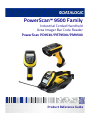
PowerScan™ 9500 Family
Industrial Corded Handheld
Area Imager Bar Code Reader
PowerScan PD9530/PBT9500/PM9500
Product Reference Guide
Datalogic ADC, Inc.
959 Terry Street | Eugene | OR 97402 | USA
Telephone: (1) 541-683-5700 | Fax: (1) 541-345-7140
©2013-2014 Datalogic, Inc.
An Unpublished Work - All rights reserved. No part of the contents of this documentation or
the procedures described therein may be reproduced or transmitted in any form or by any
means without prior written permission of Datalogic ADC, Inc. or its subsidiaries or affiliates
("Datalogic" or “Datalogic ADC”). Owners of Datalogic products are hereby granted a nonexclusive, revocable license to reproduce and transmit this documentation for the purchaser's
own internal business purposes. Purchaser shall not remove or alter any proprietary notices,
including copyright notices, contained in this documentation and shall ensure that all notices
appear on any reproductions of the documentation.
Should future revisions of this manual be published, you can acquire printed versions by contacting your Datalogic representative. Electronic versions may either be downloadable from
the Datalogic website (www.datalogic.com) or provided on appropriate media. If you visit our
website and would like to make comments or suggestions about this or other Datalogic publications, please let us know via the "Contact Datalogic" page.
Disclaimer
Datalogic has taken reasonable measures to provide information in this manual that is complete and accurate, however, Datalogic reserves the right to change any specification at any
time without prior notice.
Datalogic and the Datalogic logo are registered trademarks of Datalogic S.p.A. in many countries, including the U.S.A. and the E.U. All other brand and product names may be trademarks
of their respective owners.
Patents
See www.patents.datalogic.com for patent list.
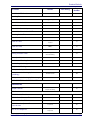
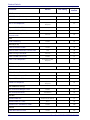
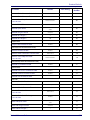
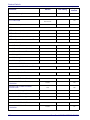
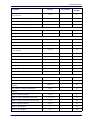
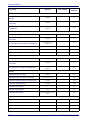
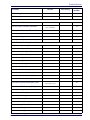
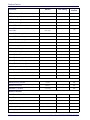
Table of Contents
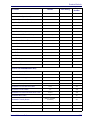
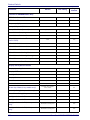
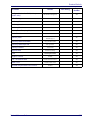
INTRODUCTION........................................................................................................................................................................................... 1
About this Manual ................................................................................................................................................................................................... 1
Overview ........................................................................................................................................................................................................... 1
Manual Conventions ....................................................................................................................................................................................... 2
References ................................................................................................................................................................................................................ 2
Technical Support ..................................................................................................................................................................................................... 2
Datalogic Website Support ............................................................................................................................................................................. 2
Reseller Technical Support ............................................................................................................................................................................. 2
Telephone Technical Support ......................................................................................................................................................................... 2
About the Reader ..................................................................................................................................................................................................... 3
PM8500 Compatible Mode: ............................................................................................................................................................................ 3
The BC9xx0™ Base Station/Charger ....................................................................................................................................................................... 4
Battery Safety ........................................................................................................................................................................................................... 5
Programming the Reader ........................................................................................................................................................................................ 6
Configuration Methods ................................................................................................................................................................................... 6
SETUP.......................................................................................................................................................................................................... 7
Unpacking ................................................................................................................................................................................................................. 7
Setting Up the Reader ............................................................................................................................................................................................. 7
Connecting the Cable (Corded versions) ....................................................................................................................................................... 8
Configuring the Base Station .................................................................................................................................................................................. 9
Mounting the BC9xx0 Cradle .................................................................................................................................................................................. 9
Mounting Brackets .......................................................................................................................................................................................... 9
Permanent Mounting ................................................................................................................................................................................... 10
Mounting for Portable Use ........................................................................................................................................................................... 11
System Connections ..................................................................................................................................................................................... 12
Connecting and Disconnecting the Interface Cable ................................................................................................................................... 13
BC9xx0 Configuration ................................................................................................................................................................................... 14
Interface Selection ................................................................................................................................................................................................. 14
Setting the Interface ..................................................................................................................................................................................... 14
Customizing Configuration Settings .................................................................................................................................................................... 17
Configure Interface Settings ........................................................................................................................................................................ 17
Global Interface Features ............................................................................................................................................................................. 17
Configuring Other Features ......................................................................................................................................................................... 17
Software Version Transmission .................................................................................................................................................................. 17
Self Test and Statistics ................................................................................................................................................................................. 17
Resetting the Product Configuration to Defaults ...................................................................................................................................... 18
Set Date and Time ........................................................................................................................................................................................ 18
Linking the Reader ................................................................................................................................................................................................. 19
Link Datalogic RF Devices to Base .............................................................................................................................................................. 19
Linking to a Bluetooth Adapter in Serial Port Profile (Slave) Mode ......................................................................................................... 19
Linking to a Bluetooth Adapter in Serial Port Profile (Master) Mode ...................................................................................................... 19
Linking to a Bluetooth Adapter in HID mode ............................................................................................................................................. 20
Power Off ....................................................................................................................................................................................................... 20
CONFIGURATION USING BAR CODES ..................................................................................................................................................... 21
Configuration Parameters ............................................................................................................................................................................ 21
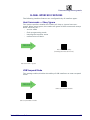
GLOBAL INTERFACE FEATURES 23
Host Commands — Obey/Ignore .............................................................................................................................................. 23
USB Suspend Mode ..................................................................................................................................................................... 23
RS-232 Only Interface25
Baud Rate ..................................................................................................................................................................................... 26
Data Bits ....................................................................................................................................................................................... 27
Stop Bits ....................................................................................................................................................................................... 27
Parity ............................................................................................................................................................................................ 28
Handshaking Control .................................................................................................................................................................. 29
RS-232/USB-Com Interfaces30
Intercharacter Delay .................................................................................................................................................................... 31
Product Reference Guide
i
Contents
Beep On ASCII BEL ....................................................................................................................................................................... 31
Beep On Not on File .................................................................................................................................................................... 32
ACK NAK Options ......................................................................................................................................................................... 32
ACK Character .............................................................................................................................................................................. 33
NAK Character ............................................................................................................................................................................. 33
ACK NAK Timeout Value ............................................................................................................................................................. 34
ACK NAK Retry Count .................................................................................................................................................................. 34
ACK NAK Error Handling ............................................................................................................................................................. 35
Indicate Transmission Failure ................................................................................................................................................... 35
Disable Character ........................................................................................................................................................................ 36
Enable Character ......................................................................................................................................................................... 36
Keyboard EMULATION Settings ..................................................................................................................................................... 37
Country Mode .............................................................................................................................................................................. 38
Send Control Characters ............................................................................................................................................................. 41
Wedge Quiet Interval .................................................................................................................................................................. 42
Intercode Delay ............................................................................................................................................................................ 42
Caps Lock State ........................................................................................................................................................................... 43
Numlock ....................................................................................................................................................................................... 43
USB Keyboard Speed ................................................................................................................................................................... 44
USB Keyboard Numeric Keypad ................................................................................................................................................. 45
USB-OEM Interface ......................................................................................................................................................................... 47
USB-OEM Device Usage ............................................................................................................................................................. 48
Interface Options ......................................................................................................................................................................... 48
Data Format ..................................................................................................................................................................................... 49
Global Prefix/Suffix (Header/Terminator) .......................................................................................................................................................... 50
Global AIM ID .......................................................................................................................................................................................................... 51
Set AIM ID Individually for GS1-128 ............................................................................................................................................................ 54
Label ID .................................................................................................................................................................................................................... 55
Label ID: Pre-Loaded Sets ............................................................................................................................................................................ 55
Individually Set Label ID ............................................................................................................................................................................... 56
Label ID Control ........................................................................................................................................................................... 56
Label ID Symbology Selection − 1D Symbologies .................................................................................................................... 57
Advanced Formatting: User Label Edit ..................................................................................................................................... 61
Case Conversion .......................................................................................................................................................................... 61
Character Conversion .................................................................................................................................................................. 61
Reading Parameters ...................................................................................................................................................................... 63
Double Read Timeout ................................................................................................................................................................. 64
LED AND BEEPER INDICATORS ........................................................................................................................................................... 66
Power On Alert ............................................................................................................................................................................ 66
Good Read: When to Indicate ..................................................................................................................................................... 66
Good Read Beep Type ................................................................................................................................................................. 67
Good Read Beep Frequency ....................................................................................................................................................... 67
Good Read Beep Length ............................................................................................................................................................. 68
Good Read Beep Volume ............................................................................................................................................................ 69
Good Read LED Duration ............................................................................................................................................................ 70
SCANNING FEATURES .......................................................................................................................................................................... 71
Scan Mode .................................................................................................................................................................................... 71
Stand Mode Indication ................................................................................................................................................................ 72
Pick Mode ..................................................................................................................................................................................... 72
Stand Mode Sensitivity ............................................................................................................................................................... 73
Stand Mode Illumination Off Time ............................................................................................................................................ 73
Scanning Active Time .................................................................................................................................................................. 74
Stand Illumination Control ......................................................................................................................................................... 74
Flash On Time .............................................................................................................................................................................. 75
Flash Off Time ............................................................................................................................................................................. 75
Aiming Pointer ............................................................................................................................................................................. 76
Aiming Duration Timer ................................................................................................................................................................ 76
Green Spot Duration ................................................................................................................................................................... 77
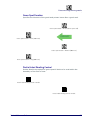
Partial Label Reading Control .................................................................................................................................................... 77
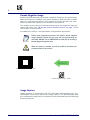
Decode Negative Image .............................................................................................................................................................. 78
Image Capture ............................................................................................................................................................................. 78
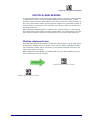
MULTIPLE LABEL READING ................................................................................................................................................................ 79
Multiple Labels per Frame ......................................................................................................................................................... 79
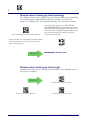
Multiple Labels Ordering by Code Symbology .......................................................................................................................... 80
Multiple Labels Ordering by Code Length ................................................................................................................................ 80
1D Symbologies ............................................................................................................................................................................... 81
ii
PowerScan™ PD9530/PBT9500/PM9500
Contents
DISABLE ALL SYMBOLOGIES ............................................................................................................................................................... 82
CODE EAN/UPC .................................................................................................................................................................................... 83
Coupon Control ............................................................................................................................................................................ 83
UPC-A .................................................................................................................................................................................................... 84
UPC-A Enable/Disable ................................................................................................................................................................ 84
UPC-A Check Character Transmission ...................................................................................................................................... 84
Expand UPC-A to EAN-13 .......................................................................................................................................................... 85
UPC-A Number System Character Transmission .................................................................................................................... 85
UPC-A 2D Component ................................................................................................................................................................. 86
UPC-E .................................................................................................................................................................................................... 86
UPC-E Enable/Disable ................................................................................................................................................................ 86
UPC-E Check Character Transmission ...................................................................................................................................... 87
UPC-E 2D Component ................................................................................................................................................................. 87
Expand UPC-E to EAN-13 ........................................................................................................................................................... 88
Expand UPC-E to UPC-A ............................................................................................................................................................. 88
UPC-E Number System Character Transmission .................................................................................................................... 89
GTIN FORMATTING ............................................................................................................................................................................... 89
EAN 13 (JAN 13) .................................................................................................................................................................................... 90
EAN 13 Enable/Disable .............................................................................................................................................................. 90
EAN 13 Check Character Transmission ..................................................................................................................................... 90
EAN-13 Flag 1 Character ............................................................................................................................................................ 91
EAN-13 ISBN Conversion ........................................................................................................................................................... 91
EAN-13 2D Component .............................................................................................................................................................. 92
ISSN ........................................................................................................................................................................................................ 92
ISSN Enable/Disable ................................................................................................................................................................... 92
EAN 8 (JAN 8) ......................................................................................................................................................................................... 93
EAN 8 Enable/Disable ................................................................................................................................................................ 93
EAN 8 Check Character Transmission ....................................................................................................................................... 93
Expand EAN 8 to EAN 13 ............................................................................................................................................................ 94
EAN 8 2D Component ................................................................................................................................................................. 94
UPC/EAN GLOBAL SETTINGS .............................................................................................................................................................. 95
UPC/EAN Price Weight Check .................................................................................................................................................... 95
UPC/EAN Quiet Zones ................................................................................................................................................................ 96
ADD-ONS ............................................................................................................................................................................................... 97
Optional Add-ons ........................................................................................................................................................................ 97
Optional Add-On Timer ............................................................................................................................................................... 98
Optional GS1-128 Add-On Timer ............................................................................................................................................. 100
CODE 39 ............................................................................................................................................................................................... 103
Code 39 Enable/Disable ........................................................................................................................................................... 103
Code 39 Check Character Calculation ...................................................................................................................................... 103
Code 39 Check Character Transmission .................................................................................................................................. 104
Code 39 Start/Stop Character Transmission ......................................................................................................................... 105
Code 39 Full ASCII ...................................................................................................................................................................... 105
Code 39 Quiet Zones ................................................................................................................................................................. 106
Code 39 Length Control ............................................................................................................................................................ 106
Code 39 Set Length 1 ................................................................................................................................................................ 107
Code 39 Set Length 2 ................................................................................................................................................................ 108
TRIOPTIC CODE ................................................................................................................................................................................... 109
Trioptic Code Enable/Disable ................................................................................................................................................... 109
CODE 32 (ITAL PHARMACEUTICAL CODE) ........................................................................................................................................ 109
Code 32 Enable/Disable ........................................................................................................................................................... 109
Code 32 Feature Setting Exceptions ....................................................................................................................................... 109
Code 32 Check Character Transmission .................................................................................................................................. 110
Code 32 Start/Stop Character Transmission ......................................................................................................................... 110
CODE 39 CIP (FRENCH PHARMACEUTICAL) ..................................................................................................................................... 111
Code 39 CIP Enable/Disable ..................................................................................................................................................... 111
CODE 39 DANISH PPT ........................................................................................................................................................................ 111
Code 39 Danish PPT Enable/Disable ...................................................................................................................................... 111
CODE 39 LAPOSTE .............................................................................................................................................................................. 112
Code 39 LaPoste Enable/Disable ............................................................................................................................................ 112
CODE 39 PZN ...................................................................................................................................................................................... 112
Code 39 PZN Enable/Disable ................................................................................................................................................... 112
CODE 128 ............................................................................................................................................................................................. 113
Code 128 Enable/Disable ......................................................................................................................................................... 113
Expand Code 128 to Code 39 .................................................................................................................................................... 113
Code 128 Check Character Transmission ............................................................................................................................... 114
Code 128 Function Character Transmission .......................................................................................................................... 114
Product Reference Guide
iii
Contents
Code 128 Sub-Code Exchange Transmission ......................................................................................................................... 115
Code 128 Quiet Zones ............................................................................................................................................................... 115
Code 128 Length Control .......................................................................................................................................................... 116
Code 128 Set Length 1 .............................................................................................................................................................. 117
Code 128 Set Length 2 .............................................................................................................................................................. 118
GS1-128 ............................................................................................................................................................................................... 119
GS1-128 Enable ......................................................................................................................................................................... 119
GS1-128 2D Component ........................................................................................................................................................... 119
CODE ISBT 128 .................................................................................................................................................................................... 120
ISBT 128 Concatenation ............................................................................................................................................................ 120
ISBT 128 Force Concatenation ................................................................................................................................................. 120
ISBT 128 Concatenation Mode ................................................................................................................................................. 121
ISBT 128 Dynamic Concatenation Timeout ............................................................................................................................ 122
ISBT 128 Advanced Concatenation Options ........................................................................................................................... 122
INTERLEAVED 2 OF 5 (I 2 OF 5) ......................................................................................................................................................... 123
I 2 of 5 Enable/Disable ............................................................................................................................................................. 123
I 2 of 5 Check Character Calculation ........................................................................................................................................ 124
I 2 of 5 Check Character Transmission .................................................................................................................................... 125
I 2 of 5 Length Control .............................................................................................................................................................. 125
I 2 of 5 Set Length 1 .................................................................................................................................................................. 126
I 2 of 5 Set Length 2 .................................................................................................................................................................. 127
INTERLEAVED 2 OF 5 CIP HR ............................................................................................................................................................ 128
Interleaved 2 of 5 CIP HR Enable/Disable .............................................................................................................................. 128
FOLLETT 2 OF 5 .................................................................................................................................................................................. 128
Follett 2 of 5 Enable/Disable ................................................................................................................................................... 128
STANDARD 2 OF 5 .............................................................................................................................................................................. 129
Standard 2 of 5 Enable/Disable .............................................................................................................................................. 129
Standard 2 of 5 Check Character Calculation ......................................................................................................................... 129
Standard 2 of 5 Check Character Transmission ..................................................................................................................... 130
Standard 2 of 5 Length Control ............................................................................................................................................... 130
Standard 2 of 5 Set Length 1 ................................................................................................................................................... 131
Standard 2 of 5 Set Length 2 ................................................................................................................................................... 132
INDUSTRIAL 2 OF 5 ............................................................................................................................................................................. 133
Industrial 2 of 5 Enable/Disable .............................................................................................................................................. 133
Industrial 2 of 5 Check Character Calculation ........................................................................................................................ 133
Industrial 2 of 5 Check Character Transmission .................................................................................................................... 134
Industrial 2 of 5 Length Control ............................................................................................................................................... 134
Industrial 2 of 5 Set Length 1 ................................................................................................................................................... 135
Industrial 2 of 5 Set Length 2 ................................................................................................................................................... 136
CODE IATA ........................................................................................................................................................................................... 137
IATA Enable/Disable ................................................................................................................................................................. 137
IATA Check Character Transmission ....................................................................................................................................... 137
CODABAR ............................................................................................................................................................................................ 138
Codabar Enable/Disable ........................................................................................................................................................... 138
Codabar Check Character Calculation ..................................................................................................................................... 138
Codabar Check Character Transmission ................................................................................................................................. 139
Codabar Start/Stop Character Transmission ......................................................................................................................... 139
Codabar Start/Stop Character Set .......................................................................................................................................... 140
Codabar Start/Stop Character Match ..................................................................................................................................... 140
Codabar Quiet Zones ................................................................................................................................................................ 141
Codabar Length Control ............................................................................................................................................................ 141
Codabar Set Length 1 ................................................................................................................................................................ 142
Codabar Set Length 2 ................................................................................................................................................................ 143
ABC CODABAR .................................................................................................................................................................................... 144
ABC Codabar Enable/Disable ................................................................................................................................................... 144
ABC Codabar Concatenation Mode .......................................................................................................................................... 144
ABC Codabar Dynamic Concatenation Timeout ..................................................................................................................... 145
ABC Codabar Force Concatenation .......................................................................................................................................... 146
CODE 11 ............................................................................................................................................................................................... 147
Code 11 Enable/Disable ........................................................................................................................................................... 147
Code 11 Check Character Calculation ...................................................................................................................................... 147
Code 11 Check Character Transmission .................................................................................................................................. 148
Code 11 Length Control ............................................................................................................................................................ 148
Code 11 Set Length 1 ................................................................................................................................................................ 149
Code 11 Set Length 2 ................................................................................................................................................................ 150
GS1 DATABAR™ OMNIDIRECTIONAL ................................................................................................................................................. 151
GS1 DataBar™ Omnidirectional Enable/Disable .................................................................................................................... 151
iv
PowerScan™ PD9530/PBT9500/PM9500
Contents
GS1 DataBar™ Omnidirectional GS1-128 Emulation ............................................................................................................. 151
GS1 DataBar™ Omnidirectional 2D Component ..................................................................................................................... 152
GS1 DATABAR™ EXPANDED .............................................................................................................................................................. 152
GS1 DataBar™ Expanded Enable/Disable ............................................................................................................................... 152
GS1 DataBar™ Expanded GS1-128 Emulation ........................................................................................................................ 153
GS1 DataBar™ Expanded 2D Component ................................................................................................................................ 153
GS1 DataBar™ Expanded Length Control ................................................................................................................................ 154
GS1 DataBar™ Expanded Set Length 1 .................................................................................................................................... 155
GS1 DataBar™ Expanded Set Length 2 .................................................................................................................................... 156
GS1 DATABAR™ LIMITED .................................................................................................................................................................... 157
GS1 DataBar™ Limited Enable/Disable ................................................................................................................................... 157
GS1 DataBar™ Limited GS1-128 Emulation ............................................................................................................................ 157
GS1 DataBar™ Limited 2D Component .................................................................................................................................... 158
CODE 93 ............................................................................................................................................................................................... 158
Code 93 Enable/Disable ........................................................................................................................................................... 158
Code 93 Check Character Calculation ...................................................................................................................................... 159
Code 93 Check Character Transmission .................................................................................................................................. 159
Code 93 Length Control ............................................................................................................................................................ 160
Code 93 Set Length 1 ................................................................................................................................................................ 161
Code 93 Set Length 2 ................................................................................................................................................................ 162
Code 93 Quiet Zones ................................................................................................................................................................. 163
MSI ....................................................................................................................................................................................................... 163
MSI Enable/Disable .................................................................................................................................................................. 163
MSI Check Character Calculation ............................................................................................................................................. 164
MSI Check Character Transmission ......................................................................................................................................... 164
MSI Length Control ................................................................................................................................................................... 165
MSI Set Length 1 ....................................................................................................................................................................... 166
MSI Set Length 2 ....................................................................................................................................................................... 167
PLESSEY .............................................................................................................................................................................................. 168
Plessey Enable/Disable ............................................................................................................................................................ 168
Plessey Check Character Calculation ...................................................................................................................................... 168
Plessey Check Character Transmission .................................................................................................................................. 169
Plessey Length Control ............................................................................................................................................................. 169
Plessey Set Length 1 ................................................................................................................................................................ 170
Plessey Set Length 2 ................................................................................................................................................................ 171
2D Symbologies ............................................................................................................................................................................. 173
2D Global Features ...............................................................................................................................................................................................173
2D Maximum Decoding Time ................................................................................................................................................... 174
2D Structured Append .............................................................................................................................................................. 175
2D Normal/Inverse Symbol Control ........................................................................................................................................ 175
AZTEC CODE ........................................................................................................................................................................................ 176
Aztec Code Enable / Disable .................................................................................................................................................... 176
Aztec Code Length Control ....................................................................................................................................................... 176
Aztec Code Set Length 1 ........................................................................................................................................................... 177
Aztec Code Set Length 2 ........................................................................................................................................................... 178
CHINA SENSIBLE CODE ...................................................................................................................................................................... 179
China Sensible Code Enable / Disable .................................................................................................................................... 179
China Sensible Code Length Control ....................................................................................................................................... 179
China Sensible Code Set Length 1 ........................................................................................................................................... 180
China Sensible Code Set Length 2 ........................................................................................................................................... 181
DATA MATRIX ...................................................................................................................................................................................... 182
Data Matrix Enable / Disable ................................................................................................................................................... 182
Data Matrix Square/Rectangular Style .................................................................................................................................. 182
Data Matrix DPM Decoding Safety .......................................................................................................................................... 183
Data Matrix Length Control ...................................................................................................................................................... 184
Data Matrix Set Length 1 ......................................................................................................................................................... 184
Data Matrix Set Length 2 ......................................................................................................................................................... 185
MAXICODE ........................................................................................................................................................................................... 186
Maxicode Enable / Disable ....................................................................................................................................................... 186
Maxicode Primary Message Transmission ............................................................................................................................ 186
Maxicode Length Control .......................................................................................................................................................... 187
Maxicode Set Length 1 ............................................................................................................................................................. 187
Maxicode Set Length 2 ............................................................................................................................................................. 188
PDF417 ................................................................................................................................................................................................ 189
PDF417 Enable / Disable ......................................................................................................................................................... 189
PDF417 Length Control ............................................................................................................................................................ 189
PDF417 Set Length 1 ................................................................................................................................................................ 190
Product Reference Guide
v
Contents
PDF417 Set Length 2 ................................................................................................................................................................ 191
MICRO PDF417 ................................................................................................................................................................................... 192
Micro PDF417 Enable / Disable ............................................................................................................................................... 192
Micro PDF417 Code 128 GS1-128 Emulation ......................................................................................................................... 192
Micro PDF417 Length Control .................................................................................................................................................. 193
Micro PDF417 Set Length 1 ...................................................................................................................................................... 193
Micro PDF417 Set Length 2 ...................................................................................................................................................... 194
QR CODE .............................................................................................................................................................................................. 195
QR Code Enable / Disable ........................................................................................................................................................ 195
QR Code Length Control ........................................................................................................................................................... 195
QR Code Set Length 1 ............................................................................................................................................................... 196
QR Code Set Length 2 ............................................................................................................................................................... 197
MICRO QR CODE ................................................................................................................................................................................. 197
Micro QR Code Enable/Disable ................................................................................................................................................ 197
Micro QR Code Length Control ................................................................................................................................................. 198
Micro QR Code Set Length 1 ..................................................................................................................................................... 198
Micro QR Code Set Length 2 ..................................................................................................................................................... 199
UCC COMPOSITE ................................................................................................................................................................................. 200
UCC Composite Enable / Disable ............................................................................................................................................. 200
UCC Optional Composite Timer ................................................................................................................................................ 201
POSTAL CODE SELECTION ................................................................................................................................................................. 202
Postnet BB Control ................................................................................................................................................................... 203
Motion Features ........................................................................................................................................................................... 205
Motion Aiming Control .............................................................................................................................................................. 205
Motion Sensitivity ..................................................................................................................................................................... 206
Motionless Timeout .................................................................................................................................................................. 206
Wireless Features ......................................................................................................................................................................... 207
WIRELESS BEEPER FEATURES ......................................................................................................................................................... 210
Good Transmission Beep .......................................................................................................................................................... 210
Beep Frequency ......................................................................................................................................................................... 210
Beep Duration ............................................................................................................................................................................ 211
Beep Volume .............................................................................................................................................................................. 212
Disconnect Beep ........................................................................................................................................................................ 212
Docking Beep ............................................................................................................................................................................. 213
Leash Alarm ............................................................................................................................................................................... 213
CONFIGURATION UPDATES ............................................................................................................................................................... 215
Automatic Configuration Update ............................................................................................................................................. 215
Copy Configuration to Scanner ................................................................................................................................................ 215
Copy Configuration to Base Station ........................................................................................................................................ 215
BATCH FEATURES .............................................................................................................................................................................. 216
Batch Mode ................................................................................................................................................................................ 216
Send Batch ................................................................................................................................................................................. 216
Erase Batch Memory ................................................................................................................................................................ 217
RF Batch Mode Transmit Delay ............................................................................................................................................... 217
DIRECT RADIO AUTOLINK .................................................................................................................................................................. 218
RF ADDRESS STAMPING .................................................................................................................................................................... 218
Source Radio Address Transmission ...................................................................................................................................... 218
Source Radio Address Delimiter Character ............................................................................................................................ 219
REAL TIME CLOCK (RTC) CONFIGURATION ....................................................................................................................................... 220
Current Date .............................................................................................................................................................................. 220
Current Time .............................................................................................................................................................................. 220
Date Tx Format .......................................................................................................................................................................... 221
Time Tx Format .......................................................................................................................................................................... 221
Date-Time Separator ................................................................................................................................................................ 222
Date-Time Transmission Order ............................................................................................................................................... 223
Power Off ................................................................................................................................................................................... 224
Powerdown Timeout ................................................................................................................................................................. 224
PBT9500-Only Features................................................................................................................................................................ 225
BLUETOOTH SECURITY FEATURES ................................................................................................................................................... 225
Bluetooth Security Mode .......................................................................................................................................................... 226
Bluetooth PIN Code ................................................................................................................................................................... 226
Select PIN Code Length ............................................................................................................................................................ 226
Set PIN Code .............................................................................................................................................................................. 227
OTHER BLUETOOTH FEATURES ........................................................................................................................................................ 228
Reconnect Attempt Interval ..................................................................................................................................................... 228
Bluetooth HID Variable PIN Code ............................................................................................................................................ 229
Bluetooth HID Alt Mode ............................................................................................................................................................ 230
vi
PowerScan™ PD9530/PBT9500/PM9500
Contents
Bluetooth HID Send Unknown ASCII Char .............................................................................................................................. 230
Bluetooth Max Client ................................................................................................................................................................ 231
Bluetooth Friendly Name ......................................................................................................................................................... 232
Bluetooth Reconnect Attempt Mode ...................................................................................................................................... 232
Power Class ............................................................................................................................................................................... 233
HID Country Mode ..................................................................................................................................................................... 233
PM9500-Only Features................................................................................................................................................................. 236
STAR Radio Protocol Timeout .................................................................................................................................................. 236
STAR Radio Transmit Mode ..................................................................................................................................................... 237
Changing System Speed ........................................................................................................................................................... 238
Frequency Agility ....................................................................................................................................................................... 238
Compatibility with PM8500.......................................................................................................................................................... 240
Compatibility Mode .....................................................................................................................................................................................240
Changing from Normal to Compatible Mode ......................................................................................................................... 240
Changing from Compatible Mode back to Normal ................................................................................................................ 241
Base Address Stamping ........................................................................................................................................................... 242
Base Address Delimiter Character .......................................................................................................................................... 242
RS-485 Master Header/Terminator ( Prefix/Suffix) ............................................................................................................. 243
RS-485 Cradle Address ............................................................................................................................................................. 243
RS-485 Slave Minimum Address ............................................................................................................................................. 244
RS-485 Slave Maximum Address ............................................................................................................................................ 244
RS-485 Network Working Mode .............................................................................................................................................. 245
RS-485 Network Warning Message ........................................................................................................................................ 245
RS-485 Transmission Warning Message ............................................................................................................................... 246
RS-485 Network Baud Rate ..................................................................................................................................................... 246
Display and Keyboard Features................................................................................................................................................... 247
Display Operating Mode ........................................................................................................................................................... 247
Display Off Timeout .................................................................................................................................................................. 248
Backlight Enable ........................................................................................................................................................................ 248
Display Contrast ........................................................................................................................................................................ 249
Font Size ..................................................................................................................................................................................... 249
Enable/disable buttons ............................................................................................................................................................ 250
Arrow Keys Mode (4-key models only) ................................................................................................................................... 251
Arrow Up String (4-key models only) ...................................................................................................................................... 251
Arrow Down String (4-key models only) ................................................................................................................................. 252
CONFIGURE ACTIONS FOR FUNCTION KEYS .................................................................................................................................... 253
Configure Actions for F1 ........................................................................................................................................................... 254
Configure Actions for F2 ........................................................................................................................................................... 254
Configure Actions for F3 (16-key models only) ...................................................................................................................... 255
Configure Actions for F4 (16-key models only) ...................................................................................................................... 255
Configure Actions for Shift (16-key models only) .................................................................................................................. 256
Define Strings ............................................................................................................................................................................ 257
Set String ID ............................................................................................................................................................................... 258
Set String Header ...................................................................................................................................................................... 258
Set String Terminator ............................................................................................................................................................... 259
ADDITIONAL FEATURES FOR 16-KEY MODELS .............................................................................................................................. 260
Last Code Shown Timeout ........................................................................................................................................................ 260
Display Time Stamping Mode .................................................................................................................................................. 260
Mode Selection .......................................................................................................................................................................... 261
Quantity Field ........................................................................................................................................................................... 261
Quantity/Code Send Mode ....................................................................................................................................................... 262
Quantity/Code Separator ........................................................................................................................................................ 262
Interkey Timeout ..................................................................................................................................................................... 263
Append Code .............................................................................................................................................................................. 264
Echo ............................................................................................................................................................................................ 265
Keypress Sound ....................................................................................................................................................................... 265
SHIFT Enable/Disable ............................................................................................................................................................. 266
SHIFT key association .............................................................................................................................................................. 266
Lower Case ................................................................................................................................................................................. 267
Set F1 Label ............................................................................................................................................................................... 267
Set F2 Label ............................................................................................................................................................................... 267
Set F3 Label ............................................................................................................................................................................... 268
Set F4 Label .............................................................................................................................................................................. 268
Barcode/Key Different Data Format ....................................................................................................................................... 269
Set Barcode Header .................................................................................................................................................................. 269
Set Barcode Terminator ............................................................................................................................................................ 269
Set Key Sequence ID ................................................................................................................................................................. 270
Product Reference Guide
vii
Contents
Set Key Sequence Header ........................................................................................................................................................ 270
Set Key Sequence Terminator .................................................................................................................................................. 270
REFERENCES ......................................................................................................................................................................................... 271
RS-232 Parameters .............................................................................................................................................................................................272
RS-232 Only .................................................................................................................................................................................................272
RS-232/USB COM Parameters ..................................................................................................................................................................273
Keyboard Interface ...............................................................................................................................................................................................280
Wedge Quiet Interval ..................................................................................................................................................................................280
Intercharacter Delay ...................................................................................................................................................................................281
Intercode Delay ............................................................................................................................................................................................282
Symbologies .........................................................................................................................................................................................................283
Datamatrix DPM Decoding Safety .............................................................................................................................................................283
Set Length ....................................................................................................................................................................................................283
Data Editing ..........................................................................................................................................................................................................285
Global Prefix/Suffix .....................................................................................................................................................................................286
Global AIM ID ................................................................................................................................................................................................286
Label ID .........................................................................................................................................................................................................288
Character Conversion ..................................................................................................................................................................................293
Reading Parameters ............................................................................................................................................................................................294
Good Read LED Duration ............................................................................................................................................................................294
Scanning Features ...............................................................................................................................................................................................295
Scan Mode ....................................................................................................................................................................................................295
Stand Mode Off Time ..................................................................................................................................................................................296
Scanning Active Time ..................................................................................................................................................................................297
Aiming Duration Time .................................................................................................................................................................................298
Flash On Time ..............................................................................................................................................................................................299
Flash Off Time .............................................................................................................................................................................................300
Multiple Labels Ordering by Code Symbology ..........................................................................................................................................301
Motion Features ...................................................................................................................................................................................................303
Motionless Timeout ....................................................................................................................................................................................303
Wireless Features ................................................................................................................................................................................................304
Automatic Configuration Update ...............................................................................................................................................................304
RF Address Stamping .................................................................................................................................................................................304
PM9500-Only Features ..............................................................................................................................................................................306
Changing System Speed in Normal Mode .............................................................................................................................. 306
Bluetooth-Only Features ...........................................................................................................................................................................306
MESSAGE FORMATTING....................................................................................................................................................................... 309
Cursor Control ..............................................................................................................................................................................................310
Font Selection ..............................................................................................................................................................................................310
Clearing Display ...........................................................................................................................................................................................310
LED and Beeper Control .............................................................................................................................................................................311
Setting RTC ...................................................................................................................................................................................................311
TECHNICAL SPECIFICATIONS ............................................................................................................................................................... 313
Imager Labeling ....................................................................................................................................................................................................317
Standard Cable Pinouts .......................................................................................................................................................................................318
LED and Beeper Indications ................................................................................................................................................................................319
Error Codes ...........................................................................................................................................................................................................320
Base Station Indications (Cordless Models ONLY) ..................................................................................................................................320
SAMPLE BAR CODES............................................................................................................................................................................. 321
STANDARD DEFAULTS.......................................................................................................................................................................... 325
KEYPAD.................................................................................................................................................................................................. 339
SCANCODE TABLES ............................................................................................................................................................................... 341
Control Character Emulation ..............................................................................................................................................................................341
Single Press and Release Keys ..................................................................................................................................................................341
Interface Type PC AT PS/2, USB-Keyboard or USB-Keyboard for APPLE ......................................................................................................342
Interface Type PC AT PS/2 Alt Mode or USB-Keyboard Alt Mode ..................................................................................................................344
Digital Interface ....................................................................................................................................................................................................346
IBM31xx 102-key .................................................................................................................................................................................................347
IBM XT ...................................................................................................................................................................................................................348
Microsoft Windows Codepage 1252 ..................................................................................................................................................................349
viii
PowerScan™ PD9530/PBT9500/PM9500
Chapter 1
Introduction
About this Manual
This Product Reference Guide (PRG) is provided for users seeking advanced
technical information, including connection, programming, maintenance
and specifications. The Quick Reference Guide (QRG) and other publications
associated with this product are downloadable free of charge from the website listed on the back cover of this manual.
Overview
Chapter 1, (this chapter) presents information about manual conventions,
and an overview of the reader, its features and operation.
Chapter 2, Setup presents information about unpacking, cable connection
information and setting up the reader.
Chapter 3, Configuration Using Bar Codes provides instructions and bar
code labels for customizing your reader. There are different sections for
interface types, general features, data formatting, symbology-specific and
model-specific features.
Chapter 4, References provides background information and detailed
instructions for more complex programming items.
Chapter 5, Message Formatting gives details for programming options.
Appendix A, Technical Specifications lists physical and performance characteristics, as well as environmental and regulatory specifications. It also provides standard cable pinouts and LED/Beeper functions.
Appendix B, Sample Bar Codes offers sample bar codes for several common
symbologies.
Appendix C, Standard Defaults references common factory default settings
for reader features and options.
Appendix D, Keypad includes numeric bar codes to be scanned for certain
parameter settings.
Appendix E, Scancode Tables lists control character emulation information
for Wedge and USB Keyboard interfaces.
Product Reference Guide
1
Introduction
Manual Conventions
The following conventions are used in this document:
The symbols listed below are used in this manual to notify the reader of key
issues or procedures that must be observed when using the reader:
Notes contain information necessary for properly diagnosing,
repairing and operating the reader.
The CAUTION symbol advises you of actions that could damage
equipment or property.
CAUTION
References
Current versions of this Product Reference Guide (PRG), Quick Reference
Guide (QRG), the Datalogic Aladdin™ Configuration application, and any
other manuals, instruction sheets and utilities for this product can be downloaded from the website listed below. Alternatively, printed copies or product support CDs for most products can be purchased through your Datalogic
reseller.
Technical Support
Datalogic Website Support
The Datalogic website (www.datalogic.com) is the complete source for technical support and information for Datalogic products. The site offers product
support, warranty information, product manuals, product tech notes, software updates, demos, and instructions for returning products for repair.
Reseller Technical Support
An excellent source for technical assistance and information is an authorized Datalogic reseller. A reseller is acquainted with specific types of businesses, application software, and computer systems and can provide
individualized assistance.
Telephone Technical Support
If you do not have internet or email access, you may contact Datalogic technical support at (541) 349-8283 or check the back cover of your manual for
more contact information.
2
PowerScan™ PD9530/PBT9500/PM9500
About the Reader
About the Reader
The PowerScan 2D is a family of feature-rich and rugged area image readers.
It is offered in several different models to better fit the different needs of
each customer.
The main model categories are:
•
•
•
PD9530-XX: Corded models.
PM9500-XX: STAR-System(tm) models.
PBT9500-XX: Bluetooth models.
Within each category, further differentiating features are available, described
by the part number suffix:
•
•
•
•
D: models equipped with display and 4-key keyboard
DK: models equipped with display and 16-key keyboard
DPM: models with laser, ink jet and dot peen reading capability
HP: models with autofocus optic
Typically, units are factory-programmed for the most common terminal and
communications settings. If you need to modify any programmable settings,
custom configuration can be done by scanning the programming barcodes
within this guide or with Datalogic Aladdin™, available from the Datalogic
website. See "Datalogic Aladdin™" on page 6 for more information.
Advancements in the LED technology used in the imager-based readers significantly improve the illumination of the target field of view, resulting in
higher scan efficiency. Whether used in Single Trigger or Continuous Mode,
the ergonomic design of the reader will help to promote comfortable handling during extended periods of use.
In addition, the reader can be set up to read and output data from USA
Driver License PDF417 bar codes. For more information reference the USA
Driver License Parsing Quick Reference Guide (QRG), available on the Datalogic website.
See "Interface Selection" on page 14 for a listing and descriptions of available interface sets by model type.
PM8500 Compatible Mode:
Powerscan PM9500 offers a limited set of features compatible with the previous PM8500 family. To access those features, you have to program the
system through the Compatibility Mode parameter (see "Compatibility Mode"
on page 240 of the Wireless Configuration chapter).
When in normal mode, the same parameter can be used to configure the
communication speed.
Product Reference Guide
3
Introduction
The BC9xx0™ Base Station/Charger
The BC9xx0 base station, when paired with one or more PowerScan™ 9500
readers, builds a Cordless Reading System for the collection, decoding and
transmission of bar code data. It can be connected to a Host PC via RS-232,
USB, or KBD Wedge, and is suited for single-cradle layouts. The BC91x0
models also provide a spare battery charger slot.
The label on the cradle contains LED indicators and a multi-function button.
When the button is pressed for less than 5 seconds, the cradle will transmit a
"broadcast" message." When the broadcast is sent, all properly configured
scanners (Radio RX Timeout set to keep the radio "awake") that are linked to
that base and within radio range coverage will emit a beep and blink within 5
seconds. This functionality is useful to:
•
•
verify which scanners are linked to a certain
base station
detect a scanner forgotten somewhere
When the button is pressed for longer than 5
seconds, all paired scanners will be unpaired.
The LEDs signal the BC9xx0-BT status, as shown in Table 1 on page 4.
Table 1. LED Status
LED
STATUS
Aux
Yellow On = BC9xx0 is powered through an external power supply.
Host
Yellow On = BC9xx0 is powered by the Host.
Green On = the reader battery is completely charged.
Red On = the reader battery is charging.
Reader
Orange Blinking = reader battery fault - replace battery.
Red / Green Alternatively Blinking = charging error - see "Error Codes"
on page 320.
Off = reader not in the cradle or not properly inserted.
Green On = the spare battery is completely charged.
Spare
(BC91x0
models
only)
Orange Blinking = spare battery fault - replace spare battery.
Red/Green Alternatively Blinking = charging error - see "Error Codes" on
page 320.
Off = no spare battery in the housing or battery not fully inserted.
Radio
Yellow Blinking = radio activity.
Ethernet
(Ethernet
models
only)
Green Blinking = Ethernet activity.
See "Base Station Indications (Cordless Models ONLY)" on page 320 for more
specific details on the LEDs.
4
PowerScan™ PD9530/PBT9500/PM9500
Battery Safety
Battery Safety
To reinstall, charge and/or perform any other action on the battery, follow
the instructions in this manual.
Before installing the Battery, read “Battery Safety” on this and the following pages. Datalogic recommends annual replacement of rechargeable battery packs to ensure maximum performance.
WARNING
Do not discharge the battery using any device except for the scanner. When the battery
is used in devices other than the designated product, it may damage the battery or
reduce its life expectancy. If the device causes an abnormal current to flow, it may cause
the battery to become hot, explode or ignite and cause serious injury.
Lithium-ion battery packs may get hot, explode or ignite and cause serious injury if
exposed to abusive conditions. Be sure to follow the safety warnings listed below:
• Do not place the battery pack in fire or heat.
• Do not connect the positive terminal and negative terminal of the battery pack to each
other with any metal object (such as wire).
• Do not carry or store the battery pack together with metal objects.
• Do not pierce the battery pack with nails, strike it with a hammer, step on it or otherwise subject it to strong impacts or shocks.
• Do not solder directly onto the battery pack.
• Do not expose the battery pack to liquids, or allow the battery to get wet.
• Do not apply voltages to the battery pack contacts.
In the event the battery pack leaks and the fluid gets into your eye, do not rub the eye.
Rinse well with water and immediately seek medical care. If left untreated, the battery
fluid could cause damage to the eye.
Always charge the battery at 32° – 104°F (0° - 40°C) temperature range.
CAUTION
Use only the authorized power supplies, battery pack, chargers, and docks supplied by
your Datalogic reseller. The use of any other power supplies can damage the device and
void your warranty.
Do not disassemble or modify the battery. The battery contains safety and protection
devices, which, if damaged, may cause the battery to generate heat, explode or ignite.
Do not place the battery in or near fire, on stoves or other high temperature locations.
Do not place the battery in direct sunlight, or use or store the battery inside cars in hot
weather. Doing so may cause the battery to generate heat, explode or ignite. Using the
battery in this manner may also result in a loss of performance and a shortened life
expectancy.
Do not place the battery in microwave ovens, high-pressure containers or on induction
cookware.
Immediately discontinue use of the battery if, while using, charging or storing the battery,
the battery emits an unusual smell, feels hot, changes color or shape, or appears abnormal in any other way.
Do not replace the battery pack when the device is turned on.
Do not remove or damage the battery pack’s label.
Do not use the battery pack if it is damaged in any part.
Battery pack usage by children should be supervised.
As with other types of batteries, Lithium-Ion (LI) batteries will lose capacity
over time. Capacity deterioration is noticeable after one year of service
whether the battery is in use or not. It is difficult to precisely predict the
finite life of a LI battery, but cell manufacturers rate them at 500 charge
cycles. In other words, the batteries should be expected to take 500 full dis-
Product Reference Guide
5
Introduction
charge / charge cycles before needing replacement. This number is higher if
partial discharging / recharging is adhered to rather than full / deep discharging,
The typical manufacturer advertised useful life of LI batteries is one to three
years, depending on usage and number of charges, etc., after which they
should be removed from service, especially in mission critical applications.
Do not continue to use a battery that is showing excessive loss of capacity, it
should be properly recycled / disposed of and replaced. For most applications, batteries should be replaced after one year of service to maintain customer satisfaction and minimize safety concerns.
Collect and recycle waste batteries separately from the device in compliance
with European Directive 2006/66/EC, 2011/65/EU, 2002/96/EC and 2012/
19/EU and subsequent modifications, US and China regulatory and others
laws and regulations about the environment.
Programming the Reader
Configuration Methods
Programming Bar Codes
The reader is factory-configured with a standard set of default features.
After scanning the interface bar code, you can select other options and customize your reader through use of the instructions and programming bar
code labels available in the corresponding features section for your interface. Customizable settings for many features are found in "Configuration
Parameters" starting on page 21.
Some programming labels, like "Restore Custom Defaults" on page 18,
require only the scan of the single label to enact the change. Most, however,
require the reader to be placed in Programming Mode prior to scanning
them. Scan an ENTER/EXIT bar code once to enter Programming Mode. Once
the reader is in Programming Mode, scan a number of parameter settings
before scanning the ENTER/EXIT bar code a second time, which will then
accept your changes, exit Programming Mode and return the reader to normal operation.
There are some exceptions to the typical programming sequence
described above. Please read the description and setting instructions
carefully when configuring each programmable feature.
Datalogic Aladdin™
Datalogic Aladdin™ is a multi-platform utility program providing a quick and
user-friendly configuration method via the RS-232/USB-COM interface.
Aladdin allows you to program the reader by selecting configuration commands through a user-friendly graphical interface running on a PC. These
commands are sent to the reader over the selected communication interface,
or they can be printed as bar codes to be scanned. Aladdin also facilitates
image capturing.
In addition, Aladdin makes it easy to upgrade the handheld’s firmware, to
attain the benefits of new reader features. Reference the Datalogic Aladdin™
Online Help for more details.
Aladdin is available for download free of charge on the Datalogic website.
6
PowerScan™ PD9530/PBT9500/PM9500
Chapter 2
Setup
Unpacking
Check carefully to ensure the reader and any accessories ordered are present and undamaged. If any damage occurred during shipment, contact Datalogic Technical Support. Information is shown on page 2.
KEEP THE PACKAGING. Should the unit ever require service, it should be
returned in its original shipping container.
Setting Up the Reader
Follow the steps below to connect and get your reader up and communicating with its host.
1. Begin by Installing the Interface Cable (Corded) or Connecting the Base
Station (Bluetooth and STAR)
2. Configure Interface Settings (see page 14).
3. Configure the Reader starting on page 17 (optional, depends on settings needed)
Connect the PowerScan by plugging directly into the host device as shown.
The power can also be supplied through an external power supply via the
Interface Cable supplied with a power jack.
Product Reference Guide
7
Setup
Connecting the Cable (Corded versions)
A
B
A. Rubber gasket
C
B. Cable Holder
D
C. Cover
D. Connector Holder
1. Slip the cable through the Cover.
2. Push the Rubber Gasket onto the Cable
Holder.
3
FRONT>>
3. Push the Cable Holder and gasket into
the handle. Ensure that the “Front”
marking on the Cable Holder is facing
out, with the arrow pointing towards the
front of the scanner.
2
1
4. Insert the end of the cable into the
socket of the Cable Holder.
5. Push the Cover along the cable towards
the reader, and hook it over the yellow
“tooth” on the back of the handle.
4
5
6. Insert the cable through the Connector
Holder, and push it up into the Cover.
7. Insert and tighten the screw to affix the
cable assembly to the reader handle.
6
7
8
PowerScan™ PD9530/PBT9500/PM9500
Configuring the Base Station
Configuring the Base Station
To set up your BC9xx0 cradle you must:
1. Physically install the cradle.
2. Make all system connections.
3. Configure the BC9xx0 cradle.
Mounting the BC9xx0 Cradle
The cradle package contains the following items:
BC9xx0 Base Station (with Desktop Mounting
Bracket installed)
1 Metal Mounting plate
BC9xx0 Quick Reference Guide
(this manual)
1 Wall Mounting Bracket
The cradle can be either mounted on a flat surface for desktop usage or
affixed vertically to a wall.
Mounting Brackets
The cradle comes with two different mounting brackets. The appropriate
bracket is used depending on whether the cradle will be mounted on a horizontal or vertical surface. When shipped, the cradle has the Desktop Mounting Bracket installed. For vertical installation, the Wall Mounting Bracket
must be attached instead.
Figure 1. Mounting Brackets
Ribs
Tab
Tab
Desktop Mounting Bracket
(Horizontal )
•
•
Bosses
Tab
Wall Mounting Bracket
(Vertical)
Desktop mount bracket has ribs to keep the scanner in place when the
cradle is horizontal.
Wall mount bracket contains bosses to keep the scanner in place when
the cradle is vertical.
Product Reference Guide
9
Setup
To change the Bracket:
1. Remove the screw holding the Bracket in place. Retain the screw for reuse.
2. Carefully lift off the Bracket.
3. Install the other bracket by first slipping the end tab into place on the
base station, then easing the tabs (shown in Figure 1 on page 9) into
place on the sides.
4. Replace the screw to secure the Bracket to the Base Station.
Figure 2. Changing the Bracket
1
2
3
Permanent Mounting
For either desktop or wall mounting, the cradle can be fastened directly to a
flat surface using screws (not included).
When mounting on drywall, the base should be screwed to a wall stud or
supporting beam for additional support.
Figure 3. Base Station Bottom
Rubber Feet
Rubber Feet
Protective Adhesive
Strips
10
Mounting
Holes
PowerScan™ PD9530/PBT9500/PM9500
Mounting the BC9xx0 Cradle
Mounting for Portable Use
If portability of the cradle is required, the metal plate must be used. There
are two ways this can be done: (1) by first mounting the metal plate on a flat
surface so the cradle can be slid off and on, or (2) mounting the metal plate
onto the back of the base station and then screwing both to the desired surface.
For additional security on wall mounting, it is strongly recommended
that the cradle be secured into place using two auxiliary screws through
the mounting holes on the side.
Mounting the Metal Plate
1. Affix the metal plate onto the desired mounting surface using the two
center screw holes (see Figure 4 on page 11).
2. Remove the adhesive strips protecting the mounting tabs on the cradle,
shown in Figure 3.
3. Slide the tabs on the back of the cradle onto the metal plate as shown
in Figure 4.
4. After aligning the tabs, push up to lock into place.
Figure 4. Mounting Plate on Wall
Product Reference Guide
11
Setup
Attaching the Metal Plate to Base
Alternatively, the mount can be attached first to the base, then both can be
mounted to a wall as described above.
Figure 5. Attaching Mounting Plate to Base
Base with Mount attached
System Connections
Connections should always be made with power off!
CAUTION
The BC9xx0 cradle provides a multi-interface connector and a power supply
connector as shown:
Power Supply
12
Multi-Interface Connector
PowerScan™ PD9530/PBT9500/PM9500
Mounting the BC9xx0 Cradle
Connecting and Disconnecting the Interface Cable
The BC9xx0 can be connected to a Host by means of a multi-interface cable,
which must be simply plugged into the Host connector, visible on the front
panel of the cradle.
To disconnect the cable, insert a paper clip or other similar object into the
hole corresponding to the Host connector on the body of the cradle. Push
down on the clip while unplugging the cable. Refer to the following figures:
Connecting/Disconnecting the Cable
Interface Emulation to Host
Power
RS-232
USB*
*The power supply is optional, the cradle can be powered by the USB port. In
this case the full charging of an empty battery will take about 10 hours. For
intense usage and/or when the system is shut down during the night, the
use of an external power supply is recommended.
WEDGE
Product Reference Guide
13
Setup
BC9xx0 Configuration
The BC9xx0 configuration can be performed in three ways: by using the
Datalogic Aladdin™ software configuration program, by sending configuration strings from the Host PC via the RS-232 or USB-COM interface or by
reading configuration bar codes with the PowerScan™ 9500 reader.
Serial Configuration
By connecting the BC9xx0 to a PC through an RS-232 or USB-COM interface
cable it is possible to send configuration strings from the PC to BC9xx0.
Configuration Bar Codes
Link the cradle and the reader using the procedures described in the PowerScan™ PM9500 or PBT9500 Quick Reference. Once the pairing is complete,
you can configure the BC9xx0 cradle by reading configuration bar codes in
this manual.
To configure the BC9xx0 using the PowerScan™ 9500 reader (paired to the
cradle with the Bind command), follow the procedure according to the interface selected.
Interface Selection
Upon completing the physical connection between the reader and its host,
proceed to Table 2 on page 15 to select the interface type the reader is connected to (for example: RS-232, Keyboard Wedge, USB, etc.). Scan the
appropriate bar code in that section to configure your system’s correct
interface type.
Setting the Interface
Scan the programming bar code from this section which selects the appropriate interface type matching the system the reader will be connected to.
Next, proceed to the corresponding section in this manual (also listed in
Table 2 on page 15) to configure any desired settings and features associated with that interface.
Unlike some programming features and options, interface selections
require that you scan only one programming bar code label. DO NOT scan an
ENTER/EXIT bar code prior to scanning an interface selection bar code.
Some interfaces require the scanner to start in the disabled state when
powered up. If additional scanner configuration is desired while in this
state, pull the trigger and hold it for five seconds. The scanner will change to
a state that allows programming with bar codes.
14
PowerScan™ PD9530/PBT9500/PM9500
Interface Selection
Table 2. Available Interfaces
RS-232
FEATURES
RS-232 standard interface
Select RS232-STD
Set RS-232
Interface
Features
$P,HA12,P(CR)
RS-232 Wincor-Nixdorf
Select RS232-WN
starting
on page
25
$P,HA13,P(CR)
RS-232 for use with OPOS/UPOS/JavaPOS
Select RS-232 OPOS
USB
FEATURES
$P,HA47,P(CR)
USB Com to simulate RS-232 standard interface
Select USB COM-STDa
$P,HA45,P(CR)
USB-OEM
(can be used for OPOS/UPOS/JavaPOS)
Select USB-OEM
$P,HA35,P(CR)
USB Keyboard with standard key encoding
Select USB Keyboard
Set USB-OEM
Interface
Features
starting
on page
47
$P,HA2B,P(CR)
USB Keyboard with alternate key encoding
Select USB Alternate Keyboard
$P,HA2C,P(CR)
USB Keyboard for Apple computers
Select USB-KBD-APPLE
a. Download the correct USB Com driver from www.datalogic.com
Product Reference Guide
15
Setup
KEYBOARD
FEATURES
$P,HA2B,P(CR)
USB Keyboard with alternate key encoding
Select USB Alternate Keyboard
$P,HA2C,P(CR)
USB Keyboard for Apple computers
Select USB-KBD-APPLE
$P,HA29,P(CR)
AT, PS/2 25-286, 30-286, 50, 50Z, 60, 70, 80, 90 &
95 w/Standard Key Encoding
Select KBD-AT
$P,HA11,P(CR)
Keyboard Wedge for IBM AT PS2 with
standard key encoding but without
external keyboard
Set KEYBOARD
WEDGE
Interface
Features
starting on
page 37
Select KBD-AT-NK
$P,HA26,P(CR)
AT, PS/2 25-286, 30-286, 50, 50Z, 60, 70, 80, 90 &
95 w/Alternate Key
Select KBD-AT-ALT
$P,HA10,P(CR)
Keyboard Wedge for IBM AT PS2 with
alternate key encoding but without
external keyboard
Select KBD-AT-ALT-NK
16
PowerScan™ PD9530/PBT9500/PM9500
Customizing Configuration Settings
Customizing Configuration Settings
Configure Interface Settings
If after scanning the interface bar code from the previous table, your installation requires you to select options to further customize your reader, turn
to the appropriate section for your interface type in "Configuration Parameters" starting on page 21.
Global Interface Features
See "Global Interface Features" on page 23 for settings configurable by all
interface types.
Configuring Other Features
If your installation requires different programming than the standard factory
default settings, the following sections of this manual allow configuration of
non-interface-specific settings you might require. Go to Configuration
Using Bar Codes, starting on page 21 for a complete list of available options.
Software Version Transmission
The software version of the device can be transmitted over the RS-232 and
Keyboard interfaces by scanning the following label.
RevA\r
Transmit Software Version
Self Test and Statistics
The internal status of the reader can be accessed in COM interfaces giving
the following command string through a Terminal Emulator program:
$S,yX,s[CR](corded reader only).
Product Reference Guide
17
Setup
Resetting the Product Configuration to Defaults
Restore Custom Defaults
If you aren’t sure what programming options are in your imager, or you’ve
changed some options and want to restore the Custom Default Configuration that may have been saved in the scanner, scan the Restore Custom
Default Configuration bar code below. This will restore the custom configuration for the currently active interface.
Custom defaults are based on the interface type. Configure the
imager for the correct interface before scanning this label.
$P,HA00,P(CR)
Restore Custom Default Configuration
Restore Factory Configuration
The "Restore Custom Default Configuration" command above is normally
enough to restart the machine from a known status (set in the factory or by
the customer via configuration file). The machine is set as it arrived to you
from the factory or according to the custom configuration file you loaded
afterward.
If you want to permanently cancel the setup defined by the configuration
file use "Restore Factory Configuration" on page 338 of this manual.
The programming items listed in the following sections show the factory
default settings for each of the menu commands. If no configuration file has
been loaded, the above command restores the factory default.
Set Date and Time
1. Scan the Enter/Exit Programming bar code below to set date and time.
ENTER/EXIT PROGRAMMING MODE
2. Scan the Set Date bar code + six
digits for Year, Month and Day
(YYMMDD) from Appendix D,
Keypad.
Set Date
3. Scan Set Time + six digits for
Hours, Minutes and Seconds
(HHMMSS) from Appendix D,
Keypad.
Set Time
4. Scan the Enter/Exit Programming bar code to complete.
18
PowerScan™ PD9530/PBT9500/PM9500
Linking the Reader
Linking the Reader
Link Datalogic RF Devices to Base
For RF devices, before configuring the interface it is necessary to link the
handheld with the base.
To link the handheld and the base, press the trigger to wake up the handheld and mount it into the base. If the reader was previously linked to
another base, you must first press and hold the button on the base (>5 seconds), then scan the Unlink bar code before re-linking to the new base.
Unlink
Linking to a Bluetooth Adapter in Serial Port Profile (Slave) Mode
1. Install any drivers provided with the Bluetooth adapter.
2. Scan the Enable RF Link to Server label below to make the scanner visible
to the host computer.
3. Use the host computer’s Bluetooth manager to “Discover new devices”
and select "Datalogic Scanner." If you receive an error message, it may
be necessary to disable security on the device.
4. Use an RS-232 terminal program to see incoming data on the port designated by the computer's Bluetooth manager.
Enable RF Link to Server
Linking to a Bluetooth Adapter in Serial Port Profile (Master) Mode
1. Ensure the PC or terminal can network with Bluetooth devices and that
it is powered on.
2. Ensure that a COM port is assigned under Services in the Bluetooth
setup menu.
3. Create a Link label that contains the address of the PC Bluetooth
adapter.
The link label is a Code 128 function 3 label with the following format:
<FN3 char>LnkB<12 character Bluetooth address>
4. Scan the link label you created in step 3.
The Bluetooth address can be found under “Properties” within the Bluetooth
setup menu.
Product Reference Guide
19
Setup
Linking to a Bluetooth Adapter in HID mode
1. Install any drivers provided with the Bluetooth adapter.
2. Scan the Link to PC in HID label below.
3. Use the host computer’s Bluetooth manager to “Discover new devices”
and select "Datalogic Scanner." If you receive an error message, it may
be necessary to disable security on the device.
4. Use a text editor to see incoming data on the port designated by the
computer's Bluetooth manager.
Link to PC in HID
The Powerscan BT9500 can be set up to require a PIN code when connecting.
If you want to set up a PIN, or when adding new equipment to a system that
uses a custom security PIN, please see "Bluetooth PIN Code" starting on
page 226 for more information.
Power Off
Scan the bar code below to shut off power to the handheld until the next
trigger pull. This function only applies to the wireless models.
PowerOff
20
PowerScan™ PD9530/PBT9500/PM9500
Chapter 3
Configuration Using Bar Codes
This and following sections provide programming bar codes to configure
your reader by changing the default settings. For details about additional
methods of programming, see "Configuration Methods" on page 6.
You must first enable your PowerScan to read bar codes in order to
use this section. If you have not done this, go to Setup, starting
on page 7 and complete the appropriate procedure.
Configuration Parameters
Once the reader is set up, you can change the default parameters to meet
your application needs. Refer to "Standard Defaults" starting on page 325 for
initial configuration in order to set the default values and select the interface
for your application.
The following configuration parameters are divided into logical groups,
making it easy to find the desired function based on its reference group.
Interface Configuration:
•
•
•
"RS-232 Only Interface" on page 25
"RS-232/USB-Com Interfaces" on page 30
"Keyboard EMULATION Settings" on page 37
Parameters common to all interface applications:
•
•
•
"Data Format" on page 49 gives options to control the messages sent to
the Host system by selecting parameters to control the message strings
sent to the handheld.
"Reading Parameters" on page 63 control various operating modes and
indicators status functioning such as programming for scanning,
beeper and LED indicators and other universal settings.
"Motion Features" on page 205 provide the ability to configure motion
settings for the handheld.
Wireless-Only Features
•
•
•
•
Wireless Features, starting on page 207:
PBT9500-Only Features, starting on page 225
PM9500-Only Features, starting on page 236
Display and Keyboard Features, starting on page 247
Symbology-specific parameters:
•
"1D Symbologies" on page 81 provides configuration of a personalized
mix of 1D codes, code families and their options.
Product Reference Guide
21
Enter/Exit Programming Mode
•
"2D Symbologies" on page 173 provides configuration of a personalized mix of 2D codes, code families and their options.
You must first enable your reader to read bar codes in order to use
this section. If you have not done this, go to Setup, starting on
page 7 and complete the appropriate procedure.
To program features:
1. Scan the ENTER/EXIT PROGRAMMING bar code, available at the top of
each programming page, when applicable.
2. Scan the bar code to set the desired programming feature. You may
need to cover unused bar codes on the page, and possibly the facing
page, to ensure that the reader reads only the bar code you intend to
scan.
3. If additional input parameters are needed, go to Appendix D, Keypad,
and scan the appropriate characters from the keypad.
Additional information about many features can be found in the “References” chapter.
If you make a mistake before the last character, scan the CANCEL bar
code to abort and not save the entry string. You can then start again
at the beginning.
4. Complete the programming sequence by scanning the ENTER/EXIT
PROGRAMMING bar code to exit Programming Mode.
For more detailed descriptions, programming information and examples for
setting selected configuration items, see References, starting on page 271.
22
PowerScan™ PD9530/PBT9500/PM9500
Enter/Exit Programming Mode
GLOBAL INTERFACE FEATURES
The following interface features are configurable by all interface types.
Host Commands — Obey/Ignore
This option specifies whether the reader will obey or ignore host commands. When set to ignore, the reader will ignore all host commands except
those necessary for:
• service mode
• flash programming mode
• keeping the interface active
• transmission of labels.
$CIFIH00(CR)
DEFAULT
Host Commands = Obey
(Do Not Ignore Host Commands)
$CIFIH01(CR)
Host Commands = Ignore
USB Suspend Mode
This setting enables/disables the ability of USB interfaces to enter suspend
mode.
$CUSSE00(CR)
DEFAULT
USB Suspend Mode = Disable
$CUSSE01(CR)
USB Suspend Mode = Enable
Product Reference Guide
23
Enter/Exit Programming Mode
NOTES
24
PowerScan™ PD9530/PBT9500/PM9500
RS-232 ONLY INTERFACE
BAUD RATE on page 26
DATA BITS on page 27
STOP BITS on page 27
PARITY on page 28
HANDSHAKING CONTROL on page 29
Use the programming bar codes in this section if modifications to the standard RS-232 interface settings are necessary to meet your system’s requirements. Additional settings which apply to both the RS-232 and USB
interfaces are available in the next section, "RS-232/USB-Com Interfaces"
starting on page 30.
Reference Appendix C, Standard Defaults for a listing of standard factory
settings.
Product Reference Guide
25
Enter/Exit Programming Mode
Baud Rate
See page 272 for information on this feature.
$CR2BA00(CR)
Baud Rate = 1200
$CR2BA01(CR)
Baud Rate = 2400
$CR2BA02(CR)
Baud Rate = 4800
$CR2BA03(CR)
Baud Rate = 9600
$CR2BA04(CR)
Baud Rate = 19,200
$CR2BA05(CR)
Baud Rate = 38,400
$CR2BA06(CR)
Baud Rate = 57,600
$CR2BA07(CR)
DEFAULT
Baud Rate = 115,200
26
PowerScan™ PD9530/PBT9500/PM9500
Enter/Exit Programming Mode
Data Bits
This parameter allows the reader to interface with devices requiring a 7-bit
or 8-bit ASCII protocol for sending and receiving data.
$CR2DA00(CR)
7 Data Bits
$CR2DA01(CR)
DEFAULT
8 Data Bits
Stop Bits
Set the number of stop bits to match host device requirements. See
page 272 for more information on this feature.
$CR2ST00(CR)
DEFAULT
1 Stop Bit
$CR2ST01(CR)
2 Stop Bits
Product Reference Guide
27
Enter/Exit Programming Mode
Parity
This feature specifies parity required for sending and receiving data. Select
the parity type according to host device requirements. See page 272 for
more information.
$CR2PA00(CR)
DEFAULT
Parity = None
$CR2PA01(CR)
Parity = Even
$CR2PA02(CR)
Parity = Odd
28
PowerScan™ PD9530/PBT9500/PM9500
Enter/Exit Programming Mode
Handshaking Control
See page 272 for more information about this feature.
$CR2HC00(CR)
DEFAULT
Handshaking Control = RTS
$CR2HC01(CR)
Handshaking Control = RTS/CTS
$CR2HC02(CR)
Handshaking Control = RTS/XON/XOFF
$CR2HC03(CR)
Handshaking Control = RTS On/CTS
$CR2HC04(CR)
Handshaking Control = RTS/CTS Scan Control
Product Reference Guide
29
RS-232/USB-COM INTERFACES
INTERCHARACTER DELAY on page 31
BEEP ON ASCII BEL on page 31
BEEP ON NOT ON FILE on page 32
ACK NAK OPTIONS on page 32
ACK CHARACTER on page 33
NAK CHARACTER on page 33
ACK NAK TIMEOUT VALUE on page 34
ACK NAK RETRY COUNT on page 34
ACK NAK ERROR HANDLING on page 35
INDICATE TRANSMISSION FAILURE on page
35
DISABLE CHARACTER on page 36
ENABLE CHARACTER on page 36
The programming bar codes in this chapter allow modifications to the standard RS-232 and USB-Com interfaces. Reference Appendix C, Standard
Defaults for a listing of standard factory settings.
Product Reference Guide
30
Enter/Exit Programming Mode
Intercharacter Delay
This parameter specifies the intercharacter delay between the end of one
character and the beginning of the next. The delay can be set within a range
of zero (0) to 990 milliseconds in 10ms increments. A setting of zero specifies no delay.
See page 281 for more information.
$CR2IC00(CR)
Intercharacter Delay = No Delay
To configure this feature, scan the ENTER/EXIT
PROGRAMMING MODE bar code above, then the bar
code at left followed by the digits from the Alphanumeric characters in Appendix D, Keypad representing your desired character(s). End by scanning
the ENTER/EXIT bar code again.
$CR2IC
Select Intercharacter Delay Setting
Make a mistake? Scan the CANCEL bar code to abort and
not save the entry string. You can then start again at the
beginning.
~
CANCEL
DEFAULT
00 = No Intercharacter Delay
Beep On ASCII BEL
When this parameter is enabled, the reader issues a beep when a <BEL>
character is detected on the RS-232 serial line. <BEL> is issued to gain a
user's attention to an illegal entry or other important event.
$CR2BB00(CR)
DEFAULT
Beep On ASCII BEL = Disable
$CR2BB01(CR)
Beep On ASCII BEL = Enable
Product Reference Guide
31
Enter/Exit Programming Mode
Beep On Not on File
This option enables/disables the action of the reader to sound a three beep
sequence upon receiving a Not-On-File (NOF) host command.
$CBPNF00(CR)
Beep On Not On File = Disable
$CBPNF01(CR)
DEFAULT
Beep On Not On File = Enable
ACK NAK Options
This enables/disables the ability of the reader to support the RS-232 ACK/
NAK protocol.
See page 274 for more information.
$CR2AE00(CR)
DEFAULT
ACK/NAK Protocol = Disable ACK/NAK
$CR2AE01(CR)
ACK/NAK Protocol = Enable for label transmission
$CR2AE02(CR)
ACK/NAK Protocol = Enable for host-command
acknowledge
$CR2AE03(CR)
ACK/NAK Protocol = Enable for label transmission and
host-command acknowledge
32
PowerScan™ PD9530/PBT9500/PM9500
Enter/Exit Programming Mode
ACK Character
This setting specifies an ASCII character or hex value to be used as the ACK
character. ASCII characters or any hex value from 0 to 0xFF can be selected.
See page 274 for more information.
Setting to previously defined characters such as XON, XOFF, or host commands conflicts with
normal operation of these characters. 8-bit data is not recognized when the option Data Bits
has been set as 7 Data Bits.
$CR2AC
Select ACK Character Setting
DEFAULT
0x06 ‘ACK’ Character
NAK Character
This setting specifies an ASCII character or hex value to be used as the NAK
character. ASCII characters or any hex value from 0 to 0xFF can be selected.
Setting to previously defined characters such as XON, XOFF, or host commands conflicts with
normal operation of these characters. 8-bit data is not recognized when the option Data Bits
has been set as 7 Data Bits.
See page 275 for more information.
$CR2NA
Select NAK Character Setting
DEFAULT
Product Reference Guide
0x15 ‘NAK’ Character
33
Enter/Exit Programming Mode
ACK NAK Timeout Value
This option specifies the amount of time the reader waits for an ACK character from the host following label transmission. The selectable timeout range
is 200 milliseconds to 15,000ms (15 seconds) in 200ms increments. A
selection of 0 disables the timeout.
See page 276 for more information on setting this feature.
To configure this feature, scan the ENTER/EXIT
PROGRAMMING MODE bar code above, then the bar
code at left followed by the digits from the Alphanumeric characters in Appendix D, Keypad representing your desired character(s). End by scanning
the ENTER/EXIT bar code again.
$CR2AT
Select ACK NAK Timeout Value Setting
Make a mistake? Scan the CANCEL bar code to abort
and not save the entry string. You can then start
again at the beginning.
~
CANCEL
DEFAULT
01 ACK NAK Timeout value is 200ms
ACK NAK Retry Count
This feature specifies the number of times the reader retries a label transmission due to a retry condition. The selectable range is from 1 to 254
retries. A selection of 0 disables the count, and a selection of 255 specifies
unlimited retries. See page 277 for more information.
To configure this feature, scan the ENTER/EXIT
PROGRAMMING MODE bar code above, then the bar
code at left followed by the digits from the Alphanumeric characters in Appendix D, Keypad representing your desired character(s). End by scanning
the ENTER/EXIT bar code again.
$CR2AR
Select ACK NAK Retry Count Setting
Make a mistake? Scan the CANCEL bar code to abort
and not save the entry string. You can then start
again at the beginning.
~
CANCEL
DEFAULT
34
003 = 3 Retries
PowerScan™ PD9530/PBT9500/PM9500
Enter/Exit Programming Mode
ACK NAK Error Handling
This feature specifies the method the reader uses to handle receive errors
detected while waiting for an ACK character from the host.
$CR2EH00(CR)
DEFAULT
ACK NAK Error Handling = Ignore Errors Detected
$CR2EH01(CR)
ACK NAK Error Handling = Process Error as Valid ACK Character
$CR2EH02(CR)
ACK NAK Error Handling = Process Error as
Valid NAK Character
Indicate Transmission Failure
This option enables/disables the reader’s ability to sound an error beep to
indicate a transmission failure while in ACK/NAK mode.
$CR2TF00(CR)
Indicate Transmission Failure = Disable Indication
$CR2TF01(CR)
DEFAULT
Indicate Transmission Failure = Enable Indication
Product Reference Guide
35
Enter/Exit Programming Mode
Disable Character
Specifies the value of the RS-232 host command used to disable the reader.
ASCII characters or any hex value from 0 to 0xFF can be selected.
Setting to previously defined characters such as XON, XOFF, or host commands conflicts
with normal operation of these characters. 8-bit data is not recognized when the option
Data Bits has been set as 7 Data Bits.
See page 278 for more information on setting this feature.
$CR2DC
Select Disable Character Setting
DEFAULT
0x44 = Disable Character is ‘D’
Enable Character
Specifies the value of the RS-232 host command used to enable the reader.
ASCII characters or any hex value from 0 to 0xFF can be selected.
Setting to previously defined characters such as XON, XOFF, or host commands conflicts with normal operation of these characters. 8-bit data is not recognized when the
option Data Bits has been set as 7 Data Bits.
See page 279 in “References” for more information on setting this feature.
$CR2EC
Select Enable Character Setting
DEFAULT
36
0x45 = Enable Character is ‘E’
PowerScan™ PD9530/PBT9500/PM9500
KEYBOARD EMULATION SETTINGS
COUNTRY MODE on page 38
SEND CONTROL CHARACTERS on page 41
WEDGE QUIET INTERVAL on page 42
INTERCODE DELAY on page 42
CAPS LOCK STATE on page 43
NUMLOCK on page 43
USB KEYBOARD SPEED on page 44
USB KEYBOARD NUMERIC KEYPAD on page 45
Use the programming bar codes in this chapter to select options for USB
Keyboard and Wedge Interfaces. Reference Appendix C, Standard Defaults
for a listing of standard factory settings.
Information about control character emulation which applies to keyboard
interfaces is listed in Appendix E, Scancode Tables.
Product Reference Guide
37
Enter/Exit Programming Mode
Country Mode
This feature specifies the country/language supported by the keyboard.
Several languages are supported:
$CKBCO00(CR)
DEFAULT
Country Mode = U.S.
$CKBCO01(CR)
Country Mode = Belgium
$CKBCO02(CR)
Country Mode = Britain
$CKBCO11(CR)
Supports only the interfaces listed in the
Country Mode feature description.
Country Mode = Croatia
$CKBCO0E(CR)
Supports only the interfaces listed in the Country
Mode feature description.
Country Mode = Czech Republic
$CKBCO03(CR)
Supports only the interfaces listed in the Country Mode feature description.
Country Mode = Denmark
$CKBCO04(CR)
Country Mode = France
38
PowerScan™ PD9530/PBT9500/PM9500
Enter/Exit Programming Mode
Country Mode (continued)
$CKBCO13(CR)
Supports only the interfaces listed in the Country
Mode feature description.
Country Mode = French Canadian
$CKBCO05(CR)
Country Mode = Germany
$CKBCO0D(CR)
Supports only the interfaces listed in the Country
Mode feature description.
Country Mode = Hungary
$CKBCO06(CR)
Country Mode = Italy
$CKBCO0C(CR)
Supports only the interfaces listed in the Country
Mode feature description.
Country Mode = Japanese 106-key
$CKBCO14(CR)
Supports only the interfaces listed in the Country Mode feature description.
Country Mode = Lithuanian
$CKBCO07(CR)
Country Mode = Norway
Product Reference Guide
39
Enter/Exit Programming Mode
Country Mode (continued)
$CKBCO12(CR)
Supports only the interfaces listed in the Country Mode feature description.
Country Mode = Poland
$CKBCO08(CR)
Supports only the interfaces listed in the Country
Mode feature description.
Country Mode = Portugal
$CKBCO10(CR)
Supports only the interfaces listed in the Country Mode feature description.
Country Mode = Romania
$CKBCO0F(CR)
Supports only the interfaces listed in the Country
Mode feature description.
Country Mode = Slovakia
$CKBCO09(CR)
Country Mode = Spain
$KBCO0A(CR)
Country Mode = Sweden
$CKBCO0B(CR)
Supports only the interfaces listed in the Country Mode feature description.
Country Mode = Switzerland
40
PowerScan™ PD9530/PBT9500/PM9500
Enter/Exit Programming Mode
Send Control Characters
This feature specifies how the reader transmits ASCII control characters to
the host. Reference Appendix E, Scancode Tables for more information
about control characters.
Options are as follows:
Control Character 00 : Characters from 00 to 0x1F are sent as control character Ctrl+Keys, special keys are located from 0x80 to 0xA1.
Control Character 01 : Characters from 00 to 0x1F are sent as control character Ctrl+Shift, special keys are located from 0x80 to 0xA1.
Control Character 02 : Special keys are located from 00 to 0x1F and characters
from 0x80 to 0xFE are intended as an extended ASCII table (see "Microsoft
Windows Codepage 1252" on page 349).
$CKBSC00(CR)
DEFAULT
Wedge Send Control Characters = 00
$CKBSC01(CR)
Wedge Send Control Characters = 01
$CKBSC02(CR)
Wedge Send Control Characters = 02
Product Reference Guide
41
Enter/Exit Programming Mode
Wedge Quiet Interval
Specifies amount of time to look for keyboard activity before scanner breaks
keyboard connection in order to transmit data to host. The selectable range
for this setting is 00 to 990 milliseconds (00-0x63 by 01) in increments of
ten milliseconds. See page 280 in “References” for detailed information and
examples for setting this feature.
To configure this feature, scan the ENTER/EXIT
PROGRAMMING MODE bar code above, then
the bar code at left followed by the digits from
the Alphanumeric characters in Appendix D,
Keypad representing your desired character(s).
End by scanning the ENTER/EXIT bar code
again.
$CKBQI
Set Wedge Quiet Interval
Make a mistake? Scan the CANCEL bar code to
abort and not save the entry string. You can
then start again at the beginning.
~
CANCEL
DEFAULT
0A = Quiet Interval is
100 milliseconds
Intercode Delay
Specifies the delay between labels transmitted to the host for this interface.
The selectable range for this feature is from 0 to 99 seconds.
See page 282 in “References” for detailed information and examples for setting this feature.
To configure this feature, scan the ENTER/EXIT
PROGRAMMING MODE bar code above, then
the bar code at left followed by the digits from
the Alphanumeric characters in Appendix D,
Keypad representing your desired character(s).
End by scanning the ENTER/EXIT bar code
again.
$CKBID
Set Intercode Delay
Make a mistake? Scan the CANCEL bar code to
abort and not save the entry string. You can
then start again at the beginning.
~
CANCEL
DEFAULT
42
00 = No Wedge Intercode Delay
PowerScan™ PD9530/PBT9500/PM9500
Enter/Exit Programming Mode
Caps Lock State
This option specifies the format in which the reader sends character data.
This does not apply when an alternate key encoding keyboard is selected.
$CKBCL00(CR)
DEFAULT
Caps Lock State = Caps Lock OFF
$CKBCL01(CR)
Caps Lock State = Caps Lock ON
$CKBCL02(CR)
Caps Lock State = AUTO Caps Lock Enable
Numlock
This option specifies the setting of the NUMLOCK key in the Keyboard
Wedge interface.
$CKBNL00(CR)
DEFAULT
Numlock = NUMLOCK key unchanged
$CKBNL01(CR)
Numlock = Numlock key toggled
Product Reference Guide
43
Enter/Exit Programming Mode
USB Keyboard Speed
This option specifies the USB poll rate for a USB keyboard.
This feature applies ONLY to the USB Keyboard interface.
$CKBSP01(CR)
DEFAULT
USB Keyboard Speed = 1ms
$CKBSP02(CR)
USB Keyboard Speed = 2ms
$CKBSP03(CR)
USB Keyboard Speed = 3ms
$CKBSP04(CR)
USB Keyboard Speed = 4ms
$CKBSP05(CR)
USB Keyboard Speed = 5ms
$CKBSP06(CR)
USB Keyboard Speed = 6ms
44
PowerScan™ PD9530/PBT9500/PM9500
Enter/Exit Programming Mode
USB Keyboard Speed (continued)
$CKBSP07(CR)
USB Keyboard Speed = 7ms
$CKBSP08(CR)
USB Keyboard Speed = 8ms
$CKBSP09(CR)
USB Keyboard Speed = 9ms
$CKBSP0A(CR)
USB Keyboard Speed = 10ms
USB Keyboard Numeric Keypad
This option Controls whether numeric characters will be sent using standard
keys or the numeric keypad.
$CKBKP00(CR)
DEFAULT
Standard Keys
$CKBKP01(CR)
Numeric Keypad
Product Reference Guide
45
Enter/Exit Programming Mode
NOTES
46
PowerScan™ PD9530/PBT9500/PM9500
USB-OEM INTERFACE
USB-OEM DEVICE USAGE on page 48
INTERFACE OPTIONS on page 48
Feature settings for USB interfaces differ depending upon which host type
the reader will be connected with. Use the feature settings in this chapter to
specifically configure for the USB-OEM interface. Other USB interfaces are
included in the appropriate chapter for their host type.
Reference Appendix C for a listing of standard factory settings.
Product Reference Guide
47
Enter/Exit Programming Mode
USB-OEM Device Usage
The USB-OEM protocol allows for the reader to be identified as one of two
different types of bar code scanners. Depending on what other scanners you
may already have connected to a USB-OEM POS, you may need to change
this setting to enable all devices to communicate.
Options are:
• Table Top Scanner
• Handheld Scanner
It may be necessary to switch device usage when connecting two readers/scanners of
the same type to a POS system.
$CIBUT00(CR)
USB-OEM Device Usage = Table Top Scanner
$CIBUT01(CR)
DEFAULT
USB-OEM Device Usage = Handheld Scanner
Interface Options
This feature provides for an interface-specific control mechanism.
$CIFO101(CR)
Obey Scanner Configuration Host Commands
$CIFO102(CR)
DEFAULT
Ignore Scanner Configuration Host Commands
48
PowerScan™ PD9530/PBT9500/PM9500
DATA FORMAT
GLOBAL PREFIX/SUFFIX (HEADER/TERMINATOR) on page 50
GLOBAL AIM ID on page 51
LABEL ID starting on page 55
•Label ID: Pre-Loaded Sets
•Individually Set Label ID
•Label ID Control
•Label ID Symbology Selection − 1D Symbol-
ogies
•Label ID Symbology Selection − 2D Symbologies
CASE CONVERSION on page 61
CHARACTER CONVERSION on page 61
The features in this chapter can be used to build specific user-defined data
into a message string. See “References” starting on page 285 for more
detailed instructions on setting these features.
Product Reference Guide
49
Enter/Exit Programming Mode
Global Prefix/Suffix (Header/Terminator)
This option sets up to 20 characters each from the set of ASCII characters or
any hex value from 00 to FF. The characters may be added as a prefix (in a
position before the bar code data, also called a header) and/or as a suffix (in
a position following the bar code data, also called a terminator). See
page 286 for more detailed instructions on setting this feature.
To configure this feature, scan the ENTER/EXIT PROGRAMMING MODE bar
code above to place the unit in Programming Mode, then the “Set Global
Prefix” or “Set Global Suffix,” bar code followed by the digits (in hex) from
the Alphanumeric characters in Appendix D Keypad representing your
desired character(s). If less than the expected string of 20 characters are
selected, scan the ENTER/EXIT bar code to terminate the string. Exit programming mode by scanning the ENTER/EXIT bar code again.
$CLFPR
Set Global Prefix
$CLFSU
Set Global Suffix
Make a mistake? Scan the CANCEL bar code to abort
and not save the entry string. You can then start
again at the beginning.
~
CANCEL
DEFAULT
50
No Global Prefix
Global Suffix = 0x0D (CR)
PowerScan™ PD9530/PBT9500/PM9500
Enter/Exit Programming Mode
Global AIM ID
This feature enables/disables addition of AIM IDs for all symbology types.
AIM label identifiers (as opposed to custom characters you select yourself as
with label identifiers) can be included with scanned bar code data. See
Table 3 on page 3-51 for a listing of AIM IDs.
AIM
•
•
•
label identifiers consist of three characters as follows:
A close brace character (ASCII ‘]’), followed by...
A code character (see some samples in the table below), followed by...
A modifier character (the modifier character is symbol dependent).
$CAIEN00(CR)
DEFAULT
Global AIM ID = Disable
$CAIEN01(CR)
Global AIM ID = Enable
Table 3. AIM IDs
Tag Name
AIM ID code
character
AIM ID code
ASCII value
ABC CODABAR
X
58
ANKER PLESSEY
N
4E
AZTEC
z
7A
CHINA SENSIBLE CODE
X
58
CODABAR
F
46
CODE11
H
48
CODE128
C
43
CODE32
A
41
CODE39
A
41
CODE39 CIP
X
58
CODE39 DANISH PPT
X
58
Product Reference Guide
51
Enter/Exit Programming Mode
AIM IDs (continued)
52
CODE39 LAPOSTE
X
58
CODE39 PZN
X
58
CODE93
G
47
DATABAR 14
e
65
DATABAR 14 COMPOSITE
e
65
DATABAR EXPANDED
e
65
DATABAR EXPANDED
COMPOSITE
e
65
DATABAR LIMITED
e
65
DATABAR LIMITED COMPOSITE
e
65
DATA MATRIX
d
64
EAN128
C
43
EAN128 COMPOSITE
C
43
EAN13
E
45
EAN13 P2
E
45
EAN13 P5
E
45
EAN13 COMPOSITE
E
45
EAN8
E
45
EAN8 P2
E
45
EAN8 P5
E
45
EAN8 COMPOSITE
E
45
FOLLET 2OF5
X
58
I2OF5
I
49
IATA INDUSTRIAL 2OF5
X
58
INDUSTRIAL 2OF5
X
58
ISBN
X
58
ISBT128 CONCAT
X
58
ISSN
X
58
PowerScan™ PD9530/PBT9500/PM9500
Enter/Exit Programming Mode
AIM IDs (continued)
MAXICODE
U
55
MICRO QR
Q
51
MICRO PDF
L
4C
MSI
M
4D
PDF417
L
4C
PLESSEY
P
50
POSTAL AUSTRALIAN
X
58
POSTAL IMB
X
58
POSTAL JAPANESE
X
58
POSTAL KIX
X
58
POSTAL PLANET
X
58
POSTAL PORTUGAL
X
58
POSTAL POSTNET BB
X
58
POSTAL ROYAL MAIL
X
58
POSTAL SWEDISH
X
58
POSTNET
X
58
QR CODE
Q
51
S25
S
53
TRIOPTIC
X
58
UPCA
E
45
UPCA P2
E
45
UPCA P5
E
45
UPCA COMPOSITE
E
45
UPCE
E
45
UPCE P2
E
45
UPCE P5
E
45
UPCE COMPOSITE
E
45
Product Reference Guide
53
Enter/Exit Programming Mode
Set AIM ID Individually for GS1-128
This feature configures a Label ID individually for the GS1-128 symbology
and the programming for this works the same way as Label ID. See Label ID:
Set Individually Per Symbology, starting on page 291 for detailed instructions on setting this feature.
$CU8AI00(CR)
Set AIM ID Individually for GS1-128 = Disable
$CU8AI01(CR)
DEFAULT
Set AIM ID Individually for GS1-128 = Enable
54
PowerScan™ PD9530/PBT9500/PM9500
Enter/Exit Programming Mode
Label ID
A Label ID is a customizable code of up to three ASCII characters (convert to
Hex using the ASCII Chart on the inside back cover of this manual), used to
identify a bar code symbology type. It can be appended previous to or following the transmitted bar code data depending upon how this option is
enabled. This feature provides options for configuring custom Label IDs or
individually per symbology (see "Individually Set Label ID" on page 56). If
you wish to program the reader to always include an industry standard label
identifier for ALL symbology types, see the previous feature "Global AIM ID"
on page 51.
See Label ID, starting on page 288 of “References” for more information on
setting this feature.
Label ID: Pre-Loaded Sets
The reader supports two pre-loaded sets of Label IDs. See Label ID: Preloaded Sets, starting on page 288 for details on the USA set and EU set.
CAUTION
When changing from one Label ID set to another, all other
reader configuration settings, including the host interface type,
will be erased and set to the standard factory defaults. Any
custom configuration or custom defaults will be lost.
$AE(CR)
Label ID Pre-loaded Set = USA Set
$Ae(CR)
DEFAULT
Label ID Pre-loaded Set = EU Set
Product Reference Guide
55
Enter/Exit Programming Mode
Individually Set Label ID
This feature configures a Label ID individually for a single symbology. To
set, first define whether you want it as a prefix or suffix by scanning a label
below. Then turn to Label ID Symbology Selection − 1D
Symbologies, starting on page 57 to select the symbology you want to set,
followed by up to 3 characters from the ASCII Chart at the back of this manual. See "Label ID: Set Individually Per Symbology" on page 291 for detailed
instructions on setting this feature.
Label ID Control
This option controls whether a Label ID is disabled, or sent as a prefix or
suffix for a given symbology type.
$CIDCO00(CR)
DEFAULT
Label ID Transmission = Disable
$CIDCO01(CR)
Label ID Transmission = Enable as Prefix
$CIDCO02(CR)
Label ID Transmission = Enable as Suffix
56
PowerScan™ PD9530/PBT9500/PM9500
Enter/Exit Programming Mode
Label ID Symbology Selection − 1D Symbologies
This option selects the symbology for which a Label ID is to be configured.
See "Label ID" on page 55 or page 291 in “References” for more detailed
instructions.
If less than the expected string of 3 characters are selected, scan the
ENTER/EXIT bar code twice to accept the selection and exit Programming Mode.
$CACID
Set ABC Codabar Label ID Character(s)
$CALID
Set Anker Plessey Label ID Character(s)
$CPAID
Set Australian Postal Code Label ID Character(s)
$CCBID
Set Codabar Label ID Character(s)
$CC1ID
Set Code 11 Label ID Character(s)
$CC8ID
Set Code 128 Label ID Character(s)
$CC3ID
Set Code 39 Label ID Character(s)
$CCCID
Set Code 39 CIP Label ID Character(s)
Product Reference Guide
$CP3ID
Set Code 32 Pharmacode Label ID Character(s)
$CC9ID
Set Code 93 Label ID Character(s)
$CI8ID
Set Concatenated ISBT 128 Label ID Character(s)
$CDPID
Set Danish PPT Label ID Character(s)
$C3BID
Set EAN 13 Label ID Character(s)
$C3MID
Set EAN 13 Composite Label ID Character(s)
$C32ID
Set EAN 13 P2 Label ID Character(s)
$C35ID
Set EAN 13 P5 Label ID Character(s)
57
Enter/Exit Programming Mode
Label ID Symbology Selection − 1D Symbologies (continued)
$C8BID
Set EAN 8 Label ID Character(s)
$C8MID
Set EAN 8 Composite Label ID Character(s)
$C82ID
Set EAN 8 P2 Label ID Character(s)
$C85ID
Set EAN 8 P5 Label ID Character(s)
$CF2ID
Set Follett 2 of 5 Label ID Character(s)
$C4BID
Set GS1 DataBar 14 Label ID Character(s)
$C4CID
Set GS1 DataBar 14 Composite Label ID Character(s)
$CXBID
Set GS1 DataBar Expanded Label ID Character(s)
$CIAID
Set IATA Industrial 2 of 5 Label ID Character(s)
58
$CXCID
Set GS1 DataBar Expanded Composite
Label ID Character(s)
$CU8ID
Set GS1-128 Label ID Character(s)
$CUMID
Set GS1-128 Composite Label ID Character(s)
$CLBID
Set GSI DataBar Limited Label ID Character(s)
$CLCID
GSI DataBar Limited Composite Label ID Character(s)
$CG2ID
Set GTIN 2 Label ID Character(s)
$CG5ID
Set GTIN 5 Label ID Character(s)
$CGBID
Set GTIN 8 Label ID Character(s)
$CLPID
Set LaPoste Code 39 Label ID Character(s)
PowerScan™ PD9530/PBT9500/PM9500
Enter/Exit Programming Mode
Label ID Symbology Selection − 1D Symbologies (continued)
$CPMID
$CMSID
Set IMB Postal Code Label ID Character(s)
$CU2ID
Set MSI Label ID Character(s)
$CPPID
Set Industrial 2 of 5 Label ID Character(s)
$CI2ID
Set Planet Postal Code Label ID Character(s)
$CPLID
Set Interleaved 2 of 5 Label ID Character(s)
Set Plessey Label ID Character(s)
$CPGID
$CISID
Set ISBN Label ID Character(s)
$CINID
Set Portugal Postal Code Label ID Character(s)
$CPNID
Set ISSN Label ID Character(s)
$CPJID
Set Japan Postal Code Label ID Character(s)
$CPZID
Set PZN Code Label ID Character(s)
$CPRID
Set Royal Postal Code Label ID Character(s)
$CS2ID
Set Standard 2 of 5 Label ID Character(s)
Product Reference Guide
Set Postnet Label ID Character(s)
$CPKID
Set Kix Postal Code Label ID Character(s)
$CPBID
Set Postnet BB Label ID Character(s)
$CAMID
Set UPC-A Composite Label ID Character(s)
$CA2ID
Set UPC-A P2 Label ID Character(s)
59
Enter/Exit Programming Mode
Label ID Symbology Selection − 1D Symbologies (continued)
$CPSID
Set Swedish Postal Code Label ID Character(s)
$CCTID
$CA5ID
Set UPC-A P5 Label ID Character(s)
$CEBID
Set Trioptic Code Label ID Character(s)
$CABID
Set UPC-A Label ID Character(s)
Set UPC-E Label ID Character(s)
$CE5ID
Set UPC-E P5 Label ID Character(s)
Label ID Symbology Selection − 2D Symbologies
$CAZID
Set Aztec Label ID Character(s)
$CCSID
Set China Sensible Label ID Character(s)
$CCFID
Set Codablock F Label ID Character(s)
$CDMID
Set Data Matrix Label ID Character(s)
$CMXID
Set Maxicode Label ID Character(s)
$CP4ID
Set PDF 417 Label ID Character(s)
$CMIID
Set Micro PDF 417 Label ID Character(s)
$CQRID
Set QR Code Label ID Character(s)
$CMQID
Set Micro QR Label ID Character(s)
60
PowerScan™ PD9530/PBT9500/PM9500
Label ID
Advanced Formatting: User Label Edit
Advanced formatting is available to create user label edit scripts. See the
Datalogic Aladdin configuration application or contact Technical Support.
Case Conversion
This feature allows conversion of the case of all alphabetic characters to
upper or lower case.
Case conversion affects ONLY scanned bar code data, and does not affect
Label ID, Prefix, Suffix, or other appended data.
$CLFCA00(CR)
DEFAULT
Case Conversion = Disable (no case conversion)
$CLFCA01(CR)
Case Conversion = Convert to upper case
$CLFCA02(CR)
Case Conversion = Convert to lower case
Character Conversion
Character conversion is an eight byte configuration item. The eight bytes are
4 character pairs represented in hexadecimal ASCII values. The first character in the pair is the character that will be converted. The second character in
the pair is the character to convert to. If the character to convert in a pair is
FF, then no conversion is done.
If less than the expected string of 16 characters are selected, scan the
ENTER/EXIT bar code twice to accept the selections and exit Programming
Mode.
$CLFCH
Configure Character Conversion
DEFAULT
Product Reference Guide
0xFFFFFFFFFFFFFFFF
(No character conversion)
61
NOTES
62
PowerScan™ PD9530/PBT9500/PM9500
READING PARAMETERS
DOUBLE READ TIMEOUT on page 64
SCANNING ACTIVE TIME on page 74
LED AND BEEPER INDICATORS on page
STAND ILLUMINATION CONTROL on page
66
74
POWER ON ALERT on page 66
FLASH ON TIME on page 75
GOOD READ: WHEN TO INDICATE on page
FLASH OFF TIME on page 75
GOOD READ BEEP TYPE on page 67
AIMING POINTER on page 76
GOOD READ BEEP FREQUENCY on page
AIMING DURATION TIMER on page 76
GOOD READ BEEP LENGTH on page 68
GREEN SPOT DURATION on page 77
GOOD READ BEEP VOLUME on page 69
PARTIAL LABEL READING CONTROL on
GOOD READ LED DURATION on page 70
DECODE NEGATIVE IMAGE on page 78
SCAN MODE on page 71
IMAGE CAPTURE on page 78
STAND MODE INDICATION on page 72
MULTIPLE LABELS PER FRAME on page 79
PICK MODE on page 72
MULTIPLE LABELS ORDERING BY CODE
SYMBOLOGY on page 80
STAND MODE SENSITIVITY on page 73
MULTIPLE LABELS ORDERING BY CODE
LENGTH on page 80
66
67
page 77
STAND MODE ILLUMINATION OFF TIME
on page 73
Product Reference Guide
63
Enter/Exit Programming Mode
Double Read Timeout
Double Read Timeout prevents a double read of the same label by setting
the minimum time allowed between reads of labels of the same symbology
and data. If the unit reads a label and sees the same label again within the
specified timeout, the second read is ignored. Double Read Timeout does
not apply to scan modes that require a trigger pull for each label read.
$CSNDR0A(CR)
Double Read Timeout = 0.1 Second
$CSNDR14(CR)
Double Read Timeout = 0.2 Second
$CSNDR1E(CR)
Double Read Timeout = 0.3 Second
$CSNDR28(CR)
Double Read Timeout = 0.4 Second
$CSNDR32(CR)
Double Read Timeout = 0.5 Second
$CSNDR3C(CR)
DEFAULT
Double Read Timeout = 0.6 Second
$CSNDR46(CR)
Double Read Timeout = 0.7 Second
64
PowerScan™ PD9530/PBT9500/PM9500
Enter/Exit Programming Mode
Double Read Timeout (continued)
$CSNDR50(CR)
Double Read Timeout = 0.8 Second
$CSNDR5A(CR)
Double Read Timeout = 0.9 Second
$CSNDR64(CR)
Double Read Timeout = 1 Second
Product Reference Guide
65
Enter/Exit Programming Mode
LED AND BEEPER INDICATORS
Power On Alert
Disables or enables the indication (from the Beeper) that the reader is
receiving power.
$CBPPU00(CR)
Power On Alert = Disable (No Audible Indication)
$CBPPU01(CR)
DEFAULT
Power On Alert = Power-up Beep
Good Read: When to Indicate
This feature specifies when the reader will provide indication (beep and/or
flash its green LED) upon successfully reading a bar code.
$CBPIN00(CR)
DEFAULT
Indicate Good Read = After Decode
$CBPIN01(CR)
Indicate Good Read = After Transmit
$CBPIN02(CR)
Indicate Good Read =
After CTS goes inactive then active
66
PowerScan™ PD9530/PBT9500/PM9500
Enter/Exit Programming Mode
Good Read Beep Type
Specifies whether the good read beep has a mono or bitonal beep sound.
$CBPTY00(CR)
DEFAULT
Good Read Beep Type = Mono
$CBPTY01(CR)
Good Read Beep Type = Bitonal
Good Read Beep Frequency
Adjusts the good read beep to sound at a selectable low, medium or high
frequency, selectable from the list below. (Controls the beeper’s pitch/
tone.)
$CBPFR00(CR)
Good Read Beep Frequency = Low
$CBPFR01(CR)
Good Read Beep Frequency = Medium
$CBPFR02(CR)
DEFAULT
Good Read Beep Frequency = High
Product Reference Guide
67
Enter/Exit Programming Mode
Good Read Beep Length
$CBPLE06(CR)
Good Read Beep Length = 60 msec
$CBPLE08(CR)
DEFAULT
Good Read Beep Length = 80 msec
$CBPLE0A(CR)
Good Read Beep Length = 100 msec
$CBPLE0C(CR)
Good Read Beep Length = 120 msec
$CBPLE0E(CR)
Good Read Beep Length = 140 msec
$CBPLE10(CR)
Good Read Beep Length = 160 msec
$CBPLE12(CR)
Good Read Beep Length = 180 msec
$CBPLE14(CR)
Good Read Beep Length = 200 msec
68
PowerScan™ PD9530/PBT9500/PM9500
Enter/Exit Programming Mode
Good Read Beep Volume
Selects the beeper volume (loudness) upon a good read beep. There are
three selectable volume levels.
$CBPVO00CR)
Good Read Beep Volume = Beeper Off
$CBPVO01CR)
Good Read Beep Volume = Low
$CBPVO02CR)
Good Read Beep Volume = Medium
$CBPVO03CR)
DEFAULT
Good Read Beep Volume = High
Product Reference Guide
69
Enter/Exit Programming Mode
Good Read LED Duration
This feature specifies the amount of time that the Good Read LED remains
on following a good read. The good read LED on time can be set within a
range of 100 milliseconds to 25,500 milliseconds (0.1 to 25.5 seconds) in
100ms increments. A setting of 00 keeps the LED on until the next trigger
pull.
See page 294 in “References” for detailed instructions and examples for setting this feature.
$CLAGL00(CR)
Good Read LED Duration Setting =
Keep LED on until next trigger pull
To configure this feature, scan the ENTER/EXIT
PROGRAMMING MODE bar code above, then the bar
code at left followed by the digits from the Alphanumeric characters in Appendix D, Keypad representing your desired character(s). End by scanning
the ENTER/EXIT bar code again.
$CLAGL
Select Good Read LED Duration Setting
Make a mistake? Scan the CANCEL bar code to abort
and not save the entry string. You can then start
again at the beginning.
~
CANCEL
DEFAULT
003 = Good Read LED
stays on for 300 ms.
Indicators are dimmed during sleep.
70
PowerScan™ PD9530/PBT9500/PM9500
Enter/Exit Programming Mode
SCANNING FEATURES
Scan Mode
Selects the reader’s scan operating mode. See page 295 in “References” for
descriptions.
$CSNRM00(CR)
DEFAULT
Scan Mode = Trigger Single
$CSN-
Scan Mode = Trigger Hold Multiple
$CSNRM02(CR)
Scan Mode = Trigger Pulse Multiple
$CSN-
Scan Mode = Flashing
$CSN-
Scan Mode = Always On
$CSN-
Scan Mode = Stand Mode
Product Reference Guide
71
Enter/Exit Programming Mode
Stand Mode Indication
This operation is useful for indicating when the reader is in Stand Mode. If
enabled, the blue indicator will blink when Stand Mode scanning is active.
$CSMFL00(CR)
DEFAULT
Stand Mode Indication = Disable
$CSMFL01(CR)
Stand Mode Indication = Enable
Pick Mode
Specifies the ability of the reader to decode labels only when they are close
to the center of the aiming pattern. This allows the reader to accurately target labels when they are placed close together, such as on a pick sheet.
This feature is not compatible with Multiple Labels Reading in a Volume.
$CSNPM00(CR)
DEFAULT
Pick Mode = Disable
$CSNPM01(CR)
Pick Mode = Enable
72
PowerScan™ PD9530/PBT9500/PM9500
Enter/Exit Programming Mode
Stand Mode Sensitivity
Sets the sensitivity level for stand mode wakeup. Choices are low, medium
and high.
$CSMSE00(CR)
Stand Mode Sensitivity = Low
$CSMSE01(CR)
DEFAULT
Stand Mode Sensitivity = Medium
$CSMSE02(CR)
Stand Mode Sensitivity = High
Stand Mode Illumination Off Time
Specifies the amount of time reader illumination stays off after pulling the
trigger when in Stand Mode. The configurable range is 01 to 32 by 01 in
increments of 500ms (500ms to 16 seconds). See page 296 in “References”
for a description of this feature.
$CSNTM
Select Stand Mode Time Setting
DEFAULT
Product Reference Guide
To configure this feature, scan the ENTER/EXIT
PROGRAMMING MODE bar code above, then the bar
code at left followed by the digits from the Alphanumeric characters in Appendix D, Keypad representing your desired character(s). End by scanning
the ENTER/EXIT bar code again.
04 = 2 Seconds
73
Enter/Exit Programming Mode
Scanning Active Time
This setting specifies the amount of time that the reader stays in scan ON
state once the state is entered. The range for this setting is from 1 to 255
seconds in 1-second increments. See page 297 in “References” for further
description of this feature.
$CSNET03(CR)
Scanning Active Time = 3 seconds
$CSNET05(CR)
DEFAULT
Scanning Active Time = 5 seconds
$CSNET08(CR)
Scanning Active Time = 8 seconds
Stand Illumination Control
Controls the illumination status while the reading mode is stand mode and
the reader is attempting to detect objects.
$CSMIL00(CR)
DEFAULT
Stand Illumination Control = OFF
$CSMIL01(CR)
Stand Illumination Control = ON
$CSMIL02(CR)
Stand Illumination Control = Dim
74
PowerScan™ PD9530/PBT9500/PM9500
Enter/Exit Programming Mode
Flash On Time
This feature specifies the ON time for the indicator LED while in Flash Mode.
The selectable range is 100 to 9,900 milliseconds (0.1 to 9.9 seconds), in
100 millisecond increments. See page 299 in “References” for detailed
information on setting this feature.
To configure this feature, scan the ENTER/EXIT
PROGRAMMING MODE bar code above, then the bar
code at left followed by the digits from the Alphanumeric characters in Appendix D, Keypad representing your desired character(s). End by scanning
the ENTER/EXIT bar code again.
$CSNFN
Select Flash ON Time Setting
Make a mistake? Scan the CANCEL bar code to abort
and not save the entry string. You can then start
again at the beginning.
~
CANCEL
DEFAULT
10 = Flash is ON for 1 Second
Flash Off Time
This feature specifies the OFF time for the indicator LED while in Flash
Mode. The selectable range is 100 to 9,900 milliseconds (0.1 to 9.9 seconds), in 100 millisecond increments. See page 300 in “References” for
detailed information on setting this feature.
To configure this feature, scan the ENTER/EXIT
PROGRAMMING MODE bar code above, then the bar
code at left followed by the digits from the Alphanumeric characters in Appendix D, Keypad representing your desired character(s). End by scanning
the ENTER/EXIT bar code again.
$CSNFF
Select Flash OFF Time Setting
Make a mistake? Scan the CANCEL bar code to abort
and not save the entry string. You can then start
again at the beginning.
~
CANCEL
DEFAULT
Product Reference Guide
06 = Flash is OFF for 600ms
75
Enter/Exit Programming Mode
Aiming Pointer
Enables/disables the aiming pointer for all symbologies.
$CTAAP00(CR)
Aiming Pointer = Disable
$CTAAP01(CR)
DEFAULT
Aiming Pointer = Enable
Aiming Duration Timer
Specifies the frame of time the aiming pointer remains on after decoding a
label, when in trigger single mode.The range for this setting is from 1 to
255 seconds in 1-second increments. See page 298 in “References” for a
description of this feature.
LSTM00
DEFAULT
Aiming Off After Decoding
LSTM
Set Aiming Duration Timer
Make a mistake? Scan the CANCEL bar code to abort
and not save the entry string. You can then start
again at the beginning.
To configure, scan the ENTER/EXIT PROGRAMMING
MODE bar code above, then the bar code at left followed by the digits from the Alphanumeric characters in Appendix D, Keypad representing your
desired character(s). End by scanning the ENTER/
EXIT bar code.
~
CANCEL
76
PowerScan™ PD9530/PBT9500/PM9500
Enter/Exit Programming Mode
Green Spot Duration
Specifies the duration of the good read pointer beam after a good read.
$CLSSP00(CR)
Green Spot Duration = Disable (Green Spot is Off)
$CLSSP01(CR)
DEFAULT
Green Spot Duration = Short (300 msec)
$CLSSP02(CR)
Green Spot Duration = Medium (500 msec)
$CLSSP03(CR)
Green Spot Duration = Long (800 msec)
Partial Label Reading Control
Enable/Disable the option to ignore partial labels to be read within the
boundary of the field of view.
IPPL00
Partial Label Reading Control = Disable
IPPL01
Partial Label Reading Control = Enable
Product Reference Guide
77
Enter/Exit Programming Mode
Decode Negative Image
Enable/Disable the ability to decode a negative image for all symbologies.
When this feature is enabled, you will be unable to read normally-printed
labels or programming labels in this manual. Scan the “Disable” bar code
below to return the scanner to its default for this feature.
The reader can also be set to decode both positive and negative codes for
certain 2D codes. See "2D Normal/Inverse Symbol Control" on page 175 for
information on this feature.
For additional options, see the Aladdin configuration application.
Unlike some programming features and options, Decode Negative
Image selections require that you scan only one programming bar
code label. DO NOT scan an ENTER/EXIT bar code prior to scanning a
Decode Negative Image bar code.
When this feature is enabled, you will be unable to read other programming labels in this manual.
CAUTION
$P,CIPVR00,P(C
R)
DEFAULT
Decode Negative Image = Disable
$P,CIPVR01,P(CR)
Decode Negative Image = Enable
Image Capture
Image capature is supported by RS-232 and USB-COM interfaces only. For
information and a list of options for Image Capture, use the Datalogic Aladdin configuration application, available for free download from the Datalogic
Scanning website.
78
PowerScan™ PD9530/PBT9500/PM9500
Enter/Exit Programming Mode
MULTIPLE LABEL READING
In standard (default) mode, when the reader’s aiming system is activated (by
a trigger pull, motion or other method depending on the mode), it then
acquires and processes each image in the area in front of it (the Volume). In
this case, the scanner stops processing the image once it decodes a label. If
several labels are present in the volume, only the first label encountered is
decoded and sent.
When Multiple Reading Mode is enabled, the scanner keeps on processing
the image until all the labels present are decoded. The reader then sorts the
data from all the bar codes (if configured to do so) before transmitting it.
Multiple Labels per Frame
Specifies the ability of the reader to decode and transmit a set of code labels
in a specific volume and in a single frame of time. When in Multiple Labels
per Frame the reader beeps and turns on the good read LED indication for
each code read in a frame.
When Multiple Labels Mode is enabled, ISBT pairing, ABC Codabar pairing,
and composites are not allowed.
$CSNML00(CR)
DEFAULT
Multiple Labels per Frame = Disable
$CSNML01(CR)
Multiple Labels per Frame = Enable
Product Reference Guide
79
Enter/Exit Programming Mode
Multiple Labels Ordering by Code Symbology
This feature allows you to specify the order multiple labels are transmitted
by symbology type, when Multiple Labels per Frame is enabled. See
page 301 in “References” for detailed information on setting this feature.
$CSNMS
Select Symbologies for Multiple Labels Ordering
Make a mistake? Scan the CANCEL bar code to abort
and not save the entry string. You can then start
again at the beginning.
To configure this feature, scan the ENTER/EXIT
PROGRAMMING MODE bar code above, then the bar
code at left followed by the digits From the alphanumeric characters In Appendix d, keypad representing
your desired Character(s). end by scanning the
enter/exit bar code again.
~
CANCEL
DEFAULT
000000000000 = Random order
Multiple Labels Ordering by Code Length
Specifies the transmission ordering by code length, when Multiple Labels
per Frame is enabled.
$CSNMT00(CR)
DEFAULT
Multiple Labels Ordering = Disable
$CSNMT01(CR)
Transmit Increasing Length Order
80
$CSNMT02(CR)
Transmit Decreasing Length Order
PowerScan™ PD9530/PBT9500/PM9500
1D SYMBOLOGIES
The reader supports the following 1D symbologies (bar code types). See "2D
Symbologies" starting on page 173 for 2D bar codes. Symbology-dependent
options are included in each chapter.
Disable All Symbologies, page 82
GS1-128, page 119
Code EAN/UPC, page 83
Code ISBT 128, page 120
UPC-E, page 86
Interleaved 2 of 5 (I 2 of 5), page 123
GTIN Formatting, page 89
Interleaved 2 of 5 CIP HR, page 128
EAN 13 (Jan 13), page 90
Follett 2 of 5, page 128
ISSN, page 92
Standard 2 of 5, page 129
EAN 8 (Jan 8), page 93
Industrial 2 of 5, page 133
UPC/EAN Global Settings, page 95
Code IATA, page 137
Add-Ons, page 97
Codabar, page 138
Code 39, page 103
ABC Codabar, page 144
Trioptic Code, page 109
Code 11, page 147
Code 32 (Ital Pharmaceutical Code), page 109
GS1 DataBar™ Omnidirectional, page 151
Code 39 CIP (French Pharmaceutical), page 111 GS1 DataBar™ Expanded, page 152
Code 39 Danish PPT, page 111
GS1 DataBar™ Limited, page 157
Code 39 LaPoste, page 112
Code 93, page 158
Code 39 PZN, page 112
MSI, page 163
Code 128, page 113
Plessey, page 168
Default settings are indicated at each feature/option with a green arrow.
Also reference Appendix C, Standard Defaults for a listing of the most widely
used set of standard factory settings.
To set most features:
1. Scan the ENTER/EXIT PROGRAMMING bar code at the top of applicable
programming pages.
2. Scan the correct bar code to set the desired programming feature or
parameter. You may need to cover unused bar codes on the page, and
possibly the facing page, to ensure that the reader reads only the bar
code you intend to scan.
3. If additional input parameters are needed, go to Appendix D, Keypad,
and scan the appropriate characters from the keypad.
Additional information about many features can be found in the “References” chapter.
If you make a mistake before the last character, scan the CANCEL bar
code to abort and not save the entry string. You can then start again
at the beginning.
4. Complete the programming sequence by scanning the ENTER/EXIT
PROGRAMMING bar code to exit Programming Mode.
Product Reference Guide
81
Enter/Exit Programming Mode
DISABLE ALL SYMBOLOGIES
Use this feature to disable all symbologies.
1. Scan the ENTER/EXIT PROGRAMMING Mode bar code.
2. Scan the Disable All Symbologies bar code.
3. Complete the programming sequence by scanning the ENTER/EXIT
PROGRAMMING bar code.
$AD(CR)
Disable All Symbologies
This does not disable the reading of programming labels.
82
PowerScan™ PD9530/PBT9500/PM9500
Enter/Exit Programming Mode
CODE EAN/UPC
Coupon Control
This feature is used to control the reader’s method of processing coupon
labels.
$CCPLC00(CR)
Coupon Control = Allow all coupon bar codes to be decoded
$CCPLC01(CR)
DEFAULT
Coupon Control = Enable only UPCA coupon decoding
$CCPLC02(CR)
Coupon Control = Enable only GS1 DataBar™
coupon decoding
Product Reference Guide
83
Enter/Exit Programming Mode
UPC-A
The following options apply to the UPC-A symbology.
UPC-A Enable/Disable
When disabled, the reader will not read UPC-A bar codes.
$CABEN00(CR)
UPC-A = Disable
$CABEN01(CR)
DEFAULT
UPC-A = Enable
UPC-A Check Character Transmission
Enable this option to transmit the check character along with UPC-A bar
code data.
$CABCT00(CR)
UPC-A Check Character Transmission = Don’t Send
$CABCT01(CR)
DEFAULT
UPC-A Check Character Transmission = Send
84
PowerScan™ PD9530/PBT9500/PM9500
Enter/Exit Programming Mode
Expand UPC-A to EAN-13
Expands UPC-A data to the EAN-13 data format. Selecting this feature also
changes the symbology ID to match those required for EAN-13.
$CAB3B00(CR)
DEFAULT
UPC-A to EAN-13 = Don’t Expand
$CAB3B01(CR)
UPC-A to EAN-13 = Expand
UPC-A Number System Character Transmission
This feature enables/disables transmission of the UPC-A number system
character.
$CABNS00(CR)
UPC-A Number System Character = Do not transmit
$CABNS01(CR)
DEFAULT
UPC-A Number System Character = Transmit
Product Reference Guide
85
Enter/Exit Programming Mode
UPC-A 2D Component
This feature enables/disables a requirement that a 2D label component be
decoded when a base label of this symbology is decoded.
$CAB2D00(CR)
DEFAULT
EAN-13 2D Component =
Disable (2D component not required)
$CAB2D01(CR)
EAN-13 2D Component =
2D component must be decoded
UPC-E
The following options apply to the UPC-E symbology.
UPC-E Enable/Disable
When disabled, the reader will not read UPC-E bar codes.
$CEBEN00(CR)
UPC-E = Disable
$CEBEN01(CR)
DEFAULT
UPC-E = Enable
86
PowerScan™ PD9530/PBT9500/PM9500
Enter/Exit Programming Mode
UPC-E Check Character Transmission
Enable this option to transmit the check character along with UPC-E bar
code data.
$CEBCT00(CR)
UPC-E Check Character Transmission = Don’t Send
$CEBCT01(CR)
DEFAULT
UPC-E Check Character Transmission = Send
UPC-E 2D Component
This feature enables/disables a requirement that a 2D label component be
decoded when a base label for this symbology is decoded.
$CEB2D00(CR)
DEFAULT
UPC-E 2D Component =
Disable (2D component not required)
$CEB2D01(CR)
UPC-E 2D Component =
2D component must be decoded
Product Reference Guide
87
Enter/Exit Programming Mode
Expand UPC-E to EAN-13
Expands UPC-E data to the EAN-13 data format. Selecting this feature also
changes the symbology ID to match those required for EAN-13.
$CEB3B00(CR)
DEFAULT
UPC-E to EAN-13 = Don’t Expand
$CEB3B01(CR)
UPC-E to EAN-13 = Expand
Expand UPC-E to UPC-A
Expands UPC-E data to the UPC-A data format.
$CEBAB00(CR)
DEFAULT
UPC-E to UPC-A = Don’t Expand
$CEBAB01(CR)
UPC-E to UPC-A = Expand
88
PowerScan™ PD9530/PBT9500/PM9500
Enter/Exit Programming Mode
UPC-E Number System Character Transmission
This feature enables/disables transmission of the UPC-E system number
character.
$CEBNS00(CR)
UPC-E Number System Character = Do not transmit
$CEBNS01(CR)
DEFAULT
UPC-E Number System Character = Transmit
GTIN FORMATTING
This feature enables/disables the ability to convert UPC-E, UPC-A, EAN 8,
and EAN 13 labels into the GTIN 14-character format.
If add-on information is present on the base label prior to the
conversion taking place, the add-on information will be
appended to the converted GTIN label.
$CGBEN00(CR)
DEFAULT
GTIN Formatting = Disable
$CGBEN01(CR)
GTIN Formatting = Enable
Product Reference Guide
89
Enter/Exit Programming Mode
EAN 13 (JAN 13)
The following options apply to the EAN 13 (Jan 13) symbology.
EAN 13 Enable/Disable
When disabled, the reader will not read EAN 13/JAN 13 bar codes.
$C3BEN00(CR)
EAN 13 = Disable
$C3BEN01(CR)
DEFAULT
EAN 13 = Enable
EAN 13 Check Character Transmission
Enable this option to transmit the check character along with EAN 13 bar
code data.
$C3BCT00(CR)
EAN 13 Check Character Transmission = Don’t Send
$C3BCT01(CR)
DEFAULT
EAN 13 Check Character Transmission = Send
90
PowerScan™ PD9530/PBT9500/PM9500
Enter/Exit Programming Mode
EAN-13 Flag 1 Character
Enables/disables transmission of an EAN/JAN13 Flag1 character. The Flag 1
character is the first character of the label.
$C3BF100(CR)
EAN-13 Flag 1 Char= Don’t transmit
$C3BF101(CR)
DEFAULT
EAN-13 Flag 1 Char= Transmit
EAN-13 ISBN Conversion
This option enables/disables conversion of EAN 13/JAN 13 Bookland labels
starting with 978 to ISBN labels.
$C3BIS00(CR)
DEFAULT
EAN-13 ISBN Conversion = Disable
$C3BIS01(CR)
EAN-13 ISBN Conversion = Convert to ISBN
Product Reference Guide
91
Enter/Exit Programming Mode
EAN-13 2D Component
This feature enables/disables a requirement that a 2D label component be
decoded when a base label of this symbology is decoded.
$C3B2D00(CR)
DEFAULT
EAN-13 2D Component =
Disable (2D component not required)
$C3B2D01(CR)
EAN-13 2D Component =
2D component must be decoded
ISSN
The following options apply to the ISSN symbology.
ISSN Enable/Disable
Enables/disables conversion of EAN/JAN13 Bookland labels starting with
977 to ISSN labels.
$C3BIN00(CR)
DEFAULT
ISSN = Disable
$C3BIN01(CR)
ISSN = Enable
92
PowerScan™ PD9530/PBT9500/PM9500
Enter/Exit Programming Mode
EAN 8 (JAN 8)
The following options apply to the EAN 8 (Jan 8) symbology.
EAN 8 Enable/Disable
When disabled, the reader will not read EAN 8/JAN 8 bar codes.
$C8BEN00(CR)
EAN 8 = Disable
$C8BEN01(CR)
DEFAULT
EAN 8 = Enable
EAN 8 Check Character Transmission
Enable this option to transmit the check character along with EAN 8 bar
code data.
$C8BCT00(CR)
EAN 8 Check Character Transmission = Don’t Send
$C8BCT01(CR)
DEFAULT
EAN 8 Check Character Transmission = Send
Product Reference Guide
93
Enter/Exit Programming Mode
Expand EAN 8 to EAN 13
Enable this option to expand EAN 8/JAN 8 labels to EAN 13/JAN 13.
$C8B3B00(CR)
DEFAULT
Expand EAN 8 to EAN 13 = Disable
$C8B3B01(CR)
Expand EAN 8 to EAN 13 = Enable
EAN 8 2D Component
This feature enables/disables a requirement that a 2D label component be
decoded when a base label for this symbology is decoded.
$C8B2D00(CR)
DEFAULT
EAN 8 2D Component =
Disable (2D component not required)
$C8B2D01(CR)
EAN 8 2D Component =
2D component must be decoded
94
PowerScan™ PD9530/PBT9500/PM9500
Enter/Exit Programming Mode
UPC/EAN GLOBAL SETTINGS
This section provides configuration settings for UPC-A, UPC-E, EAN 13 and
EAN 8 symbologies, and affects all of these unless otherwise marked for
each feature description.
UPC/EAN Price Weight Check
This feature enables/disables calculation and verification of price/weight
check digits.
$CPWEN00(CR)
DEFAULT
Price Weight Check = Disabled
$CPWEN01(CR)
Price Weight Check = 4-digit price-weight check
$CPWEN02(CR)
Price Weight Check = 5-digit price-weight check
$CPWEN03(CR)
Price Weight Check = European 4-digit price-weight check
$CPWEN04(CR)
Price Weight Check = European 5-digit price-weight check
Product Reference Guide
95
Enter/Exit Programming Mode
UPC/EAN Quiet Zones
This feature specifies the number of quiet zones for UPC/EAN labels. Quiet
zones are blank areas at the ends of a bar code, typically 10 times the width
of the narrowest bar or space in the label. The property applies to all EANUPC symbologies globally and to the ADDONs.
$CUNLO02(CR)
DEFAULT
UPC/EAN Quiet Zones = Two Modules
$CUNLO03(CR)
UPC/EAN Quiet Zones = Three Modules
96
PowerScan™ PD9530/PBT9500/PM9500
Enter/Exit Programming Mode
ADD-ONS
Contact Customer Support for advanced programming of optional and conditional add-ons.
Optional Add-ons
The reader can be enabled to optionally read the following add-ons (supplementals):
If a UPC/EAN base label and an add-on are both decoded, the reader
will transmit the base label and add-on. If a UPC/EAN base label is
decoded without an add-on, the base label will be transmitted without
an add-on.
Conditional add-on settings (if enabled) are considered by the reader
before optional add-on settings.
$CADO200(CR)
DEFAULT
Optional Add-Ons = Disable P2
$CADO201(CR)
Optional Add-Ons = Enable P2
$CADO500(CR)
DEFAULT
Optional Add-Ons = Disable P5
$CADO501(CR)
Optional Add-Ons = Enable P5
$CADO800(CR)
DEFAULT
Optional Add-Ons = Disable GS1-128
$CADO801(CR)
Optional Add-Ons = Enable GS1-128
Product Reference Guide
97
Enter/Exit Programming Mode
Optional Add-On Timer
This option sets the time the reader will look for an add-on when an add-on
fragment has been seen and optional add-ons are enabled. (Also see
"Optional GS1-128 Add-On Timer" on page 100.)
$CADOT01(CR)
Optional Add-on Timer = 10ms
$CADOT02(CR)
Optional Add-on Timer = 20ms
$CADOT03(CR)
Optional Add-on Timer = 30ms
$CADOT04(CR)
Optional Add-on Timer = 40ms
$CADOT05(CR)
Optional Add-on Timer = 50ms
$CADOT06(CR)
Optional Add-on Timer = 60ms
$CADOT07(CR)
DEFAULT
Optional Add-on Timer = 70ms
$CADOT0A(CR)
Optional Add-on Timer = 100ms
98
PowerScan™ PD9530/PBT9500/PM9500
Enter/Exit Programming Mode
Optional Add-On Timer (continued)
$CADOT0C(CR)
Optional Add-on Timer = 120ms
$CADOT0E(CR)
Optional Add-on Timer = 140ms
$CADOT10(CR)
Optional Add-on Timer = 160ms
$CADOT12(CR)
Optional Add-on Timer = 180ms
$CADOT14(CR)
Optional Add-on Timer = 200ms
$CADOT16(CR)
Optional Add-on Timer = 220ms
$CADOT18(CR)
Optional Add-on Timer = 240ms
$CADOT1A(CR)
Optional Add-on Timer = 260ms
Product Reference Guide
99
Enter/Exit Programming Mode
Optional Add-On Timer (continued)
$CADOT1C(CR)
Optional Add-on Timer = 280ms
$CADOT1E(CR)
Optional Add-on Timer = 300ms
Optional GS1-128 Add-On Timer
This option sets the timer expiration value to read the added part after
reading the linear EAN/UPC part. For UPC/EAN add-ons other than those of
that type, see "Optional Add-On Timer" on page 98.
$CADUT00(CR)
DEFAULT
Optional GS1-128 Add-On Timer = Disable
$CADUT01(CR)
Optional GS1-128 Add-On Timer = 10ms
$CADUT02(CR)
Optional GS1-128 Add-On Timer = 20ms
$CADUT03(CR)
Optional GS1-128 Add-On Timer = 30ms
100
PowerScan™ PD9530/PBT9500/PM9500
Enter/Exit Programming Mode
Optional GS1-128 Add-On Timer (continued)
$CADUT04(CR)
Optional GS1-128 Add-On Timer = 40ms
$CADUT05(CR)
Optional GS1-128 Add-On Timer = 50ms
$CADUT06(CR)
Optional GS1-128 Add-On Timer = 60ms
$CADUT07(CR)
Optional GS1-128 Add-On Timer = 70ms
$CADUT0A(CR)
Optional GS1-128 Add-On Timer = 100ms
$CADUT0C(CR)
Optional GS1-128 Add-On Timer = 120ms
$CADUT0E(CR)
Optional GS1-128 Add-On Timer = 140ms
$CADUT10(CR)
Optional GS1-128 Add-On Timer = 160ms
Product Reference Guide
101
Enter/Exit Programming Mode
Optional GS1-128 Add-On Timer (continued)
$CADUT12(CR)
Optional GS1-128 Add-On Timer = 180ms
$CADUT14(CR)
Optional GS1-128 Add-On Timer = 200ms
$CADUT16(CR)
Optional GS1-128 Add-On Timer = 220ms
$CADUT18(CR)
Optional GS1-128 Add-On Timer = 240ms
$CADUT1A(CR)
Optional GS1-128 Add-On Timer = 260ms
$CADUT1C(CR)
Optional GS1-128 Add-On Timer = 280ms
$CADUT1E(CR)
Optional GS1-128 Add-On Timer = 300ms
102
PowerScan™ PD9530/PBT9500/PM9500
Enter/Exit Programming Mode
CODE 39
The following options apply to the Code 39 symbology.
Code 39 Enable/Disable
$CC3EN00(CR)
Code 39 = Disable
$CC3EN01(CR)
DEFAULT
Code 39 = Enable
Code 39 Check Character Calculation
Enable this option to enables/disables calculation and verification of an
optional Code 39 check character. When disabled, any check character in
the label is treated as a data character
$CC3CC00(CR)
DEFAULT
Code 39 Check Character Calculation = Don’t Calculate
$CC3CC01(CR)
Code 39 Check Character Calculation =
Calculate Std Check
$CC3CC02(CR)
Code 39 Check Character Calculation =
Calculate Mod 7 Check
Product Reference Guide
103
Enter/Exit Programming Mode
Code 39 Check Character Calculation (continued)
$CC3CC04(CR)
Code 39 Check Character Calculation =
Enable Italian Post Check
$CC3CC08(CR)
Code 39 Check Character Calculation =
Enable Daimler Chrysler Check
Code 39 Check Character Transmission
Enable this option to transmit the check character along with Code 39 bar
code data.
$CC3CT00(CR)
Code 39 Check Character Transmission = Don’t Send
$CC3CT01(CR)
DEFAULT
Code 39 Check Character Transmission = Send
104
PowerScan™ PD9530/PBT9500/PM9500
Enter/Exit Programming Mode
Code 39 Start/Stop Character Transmission
Enable this option to enable/disable transmission of Code 39 start and stop
characters.
$CC3SS00(CR)
DEFAULT
Code 39 Start/Stop Character Transmission =
Don’t Transmit
$CC3SS01(CR)
Code 39 Start/Stop Character Transmission = Transmit
Code 39 Full ASCII
Enables/disables the translation of Code 39 characters to Code 39 fullASCII characters.
$CC3FA00(CR)
DEFAULT
Code 39 Full ASCII = Disable
$CC3FA01(CR)
Code 39 Full ASCII = Enable
Product Reference Guide
105
Enter/Exit Programming Mode
Code 39 Quiet Zones
This feature specifies the number of quiet zones for Code 39 labels. Quiet
zones are blank areas at the ends of a bar code, typically 10 times the width
of the narrowest bar or space in the label.
$CC3LO02(CR)
Code 39 Quiet Zones = Quiet Zones on two sides
$CC3LO03(CR)
DEFAULT
Code 39 Quiet Zones = Small Quiet Zones on two sides
Code 39 Length Control
This feature specifies either variable length decoding or fixed length decoding for the Code 39 symbology.
Variable Length: For variable length decoding, a minimum and maximum
length may be set.
Fixed Length: For fixed length decoding, two different lengths may be set.
$CC3LC00(CR)
DEFAULT
Code 39 Length Control = Variable Length
$CC3LC01(CR)
Code 39 Length Control = Fixed Length
106
PowerScan™ PD9530/PBT9500/PM9500
Enter/Exit Programming Mode
Code 39 Set Length 1
This feature specifies one of the bar code lengths for Code 39 Length Control. Length 1 is the minimum label length if in Variable Length Mode, or the
first fixed length if in Fixed Length Mode. Length includes the bar code’s
data characters only. The length can be set from 0 to 50 characters.
Table 4 provides examples for setting Length 1. See page 283 for detailed
instructions on setting this feature.
Table 4. Code 39 Length 1 Setting Examples
STEP
ACTION
EXAMPLES
1
Desired Setting
2
Scan ENTER/EXIT PROGRAMMING MODE
3
Scan SELECT CODE 39 LENGTH 1 SETTING
4
Scan Two Characters From
Appendix D, Keypad
5
Scan ENTER/EXIT PROGRAMMING MODE
00 Characters
‘0’ and ‘0’
07 Characters
15 Characters
50 Characters
‘0’ and ‘7’
‘1’ and ‘5’
‘5’ AND ‘0’
$CC3L1
Select Code 39 Set Length 1 Setting
Make a mistake? Scan the CANCEL bar code to abort
and not save the entry string. You can then start
again at the beginning.
~
CANCEL
DEFAULT
Product Reference Guide
02 = Length 1 is 2 Characters
107
Enter/Exit Programming Mode
Code 39 Set Length 2
This feature specifies one of the bar code lengths for Code 39 Length Control. Length 2 is the maximum label length if in Variable Length Mode, or the
second fixed length if in Fixed Length Mode. Length includes the bar code’s
check, data, and full-ASCII shift characters. The length does not include
start/stop characters.
Table 5 provides examples for setting Length 2. See page 284 for detailed
instructions on setting this feature.
Table 5. Code 39 Length 2 Setting Examples
STEP
ACTION
EXAMPLES
1
Desired Setting
2
Scan ENTER/EXIT PROGRAMMING MODE
3
Scan SELECT CODE 39 LENGTH 2 SETTING
4
Scan Two Characters From
Appendix D, Keypad
5
Scan ENTER/EXIT PROGRAMMING .MODE
00 (Ignore This
Length)
‘0’ and ‘0’
07 Characters
15 Characters
50 Characters
‘0’ and ‘7’
‘1’ and ‘5’
‘5’ AND ‘0’
$CC3L2
Select Code 39 Length 2 Setting
Make a mistake? Scan the CANCEL bar code to abort
and not save the entry string. You can then start
again at the beginning.
~
CANCEL
DEFAULT
108
50 = Length 2 is 50 Characters
PowerScan™ PD9530/PBT9500/PM9500
Enter/Exit Programming Mode
TRIOPTIC CODE
The following options apply to the Trioptic symbology.
Trioptic Code Enable/Disable
$CCTEN00(CR)
DEFAULT
Trioptic Code = Disable
$CCTEN01(CR)
Trioptic Code = Enable
CODE 32 (ITAL PHARMACEUTICAL CODE)
The following options apply to the Code 32 (Italian Pharmaceutical Code)
symbology.
Code 32 Enable/Disable
When disabled, the reader will not read Code 32 bar codes.
$CP3EN00(CR)
DEFAULT
Code 32 = Disable
$CP3EN01(CR)
Code 32 = Enable
Code 32 Feature Setting Exceptions
The following features are set for Code 32 by using these Code 39 settings:
"Code 39 Quiet Zones" on page 106
"Code 39 Length Control" on page 106
"Trioptic Code" on page 109
Product Reference Guide
109
Enter/Exit Programming Mode
Code 32 Check Character Transmission
Enable this option to transmit the check character along with Code 32 bar
code data.
$CP3CT00(CR)
DEFAULT
Code 32 Check Character Transmission = Don’t Send
$CP3CT01(CR)
Code 32 Check Character Transmission = Send
Code 32 Start/Stop Character Transmission
This option enables/disables transmission of Code 32 start and stop characters.
$CP3SS00(CR)
DEFAULT
Code 32 Start/Stop Character Transmission =
Don’t Transmit
$CP3SS01(CR)
Code 32 Start/Stop Character Transmission = Transmit
110
PowerScan™ PD9530/PBT9500/PM9500
Enter/Exit Programming Mode
CODE 39 CIP (FRENCH PHARMACEUTICAL)
The following options apply to the Code 39 CIP symbology.
Code 39 CIP Enable/Disable
Enables/Disables ability of the reader to decode Code 39 CIP labels.
$CCCEN00(CR)
DEFAULT
Code 39 CIP = Disable
$CCCEN01(CR)
Code 39 CIP = Enable
CODE 39 DANISH PPT
The following options apply to the Code 39 Danish PPT symbology.
Code 39 Danish PPT Enable/Disable
Enables/Disables AIM ID for Code 39 Danish PPT Codes.
$CDPEN00(CR)
DEFAULT
Code 39 Danish PPT = Disable
$CDPEN01(CR)
Code 39 Danish PPT = Enable
Product Reference Guide
111
Enter/Exit Programming Mode
CODE 39 LAPOSTE
The following options apply to the Code 39 LaPoste symbology.
Code 39 LaPoste Enable/Disable
Enables/disables the ability of the scanner to decode Code39 La Poste
labels.
$CLPEN00(CR)
DEFAULT
Code 39 LaPoste = Disable
$CLPEN01(CR)
Code 39 LaPoste = Enable
CODE 39 PZN
The following options apply to the Code 39 PZN symbology.
Code 39 PZN Enable/Disable
Enables/disables the ability of the scanner to decode Code39 PZN labels.
$PZEN00(CR)
DEFAULT
Code 39 PZN = Disable
$PZEN01(CR)
Code 39 PZN = Enable
112
PowerScan™ PD9530/PBT9500/PM9500
Enter/Exit Programming Mode
CODE 128
The following options apply to the Code 128 symbology.
Code 128 Enable/Disable
When disabled, the reader will not read Code 128 bar codes.
$CC8EN00(CR)
Code 128 = Disable
$CC8EN01(CR)
DEFAULT
Code 128 = Enable
Expand Code 128 to Code 39
This feature enables/disables expansion of Code 128 labels to Code 39
labels.
$CC8C300(CR)
DEFAULT
Code 128 to Code 39 = Don’t Expand
$CC8C301(CR)
Code 128 to Code 39 = Expand
Product Reference Guide
113
Enter/Exit Programming Mode
Code 128 Check Character Transmission
Enable this option to transmit the check character along with Code 128 bar
code data.
$CC8CT00(CR)
DEFAULT
Code 128 Check Character Transmission = Don’t Send
$CC8CT01(CR)
Code 128 Check Character Transmission = Send
Code 128 Function Character Transmission
Enables/disables transmission of Code128 function characters 1, 2, 3, and
4.
$CC8TF00(CR)
DEFAULT
Code 128 Function Character Transmission = Don’t Send
$CC8TF01(CR)
Code 128 Function Character Transmission = Send
114
PowerScan™ PD9530/PBT9500/PM9500
Enter/Exit Programming Mode
Code 128 Sub-Code Exchange Transmission
Enables/disables the transmission of “Sub-Code Exchange” characters (NOT
transmitted by standard decoding).
$CC8SC00(CR)
DEFAULT
Code 128 Sub-Code Exchange Transmission = Disable
$CC8SC01(CR)
Code 128 Sub-Code Exchange Transmission = Enable
Code 128 Quiet Zones
This feature specifies the number of quiet zones for Code 128 labels. Quiet
zones are blank areas at the ends of a bar code and are typically 10 times
the width of the narrowest bar or space in the label.
$CC8LO02(CR)
Code 128 Quiet Zones = Quiet Zones on two sides
$CC8LO03(CR)
DEFAULT
Code 128 Quiet Zones = Small Quiet Zones on two sides
Product Reference Guide
115
Enter/Exit Programming Mode
Code 128 Length Control
This feature specifies either variable length decoding or fixed length decoding for the Code 128 symbology. See page 283 for more information.
$CC8LC00(CR)
DEFAULT
Code 128 Length Control = Variable Length
$CC8LC01(CR)
Code 128 Length Control = Fixed Length
116
PowerScan™ PD9530/PBT9500/PM9500
Enter/Exit Programming Mode
Code 128 Set Length 1
Specifies one of the bar code lengths for Code 128 Length Control. Length 1
is the minimum label length if in Variable Length Mode, or the first fixed
length if in Fixed Length Mode. Length includes the bar code’s data characters only. The length can be set from 1 to 80 characters.
Table 6 provides some examples for setting Length 1. See page 283 for
detailed instructions on setting this feature.
Table 6. Code 128 Length 1 Setting Examples
STEP
ACTION
EXAMPLES
1
Desired Setting
2
Scan ENTER/EXIT PROGRAMMING MODE
3
Scan SELECT CODE 128 LENGTH 1 SETTING
4
Scan Two Characters From
Appendix D, Keypad
5
Scan ENTER/EXIT PROGRAMMING MODE
01 Character
07 Characters
15 Characters
80 Characters
‘0’ and ‘7’
‘1’ and ‘5’
‘8’ AND ‘0’
‘0’ and ‘1’
$CC8L1
Select Code 128 Set Length 1 Setting
Make a mistake? Scan the CANCEL bar code to abort
and not save the entry string. You can then start
again at the beginning.
~
CANCEL
DEFAULT
Product Reference Guide
01 = Length 1 is 1 Character
117
Enter/Exit Programming Mode
Code 128 Set Length 2
This feature specifies one of the bar code lengths for Code 128 Length Control. Length 2 is the maximum label length if in Variable Length Mode, or the
second fixed length if in Fixed Length Mode. Length includes the bar code’s
data characters only.
The length can be set from 1 to 80 characters. A setting of 0 specifies to
ignore this length (only one fixed length).
Table 7 provides examples for setting Length 2. See page 284 for detailed
instructions on setting this feature.
Table 7. Code 128 Length 2 Setting Examples
STEP
ACTION
EXAMPLES
1
Desired Setting
2
Scan ENTER/EXIT PROGRAMMING MODE
3
Scan SELECT CODE 128 LENGTH 2 SETTING
4
Scan Two Characters From
Appendix D, Keypad
5
Scan ENTER/EXIT PROGRAMMING MODE
00 (Ignore This
Length)
‘0’ and ‘0’
07 Characters
15 Characters
80 Characters
‘0’ and ‘7’
‘1’ and ‘5’
‘8’ and 0’
$CC8L2
Select Code 128 Length 2 Setting
Make a mistake? Scan the CANCEL bar code to abort
and not save the entry string. You can then start
again at the beginning.
~
CANCEL
DEFAULT
118
80 = Length 2 is 80 Characters
PowerScan™ PD9530/PBT9500/PM9500
Enter/Exit Programming Mode
GS1-128
The following options apply to the GS1-128 symbology. (Also known as
USS-128, GS1-128, GTIN-128, UCC-128, EAN-128.)
GS1-128 Enable
This option enables/disables the ability of the reader to translate GS1-128
labels to the GS1-128 data format. Options are:
• Transmit GS1-128 labels in Code 128 data format.
• Transmit GS1-128 labels in GS1-128 data format.
• Do not transmit GS1-128 labels.
$CU8EN00CR)
GS1-128 = Transmit in Code 128 data format
$CU8EN01CR)
DEFAULT
GS1-128 = Transmit in GS1-128 data format
$CU8EN02CR)
GS1-128 = Do not transmit GS1-128 labels
GS1-128 2D Component
This feature enables/disables a requirement that a 2D label component be
decoded when a base label of this symbology is decoded.
$CU82D00(CR)
DEFAULT
GS1-128 2D Component = Disable
$CU82D01(CR)
GS1-128 2D Component = Enable
Product Reference Guide
119
Enter/Exit Programming Mode
CODE ISBT 128
The following options apply to the ISBT 128 symbology.
ISBT 128 Concatenation
Use this option to enable/disable ISBT128 concatenation of 2 labels.
$CI8CE00(CR)
DEFAULT
ISBN 128 Concatenation = Disable
$CI8CE01(CR)
ISBN 128 Concatenation = Enable
ISBT 128 Force Concatenation
When enabled, this feature forces concatenation for ISBT.
This option is only valid when ISBT 128 Concatenation is enabled.
$CI8FC00(CR)
DEFAULT
ISBT 128 Force Concatenation = Disable
$CI8FC01(CR)
ISBT 128 Force Concatenation = Enable
120
PowerScan™ PD9530/PBT9500/PM9500
Enter/Exit Programming Mode
ISBT 128 Concatenation Mode
Specifies the concatenation mode between Static and Dynamic.
This option is only valid when ISBT 128 Concatenation is enabled (see "ISBT 128
Concatenation" on page 120).
$CI8CM00CR)
DEFAULT
ISBT 128 Concatenation Mode = Static
$CI8CM01CR)
ISBT 128 Concatenation Mode = Dynamic
Product Reference Guide
121
Enter/Exit Programming Mode
ISBT 128 Dynamic Concatenation Timeout
Specifies the timeout used by the ISBT 128 Dynamic Concatenation Mode.
$CI8DT05(CR)
ISBT 128 Dynamic Concatenation Timeout = 50 msec
$CI8DT0A(CR)
ISBT 128 Dynamic Concatenation Timeout = 100 msec
DEFAULT
$CI8DT14(CR)
ISBT 128 Dynamic Concatenation Timeout = 200 msec
$CI8DT32(CR)
ISBT 128 Dynamic Concatenation Timeout = 500 msec
$CI8DT4B(CR)
ISBT 128 Dynamic Concatenation Timeout = 750 msec
$CI8DT64(CR)
ISBT 128 Dynamic Concatenation Timeout = 1 second
ISBT 128 Advanced Concatenation Options
To set up pairs of label types for concatenation, use the Datalogic Aladdin configuration application or contact Datalogic Technical Support, as described on page 2.
122
PowerScan™ PD9530/PBT9500/PM9500
Enter/Exit Programming Mode
INTERLEAVED 2 OF 5 (I 2 OF 5)
The following options apply to the I 2 of 5 symbology.
I 2 of 5 Enable/Disable
When disabled, the reader will not read I 2 of 5 bar codes.
$CI2EN00(CR)
DEFAULT
I 2 of 5 = Disable
$CI2EN01(CR)
I 2 of 5 = Enable
Product Reference Guide
123
Enter/Exit Programming Mode
I 2 of 5 Check Character Calculation
This option enables/disables calculation and verification of an optional I 2 of
5 check character. Combinations of these settings are possible via the Aladdin configuration utility, or contact Technical Support.
$CI2CC00(CR)
DEFAULT
I 2 of 5 Check Character Calculation = Disable
$CI2CC01(CR)
I 2 of 5 Check Character Calculation = Check Standard
(Modulo 10)
$CI2CC02(CR)
I 2 of 5 Check Character Calculation = Check German Parcel
$CI2CC04(CR)
I 2 of 5 Check Character Calculation = Check DHL
$CI2CC08(CR)
I 2 of 5 Check Character Calculation = Check Daimler Chrysler
$CI2CC10(CR)
I 2 of 5 Check Character Calculation = Check Bosch
$CI2CC20(CR)
I 2 of 5 Check Character Calculation = Italian Post
124
PowerScan™ PD9530/PBT9500/PM9500
Enter/Exit Programming Mode
I 2 of 5 Check Character Transmission
Enable this option to transmit the check character along with I 2 of 5 bar
code data.
$CI2CT00(CR)
I 2 of 5 Check Character Transmission = Don’t Send
$CI2CT01(CR)
DEFAULT
I 2 of 5 Check Character Transmission = Send
I 2 of 5 Length Control
This feature specifies either variable length decoding or fixed length decoding for the I 2 of 5 symbology.
Variable Length: For variable length decoding, a minimum and maximum
length may be set.
Fixed Length: For fixed length decoding, two different lengths may be set.
$CI2LC00(CR)
DEFAULT
I 2 of 5 Length Control = Variable Length
$CI2LC01(CR)
I 2 of 5 Length Control = Fixed Length
Product Reference Guide
125
Enter/Exit Programming Mode
I 2 of 5 Set Length 1
This feature specifies one of the bar code lengths for I 2 of 5 Length Control.
Length 1 is the minimum label length if in Variable Length Mode, or the first
fixed length if in Fixed Length Mode. The length includes the bar code’s
check and data characters. The length can be set from 2 to 50 characters in
increments of two.
Table 8 provides some examples for setting Length 1. See page 283 for
detailed instructions on setting this feature.
Table 8. I 2 of 5 Length 1 Setting Examples
STEP
ACTION
EXAMPLES
1
Desired Setting
2
Pad with leading zeroes to
yield two digits
3
Scan ENTER/EXIT PROGRAMMING MODE
4
Scan SELECT I 2 of 5 LENGTH 1 SETTING
5
Scan Two Characters From
Appendix D, Keypad
6
Scan ENTER/EXIT PROGRAMMING MODE
2 Characters
6 Characters
14 Characters
50 Characters
02
06
14
50
‘0’ and ‘6’
‘1’ and ‘4’
‘5’ AND ‘0’
‘0’ and ‘2’
$CI2L1
Select I 2 of 5 Length 1 Setting
Make a mistake? Scan the CANCEL bar code to abort
and not save the entry string. You can then start
again at the beginning.
~
CANCEL
DEFAULT
126
06 = Length 1 is 6 Characters
PowerScan™ PD9530/PBT9500/PM9500
Enter/Exit Programming Mode
I 2 of 5 Set Length 2
This feature specifies one of the bar code lengths for I 2 of 5 Length Control. Length 2 is the maximum label length if in Variable Length Mode, or
the second fixed length if in Fixed Length Mode. The length includes the bar
code’s check and data characters.
The length can be set from 2 to 50 characters. A setting of 0 specifies to
ignore this length (only one fixed length).
Table 9 provides examples for setting Length 2. See page 284 for detailed
instructions on setting this feature.
Table 9. I 2 of 5 Length 2 Setting Examples
STEP
ACTION
EXAMPLES
1
Desired Setting
2
Pad with leading zeroes to
yield two digits
3
Scan ENTER/EXIT PROGRAMMING MODE
4
Scan SELECT I 2 OF 5 LENGTH 2 SETTING
5
Scan Two Characters From
Appendix D, Keypad
6
Scan ENTER/EXIT PROGRAMMING MODE
Ignore This
Length
4 Characters
14 Characters
50 Characters
00
04
14
50
‘0’ and ‘4’
‘1’ and ‘4’
‘5’ AND ‘0’
‘0’ and ‘0’
$CI2L2
Select I 2 of 5 Length 2 Setting
Make a mistake? Scan the CANCEL bar code to abort
and not save the entry string. You can then start
again at the beginning.
~
CANCEL
DEFAULT
Product Reference Guide
50 = Length 2 is 50 Characters
127
Enter/Exit Programming Mode
INTERLEAVED 2 OF 5 CIP HR
The following options apply to the Interleaved 2 of 5 CIP HR symbology.
Interleaved 2 of 5 CIP HR Enable/Disable
Enables/Disables ability of reader to decode Interleaved 2 of 5 CIP HR labels.
$CCHEN00(CR)
DEFAULT
Interleaved 2 of 5 CIP HR = Disable
$CCHEN01(CR)
Interleaved 2 of 5 CIP HR = Enable
FOLLETT 2 OF 5
The following options apply to the Follett 2 of 5 symbology.
Follett 2 of 5 Enable/Disable
Enables/Disables ability of reader to decode Plessey labels.
$CF2EN00(CR)
DEFAULT
Follett 2 of 5 = Disable
$CF2EN01(CR)
Follett 2 of 5 = Enable
128
PowerScan™ PD9530/PBT9500/PM9500
Enter/Exit Programming Mode
STANDARD 2 OF 5
The following options apply to the Standard 2 of 5 symbology.
Standard 2 of 5 Enable/Disable
When disabled, the reader will not read Standard 2 of 5 bar codes.
$C2SEN00(CR)
DEFAULT
Standard 2 of 5 = Disable
$C2SEN01(CR)
Standard 2 of 5 = Enable
Standard 2 of 5 Check Character Calculation
This option enables/disables calculation and verification of an optional
Standard 2 of 5 check character.
$CS2CC00(CR)
DEFAULT
Standard 2 of 5 Check Character Calculation = Disable
$CS2CC01(CR)
Standard 2 of 5 Check Character Calculation = Enable
Product Reference Guide
129
Enter/Exit Programming Mode
Standard 2 of 5 Check Character Transmission
This feature enables/disables transmission of an optional Standard 2 of 5
check character.
$CS2CT00(CR)
Standard 2 of 5 Check Character Transmission =
Don’t Send
$CS2CT01(CR)
DEFAULT
Standard 2 of 5 Check Character Transmission = Send
Standard 2 of 5 Length Control
This feature specifies either variable length decoding or fixed length decoding for the Standard 2 of 5 symbology.
Variable Length: For variable length decoding, a minimum and maximum
length may be set.
Fixed Length: For fixed length decoding, two different lengths may be set.
$CS2LC00(CR)
DEFAULT
Standard 2 of 5 Length Control = Variable Length
$CS2LC01(CR)
Standard 2 of 5 Length Control = Fixed Length
130
PowerScan™ PD9530/PBT9500/PM9500
Enter/Exit Programming Mode
Standard 2 of 5 Set Length 1
This feature specifies one of the bar code lengths for Standard 2 of 5 Length
Control. Length 1 is the minimum label length if in Variable Length Mode, or
the first fixed length if in Fixed Length Mode. Length includes the bar code’s
check and data characters. The length can be set from 1 to 50 characters.
Table 10 provides some examples for setting Length 1. See page 283 if you
want detailed instructions on setting this feature.
Table 10. Standard 2 of 5 Length 1 Setting Examples
STEP
ACTION
EXAMPLES
1
Desired Setting
2
Scan ENTER/EXIT PROGRAMMING MODE
3
Scan SELECT STANDARD 2 OF 5 LENGTH 1 SETTING
4
Scan Two Characters From
Appendix D, Keypad
5
Scan ENTER/EXIT PROGRAMMING MODE
01 Character
‘0’ and ‘1’
07 Characters
‘0’ and ‘7’
15 Characters
50 Characters
‘1’ and ‘5’
‘5’ AND ‘0’
$CS2L1
Select Standard 2 of 5 Length 1 Setting
Make a mistake? Scan the CANCEL bar code to abort
and not save the entry string. You can then start
again at the beginning.
~
CANCEL
DEFAULT
Product Reference Guide
08 = Length 1 is 8 Characters
131
Enter/Exit Programming Mode
Standard 2 of 5 Set Length 2
This feature specifies one of the bar code lengths for Standard 2 of 5 Length
Control. Length 2 is the maximum label length if in Variable Length Mode,
or the second fixed length if in Fixed Length Mode. Length includes the bar
code’s check and data characters.
The length can be set from 1 to 50 characters. A setting of 0 specifies to
ignore this length (only one fixed length).
Table 11 provides examples for setting Length 2. See page 284 for detailed
instructions on setting this feature.
Table 11. Standard 2 of 5 Length 2 Setting Examples
STEP
ACTION
EXAMPLES
1
Desired Setting (pad with
leading zeroes)
2
Scan ENTER/EXIT PROGRAMMING MODE
3
Scan SELECT STANDARD 2 OF 5 LENGTH 2 SETTING
4
Scan Two Characters From
Appendix D, Keypad
5
Scan ENTER/EXIT PROGRAMMING MODE
00 (Ignore This
Length)
‘0’ and ‘0’
07 Characters
‘0’ and ‘7’
15 Characters
50 Characters
‘1’ and ‘5’
‘5’ AND ‘0’
$CS2L2
Select Standard 2 of 5 Length 2 Setting
Make a mistake? Scan the CANCEL bar code to abort
and not save the entry string. You can then start
again at the beginning.
~
CANCEL
DEFAULT
132
50 = Length 2 is 50 Characters
PowerScan™ PD9530/PBT9500/PM9500
Enter/Exit Programming Mode
INDUSTRIAL 2 OF 5
The following options apply to the Industrial 2 of 5 symbology.
Industrial 2 of 5 Enable/Disable
Enables/Disables ability of reader to decode Industrial 2 of 5 labels.
$CU2EN00(CR)
DEFAULT
Industrial 2 of 5 = Disable
$CU2EN01(CR)
Industrial 2 of 5 = Enable
Industrial 2 of 5 Check Character Calculation
Enables/Disables calculation and verification of an optional Industrial 2 of 5
check character.
$CU2CC00(CR)
DEFAULT
Industrial 2 of 5 Check Character Calculation = Disable
$CU2CC01(CR)
Industrial 2 of 5 Check Character Calculation = Enable
Product Reference Guide
133
Enter/Exit Programming Mode
Industrial 2 of 5 Check Character Transmission
Enables/disables transmission of an Industrial 2 of 5 check character.
$CU2CT00(CR)
Industrial 2 of 5 Check Character Transmission = Disable
$CU2CT01(CR)
DEFAULT
Industrial 2 of 5 Check Character Transmission = Enable
Industrial 2 of 5 Length Control
This feature specifies either variable length decoding or fixed length decoding for the Industrial 2 of 5 symbology.
Variable Length: For variable length decoding, a minimum and maximum
length may be set.
Fixed Length: For fixed length decoding, two different lengths may be set.
$CU2LC00(CR)
DEFAULT
Industrial 2 of 5 Length Control = Variable Length
$CU2LC01(CR)
Industrial 2 of 5 = Fixed Length
134
PowerScan™ PD9530/PBT9500/PM9500
Enter/Exit Programming Mode
Industrial 2 of 5 Set Length 1
This feature specifies one of the bar code lengths for Industrial 2 of 5
Length Control. Length 1 is the minimum label length if in Variable Length
Mode, or the first fixed length if in Fixed Length Mode. Length includes the
bar code’s data characters only. The length can be set from 0 to 50 characters.
Table 12 provides some examples for setting Length 1. See page 283 if you
want detailed instructions on setting this feature.
Table 12. Industrial 2 of 5 Length 1 Setting Examples
STEP
ACTION
EXAMPLES
1
Desired Setting
2
Scan ENTER/EXIT PROGRAMMING MODE
3
Scan SELECT INDUSTRIAL 2 OF 5 LENGTH 1 SETTING
4
Scan Two Characters From
Appendix D, Keypad
5
Scan ENTER/EXIT PROGRAMMING MODE
00 Characters
‘0’ and ‘0’
07 Characters
‘0’ and ‘7’
15 Characters
50 Characters
‘1’ and ‘5’
‘5’ AND ‘0’
$CU2L1
Select Industrial 2 of 5 Set Length 1 Setting
Make a mistake? Scan the CANCEL bar code to abort
and not save the entry string. You can then start
again at the beginning.
~
CANCEL
DEFAULT
Product Reference Guide
01 = Length 1 is 1 Character
135
Enter/Exit Programming Mode
Industrial 2 of 5 Set Length 2
This feature specifies one of the bar code lengths for Industrial 2 of 5
Length Control. Length 2 is the maximum label length if in Variable Length
Mode, or the second fixed length if in Fixed Length Mode. Length includes
the bar code’s check, data, and full-ASCII shift characters. The length does
not include start/stop characters.
The length can be set from 1 to 50 characters. A setting of 0 specifies to
ignore this length (only one fixed length).
Table 13 provides examples for setting Length 2. See page 284 for detailed
instructions on setting this feature.
Table 13. Industrial 2 of 5 Length 2 Setting Examples
STEP
ACTION
EXAMPLES
1
Desired Setting
2
Scan ENTER/EXIT PROGRAMMING MODE
3
Scan SELECT INDUSTRIAL 2 OF 5 LENGTH 2 SETTING
4
Scan Two Characters From
Appendix D, Keypad
5
Scan ENTER/EXIT PROGRAMMING MODE
00 (Ignore This
Length)
‘0’ and ‘0’
07 Characters
‘0’ and ‘7’
15 Characters
50 Characters
‘1’ and ‘5’
‘5’ AND ‘0’
$CU2L2
Select Industrial 2 of5 Length 2 Setting
Make a mistake? Scan the CANCEL bar code to abort
and not save the entry string. You can then start
again at the beginning.
~
CANCEL
DEFAULT
136
50 = Length 2 is 50 Characters
PowerScan™ PD9530/PBT9500/PM9500
Enter/Exit Programming Mode
CODE IATA
The following options apply to the IATA symbology.
IATA Enable/Disable
Enables/Disables the ability of the reader to decode IATA labels.
$CIAEN00(CR)
DEFAULT
IATA = Disable
$CIAEN01(CR)
IATA = Enable
IATA Check Character Transmission
Enables/Disables calculation and verification of an optional Industrial 2 of 5
check character.
$CIACT00(CR)
IATA Check Character Transmission = Disable
$CIACT01(CR)
DEFAULT
IATA Check Character Transmission = Enable
Product Reference Guide
137
Enter/Exit Programming Mode
CODABAR
The following options apply to the Codabar symbology.
Codabar Enable/Disable
When disabled, the reader will not read Codabar bar codes.
$CCBEN00(CR)
DEFAULT
Codabar = Disable
$CCBEN01(CR)
Codabar = Enable
Codabar Check Character Calculation
Enable this option to enables/disables calculation and verification of an
optional Codabar check character. When disabled, any check character in the
label is treated as a data character
$CCBCC00(CR)
DEFAULT
Codabar Check Character Calculation =
Don’t Calculate
$CCBCC01(CR)
Codabar Check Character Calculation = Enable AIM standard
check char.
$CCBCC02(CR)
Codabar Check Character Calculation =
Enable Modulo 10 check char.
138
PowerScan™ PD9530/PBT9500/PM9500
Enter/Exit Programming Mode
Codabar Check Character Transmission
Enable this option to transmit the check character along with Codabar bar
code data.
$CCBCT00(CR)
Codabar Check Character Transmission = Don’t Send
$CCBCT01(CR)
DEFAULT
Codabar Check Character Transmission = Send
Codabar Start/Stop Character Transmission
Enable this option to enable/disable transmission of Codabar start and stop
characters.
$CCBSS00(CR)
Codabar Start/Stop Character Transmission =
Don’t Transmit
$CCBSS01(CR)
DEFAULT
Codabar Start/Stop Character Transmission = Transmit
Product Reference Guide
139
Enter/Exit Programming Mode
Codabar Start/Stop Character Set
This option specifies the format of transmitted Codabar start/stop characters.
$CCBSC00(CR)
Codabar Check Character Set = ABCD/TN*E
$CCBSC01(CR)
Codabar Check Character Set = ABCD/ABCD
$CCBSC02(CR)
Codabar Check Character Set = abcd/tn*e
$CCBSC03(CR)
DEFAULT
Codabar Check Character Set = abcd/abcd
Codabar Start/Stop Character Match
When enabled, this option requires that start and stop characters match.
$CCBSM00(CR)
DEFAULT
Codabar Start/Stop Character Match =
Don’t Require Match
$CCBSM01(CR)
Codabar Start/Stop Character Match = Require Match
140
PowerScan™ PD9530/PBT9500/PM9500
Enter/Exit Programming Mode
Codabar Quiet Zones
Specifies the number of quiet zones for Codabar labels. Quiet zones are
blank areas at the ends of a bar code and are typically 10 times the width of
the narrowest bar or space in the label.
$CCBLO02(CR)
DEFAULT
Codabar Quiet Zones = Quiet Zones on two sides
$CCBLO03(CR)
Codabar Quiet Zones = Small Quiet Zones on two sides
Codabar Length Control
This feature specifies either variable length decoding or fixed length decoding for the Codabar symbology.
Variable Length: For variable length decoding, a minimum and maximum
length may be set.
Fixed Length: For fixed length decoding, two different lengths may be set.
$CCBLC00(CR)
DEFAULT
Codabar Length Control = Variable Length
$CCBLC01(CR)
Codabar Length Control = Fixed Length
Product Reference Guide
141
Enter/Exit Programming Mode
Codabar Set Length 1
This feature specifies one of the bar code lengths for Codabar Length ControlCodabar Length Control. Length 1 is the minimum label length if in Variable Length Mode, or the first fixed length if in Fixed Length Mode. Length
includes the bar code’s start, stop, check and data characters. The length
must include at least one data character. The length can be set from 3 to 50
characters.
Table 14 provides some examples for setting Length 1. See page 283 for
detailed instructions on setting this feature.
Table 14. Codabar Length 1 Setting Examples
STEP
ACTION
EXAMPLES
1
Desired Setting (and pad
with leading zeroes)
2
Scan ENTER/EXIT PROGRAMMING MODE
3
Scan SELECT CODABAR LENGTH 1 SETTING
4
Scan Two Characters From
Appendix D, Keypad
5
Scan ENTER/EXIT PROGRAMMING MODE
03 Characters
‘0’ and ‘3’
09 Characters
15 Characters
50 Characters
‘0’ and ‘9’
‘1’ and ‘5’
‘5’ AND ‘0’
$CCBL1
Select Codabar Length 1 Setting
Make a mistake? Scan the CANCEL bar code to abort
and not save the entry string. You can then start
again at the beginning.
~
CANCEL
DEFAULT
142
03 = Length 1 is 3 Characters
PowerScan™ PD9530/PBT9500/PM9500
Enter/Exit Programming Mode
Codabar Set Length 2
This feature specifies one of the bar code lengths for Codabar Length ControlCodabar Length Control. Length 2 is the maximum label length if in
Variable Length Mode, or the second fixed length if in Fixed Length Mode.
The length includes the bar code’s start, stop, check and data characters.
The length must include at least one data character.
The length can be set from 3 to 50 characters. A setting of 0 specifies to
ignore this length (only one fixed length).
Table 15 provides examples for setting Length 2. See page 284 for detailed
instructions on setting this feature.
Table 15. Codabar Length 2 Setting Examples
STEP
ACTION
EXAMPLES
1
Desired Setting (and pad
with leading zeroes)
2
Scan ENTER/EXIT PROGRAMMING MODE
3
Scan SELECT CODABAR LENGTH 2 SETTING
4
Scan Two Characters From
Appendix D, Keypad
5
Scan ENTER/EXIT PROGRAMMING MODE
00 Ignore This
Length
‘0’ and ‘0’
07 Characters
15 Characters
50 Characters
‘0’ and ‘7’
‘1’ and ‘5’
‘5’ AND ‘0’
$CCBL2
Select Codabar Length 2 Setting
Make a mistake? Scan the CANCEL bar code to abort
and not save the entry string. You can then start
again at the beginning.
~
CANCEL
DEFAULT
Product Reference Guide
50 = Length 2 is 50 Characters
143
Enter/Exit Programming Mode
ABC CODABAR
The following options apply to the ABC Codabar symbology.
ABC Codabar Enable/Disable
Enables/Disables ability of reader to decode ABC Codabar labels.
$CCBAB00(CR)
DEFAULT
ABC Codabar = Disable
$CCBAB01(CR)
ABC Codabar = Enable
ABC Codabar Concatenation Mode
Specifies the concatenation mode between Static and Dynamic.
$CCBCM00(CR)
DEFAULT
ABC Codabar Concatenation Mode = Static
$CCBCM01(CR)
ABC Codabar Concatenation Mode = Dynamic
144
PowerScan™ PD9530/PBT9500/PM9500
Enter/Exit Programming Mode
ABC Codabar Dynamic Concatenation Timeout
Specifies the timeout in 10-millisecond ticks used by the ABC Codabar
Dynamic Concatenation Mode.
$CCBDT05(CR)
ABC Codabar Dynamic Concatenation Timeout =
50 msec
$CCBDT0A(CR)
ABC Codabar Dynamic Concatenation Timeout =
100 msec
$CCBDT14(CR)
DEFAULT
ABC Codabar Dynamic Concatenation Timeout =
200 msec
$CCBDT32(CR)
ABC Codabar Dynamic Concatenation Timeout =
500 msec
$CCBDT4B(CR)
ABC Codabar Dynamic Concatenation Timeout =
750 msec
$CCBDT64(CR)
ABC Codabar Dynamic Concatenation Timeout =
1 Second
Product Reference Guide
145
Enter/Exit Programming Mode
ABC Codabar Force Concatenation
Forces labels starting or ending with D to be concatenated.
$CCBFC00(CR)
DEFAULT
ABC Codabar Force Concatenation = Disable
$CCBFC01(CR)
ABC Codabar Force Concatenation = Enable
146
PowerScan™ PD9530/PBT9500/PM9500
Enter/Exit Programming Mode
CODE 11
The following options apply to the Code 11 symbology.
Code 11 Enable/Disable
When disabled, the reader will not read Code 11 bar codes.
$CC1EN00(CR)
DEFAULT
Code 11 = Disable
$CC1EN01(CR)
Code 11 = Enable
Code 11 Check Character Calculation
This option enables/disables calculation and verification of optional Code
11 check character.
$CC1CC00(CR)
Code 11 Check Character Calculation = Disable
$CC1CC01(CR)
Code 11 Check Character Calculation = Check C
$CC1CC02(CR)
Code 11 Check Character Calculation = Check K
$CC1CC03(CR)
DEFAULT
Code 11 Check Character Calculation = Check C and K
Product Reference Guide
147
Enter/Exit Programming Mode
Code 11 Check Character Transmission
This feature enables/disables transmission of an optional Code 11 check
character.
$CC1CT00(CR)
Code 11 Check Character Transmission = Don’t Send
$CC1CT01(CR)
DEFAULT
Code 11 Check Character Transmission = Send
Code 11 Length Control
This feature specifies either variable length decoding or fixed length decoding for the Code 11 symbology.
Variable Length: For variable length decoding, a minimum and maximum
length may be set.
Fixed Length: For fixed length decoding, two different lengths may be set.
$CC1LC00(CR)
DEFAULT
Code 11 Length Control = Variable Length
$CC1LC01(CR)
Code 11 Length Control = Fixed Length
148
PowerScan™ PD9530/PBT9500/PM9500
Enter/Exit Programming Mode
Code 11 Set Length 1
This feature specifies one of the bar code lengths for Code 11 Length Control. Length 1 is the minimum label length if in Variable Length Mode, or the
first fixed length if in Fixed Length Mode. Length includes the bar code’s
check and data characters. The length can be set from 2 to 50 characters.
Table 16 provides some examples for setting Length 1. See page 283 for
detailed instructions on setting this feature.
Table 16. Code 11 Length 1 Setting Examples
STEP
ACTION
EXAMPLES
1
Desired Setting (pad with
leading zeroes)
2
Scan ENTER/EXIT PROGRAMMING MODE
3
Scan SELECT CODE 11 LENGTH 1 SETTING
4
Scan Two Characters From
Appendix D, Keypad
5
Scan ENTER/EXIT PROGRAMMING MODE
02 Characters
‘0’ and ‘2’
07 Characters
15 Characters
50 Characters
‘0’ and ‘7’
‘1’ and ‘5’
‘5’ AND ‘0’
$CC1L1
Select Code 11 Set Length 1 Setting
Make a mistake? Scan the CANCEL bar code to abort
and not save the entry string. You can then start
again at the beginning.
~
CANCEL
DEFAULT
Product Reference Guide
04 = Length 1 is 4 Characters
149
Enter/Exit Programming Mode
Code 11 Set Length 2
This feature specifies one of the bar code lengths for Code 11 Length Control. Length 2 is the maximum label length if in Variable Length Mode, or the
second fixed length if in Fixed Length Mode. Length includes the bar code’s
check and data characters.
The length can be set from 2 to 50 characters. A setting of 0 specifies to
ignore this length (only one fixed length).
Table 17 provides examples for setting Length 2. See page 284 for detailed
instructions on setting this feature.
Table 17. Code 11 Length 2 Setting Examples
STEP
ACTION
EXAMPLES
1
Desired Setting (pad with
leading zeroes)
2
Scan ENTER/EXIT PROGRAMMING MODE
3
Scan SELECT CODE 11 LENGTH 2 SETTING
4
Scan Two Characters From
Appendix D, Keypad
5
Scan ENTER/EXIT PROGRAMMING MODE
00 (Ignore This
Length)
‘0’ and ‘0’
07 Characters
15 Characters
50 Characters
‘0’ and ‘7’
‘1’ and ‘5’
‘5’ and 0’
$CC1.2
Select Code 11 Length 2 Setting
Make a mistake? Scan the CANCEL bar code to abort
and not save the entry string. You can then start
again at the beginning.
~
CANCEL
DEFAULT
150
50 = Length 2 is 50 Characters
PowerScan™ PD9530/PBT9500/PM9500
Enter/Exit Programming Mode
GS1 DATABAR™ OMNIDIRECTIONAL
The following options apply to the GS1 DataBar™ Omnidirectional (formerly
RSS-14) symbology.
GS1 DataBar™ Omnidirectional Enable/Disable
When disabled, the reader will not read GS1 DataBar™ Omnidirectional bar
codes.
$C4BEN00(CR)
DEFAULT
GS1 DataBar™ Omnidirectional = Disable
$C4BEN01(CR)
GS1 DataBar™ Omnidirectional = Enable
GS1 DataBar™ Omnidirectional GS1-128 Emulation
When enabled, GS1 DataBar™ Omnidirectional bar codes will be translated
to the GS1-128 label data format.
$C4BU800(CR)
DEFAULT
GS1 DataBar™ Omnidirectional GS1-128 Emulation = Disable
$C4BU801(CR)
GS1 DataBar™ Omnidirectional GS1-128 Emulation = Enable
Product Reference Guide
151
Enter/Exit Programming Mode
GS1 DataBar™ Omnidirectional 2D Component
This feature enables/disables a requirement that a 2D label component be
decoded when a base label for this symbology is decoded.
$C4B2D00(CR)
DEFAULT
GS1 DataBar™ Omnidirectional 2D Component =
Disable (2D component not required)
$C4B2D01(CR)
GS1 DataBar™ Omnidirectional 2D Component =
2D component must be decoded
GS1 DATABAR™ EXPANDED
The following options apply to the GS1 DataBar™ Expanded (formerly RSS
Expanded) symbology.
GS1 DataBar™ Expanded Enable/Disable
When disabled, the reader will not read GS1 DataBar™ Expanded bar codes.
$CXBEN00(CR)
DEFAULT
GS1 DataBar™ Expanded = Disable
$CXBEN01(CR)
GS1 DataBar™ Expanded = Enable
152
PowerScan™ PD9530/PBT9500/PM9500
Enter/Exit Programming Mode
GS1 DataBar™ Expanded GS1-128 Emulation
When enabled, GS1 DataBar™ Expanded bar codes will be translated to the
GS1-128 label data format.
$CXBU800(CR)
DEFAULT
GS1 DataBar™ Expanded GS1-128 Emulation = Disable
$CXBU801(CR)
GS1 DataBar™ Expanded GS1-128 Emulation = Enable
GS1 DataBar™ Expanded 2D Component
This feature enables/disables a requirement that a 2D label component be
decoded when a base label of this symbology is decoded.
$CXB2D00(CR)
DEFAULT
GS1 DataBar™ Expanded 2D Component = Disable
$CXB2D01(CR)
GS1 DataBar™ Expanded 2D Component = Enable
Product Reference Guide
153
Enter/Exit Programming Mode
GS1 DataBar™ Expanded Length Control
This feature specifies either variable length decoding or fixed length decoding for the GS1 DataBar™ Expanded symbology.
Variable Length: For variable-length decoding, a minimum length may be set.
Fixed Length: For fixed-length decoding, two different lengths may be set.
$CXBLC00(CR)
DEFAULT
GS1 DataBar™ Expanded Length Control =
Variable Length
$CXBLC01(CR)
GS1 DataBar™ Expanded Length Control = Fixed Length
154
PowerScan™ PD9530/PBT9500/PM9500
Enter/Exit Programming Mode
GS1 DataBar™ Expanded Set Length 1
This feature specifies one of the bar code lengths for GS1 DataBar™
Expanded Length Control. Length 1 is the minimum label length if in Variable Length Mode, or the first fixed length if in Fixed Length Mode. Length
includes the bar code’s data characters only. The length can be set from 1
to 74 characters.
Table 18 provides some examples for setting Length 1. See page 283 for
detailed instructions on setting this feature.
Table 18. GS1 DataBar™ Expanded Length 1 Setting Examples
STEP
ACTION
EXAMPLES
1
Desired Setting
2
Scan ENTER/EXIT PROGRAMMING MODE
3
Scan SELECT GS1 DataBar™ EXPANDED LENGTH 1SETTING
4
Scan Two Characters From
Appendix D, Keypad
5
Scan ENTER/EXIT PROGRAMMING MODE
01 Character
‘0’ and ‘1’
07 Characters
‘0’ and ‘7’
52 Characters
74 Characters
‘5’ and ‘2’
‘7’ AND ‘4’
$CXBL1
Select GS1 DataBar™ Expanded Set Length 1 Setting
Make a mistake? Scan the CANCEL bar code to abort
and not save the entry string. You can then start
again at the beginning.
~
CANCEL
DEFAULT
Product Reference Guide
01 = Length 1 is 1 Character
155
Enter/Exit Programming Mode
GS1 DataBar™ Expanded Set Length 2
This feature specifies one of the bar code lengths for GS1 DataBar™
Expanded Length Control. Length 2 is the maximum label length if in Variable Length Mode, or the second fixed length if in Fixed Length Mode.
Length includes the bar code’s data characters only. The length can be set
from 1 to 74 characters. A setting of 0 specifies to ignore this length (only
one fixed length).
Table 19 provides examples for setting Length 2. See page 284 for detailed
instructions on setting this feature.
Table 19. GS1 DataBar™ Expanded Length 2 Setting Examples
STEP
ACTION
EXAMPLES
1
Desired Setting
2
Scan ENTER/EXIT PROGRAMMING MODE
3
Scan SELECT GS1 DataBar™ EXPANDED LENGTH 2 SETTING
4
Scan Two Characters From
Appendix D, Keypad
5
Scan ENTER/EXIT PROGRAMMING MODE
00 (ignore second length)
‘0’ and ‘0’
07 Characters
‘0’ and ‘7’
52 Characters
74 Characters
‘5’ and ‘2’
‘7’ and ‘4’
$CXBL2
Select GS1 DataBar™ Expanded Set Length 2 Setting
Make a mistake? Scan the CANCEL bar code to abort
and not save the entry string. You can then start
again at the beginning.
~
CANCEL
DEFAULT
156
74 = Length 2 is 74 Characters
PowerScan™ PD9530/PBT9500/PM9500
Enter/Exit Programming Mode
GS1 DATABAR™ LIMITED
The following options apply to the GS1 DataBar™ Limited (formerly RSS Limited) symbology.
GS1 DataBar™ Limited Enable/Disable
When disabled, the reader will not read GS1 DataBar™ Limited bar codes.
$CLBEN00(CR)
DEFAULT
GS1 DataBar™ Limited = Disable
$CLBEN01(CR)
GS1 DataBar™ Limited = Enable
GS1 DataBar™ Limited GS1-128 Emulation
When enabled, GS1 DataBar™ Limited bar codes will be translated to the
GS1-128 label data format.
$CLBU800(CR)
DEFAULT
GS1 DataBar™ Limited GS1-128 Emulation = Disable
$CLBU801(CR)
GS1 DataBar™ Limited GS1-128 Emulation = Enable
Product Reference Guide
157
Enter/Exit Programming Mode
GS1 DataBar™ Limited 2D Component
This feature enables/disables a requirement that a 2D label component be
decoded when a base label of this symbology is decoded.
$CLB2D00(CR)
DEFAULT
GS1 DataBar™ Limited 2D Component =
Disable (2D component not required)
$CLB2D01(CR)
GS1 DataBar™ Limited 2D Component =
2D component must be decoded
CODE 93
The following options apply to the Code 93 symbology.
Code 93 Enable/Disable
Enables/Disables ability of reader to decode Code 93 labels.
$CC9EN00(CR)
DEFAULT
Code 93 = Disable
$CC9EN01(CR)
Code 93 = Enable
158
PowerScan™ PD9530/PBT9500/PM9500
Enter/Exit Programming Mode
Code 93 Check Character Calculation
Enables/disables calculation and verification of an optional Code 93 check
character.
$CC9CC00(CR)
Code 93 Check Character Calculation = Disable
$CC9CC01(CR)
Code 93 Check Character Calculation = Enable Check C
$CC9CC02(CR)
Code 93 Check Character Calculation = Enable Check K
$CC9CC03(CR)
DEFAULT
Code 93 Check Character Calculation =
Enable Check C and K
Code 93 Check Character Transmission
Enables/disables transmission of an optional Code 93 check character.
$CC9CT00(CR)
Code 93 Check Character Transmission = Disable
$CC9CT01(CR)
DEFAULT
Code 93 Check Character Transmission = Enable
Product Reference Guide
159
Enter/Exit Programming Mode
Code 93 Length Control
This feature specifies either variable length decoding or fixed length decoding for the Code 93 symbology.
Variable Length: For variable length decoding, a minimum and maximum
length may be set.
Fixed Length: For fixed length decoding, two different lengths may be set.
$CC9LC00(CR)
DEFAULT
Code 93 Length Control = Variable Length
$CC9LC01(CR)
Code 93 = Fixed Length
160
PowerScan™ PD9530/PBT9500/PM9500
Enter/Exit Programming Mode
Code 93 Set Length 1
Specifies one of the bar code lengths for Code 93 Length Control. Length 1
is the minimum label length if in Variable Length Mode, or the first fixed
length if in Fixed Length Mode. Length includes the bar code’s data characters only. The length can be set from 01 to 50 characters.
Table 20 provides some examples for setting Length 1. See page 283 for
detailed instructions on setting this feature.
Table 20. Code 93 Length 1 Setting Examples
STEP
ACTION
EXAMPLES
1
Desired Setting
2
Scan ENTER/EXIT PROGRAMMING MODE
3
Scan SELECT CODE 93 LENGTH 1 SETTING
4
Scan Two Characters From
Appendix D, Keypad
5
Scan ENTER/EXIT PROGRAMMING MODE
01 Characters
‘0’ and ‘1’
07 Characters
15 Characters
50 Characters
‘0’ and ‘7’
‘1’ and ‘5’
‘5’ AND ‘0’
$CC9L1
Select Code 93 Set Length 1 Setting
Make a mistake? Scan the CANCEL bar code to abort
and not save the entry string. You can then start
again at the beginning.
~
CANCEL
DEFAULT
Product Reference Guide
01 = Length 1 is 1 Character
161
Enter/Exit Programming Mode
Code 93 Set Length 2
This feature specifies one of the bar code lengths for Code 93 Length Control. Length 2 is the maximum label length if in Variable Length Mode, or the
second fixed length if in Fixed Length Mode. Length includes the bar code’s
check, data, and full-ASCII shift characters. The length does not include
start/stop characters. The length can be set from 1 to 50 characters. A setting of 0 specifies to ignore this length (only one fixed length).
Table 21 provides examples for setting Length 2. See page 284 for detailed
instructions on setting this feature.
Table 21. CODE 93 Length 2 Setting Examples
STEP
ACTION
EXAMPLES
1
Desired Setting
2
Scan ENTER/EXIT PROGRAMMING MODE
3
Scan SELECT CODE 93 LENGTH 2 SETTING
4
Scan Two Characters From
Appendix D, Keypad
5
Scan ENTER/EXIT PROGRAMMING MODE
00 (Ignore This
Length)
‘0’ and ‘0’
07 Characters
15 Characters
50 Characters
‘0’ and ‘7’
‘1’ and ‘5’
‘5’ AND ‘0’
$CC9L2
Select Code 93 Length 2 Setting
Make a mistake? Scan the CANCEL bar code to abort
and not save the entry string. You can then start
again at the beginning.
~
CANCEL
DEFAULT
162
50 = Length 2 is 50 Characters
PowerScan™ PD9530/PBT9500/PM9500
Enter/Exit Programming Mode
Code 93 Quiet Zones
Enables/disables quiet zones for Code 93.
$CC9LO02(CR)
Code 93 Quiet Zones = Quiet Zones on two sides
$CC9LO03(CR)
DEFAULT
Code 93 Quiet Zones = Small Quiet Zones on two sides
MSI
The following options apply to the MSI symbology.
MSI Enable/Disable
Enables/Disables ability of reader to decode MSI labels.
$CMSEN00(CR)
DEFAULT
MSI = Disable
$CMSEN01(CR)
MSI = Enable
Product Reference Guide
163
Enter/Exit Programming Mode
MSI Check Character Calculation
Enables/Disables calculation and verification of an optional MSI check character.
$CMSCC00(CR)
MSI Check Character Calculation = Disable
$CMSCC01(CR)
DEFAULT
MSI Check Character Calculation = Enable Mod10
$CMSCC02(CR)
MSI Check Character Calculation = Enable Mod11/10
$CMSCC03(CR)
MSI Check Character Calculation = Enable Mod10/10
MSI Check Character Transmission
Enables/disables transmission of an MSI check character.
$CMSCT00(CR)
MSI Check Character Transmission = Disable
$CMSCT01(CR)
DEFAULT
MSI Check Character Transmission = Enable
164
PowerScan™ PD9530/PBT9500/PM9500
Enter/Exit Programming Mode
MSI Length Control
This feature specifies either variable length decoding or fixed length decoding for the MSI symbology.
Variable Length: For variable length decoding, a minimum and maximum
length may be set.
Fixed Length: For fixed length decoding, two different lengths may be set.
$CMSLC00(CR)
DEFAULT
MSI Length Control = Variable Length
$CMSLC01(CR)
MSI = Fixed Length
Product Reference Guide
165
Enter/Exit Programming Mode
MSI Set Length 1
This feature specifies one of the bar code lengths for MSI Length Control.
Length 1 is the minimum label length if in Variable Length Mode, or the first
fixed length if in Fixed Length Mode. Length includes the bar code’s data
characters only. The length can be set from 01 to 50 characters.
Table 22 provides some examples for setting Length 1. See page 283 for
detailed instructions on setting this feature.
Table 22. MSI Length 1 Setting Examples
STEP
ACTION
EXAMPLES
1
Desired Setting
2
Scan ENTER/EXIT PROGRAMMING MODE
3
Scan SELECT MSI LENGTH 1 SETTING
4
Scan Two Characters From
Appendix D, Keypad
5
Scan ENTER/EXIT PROGRAMMING MODE
01 Characters
‘0’ and ‘1’
07 Characters
15 Characters
50 Characters
‘0’ and ‘7’
‘1’ and ‘5’
‘5’ AND ‘0’
$CMSL1
Select MSI Set Length 1 Setting
Make a mistake? Scan the CANCEL bar code to abort
and not save the entry string. You can then start
again at the beginning.
~
CANCEL
DEFAULT
166
01 = Length 1 is 1 Character
PowerScan™ PD9530/PBT9500/PM9500
Enter/Exit Programming Mode
MSI Set Length 2
This feature specifies one of the bar code lengths for MSI Length Control.
Length 2 is the maximum label length if in Variable Length Mode, or the
second fixed length if in Fixed Length Mode. Length includes the bar code’s
check, data, and full-ASCII shift characters. The length does not include
start/stop characters.
The length can be set from 1 to 50 characters. A setting of 0 specifies to
ignore this length (only one fixed length).
Table 23 provides examples for setting Length 2. See page 284 for detailed
instructions on setting this feature.
Table 23. MSI Length 2 Setting Examples
STEP
ACTION
EXAMPLES
1
Desired Setting
2
Scan ENTER/EXIT PROGRAMMING MODE
3
Scan SELECT MSI LENGTH 2 SETTING
4
Scan Two Characters From
Appendix D, Keypad
5
Scan ENTER/EXIT PROGRAMMING MODE
00 (Ignore This
Length)
‘0’ and ‘0’
07 Characters
15 Characters
50 Characters
‘0’ and ‘7’
‘1’ and ‘5’
‘5’ AND ‘0’
$CMSL2
Select MSI Length 2 Setting
Make a mistake? Scan the CANCEL bar code to abort
and not save the entry string. You can then start
again at the beginning.
~
CANCEL
DEFAULT
Product Reference Guide
50 = Length 2 is 50 Characters
167
Enter/Exit Programming Mode
PLESSEY
The following options apply to the Plessey symbology.
Plessey Enable/Disable
Enables/Disables ability of reader to decode Plessey labels.
$CPLEN00CR)
DEFAULT
Plessey = Disable
$CPLEN01CR)
Plessey = Enable
Plessey Check Character Calculation
Enables/Disables calculation and verification of an optional Plessey check
character.
$CPLCC00(CR)
Plessey Check Character Calculation = Disable
$CPLCC01(CR)
DEFAULT
Plessey Check Character Calculation =
Enable Plessey std. check char. verification
$CPLCC02(CR)
Plessey Check Character Calculation =
Enable Anker check char. verification
$CPLCC03(CR)
Plessey Check Character Calculation =
Enable Plessey std. and Anker check char verification
168
PowerScan™ PD9530/PBT9500/PM9500
Enter/Exit Programming Mode
Plessey Check Character Transmission
Enables/disables transmission of an MSI check character.
$CPLCT00(CR)
Plessey Check Character Transmission = Disable
$CPLCT01(CR)
DEFAULT
Plessey Check Character Transmission = Enable
Plessey Length Control
This feature specifies either variable length decoding or fixed length decoding for the Plessey symbology.
Variable Length: For variable length decoding, a minimum and maximum
length may be set.
Fixed Length: For fixed length decoding, two different lengths may be set.
$CPLLC00(CR)
DEFAULT
Plessey Length Control = Variable Length
$CPLLC01(CR)
Plessey = Fixed Length
Product Reference Guide
169
Enter/Exit Programming Mode
Plessey Set Length 1
This feature specifies one of the bar code lengths for Plessey Length Control. Length 1 is the minimum label length if in Variable Length Mode, or the
first fixed length if in Fixed Length Mode. Length includes the bar code’s
data characters only. The length can be set from 01 to 50 characters.
Table 24 provides some examples for setting Length 1. See page 283 for
detailed instructions on setting this feature.
Table 24. Plessey Length 1 Setting Examples
STEP
ACTION
EXAMPLES
1
Desired Setting
2
Scan ENTER/EXIT PROGRAMMING MODE
3
Scan SELECT Plessey LENGTH 1 SETTING
4
Scan Two Characters From
Appendix D, Keypad
5
Scan ENTER/EXIT PROGRAMMING MODE
01 Characters
‘0’ and ‘1’
07 Characters
15 Characters
50 Characters
‘0’ and ‘7’
‘1’ and ‘5’
‘5’ AND ‘0’
$CPLL1
Select Plessey Set Length 1 Setting
Make a mistake? Scan the CANCEL bar code to abort
and not save the entry string. You can then start
again at the beginning.
~
CANCEL
DEFAULT
170
01 = Length 1 is 1 Character
PowerScan™ PD9530/PBT9500/PM9500
Enter/Exit Programming Mode
Plessey Set Length 2
This feature specifies one of the bar code lengths for Plessey Length Control. Length 2 is the maximum label length if in Variable Length Mode, or
the second fixed length if in Fixed Length Mode. Length includes the bar
code’s check, data, and full-ASCII shift characters. The length does not
include start/stop characters.
The length can be set from 1 to 50 characters. A setting of 0 specifies to
ignore this length (only one fixed length).
Table 25 provides examples for setting Length 2. See page 284 for detailed
instructions on setting this feature.
Table 25. Plessey Length 2 Setting Examples
STEP
ACTION
EXAMPLES
1
Desired Setting
2
Scan ENTER/EXIT PROGRAMMING MODE
3
Scan SELECT PLESSEY LENGTH 2 SETTING
4
Scan Two Characters From
Appendix D, Keypad
5
Scan ENTER/EXIT PROGRAMMING MODE
00 (Ignore This
Length)
‘0’ and ‘0’
07 Characters
15 Characters
50 Characters
‘0’ and ‘7’
‘1’ and ‘5’
‘5’ AND ‘0’
$CPLL2
Select Plessey Length 2 Setting
Make a mistake? Scan the CANCEL bar code to abort
and not save the entry string. You can then start
again at the beginning.
~
CANCEL
DEFAULT
Product Reference Guide
50 = Length 2 is 50 Characters
171
NOTES
172
PowerScan™ PD9530/PBT9500/PM9500
2D SYMBOLOGIES
2D Global Features
2D Maximum Decoding Time on
page 174
2D Normal/Inverse Symbol
Control on page 175
2D Structured Append on page 175
The reader supports the following 2D symbologies (bar code types). Symbology-dependent options for each symbology are included in this chapter.
See "1D Symbologies" starting on page 81 for configuration of 1D bar codes.
Aztec Code on page 176
Micro PDF417 on page 192
China Sensible Code on page 179
QR Code on page 195
Data Matrix on page 182
Micro QR Code on page 197
Maxicode on page 186
UCC Composite on page 200
PDF417 on page 189
Postal Code Selection on page 202
2D Global Features
The following features are common to all, or in some cases, most of the
available 2D symbologies. Default settings are indicated at each feature/
option with a green arrow. Also reference Appendix C, Standard Defaults for
a listing of the most widely used set of standard factory settings. That section also provides space to record any custom settings needed or implemented for your system.
To set most features:
1. Scan the ENTER/EXIT PROGRAMMING bar code at the top of applicable
programming pages.
2. Scan the correct bar code to set the desired programming feature or
parameter. You may need to cover unused bar codes on the page, and
possibly the facing page, to ensure that the reader reads only the bar
code you intend to scan.
3. If additional input parameters are needed, go to Appendix D, Keypad,
and scan the appropriate characters from the keypad.
Additional information about many features can be found in the “References” chapter.
If you make a mistake before the last character, scan the CANCEL bar
code to abort and not save the entry string. You can then start again
at the beginning.
Complete the programming sequence by scanning the ENTER/EXIT PROGRAMMING bar code to exit Programming Mode.
Product Reference Guide
173
Enter/Exit Programming Mode
2D Global Features
2D Maximum Decoding Time
This feature specifies the maximum amount of time the software will spend
attempting to decode a 2D label. The selectable range is 10 milliseconds to
2.55 milliseconds.
$CDETM0A(CR)
2D Maximum Decoding Time = 100 msec
$CDETM32(CR)
2D Maximum Decoding Time = 200 msec
$CDETM23(CR)
DEFAULT
2D Maximum Decoding Time = 350 msec
$CDETM80(CR)
2D Maximum Decoding Time = 500 msec
$CDETM16(CR)
2D Maximum Decoding Time = 1 Second
$CDETMC8(CR)
2D Maximum Decoding Time = 2 Seconds
$CDETMFF(CR)
2D Maximum Decoding Time = 2.55 Seconds
174
PowerScan™ PD9530/PBT9500/PM9500
2D Global Features
Enter/Exit Programming Mode
2D Structured Append
Enables/disables ability of reader to append multiple 2D Codes labels in a
structured format. The structured append property is globally applied to the
following symbologies, if these are enabled:
• Data Matrix
• Aztec
• QR Code
• PDF 417
$CDESA00(CR)
DEFAULT
Structured Append = Disable
$CDESA01(CR)
Structured Append = Enable
2D Normal/Inverse Symbol Control
Specifies the options available for decoding normal/negative printed 2D
symbols. This configuration item applies globally to all the 2D symbologies
that support that feature according to Standard AIM Specification: Data
Matrix, QR, MicroQR, Aztec and Chinese Sensible Code.
To decode all symbologies, including linear symbologies, refer to "Decode
Negative Image" on page 78D Symbology Selection
$CIPNR00(CR)
Normal/Inverse Symbol Control = Normal
$CIPNR01(CR)
Normal/Inverse Symbol Control = Inverse
$CIPNR02(CR)
DEFAULT
Normal/Inverse Symbol Control =
Both Normal and Inverse
Product Reference Guide
175
Enter/Exit Programming Mode
2D Global Features
AZTEC CODE
Aztec Code Enable / Disable
Enables/disables the ability of the reader to decode Aztec Code labels.
$CAZEN00(CR)
DEFAULT
Aztec Code = Disable
$CAZEN01(CR)
Aztec Code = Enable
Aztec Code Length Control
This feature specifies either variable length decoding or fixed length decoding for this symbology.
Variable Length: For variable length decoding, a minimum and maximum
length may be set.
Fixed Length: For fixed length decoding, two different lengths may be set.
$CAZLC00(CR)
DEFAULT
Aztec Code Length Control = Variable Length
$CAZLC01(CR)
Aztec Code Length Control = Fixed Length
176
PowerScan™ PD9530/PBT9500/PM9500
2D Global Features
Enter/Exit Programming Mode
Aztec Code Set Length 1
Specifies one of the bar code lengths for Aztec Code Length Control. Length
1 is the minimum label length if in Variable Length Mode, or the first fixed
length if in Fixed Length Mode. Characters can be set from 0001 to 3,832
characters in increments of 0001 (pad with zeroes).
See page 283 for detailed instructions on setting this feature.
To configure this feature, scan the ENTER/EXIT
PROGRAMMING MODE bar code above, then the bar
code at left followed by the digits from the Alphanumeric characters in Appendix D, Keypad representing your desired character(s). End by scanning
the ENTER/EXIT bar code again.
$CAZL1
Select Aztec Code Length 1 Setting
Make a mistake? Scan the CANCEL bar code to abort
and not save the entry string. You can then start
again at the beginning.
~
CANCEL
DEFAULT
Product Reference Guide
0001 = Length 1 is 1 Character
177
Enter/Exit Programming Mode
2D Global Features
Aztec Code Set Length 2
This feature specifies one of the bar code lengths for Aztec Code Length
Control. Length 2 is the maximum label length if in Variable Length Mode,
or the second fixed length if in Fixed Length Mode. Characters can be set
from 0001 to 3,832 characters in increments of 0001 (pad with zeroes).
See page 284 for detailed instructions on setting this feature.
To configure this feature, scan the ENTER/EXIT
PROGRAMMING MODE bar code above, then the bar
code at left followed by the digits from the Alphanumeric characters in Appendix D, Keypad representing your desired character(s). End by scanning
the ENTER/EXIT bar code again.
$CAZL2
Select Aztec Code Length 2 Setting
Make a mistake? Scan the CANCEL bar code to abort
and not save the entry string. You can then start
again at the beginning.
~
CANCEL
DEFAULT
178
Length 2 is 3,832 Characters
PowerScan™ PD9530/PBT9500/PM9500
2D Global Features
Enter/Exit Programming Mode
CHINA SENSIBLE CODE
China Sensible Code Enable / Disable
Enables/disables the ability of the reader to decode China Sensible Code
labels.
$CCSEN00(CR)
DEFAULT
China Sensible Code = Disable
$CCSEN01(CR)
China Sensible Code = Enable
China Sensible Code Length Control
This feature specifies either variable length decoding or fixed length decoding for this symbology.
Variable Length: For variable length decoding, a minimum and maximum
length may be set.
Fixed Length: For fixed length decoding, two different lengths may be set.
$CCSLC00(CR)
DEFAULT
China Sensible Code Length Control = Variable Length
$CCSLC01(CR)
China Sensible Code Length Control = Fixed Length
Product Reference Guide
179
Enter/Exit Programming Mode
2D Global Features
China Sensible Code Set Length 1
Specifies one of the bar code lengths for China Sensible Code Length Control. Length 1 is the minimum label length if in Variable Length Mode, or the
first fixed length if in Fixed Length Mode. Characters can be set from 0001
to 7,827 characters in increments of 0001 (pad with zeroes).
See page 283 for detailed instructions on setting this feature.
To configure this feature, scan the ENTER/EXIT
PROGRAMMING MODE bar code above, then the bar
code at left followed by the digits from the Alphanumeric characters in Appendix D, Keypad representing your desired character(s). End by scanning
the ENTER/EXIT bar code again.
$CCSL1
Select China Sensible Code Length 1 Setting
Make a mistake? Scan the CANCEL bar code to abort
and not save the entry string. You can then start
again at the beginning.
~
CANCEL
DEFAULT
180
0001 = Length 1 is 1 Character
PowerScan™ PD9530/PBT9500/PM9500
2D Global Features
Enter/Exit Programming Mode
China Sensible Code Set Length 2
This feature specifies one of the bar code lengths for China Sensible Code
Length Control. Length 2 is the maximum label length if in Variable Length
Mode, or the second fixed length if in Fixed Length Mode. Characters can be
set from 0001 to 7,827 characters in increments of 0001 (pad with zeroes).
See page 284 for detailed instructions on setting this feature.
$CCSL2
Select China Sensible Code Length 2 Setting
Make a mistake? Scan the CANCEL bar code to abort
and not save the entry string. You can then start
again at the beginning.
To configure this feature, scan the ENTER/EXIT
PROGRAMMING MODE bar code above, then the bar
code at left followed by the digits from the Alphanumeric characters in Appendix D, Keypad representing your desired character(s). End by scanning
the ENTER/EXIT bar code again.
~
CANCEL
DEFAULT
Product Reference Guide
Length 2 is 7,827 Characters
181
Enter/Exit Programming Mode
2D Global Features
DATA MATRIX
Data Matrix Enable / Disable
Enables/disables ability of reader to decode Data Matrix labels.
$CDMEN00(CR)
Data Matrix = Disable
$CDMEN01(CR)
DEFAULT
Data Matrix = Enable
Data Matrix Square/Rectangular Style
Specifies the options available when reading Data Matrix with different form
factors. Choices are:
• Square Style
• Rectangular Style
• Both Square and Rectangular Style
The configuration item can also be configured as a bit mask to filter one or
more Data Matrix labels with different symbol size AND shape styles.
$CDMDM3FFF0BDF)
Data Matrix Dimensions Mask = Square Style
$CDMDM0000420
Data Matrix Dimensions Mask = Rectangular Style
$CDMD03FFFFFF
DEFAULT
182
Data Matrix Dimensions Mask =
Both Square and Rectangular Style
PowerScan™ PD9530/PBT9500/PM9500
2D Global Features
Enter/Exit Programming Mode
Data Matrix DPM Decoding Safety
This feature defines the tolerance of DPM decoding software to operate with
poor quality labels. Decoding Safety is used to configure a barcode symbology decoder to be very aggressive to very conservative depending on a particular customer’s needs. Higher tolerance to poor quality labels increases
the reading capability of the scanner.
See page 283 for more information on this feature.
This feature is valid for the PD9530-DPM model only.
$CDMDA01(CR)
DEFAULT
Data Matrix Decoding Safety = 1 (Aggressive)
$CDMDA02(CR)
Data Matrix Decoding Safety = 2
$CDMDA03(CR)
Data Matrix Decoding Safety = 3
$CDMDA04(CR)
Data Matrix Decoding Safety = 4
$CDMDA05(CR)
Data Matrix Decoding Safety = 5 (Conservative)
Product Reference Guide
183
Enter/Exit Programming Mode
2D Global Features
Data Matrix Length Control
This feature specifies either variable length decoding or fixed length decoding for this symbology.
Variable Length: For variable length decoding, a minimum and maximum
length may be set.
Fixed Length: For fixed length decoding, two different lengths may be set.
$CDMLC00(CR)
DEFAULT
Data Matrix Length Control = Variable Length
$CDMLC01(CR)
Data Matrix Length Control = Fixed Length
Data Matrix Set Length 1
Specifies one of the bar code lengths for Data Matrix Length Control. Length
1 is the minimum label length if in Variable Length Mode, or the first fixed
length if in Fixed Length Mode. Characters can be set from 0001 to 3,116
characters in increments of 0001 (pad with zeroes).
See page 283 for detailed instructions on setting this feature.
To configure this feature, scan the ENTER/EXIT
PROGRAMMING MODE bar code above, then the bar
code at left followed by the digits from the Alphanumeric characters in Appendix D, Keypad representing your desired character(s). End by scanning
the ENTER/EXIT bar code again.
$CDML1
Select Data Matrix Length 1 Setting
Make a mistake? Scan the CANCEL bar code to abort
and not save the entry string. You can then start
again at the beginning.
~
CANCEL
DEFAULT
184
0001 = Length 1 is 1 Character
PowerScan™ PD9530/PBT9500/PM9500
2D Global Features
Enter/Exit Programming Mode
Data Matrix Set Length 2
This feature specifies one of the bar code lengths for Data Matrix Length
Control. Length 2 is the maximum label length if in Variable Length Mode,
or the second fixed length if in Fixed Length Mode. Characters can be set
from 0001 to 3,116 characters in increments of 0001 (pad with zeroes).
See page 284 for detailed instructions on setting this feature.
To configure this feature, scan the ENTER/EXIT
PROGRAMMING MODE bar code above, then the bar
code at left followed by the digits from the Alphanumeric characters in Appendix D, Keypad representing your desired character(s). End by scanning
the ENTER/EXIT bar code again.
$CDML2
Select Data Matrix Length 2 Setting
Make a mistake? Scan the CANCEL bar code to abort
and not save the entry string. You can then start
again at the beginning.
~
CANCEL
DEFAULT
Product Reference Guide
Length 2 is 3,116 Characters
185
Enter/Exit Programming Mode
2D Global Features
MAXICODE
Maxicode Enable / Disable
Enables/disables ability of reader to decode Maxicode labels.
$CMXEN00(CR)
DEFAULT
Maxicode = Disable
$CMXEN01(CR)
Maxicode = Enable
Maxicode Primary Message Transmission
Enables/disables the transmission of only the Primary Message when the
Secondary Message is not readable.
$CMXPT00(CR)
DEFAULT
Maxicode Primary Message Transmission = Disable
$CMXPT01(CR)
Maxicode Primary Message Transmission = Enable
186
PowerScan™ PD9530/PBT9500/PM9500
2D Global Features
Enter/Exit Programming Mode
Maxicode Length Control
This feature specifies either variable length decoding or fixed length decoding for this symbology.
Variable Length: For variable length decoding, a minimum and maximum
length may be set.
Fixed Length: For fixed length decoding, two different lengths may be set.
$CMXLC00(CR)
DEFAULT
Maxicode Length Control = Variable Length
$CMXLC01(CR)
Maxicode Length Control = Fixed Length
Maxicode Set Length 1
Specifies one of the bar code lengths for Maxicode Length Control. Length 1
is the minimum label length if in Variable Length Mode, or the first fixed
length if in Fixed Length Mode. Characters can be set from 0001 to 0145
characters in increments of 0001 (pad with zeroes).
See page 283 for detailed instructions on setting this feature.
To configure this feature, scan the ENTER/EXIT
PROGRAMMING MODE bar code above, then the bar
code at left followed by the digits from the Alphanumeric characters in Appendix D, Keypad representing your desired character(s). End by scanning
the ENTER/EXIT bar code again.
$CMXL1
Select Maxicode Length 1 Setting
Make a mistake? Scan the CANCEL bar code to abort
and not save the entry string. You can then start
again at the beginning.
~
CANCEL
DEFAULT
Product Reference Guide
0001 = Length 1 is 1 Character
187
Enter/Exit Programming Mode
2D Global Features
Maxicode Set Length 2
This feature specifies one of the bar code lengths for Maxicode Length Control. Length 2 is the maximum label length if in Variable Length Mode, or the
second fixed length if in Fixed Length Mode. Characters can be set from
0001 to 0145 characters in increments of 0001 (pad with zeroes).
See page 284 for detailed instructions on setting this feature.
To configure this feature, scan the ENTER/EXIT
PROGRAMMING MODE bar code above, then the bar
code at left followed by the digits from the Alphanumeric characters in Appendix D, Keypad representing your desired character(s). End by scanning
the ENTER/EXIT bar code again.
$CMXL2
Select Maxicode Length 2 Setting
Make a mistake? Scan the CANCEL bar code to abort
and not save the entry string. You can then start
again at the beginning.
~
CANCEL
DEFAULT
188
Length 2 is 0145 Characters
PowerScan™ PD9530/PBT9500/PM9500
2D Global Features
Enter/Exit Programming Mode
PDF417
PDF417 Enable / Disable
Enables/disables the ability of the reader to decode PDF417 labels.
$CP4EN00(CR)
PDF417 = Disable
$CP4EN01(CR)
DEFAULT
PDF417 = Enable
PDF417 Length Control
This feature specifies either variable length decoding or fixed length decoding for this symbology.
Variable Length: For variable length decoding, a minimum and maximum
length may be set.
Fixed Length: For fixed length decoding, two different lengths may be set.
$CP4LC00(CR)
DEFAULT
PDF417 Length Control = Variable Length
$CP4LC01(CR)
PDF417 Length Control = Fixed Length
Product Reference Guide
189
Enter/Exit Programming Mode
2D Global Features
PDF417 Set Length 1
Specifies one of the bar code lengths for PDF417 Length Control. Length 1 is
the minimum label length if in Variable Length Mode, or the first fixed
length if in Fixed Length Mode. Length includes the bar code’s data characters only. Characters can be set from 0001 to 2,710 characters (pad with
zeroes) in increments of 01. Any value greater than 2,710 will be considered
to be 2,710.
See page 283 for detailed instructions on setting this feature.
To configure this feature, scan the ENTER/EXIT
PROGRAMMING MODE bar code above, then the bar
code at left followed by the digits from the Alphanumeric characters in Appendix D, Keypad representing your desired character(s). End by scanning
the ENTER/EXIT bar code again.
$CP4L1
Select PDF417 Length 1 Setting
Make a mistake? Scan the CANCEL bar code to abort
and not save the entry string. You can then start
again at the beginning.
~
CANCEL
DEFAULT
190
0001 = Length 1 is 1 Character
PowerScan™ PD9530/PBT9500/PM9500
2D Global Features
Enter/Exit Programming Mode
PDF417 Set Length 2
This feature specifies one of the bar code lengths for PDF417 Length Control. Length 2 is the maximum label length if in Variable Length Mode, or
the second fixed length if in Fixed Length Mode. Length includes the bar
code’s check, data, and full-ASCII shift characters. The length does not
include start/stop characters. Characters can be set from 01 to 2,710 characters (pad with zeroes) in increments of 01. Any value greater than 2,710
will be considered to be 2,710.
See page 284 for detailed instructions on setting this feature.
To configure this feature, scan the ENTER/EXIT
PROGRAMMING MODE bar code above, then the bar
code at left followed by the digits from the Alphanumeric characters in Appendix D, Keypad representing your desired character(s). End by scanning
the ENTER/EXIT bar code again.
$CP4L2
Select PDF417 Length 2 Setting
Make a mistake? Scan the CANCEL bar code to abort
and not save the entry string. You can then start
again at the beginning.
~
CANCEL
DEFAULT
Product Reference Guide
Length 2 is 2,710 Characters
191
Enter/Exit Programming Mode
2D Global Features
MICRO PDF417
Micro PDF417 Enable / Disable
Enables/disables the ability of the reader to decode Micro PDF417 labels.
$CMIEN00(CR)
DEFAULT
Micro PDF417 = Disable
$CMIEN01(CR)
Micro PDF417 = Enable
Micro PDF417 Code 128 GS1-128 Emulation
Specifies which AIM ID to use for MicroPDF labels when doing Code 128 or
GS1-128 emulation.
Emulation choices are:
• Micro PDF AIM ID and label type
• Code 128 / EAN128 AIM Id and label type
$CMIU800(CR)
DEFAULT
Micro PDF417 Code 128 GS1-128 Emulation =
Micro PDF AIM ID and label type
$CMIU801(CR)
Micro PDF417 Code 128 GS1-128 Emulation =
Code 128 / EAN128 AIM ID and label type
192
PowerScan™ PD9530/PBT9500/PM9500
2D Global Features
Enter/Exit Programming Mode
Micro PDF417 Length Control
This feature specifies either variable length decoding or fixed length decoding for this symbology.
Variable Length: For variable length decoding, a minimum and maximum
length may be set.
Fixed Length: For fixed length decoding, two different lengths may be set.
$CMILC00(CR)
DEFAULT
Micro PDF417 Length Control = Variable Length
$CMILC01(CR)
Micro PDF417 Length Control = Fixed Length
Micro PDF417 Set Length 1
Specifies one of the bar code lengths for Micro PDF417 Length Control.
Length 1 is the minimum label length if in Variable Length Mode, or the first
fixed length if in Fixed Length Mode. Length includes the bar code’s data
characters only. Characters can be set from 0001 to 0366 characters (pad
with zeroes) in increments of 01. Any value greater than 0366 will be considered to be 0366.
See page 283 for detailed instructions on setting this feature.
To configure this feature, scan the ENTER/EXIT
PROGRAMMING MODE bar code above, then the bar
code at left followed by the digits from the Alphanumeric characters in Appendix D, Keypad representing your desired character(s). End by scanning
the ENTER/EXIT bar code again.
$CMIL1
Select Micro PDF417 Length 1 Setting
Make a mistake? Scan the CANCEL bar code to abort
and not save the entry string. You can then start
again at the beginning.
~
CANCEL
DEFAULT
Product Reference Guide
0001 = Length 1 is 1 Character
193
Enter/Exit Programming Mode
2D Global Features
Micro PDF417 Set Length 2
This feature specifies one of the bar code lengths for Micro PDF417 Length
Control. Length 2 is the maximum label length if in Variable Length Mode,
or the second fixed length if in Fixed Length includes the bar code’s data
characters only. Characters can be set from 0001 to 0366 characters (pad
with zeroes) in increments of 01. Any value greater than 0366 will be considered to be 0366.
See page 284 for detailed instructions on setting this feature.
To configure this feature, scan the ENTER/EXIT
PROGRAMMING MODE bar code above, then the bar
code at left followed by the digits from the Alphanumeric characters in Appendix D, Keypad representing your desired character(s). End by scanning
the ENTER/EXIT bar code again.
$CMIL2
Select Micro PDF417 Length 2 Setting
Make a mistake? Scan the CANCEL bar code to abort
and not save the entry string. You can then start
again at the beginning.
~
CANCEL
DEFAULT
194
Length 2 is 0366 Characters
PowerScan™ PD9530/PBT9500/PM9500
2D Global Features
Enter/Exit Programming Mode
QR CODE
QR Code Enable / Disable
Enables/disables the ability of the reader to decode QR Code labels.
$CQREN00(CR)
QR Code = Disable
$CQREN01(CR)
DEFAULT
QR Code = Enable
QR Code Length Control
This feature specifies either variable length decoding or fixed length decoding for this symbology.
Variable Length: For variable length decoding, a minimum and maximum
length may be set.
Fixed Length: For fixed length decoding, two different lengths may be set.
$CQRLC00(CR)
DEFAULT
QR Code Length Control = Variable Length
$CQRLC01(CR)
QR Code Length Control = Fixed Length
Product Reference Guide
195
Enter/Exit Programming Mode
2D Global Features
QR Code Set Length 1
Specifies one of the bar code lengths for QR Code Length Control. Length 1
is the minimum label length if in Variable Length Mode, or the first fixed
length if in Fixed Length Mode. Characters can be set from 0001 to 7,089
characters in increments of 0001 (pad with zeroes).
See page 283 for detailed instructions on setting this feature.
To configure this feature, scan the ENTER/EXIT
PROGRAMMING MODE bar code above, then the bar
code at left followed by the digits from the Alphanumeric characters in Appendix D, Keypad representing your desired character(s). End by scanning
the ENTER/EXIT bar code again.
$CQRL1
Select QR Code Length 1 Setting
Make a mistake? Scan the CANCEL bar code to abort
and not save the entry string. You can then start
again at the beginning.
~
CANCEL
DEFAULT
196
0001 = Length 1 is 1 Character
PowerScan™ PD9530/PBT9500/PM9500
2D Global Features
Enter/Exit Programming Mode
QR Code Set Length 2
This feature specifies one of the bar code lengths for QR Code Length Control. Length 2 is the maximum label length if in Variable Length Mode, or
the second fixed length if in Fixed Length Mode. Characters can be set from
0001 to 7,089 characters in increments of 0001 (pad with zeroes).
See page 284 for detailed instructions on setting this feature.
$CQRL2
Select QR Code Length 2 Setting
Make a mistake? Scan the CANCEL bar code to abort
and not save the entry string. You can then start
again at the beginning.
To configure this feature, scan the ENTER/EXIT
PROGRAMMING MODE bar code above, then the bar
code at left followed by the digits from the Alphanumeric characters in Appendix D, Keypad representing your desired character(s). End by scanning
the ENTER/EXIT bar code again.
~
CANCEL
DEFAULT
Length 2 is 7,089 Characters
MICRO QR CODE
Micro QR Code Enable/Disable
Enables/disables the ability of the reader to decode Micro QR Code labels.
MQEN00
DEFAULT
Micro QR Code = Disable
MQEN01
Micro QR Code = Enable
Product Reference Guide
197
Enter/Exit Programming Mode
2D Global Features
Micro QR Code Length Control
This feature specifies either variable length decoding or fixed length decoding for this symbology.
Variable Length: For variable length decoding, a minimum and maximum
length may be set.
Fixed Length: For fixed length decoding, two different lengths may be set.
$CMQLC00(CR)
DEFAULT
Micro QR Code Length Control = Variable Length
$CMQLC01(CR)
Micro QR Code Length Control = Fixed Length
Micro QR Code Set Length 1
Specifies one of the bar code lengths for Micro QR Code Length Control.
Length 1 is the minimum label length if in Variable Length Mode, or the first
fixed length if in Fixed Length Mode. Characters can be set from 0001 to
0035 characters in increments of 0001 (pad with zeroes).
See page 283 for detailed instructions on setting this feature.
To configure this feature, scan the ENTER/EXIT
PROGRAMMING MODE bar code above, then the bar
code at left followed by the digits from the Alphanumeric characters in Appendix D, Keypad representing your desired character(s). End by scanning
the ENTER/EXIT bar code again.
$CMQL1
Select Micro QR Code Length 1 Setting
Make a mistake? Scan the CANCEL bar code to abort
and not save the entry string. You can then start
again at the beginning.
~
CANCEL
DEFAULT
198
0001 = Length 1 is 1 Character
PowerScan™ PD9530/PBT9500/PM9500
2D Global Features
Enter/Exit Programming Mode
Micro QR Code Set Length 2
This feature specifies one of the bar code lengths for Micro QR Code Length
Control. Length 2 is the maximum label length if in Variable Length Mode,
or the second fixed length if in Fixed Length Mode. Characters can be set
from 0001 to 0035 characters in increments of 0001 (pad with zeroes).
See page 284 for detailed instructions on setting this feature.
To configure this feature, scan the ENTER/EXIT
PROGRAMMING MODE bar code above, then the bar
code at left followed by the digits from the Alphanumeric characters in Appendix D, Keypad representing your desired character(s). End by scanning
the ENTER/EXIT bar code again.
$CMQL2
Select QR Code Length 2 Setting
Make a mistake? Scan the CANCEL bar code to abort
and not save the entry string. You can then start
again at the beginning.
~
CANCEL
DEFAULT
Product Reference Guide
Length 2 is 0035 Characters
199
Enter/Exit Programming Mode
2D Global Features
UCC COMPOSITE
UCC Composite Enable / Disable
Enables/disables the ability of the reader to decode the stacked part of a
UCC Composite label.
This feature is not effective when Global AIM IDs are enabled (see
"Global AIM ID" on page 51).
$CCMEN00(CR)
DEFAULT
UCC Composite = Disable
$CCMEN01(CR)
UCC Composite = Enable
200
PowerScan™ PD9530/PBT9500/PM9500
2D Global Features
Enter/Exit Programming Mode
UCC Optional Composite Timer
Specifies the amount of time the system will wait for the stacked part of a
UCC Composite label before transmitting the linear label without an addon.
$CCMOT00(CR)
DEFAULT
UCC Optional Composite Timer = Timer Disabled
$CCMOT01(CR)
UCC Optional Composite Timer = 100msec
$CCMOT02(CR)
UCC Optional Composite Timer = 200msec
$CCMOT03(CR)
UCC Optional Composite Timer = 300msec
$CCMOT04(CR)
UCC Optional Composite Timer = 400msec
$CCMOT05(CR)
UCC Optional Composite Timer = 500msec
Product Reference Guide
201
Enter/Exit Programming Mode
2D Global Features
POSTAL CODE SELECTION
Enables/disables the ability of the scanner to decode labels of a specific
postal symbology.
$CPOEN00(CR)
DEFAULT
Postal Code Selection = Disable All Postal Codes
$CPOEN01(CR)
Postal Code Selection = Enable Postnet
$CPOEN02(CR)
Postal Code Selection = Enable Planet
$CPOEN03(CR)
Postal Code Selection = Enable Royal Mail
$CPOEN04(CR)
Postal Code Selection = Enable Kix
$CPOEN05(CR)
Postal Code Selection = Enable Australia Post
202
PowerScan™ PD9530/PBT9500/PM9500
2D Global Features
Enter/Exit Programming Mode
Postal Code Selection (continued)
$CPOEN06(CR)
Postal Code Selection = Enable Japan Post
$CPOEN07(CR)
Postal Code Selection = Enable IMB
$CPOEN08(CR)
Postal Code Selection = Enable Sweden Post
$CPOEN09(CR)
Postal Code Selection = Enable Portugal Post
Postnet BB Control
Controls the ability of the scanner to decode B and B' fields of Postnet
labels.
$CPOBB00(CR)
DEFAULT
Postnet BB Control = Disable
$CPOBB01(CR)
Postnet BB Control = Enable
Product Reference Guide
203
NOTES
204
PowerScan™ PD9530/PBT9500/PM9500
MOTION FEATURES
MOTION AIMING CONTROL on page 205
MOTION SENSITIVITY on page 206
MOTIONLESS TIMEOUT on page 206
Use this chapter to configure motion settings for the handheld.
Reference Appendix C, for a listing of standard factory settings.
Motion Aiming Control
Configures the ability of the scanner to Enable/Disable the Aiming system
when motion is detected.
$CMOMD00(CR)
Motion Aiming Control = Disable
$CMOMD01(CR)
DEFAULT
Motion Aiming Control = Enable
Product Reference Guide
205
Enter/Exit Programming Mode
Motion Sensitivity
Defines discrete set of levels for scanner motion sensitivity when in handheld use.
$CMOSY00(CR)
Motion Sensitivity = Low
$CMOSY01(CR)
DEFAULT
Motion Sensitivity = Medium
$CMOSY02(CR)
Motion Sensitivity = High
Motionless Timeout
Specifies the waiting time in 100 millisecond ticks to assume that the reader
is in a motionless condition. The selectable range is 500 msec to 25.5 Seconds. When no motion event is detected for a period of time longer than this
timeout, the software assumes the reader is in a motionless condition. This
option relates to such features as Aimer On and Stand Mode Object Sense
scanning with respect to motion. See "Motionless Timeout" on page 303 in
References.
$CMOTO
Select Motionless Timeout Setting
Make a mistake? Scan the CANCEL bar code to abort
and not save the entry string. You can then start
again at the beginning.
To configure this feature, scan the ENTER/EXIT
PROGRAMMING MODE bar code above, then the bar
code at left followed by three digits from the Alphanumeric characters in Appendix D, Keypad representing your desired character(s). End by scanning
the ENTER/EXIT bar code again.
~
CANCEL
DEFAULT
206
020 = Motionless Timeout = 2 seconds
PowerScan™ PD9530/PBT9500/PM9500
WIRELESS FEATURES
This section provides options and programming related to the reader’s wireless communication features. Reference Appendix C, for a listing of standard
factory settings.
WIRELESS BEEPER FEATURES starting on page 210
•"Good Transmission Beep" on page 210
•"Beep Frequency" on page 210
•"Beep Duration" on page 211
•"Beep Volume" on page 212
•"Disconnect Beep" on page 212
•"Docking Beep" on page 213
•"Leash Alarm" on page 213
CONFIGURATION UPDATES starting on page 215
•Automatic Configuration Update on page 215
•Copy Configuration to Scanner on page 215
•Copy Configuration to Base Station on page 215
BATCH FEATURES starting on page 216
•Batch Mode on page 216
•Send Batch on page 216
•Erase Batch Memory on page 217
•RF Batch Mode Transmit Delay on page 217
DIRECT RADIO AUTOLINK starting on page 218
RF ADDRESS STAMPING starting on page 218
•Source Radio Address Transmission on page 218
•Source Radio Address Delimiter Character on page 219
REAL TIME CLOCK (RTC) CONFIGURATION starting on page 220
•Current Date on page 220
•Current Time on page 220
•Date Tx Format on page 221
•Time Tx Format on page 221
•Date-Time Separator on page 222
•Date-Time Transmission Order on page 223
•Power Off on page 224
•Powerdown Timeout on page 224
Product Reference Guide
207
Enter/Exit Programming Mode
PBT9500-Only Features
BLUETOOTH SECURITY FEATURES starting on page 225
•Bluetooth Security Mode on page 226
•Bluetooth PIN Code on page 226
•Select PIN Code Length on page 226
•Set PIN Code on page 227
OTHER BLUETOOTH FEATURES starting on page 228
•Reconnect Attempt Interval on page 228
•Bluetooth HID Variable PIN Code on page 229
•Bluetooth HID Alt Mode on page 230
•Bluetooth HID Send Unknown ASCII Char on page 230
•Bluetooth Max Client on page 231
•Bluetooth Friendly Name on page 232
•Bluetooth Reconnect Attempt Mode on page 232
•Power Class on page 233
•HID Country Mode on page 233
PM9500-Only Features
•STAR Radio Protocol Timeout on page 236
•STAR Radio Transmit Mode on page 237
•Changing System Speed on page 238
•Frequency Agility on page 238
COMPATIBILITY WITH PM8500 starting on page 240
•Compatibility Mode on page 240
•Changing from Normal to Compatible Mode on page 240
•Changing from Compatible Mode back to Normal on page 241
•Base Address Stamping on page 242
•Base Address Delimiter Character on page 242
•RS-485 Master Header/Terminator ( Prefix/Suffix) on page 243
•RS-485 Cradle Address on page 243
•RS-485 Slave Minimum Address on page 244
•RS-485 Slave Maximum Address on page 244
•RS-485 Network Working Mode on page 245
•RS-485 Network Warning Message on page 245
•RS-485 Transmission Warning Message on page 246
•RS-485 Network Baud Rate on page 246
208
PowerScan™ PD9530/PBT9500/PM9500
Enter/Exit Programming Mode
Display and Keyboard Features
•Display Operating Mode on page 247
•Display Off Timeout on page 248
•Backlight Enable on page 248
•Display Contrast on page 249
•Font Size on page 249
•Enable/disable buttons on page 250
•Arrow Keys Mode (4-key models only) on page 251
•Arrow Up String (4-key models only) on page 251
•Arrow Down String (4-key models only) on page 252
•Action Configuration for Function Keys on page 254
•Define Strings on page 257
•Set String ID on page 258
•Set String Header on page 258
•Set String Terminator on page 259
ADDITIONAL FEATURES FOR 16-KEY MODELS starting on page 260
•Last Code Shown Timeout on page 260
•Display Time Stamping Mode on page 260
•Mode Selection on page 261
•Quantity Field on page 261
•Quantity/Code Send Mode on page 262
•Quantity/Code Separator on page 262
•Interkey Timeout on page 263
•Append Code on page 264
•Echo on page 265
•Keypress Sound on page 265
•SHIFT Enable/Disable on page 266
•SHIFT key association on page 266
•Lower Case on page 267
•Set Function Key Labels on page 267
•Barcode/Key Different Data Format on page 269
•Set Barcode Header on page 269
•Set Barcode Terminator on page 269
•Set Key Sequence ID on page 270
•Set Key Sequence Header on page 270
•Set Key Sequence Terminator on page 270
Product Reference Guide
209
Enter/Exit Programming Mode
WIRELESS BEEPER FEATURES
Several options are available to configure beeper behavior for RF operation.
Good Transmission Beep
Enables/disables the Good Transmission Beep indication. When enabled, a
beep occurs when a Label is correctly transmitted to the base.
$CBTAB00(CR)
Good Transmission Beep = Disable
$CBTAB01(CR)
DEFAULT
Good Transmission Beep = Enable
Beep Frequency
Adjusts radio-specific beep indications to sound at a low, medium or high
frequency, selectable from the list below (controls the beeper’s pitch/tone).
$CBTBF00(CR)
DEFAULT
Beep Frequency = Low
$CBTBF01(CR)
Beep Frequency = Medium
$CBTBF02(CR)
Beep Frequency = High
210
PowerScan™ PD9530/PBT9500/PM9500
Enter/Exit Programming Mode
Beep Duration
This feature controls the duration of radio-specific beep indications.
$CBTBD06(CR)
Beep Duration = 60 msec
$CBTBD08(CR)
DEFAULT
Beep Duration = 80 msec
$CBTBD0A(CR)
Beep Duration = 100 msec
$CBTBD0C(CR)
Beep Duration = 120 msec
$CBTBD0E(CR)
Beep Duration = 140 msec
$CBTBD10(CR)
Beep Duration = 160 msec
$CBTBD12(CR)
Beep Duration = 180 msec
$CBTBD14(CR)
Beep Duration = 200 msec
Product Reference Guide
211
Enter/Exit Programming Mode
Beep Volume
Selects the beeper volume (loudness) of radio-specific beep indications.
There are three selectable volume levels.
$CBTBV00(CR)
Beep Volume = Low
$CBTBV01(CR)
Beep Volume = Medium
$CBTBV02(CR)
DEFAULT
Beep Volume = High
Disconnect Beep
Enables/disables the beep indication that a handheld has become connected
or disconnected from a Base Station.
The defaults are different for the STAR and Bluetooth models.
$CBTDB00(CR)
Disconnect Beep = Disable
$CBTDB01(CR)
DEFAULT
Disconnect Beep = Enable
212
PowerScan™ PD9530/PBT9500/PM9500
Enter/Exit Programming Mode
Docking Beep
Enables/disables a beep indication when the handheld is placed in the Base
Station.
$CBTCB00(CR)
Docking Beep = Disable
$CBTCB01(CR)
DEFAULT
Docking Beep = Enable
Leash Alarm
This setting specifies the number of seconds to sound the Leash Mode
beeps (three per second) when the handheld goes out of range. This is
especially useful in instances where the reader might inadvertently have
been placed in a bag or cart.
For this mode to be effective, the reader must be linked to the Base Station.
If the reader is asleep or disconnected from the Base Station, there is no way
for it to know where it is relative to the Base Station because communication
is not active between the devices.
$CBTLB00(CR)
DEFAULT
Leash Alarm = Disabled
$CBTLB01(CR)
Leash Alarm = 1 Second
$CBTLB02(CR)
Leash Alarm = 2 Seconds
Product Reference Guide
213
Enter/Exit Programming Mode
Leash Alarm (continued)
$CBTLB03(CR)
Leash Alarm = 3 Seconds
$CBTLB04(CR)
$CCpyCfg2HH
Leash Alarm = 4 Seconds
$CBTLB05(CR)
Leash Alarm = 5 Seconds
$CBTLB0A(CR)
Leash Alarm = 10 Seconds
$CBTLB19(CR)
Leash Alarm = 25 Seconds
$CBTLB1E(CR)
Leash Alarm = 30 Seconds
214
PowerScan™ PD9530/PBT9500/PM9500
Enter/Exit Programming Mode
CONFIGURATION UPDATES
See page 304 in “References” for detailed information and examples of
these features.
Automatic Configuration Update
When this feature is enabled, a reader and its linked Base Station can automatically ensure they stay in sync with regard to application hardware and/
or configuration. See page 304 for more information on this feature.
$CBTCU00(CR)
Automatic Configuration Update = Disable
$CBTCU01(CR)
DEFAULT
Automatic Configuration Update = Enable
Copy Configuration to Scanner
Scan the following label to copy the current Base Station configuration to the
scanner. Use this method when the Auto Configuration Update feature is
disabled and you want a one-time configuration update to be performed on
the scanner.
Do not scan an ENTER/EXIT PROGRAMMING MODE label with this bar
code.
CpyCfg2HH
Copy Configuration to Scanner
Copy Configuration to Base Station
Scan the following label to copy the current scanner configuration to the
Base Station. Use this method when the Auto Configuration Update feature
is disabled and you want a one-time configuration update to be performed
on the Base Station.
Cpycfg2Ba
Copy Configuration to Base Station
Do not scan an ENTER/EXIT PROGRAMMING MODE label with this bar
code.
Product Reference Guide
215
Enter/Exit Programming Mode
BATCH FEATURES
Batch Mode
This option specifies whether to store labels in the handheld while disconnected from the base. Options are as follows:
• Disabled — The handheld will not store/batch labels.
• Automatic — The handheld will store labels to RAM when the handheld
goes out of range and is disconnected from the remote device.
• Manual — The handheld will always store labels to Flash memory. The
user must manually send the stored labels to the remote device using a
special "batch send" label.
$CBTBM00(CR)
DEFAULT
Batch Mode = Disabled
$CBTBM01(CR)
Batch Mode = Automatic
$CBTBM02(CR)
Batch Mode = Manual
Send Batch
When the scanner is configured in Manual Batch Mode, use the following bar
code to initiate sending of labels stored in batch memory.
Do not scan an ENTER/EXIT PROGRAMMING MODE label in conjunction with this bar code.
BatchSend
Send Batch
216
PowerScan™ PD9530/PBT9500/PM9500
Enter/Exit Programming Mode
Erase Batch Memory
When the scanner is configured in Manual Batch Mode, use the following bar
code to erase any labels stored in batch memory.
Do not scan an ENTER/EXIT PROGRAMMING MODE label in conjunction with this bar code.
BatchClear
Erase Batch Memory
RF Batch Mode Transmit Delay
Specifies the delay in 10 msec increments between transmitting labels
stored in batch memory.
$CBTTD00(CR)
DEFAULT
RF Batch Mode Transmit Delay = No Delay
$CBTTD05(CR)
RF Batch Mode Transmit Delay = 50 mS
$CBTTD0A(CR)
RF Batch Mode Transmit Delay = 100 mS
$CBTTD32(CR)
RF Batch Mode Transmit Delay = 0.5 seconds
$CBTTD64(CR)
RF Batch Mode Transmit Delay = 1 second
$CBTTDFA(CR)
RF Batch Mode Transmit Delay = 2.5 seconds
Product Reference Guide
217
Enter/Exit Programming Mode
DIRECT RADIO AUTOLINK
This feature enables/disables the ability to link a wireless handheld to a
base station without scanning the Unlink label first.
$CBTDL00(CR)
DEFAULT
Direct Radio Link = Unlink Label Required
$CBTDL01(CR)
Direct Radio Link = Automatic Unlinking
RF ADDRESS STAMPING
These features allow configuration of source radio data inclusion.
Source Radio Address Transmission
Enables/disables the ability of source radio address information to be transmitted to the host and, if so, at what position with respect to the label data.
See page 304 in “References” for detailed information and examples for setting this feature.
When included as a prefix, the source-radio ID is displayed after all
label formatting has been applied. The 6 byte hex address is sent as
12 ascii characters, i.e., an address of 00 06 66 00 1A ED will be sent as
(shown in hex): 30 30 30 36 36 36 30 30 31 41 45 44
$CBTAS00(CR)
DEFAULT
Source Radio Address Transmission = Do Not Include
$CBTAS01(CR)
Source Radio Address Transmission = Prefix
218
PowerScan™ PD9530/PBT9500/PM9500
Enter/Exit Programming Mode
Source Radio Address Delimiter Character
This option specifies the delimiter character to be placed between the label
data and radio address when address stamping is enabled.
This feature only applies if "Source Radio Address Transmission" on page 218 is enabled.
To configure this feature, scan the ENTER/EXIT PROGRAMMING MODE bar code above, then the bar code at
left followed by the digits from the Alphanumeric characters in Appendix D, Keypad representing your
desired character(s). End by scanning the ENTER/EXIT
bar code again.
$CBTAD
Set Source Radio Address Delimiter Character
Make a mistake? Scan the CANCEL bar code to abort
and not save the entry string. You can then start again
at the beginning.
~
CANCEL
DEFAULT
Product Reference Guide
00 = No Delimiter Character
219
Enter/Exit Programming Mode
REAL TIME CLOCK (RTC) CONFIGURATION
Current Date
Sets the date of the internal Real Time Clock (RTC)
$CDYMD
Set Current Date = YYMMDD
Make a mistake? Scan the CANCEL bar code to abort
and not save the entry string. You can then start again
at the beginning.
To configure this feature, scan the ENTER/EXIT PROGRAMMING MODE bar code above, then the bar code at
left followed by the digits from the Alphanumeric characters in Appendix D, Keypad representing your
desired character(s). End by scanning the ENTER/EXIT
bar code again.
~
CANCEL
Current Time
Sets the time of the internal Real Time Clock (RTC). HH = 24 hours format
$CTHMS
Set Current Time = HHMMSS
Make a mistake? Scan the CANCEL bar code to abort
and not save the entry string. You can then start again
at the beginning.
To configure this feature, scan the ENTER/EXIT PROGRAMMING MODE bar code above, then the bar code at
left followed by the digits from the Alphanumeric characters in Appendix D, Keypad representing your
desired character(s). End by scanning the ENTER/EXIT
bar code again.
~
CANCEL
220
PowerScan™ PD9530/PBT9500/PM9500
Enter/Exit Programming Mode
Date Tx Format
Sets the format of the date.
$CDTXF00\r
DEFAULT
YYYY-MM-DD (ISO 8601)
$CDTXF01\r
YYYYMMDD (No ISO)
$CDTXF02\r
MMDDYYYY
$CDTXF03\r
DDMMYYYY
Time Tx Format
Sets the format of the time.
$CTTXF00\r
DEFAULT
hh:mm:ss (ISO 8601)
$CTTXF01\r
hhmmss (No ISO)
Product Reference Guide
221
Enter/Exit Programming Mode
Date-Time Separator
Sets the character used to separate Date and Time from the next field in
message.
$CRFTD0000\r
DEFAULT
Disable Date-Time Separator
$CRFTD01\r
Set Character Separator =
Make a mistake? Scan the CANCEL bar code to abort
and not save the entry string. You can then start again
at the beginning.
To configure this feature, scan the ENTER/EXIT PROGRAMMING MODE bar code above, then the bar code at
left followed by 2 digits from the Alphanumeric characters in Appendix D, Keypad representing your
desired character(s). End by scanning the ENTER/EXIT
bar code again.
~
CANCEL
222
PowerScan™ PD9530/PBT9500/PM9500
Enter/Exit Programming Mode
Date-Time Transmission Order
Allows the selection of the order of date and time transmission.
$CRFTS00\r
DEFAULT
Disabled
$CRFTS01\r
ISO 8601: Date'T'Time
$CRFTS02\r
DateTime
$CRFTS03\r
TimeDate
$CRFTS04\r
Date
$CRFTS05\r
Time
Product Reference Guide
223
Enter/Exit Programming Mode
Power Off
See “Power Off” on page 20 for information about this feature.
Powerdown Timeout
The Powerdown Timeout feature sets the time for automatically switching
the unit off when the imager has been idle.
$CSLPS00(CR)
Powerdown Timeout = Disable
$CSLPS01(CR)
Powerdown Timeout = 10 minutes
$CSLPS02(CR)
Powerdown Timeout = 20 minutes
R)$CSLPS03(CR
)
DEFAULT
DEFAULT
Powerdown Timeout = 30 minutes
$CSLPS06(CR)
Powerdown Timeout = 60 Minutes (1 Hour)
$CSLPS0C(CR)
Powerdown Timeout = 120 Minutes (2 Hours)
224
PowerScan™ PD9530/PBT9500/PM9500
Enter/Exit Programming Mode
PBT9500-ONLY FEATURES
The features in this section are valid only for PBT9500 Bluetooth models.
Also reference the Setup section for instructions on "Linking the Reader,"
starting on page 19.
BLUETOOTH SECURITY FEATURES
On the Bluetooth system, it is possible to set a (configurable) PIN code to
authenticate/connect Bluetooth devices, and encrypt the data.
The Bluetooth PIN code can be enabled and configured by reading the bar
codes in the following sections.
If you are using a Bluetooth scanner directly connected to a host through a
Bluetooth dongle, verify that the scanner and the Bluetooth driver used by
the dongle share the same PIN code and the same security level. Otherwise
the connection cannot be established.
Follow these steps to set the PIN code for a scanner:
1. Enable Bluetooth Security Mode by scanning the “Enable” bar code
below.
2. Select a PIN code length of either 4 or 16 characters by scanning the
appropriate bar code in "Select PIN Code Length" on page 226.
3. Scan the relevant bar code from "Set PIN Code" on page 227, then scan
the desired alphanumeric characters from the keypad in Appendix D,
Keypad to set the PIN code.
See page 306 in “References” for more detailed information and examples
for this feature.
Product Reference Guide
225
Enter/Exit Programming Mode
Bluetooth Security Mode
This feature enables/disables authentication and encryption of the Bluetooth link. Use the feature "Bluetooth PIN Code" on page 226 to specify the
length and digits in the PIN code used to authenticate the Bluetooth Link.
Changing the security mode setting will unlink the devices. If the Automatic
Configuration Update is set to the default “Enabled” setting, the devices must
only be relinked. If the Automatic Configuration Update is set to “Disabled,”
the Security Mode setting must also be updated in the Base Station using
Aladdin. After the Base Station has been updated, the devices must be
relinked.
$CBTSE00(CR)
DEFAULT
Bluetooth Security Mode = Disable
$CBTSE01(CR)
Bluetooth Security Mode = Enable
Bluetooth PIN Code
After enabling Security Mode (see "Bluetooth Security Mode" on page 226),
specify whether you want to set a 4-digit or a 16-digit PIN Code. See
page 306 for detailed information and examples for setting this feature.
Select PIN Code Length
$CBTPS00\r
DEFAULT
Select 4-character Bluetooth PIN Code
~$CBTPS01\r
Select 16-character Bluetooth PIN Code
226
PowerScan™ PD9530/PBT9500/PM9500
Enter/Exit Programming Mode
Set PIN Code
Determine the desired characters for the PIN code, then convert to hexadecimal using the ASCII Chart on page 1 on the inside back cover of this manual. See page 306 for detailed information and examples for setting this
feature.
$CBTPC
Set 4-character Bluetooth PIN Code
To configure this feature, scan the ENTER/EXIT PROGRAMMING MODE bar code above, then the bar code at
left followed by the hexadecimal digits from the Alphanumeric characters in Appendix D, Keypad representing your desired character(s). End by scanning the
ENTER/EXIT bar code again.
$CBTP6
Set 16-character Bluetooth PIN Code
~
Make a mistake? Scan the CANCEL bar code to abort
and not save the entry string. You can then start again
at the beginning.
CANCEL
DEFAULT
Product Reference Guide
31323334 = Default PIN Code is 1234
227
Enter/Exit Programming Mode
OTHER BLUETOOTH FEATURES
Reconnect Attempt Interval
This feature specifies the interval time between reconnection attempts.
$CBTRI01(CR)
DEFAULT
1 minute
$CBTRI02(CR)
5 minutes
$CBTRI03(CR)
30 minutes
$CBTRI00(CR)
Indefinitely
228
PowerScan™ PD9530/PBT9500/PM9500
Enter/Exit Programming Mode
Bluetooth HID Variable PIN Code
Specifies the selection available for Static or Variable Pin Code, when Bluetooth HID profile is configured.
Some Bluetooth drivers on the Host (such as WIDCOMM and BlueSoleil 8)
require a Variable PIN Code. When attempting connection, the application
presents a window that includes a PIN Code which is to be input using the
PowerScan BT9500. Scan the bar code "Variable PIN Code" below, then use
the host computer’s Bluetooth manager to “Discover new devices” and select
"Datalogic Scanner." Use a text editor to see incoming data on the port designated by the computer's Bluetooth manager.
If you receive an error message, it may be necessary to disable
security on the device.
When you hear the beep and see the Green LED blinking indicating the
reader is waiting for an alphanumeric entry, enter the required variable PIN
Code by scanning the corresponding bar codes in Appendix D, Keypad for
alphanumeric entry. Finish by scanning the Exit HID Variable PIN Code label.
$CBTHP00
DEFAULT
DEFAULT
Set Static Pin Code
$CBTHP01
Set Variable Pin code
~
Make a mistake? Scan the CANCEL bar code to abort
and not save the entry string. You can then start again
at the beginning.
CANCEL
Exit HID Variable PIN Code
Product Reference Guide
229
Enter/Exit Programming Mode
Bluetooth HID Alt Mode
Enable/Disable the ability to correctly transmit a label to the host regardless
of the Bluetooth HID Country Mode selected, when Bluetooth HID Profile is
configured.
Read the configuration command label below for the HID Alt Mode feature.
DEFAULT
DEFAULT
HID Alt Mode = OFF
HID Alt Mode = ON
Bluetooth HID Send Unknown ASCII Char
Unknown characters are characters the host does not recognize. When Disable HID Send ASCII Unknown character is selected, all barcode data is sent
except for unknown characters, and an error beep will sound. When HID
Send Unknown ASCII character is enabled, an unknown character will be
sent as a SPACE.
$CBTHO00(CR
DEFAULT
HID Send Unknown ASCII character = Disable
CBTHO01(CR
HID Send Unknown ASCII character = Enable
230
PowerScan™ PD9530/PBT9500/PM9500
Enter/Exit Programming Mode
Bluetooth Max Client
Set the number of Readers that can connect to the Base in a Piconet network.
$CBTMS01(CR)
Bluetooth Max Client = 1
$CBTMS02(CR)
DEFAULT
Bluetooth Max Client = 2
$CBTMS03(CR)
Bluetooth Max Client = 3
$CBTMS04(CR)
Bluetooth Max Client = 4
$CBTMS05(CR)
Bluetooth Max Client = 5
$CBTMS06(CR)
Bluetooth Max Client = 6
$CBTMS07(CR)
Bluetooth Max Client = 7
Product Reference Guide
231
Enter/Exit Programming Mode
Bluetooth Friendly Name
You can set a meaningful name for PowerScan BT9500 that will appear in the
application during device discovery.
To set a new Bluetooth Friendly Name, scan the barcode below and follow
the instructions.
To configure this feature, scan the ENTER/EXIT PROGRAMMING MODE bar code above, then the bar code
at left followed by a maximum 64 digits from the
Alphanumeric characters in Appendix D, Keypad.
The digits must be the hexadecimal ASCII representation of the desired characters. If less than the expected
string of 32 characters are selected, scan the ENTER/
EXIT bar code to terminate the string.
$CBTFN
Set Bluetooth Friendly Name
Make a mistake? Scan the CANCEL bar code to abort
and not save the entry string. You can then start again
at the beginning.
~
CANCEL
DEFAULT
POWERSCAN BT9500
[SERIAL_NUMBER_SCANNER]
Bluetooth Reconnect Attempt Mode
Enable/Disable reconnection by trigger pull.
$CBTRM00(CR)
Bluetooth Reconnect Attempt Mode = Disable
$CBTRM01(
DEFAULT
Bluetooth Reconnect Attempt Mode = Enable
232
PowerScan™ PD9530/PBT9500/PM9500
Enter/Exit Programming Mode
Power Class
$CBTPP00(CR)
DEFAULT
Power Class 1
$CBTPP01(C
Power Class 2
HID Country Mode
When the Reader is connected with a Bluetooth Adapter in HID mode, you
may want to set the country for which your PC is localized. In order to do
that, read one of the configuration command labels below.
Country Mode = U.S.
Country Mode = Belgium
Country Mode = Britain
Country Mode = Croatia
Product Reference Guide
233
Enter/Exit Programming Mode
HID Country Mode (continued)
Country Mode = Czech Republic
Country Mode = Denmark
Country Mode = France
Country Mode = French Canadian
Country Mode = Germany
Country Mode = Hungary
Country Mode = Italy
Country Mode = Japanese 106-key
Country Mode = Lithuanian
234
PowerScan™ PD9530/PBT9500/PM9500
Enter/Exit Programming Mode
HID Country Mode (continued)
Country Mode = Norway
Country Mode = Poland
Country Mode = Portugal
Country Mode = Romania
Country Mode = Spain
Country Mode = Sweden
Country Mode = Slovakia
Country Mode = Switzerland
Product Reference Guide
235
Enter/Exit Programming Mode
PM9500-ONLY FEATURES
The features in this section are valid only for the PowerScan PM9500 Star
model:
• STAR Radio Protocol Timeout on page 236
• STAR Radio Transmit Mode on page 237
STAR Radio Protocol Timeout
This parameter sets the valid wait time before transmission between the
handheld reader and Base Station is considered failed.
When setting this parameter, take into consideration the radio traffic (number of readers in the same area). The selectable range for this feature is
from 02 to 25 seconds. See page 305 in “References” for detailed information and examples for setting this feature.
Set Radio Protocol Timeout
Make a mistake? Scan the CANCEL barcode to abort
and not save the entry string. You can then start again
at the beginning.
To configure this feature, scan the ENTER/EXIT PROGRAMMING MODE bar code above, then the bar code
at left followed by two digits from the Alphanumeric
characters in Appendix D, Keypad representing
your desired character(s). End by scanning the
ENTER/EXIT bar code again.
~
CANCEL
DEFAULT
236
02 = 2 Seconds Radio Protocol Timeout
PowerScan™ PD9530/PBT9500/PM9500
Enter/Exit Programming Mode
STAR Radio Transmit Mode
Specifies the transmission protocol for Star communications.
Options are:
• ACK from cradle to scanner — signals a good transmission as soon as
the Base Station receives a label
• ACK when sent to host — scanner signals a good transmission as soon
as the Base Station has sent the label to the host
• ACK from host — scanner signals a good transmission as soon as the
Base Station has sent the label to the host and host has replied with an
acknowledge message.
DEFAULT
ACK from cradle
ACK when sent to host
ACK from host
ACK from host works only for RS-232 or USB-COM interfaces with
ACK/NACK disabled. If ACK from host is configured with any other
interface conditions, it works like ACK when sent to host. See
"Message Formatting" on page 309 for details.
For this feature to be operational, the scanner must be set to
Ignore Host Commands (see page 23).
The Base Station can receive a host message only if Host Commands Obey/Ignore (page 23) is set to Ignore.
Product Reference Guide
237
Enter/Exit Programming Mode
Changing System Speed
1. Link the PM9500 with a BC9xxx Base.
2. With the PM9500, read a “Compatible Mode/Normal Mode Speed” programming label on page 240 to set “Low, Medium, or High Speed”.
3. Place the PM9500 into the BC9xxx.
The Reader and Base will now be linked at the new programmed speed.
This feature can also be programmed using Datalogic Aladdin.
1. On the BC9xxx Base, change the Compatible mode parameter to low,
intermediate, or high speed through Aladdin.
2. Place an unlinked PM9500 onto the BC9xxx base.
The Reader and base will link at the new programmed speed.
Frequency Agility
In exceptionally noisy environments or in case of a high concentration of
radio devices, Star system performance may be improved by configuring
Frequency Agility. Frequency Agility parameters change the way the radio
frequencies are used in a Star communication system.
As when changing the System Speed, use the following procedure:
1. Link the PM9500 with a BC9xxx Base.
2. With the PM9500, read one of the “Frequency Agility” programming
labels below.
3. Place the PM9500 into the BC9xxx.
Reader and Base will then be linked and the new frequencies handling will be
operational.
$CSTFA00
DEFAULT
Use default fixed channel
$CSTFA80
Enable frequency hopping
The channel is changed automatically
238
PowerScan™ PD9530/PBT9500/PM9500
Enter/Exit Programming Mode
it is possible to select a fixed channel with a frequency different
from the default; please contact Datalogic Technical Support for
information about this feature.
For the 910 models, the radio range can change depending on the
Frequency Agility parameter value; in particular, at low speed, the
radio range is shorter when a fixed channel is programmed. See
the Radio Range values in "Radio Features" on page 316 of
Technical Specifications.
The frequency agility features are not equally supported for all model
speeds. Please refer to the following table:
Table 26. Frequency Agility
Mode
Frequency hopping
Fixed Channel different
from default
433 MHz Model
Compatibile
No
No
Normal, low speed
Yes
Yes
Normal, intermediate speed
No
No
Normal, high speed
No
No
Normal, low speed
Yes
Yes
Normal, high speed
Yes
Yes
910 MHz Model
Product Reference Guide
239
Enter/Exit Programming Mode
COMPATIBILITY WITH PM8500
Compatibility Mode
Powerscan PM9500 offers a limited set of features compatible with the previous PM8500 family. To access those features, you have to program the
system through the Compatible Mode parameter.
When in normal mode, the same parameter can be used to configure the
communication speed.
You must read the barcode "Restore Custom Defaults" on
page 18 when switching from normal mode to compatible mode, or
vice-versa.
Changing from Normal to Compatible Mode
PM9500 Handheld
1. With the PM9500, read the Compatible Mode (0) bar code below.
2. Now you can link your PM9500 with a BC8xxx as if it were a PM8500,
assigning an address to the reader and performing a Join or Bind (see
the Set Radio Address and Bind commands in the PM8500 QRG).
When the PM9500 is in Compatible Mode, some newer features
(such as communication speed programming) will not be available.
$CSTCP00\r
Compatible Mode (0)
$CSTCP01\r
Normal Mode: Low Speed (1)
$CSTCP02\r
Normal Mode: Intermediate Speed (2)
$CSTCP03\r
DEFAULT
Normal Mode: High Speed (3)
240
PowerScan™ PD9530/PBT9500/PM9500
Enter/Exit Programming Mode
BC9xxx Base
The BC9xxx can be changed from Normal to Compatible mode using the
Aladdin configuration tool. See "Datalogic Aladdin™" on page 6 for more
information. This will allow you to Join or Bind a PM8500 to your BC9xxx.
Changing from Compatible Mode back to Normal
PM9500 Handheld
1. With the PM9500, read a Compatible mode programming label on
page 240 with a value of “Low, Medium, or High Speed”.
2. With the PM9500, read the Unlink programing label.
3. Now you can link your PM9500 to a BC9xxx in normal mode; the
PM9500 will inherit the programmed speed from the BC9xxx.
BC9xxx Base
1. Using Datalogic Aladdin, change the Compatible Mode parameter to
“Low, Medium, or High Speed”.
2. Now you can link a previously unlinked PM9500; the reader will inherit
the speed programmed in the BC9xxx.
If Aladdin is not available, use the following procedure:
1. With a PM9500 in normal mode, read the Unlink programming label on
page 19, then read the following bar code:
Return to Normal
Do not scan an ENTER/EXIT PROGRAMMING MODE label with this bar
code.
2. Place the same PM9500 on your BC9xxx.
Your BC9xxx will link to the PM9500 and will inherit the reader’s programmed speed.
Product Reference Guide
241
Enter/Exit Programming Mode
Base Address Stamping
Enables/disables the ability of base address information to be transmitted to
the host and, if so, at what position with respect to the label data. See
page 304 in “References” for detailed information and examples for setting
this feature.
$CCNAS00(CR)
DEFAULT
Base Address Transmission = Do Not Include
$CCNAS01(CR)
Base Address Transmission = Prefix
Base Address Delimiter Character
This option specifies the delimiter character to be placed between the label
data and base address when address stamping is enabled.
This feature only applies if "Base Address Stamping" on page 242
is enabled.
To configure this feature, scan the ENTER/EXIT PROGRAMMING MODE bar code above, then the bar code at
left followed by two digits from the Alphanumeric
characters in Appendix D, Keypad representing
your desired character. End by scanning the ENTER/
EXIT bar code again.
$CCNAD
Set Base Address Delimiter Character
Make a mistake? Scan the CANCEL bar code to abort
and not save the entry string. You can then start again
at the beginning.
~
CANCEL
DEFAULT
242
00 = No Delimiter Character
PowerScan™ PD9530/PBT9500/PM9500
Enter/Exit Programming Mode
RS-485 Master Header/Terminator ( Prefix/Suffix)
Specifies the Master Cradle header or terminator characters to be added to a
label sent to Host. The characters may be added as a prefix (in a position
before the bar code data, also called a header) and/or as a suffix (in a position following the bar code data, also called a terminator).
To configure this feature, scan the ENTER/EXIT PROGRAMMING MODE bar
code above to place the unit in Programming Mode, then the “Set Master
Cradle Prefix” or “Set Master Cradle Suffix” bar code followed by the digits
(in hex) from the Alphanumeric characters in Appendix D, Keypad representing your desired character(s). If less than the expected string of 8 characters are selected, scan the ENTER/EXIT bar code to terminate the string.
Exit programming mode by scanning the ENTER/EXIT bar code again.
$CR4A0
Set Master Cradle Prefix
$CR4A1
Set Master Cradle Suffix
Make a mistake? Scan the CANCEL bar code to abort and
not save the entry string. You can then start again at the
beginning.
~
CANCEL
RS-485 Cradle Address
Specifies the Address for the Cradle in the RS-485 network..
$CS1AD
Set Cradle Address
Make a mistake? Scan the CANCEL bar code to abort and
not save the entry string. You can then start again at the
beginning.
To configure this feature, scan the ENTER/EXIT PROGRAMMING MODE bar code above, then the bar code at
left followed by the digits from the Alphanumeric characters in Appendix D, Keypad representing your
desired character(s). End by scanning the ENTER/EXIT
bar code again.
~
CANCEL
Product Reference Guide
243
Enter/Exit Programming Mode
RS-485 Slave Minimum Address
Specifies the minimum address that can be set for a Cradle in an RS-485
network.
The maximum number of cradles in a single network is 16 (including the Master if
present). All cradles in the system must have different addresses.
$CR4JB
Slave Minimum Address
Make a mistake? Scan the CANCEL bar code to abort and
not save the entry string. You can then start again at the
beginning.
To configure this feature, scan the ENTER/EXIT PROGRAMMING MODE bar code above, then the bar code at
left followed by four digits from the Alphanumeric characters in Appendix D, Keypad representing your
desired character(s). End by scanning the ENTER/EXIT
bar code again.
~
CANCEL
RS-485 Slave Maximum Address
Specifies the maximum address that can be set for a Cradle in an RS-485
network.
The maximum number of cradles in a single network is 16 (including the Master if
present). All cradles in the system must have different addresses.
$CR4JC
Slave Maximum Address
Make a mistake? Scan the CANCEL bar code to abort and
not save the entry string. You can then start again at the
beginning.
To configure this feature, scan the ENTER/EXIT PROGRAMMING MODE bar code above, then the bar code at
left followed by four digits from the Alphanumeric characters in Appendix D, Keypad representing your
desired character(s). End by scanning the ENTER/EXIT
bar code again.
~
CANCEL
244
PowerScan™ PD9530/PBT9500/PM9500
Enter/Exit Programming Mode
RS-485 Network Working Mode
Specifies the selection available for Cradle working mode in an RS-485 network.
$CR4RZ00\r
DEFAULT
Disable Network
$CR4RZ01\r
Enable RS-485 Slave
$CR4RZ02\r
Enable RS-485 Master
RS-485 Network Warning Message
Enable/Disable the ability of Cradle to transmit warning messages to the
Host regarding some RS-485 network errors.
$CR4JG00\r
DEFAULT
Not Transmitted
$CR4JG01\r
Transmitted
Product Reference Guide
245
Enter/Exit Programming Mode
RS-485 Transmission Warning Message
Enable/Disable the ability of the cradle to transmit warning messages to the Host
regarding wrong reception of data.
$CR4JH00\r
DEFAULT
Not Transmitted
$CR4JH01\r
Transmitted
RS-485 Network Baud Rate
Specifies the baud rate of an RS-485 network.
$CR4JE00\r
DEFAULT
Baud Rate 9600
$CR4JE01\r
Baud Rate 19200
$CR4JE02\r
Baud Rate 34800
246
PowerScan™ PD9530/PBT9500/PM9500
Enter/Exit Programming Mode
DISPLAY AND KEYBOARD FEATURES
Two keyboard models are available, the 4-key model and the 16-key model.
The following section contains configuration parameters that are common
and applicable to both keypad models, unless specifically labeled as "4-key
models only" or "16-key models only”.
For more items for the 16-key model, see "Additional Features for 16-key
models," starting on page 260.
Display Operating Mode
Select the operating mode of the display. Options are:
•
•
•
Normal Mode: Display not cleared, no echo of the code on Display.
Local Echo: Display cleared after decode, echo of the code on display.
Clear display after decode: Display is cleared after decode, no echo.
$CDIMD00\r
Normal Mode = Display not cleared
$CDIMD01\r
DEFAULT
Local echo mode
$CDIMD02\r
Clear display after decode
Product Reference Guide
247
Enter/Exit Programming Mode
Display Off Timeout
Sets the timeout for display, backlight and keyboard.
Display Off Timeout = Disabled
To configure this feature, scan the ENTER/EXIT PROGRAMMING MODE bar code above, then the bar code at
left followed by two digits from the Alphanumeric
characters in Appendix D, Keypad representing
your desired character(s). End by scanning the ENTER/
EXIT bar code again.
$CDIOT
Set Display Off Timeout
Make a mistake? Scan the CANCEL bar code to abort
and not save the entry string. You can then start again
at the beginning.
~
CANCEL
DEFAULT
08 = 8 second delay
Backlight Enable
Enables/Disables the display backlight.
$CDIBL00\r
DEFAULT
Backlight Disabled
$CDIBL01\r
Backlight Enabled
248
PowerScan™ PD9530/PBT9500/PM9500
Enter/Exit Programming Mode
Display Contrast
Adjust the contrast of the display.
$CDICT
Set Display Contrast
Make a mistake? Scan the CANCEL bar code to abort
and not save the entry string. You can then start again
at the beginning.
To configure this feature, scan the ENTER/EXIT PROGRAMMING MODE bar code above, then the bar code at
left followed by two digits (00-32 by 01) from the
Alphanumeric characters in Appendix D, Keypad
representing your desired character(s). End by scanning the ENTER/EXIT bar code again.
~
CANCEL
Font Size
Select the font size.
$CDIFS00\r
DEFAULT
Font Size = Small
$CDIFS01\r
Font Size = Medium
$CDIFS02\r
Font Size = Large
Product Reference Guide
249
Enter/Exit Programming Mode
Enable/disable buttons
This feature offers the ability to enable or disable the keypad.
Figure 6. PowerScan 9500 Keypad Models
4-key keypad
16-key keypad
Key Programming
$CPWFZFFFF\r
DEFAULT
All keys enabled
$CPWFZ0000\r
All keys disabled
$CPWFZ
Enable a combination of keys (4-key models only)
Make a mistake? Scan the CANCEL bar code to abort and
not save the entry string. You can then start again at the
beginning.
To configure this feature, scan the ENTER/EXIT PROGRAMMING MODE bar code above, then the bar code at
left followed by 4 digits from the Alphanumeric characters in Appendix D, Keypad.
4-key models only: The last 3 digits must always be 0;
the 4 bits of the first digit must be 1 if the corresponding
key is enabled; the four bits represent, starting from the
highest: Arrow Up, F2, F1, Arrow Down. End by scanning
the ENTER/EXIT bar code again.
~
CANCEL
250
PowerScan™ PD9530/PBT9500/PM9500
Enter/Exit Programming Mode
Arrow Keys Mode (4-key models only)
Configure the Arrow Keys functionality type. Two options are available:
Function Keys Action Select mode: When in this mode, arrow keys are used to
select one of the 3 possible actions associated to the Function Keys. To
associate actions to the Function keys, see "Configure Actions for Function
keys" on page 253.
String Association Mode: When in this mode, each one of the arrow keys can
be programmed to display and transmit a pre-defined string (see "Arrow Up
String (4-key models only)" on page 251 and "Arrow Down String (4-key
models only)" on page 252).
$CDIAC00\r
DEFAULT
Function Keys Action Select mode
$CDIAC01\r
String Association Mode
Arrow Up String (4-key models only)
Associate a pre-defined string to the Arrow Up key
$CDAUS
Set string for Arrow Up Key
Make a mistake? Scan the CANCEL bar code to abort
and not save the entry string. You can then start again
at the beginning.
To configure this feature, scan the ENTER/EXIT PROGRAMMING MODE bar code above, then the bar code at
left. Define the label string by further scanning 32 digits from the Alphanumeric characters in Appendix D, Keypad.
The digits must be the hexadecimal ASCII representation of the desired characters; if less than the expected
string of 16 characters are selected, scan the ENTER/
EXIT bar code to terminate the string.
End by scanning the ENTER/EXIT bar code again.
~
CANCEL
Product Reference Guide
251
Enter/Exit Programming Mode
Arrow Down String (4-key models only)
Associate a pre-defined string to the Arrow Down key
$CDADS
Set string for Arrow Down Key
Make a mistake? Scan the CANCEL bar code to abort
and not save the entry string. You can then start again
at the beginning.
To configure this feature, scan the ENTER/EXIT PROGRAMMING MODE bar code above, then the bar code at
left. Define the label string by further scanning 32 digits from the Alphanumeric characters in Appendix
D, Keypad.
The digits must be the hexadecimal ASCII representation of the desired characters; if less than the expected
string of 16 characters are selected, scan the ENTER/
EXIT bar code to terminate the string.
End by scanning the ENTER/EXIT bar code again.
~
CANCEL
252
PowerScan™ PD9530/PBT9500/PM9500
Enter/Exit Programming Mode
CONFIGURE ACTIONS FOR FUNCTION KEYS
Each of the function keys can be programmed to perform a user-assigned
function. This is done by associating a function key with either a predefined
command or your own custom string. See the "Define Strings" on page
257command to define customized strings.
Each function key has an associated label which shows in the display when
active. The default labels are shown in the table below. To program the
function key labels, see "Set String ID" on page 258.
The following table shows the list of predefined commands and available
strings.
Table 27. Keyboard Programming
CMD_ID
Name
Function
Default
Label
16K
4K
<None>
Not configured action.
If a key must be kept enabled but isn’t required
in normal mode , this function can be selected to
keep it ineffective. Whenever an unconfigured
function key is pressed, an error message
appears on the display and an error beep is
emitted.
0
Not configured
1
Enter CMD
Same as ENTER_KEY.
Ent
2
String 1
Display and transmit string 1.
S1T
3
String 2
Display and transmit string 2.
S2T
4
String 3
Display and transmit string 3.
S3T
5
String 4
Display and transmit string 4.
S4T
6
String 5
Display and transmit string 5.
S5T
7
Backlight CMD
Toggle backlight on/off.
Blt
8
Clear CMD
Clears the screen
CLR
9
Backspace CMD
Same as Backspace key.
A
Recall
If pressed once, it recalls the last code sent out.
If pressed twice, resends the last code.
Rcl
B
Show Date/Time Display the internal date, time.
Tim
C
Scroll Up
Scroll up between multiple function
˅
D
Scroll Down
Scroll down between multiple function
˄
E
Dot char
Display dot [.] char
[.]
F
Dynamic
Quantity
Dynamic Quantity Code function
Qty
Product Reference Guide
253
Enter/Exit Programming Mode
ACTION CONFIGURATION FOR FUNCTION KEYS
Configure actions (up to three) for the function keys
Configure Actions for F1
$CPWEV0000\r
DEFAULT
F1 No Actions Configured
$CPWEV
Configures Action for F1
Make a mistake? Scan the CANCEL bar code to abort and
not save the entry string. You can then start again at the
beginning.
To configure this feature, scan the ENTER/EXIT PROGRAMMING MODE bar code above, then the bar code for
the Function Key you want to program. Next scan 4 digits from the Alphanumeric characters in Appendix D,
Keypad.
The first digit must be 0; the following 3 digits must
be configured according to the CMD_ID numbers in
Table 27 on page 253. End by scanning the
ENTER/EXIT bar code again.
~
CANCEL
Configure Actions for F2
$CPWET0000\r
DEFAULT
F2 No Actions Configured
$CPWET
Configure Actions for F2
Make a mistake? Scan the CANCEL bar code to abort and
not save the entry string. You can then start again at the
beginning.
To configure this feature, scan the ENTER/EXIT PROGRAMMING MODE bar code above, then the bar code for
the Function Key you want to program. Next scan 4 digits from the Alphanumeric characters in Appendix D,
Keypad.
The first digit must be 0; the following 3 digits must be
configured according to the CMD_ID numbers in
Table 27 on page 253. End by scanning the
ENTER/EXIT bar code again.
~
CANCEL
254
PowerScan™ PD9530/PBT9500/PM9500
Enter/Exit Programming Mode
FUNCTION KEYS CONFIGURATION (16-KEY MODELS ONLY)
Function Keys F3 through F5 are available on 16-key models only. For more
16-key programming, see "Additional Features for 16-key models" on
page 260.
Configure Actions for F3 (16-key models only)
$CPWEU0000\r
DEFAULT
F3 No Actions Configured
$CPWEU
Configure Actions for F3
To configure this feature, scan the ENTER/EXIT PROGRAMMING MODE bar code above, then the bar code for
the Function Key you want to program. Next scan 4 digits from the Alphanumeric characters in Appendix D,
Keypad.
The first digit must be 0; the following 3 digits must be
configured according to the CMD_ID numbers in
Table 27 on page 253. End by scanning the
ENTER/EXIT bar code again.
Configure Actions for F4 (16-key models only)
$CPWES0000\r
DEFAULT
F4 No Actions Configured
$CPWES
Configure Actions for F4
Product Reference Guide
To configure this feature, scan the ENTER/EXIT PROGRAMMING MODE bar code above, then the bar code for
the Function Key you want to program. Next scan 4 digits from the Alphanumeric characters in Appendix D,
Keypad.
The first digit must be 0; the following 3 digits must be
configured according to the CMD_ID numbers in
Table 27 on page 253. End by scanning the
ENTER/EXIT bar code again.
255
Enter/Exit Programming Mode
Configure Actions for Shift (16-key models only)
$CPWEQ0000\r
DEFAULT
Shift No Actions Configured
$CPWEQ
Configure Actions for Shift
256
To configure this feature, scan the ENTER/EXIT PROGRAMMING MODE bar code above, then the bar code for
the Function Key you want to program. Next scan 4 digits from the Alphanumeric characters in Appendix D,
Keypad.
The first digit must be 0; the following 3 digits must be
configured according to the CMD_ID numbers in
Table 27 on page 253. End by scanning the
ENTER/EXIT bar code again.
PowerScan™ PD9530/PBT9500/PM9500
Enter/Exit Programming Mode
Define Strings
Configure string 1-5.
To configure this feature, scan the ENTER/EXIT PROGRAMMING MODE bar code at the top of
the page, then the bar code for the String you want to set. Define the label string by scanning 32
digits from the Alphanumeric characters in Appendix D, Keypad.
The digits must be the hexadecimal ASCII representation of the desired characters; if less than
the expected string of 16 characters are selected, scan the ENTER/EXIT bar code to terminate
the string.
End by scanning the ENTER/EXIT bar code again.
$CPWEP
Set String 1
$CPWEO
Set String 2
$CPWEN
Set String 3
$CPWEM
Set String 4
$CPWEL
Set String 5
Make a mistake? Scan the CANCEL bar code to abort and
not save the entry string. You can then start again at the
beginning.
~
CANCEL
Product Reference Guide
257
Enter/Exit Programming Mode
Set String ID
Sets the identifier of the predefined strings.
$CPWEB
Set String ID
Make a mistake? Scan the CANCEL bar code to abort and
not save the entry string. You can then start again at the
beginning.
To configure this feature, scan the ENTER/EXIT PROGRAMMING MODE bar code above, then the bar code at
left followed by 6 digits from the Alphanumeric characters in Appendix D, Keypad.
The ID characters must be represented by their hexadecimal ASCII code; if the first 2 digits are 0, this feature
is disabled. End by scanning the ENTER/EXIT bar code
again.
~
CANCEL
Set String Header
Sets the header of the predefined strings.
$CPWED
Set String Header
Make a mistake? Scan the CANCEL bar code to abort and
not save the entry string. You can then start again at the
beginning.
To configure this feature, scan the ENTER/EXIT PROGRAMMING MODE bar code above, then the bar code at
left followed by 32 digits from the Alphanumeric characters in Appendix D, Keypad.
The digits must be the hexadecimal ASCII representation
of the desired characters. If less than the expected
string of 16 characters are selected, scan the ENTER/
EXIT bar code to terminate the string.
If the first 2 digits are 0, the feature is disabled. End by
scanning the ENTER/EXIT bar code again.
~
CANCEL
258
PowerScan™ PD9530/PBT9500/PM9500
Enter/Exit Programming Mode
Set String Terminator
Sets the terminator of the predefined strings.
$CPWEF
Set String Terminator
Make a mistake? Scan the CANCEL bar code to abort and
not save the entry string. You can then start again at the
beginning.
To configure this feature, scan the ENTER/EXIT PROGRAMMING MODE bar code above, then the bar code at
left followed by 32 digits from the Alphanumeric characters in Appendix D, Keypad.
The digits must be the hexadecimal ASCII representation
of the desired characters. If less than the expected
string of 16 characters are selected, scan the ENTER/
EXIT bar code to terminate the string.
If the first 2 digits are 0, the feature is disabled. End by
scanning the ENTER/EXIT bar code again.
~
CANCEL
Product Reference Guide
259
Enter/Exit Programming Mode
ADDITIONAL FEATURES FOR 16-KEY MODELS
See also "Function Keys Configuration (16-key models only)" on page 255.
Last Code Shown Timeout
After the CODE transmission, the last code read will be shown on the display
for a configurable timeout (LAST CODE SHOWN TOUT). .
The standard DISPLAY OFF TIMEOUT (see page 248) has a higher priority than the LAST CODE SHOWN TOUT, so the two parameters should
be combined to get the desired result.
$CDIST
Last Code Shown Timeout
To configure this feature, scan the ENTER/EXIT PROGRAMMING MODE bar code above, then the bar code at
left followed by 2 digits (00-63 by 01) from the Alphanumeric characters in Appendix D, Keypad.
End by scanning the ENTER/EXIT bar code again.
~
Make a mistake? Scan the CANCEL bar code to abort and
not save the entry string. You can then start again at the
beginning.
CANCEL
Display Time Stamping Mode
Time Stamping Mode can be applied when entering data from either a barcode, from the keyboard, or both.
$CDITS00\r
DEFAULT
Applied to both
$CDITS01\r
Applied only to barcode data
$CDITS02\r
Applied only to keyboard data
260
PowerScan™ PD9530/PBT9500/PM9500
Enter/Exit Programming Mode
Mode Selection
This feature allows the PowerScan 16K model to operate in one of two basic
operative modes:
• Normal Mode — data entered, either on the keypad or read via barcode, is transmitted to the host once the enter key is pressed, following the configured formatting.
• Quantity/Code Mode — Can be further configured. See the next sections for Qty/Code operations. .
$CDISM00\r
DEFAULT
Set Normal Mode
$CDISM01\r
Set QtylCode Mode
Quantity Field
This feature defines the behavior of the scanner if no data is entered in the
QTY field so that it is left empty. Options are:
• code is transmitted with default QTY (‘1’)
• code is transmitted alone (without any quantity information)
• code is discarded and an error beep is generated
$CPWEK00\r
DEFAULT
Transmit code with default qty (1)
$CPWEK01\r
Transmit Code only
$CPWEK02\r
Discard Code
Product Reference Guide
261
Enter/Exit Programming Mode
Quantity/Code Send Mode
This feature defines the rules that will be used to send a QTY/CODE pair:
0. Code is transmitted with QTY field (and its predefined format) preceding CODE field (and its predefined format)
1. Code is transmitted with CODE field (and its predefined format) preceding QTY field (and its predefined format)
2. Code in CODE field is sent out for the number of times defined in the
QTY field
$CPWEH00\r
DEFAULT
Qty precedes Code
$CPWEH01\r
Code precedes Qty
$CPWEH02\r
Code transmitted Qty times
Quantity/Code Separator
This feature allows the insertion of a separator between Qty/Code pairs. $CPWQP00\r
DEFAULT
No separator
$CPWQP
Set Qty/Code string separator
262
To configure this feature, scan the ENTER/EXIT PROGRAMMING MODE bar code above, then the barcode at
left. Next scan 1 digit from Appendix D, Keypad (in
the range 1-8) representing the number of characters to
be used as separator.
Finally, define the separator string by reading the
desired characters from the ASCII table at the back of
this manual, expressed in hexadecimal form. End by
scanning the ENTER/EXIT bar code again.
PowerScan™ PD9530/PBT9500/PM9500
Enter/Exit Programming Mode
Interkey Timeout
The 16-key keypad is organized like a cell phone, with multi-tap access to
alpha characters on numeric keys. In alphabetic mode (entered by toggling
the SHIFT key), the keys must be pressed once, twice, or more to obtain the
desired letter.
This command allows you to specify the time which occurs between a key
press, and the confirmation of the letter by the scanner (when in alpha
mode). The timeout can be configured in increments of 0.5 second.
$CPWNT00\r
0.5 seconds
$CPWNT01\r
DEFAULT
1.0 seconds
$CPWNT02\r
1.5 seconds
$CPWNT03\r
2.0 seconds
Product Reference Guide
263
Enter/Exit Programming Mode
Append Code
This function defines how a scanned barcode interacts with a pre-edited
CODE field, or with a string entered by a preprogrammed FUNC KEY.
Options are:
0. Barcode data overwrites what is written in the CODE field by keyboard
and the code is transmitted;
1. Barcode data is appended to any text in the CODE field and the code is
transmitted;
2. Barcode data is appended to any text in the CODE field but the code IS
NOT transmitted. Data is transmitted when the enter key is pressed.
$CPWFW00\r
DEFAULT
Overwrite always
$CPWFW01\r
Append and transmit
$CPWFW02\r
Append and don’t transmit
264
PowerScan™ PD9530/PBT9500/PM9500
Enter/Exit Programming Mode
Echo
This function enables/disables the keypad echo. It works only when the
scanner is in simple data input mode (no QTY/CODE).
$CPWKE00\r
DEFAULT
Full Keypad echo
$CPWKE01\r
No echo on function key
$CPWKE02\r
No echo on any key
Keypress Sound
Enables/disables the KEY press sound (‘click’).
$CPWEI00\r
Disable
$CPWEI01\r
DEFAULT
Enable
Product Reference Guide
265
Enter/Exit Programming Mode
SHIFT Enable/Disable
This function enables/disables the SHIFT function.
$CPWER00\r
Disable SHIFT function
$CPWER01\r
DEFAULT
Enable SHIFT function
SHIFT key association
This function allows the association of the SHIFT function to one of the following keys: F1, F2, F3, F4, ↑ (up arrow key).
$CPWEY01\r
Associate SHIFT to F1
$CPWEY02\r
Associate SHIFT to F2
$CPWEY03\r
Associate SHIFT to F3
$CPWEY04\r
Associate SHIFT to F4
$CPWEY05\r
Associate SHIFT to ↑
266
PowerScan™ PD9530/PBT9500/PM9500
Enter/Exit Programming Mode
Lower Case
This function enables/disables the capability to use the SHIFT key to switch
to Lower Case (alphanumeric) mode. When enabled, the indication in the
upper right corner of display is ‘ab’.
$CPWSA00\r
DEFAULT
Disable Lower Case
$CPWSA01\r
Enable Lower Case
SET FUNCTION KEY LABELS
Set F1 Label
This item allows the user to change the default mnemonic label associated
to each individual function key. This is done by programming a short acronym 4-character string to be shown in the bottom of the display. The purpose of the label is to serve as an indication of the programmed function of
the Function Key below it.
$CPWSB
Set F1 label
To configure this feature, scan the ENTER/EXIT PROGRAMMING MODE bar code above, then the bar code at
left followed by 8 digits from the Appendix D, Keypad. The digits must be the hexadecimal ASCII representation of the desired characters.
End by scanning the ENTER/EXIT bar code again.
Set F2 Label
This item allows the user to change the default mnemonic label associated
to each individual function key. This is done by programming a short acronym 4-character string to be shown in the bottom of the display. The purpose of the label is to serve as an indication of the programmed function of
the Function Key below it.
$CPWSC
Set F2 label
Product Reference Guide
To configure this feature, scan the ENTER/EXIT PROGRAMMING MODE bar code above, then the bar code at
left followed by 8 digits from the Appendix D, Keypad. The digits must be the hexadecimal ASCII representation of the desired characters.
End by scanning the ENTER/EXIT bar code again.
267
Enter/Exit Programming Mode
Set F3 Label
This item allows the user to change the default mnemonic label associated
to each individual function key. This is done by programming a short acronym 4-character string to be shown in the bottom of the display. The purpose of the label is to serve as an indication of the programmed function of
the Function Key below it.
$CPWSD
Set F3 label
To configure this feature, scan the ENTER/EXIT PROGRAMMING MODE bar code above, then the bar code at
left followed by 8 digits from the Appendix D, Keypad. The digits must be the hexadecimal ASCII representation of the desired characters.
End by scanning the ENTER/EXIT bar code again.
Set F4 Label
This item allows the user to change the default mnemonic label associated
to each individual function key. This is done by programming a short acronym 4-character string to be shown in the bottom of the display. The purpose of the label is to serve as an indication of the programmed function of
the Function Key below it.
$CPWSE
Set F4 label
268
To configure this feature, scan the ENTER/EXIT PROGRAMMING MODE bar code above, then the bar code at
left followed by 8 digits from the Appendix D, Keypad. The digits must be the hexadecimal ASCII representation of the desired characters.
End by scanning the ENTER/EXIT bar code again.
PowerScan™ PD9530/PBT9500/PM9500
Enter/Exit Programming Mode
Barcode/Key Different Data Format
If this parameter is enabled, barcode and keyboard entered data can be formatted separately. More specifically: if this parameter is disabled, barcode
and keyboard data will share the same Header and Terminator defined using
“Set Barcode Header” and “Set Barcode Terminator” below. If this parameter
is enabled, keyboard entered data are treated differently, as their format
must be programmed through the parameters "Set String Header", "Set
String Terminator", "Set Key Sequence Header" and "Set Key Sequence Terminator".
$CPWDF00\r
DEFAULT
Disable
$CPWDF01\r
Enable
Set Barcode Header
Sets the header for barcode and keyboard composed strings.
$CPWBH
Set barcode header
To configure this feature, scan the ENTER/EXIT PROGRAMMING MODE bar code above, then the bar code at
left followed by 32 digits from the Alphanumeric characters in Appendix D, Keypad. The digits must be the
hexadecimal ASCII representation of the desired characters.
If less than the expected string of 16 characters are
selected, scan the ENTER/EXIT bar code to terminate the
string. If the first 2 digits are 0, the feature is disabled.
End by scanning the ENTER/EXIT bar code again.
Set Barcode Terminator
Sets the terminator for barcode and keyboard composed strings.
$CPWBT
Set barcode terminator
Product Reference Guide
To configure this feature, scan the ENTER/EXIT PROGRAMMING MODE bar code above, then the bar code at
left followed by 32 digits from the Alphanumeric characters in Appendix D, Keypad. The digits must be the
hexadecimal ASCII representation of the desired characters.
If less than the expected string of 16 characters are
selected, scan the ENTER/EXIT bar code to terminate the
string. If the first 2 digits are 0, the feature is disabled.
End by scanning the ENTER/EXIT bar code again.
269
Enter/Exit Programming Mode
Set Key Sequence ID
Sets the identifier for keyboard composed strings.
$CPWEC
Set keys sequence ID
To configure this feature, scan the ENTER/EXIT PROGRAMMING MODE bar code above, then the bar code at
left followed by 6 digits from Appendix D, Keypad.
The ID characters must be represented by their hexadecimal ASCII code; if the first 2 digits are 0, this feature is disabled. End by scanning the ENTER/EXIT bar code again.
Set Key Sequence Header
Sets the header for keyboard composed strings.
$CPWE1
Set key sequence header
To configure this feature, scan the ENTER/EXIT PROGRAMMING MODE bar code above, then the bar code at
left followed by 32 digits from the Alphanumeric characters in Appendix D, Keypad. The digits must be
the hexadecimal ASCII representation of the desired
characters.
If less than the expected string of 16 characters are
selected, scan the ENTER/EXIT bar code to terminate
the string.
If the first 2 digits are 0, the feature is disabled. End by
scanning the ENTER/EXIT bar code again.
Set Key Sequence Terminator
Sets the terminator for keyboard composed strings.
$CPWE2
Set key sequence terminator
270
To configure this feature, scan the ENTER/EXIT PROGRAMMING MODE bar code above, then the bar code at
left followed by 32 digits from the Alphanumeric characters in Appendix D, Keypad. The digits must be
the hexadecimal ASCII representation of the desired
characters.
If less than the expected string of 16 characters are
selected, scan the ENTER/EXIT bar code to terminate
the string.
If the first 2 digits are 0, the feature is disabled. End by
scanning the ENTER/EXIT bar code again.
PowerScan™ PD9530/PBT9500/PM9500
Chapter 4
References
This section contains explanations and examples of selected bar code features. See Configuration Using Bar Codes, starting on page 21 for the actual
bar code labels used to configure the reader.
RS-232 PARAMETERS on page 272
• RS-232 Only on page 272
• RS-232/USB COM Parameters on page 273
KEYBOARD INTERFACE on page 280
• Wedge Quiet Interval on page 280
• Intercharacter Delay on page 281
• Intercode Delay on page 282
SYMBOLOGIES on page 283
• Datamatrix DPM Decoding Safety on page 283
• Set Length on page 283
DATA EDITING on page 285
• Global Prefix/Suffix on page 286
• Global AIM ID on page 286
• Label ID on page 288
• Character Conversion on page 293
READING PARAMETERS on page 294
• Good Read LED Duration on page 294
SCANNING FEATURES on page 295
• Scan Mode on page 295
• Stand Mode Off Time on page 296
• Scanning Active Time on page 297
• Aiming Duration Time on page 298
• Flash On Time on page 299
• Flash Off Time on page 300
• Multiple Labels Ordering by Code Symbology on page
301
WIRELESS FEATURES starting on page 304
• Automatic Configuration Update
• RF Address Stamping
• RF Address Stamping
• PM9500-Only Features
• Bluetooth-Only Features
MOTION FEATURES on page 303
• Motionless Timeout on page 303
Product Reference Guide
271
References
RS-232 Parameters
RS-232 Only
Baud Rate
Baud rate is the number of bits of data transmitted per second. Set the
reader's baud rate to match the baud rate setting of the host device. With an
improper baud rate setting, data may not reach the host correctly.
Stop Bits
The stop bit(s) at the end of each transmitted character marks the end of
transmission of one character and prepares the receiving device for the next
character in the serial data stream. The number of stop bits selected (one or
two) depends on the number the receiving terminal is programmed to
accommodate. Set the number of stop bits to match host device requirements.
Parity
This feature specifies parity required for sending and receiving data. A parity
check bit is the most significant bit of each ASCII coded character. Select the
parity type according to host device requirements.
• Select None when no parity bit is required.
• Select Odd parity and the parity bit value is set to 0 or 1, based on data,
to ensure that an odd number of 1 bits are contained in the coded
character.
• Select Even parity and the parity bit value is set to 0 or 1, based on
data, to ensure that an even number of 1 bits are contained in the
coded character.
Handshaking Control
The data interface consists of an RS-232 port designed to operate either
with or without the hardware handshaking lines, Request to Send (RTS), and
Clear to Send (CTS). Handshaking Control includes the following options:
• RTS — RTS is asserted during transmissions. CTS is ignored.
• RTS/CTS — RTS is asserted during transmissions. CTS gates transmissions.
• RTS/XON/XOFF — RTS is asserted during transmissions. CTS is ignored.
XON and XOFF gate transmissions.
• RTS On/CTS — RTS is always asserted. CTS gates transmissions.
RTS/CTS Scan Control — RTS is asserted during transmissions. CTS gates
transmissions and controls enable and disable state of scanner.
272
PowerScan™ PD9530/PBT9500/PM9500
RS-232 Parameters
RS-232/USB COM Parameters
Intercharacter Delay
This parameter specifies the intercharacter delay between the end of one
character and the beginning of the next. The delay can be set within a range
of zero (0) to 990 milliseconds in 10ms increments. A setting of zero specifies no delay.
To set the delay:
1. Determine the desired setting in milliseconds.
2. Divide the desired setting by 10 (setting is in 10ms increments). Pad
the result with leading zeroes to yield two digits. For example: 0 = 00,
5 = 05, 20 = 20, etc.
3. Scan the ENTER/EXIT PROGRAMMING MODE bar code to enter Programming Mode.
4. Go to page 31 and scan the bar code: SELECT INTERCHARACTER DELAY
SETTING.
5. Scan the appropriate two digits from the keypad in Appendix D, Keypad, that represent the duration which was determined in the steps
above. You will hear a two-beep indication after the last character.
If you make a mistake before the last character, scan the CANCEL bar code
to abort and not save the entry string. You can then start again at the
beginning.
6. Scan the ENTER/EXIT PROGRAMMING MODE bar code to exit.
This completes the procedure. See Table 28 for some examples of how to
set this feature.
Table 28. Intercharacter Delay Setting Examples
STEP
ACTION
1
Desired Setting
2
Divide by 10 (pad with
leading zeroes to yield
two-digits)
3
Scan ENTER/EXIT PROGRAMMING MODE
4
Scan SELECT INTERCHARACTER DELAY SETTING
5
Scan Two Characters From
Appendix D, Keypad
6
Scan ENTER/EXIT PROGRAMMING MODE
Product Reference Guide
EXAMPLES
50ms
150ms
600ms
850ms
05
15
60
85
‘5’ and ‘0’
‘6’ and ‘0’
‘8’ and ‘5’
‘0’ and ‘5’
273
References
ACK NAK Options
This enables/disables the ability of the reader to support the RS-232 ACK/
NAK protocol. When configured, the reader and/or host sends an “ACK”
when it receives data properly, and sends “NAK” when the data is in error.
Options are:
• Disable
• Enable for label transmission — The reader expects an ACK/NAK
response from the host when a label is sent.
• Enable for host-command acknowledge — The reader will respond with
ACK/NAK when the host sends a command.
• Enable for label transmission and host-command acknowledge
ACK Character
This setting specifies an ASCII character or hex value to be used as the ACK
character. ASCII characters or any hex value from 0 to 0xFF can be selected.
Setting to previously defined characters such as XON, XOFF, or host
commands conflicts with normal operation of these characters. 8-bit
data is not recognized when the option Data Bits has been set as 7
Data Bits.
1. Determine the desired character or value.
2. Use the ASCII Chart on the inside back cover of this manual to find the
hex equivalent for the desired character/value.
3. Go to page 33 and scan ENTER/EXIT PROGRAMMING MODE to enter
Programming Mode.
4. Scan the bar code: SELECT ACK CHARACTER SETTING.
5. Scan the appropriate two alphanumeric characters from the keypad in
Appendix D, Keypad, that represent the desired character/value in step
1 above. The second character will cause a two-beep indication.
6. Scan the ENTER/EXIT PROGRAMMING MODE bar code to exit.
See Table 29 for some examples of how to set this feature.
Table 29. ACK Character Setting Examples
STEP
ACTION
1
Desired Character/Value
ACK
$
@
>
2
Hex equivalent from ASCII
Chart
0x06
0x24
0x40
0x3E
3
Scan ENTER/EXIT PROGRAMMING MODE
4
Scan SELECT ACK CHARACTER SETTING
5
Scan Two Characters from
Appendix D, Keypad
‘2’ and ‘4’
‘4’ and ‘0’
‘3’ AND ‘E’
6
Scan ENTER/EXIT PROGRAMMING MODE
274
EXAMPLES
‘0’ and ‘6’
PowerScan™ PD9530/PBT9500/PM9500
RS-232 Parameters
NAK Character
This setting specifies an ASCII character or hex value to be used as the NAK
character. ASCII characters or any hex value from 0 to 0xFF can be selected.
Setting to previously defined characters such as XON, XOFF, or
host commands conflicts with normal operation of these characters. 8-bit data is not recognized when the option Data Bits
has been set as 7 Data Bits.
To set this feature:
1. Determine the desired character or value.
2. Use the ASCII Chart on the inside back cover of this manual to find the
hex equivalent for the desired character/value.
3. Go to page 33 and scan the ENTER/EXIT PROGRAMMING MODE bar code
to enter Programming Mode.
4. Scan the bar code: SELECT NAK CHARACTER SETTING.
5. Scan the appropriate two alphanumeric characters from the keypad in
Appendix D, Keypad, that represent the desired character/value in step
1 above. The second character will cause a two-beep indication.
6. Scan the ENTER/EXIT PROGRAMMING MODE bar code to exit Programming Mode.
This completes the procedure. See Table 30 for some examples of how to
set this feature.
Table 30. NAK Character Setting Examples
STEP
ACTION
1
Desired Character/Value
NAK
$
@
>
2
Hex equivalent from ASCII
Chart
0x15
0x24
0x40
0x3E
3
Scan ENTER/EXIT PROGRAMMING MODE
4
Scan SELECT NAK CHARACTER SETTING
5
Scan Two Characters From
Appendix D, Keypad
‘2’ and ‘4’
‘4’ and ‘0’
‘3’ AND ‘E’
6
Scan ENTER/EXIT PROGRAMMING MODE
Product Reference Guide
EXAMPLES
‘1’ and ‘5’
275
References
ACK NAK Timeout Value
This option specifies the amount of time the reader waits for an ACK character from the host following label transmission. The selectable timeout range
is 200 milliseconds to 15,000ms (15 seconds) in 200ms increments. A
selection of 0 disables the timeout.
To set this value:
1. Determine the desired setting in milliseconds.
2. Divide the desired setting by 200 (setting is in 200ms increments). Pad
the result with leading zeroes to yield two digits. For example: 0 = 00,
5 = 05, 20 = 20, etc.
3. Go to page 34 and scan the ENTER/EXIT PROGRAMMING MODE bar code
to enter Programming Mode.
4. Scan the bar code: SELECT ACK NAK TIMEOUT VALUE SETTING.
5. Scan the appropriate two digits from the keypad in Appendix D, Keypad, that represent the duration which was determined in the steps
above. You will hear a two-beep indication after the last character.
If you make a mistake before the last character, scan the CANCEL bar
code to abort and not save the entry string. You can then start again
at the beginning.
6. Scan the ENTER/EXIT PROGRAMMING MODE bar code to exit Programming Mode.
This completes the procedure. See Table 31 for some examples of how to
set this feature.
Table 31. ACK NAK Timeout Value Setting Examples
STEP
ACTION
1
Desired Setting
2
Divide by 200
3
Scan ENTER/EXIT PROGRAMMING MODE
4
Scan SELECT ACK NAK TIMEOUT VALUE SETTING
5
Scan Two Characters From
Appendix D, Keypad
6
Scan ENTER/EXIT PROGRAMMING MODE
276
EXAMPLES
200ms
1,000ms (1 sec.)
5200ms (5.2
sec.)
15,000ms (15 sec.)
01
05
26
75
‘0’ and ‘5’
‘2’ and ‘6’
‘7’ and ‘5’
‘0’ and ‘1’
PowerScan™ PD9530/PBT9500/PM9500
RS-232 Parameters
ACK NAK Retry Count
This feature specifies the number of times the reader retries a label transmission due to a retry condition. The selectable range is from 1 to 254
retries. A selection of 0 disables the count, and a selection of 255 specifies
unlimited retries.
To set this feature:
1. Determine the desired setting.
2. Pad the number with leading zeroes to yield three digits. For example:
0 = 000, 5 = 005, 20 = 020, etc.
3. Go to page 34 and scan the ENTER/EXIT PROGRAMMING MODE bar code
to enter Programming Mode.
4. Scan the bar code: SELECT ACK NAK RETRY COUNT SETTING.
5. Scan the appropriate three digits from the keypad in Appendix D, Keypad, that represent the number which was determined in the steps
above. You will hear a two-beep indication after the last character.
If you make a mistake before the last character, scan the CANCEL bar
code to abort and not save the entry string. You can then start again
at the beginning.
6. Scan the ENTER/EXIT PROGRAMMING MODE bar code to exit Programming Mode.
This completes the procedure. See Table 32 for some examples of how to
set this feature.
Table 32. ACK NAK Retry Count Setting Examples
STEP
ACTION
1
Desired Setting
2
Pad with leading zero(es)
3
Scan ENTER/EXIT PROGRAMMING MODE
4
Scan SELECT ACK NAK RETRY COUNT SETTING
5
Scan Three Characters
From Appendix D,
Keypad
6
Scan ENTER/EXIT PROGRAMMING MODE
Product Reference Guide
EXAMPLES
Disable Retry
Count
3 Retries
54 Retries
Unlimited Retries
000
003
054
255
‘0’, ‘0’ and ‘3’
‘0’, ‘5’ and ‘4’
‘2’, ‘5’ and ‘5’
‘0’, ‘0’ and ‘0’
277
References
Disable Character
Specifies the value of the RS-232 host command used to disable the reader.
ASCII characters or any hex value from 0 to 0xFF can be selected.
Setting to previously defined characters such as XON, XOFF, or
host commands conflicts with normal operation of these characters. 8-bit data is not recognized when the option Data Bits
has been set as 7 Data Bits.
To set the value:
1. Determine the desired character or value. A setting of 0xFF indicates
the Disable Character is not used (not available).
2. Use the ASCII Chart on the inside back cover of this manual to find the
hex equivalent for the desired character/value.
3. Go to page 36 and scan the ENTER/EXIT PROGRAMMING MODE bar code
to enter Programming Mode.
4. Scan the bar code: SELECT DISABLE CHARACTER SETTING.
5. Scan the appropriate two alphanumeric characters from the keypad in
Appendix D, Keypad, that represent the desired character/value in step
1 above. The second character will cause a two-beep indication.
6. Scan the ENTER/EXIT PROGRAMMING MODE bar code to exit Programming Mode.
This completes the procedure. See Table 33 for some examples of how to
set this feature.
Table 33. Disable Character Setting Examples
STEP
ACTION
1
Desired character/value
2
Hex equivalent from ASCII
Chart
3
Scan ENTER/EXIT PROGRAMMING MODE
4
Scan SELECT DISABLE CHARACTER VALUE SETTING
5
Scan Two Characters From
Appendix D, Keypad
6
Scan ENTER/EXIT PROGRAMMING MODE
278
EXAMPLES
‘d’
‘}’
‘D’
Disable Command
Not Used
0x64
0x7D
0x44
0xFF
‘4’ and ‘4’
‘F’ AND ‘F’
‘6’ and ‘4’
‘7’ and ‘D’
PowerScan™ PD9530/PBT9500/PM9500
RS-232 Parameters
Enable Character
Specifies the value of the RS-232 host command used to enable the reader.
ASCII characters or any hex value from 0 to 0xFF can be selected.
Setting to previously defined characters such as XON, XOFF, or
host commands conflicts with normal operation of these characters. 8-bit data is not recognized when the option Data Bits
has been set as 7 Data Bits.
To set this feature:
Determine the desired character or value. A setting of 0xFF indicates the
Enable Character is not used (not available).
1. Determine the desired character or value.
2. Use the ASCII Chart on the inside back cover of this manual to find the
hex equivalent for the desired character/value.
3. Go to page 36 and scan the ENTER/EXIT PROGRAMMING MODE bar code
to enter Programming Mode.
4. Scan the bar code: SELECT ENABLE CHARACTER SETTING.
5. Scan the appropriate two alphanumeric characters from the keypad in
Appendix D, Keypad, that represent the desired character/value in step
2 above. The second character will cause a two-beep indication.
6. Scan the ENTER/EXIT PROGRAMMING MODE bar code to exit Programming Mode.
This completes the procedure. See Table 34 for some examples of how to
set this feature.
Table 34. Enable Character Setting Examples
STEP
ACTION
1
Desired character/value
2
Hex equivalent from ASCII
Chart
3
Scan ENTER/EXIT PROGRAMMING MODE
4
Scan SELECT ENABLE CHARACTER VALUE SETTING
5
Scan Two Characters From
Appendix D, Keypad
6
Scan ENTER/EXIT PROGRAMMING MODE
Product Reference Guide
EXAMPLES
‘e’
‘}’
‘E’
Enable Command
Not Used
0x65
0x7D
0x45
0xFF
‘4’ and ‘5’
‘F’ AND ‘F’
‘6’ and ‘5’
‘7’ and ‘D’
279
References
Keyboard Interface
Wedge Quiet Interval
Specifies the amount of time the reader looks for keyboard activity before it
breaks the keyboard connection in order to transmit data to host. The range
is from 0 to 990ms in 10ms increments.
This feature applies ONLY to the Keyboard Wedge interface.
1. Determine the desired setting in milliseconds.
2. Divide the desired setting by 10 (setting is in 10ms increments). Pad
the result with leading zeroes to yield two digits. For example: 0 = 00,
5 = 05, 20 = 20, etc.
3. Go to page 42 and scan the ENTER/EXIT PROGRAMMING MODE bar code
to enter Prog. Mode.
4. Scan the bar code: SELECT WEDGE QUIET INTERVAL SETTING.
5. Scan the appropriate two digits from the keypad in Appendix D, Keypad, that represent the duration which was determined in the steps
above. You will hear a two-beep indication after the last character.
If you make a mistake before the last character, scan the CANCEL bar code
to abort and not save the entry string. You can then start again at the
beginning.
6. Scan the ENTER/EXIT PROGRAMMING MODE bar code to exit.
This completes the procedure to set the Wedge Quiet Interval. See Table 35
for some examples of how to set this feature.
Table 35. Wedge Quiet Interval Setting Examples
STEP
ACTION
1
Desired Setting
2
Divide by 10 (and pad with
leading zeroes)
3
Scan ENTER/EXIT PROGRAMMING MODE
4
Scan SELECT WEDGE QUIET INTERVAL SETTING
5
Scan Two Characters From
Appendix D, Keypad
6
Scan ENTER/EXIT PROGRAMMING MODE
280
EXAMPLES
10ms
150ms
600ms
850ms
01
15
60
85
‘1’ and ‘5’
‘6’ and ‘0’
‘8’ and ‘5’
‘0’ and ‘1’
PowerScan™ PD9530/PBT9500/PM9500
Keyboard Interface
Intercharacter Delay
This parameter specifies the intercharacter delay between the end of one
character and the beginning of the next. The delay can be set within a range
of zero (0) to 990 milliseconds in 10ms increments. A setting of zero specifies no delay.
This feature applies ONLY to the Keyboard Wedge interface.
To set the delay:
1. Determine the desired setting in milliseconds.
2. Divide the desired setting by 10 (setting is in 10ms increments). Pad
the result with leading zeroes to yield two digits. For example: 0 = 00,
5 = 05, 20 = 20, etc.
3. Go to page 31 and scan the ENTER/EXIT PROGRAMMING MODE bar code
to enter Programming Mode.
4. Scan the bar code: SELECT INTERCHARACTER DELAY SETTING.
5. Scan the appropriate two digits from the keypad in Appendix D, Keypad, that represent the duration which was determined in the steps
above. You will hear a two-beep indication after the last character.
If you make a mistake before the last character, scan the CANCEL bar
code to abort and not save the entry string. You can then start again
at the beginning.
6. Scan the ENTER/EXIT PROGRAMMING MODE bar code to exit Programming Mode.
This completes the procedure. See Table 36 for some examples of how to
set this feature.
Table 36. Intercharacter Delay Setting Examples
STEP
ACTION
1
Desired Setting
2
Divide by 10 (and pad with
leading zeroes to yield
two-digits)
3
Scan ENTER/EXIT PROGRAMMING MODE
4
Scan SELECT INTERCHARACTER DELAY SETTING
5
Scan Two Characters From
Appendix D, Keypad
6
Scan ENTER/EXIT PROGRAMMING MODE
Product Reference Guide
EXAMPLES
50ms
150ms
600ms
850ms
05
15
60
85
‘1’ and ‘5’
‘6’ and ‘0’
‘8’ and ‘5’
‘0’ and ‘5’
281
References
Intercode Delay
Specifies the delay between labels transmitted to the host for this interface.
The selectable range for this feature is from 0 to 99 seconds.
Follow these instructions to set this feature:
1. Determine the desired setting.
2. Pad the number with leading zeroes to yield two digits. For example: 0
= 00, 5 = 05, 20 = 20, etc
3. Go to page 42 and scan the ENTER/EXIT PROGRAMMING MODE bar code
to enter Programming Mode.
4. Scan the bar code: SELECT INTERCODE DELAY SETTING.
5. Scan the appropriate two digits from the keypad in Appendix D, Keypad, that represent the duration which was determined in the steps
above. You will hear a two-beep indication after the last character.
If you make a mistake before the last character, scan the CANCEL bar
code to abort and not save the entry string. You can then start again
at the beginning.
6. Scan the ENTER/EXIT PROGRAMMING MODE bar code to exit Programming Mode.
This completes the procedure. See Table 37 for some examples of how to
set this feature.
Table 37. Wedge Intercode Delay Examples
STEP
ACTION
1
Desired Setting
2
Pad with leading zero(es)
3
Scan ENTER/EXIT PROGRAMMING MODE
4
Scan SELECT INTERCODE DELAY SETTING
5
Scan Two Characters From
Appendix D, Keypad
6
Scan ENTER/EXIT PROGRAMMING MODE
282
EXAMPLES
No Delay
5 Seconds
60 Seconds
99 Seconds
00
05
60
99
‘0’ and ‘5’
‘6’ and ‘0’
‘9’ AND ‘9’
‘0’ and ‘0’
PowerScan™ PD9530/PBT9500/PM9500
Symbologies
Symbologies
Datamatrix DPM Decoding Safety
Decoding Safety is used to configure a decoder to be very aggressive to very
conservative, depending on a particular customer’s needs.
• Level 1 results in a very aggressive decoder.
• Level 5 results in a very conservative decoder at the expense of not
being able to read poorly printed or damaged labels.
There are many factors that determine when to change the decoding safety.
These factors include spots, voids, non-uniform backgrounds, damaged
labels, etc. that may be experienced in some barcode labels. If there are
many hard to read or damaged labels that cannot be decoded using a conservative setting, decrease the decoding safety to be more aggressive. In
case of rigorous reliability application requirements it is suggested to use
higher decoding safety values (conservative).
Set Length
Length Control allows you to select either variable length decoding or fixed
length decoding for the specified symbology.
Variable Length: For variable length decoding, a minimum and maximum
length may be set.
Fixed Length: For fixed length decoding, two different lengths may be set.
Set Length 1
This feature specifies one of the bar code lengths for Length Control. Length
1 is the minimum label length if in Variable Length Mode, or the first fixed
length if in Fixed Length Mode. Length includes the bar code’s data characters only.
The number of characters that can be set varies, depending on the symbology. Reference the page for your selected symbology to see specific variables.
1. Determine the desired character length (varies depending on symbology). Pad the number with leading zeroes to yield two digits. For example: 0 = 00, 5 = 05, 20 = 20, etc.
2. Go to the Set Length page for your selected symbology and scan the
ENTER/EXIT PROGRAMMING MODE bar code to enter Programming
Mode.
3. Scan the bar code to SELECT LENGTH 1 SETTING for your selected symbology.
4. Scan the appropriate two digits from the keypad in Appendix D, Keypad, that represent the length setting which was determined in the
steps above. You will hear a two-beep indication after the last character.
If you make a mistake before the last character, scan the CANCEL bar code to
abort and not save the entry string. You can then start again at the beginning.
Product Reference Guide
283
References
5. Scan the ENTER/EXIT PROGRAMMING MODE bar code to exit Prog Mode.
Set Length 2
This feature allows you to set one of the bar code lengths for the specified
symbology. Length 2 is the maximum label length if in Variable Length
Mode, or the second fixed length if in Fixed Length Mode. See the page for
the specific symbology for parameters.
The length that can be set varies depending on the symbology. A setting of
0 specifies to ignore this length (only one fixed length).
Follow these instructions to set this feature:
1. Determine the desired character length (from 1 to 50 — or 0 to ignore
this length). Pad the number with leading zeroes to yield two digits. For
example: 0 = 00, 5 = 05, 20 = 20, etc.
2. Go to the Set Length page for your selected symbology and scan the
ENTER/EXIT PROGRAMMING MODE bar code to enter Programming
Mode.
3. Scan the bar code to SELECT LENGTH 2 SETTING for your selected symbology.
4. Scan the appropriate two digits from the keypad in Appendix D, Keypad
that represent the length setting which was determined in the steps
above. You will hear a two-beep indication after the last character.
If you make a mistake, before the last character scan the CANCEL bar
code to abort and not save the entry string. You can then start again
at the beginning.
5. Scan the ENTER/EXIT PROGRAMMING MODE bar code to exit Programming Mode.
This completes the procedure.
284
PowerScan™ PD9530/PBT9500/PM9500
Data Editing
Data Editing
When a bar code is scanned, additional information can be sent to the host
computer along with the bar code data. This combination of bar code data
and supplementary user-defined data is called a “message string.” The Data
Editing features can be used to build specific user-defined data into a message string.
There are several types of selectable data characters that can be sent before
and after scanned data. You can specify if they should be sent with all symbologies, or only with specific symbologies. Figure 7 shows the available
elements you can add to a message string:
Figure 7. Breakdown of a Message String
Label ID Transmission:
Enable this option to
transmit the Label ID you
configure for the scanned
symbology.
Prefix
Label ID
AIM ID
OR...
Bar Code Data
Label ID
Suffix
AIM ID: This function is used to identify and display the
common label identifier for its symbology. When enabled,
this ID code will be transmitted before the scanned bar
code data.
00 - 20 Characters (ASCII)
Additional advanced editing is available. See the Advanced formatting
features in the Datalogic Aladdin configuration software, or contact
Technical Support (as described on page 2) for more information.
Please Keep In Mind...
•
•
•
•
Modifying a message string is not a mandatory requirement. Data editing is a sophisticated feature allowing highly customizable output for
advanced users. Factory default settings for data editing is typically set
to NONE.
A prefix or suffix may be applied only to a specified symbology (reference 1D Symbologies, starting on page 81 or 2D Symbologies, starting
on page 173 ) or across all symbologies (set via the Global features in
this chapter).
You can add any character from the ASCII Chart (from 00-FF) on the
inside back cover of this manual as a prefix, suffix or Label ID.
Enter prefixes and suffixes in the order in which you want them to
appear on the output.
Product Reference Guide
285
References
Global Prefix/Suffix
Up to 20 ASCII characters may be added as a prefix (in a position before the
bar code data) and/or as a suffix (in a position following the bar code data)
as indicated in Figure 8.
Figure 8. Prefix and Suffix Positions
OR...
Prefix
Label ID
AIM ID
Bar Code Data
Label ID
Suffix
00 - 20 Characters (ASCII)
AND
OR
Example: Setting a Prefix
In this example, we’ll set a prefix for all symbologies.
1. Determine which ASCII character(s) are to be added to scanned bar
code data. In this example, we’ll add a dollar sign (‘$’) as a prefix.
2. Go to page 50 and scan the ENTER/EXIT PROGRAMMING MODE bar
code, then scan the SET GLOBAL PREFIX bar code.
3. Reference the ASCII Chart on the inside back cover of this manual to
find the hex value assigned to the desired character. The corresponding
hex number for the ‘$’ character is 24. To enter this selection code,
scan the ‘2’ and ‘4’ bar codes from Appendix D, Keypad.
If you make a mistake before the last character, scan the CANCEL bar
code to abort and not save the entry string. You can then start again
at the beginning.
4. If less than the expected string of 20 characters are selected, scan the
ENTER/EXIT bar code to terminate the string.
5. Scan the ENTER/EXIT bar code once again to exit Programming Mode.
6. The resulting message string would appear as follows:
Scanned bar code data: 12345
Resulting message string output: $12345
Global AIM ID
This feature enables/disables addition of AIM IDs for all symbology types.
AIM label identifiers (as opposed to custom characters you select yourself as
with label identifiers) can be included with scanned bar code data. AIM label
identifiers consist of three characters as follows:
• A close brace character (ASCII ‘]’), followed by...
• A code character (see the table below), followed by...
286
PowerScan™ PD9530/PBT9500/PM9500
Data Editing
•
A modifier character (the modifier character is symbol dependent).
SYMBOLOGY
CHAR
SYMBOLOGY
CHAR
UPC/EAN
Ea
Code 128/GS1-128
C
Code 39 and
Code 32
A
DataBar Omnidirectional, DataBar
Expanded
e
Codabar
F
Standard 2 of 5
S
Interleaved 2 of 5
I
ISBN
Xb
Code 93
G
Code 11
H
a. UPC-A and UPC-E labels are converted to EAN 13 when adding
AIM IDs.
b. ISBN (X with a 0 modifier character)
Figure 9. AIM ID
Prefix
Product Reference Guide
Label ID
AIM ID
Bar Code Data
Label ID
Suffix
287
References
Label ID
A Label ID is a customizable code of up to three ASCII characters (each can
be one of hex 0x01-0xFF), used to identify a bar code (symbology) type. It
can be appended previous to or following the transmitted bar code data
depending upon how this option is enabled. This feature provides options
for configuring custom Label IDs as a pre-loaded set (see "Label ID: Preloaded Sets" below) or individually per symbology (see "Label ID: Set Individually Per Symbology" on page 291). If you wish to program the reader to
always include an industry standard label identifier for ALL symbology types,
see "Global AIM ID" on page 51.
Label ID: Pre-loaded Sets
The reader supports two pre-loaded sets of Label IDs. Table 38 shows the
USA and the EU sets.
CAUTION
When changing from one Label ID set to another, all other reader configuration settings, including the host interface type, will be erased
and set to the standard factory defaults. Any custom configuration or
custom defaults will be lost.
Table 38. Label ID Pre-loaded Sets
USA Label ID set
Symbology
Default
Character
EU Label ID set
Default
ASCII
Default
Character
Default
ASCII
ABC CODABAR
S
530000
S
530000
ANKER PLESSEY
o
6F0000
o
6F0000
AZTEC
Az
417A00
!
210000
CHINA SENSIBLE CODE
$S
245300
$S
245300
CODABAR
%
250000
R
520000
CODE11
CE
434500
b
620000
CODE128
#
230000
T
540000
CODE32
A
410000
X
580000
CODE39
*
2A0000
V
560000
CODE39 CIP
Y
590000
Y
590000
CODE39 DANISH PPT
$Y
245900
$Y
245900
CODE39 LAPOSTE
$a
246100
$a
246100
CODE39 PZN
$Z
245A00
$Z
245A00
CODE93
&
260000
U
550000
DATABAR 14
R4
523400
u
750000
DATABAR 14 COMPOSITE
R4
523400
c
523400
DATABAR EXPANDED
RX
525800
t
740000
288
PowerScan™ PD9530/PBT9500/PM9500
Data Editing
USA Label ID set
Symbology
Default
Character
EU Label ID set
Default
ASCII
Default
Character
Default
ASCII
DATABAR EXPANDED COMPOSITE
RX
525800
d
525800
DATABAR LIMITED
RL
524C00
v
760000
DATABAR LIMITED COMPOSITE
RL
524C00
i
524C00
DATA MATRIX
Dm
446D00
w
770000
EAN128
000000
k
6B0000
EAN128 COMPOSITE
000000
$E
244500
EAN13
F
460000
B
420000
EAN13 P2
F
460000
L
4C0000
EAN13 P5
F
460000
M
4D0000
EAN13 COMPOSITE
F
460000
$F
244600
EAN8
FF
464600
A
410000
EAN8 P2
FF
464600
J
4A0000
EAN8 P5
FF
464600
K
4B0000
EAN8 COMPOSITE
FF
464600
$G
244700
FOLLET 2OF5
O
4F0000
O
4F0000
GTIN
G
470000
$A
244100
GTIN2
G2
473200
$B
244200
GTIN5
G5
473500
$C
244300
I2OF5
i
690000
N
4E0000
IATA INDUSTRIAL 2OF5
IA
494100
&
260000
INDUSTRIAL 2OF5
W
570000
W
570000
ISBN
I
490000
@
400000
ISBT128 CONCAT
f
660000
f
660000
ISSN
n
6E0000
n
6E0000
MAXICODE
MC
4D4300
x
780000
MICRO QR
$Q
245100
$Q
245100
MICRO PDF
mP
6D5000
8
380000
MSI
@
400000
Z
5A0000
PDF417
P
500000
r
720000
PLESSEY
a
610000
a
610000
POSTAL AUSTRALIAN
$K
244B00
$K
244B00
POSTAL IMB
$V
245600
$V
245600
Product Reference Guide
289
References
USA Label ID set
Symbology
Default
Character
EU Label ID set
Default
ASCII
Default
Character
Default
ASCII
POSTAL JAPANESE
$R
245200
$R
245200
POSTAL KIX
$U
245500
$U
245500
POSTAL PLANET
$W
245700
$W
245700
POSTAL PORTUGAL
$P
245000
$P
245000
POSTAL POSTNET BB
$L
244C00
$L
244C00
POSTAL ROYAL MAIL
$M
244D00
$M
244D00
POSTAL SWEDISH
$X
245800
$X
245800
POSTNET
1
310000
1
310000
QR CODE
QR
515200
y
790000
S25
s
730000
P
500000
TRIOPTIC
$T
245400
$T
245400
UPCA
A
410000
C
430000
UPCA P2
A
410000
F
460000
UPCA P5
A
410000
G
470000
UPCA COMPOSITE
A
410000
$H
244800
UPCE
E
450000
D
440000
UPCE P2
E
450000
H
480000
UPCE P5
E
450000
I
490000
UPCE COMPOSITE
E
450000
$J
244A00
290
PowerScan™ PD9530/PBT9500/PM9500
Data Editing
Label ID: Set Individually Per Symbology
To configure a Label ID individually for a single symbology:
1. Go to page 56 and scan the ENTER/EXIT bar code.
2. Select Label ID position as either BEFORE (Enable as Prefix) or AFTER
(Enable as suffix) by scanning the appropriate bar code in the section
"Label ID Control" on page 56. Reference Figure 10 for Label ID positioning options if multiple identification features are enabled.
3. Scan a bar code to select the symbology for which you wish to configure a custom Label ID from the section "Label ID Symbology Selection −
1D Symbologies" on page 57.
4. Determine the desired character(s) (you may choose up to three) which
will represent the Label ID for the selected symbology.
5. Turn to the ASCII Chart on the inside back cover of this manual and find
the equivalent hex digits associated with your choice of Label ID. For
example, if you wish to select an equal sign (=) as a Label ID, the chart
indicates its associated hex characters as 3D. Turn to Keypad, starting
on page 339 and scan the bar codes representing the hex characters
determined. For the example given, the characters ‘3’ and ‘D’ would be
scanned. More examples of Label ID settings are provided in Table 39.
If you make a mistake before the last character, scan the CANCEL bar
code to abort and not save the entry string. You can then start again
at the beginning.
6. Scan the ENTER/EXIT bar code to exit Label ID entry.
7. Scan the ENTER/EXIT bar code once again to exit Programming Mode.
This completes the steps to configure a Label ID for a given symbology.
Figure 10. Label ID Position Options
Prefix
Label ID
Aim ID
Bar Code Data
Label ID
Suffix
OR
Product Reference Guide
291
References
Table 39. Label ID Examples
STEP
ACTION
1.
Scan the ENTER/EXIT bar
code
2.
Determine placement of
the Label ID characters
BEFORE or AFTER with
regard to scanned data
Enable as Prefix Enable as Suffix Enable as Prefix
using Label ID
Control, starting on page
56
3.
Scan the bar code selecting
the symbology type you
wish to designate label ID
DataBar
characters for using Label
Omnidirectional
ID Symbology Selection −
1D Symbologies, starting
on page 57.
4.
Custom Label ID example
(desired characters):
5.
Find hex equivalents from
the ASCII Chart(inside
back cover), then scan in
these digits/characters
using the bar codes in the
section: Keypad, starting
on page 339. If you make
a mistake before the last
character, scan the CANCEL
bar code to abort and not
save the entry string. You
can then start again at the
beginning.
6.
Scan the ENTER/EXIT bar
code
(Scanner exits Label ID entry)
7.
Scan the ENTER/EXIT bar
code once again
(Scanner exits Programming Mode)
Result:
292
EXAMPLES
(Scanner enters Programming Mode)
Enable as Suffix
Code 39
Interleaved 2 of
5
Code 32
D B *
=C3
+
PH
44 42 2A
3D 43 33
2B
50 48
DB*[bar code
data]
[bar code
data]=C3
+[bar code data]
[bar code data]PH
PowerScan™ PD9530/PBT9500/PM9500
Data Editing
Character Conversion
Character conversion is an eight byte configuration item. The eight bytes are
4 character pairs represented in hexadecimal ASCII values. The first character in the pair is the character that will be converted. The second character in
the pair is the character to convert to. If the character to convert in a pair is
FF, then no conversion is done.
For example, if you have the character conversion configuration item set to
the following: 41423132FFFFFFFF
The first pair is 4142 or AB (41 hex is an ASCII capital A, 42 hex is an ASCII
capital B) and the second pair is 3132 or 12 (31 hex is an ASCII 1, 32 is an
ASCII 2). The other two pairs are FFFF and FFFF.
With the label, AB12BA21, it would look as follows after the character conversion: BB22BB22.
The A characters were converted to B characters and the 1 characters were
converted to 2 characters. Nothing is done with the last two character pairs,
since they are all FF.
To set Character Conversion:
1. Go to page 61 and scan the ENTER/EXIT bar code.
2. Scan the “Configure Character Conversion” bar code.
3. Determine the desired string. Sixteen positions must be determined as
in the above example. Next, turn to the ASCII Chart on the inside back
cover of this manual and find the equivalent hex digits needed to fulfill
the string.
4. Turn to Appendix D, Keypad and scan the bar codes representing the
hex characters determined in the previous step.
5. Scan the ENTER/EXIT bar code to exit Programming Mode.
If less than the expected string of 16 characters are selected, scan the
ENTER/EXIT bar code twice to accept the selections and exit Programming Mode.
Product Reference Guide
293
References
Reading Parameters
Good Read LED Duration
This feature specifies the amount of time that the Good Read LED remains
on following a good read. The good read LED on time can be set within a
range of 10 milliseconds to 2,550 milliseconds (0.001 to 2.55 seconds) in
100ms increments.
Follow these instructions to set this feature:
1. Determine the desired setting in milliseconds. A setting of 0 means that
the good read LED stays on until the next time the trigger is pulled.
2. Divide the desired setting by 10 (setting is in 100ms increments). Pad
the result with leading zeroes to yield three digits. For example: 0 =
000, 5 = 000, 20 = 020, etc.
3. Go to page 70 and scan the ENTER/EXIT PROGRAMMING MODE bar code
to enter Programming Mode.
4. Scan the bar code: SELECT GOOD READ LED DURATION SETTING.
5. Scan the appropriate three digits from the keypad in Appendix D, Keypad representing the duration which was determined in the steps
above. You will hear a two-beep indication after the last character.
If you make a mistake before the last character, scan the CANCEL bar
code to abort and not save the entry string. You can then start again
at the beginning.
6. Scan the ENTER/EXIT PROGRAMMING MODE bar code to exit Programming Mode.
This completes the procedure. See Table 40 for some examples of how to
set this feature.
Table 40. Good Read LED Duration Setting Examples
STEP
ACTION
EXAMPLES
1
Desired Setting
Good Read LED
stays on until
next trigger pull
(00)
20ms
150ms
2550ms (2.55 sec.)
2
Divide by 10 (and pad with
leading zeroes)
000
002
015
255
3
Scan ENTER/EXIT PROGRAMMING MODE
4
Scan SELECT GOOD READ LED DURATION SETTING
5
Scan Three Characters
From Appendix D,
Keypad
‘0’, ‘1’ and ‘5’
‘2’, ‘5’ and ‘5’
6
Scan ENTER/EXIT PROGRAMMING MODE
294
‘0’, ‘0’ and ‘0’
‘0’, ‘0’ and ‘2’
PowerScan™ PD9530/PBT9500/PM9500
Scanning Features
Scanning Features
Scan Mode
This mode is associated with typical handheld reader operation. Selects the
scan operating mode for the reader. The following selections are valid for all
models:
Trigger Single: When the trigger is pulled, scanning is activated until one of
the following occurs:
- Scanning Active Time has elapsed
- a label has been read
- the trigger is released
Trigger Hold Multiple: When the trigger is pulled, scanning starts and the
product scans until the trigger is released or Scanning Active Time has
elapsed. Reading a label does not disable scanning. Double Read Timeout
prevents undesired multiple reads of the same label while in this mode.
Trigger Pulse Multiple: When the trigger is pulled, continuous scanning is activated until Scanning Active Time has elapsed or the trigger has been
released and pulled again. Double Read Timeout prevents undesired multiple reads of the same label while in this mode.
Flashing: The reader flashes on and off regardless of the trigger status. Flash
rate is controlled by Flash On Time and Flash Off Time. When Flash is ON the
imager reads continuously; when Flash is OFF scanning is deactivated.
Always On: No trigger pull is required to read a bar code. Scanning is continually on. If the trigger is pulled, the reader acts as if it is in Trigger Single
Mode. Double Read Timeout prevents undesired multiple reads of the same
label while in this mode.
Stand Mode: No trigger pull is required to read a bar code. Scanning is turned
on automatically when an item is placed in the reader’s field of view. Double
Read Timeout prevents undesired multiple reads while in this mode.
Product Reference Guide
295
References
Stand Mode Off Time
This feature specifies the amount of time reader illumination stays off after
pulling the trigger when in Stand Mode. The configurable range is 01 to 32
by 01 in increments of 500ms (500ms to 16 seconds).
Follow these instructions to set this feature:
1. Determine the desired setting.
2. Pad the result with leading zeroes to yield two digits. For example: 2 =
02, 5 = 05, 20 = 20, etc.
3. Go to page 73 and scan the ENTER/EXIT PROGRAMMING MODE bar code
to enter Programming Mode.
4. Scan the bar code: Set Stand Mode Illuminator Off Time.
5. Scan the appropriate two digits from the keypad in Appendix D, Keypad, that represent the setting which was determined in the steps
above. You will hear a two-beep indication after the last character.
6. Scan the ENTER/EXIT PROGRAMMING MODE bar code to exit Programming Mode.
This completes the procedure. See Table 41 for some examples of how to
set this feature.
Table 41. Stand Mode Off Time
STEP
ACTION
1
Desired Setting
2
Pad leading zero
3
Scan ENTER/EXIT PROGRAMMING MODE
4
Scan SELECT STAND MODE OFF TIME
5
Scan Two Characters From
Appendix D, Keypad
6
Scan ENTER/EXIT PROGRAMMING MODE
296
EXAMPLES
500 ms
1 Second
5.5 Seconds
16 Seconds
01
02
11
32
‘0’ and ‘2’
‘1’ and ‘1’
‘3’ and ‘2’
‘0’ and ‘1’
PowerScan™ PD9530/PBT9500/PM9500
Scanning Features
Scanning Active Time
This setting specifies the amount of time that the reader stays in scan ON
state once the state is entered. The range for this setting is from 1 to 255
seconds in 1-second increments.
Follow these instructions to set this feature:
1. Determine the desired setting.
2. Pad the result with leading zeroes to yield three digits. For example: 0
= 000, 5 = 005, 20 = 020, etc.
3. Go to page 74 and scan the ENTER/EXIT PROGRAMMING MODE bar code
to enter Programming Mode.
4. Scan the bar code: SELECT SCANNING ACTIVE TIME SETTING.
5. Scan the appropriate three digits from the keypad in Appendix D, Keypad, that represent the duration which was determined in the steps
above. You will hear a two-beep indication after the last character.
If you make a mistake before the last character, scan the CANCEL bar
code to abort and not save the entry string. You can then start again
at the beginning.
6. Scan the ENTER/EXIT PROGRAMMING MODE bar code to exit Programming Mode.
This completes the procedure. See Table 42 for some examples of how to
set this feature.
Table 42. Scanning Active Time Setting Examples
STEP
ACTION
1
Desired Setting
2
Pad leading zero(es)
3
Scan ENTER/EXIT PROGRAMMING MODE
4
Scan SELECT SCANNING ACTIVE TIME SETTING
5
Scan Three Characters
From Appendix D,
Keypad
6
Scan ENTER/EXIT PROGRAMMING MODE
Product Reference Guide
EXAMPLES
1 Second
90 Sec. (1.5 min.) 180 Sec. (3 min.)
001
‘0’, ‘0’ and ‘1’
255 Seconds (4.25
min.)
090
180
255
‘0’, ‘9’ and ‘0’
‘1’, ‘8’ and ‘0’
‘2’, ‘5’ and ‘5’
297
References
Aiming Duration Time
Specifies the frame of time the aiming pointer remains on after decoding a
label, when in trigger single mode. The range for this setting is from 1 to
255 seconds in 1-second increments.
Follow these instructions to set this feature:
1. Determine the desired setting.
2. Pad the result with leading zeroes to yield three digits. For example: 0
= 000, 5 = 005, 20 = 020, etc.
3. Go to page 76 and scan the ENTER/EXIT PROGRAMMING MODE bar code
to enter Programming Mode.
4. Scan the bar code: SELECT AIMING DURATION TIME SETTING.
5. Scan the appropriate three digits from the keypad in Appendix D, Keypad, that represent the duration which was determined in the steps
above. You will hear a two-beep indication after the last character.
If you make a mistake before the last character, scan the CANCEL bar
code to abort and not save the entry string. You can then start again
at the beginning.
6. Scan the ENTER/EXIT PROGRAMMING MODE bar code to exit Programming Mode.
This completes the procedure. See Table 43 for some examples of how to
set this feature.
Table 43. Aiming Duration Time Setting Examples
STEP
ACTION
1
Desired Setting
2
Pad leading zero(es)
3
Scan ENTER/EXIT PROGRAMMING MODE
4
Scan SELECT AIMING DURATION TIME SETTING
5
Scan Three Characters
From Appendix D,
Keypad
6
Scan ENTER/EXIT PROGRAMMING MODE
298
EXAMPLES
1 Second
90 Sec. (1.5 min.) 180 Sec. (3 min.)
001
‘0’, ‘0’ and ‘1’
255 Seconds (4.25
min.)
090
180
255
‘0’, ‘9’ and ‘0’
‘1’, ‘8’ and ‘0’
‘2’, ‘5’ and ‘5’
PowerScan™ PD9530/PBT9500/PM9500
Scanning Features
Flash On Time
This feature specifies the ON time for the indicator LED while in Flash Mode.
The selectable range is 100 to 9,900 milliseconds (0.1 to 9.9 seconds), in
100 millisecond increments.
Follow these instructions to set this feature.
1. Determine the desired setting in milliseconds.
2. Divide the desired setting by 100 (setting is in 100ms increments). Pad
the result with leading zeroes to yield two digits. For example: 0 = 00,
5 = 05, 20 = 20, etc.
3. Go to page 74 and scan the ENTER/EXIT PROGRAMMING MODE bar code
to enter Programming Mode.
4. Scan the bar code: SELECT FLASH ON TIME SETTING.
5. Scan the appropriate two digits from the keypad in Appendix D, Keypad
representing the duration which was determined in the steps above.
You will hear a two-beep indication after the last character.
If you make a mistake before the last character, scan the CANCEL bar
code to abort and not save the entry string. You can then start again
at the beginning.
6. Scan the ENTER/EXIT PROGRAMMING MODE bar code to exit Programming Mode.
This completes the procedure. See Table 44 for examples of how to set this
feature.
Table 44. Flash On Time Setting Examples
STEP
ACTION
1
Desired Setting
2
Divide by 100 (and pad
with leading zeroes to yield
two digits)
3
Scan ENTER/EXIT PROGRAMMING MODE
4
Scan SELECT FLASH ON TIME SETTING
5
Scan Two Characters From
Appendix D, Keypad
6
Scan ENTER/EXIT PROGRAMMING MODE
Product Reference Guide
EXAMPLES
500ms
1,000ms (1 sec.)
5200ms (5.2
sec.)
9,900ms (9.9 sec.)
05
10
52
99
‘1’ and ‘0’
‘5’ and ‘2’
‘9’ and ‘9’
‘0’ and ‘5’
299
References
Flash Off Time
This feature specifies the OFF time for the indicator LED while in Flash Mode.
The selectable range is 100 to 9,900 milliseconds (0.1 to 9.9 seconds), in
100 millisecond increments.
Follow these instructions to set this feature.
1. Determine the desired setting in milliseconds.
2. Divide the desired setting by 100 (setting is in 100ms increments). Pad
the result with leading zeroes to yield two digits. For example: 0 = 00,
5 = 05, 20 = 20, etc.
3. Go to page 75 and scan the ENTER/EXIT PROGRAMMING MODE bar code
to enter Programming Mode.
4. Scan the bar code: SELECT FLASH OFF TIME SETTING.
5. Scan the appropriate two digits from the keypad in Appendix D, Keypad, that represent the duration which was determined in the steps
above. You will hear a two-beep indication after the last character.
If you make a mistake before the last character, scan the CANCEL bar
code to abort and not save the entry string. You can then start again
at the beginning.
6. Scan the ENTER/EXIT PROGRAMMING MODE bar code to exit Programming Mode.
This completes the procedure. See Table 45 for some examples of how to
set this feature.
Table 45. Flash Off Time Setting Examples
STEP
ACTION
1
Desired Setting
2
Divide by 100 (and pad
with leading zeroes to yield
two digits)
3
Scan ENTER/EXIT PROGRAMMING MODE
4
Scan SELECT FLASH OFF TIME SETTING
5
Scan Two Characters From
Appendix D, Keypad
6
Scan ENTER/EXIT PROGRAMMING MODE
300
EXAMPLES
500ms
1,000ms (1 sec.)
5200ms (5.2
sec.)
9,900ms (9.9 sec.)
05
10
52
99
‘1’ and ‘0’
‘5’ and ‘2’
‘9’ and ‘9’
‘0’ and ‘5’
PowerScan™ PD9530/PBT9500/PM9500
Scanning Features
Multiple Labels Ordering by Code Symbology
This feature Specifies the transmission ordering by symbology type, when
Multiple Labels per Frame is enabled.Up to six symbologies can be selected.
Zeroes must be added to pad the string to 12 characters if not using all six
symbologies.
The labels are ordered first as specified in the output mask. Labels present
in the volume but not specified will be transmitted as unspecified symbologies in random order as allowed by the reading time sequence. For each
label decoded in the volume the reader signals the standard beeper and LED
indications.
To specify the symbology order:
1. Determine the symbologies and order you want to specify.
2. Use Table 47 on page 302 to find the hex values for up to six symbologies.
3. Go to page 80 and scan the ENTER/EXIT PROGRAMMING MODE bar code
to enter Programming Mode.
4. Scan the bar code: “SELECT SYMBOLOGIES FOR MULTIPLE LABELS
ORDERING”.
5. Scan the appropriate two alphanumeric characters from the keypad in
Appendix D, Keypad, that represent the desired character/value in step
2 above.
6. Scan zeroes if needed to make a 12-character string.
7. When finished, scan the ENTER/EXIT PROGRAMMING MODE bar code to
exit Programming Mode.
This completes the procedure. See Table 46 for some examples of how to
set this feature.
Table 46. Multiple Labels Ordering by Code Symbology Examples
STEP
ACTION
EXAMPLES
1
Desired symbology
2
Hex equivalent from ASCII
Chart
3
Scan ENTER/EXIT PROGRAMMING MODE
4
Scan SELECT SYMBOLOGIES FOR MULTIPLE LABELS ORDERING
5
Scan Two Characters From
Appendix D, Keypad
RESULT
6
Code 39
Data Matrix
Code 128
Aztec
24
0E
0C
4E
‘0’ and ‘C’
‘4’ and ‘E’
‘2’ and ‘4’
‘0’ and ‘E’
0x240E0C4E0000
Scan ENTER/EXIT PROGRAMMING MODE
Table 47 on page 302 shows the hex value associated with each symbology.
Product Reference Guide
301
References
Table 47. Symbology Hex Values
Hex
Value
Symbology ID
Hex
Value
Symbology ID
00
Don't care
UPC-A
UPC-E
EAN8
EAN13
UPC2
UPC5
C128_ADDON
EAN128
C128_PROGRAMMING_LABEL
CODE128
FNC3_C128_LABEL
DATA MATRIX
MAXICODE
QRCODE
Reserved
Reserved
CODE49
UPC-E2
UPC-E5
Reserved
UPC-A2
UPC-A5
Reserved
EAN82
EAN85
Reserved
EAN132
EAN135
EAN138
ISBN_ID
TWO_LABEL_PAIR
I2OF5
CODABAR
CODE39
PHARMAC39
MSI_PLESSEY
CODE93
RSS_EXP_ID
2C
29
RSS_14_ID
54
2A
GTIN
GTIN2
55
GTIN5
GTIN8
S2OF5
PDF417
CODE11
IATA
MICRO_PDF
GS1 DataBar_LIM_ID
GS1 DataBar_LIM_COMP
GS1 DataBar_Omnidirectional_COMP
GS1 DataBar_EXP_COMP
GENERIC_DATA
CC_A
CC_B
CC_C
LABELIMAGE
CAPTURE_IMAGE_LABEL
Reserved
M2OF5
D2OF5
PLESSEY65
ISSN
ISBT
Reserved
TIMER_EXPIRED_EVENT
FOLLETT_2OF5
Reserved
Reserved
CODE39_CIP
ABC_CODABAR
I2OF5_CIP
C2OF5
IND2OF5
AZTEC
UPC-E_COMP
UPC-A_COMP
EAN8_COMP
EAN13_COMP
EAN128_COMP
DATA MATRIX_PROGRAMMING_LABEL
LABEL_ID_MAX
INVALID_LABEL_TYPE
01
02
03
04
05
06
07
0A
0B
0C
0D
0E
0F
10
11
12
13
14
15
16
17
18
19
1A
1B
1C
1D
1E
1F
20
21
22
23
24
25
26
27
28
2B
302
2D
2E
2F
30
31
32
33
34
35
36
37
38
39
3A
3B
3C
3D
3E
3F
40
42
43
44
45
46
47
48
49
4A
4B
4C
4D
4E
4F
50
51
52
53
FF
PowerScan™ PD9530/PBT9500/PM9500
Motion Features
Motion Features
Motionless Timeout
This setting specifies the amount of time that the reader takes to assume
that it is in a motionless condition. The range for this setting is from 500
msec to 25.5 seconds, in 100 millisecond increments.
Follow these instructions to set this feature.
1. Determine the desired setting.
2. Pad the result with leading zeroes to yield three digits. For example: 0.5
= 0005 = 00, 5 = 050, 20 = 200, etc.
3. Go to page 206 and scan the ENTER/EXIT PROGRAMMING MODE bar
code to enter Programming Mode.
4. Scan the bar code: SELECT MOTIONLESS TIMEOUT SETTING.
5. Scan the appropriate three digits from the keypad in Appendix D, Keypad representing the duration which was determined in the steps
above. You will hear a two-beep indication after the last character.
If you make a mistake before the last character, scan the CANCEL bar
code to abort and not save the entry string. You can then start again
at the beginning.
6. Scan the ENTER/EXIT PROGRAMMING MODE bar code to exit Programming Mode.
This completes the procedure. See Table 48 for examples of how to set this
feature.
Table 48. Motionless Timeout Setting Examples
STEP
ACTION
1
Desired Setting
2
Divide by 100 (and pad
with leading zeroes to yield
two digits)
3
Scan ENTER/EXIT PROGRAMMING MODE
4
Scan SELECT MOTIONLESS TIMEOUT SETTING
5
Scan Two Characters From
Appendix D, Keypad
6
Scan ENTER/EXIT PROGRAMMING MODE
Product Reference Guide
EXAMPLES
500ms
1 sec.
10 sec
9,900ms (9.9 sec.)
005
010
100
250
‘0’, ‘1’ and ‘0’
‘1’, ‘0’, and ‘0’
‘2’, ‘5’, and ‘0’
‘0’, ‘0’ and ‘5’
303
References
Wireless Features
Automatic Configuration Update
When this feature is enabled, the base station and reader will keep their
configurations synchronized. If a reader's configuration is altered by reading
programming labels, this change is automatically transferred and updated in
a linked base station. Likewise, if the base station's configuration is changed
using Aladdin or by host commands, then the reader's configuration will
automatically be updated if this feature is enabled.
RF Address Stamping
Source Radio Address Delimiter Character
This option specifies the delimiter character to be placed between the label
data and radio address when address stamping is enabled.
This feature only applies if "Source Radio Address Transmission" on page 218 is enabled.
Follow these instructions to select the delimiter character:
1. Determine the desired character, then find its hexadecimal equivalent
on the ASCII Chart on the inside back cover. A setting of 00 specifies no
delimiter character.
2. Go to page 219 and scan the ENTER/EXIT PROGRAMMING MODE bar
code to enter Programming Mode.
3. Scan the bar code: SET SOURCE RADIO ADDRESS DELIMITER CHARACTER.
4. Scan the appropriate two digits from the keypad in Appendix D, Keypad, that represent the hexadecimal characters which were determined
in the steps above. You will hear a two-beep indication after the last
character.
If you make a mistake before the last character, scan the CANCEL bar
code to abort and not save the entry string. You can then start again
at the beginning.
5. Scan the ENTER/EXIT PROGRAMMING MODE bar code to exit.
Table 49. Source Radio Address Delimiter Character Setting Examples
STEP
ACTION
1
Desired Setting
2
Scan ENTER/EXIT PROGRAMMING MODE
3
Scan SET SOURCE RADIO ADDRESS DELIMiTER CHARACTER
4
Scan Two Characters From
Appendix D, Keypad
5
Scan ENTER/EXIT PROGRAMMING MODE
304
EXAMPLES
No delimiter
character
‘0’ and ‘0’
, (comma)
‘2’ and ‘C’
- (dash)
/ (slash)
‘2’ and ‘D’
‘2’ AND ‘F’
PowerScan™ PD9530/PBT9500/PM9500
Wireless Features
STAR Radio Protocol Timeout
This parameter sets the valid wait time before transmission between the
handheld reader and Base Station is considered failed.
When setting this parameter, take into consideration the radio traffic (number of readers in the same area). The selectable range for this feature is from
02 to 25 seconds.
Follow these instructions to set this feature:
1. Determine the desired setting.
2. Pad the number with leading zeroes to yield two digits. For example: 2
= 02, 5 = 05, 25 = 25, etc
3. Go to page 236 and scanScan the ENTER/EXIT PROGRAMMING MODE
barcode to enter Programming Mode.
4. Scan the barcode: SELECT RADIO PROTOCOL TIMEOUT.
5. Scan the appropriate two digits from the keypad in Appendix D, Keypad, that represent the duration which was determined in the steps
above. You will hear a two-beep indication after the last character.
If you make a mistake before the last character, scan the CANCEL barcode to abort and not save the entry string. You can then start again
at the beginning.
6. Scan the ENTER/EXIT PROGRAMMING MODE barcode to exit Programming Mode.
This completes the procedure. See Table 50 for some examples of how to
set this feature.
Table 50. STAR Radio Protocol Timeout Examples
STEP
ACTION
1
Desired Setting
2
Pad with leading zero(es)
3
Scan ENTER/EXIT PROGRAMMING MODE
4
Scan SELECTSTAR RADIO PROTOCOL TIMEOUT SETTING
5
Scan Two Characters From
Appendix D, Keypad
6
Scan ENTER/EXIT PROGRAMMING MODE
Product Reference Guide
EXAMPLES
2 Seconds
5 Seconds
10 Seconds
25 Seconds
02
05
10
25
‘1’ and ‘0’
‘2’ AND ‘5’
‘0’ and ‘2’
‘0’ and ‘5’
305
References
PM9500-Only Features
Changing System Speed in Normal Mode
1. Link the PM9500 with a BC9xxx Base.
2. With the PM9500, read a Compatible Mode programming label on
page 240 to set low, intermediate, or high speed.
3. Place the PM9500 into the BC9xxx.
The Reader and Base will now be linked at the new programmed speed.
This feature can also be programmed using Datalogic Aladdin.
1. On the BC9xxx Base, change the Compatible mode parameter to low,
intermediate, or high speed through Aladdin.
2. Place an unlinked PM9500 onto the BC9xxx base.
The Reader and base will link with the new programmed speed.
Bluetooth-Only Features
Bluetooth Pin Code
This option specifies the 4-character or 16-character pin code to be used
for authentication of the Bluetooth link. To set the pin code:
1. Scan the ENTER/EXIT PROGRAMMING MODE bar code to enter Programming Mode, then enable "Bluetooth Security Mode" on page 226.
2. Specify the desired pin code length (4 or 16) by scanning the appropriate bar code in "Select PIN Code Length" on page 226.
3. Determine the desired characters. For example, D254 or
STOR12345678135M.
4. Convert the characters to hexadecimal using the ASCII Chart on the
inside back cover of this manual.
5. Go to page 226 and Scan the bar code: SET 4 CHAR PIN CODE or SET
16-CHAR PIN CODE.
6. Scan the appropriate alphanumeric characters from the keypad in
Appendix D, Keypad, representing the hexadecimal entries determined
in the steps above. You will hear a two-beep indication after the last
character.
If you make a mistake before the last character, scan the CANCEL bar code
to abort and not save the entry string. You can then start again at the
beginning.
306
PowerScan™ PD9530/PBT9500/PM9500
Wireless Features
7. Scan the ENTER/EXIT PROGRAMMING MODE bar code to exit Programming Mode.
Changing the pin code setting will unlink the devices. If the Automatic
Configuration Update is set to the default enabled setting, the devices
must only be relinked. If the Automatic Configuration Update is set to the
disabled setting, the Pin Code setting must also be updated in the Base
Station using Aladdin. After the Base Station has been updated, the
devices must be relinked.
Table 51. Bluetooth Pin Code Setting Examples
STEP
ACTION
1
Desired Setting
2
Convert the characters
to hexadecimal
3
Scan ENTER/EXIT PROGRAMMING MODE
4
Scan SET Bluetooth PIN CODE
5
Scan 8 or 32
Alphanumeric
Characters From
Appendix D, Keypad
6
Scan ENTER/EXIT PROGRAMMING MODE
Product Reference Guide
EXAMPLES
D254
STOR12345678135M
44 32 35 34
53 54 4F 52 31 32 33 34 35 36 37 38 31 33 35 4D
44323534
53544F5231323334353637383133354D
307
References
NOTES
308
PowerScan™ PD9530/PBT9500/PM9500
Chapter 5
Message Formatting
Message Formatting is available for PM9500 models only.
For this feature to be operational, the scanner must be set to
Ignore Host Commands (see page 23).
A message from the Host to the base must follow these rules:
• If Address stamping options or address delimiter are enabled on the
base, the Host replay must have address field and delimiter too. Otherwise the message will be ignored. Address delimiter is present only
when address stamping is enabled.
• Address stamping is necessary to correctly route the message to the
PM9500, especially when more than one handheld is linked to the same
base. Address stamping could be disabled if the system is in point to
point configuration. If address stamping is not enabled, the messages
are addressed to the first handheld linked to the base.
• The maximum character length for messages is 48.
• Messages end with “CR” 0x0D ASCII character. The CR character cannot
be contained in the middle.
• Messages cannot start with '$' or # because these are reserved for Service mode command
• Base station can receive host message only if Host Commands Obey/
Ignore is set to Ignore.
• Message could be sent to the handheld in response to a Label when
“Transmit mode” require Ack from Host (see transmit mode parameter)
or at any time. When messages are sent not in response to a label must
start with DC2 0x12 ASCII character and could be sent in any transmit
mode setting.
• Message could be sent to all handhelds linked to the base by using a
Multicast message:
“00 00 00 00 2A AA”
• In order to receive a message, handhelds must not be in sleep state.
The format of the ACK from Host message (used for transmission mode 02)
is:
[Scanner_Addr] [Scanner_Addr_delimiter] MESSAGE <CR>
The format of a generic message From Host to HH is:
[Scanner_Addr] [Scanner_Addr_delimiter] DC2 MESSAGE <CR>
where DC2 is ASCII 0x12 (^R) character.
[Items in square brackets are optional.]
• If you want to control the Scanner's beeper from the host, you will also
probably want to disable the good transmission beep that is emitted
when the code is received from the cradle. (See "Wireless Beeper Features" on page 210).
The message field can store plain text and escape sequences.
• Escape sequences are interpreted as commands.
Product Reference Guide
309
Message Formatting
Cursor Control
ESC [ n A
ESC [ n B
ESC [ n C
ESC [ n D
ESC [ G
ESC [ r ; c H
ESC D
ESC E
ESC M
Up n rows, no scroll
Down n rows, no scroll
Right n columns
Left n columns
CR
Move to row r, column c
(ESC[1;1H is the upper left character position of the display)
Down 1 row, with scroll
CR and cursor down 1 row with scroll
Up 1 row and scroll
•
•
•
Since CR is used as the message terminator, you must use ESC [ G
or ESC E to print a CR.
The cursor row position is not affected by the currently selected
font. The display always has 4 rows, so when writing with the large
font, actually two rows are written to: the current one and the one
below it. You will need two ESC E commands to step from one row
to the next when using the large font.
The cursor column position is affected by the currently selected
font. Therefore, column 6 is 36 pixels from the left border only if you
last selected the 6x8 font; otherwise it could be 48 or 72 pixels from
the left border.
Font Selection
ESC [ 0 m
ESC [ 7 m
ESC # 4
ESC # 5
ESC # 7
Normal mode
Reverse mode
Large font: subsequent characters are written on the current row and the row
below it using the 12x16 font which allows for two rows of eight characters on the
display.
Normal font: subsequent characters are written using the 6x8 font, which allows for
four rows of sixteen characters on the display.
Medium font: subsequent characters are written using the 8x8 font, which allows
for four rows of twelve characters on the display.
Clearing Display
ESC [ 0 K
ESC [ 1 K
ESC [ 2 K
ESC [ 0 J
ESC [ 1 J
ESC [ 2 J
310
From cursor position to end of line inclusive
From beginning of line to cursor position (not inclusive)
Entire line
From cursor position to end of display inclusive
From beginning of display to cursor position (not inclusive)
Entire display; moves cursor to upper left corner on display
PowerScan™ PD9530/PBT9500/PM9500
LED and Beeper Control
ESC [ 0 q
ESC [ 1 q
ESC [ 2 q
ESC [ 3 q
ESC [ 4 q
ESC [ 5 q
ESC [ 6 q
ESC [ 7 q
ESC [ 8 q
ESC [ 9 q
Emit short High tone + short delay
Emit short Low tone + short delay
Emit long Low tone + short delay
Emit good read tone
Emit bad tx tone
Wait 100 ms
Turn on the green LED
Turn off the green LED
Turn on the red LED
Turn off the red LED
The LED control escape sequences are intended to activate the LEDs for
short periods of time and can be used in combination with the Beeper. The
LED and Beeper will be controlled by the system after the entire command
sequence is interpreted.
Example:
ESC [ 6 q ESC [ 3 q ESC [ 7 q
ESC [ 6 q ESC [ 5 q ESC [ 7 q
Turns on the green LED, emits a good read tone, and turns
off the green LED.
Turns on the green LED for 100 ms and then turns off the
green LED.
Setting RTC
ESC [ 0 p d d m m y y
ESC [ 1 p h h m m
Product Reference Guide
Set date to day, month, year
Set time to hours, minutes; seconds are automatically
set to 00.
311
Message Formatting
NOTES
312
PowerScan™ PD9530/PBT9500/PM9500
Appendix A
Technical Specifications
The tables that follow contain Physical and Performance Characteristics,
User Environment and Regulatory information. Table 53 provides Standard
Cable Pinouts.
Table 52. Technical Specifications
Item
Description
Physical Characteristics
Dimensions
Height: 212 mm
Length: 110 mm
Width: 74 mm
Weight (without cable)
330 gr (without cable)
Electrical Characteristics
PD9530 models
Voltage & Current
PD9530/
PD9530-HP
PD9530-HPE
PD9530-DPM
Input Voltage
5 VDC +/- 5%
10 to 30 VDC
5 VDC +/- 5%
Operating (typical):
335 mA
135 mA @ 10V
350 mA
Operating (max):
475 mA
300 mA @ 10V
480 mA
Idle/Standby (typical)
180 mA
60 mA @ 10V
120 mA
Input Current
PBT9500 and PM9500 models
Battery Type
Charge time for full
charge from full discharge
Operating autonomy
(continuous reading)
Cradle consumption and
DC input supply range
Li-Ion battery pack
4 hours with external power supply adaptera
Typical 10 hours with Host power (in this case no supply
adapter is needed)a
30,000 reads (typical)
Volt 10-30 VDC; Power <8Wb;
Max 500 mA when in host/bus powered modeb.
a. Charge Times are much lower when battery is within daily typical operating condition.
b. Typical input current measured under factory default configuration.
Product Reference Guide
313
Technical Specifications
Performance Characteristics
Light Source
LED
Roll (Tilt) Tolerance
± 180°
Pitch Tolerance
± 40°
Skew (Yaw) Tolerance
± 40°
Print Contrast
Minimum
15% minimum reflectance
Resolution
Standard Optics Model
High Performance (HP)
Max resolution 1D 4 mils
1D 2.5 mil
Max resolution 2D 7.5 mils
2D 4 mil
Depth of Field (Typical)a
Symbology
Standard Optics Model
High Performance (HP)
4 mils: 6-17 cm
2.5 mils: 2-6 cm
20 mils: 4-55 cm
20 mils: 3-70 cm
40 mils: 4-85 cm
40 mils: 3-110 cm
EAN 13
13 mils: 4-48 cm 13
13 mils: 3-60 cm
PDF-417
10 mils: 2-25 cm
10 mils: 2-30 cm
7.5 mils: 7-14 cm
4mil: 2-6 cm
10 mils: 4-18 cm
10mil: 2-20 cm
Standard Range:
1D Minimum Resolution = 4 mil
PDF-417 Minimum Resolution
= 5 mil
Data Matrix Minimum Resolution
= 7 mil
High Density:
1D Minimum Resolution
= 2.5 mil
PDF-417 Minimum Resolution
= 4 mil
Data Matrix Minimum Resolution
= 5 mil
Code 39
DataMatrix
Minimum
Element Width
a
314
13 mils DOF based on EAN. All other 1D codes are Code 39. All labels grade A, 300 lux ambient light, 20°C,
label inclination 10°
PowerScan™ PD9530/PBT9500/PM9500
Decode Capability
Item
Description
1D Bar Codes
GS1 Databar linear codes, UPC/EAN (A,E,13,8), UPC/EAN with P2/
P5 Addons, UPC/EAN Coupons, ISBN, Code128, EAN128, ISBT128,
Code39, Code39 Full ASCII, Code39 CIP, Code 32, Codabar, Interleaved 2 of 5, IATA, Industrial 2 of 5, Standard 2 of 5, Code11, MSI,
Plessey, Code 93, Follet 2/5
DataMatrix, MaxiCode and QR Codes(QR, Micro QR and Multiple
QR codes), Aztec
2D / Stacked Codes
- Postal codes including Australian Post, China Post, Japanese
Post, KIX Post, Korea Post, Planet Code, Postnet, Royal Mail Code
(RM45CC), IMB
- stacked codes including EAN/JAN Composites; GS1 Databar
Composites, GS1 Databar Expanded Stacked; GS1 DataBar
Stacked; GS1 DataBar Stacked Omnidirectional; MacroPDF; Micro
PDF417; PDF417; UPC A/E Composites, French CIP13, Grid Matrix
(Chinese) code
High Performance Model:
Same as above.
Interfaces
Supporteda
RS-232, Keyboard Wedge (IBM AT-PS/2), USB (USB-KBD, USBCOM).
a. See "Interface Selection" on page 14 for a listing of available interface sets by model type.
Item
Description
User Environment
Operating
Temperature
-4° to 122° F (-20° - +50° C )
Storage Temperature
-40° to 158° F (-40° to 70° C)
Humidity
0 to 95% non-condensing
Drop Specifications
Scanner withstands >50 times 6.5' (2 m) drops to concrete
Ambient Light
Immunity
100,000 Lux
Contaminants Spray/
IP65
Rain/Dust/Particulates
ESD Level
20 KV
Beeper/Speaker
>= 80 dB @ 10 cm
Product Reference Guide
315
Technical Specifications
Item
Description
Regulatory
PD9530 (Corded
Models)
Electrical Safety
EMI/RFI
UL 60950, CSA C22.2
No. 60950, IEC 60950
North America (FCC) :
Part 15 Class B; Canada ( IC) : ICES-003
Class B; Russia ( Gost);
European Union EMC
Directive;
VCCI-Japan; Korean
KCC; Taiwan EMC
(BSMI); Australia
(ACMA); Mexico (NOM
Nyce)
Laser Safety
PBT9500
PM9500
UL 60950, CSA C22.2
No. 60950, IEC 60950
UL 60950, CSA C22.2
No. 60950, IEC 60950
433 MHz model
North America (FCC) :
Canada ( IC); Russia (
Gost); European
Union R&TTE Directive;
Japan; Korean KCC;
Taiwan; Australia;
Mexico
Europe - CE, Russia –
Gost; Australia –
Ctick;
China – SRRC; Singapore – IDA
910 MHz model
USA/Canada – FCC/
IC; Mexico – NOM +
Cofetel
IEC Class 2
IEC Class 2
IEC Class 2
Radiation 1 mW Avg.,
Emitted wavelength
650 nm, 12ms pulse,
Beam Divergence 8.4
deg x 8.1 deg (“plus”
pattern)
Radiation 1 mW Avg.,
Emitted wavelength
650 nm, 12ms pulse,
Beam Divergence 8.4
deg x 8.1 deg (“plus”
pattern)
Radiation 1 mW Avg.,
Emitted wavelength
650 nm, 12ms pulse,
Beam Divergence 8.4
deg x 8.1 deg (“plus”
pattern)
Complies with FDA performance standards for laser products except for deviations pursuant to
Laser Notice No. 50, dated June 24, 2007.
Radio Features
PBT9500
316
Frequency working
center
2400 to 2483.5 MHz
Range (in open air)
up to 100 m
Max number of
devices per base
station
7
PowerScan™ PD9530/PBT9500/PM9500
Imager Labeling
PM9500
Frequency working
center
433 MHz
19.2 kb/s
Programmable
Speed
36.8 kb/s
115.2 kb/s
500 kb/s (default)
Typical Range (in
open air)
910 MHz
50 m (at 500 kb/s)
100 m (at 19.2 kb/s)
Typical Range (in
open air)
DPM models
40 m (at 500 kb/s)
80 m (at 19.2 kb/s)
Max number of
devices per base
station
16
500 kb/s (default)
100 m (at 500 kb/s)
140 m (at 36.8 kb/s,
frequency hopping)
50 m (at 36.8 kb/s,
fixed channel)
100 m (at 500 kb/s)
140 m (at 36.8 kb/s,
frequency hopping)
50 m (at 36.8 kb/s,
fixed channel)
Imager Labeling
Sample labels are shown for illustrative purposes only. Please view the labels
on your product for actual details, as they may vary from those depicted.
Scanner Regulatory Label
Product Reference Guide
317
Technical Specifications
Standard Cable Pinouts
The data below provides standard pinout information for the interface cable.
Figure 11. Standard Cable Pinouts: Handheld
The signal descriptions in Table 53 apply to the connector on the reader and
are for reference only.
Table 53. Standard Cable Pinouts
USB
Keyboard
Wedge
2
D+
CLKIN (KBD side)
3
D-
DATAIN (KBD side)
GND
GND
VCC
VCC
Pin
RS-232
1
RTS (out)
4
GND
5
RX
6
TX
7
VCC
8
CLKOUT (PC side)
9
DATAOUT (PC
side)
10
318
CTS (in)
PowerScan™ PD9530/PBT9500/PM9500
LED and Beeper Indications
LED and Beeper Indications
The reader’s beeper sounds and its LED illuminates to indicate various functions or errors on the reader. An optional “Green Spot” also performs useful
functions. The tables below list these indications. One exception to the
behaviors listed in the tables is that the reader’s functions are programmable, and may or may not be turned on. For example, certain indications such
as the power-up beep can be disabled using programming bar code labels.
Table 54. LED and Beeper Indications
INDICATION
Power-up
Beep
DESCRIPTION
LED
BEEPER
Reader beeps four
times at highest frequency and volume
upon power-up.
The reader is in the process of powering-up.
A label has been successfully scanned by
the reader.
LED behavior for
this indication is
configurable via
the feature “Good
Read: When to
Indicate”
The reader will beep
once at current frequency, volume, tonal
setting and duration
upon a successful label
scan.
Green Spot
flashes
momentarily
Upon successful read of
a label, the software
turns the green spot on
for the time specified by
the configured value.
N/A
N/A
Image Capture
When ready to capture
image
Blue light flashes 2
times when updating
N/A
Good Read
Beep
a
a. Except when in sleep mode or when a Good Read LED Duration other than 00 is selected
Table 55. Programming Mode Indications
Programming Mode - The following indications ONLY occur when the reader is in Programming Mode.
INDICATION
DESCRIPTION
LED
BEEPER
Label Programming Mode Entry
A valid programming
label has been scanned.
LED blinks continuously
Reader sounds
four low frequency
beeps.
N/A
Reader sounds
three times at lowest frequency &
current volume.
N/A
Reader sounds one
short beep at highest frequency &
current volume.
Label Programming Mode Rejection of Label
A label has been rejected.
Label Programming Mode Acceptance of Partial
Label
In cases where multiple
labels must be scanned
to program one feature,
this indication acknowledges each portion as it is
successfully scanned.
Product Reference Guide
319
Technical Specifications
Programming Mode Indications (continued)
INDICATION
DESCRIPTION
Label Programming Mode Acceptance of
Programming
Configuration option(s)
have been successfully
programmed via labels
and the reader has exited
Programming Mode.
Label Programming Mode Cancel
Item Entry
Cancel label has been
scanned.
LED
BEEPER
N/A
Reader sounds one
high frequency
beep and 4 low frequency beeps followed by reset
beeps.
N/A
Reader sounds two
times at low frequency and current
volume.
Error Codes
Upon startup, if the reader sounds a long tone, this means the reader has
not passed its automatic Selftest and has entered FRU (Field Replaceable
Unit) isolation mode. If the reader is reset, the sequence will be repeated.
Press and release the trigger to hear the FRU indication code.
The following table describes the LED flashes/beep codes associated with an
error found.
NUMBER OF
LED FLASHES/
BEEPS
Error
1
Configuration
2
Interface PCB
6
Digital PCB
11
Imager
CORRECTIVE ACTION
Contact Helpdesk for
assistance
Base Station Indications (Cordless Models ONLY)
Base Station Button Indicators
320
BUTTON PUSH
EVENT
CORDLESS
RED
INDICATOR(**)
GREEN
INDICATOR(**)
Push at power-up
force device connection
(Aladdin)
Off
Slow blink
Fast blink
< 5 sec
Paging
Off
Fast blink
5 to 10 sec
Unlink (Only Bluetooth)
Off
Slow blink
PowerScan™ PD9530/PBT9500/PM9500
Appendix B
Sample Bar Codes
The sample bar codes in this appendix are typical representations for their
symbology types.
1D Bar Codes
UPC-A
EAN-13
978033029095
Code 39
Code 128
Code 128
Interleaved 2 of 5
Product Reference Guide
321
Sample Bar Codes
Sample Bar Codes (continued)
Code 32
Codabar
13579
Code 93
Code 11
123456789
322
PowerScan™ PD9530/PBT9500/PM9500
GS1 DataBar™ (RSS)
GS1 DataBar™ variants must be enabled to read the bar codes below (see "GS1 DataBar™
Omnidirectional" on page 151).
GS1 DataBar™ Expanded Stacked
10293847560192837465019283746029478450366523
GS1 DataBar™ Expanded
1234890hjio9900mnb
GS1 DataBar™ Limited
08672345650916
GS1 DataBar™-14
GS1 DataBar™ Omnidirectional Truncated
55432198673467
GS1 DataBar™ Omnidirectional Stacked
90876523412674
GS1 DataBar™ Omnidirectional Stacked
78123465709811
Product Reference Guide
323
Sample Bar Codes
2D Bar Codes
Aztec
Datamatrix
China Sensible Code
MaxiCode
Test Message
PDF 417
Micro PDF 417
ABCabc
BV17453
QR Code
Micro QR Code
123456
35900G9
UCC Composite
324
PowerScan™ PD9530/PBT9500/PM9500
Appendix C
Standard Defaults
The most common configuration settings are listed in the “Default” column of the table below. Page references are also provided for feature
descriptions and programming bar codes for each parameter. A column
has also been provided for recording of your preferred default settings
for these same configurable features.
Table 56. Standard Defaults
Parameter
Default
Your Setting
Page
Number
GLOBAL INTERFACE FEATURES
Host Commands — Obey/Ignore
Obey
23
Disable
23
Baud Rate
115200
26
Data Bits
8 Data Bits
27
Stop Bits
1 Stop Bit
27
Parity
None
28
Handshaking Control
RTS
29
No Delay
31
Beep On ASCII BEL
Disable
31
Beep On Not on File
Enable
32
ACK NAK Options
Disable
32
ACK Character
‘ACK’
33
NAK Character
‘NAK’
33
200 ms
34
3 Retries
34
Ignore Errors Detected
35
USB Suspend Mode
RS-232 ONLY
RS-232/USB-Com
Intercharacter Delay
ACK NAK Timeout Value
ACK NAK Retry Count
ACK NAK Error Handling
Product Reference Guide
325
Standard Defaults
Parameter
Indicate Transmission Failure
Default
Your Setting
Page
Number
Enable
35
Disable Character
‘D’
36
Enable Character
‘E’
36
U.S. Keyboard
38
00
41
100 ms
42
Intercode Delay
No Delay
42
Caps Lock State
Caps Lock OFF
43
NumLock Key Unchanged
43
1 ms
44
Standard Keys
45
Handheld
48
Ignore Scanner Configuration Host Commands
48
No Global Prefix
Global Suffix = 0x0D (CR)
50
Global AIM ID
Disable
51
Set AIM ID Individually for GS1-128
Enable
54
Label ID: Pre-Loaded Sets
EU Set
55
Individually Set Label ID
Disable
56
Case Conversion
Disable
61
No Char Conversion
61
0.6 Second
63
Power-up Beep
66
After Decode
66
Good Read Beep Type
Mono
67
Good Read Beep Frequency
High
67
Good Read Beep Length
80 ms
68
Good Read Beep Volume
High
69
KEYBOARD WEDGE
Country Mode
Send Control Characters
Wedge Quiet Interval
Numlock
USB Keyboard Speed
USB Keyboard Numeric Keypad
USB-OEM
USB-OEM Device Usage
Interface Options
Data Format
Global Prefix/Suffix (Header/Terminator)
Character Conversion
READING PARAMETERS
Double Read Timeout
Power On Alert
Good Read: When to Indicate
326
PowerScan™ PD9530/PBT9500/PM9500
Standard Defaults
Parameter
Good Read LED Duration
Default
Your Setting
Page
Number
300 ms
70
Trigger Single
71
Stand Mode Indication
Disable
72
Pick Mode
Disable
72
Stand Mode Sensitivity
Medium
73
Stand Mode Illumination Off Time
2 Seconds
73
Scanning Active Time
5 Seconds
74
OFF
74
Flash On Time
10 = Flash is ON for 1
Second
75
Flash Off Time
06 = Flash is OFF for
600ms
75
Aiming Pointer
Enable
76
Aiming Off
After Decoding
76
Green Spot Duration
300 ms
77
Partial Label Reading Control
Enable
77
Decode Negative Image
Disable
78
Disable
79
Random Order
80
Disable
80
Enable only UPCA
coupon decoding
83
Enable
84
Send
84
Don’t Expand
85
Transmit
85
2D Component Not
Required
86
Scanning Features
Scan Mode
Stand Illumination Control
Aiming Duration Timer
Multiple Label Reading
Multiple Labels per Frame
Multiple Labels Ordering by Code
Symbology
Multiple Labels Ordering by Code Length
CODE SELECTION - 1D SYMBOLOGIES
Code EAN/UPC
Coupon Control
UPC-A
UPC-A Enable/Disable
UPC-A Check Character Transmission
Expand UPC-A to EAN-13
UPC-A Number System Character
Transmission
UPC-A 2D Component
Product Reference Guide
327
Standard Defaults
Parameter
Default
Your Setting
Page
Number
UPC-E
UPC-E Enable/Disable
Enable
86
Send
87
2D Component Not
Required
87
Expand UPC-E to EAN-13
Don’t Expand
88
Expand UPC-E to UPC-A
Don’t Expand
88
Transmit
89
Disable
89
Enable
90
Send
90
EAN-13 Flag 1 Character
Transmit
91
EAN-13 ISBN Conversion
Disable
91
2D Component Not
Required
92
Disable
92
Enable
93
Send
93
Disable
94
2D Component Not
Required
94
Disable
95
Two Modules
96
Disable P2, P5 and P8
97
Optional Add-On Timer
70 ms
98
Optional GS1-128 Add-On Timer
Disable
100
Enable
103
UPC-E Check Character Transmission
UPC-E 2D Component
UPC-E Number System Character
Transmission
GTIN
GTIN Formatting
EAN 13 (Jan 13)
EAN 13 Enable/Disable
EAN 13 Check Character Transmission
EAN-13 2D Component
ISSN
ISSN Enable/Disable
EAN 8
EAN 8 Enable/Disable
EAN 8 Check Character Transmission
Expand EAN 8 to EAN 13
EAN 8 2D Component
UPC/EAN Global Settings
UPC/EAN Price Weight Check
UPC/EAN Quiet Zones
Add-Ons
Optional Add-ons
Code 39
Code 39 Enable/Disable
328
PowerScan™ PD9530/PBT9500/PM9500
Standard Defaults
Parameter
Code 39 Check Character Calculation
Default
Your Setting
Page
Number
Don’t Calculate
103
Send
104
Don’t Transmit
105
Disable
105
Small Quiet Zones on two
sides
106
Variable
106
Code 39 Set Length 1
2
107
Code 39 Set Length 2
50
108
Disable
109
Disable
109
Don’t Send
110
Don’t Transmit
110
Disable
111
Code 39 Danish PPT Enable/Disable
Disable
111
Code 39 LaPoste Enable/Disable
Disable
112
Code 39 PZN Enable/Disable
Disable
112
Enable
113
Don’t Expand
113
Code 128 Check Character Transmission
Don’t Send
114
Code 128 Function Character
Transmission
Don’t Send
114
Code 128 Sub-Code Exchange
Transmission
Disable
115
Small Quiet Zones on two
sides
115
Variable
116
1
117
Code 39 Check Character Transmission
Code 39 Start/Stop Character
Transmission
Code 39 Full ASCII
Code 39 Quiet Zones
Code 39 Length Control
Trioptic Code
Trioptic Code Enable/Disable
Code 32 (Italian Pharmaceutical Code)
Code 32 Enable/Disable
Code 32 Check Character Transmission
Code 32 Start/Stop Character
Transmission
Code 39 CIP (French Pharmaceutical Code)
Code 39 CIP Enable/Disable
Special Codes
Code 128
Code 128 Enable/Disable
Expand Code 128 to Code 39
Code 128 Quiet Zones
Code 128 Length Control
Code 128 Set Length 1
Product Reference Guide
329
Standard Defaults
Parameter
Code 128 Set Length 2
Default
Your Setting
Page
Number
80
118
Transmit in Code 128
Data Format
119
Disable
119
ISBT 128 Concatenation
Disable
120
ISBT 128 Force Concatenation
Disable
120
ISBT 128 Concatenation Mode
Static
121
200 msec
122
I 2 of 5 Enable/Disable
Disable
123
I 2 of 5 Check Character Calculation
Disable
124
Send
125
Variable
125
I 2 of 5 Set Length 1
6
126
I 2 of 5 Set Length 2
50
127
Disable
128
Disable
128
Standard 2 of 5 Enable/Disable
Disable
129
Standard 2 of 5 Check Character
Calculation
Disable
129
Standard 2 of 5 Check Character
Transmission
Send
130
Variable
130
Standard 2 of 5 Set Length 1
8
131
Standard 2 of 5 Set Length 2
50
132
Industrial 2 of 5 Enable/Disable
Disable
133
Industrial 2 of 5 Check Character
Calculation
Disable
133
GS1-128
GS1-128 Enable
GS1-128 2D Component
ISBT 128
ISBT 128 Dynamic Concatenation Timeout
Interleaved 2 of 5
I 2 of 5 Check Character Transmission
I 2 of 5 Length Control
Interleaved 2 of 5 CIP HR
Interleaved 2 of 5 CIP HR Enable/Disable
Follett 2 of 5
Follett 2 of 5 Enable/Disable
Standard 2 of 5
Standard 2 of 5 Length Control
Industrial 2 of 5
330
PowerScan™ PD9530/PBT9500/PM9500
Standard Defaults
Parameter
Default
Your Setting
Page
Number
Industrial 2 of 5 Check Character
Transmission
Enable
134
Industrial 2 of 5 Length Control
Variable
134
Industrial 2 of 5 Set Length 1
1
135
Industrial 2 of 5 Set Length 2
50
136
IATA Enable/Disable
Disable
137
IATA Check Character Transmission
Enable
137
Disable
138
Don’t Calculate
138
Send
139
Transmit
139
abcd/abcd
140
Don’t Require Match
140
Quiet Zones on two sides
141
Variable
141
Codabar Set Length 1
3
142
Codabar Set Length 2
50
143
Disable
144
Disable
144
Static
144
200 msec
145
Disable
146
Disable
147
Check C and K
147
Send
148
Variable
148
Code 11 Set Length 1
4
149
Code 11 Set Length 2
50
150
Code IATA
Codabar
Codabar Enable/Disable
Codabar Check Character Calculation
Codabar Check Character Transmission
Codabar Start/Stop Character
Transmission
Codabar Start/Stop Character Set
Codabar Start/Stop Character Match
Codabar Quiet Zones
Codabar Length Control
ABC Codabar
ABC Codabar
ABC Codabar Enable/Disable
ABC Codabar Concatenation Mode
ABC Codabar Dynamic Concatenation
Timeout
ABC Codabar Force Concatenation
Code 11
Code 11 Enable/Disable
Code 11 Check Character Calculation
Code 11 Check Character Transmission
Code 11 Length Control
Product Reference Guide
331
Standard Defaults
Parameter
Default
Your Setting
Page
Number
GS1 DataBar™ Omnidirectional
GS1 DataBar™ Omnidirectional Enable/
Disable
Disable
151
GS1 DataBar™ Omnidirectional GS1-128
Emulation
Disable
151
2D component not
required
152
GS1 DataBar™ Expanded Enable/Disable
Disable
152
GS1 DataBar™ Expanded GS1-128
Emulation
Disable
153
GS1 DataBar™ Expanded 2D Component
2D component not
required
153
GS1 DataBar™ Expanded Length Control
Variable
154
GS1 DataBar™ Expanded Set Length 1
1
155
GS1 DataBar™ Expanded Set Length 2
74
156
GS1 DataBar™ Limited Enable/Disable
Disable
157
GS1 DataBar™ Limited GS1-128
Emulation
Disable
157
2D component not
required
158
Disable
158
Enable Check C and K
159
Code 93 Check Character Transmission
Enable
159
Code 93 Length Control
Variable
160
Code 93 Set Length 1
1
161
Code 93 Set Length 2
50
162
Code 93 Quiet Zones
Small Quiet Zones on two
sides
163
Disable
163
Enable Mod10
164
MSI Check Character Transmission
Enable
164
MSI Length Control
Variable
166
GS1 DataBar™ Omnidirectional 2D
Component
GS1 DataBar™ Expanded
GS1 DataBar™ Limited
GS1 DataBar™ Limited 2D Component
Code 93
Code 93 Enable/Disable
Code 93 Check Character Calculation
MSI
MSI Enable/Disable
MSI Check Character Calculation
332
PowerScan™ PD9530/PBT9500/PM9500
Standard Defaults
Parameter
Default
Your Setting
Page
Number
MSI Set Length 1
1
166
MSI Set Length 2
50
167
Disable
168
Enable Plessey std. check
char. verification
168
Plessey Check Character Transmission
Enable
169
Plessey Length Control
Variable
169
Plessey Set Length 1
1
170
Plessey Set Length 2
50
171
350msec
174
Disable
175
Both
175
Aztec Code Enable / Disable
Disable
176
Aztec Code Length Control
Enable
176
Aztec Code Length Control
Variable
176
1
177
China Sensible Code Enable / Disable
Disable
179
China Sensible Code Length Control
Variable
179
China Sensible Code Set Length 1
1
180
China Sensible Code Set Length 2
7,827
181
Data Matrix Enable / Disable
Enable
182
Both Square and
Rectangular style
182
1
183
Variable
184
Data Matrix Set Length 1
1
184
Data Matrix Set Length 2
3,116
185
Maxicode Enable / Disable
Disable
186
Maxicode Primary Message Transmission
Disable
186
Maxicode Length Control
Variable
187
Maxicode Set Length 1
1
187
Maxicode Set Length 2
0145
188
Plessey
Plessey Enable/Disable
Plessey Check Character Calculation
CODE SELECTION - 2D SYMBOLOGIES
2D Maximum Decoding Time
2D Structured Append
2D Normal/Inverse Symbol Control
Aztec Code Set Length 1
Data Matrix Square/Rectangular Style
Data Matrix DPM Decoding Safety
Data Matrix Length Control
Product Reference Guide
333
Standard Defaults
Parameter
Default
Your Setting
Page
Number
PDF417 Enable / Disable
Enable
189
PDF417 Length Control
Variable
189
PDF417 Set Length 1
1
190
PDF417 Set Length 2
2,710
191
Disable
192
Micro PDF AIM ID and
label type
192
Variable
193
Micro PDF417 Set Length 1
1
193
Micro PDF417 Set Length 2
0366
194
QR Code Enable / Disable
Enable
195
QR Code Length Control
Variable
195
QR Code Set Length 1
1
196
QR Code Set Length 2
7,089
197
Micro QR Code Enable/Disable
Disable
197
Micro QR Code Length Control
Variable
198
Micro QR Code Set Length 1
0001
198
Micro QR Code Set Length 2
0035
199
Disable
200
Timer Disabled
201
Disable all Postal codes
202
Disable
203
Motion Aiming Control
Enable
205
Motion Sensitivity
Medium
206
2 seconds
206
Enable
210
Low
210
Beep Duration
80 msec
211
Beep Volume
High
212
Disconnect Beep
Enable
212
Docking Beep
Enable
213
Micro PDF417 Enable / Disable
Micro PDF417 Code 128 GS1-128
Emulation
Micro PDF417 Length Control
UCC Composite Enable / Disable
UCC Optional Composite Timer
Postal Code Selection
Postnet BB Control
Motion Features
Motionless Timeout
Wireless Features
Good Transmission Beep
Beep Frequency
334
PowerScan™ PD9530/PBT9500/PM9500
Standard Defaults
Parameter
Default
Your Setting
Page
Number
Leash Alarm
Disable
213
Automatic Configuration Update
Enable
215
Copy Configuration to Scanner
N/A
215
Copy Configuration to Base Station
N/A
215
Batch Mode
Disable
216
Send Batch
N/A
216
Erase Batch Memory
N/A
217
No Delay
217
Unlink Label Required
218
Do not include
218
No Delimiter Character
219
Current Date
YYMMDD
220
Current Time
HHMMSS
220
Date Tx Format
YYYY-MM-DD (ISO 8601)
221
Time Tx Format
hh:mm:ss (ISO 8601)
221
Date-Time Separator
Disable
222
Date-Time Transmission Order
Disable
223
30 minutes
224
Disable
226
N/A
226
4-Character
226
1234
227
1 minute
228
Static
229
Off
230
Disable
230
2
231
[SERIAL_NUMBER_
SCANNER]
232
Enable
232
Power Class 1
233
US
233
RF Batch Mode Transmit Delay
Direct Radio Autolink
Source Radio Address Transmission
Source Radio Address Delimiter Character
Powerdown Timeout
Features for PBT9500 Models Only
Bluetooth Security Mode
Bluetooth PIN Code
Select PIN Code Length
Set PIN Code
Reconnect Attempt Interval
Bluetooth HID Variable PIN Code
Bluetooth HID Alt Mode
Bluetooth HID Send Unknown ASCII Char
Bluetooth Max Client
Bluetooth Friendly Name
Bluetooth Reconnect Attempt Mode
Power Class
HID Country Mode
Product Reference Guide
335
Standard Defaults
Parameter
Default
Your Setting
Page
Number
Features for PM9500 Models Only
STAR Radio Protocol Timeout
02
236
Ack from cradle
237
Use default fixed channel
238
High Speed
240
Do Not Include
242
No Delimiter Character
242
RS-485 Master Header/Terminator (
Prefix/Suffix)
N/A
243
RS-485 Cradle Address
N/A
243
RS-485 Slave Minimum Address
N/A
244
RS-485 Slave Maximum Address
N/A
244
RS-485 Network Working Mode
Disable
245
RS-485 Network Warning Message
Not Transmitted
246
RS-485 Transmission Warning Message
Not Transmitted
246
9600
246
Local echo mode
247
8 second delay
248
Disable
248
STAR Radio Transmit Mode
Frequency Agility
Compatibility with PM8500
Compatible Mode System Speed
Base Address Stamping
Base Address Delimiter Character
RS-485 Network Baud Rate
Display and Keyboard Features
Display Operating Mode
Display Off Timeout
Backlight Enable
Display Contrast
Font Size
249
Small
249
All 4 keys enabled
250
Function Keys Action
Select mode
251
Arrow Up String (4-key models only)
N/A
251
Arrow Down String (4-key models only)
N/A
252
Configure Actions for F1
No Actions Configured
254
Configure Actions for F2
No Actions Configured
254
Configure Actions for F3 (16-key models
only)
No Actions Configured
255
Configure Actions for F4 (16-key models
only)
No Actions Configured
255
Enable/disable buttons
Arrow Keys Mode (4-key models only)
336
PowerScan™ PD9530/PBT9500/PM9500
Standard Defaults
Parameter
Configure Actions for Shift (16-key
models only)
Default
Your Setting
Page
Number
No Actions Configured
256
Define Strings
N/A
257
Set String ID
N/A
258
No Header
258
Set String Terminator
No Terminator
259
Display Time Stamping Mode
Applied to both
260
Mode Selection
Set Normal Mode
261
Quantity Field
Transmit code with
default qty (1)
261
Quantity/Code Send Mode
Qty precedes Code
262
Quantity/Code Separator
No separator
262
Interkey Timeout
1.0 seconds
263
Overwrite always
264
Full Keypad echo
265
Enable
265
Enable SHIFT function
266
Disable Lower Case
267
Disable
269
Set String Header
Append Code
Echo
Keypress Sound
SHIFT Enable/Disable
Lower Case
Barcode/Key Different Data Format
Product Reference Guide
337
Standard Defaults
Restore Factory Configuration
If you want to restore the Factory Configuration for your imager, scan
either the Restore USA Factory Configuration bar code or the Restore EU
Factory Configuration bar code below. Both labels restore the scanner
configuration to the factory settings, including the interface type.
CAUTION
Scanning either of the “Restore Factory Configuration” commands
below will result in the loss of any custom configuration settings
for your device. Go to "Restore Custom Defaults" on page 18 if
you want to restore your custom configuration settings.
The USA label restores Label IDs to those historically used in the USA.
The EU label restores Label IDs to those historically used in Europe. The
Label ID sets for USA and EU are shown in Label ID: Pre-loaded Sets, starting
on page 288 of this manual.
$P,AE,P(CR)
Restore USA Factory Configuration
$P,Ae,P(CR)
Restore EU Factory Configuration
338
PowerScan™ PD9530/PBT9500/PM9500
Appendix D
Keypad
Use the bar codes in this appendix to enter numbers as you would select
digits/characters from a keypad.
0
2
4
Product Reference Guide
1
3
5
6
7
8
9
339
Keypad
Keypad (continued)
A
B
C
D
E
F
Make a mistake? Scan the CANCEL bar code to
abort and not save the entry string. You can
then start again at the beginning.
~
CANCEL
340
PowerScan™ PD9530/PBT9500/PM9500
Appendix E
Scancode Tables
Control Character Emulation
Control character emulation selects from different scancode tables as
listed in this appendix. Each of the control character sets below are
detailed by interface type in the tables. These apply to Wedge and USB
Keyboard platforms.
Control Character 00 : Characters from 00 to 0x1F are sent as control
character Ctrl+Keys, special keys are located from 0x80 to 0xA1.
Control Character 01 : Characters from 00 to 0x1F are sent as control
character Ctrl+Capital Key, special keys are located from 0x80 to 0xA1.
Control Character 02 : Special keys are located from 00 to 0x1F and
characters from 0x80 to 0xFE are intended as an extended ASCII table
(Microsoft Windows Codepage 1252 — see page 348).
Single Press and Release Keys
In the following tables, Ar↓ means Alt right pressed and Ar↑ means Alt
right released and so on. Definitions for other keys are Al (Alt left ), Cr
(Control Right ) Cl (Control Left ) Sh (shift). This method can be used for
combining Alt, Control or Shift with other keys.
Example: Consider a Control character set to 00. If AltRight+A is
required before sending a label to the host, it could be done by setting
three Prefix keys in this way: 0x99 0x41 0x9A.
Product Reference Guide
341
Interface Type PC AT PS/2, USB-Keyboard or USB-Keyboard for APPLE
Table 57. Scancode Set When Control Character is 00 or 01
0x
1x
x0
NULL
C+@
DLE
C(S)+P
x1
SOH
C(S)+A
DC1
C(S)+Q
x2
STX
C(S)+B
DC2
C(S)+R
x3
ETX
C(S)+C
DC3
C(S)+S
x4
EOT
C(S)+D
DC4
C(S)+T
x5
ENQ
C(S)+E
NAK
C(S)+U
X6
ACK
C(S)+F
SYN
C(S)+V
x7
BEL
C(S)+G
ETB
C(S)+W
x8
BS
CAN
C(S)+X
x9
HT
TAB
EM
C(S)+Y
xA
LF
C(S)+J
SUB
C(S)+Z
xB
VT
C(S)+K
ESC
Esc
xC
FF
C(S)+L
FS
C+\
xD
CR
Enter
GS
C+]
xE
SO
C(S)+N
RS
C+^
xF
SI
C(S)+O
US
C(S)+_
2x
SP
!
"
#
$
%
&
'
(
)
*
+
,
-
.
/
3x
0
1
2
3
4
5
6
7
8
9
:
;
<
=
>
?
4x
@
A
B
C
D
E
F
G
H
I
J
K
L
M
N
O
5x
P
Q
R
S
T
U
V
W
X
Y
Z
[
\
]
^
_
6x
`
a
b
c
d
e
f
g
h
i
j
k
l
m
n
o
7x
p
q
r
s
t
u
v
w
x
y
z
{
|
}
~
Del
8x
€
Sh↓
Sh↑
Ins
Ent
(keyp)
F1
F2
F3
F4
F5
F6
F7
F8
F9
F10
F11
9x
F12
Home
End
Pg Up
Pg Dwn
Ar↓
Ar↑
Al↓
Al↑
Cl ↓
Cl ↑
Cr ↓
Ax
Cr ↑
‘
ƒ
„
…
†
‡
ˆ
‰
Š
‹
Ś
‹
Œ
Bx
°
±
²
³
´
µ
¶
·
¸
¹
º
»
¼
½
¾
¿
Cx
À
Á
Â
Ã
Ä
Å
Æ
Ç
È
É
Ê
Ë
Ì
Í
Î
Ï
Dx
Ð
Ò
Ó
Ô
Õ
Ö
×
Ø
Ù
Ú
Û
Ü
Ý
Þ
ß
Ex
à
á
â
ã
ä
å
æ
ç
è
é
ê
ë
ì
í
î
ï
Fx
ð
ñ
ò
ó
ô
õ
ö
÷
ø
ù
ú
û
ü
ý
þ
ÿ
Extended characters (sky blue) are sent through dedicated keys (when available in the selected country mode) or by using an
Alt Mode sequence.
342
PowerScan™ PD9530/PBT9500/PM9500
Interface Type PC AT PS/2, USB-Keyboard or USB-Keyboard for APPLE (continued)
Table 58. Scancode Set When Control Character is 02
x0
x1
x2
x3
x4
x5
X6
x7
x8
x9
xA
xB
0x
Ar↓
Ar↑
Al↓
Al ↑
Cl ↓
Cl ↑
Cr ↓
Cr ↑
BS
Tab
S+ Tab
1x
Pg Dwn
Home
F6
F1
F2
F3
F4
F5
ESC
2x
Space
!
“
#
$
%
&
‘
(
)
*
3x
0
1
2
3
4
5
6
7
8
9
4x
@
A
B
C
D
E
F
G
H
5x
P
Q
R
S
T
U
V
W
6x
`
a
b
c
d
e
f
7x
p
q
r
s
t
u
8x
€
‘
ƒ
„
‘
’
“
9x
xC
Enter
Keypd
xD
xE
xF
Enter
Ins
Pg Up
F7
F8
F9
F10
+
,
-
.
/
:
;
<
=
>
?
I
J
K
L
M
N
O
X
Y
Z
[
\
]
^
_
g
h
i
j
k
l
m
n
o
v
w
x
y
z
{
|
}
~
Del
…
†
‡
ˆ
‰
Š
‹
Ś
‹
Œ
”
•
–
—
˜
™
š
›
œ
ž
Ÿ
Ax
NBSP
¡
¢
£
¤
¥
¦
§
¨
©
ª
«
¬
-
®
¯
Bx
°
±
²
³
´
µ
¶
·
¸
¹
º
»
¼
½
¾
¿
Cx
À
Á
Â
Ã
Ä
Å
Æ
Ç
È
É
Ê
Ë
Ì
Í
Î
Ï
Dx
Ð
Ò
Ó
Ô
Õ
Ö
×
Ø
Ù
Ú
Û
Ü
Ý
Þ
ß
Ex
à
á
â
ã
ä
å
æ
ç
è
é
ê
ë
ì
í
î
ï
Fx
ð
ñ
ò
ó
ô
õ
ö
÷
ø
ù
ú
û
ü
ý
þ
ÿ
Product Reference Guide
343
Interface Type PC AT PS/2 Alt Mode or USB-Keyboard Alt Mode
Table 59. Scancode Set When Control Character is 00 or 01
x0
x1
x2
x3
x4
x5
X6
x7
x8
0x
Alt+000
Alt+001
Alt+002
Alt+003
Alt+004
Alt+005
Alt+006
Alt+007
1x
Alt+016
Alt+017
Alt+018
Alt+019
Alt+020
Alt+021
Alt+022
Alt+023
Alt+024
Alt+025
Alt+026
2x
A+032
A+033
A+034
A+035
A+036
A+037
A+038
A+039
A+040
A+041
A+042
3x
A+048
A+049
A+050
A+051
A+052
A+053
A+054
A+055
A+056
A+057
4x
A+064
A+065
A+066
A+067
A+068
A+069
A+070
A+071
A+072
5x
A+080
A+081
A+082
A+083
A+084
A+085
A+086
A+087
6x
A+096
A+097
A+098
A+099
A+100
A+101
A+102
7x
A+112
A+113
A+114
A+115
A+116
A+117
8x
€
Sh↓
Sh↑
Ins
Ent
(keyp)
9x
F12
Home
End
Pg Up
Ax
Cr ↑
A+0161
A+0162
Bx
A+0176
A+0177
Cx
A+0192
Dx
BS
x9
HT
TAB
xA
xB
Alt+010
Alt+011
ESC
Esc
xC
xD
CR
Alt+012
Enter
xE
Xf
Alt+014
Alt+015
Alt+028
Alt+029
Alt+030
Alt+031
A+043
A+044
A+045
A+046
A+047
A+058
A+059
A+060
A+061
A+062
A+063
A+073
A+074
A+075
A+076
A+077
A+078
A+079
A+088
A+089
A+090
A+091
A+092
A+093
A+094
A+095
A+103
A+104
A+105
A+106
A+107
A+108
A+109
A+110
A+111
A+118
A+119
A+120
A+121
A+122
A+123
A+124
A+125
A+126
A+127
F1
F2
F3
F4
F5
F6
F7
F8
F9
F10
F11
Pg Dwn
Ar↓
Ar↑
Al↓
Al ↑
Cl ↓
Cl ↑
Cr ↓
A+0163
A+0164
A+0165
A+0166
A+0167
A+0168
A+0169
A+0170
A+0171
A+0172
A+0173
A+0174
A+0175
A+0178
A+0179
A+0180
A+0181
A+0182
A+0183
A+0184
A+0185
A+0186
A+0187
A+0188
A+0189
A+0190
A+0191
A+0193
A+0194
A+0195
A+0196
A+0197
A+0198
A+0199
A+0200
A+0201
A+0202
A+0203
A+0204
A+0205
A+0206
A+0207
A+0208
A+0209
A+0210
A+0211
A+0212
A+0213
A+0214
A+0215
A+0216
A+0217
A+0218
A+0219
A+0220
A+0221
A+0222
A+0223
Ex
A+0224
A+0225
A+0226
A+0227
A+0228
A+0229
A+0230
A+0231
A+0232
A+0233
A+0234
A+0235
A+0236
A+0237
A+0238
A+0239
Fx
A+0240
A+0241
A+0242
A+0243
A+0244
A+0245
A+0246
A+0247
A+0248
A+0249
A+0250
A+0251
A+052
A+0253
A+0254
A+0255
344
PowerScan™ PD9530/PBT9500/PM9500
Interface Type PC AT PS/2 Alt Mode or USB-Keyboard Alt Mode (continued)
Table 60. Scancode Set When Control Character is 02
x0
x1
x2
x3
x4
x5
X6
x7
x8
x9
xA
xD
xE
xF
0x
Ar↓
Ar↑
Al↓
Al ↑
Cl ↓
Cl ↑
Cr ↓
Cr ↑
BS
Tab
Enter
Ins
Pg Up
1x
Pg Dwn
Home
F6
F1
F2
F3
F4
F5
ESC
F7
F8
F9
F10
2x
A+032
A+033
A+034
A+035
A+036
A+037
A+038
A+039
A+040
A+041
A+042
A+043
A+044
A+045
A+046
A+047
3x
A+048
A+049
A+050
A+051
A+052
A+053
A+054
A+055
A+056
A+057
A+058
A+059
A+060
A+061
A+062
A+063
4x
A+064
A+065
A+066
A+067
A+068
A+069
A+070
A+071
A+072
A+073
A+074
A+075
A+076
A+077
A+078
A+079
5x
A+080
A+081
A+082
A+083
A+084
A+085
A+086
A+087
A+088
A+089
A+090
A+091
A+092
A+093
A+094
A+095
6x
A+096
A+097
A+098
A+099
A+100
A+101
A+102
A+103
A+104
A+105
A+106
A+107
A+108
A+109
A+110
A+111
7x
A+112
A+113
A+114
A+115
A+116
A+117
A+118
A+119
A+120
A+121
A+122
A+123
A+124
A+125
A+126
A+127
8x
A+0128
A+0129
A+0130
A+0131
A+0132
A+0133
A+0134
A+0135
A+0136
A+0137
A+0138
A+0139
A+0140
A+0141
A+0142
A+0143
9x
A+0144
A+0145
A+0146
A+0147
A+0148
A+0149
A+0150
A+0151
A+0152
A+0153
A+0154
A+0155
A+0156
A+0157
A+0158
A+0159
Ax
A+0160
A+0161
A+0162
A+0163
A+0164
A+0165
A+0166
A+0167
A+0168
A+0169
A+0170
A+0171
A+0172
A+0173
A+0174
A+0175
Bx
A+0176
A+0177
A+0178
A+0179
A+0180
A+0181
A+0182
A+0183
A+0184
A+0185
A+0186
A+0187
A+0188
A+0189
A+0190
A+0191
Cx
A+0192
A+0193
A+0194
A+0195
A+0196
A+0197
A+0198
A+0199
A+0200
A+0201
A+0202
A+0203
A+0204
A+0205
A+0206
A+0207
Dx
A+0208
A+0209
A+0210
A+0211
A+0212
A+0213
A+0214
A+0215
A+0216
A+0217
A+0218
A+0219
A+0220
A+0221
A+0222
A+0223
Ex
A+0224
A+0225
A+0226
A+0227
A+0228
A+0229
A+0230
A+0231
A+0232
A+0233
A+0234
A+0235
A+0236
A+0237
A+0238
A+0239
Fx
A+0240
A+0241
A+0242
A+0243
A+0244
A+0245
A+0246
A+0247
A+0248
A+0249
A+0250
A+0251
A+052
A+0253
A+0254
A+0255
Product Reference Guide
xB
xC
Enter
S+ Tab
Keypd
345
Digital Interface
Table 61. Scancode Set When Control Character is 00 or 01
0x
1x
X0
NULL
C+@
DLE
C(S)+P
x1
SOH
C(S)+A
DC1
C(S)+Q
x2
STX
C(S)+B
DC2
C(S)+R
x3
ETX
C(S)+C
DC3
C(S)+S
x4
EOT
C+D
DC4
C(S)+T
x5
ENQ
C(S)+E
NAK
C(S)+U
x6
ACK
C(S)+F
SYN
C(S)+V
x7
BEL
C(S)+G
ETB
C(S)+W
x8
BS
CAN
C(S)+X
x9
HT
TAB
EM
C(S)+Y
xA
LF
C(S)+J
SUB
C(S)+Z
xB
VT
C(S)+K
ESC
Esc
xC
FF
C(S)+L
FS
C(S)+\
xD
CR
Enter
GS
C+]
xE
SO
C(S)+N
RS
C(S)+^
xF
SI
C(S)+O
US
C(S)+_
2x
Space
!
“
#
$
%
&
‘
(
)
*
+
,
-
.
/
3x
0
1
2
3
4
5
6
7
8
9
:
;
<
=
>
?
4x
@
A
B
C
D
E
F
G
H
I
J
K
L
M
N
O
5x
P
Q
R
S
T
U
V
W
X
Y
Z
[
\
]
^
_
6x
`
a
b
c
d
e
f
g
h
i
j
k
l
m
n
o
7x
p
q
r
s
t
u
v
w
x
y
z
{
|
}
~
Del
Sh↓
Sh↑
Ins
Ent
(keyp)
F1
F2
F3
F4
F5
F6
F7
F8
F9
F10
F11
F13
F14
F15
F16
Cl ↓
Cl ↑
x4
x5
x6
x7
x8
x9
xA
xB
xC
xD
xE
Cl ↓
Cl ↑
BS
Tab
à
S+ Tab
Enter
Keypd
Enter
Ins
8x
9x
F12
Table 62. Scancode Set When Control Character is 02
X0
x1
x2
x3
0x
1x
xF
F6
F1
F2
F3
F4
F5
ESC
F7
F8
F9
F10
2x
Space
!
“
#
$
%
&
‘
(
)
*
+
,
-
.
/
3x
0
1
2
3
4
5
6
7
8
9
:
;
<
=
>
?
4x
@
A
B
C
D
E
F
G
H
I
J
K
L
M
N
O
5x
P
Q
R
S
T
U
V
W
X
Y
Z
[
\
]
^
_
6x
`
a
b
c
d
e
f
g
h
i
j
k
l
m
n
o
7x
p
q
r
s
t
u
v
w
x
y
z
{
|
}
~
Del
346
PowerScan™ PD9530/PBT9500/PM9500
IBM31xx 102-key
Table 63. Scancode Set When Control Character is 00 or 01
0x
1x
X0
NULL
C+@
DLE
C(S)+P
x1
SOH
C(S)+A
DC1
C(S)+Q
x2
STX
C(S)+B
DC2
C(S)+R
x3
ETX
C(S)+C
DC3
C(S)+S
x4
EOT
C+D
DC4
C(S)+T
x5
ENQ
C(S)+E
NAK
C(S)+U
x6
ACK
C(S)+F
SYN
C(S)+V
x7
BEL
C(S)+G
ETB
C(S)+W
x8
BS
CAN
C(S)+X
x9
HT
TAB
EM
C(S)+Y
xA
LF
C(S)+J
SUB
C(S)+Z
xB
VT
C(S)+K
ESC
Esc
xC
FF
C(S)+L
FS
C(S)+\
xD
CR
Enter
GS
C+]
xE
SO
C(S)+N
RS
C(S)+^
xF
SI
C(S)+O
US
C(S)+_
2x
Space
!
“
#
$
%
&
‘
(
)
*
+
,
-
.
/
3x
0
1
2
3
4
5
6
7
8
9
:
;
<
=
>
?
4x
@
A
B
C
D
E
F
G
H
I
J
K
L
M
N
O
5x
P
Q
R
S
T
U
V
W
X
Y
Z
[
\
]
^
_
6x
‘
a
B
c
d
e
f
g
h
i
j
k
l
m
n
o
7x
p
q
R
s
t
u
v
w
x
y
z
{
|
}
Sh↓
Sh↑
Ins
Ent
(keyp)
F1
F2
F3
F4
F5
F6
F7
F8
F9
F10
F11
Enter
Reset
Insert
Delete
Field -
Field +
Enter
paddle
Printl
Ar↓
Ar↑
Al↓
Al ↑
Cl ↓
Cl ↑
Cr ↓
xC
Enter
Keypd
xD
xE
xF
Enter
Ins
Pg Up
8x
9x
F12
Ax
Cr ↑
Del
Table 64. Scancode Set When Control Character is 02
X0
x1
x2
x3
x4
x5
x6
x7
x8
x9
xA
xB
0x
Ar↓
Ar↑
Al↓
Al ↑
Cl ↓
Cl ↑
Cr ↓
Cr ↑
BS
Tab
S+ Tab
1x
Pg Dwn
Home
F6
F1
F2
F3
F4
F5
ESC
F7
F8
F9
F10
2x
Space
!
“
#
$
%
&
‘
(
)
*
+
,
-
.
/
3x
0
1
2
3
4
5
6
7
8
9
:
;
<
=
>
?
4x
@
A
B
C
D
E
F
G
H
I
J
K
L
M
N
O
5x
P
Q
R
S
T
U
V
W
X
Y
Z
[
\
]
^
_
6x
‘
a
B
c
d
e
f
g
h
i
j
k
l
m
n
o
7x
p
q
R
s
t
u
v
w
x
y
z
{
|
}
Product Reference Guide
Del
347
IBM XT
Table 65. Scancode Set When Control Character is 00 or 01
0x
1x
X0
NULL
C+@
DLE
C(S)+P
x1
SOH
C(S)+A
DC1
C(S)+Q
x2
STX
C(S)+B
DC2
C(S)+R
x3
ETX
C(S)+C
DC3
C(S)+S
x4
EOT
C+D
DC4
C(S)+T
x5
ENQ
C(S)+E
NAK
C(S)+U
x6
ACK
C(S)+F
SYN
C(S)+V
x7
BEL
C(S)+G
ETB
C(S)+W
x8
BS
C(S)+H
CAN
C(S)+X
x9
HT
TAB
EM
C(S)+Y
xA
LF
C(S)+J
SUB
C(S)+Z
xB
VT
C(S)+K
ESC
Esc
xC
FF
C(S)+L
FS
C(S)+\
xD
CR
Enter
GS
C+]
xE
SO
C(S)+N
RS
C(S)+^
xF
SI
C(S)+O
US
C(S)+_
2x
Space
!
“
#
$
%
&
‘
(
)
*
+
,
-
.
/
3x
0
1
2
3
4
5
6
7
8
9
:
;
<
=
>
?
4x
@
A
B
C
D
E
F
G
H
I
J
K
L
M
N
O
5x
P
Q
R
S
T
U
V
W
X
Y
Z
[
\
]
^
_
6x
‘
a
B
c
d
e
f
g
h
i
j
k
l
m
n
o
7x
p
q
R
s
t
u
v
w
x
y
z
{
|
}
Sh↓
Sh↑
Ins
Ent
(keyp)
F1
F2
F3
F4
F5
F6
F7
F8
F9
F10
F11
Home
End
Pg Up
Pg Dwn
Ar↓
Ar↑
Al↓
Al ↑
Cl ↓
Cl ↑
Cr ↓
8x
9x
F12
Ax
Cr ↑
Del
Table 66. Scancode Set when Control Character 02
X0
x1
x2
x3
x4
x5
x6
x7
x8
x9
xA
xB
xC
xD
xE
xF
0x
Ar↓
Ar↑
Al↓
Al ↑
Cl ↓
Cl ↑
Cr ↓
Cr ↑
BS
Tab
S+ Tab
Enter
Keypd
Enter
Ins
Pg Up
1x
Pg Dwn
Home
F6
F1
F2
F3
F4
F5
ESC
F7
F8
F9
F10
2x
Space
!
“
#
$
%
&
‘
(
)
*
+
,
-
.
/
3x
0
1
2
3
4
5
6
7
8
9
:
;
<
=
>
?
4x
@
A
B
C
D
E
F
G
H
I
J
K
L
M
N
O
5x
P
Q
R
S
T
U
V
W
X
Y
Z
[
\
]
^
_
6x
‘
a
B
c
d
e
f
g
h
i
j
k
l
m
n
o
7x
p
q
R
s
t
u
v
w
x
y
z
{
|
}
348
Del
PowerScan™ PD9530/PBT9500/PM9500
Microsoft Windows Codepage 1252
Microsoft Windows Codepage 1252
Windows-1252 is a character encoding of the Latin alphabet, used by
default in the legacy components of Microsoft Windows in English and
some other Western languages.
Product Reference Guide
349
Scancode Tables
NOTES
350
PowerScan™ PD9530/PBT9500/PM9500
ASCII Chart
ASCII
Char.
Hex
No.
ASCII
Char.
Hex
No.
ASCII
Char.
Hex
No.
ASCII
Char.
Hex
No.
NUL
SOH
STX
ETX
EOT
ENQ
ACK
BEL
BS
HT
LF
VT
FF
CR
SO
SI
DLE
DC1
DC2
DC3
DC4
NAK
SYN
ETB
CAN
EM
SUB
ESC
FS
GS
RS
US
00
01
02
03
04
05
06
07
08
09
0A
0B
0C
0D
0E
0F
10
11
12
13
14
15
16
17
18
19
1A
1B
1C
1D
1E
1F
SP
!
“
#
$
%
&
’
(
)
*
+
,
.
/
0
1
2
3
4
5
6
7
8
9
:
;
<
=
>
?
20
21
22
23
24
25
26
27
28
29
2A
2B
2C
2D
2E
2F
30
31
32
33
34
35
36
37
38
39
3A
3B
3C
3D
3E
3F
@
A
B
C
D
E
F
G
H
I
J
K
L
M
N
O
P
Q
R
S
T
U
V
W
X
Y
Z
[
\
]
^
_
40
41
42
43
44
45
46
47
48
49
4A
4B
4C
4D
4E
4F
50
51
52
53
54
55
56
57
58
59
5A
5B
5C
5D
5E
5F
‘
a
b
c
d
e
f
g
h
i
j
k
l
m
n
o
p
q
r
s
t
u
v
w
x
y
z
{
|
}
~
DEL
60
61
62
63
64
65
66
67
68
69
6A
6B
6C
6D
6E
6F
70
71
72
73
74
75
76
77
78
79
7A
7B
7C
7D
7E
7F
www.datalogic.com
©2013-2014 Datalogic, Inc. All rights reserved. Datalogic and the
Datalogic logo are registered trademarks of Datalogic S.p.A. in many
countries, including the U.S.A. and the E.U.
Datalogic ADC, Inc.
959 Terry Street | Eugene |OR 97402 | USA
Telephone: (1) 541-683-5700 | Fax: (1) 541-345-7140
820053614
(Rev F)
Oct. 2014