1
FAX Option Type 4000
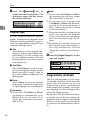
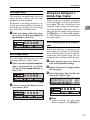
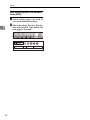
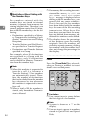
Operating Instructions
Facsimile Reference (option)
<Basic Features>
ZC HH0 10 N. eps
Read this manual carefully before you use this product and keep it handy for future
reference.
For safety, please follow the instructions in this manual.
FAX Option Type 4000 Operating Instructions
Printed in Japan
UE USA B383-8607B
Available Options
•
Expansion Memory (FAX Feature Expander Type 450)
•
Optional Hard Disk (FAX Feature Expander Type 4000)
•
400 dpi Option (FAX 400dpi Option Type 450)
•
ISDN Unit (ISDN Option Type 450)
•
Stamp Unit (FAX Stamp Type 4000)
•
Handset (Handset Type 4000)
Supplies
•
Marker Ink (Marker Type 30 is recommended for the best performance)
TABLE OF CONTENTS
1. Getting Started
Guide to Components ...............................................................................
Front View .....................................................................................................
Rear View......................................................................................................
Operation Panel .........................................................................................
1
1
2
4
Starting the Machine ................................................................................. 7
Turning on the Power.................................................................................... 7
Turning off the Power.................................................................................... 7
Switching Between Copy Mode and Facsimile Mode ............................ 8
Reading the Display .................................................................................. 9
Reading the Display Panel and Using Keys.................................................. 9
Standby Display ............................................................................................ 9
Communication Display .............................................................................. 10
Display Prompts .......................................................................................... 10
2. Faxing
Overview...................................................................................................
Changing Memory Transmission and Immediate Transmission .................
Setting Originals......................................................................................
Setting a Single Original on the Exposure Glass ........................................
Setting Originals in the Document Feeder (ARDF) .....................................
If the machine cannot detect the size of your original .................................
Original Sizes Difficult to Detect..................................................................
Memory Transmission ............................................................................
11
11
12
13
14
16
16
18
Canceling a Memory Transmission .......................................................
Canceling the Transmission Before the Original is Scanned ......................
Canceling a Transmission While the Original is Being Scanned ................
Canceling a Transmission While the Message is Being Sent .....................
Immediate Transmission ........................................................................
Canceling an Immediate Transmission .................................................
Canceling a Transmission Before You Have Pressed Start........................
Canceling a Transmission After You Have Pressed the Start Key .............
Scan Settings...........................................................................................
Resolution ...................................................................................................
Original Type...............................................................................................
Image Density (Contrast) ............................................................................
Mixing Scan Settings for a Multiple Page Original ......................................
23
23
23
23
25
28
28
28
29
29
30
30
31
i
Dialing.......................................................................................................
Number Keys ..............................................................................................
Quick Dials ..................................................................................................
Speed Dials.................................................................................................
Groups ........................................................................................................
Optional Group Dial.....................................................................................
Reception .................................................................................................
Selecting the Reception Mode ....................................................................
33
33
35
36
37
38
39
39
3. Registering
RTI/TTI ......................................................................................................
Registering RTI/TTI.....................................................................................
G3 Analog Line ........................................................................................
Quick Dial .................................................................................................
Registering Quick Dials...............................................................................
Quick Dial Key and Function Key Label (Dial label)....................................
Deleting Quick Dials....................................................................................
Speed Dial ................................................................................................
Registering Speed Dial ...............................................................................
Deleting Speed Dial ....................................................................................
Groups......................................................................................................
Registering Groups .....................................................................................
Deleting Groups ..........................................................................................
Registering Optional Groups.......................................................................
Deleting Optional Groups............................................................................
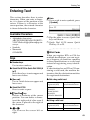
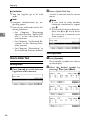
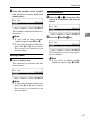
Entering Text............................................................................................
Available Characters ...................................................................................
Keys ............................................................................................................
How to Enter Text .......................................................................................
41
41
43
45
45
47
50
52
52
54
56
56
58
60
63
65
65
65
66
4. Troubleshooting
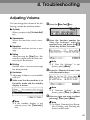
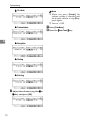
Adjusting Volume .................................................................................... 69
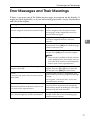
Error Messages and Their Meanings..................................................... 71
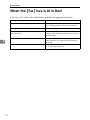
When the {Fax} key is Lit in Red ............................................................ 72
Solving Problems .................................................................................... 73
INDEX........................................................................................................ 74
ii
1. Getting Started
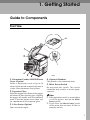
Guide to Components
Front View
ZCHH020N.eps
1. Document Feeder (ARDF)/Platen
Cover (Option)
4. Optional Handset
Holds a document stack of up to 50
sheets which are fed automatically one at
a time. Place documents face up here.
5. Main Power Switch
2. Exposure Glass
Place the original face down on the upper
left corner of the exposure glass, aligning
the upper left corner with the reference
mark. Close the platen cover when you
set a document on the exposure glass.
3. 3–bin Sorter (Option)
Sorts and stacks copies.
This permits voice communication.
Do not touch this switch. This switch
should be only used by a service representative.
Note
❒ If the operation switch is on and there
is still no power, turn on the Main
Power switch.
❒ If you leave the Main Power switch
off for more than an hour, all files in
memory are lost.
1
Getting Started
1
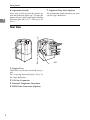
6. Operation Switch
7. Optional Tray Unit (Option)
Press this switch to turn the power on
(the On indicator lights up). To turn the
power off, press this switch again (the On
indicator goes off).⇒ P.7 “Turning on the
Power”
For information about optional tray unit,
see the Copy Reference.
Rear View
ZCHH030N.eps
1. Bypass Tray
Select this tray for non-standard size paper.
See “Copying from the Bypass Tray” in
the Copy Reference.
2. G3 Line Connector
3. External Telephone Connector
4. ISDN Line Connector (Option)
2
Guide to Components
1
This page is intentionally blank.
3
Getting Started
Operation Panel
1
ZCHH040N.eps
Communicating
Start
Manual RX
Receive
File
TX File
Status
Confidential
File
TEL
Mode
Standard
Detail
Super Fine
Immediate
Trans.
Memory
Trans.
Auto Image Density
TEXT
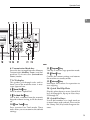
1. Communicating Indicator
Lights during transmission or reception.
❖ Features Programmed by Default
Key
Standard
With ISDN
Unit and
Stamp options
F1
Start Manual RX
←
3. Confidential File Indicator
F2
←
Blinks when a Memory Lock file has been
stored in memory.
Lights when a message has been received
into memory with Confidential Reception.
Transmission Result
Display
F3
TEL Mode
←
F4
-
G3/G4 Line
Selection
4. User Function keys
F5
-
Stamp
2. Receive File Indicator
Lights to tell you a message has been received into memory.
Note that this indicator does not inform
you of a Confidential Reception.
Each of these can be programmed for
rapid access to frequently used features.
4
TEXT-PHOTO
5. Resolution key
Press to switch between Standard, Detail
and Super Fine (optional 400dpi Option
required).
PHOTO
Operation Panel
1
eps
Interrupt
Screen Contrast
User Tools Adjustment
Program
Clear Modes Energy Saver
Speed Dial
On Hook Dial
Pause /
Redial
Tone
6. Transmission Mode key
11. {Program}} key
Press this key to toggle between Memory
Transmission (Memory Trans.) and Imm ed ia te T ran sm iss ion (Immediate
Trans.) modes.
This key is used in Copy operation mode.
7. LCD display
This guides you through tasks and informs you of the machine status. A messages appears here.
8. {Speed Dial}} key
Press to select a Speed Dial.
9. {On Hook Dial}} key
Use to dial a number from the numeric
keypad without having to lift the handset.
10. {User Tools}} key
Press to enter User Tools mode. These
tools allow you to customize the default
settings.
12. {Reset}} key
Cancels the current settings and returns
the machine to standby mode.
13. {Interrupt}} key
Interrupts the current fax operation to
start copying.
14. Quick Dial Flip Plate
Flip this plate down to access Quick Dial
keys 01 through 28, flip up to access keys
29 through 56.
15. Quick Dial keys
Use to dial numbers at a single touch or
to enter letters and symbols. Also use for
the Group Dial, Keystroke Program features.
5
Getting Started
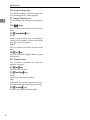
16. Original Type key
Use when sending a halftone image such
as a photograph or a color original.
17. Image Density key
1
Use to change the setting of image density.
18. < > keys
Press to move the cursor or select functions.
19. {Pause/Redial}} key
Pause:
Inserts a pause when you are dialing or
storing a fax number. A pause cannot be
inserted as the first digit.
Redial:
Press to redial one of the last ten numbers.
20. {Tone}} key
Press to send tonal signals down a pulse
dialing line.
21. Number keys
Use to dial fax numbers or enter the
number of copies.
22. {Start}} key
Press to start all tasks.
23. {Clear/Stop}} key
Clear:
Deletes one character or digit.
Stop:
Interrupts the current operation (transmission, scanning, copying or printing).
24. {Facsimile}} key
Press to switch to Facsimile mode.
6
Starting the Machine
Starting the Machine
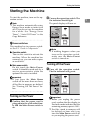
To start the machine, turn on the operation switch.
Note
❒ This machine automatically enters
Energy Saver mode or turns itself
off if you do not use the machine
for a while. See “Energy Saver
Timer”, “Auto Off Timer” in the
Copy Reference.
B Turn on the operation switch. The
1
On indicator should light.
The panel display will turn on.
LTWO020E.eps
Interrupt
Clear Modes Energy Saver
- Power switches
This machine has two power switches: See P.1 “Guide to Components”.
Note
❒ If nothing happens when you
turn on the operation switch,
make sure the Main Power
switch is turned on.
❖ Operation switch
Turn on this switch to activate the
machine. When the machine has
warmed up, you can make copies
or send faxes.
❖ Main power switch
Do not touch the Main Power
switch. It should be used only by a
service representative when the
optional fax unit is installed.
Turning off the Power
A Turn
off the operation switch.
The On indicator will go out.
LTWO020E.eps
Interrupt
Important
❒ If you leave the Main Power
switch off for more than one hour,
all fax files in memory are deleted.
See “Turning Off The Power” below.
Turning on the Power
A Confirm
that the power cord is
plugged into the wall outlet firmly and the Main Power switch is
on.
Clear Modes Energy Saver
Important
❒ Before you unplug the power
cord, confirm that the display in
Facsimile mode indicates that the
remaining memory space is 100%.
❒ Fax files stored in memory will
be deleted an hour after you
turn the Main Power switch off
or you unplug the power cord.
7
Getting Started
Switching Between Copy Mode and
Facsimile Mode
1
This machine is both a fax and a copier. When you turn on the power switch, the
copier screen is shown and the machine is ready to make copies. When you wish
to use fax functions, press the {Facsimile} key on the right of the operation panel.
You can set this machine to display facsimile mode immediately after the power
switch is turned on. See “Changing the Machine Settings” in the Copy Reference.
LTWO122E.eps
Dial
k Dial
Limitation
❒ You cannot switch modes under the following circumstances:
• While scanning in a fax
• During Immediate Transmission
• While editing the System Settings
• During Interrupt Copying
• While using On-hook Dial
8
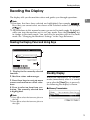
Reading the Display
Reading the Display
The display tells you the machine status and guides you through operations.
1
Note
❒ Functions that have been selected are highlighted (for example 11 17 ).
Keys that you cannot select are shown with a dashed outline (for example
).
❒ All procedures in this manual assume you are in Facsimile mode. By default,
when you turn the machine on it is in Copy mode. Press the {Facsimile} key
to change to Facsimile mode. You can have the machine start in Facsimile
mode. See “Changing the Machine's Settings” in the Copy Reference.
Reading the Display Panel and Using Keys
LTWO290E.eps
Fax
2
1
3
4
Auto Image Dens
Text
Auto Text / Photo
Photo
1. Display for the currently selected
function.
2. Machine status and messages.
3. Press these keys to navigate menu
screens and confirm or cancel selections.
4. Press to select an item from a selection. The currently selected item
is highlighted.
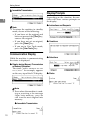
Standby Display
While the machine is in standby
mode (immediately after it is turned
on or after the {Reset} key is pressed),
the following the display is shown.
❖ Memory Transmission
Us28-1.tif
Note
❒ Press < to select the item one place to
the left.
❒ Press > to select the item one place to
the right.
9
Getting Started
❖ Immediate Transmission
Us35-1.tif
Display Prompts
Depending on the situation, the machine will show various prompts on
the display.
1
Note
❒ To return the machine to standby
mode, do one of the following:
• If you have set the original and
have not pressed the {Start}key,
remove the original.
• If you have not set an original,
press the {Reset} key.
• If you are in User Tools mode,
press the {User Tools} key.
❖ Instructions and Requests
Us79-2.tif
❖ Questions
Us15-4.tif
Communication Display
While the machine is communicating
the status is displayed.
❖ Display during Memory Transmission
or Memory Reception:
The status “PARIS BRANCH A4→A4
P001/P003” for exomple, appears
on the vary top of the LCD display.
Us15-1.tif
❖ Selections
Us87-3.tif
❖ Status
Us15-6.tif
Note
❒ Even when the machine is sending or receiving a fax message
from/into memory, you can
still scan the next original into
memory.
❖ Immediate Transmission:
Us37-2.tif
10
2. Faxing
Overview
Changing Memory
Transmission and Immediate
Transmission
The basic procedure to send a fax
message is:
A Make sure the Facsimile indicator
is lit
B Set your original
C Dial the number
D Press the {Start} key
The rest of this section describes these
steps and the various features that are
available in more detail.
There are two ways to send a fax message:
• Memory Transmission
• Immediate Transmission
Check the indicators on the operation
panel to check which mode is currently active and press the {Transmission
Mode} key to toggle between them.
11
Faxing
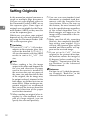
Setting Originals
In this manual an original can mean a
single or multiple page document.
You can set your originals either in
the Document Feeder (ARDF) or on
the exposure glass. Some types of
originals are unsuitable for the Document Feeder (ARDF) so they must be
set on the exposure glass.
Which way you place your original
depends on its size and whether you
are using the Document Feeder (ARDF) or the exposure glass.
2
Limitation
❒ If you set 51/2"×81/2" /A5 size documents on the exposure glass, they
will not be detected. 51/2"×81/2" /
A5 size documents with the ARDF
results in sent as 8 1 / 2 "×11" /A4
size.
Note
❒ When sending a fax, the image
output at the other end depends on
the size and direction of paper
used in the receiver's terminal. If
the receiver does not use paper of
the same size and direction as that
of the original, the fax image may
be output reduced, trimmed at the
both edges, or divided into two or
more sheets. When sending an important original, we recommend
that you ask the receiver about the
size and direction of the paper
used in their terminal.
❒ When sending an original of an irregular (i.e. non-standard) size or
part of a large original, you can
specify the scan area precisely.
12
❒ You can scan non-standard sized
documents as standard sized documents with the Irregular Scan
Area feature. When you turn on
this feature, the area scanned will
be in the specified range regardless
of the actual document size. A
blank margin will appear or the
image will be truncated at the receiving end.
❒ Make sure that all ink, correcting
fluid etc., has completely dried before setting your original. If it is
still wet, the exposure glass will be
marked and those marks will appear on the received image.
❒ If you set an 81/2"×11" /A4 size
original in the portrait direction,
the machine rotates the image by
90 degrees before sending it. See
Chapter1, “Transmission with Image Rotation” in the Advanced
Features manual.
Reference
For how to set 2-sided documents,
see Chapter3, “Book Fax” in the
Advanced Features manual.
Setting Originals
- How to set A4, B4, A3, Lt, LG
and DLT size originals
Setting a Single Original on
the Exposure Glass
ND0X01E2.eps
Original
Where original is set
Exposure glass
Document Feeder(ADF)
Set originals that cannot be placed in
the Document Feeder (ARDF), such
as a book, on the exposure glass one
page at a time.
2
A Lift the Document Feeder (ARDF)
by at least 30 degrees. Place the
original face down and align its
upper left corner with the reference mark at the upper left corner
of the exposure glass.
ND0X01E2
Zaah220e.eps
- How to set A4, A5 and B5 size
originals
ND0X01E1.eps
Original
Where original is set
Exposure glass
Document Feeder(ADF)
ND0X01E1
Limitation
❒ 51/2"×81/2" /A5 size on the exposure glass is not detected. Set 51/2"
×81/2" /A5 size documents in the
ARDF.
1. Reference mark
2. Scale
Note
❒ If you do not raise the Document Feeder (ARDF) by at least
30 degrees, the original size will
not be detected.
B Close the Document Feeder (ARDF).
Note
❒ When sending a bound original,
the received image may contain
some black areas. To reduce this
effect, hold down the original to
prevent its bound part from rising.
13
Faxing
Reference
For information about the sizes
and number of originals that can
be placed in the Document Feeder
(ARDF), see Chapter9, “Acceptable types of Originals” in the Advanced Features manual.
- Bound Original Page Order
W h en s en din g bound orig inals
(books, magazines, etc.), you can
choose to have either the left page or
right page sent first.
2
Note
❒ The default setting is Send Left
Page first.
Setting Originals in the
Document Feeder (ARDF)
A Adjust
the document guide to
match the size of your originals.
Align the edges of your originals
and stack them in the Document
Feeder (ARDF) face up.
ND1D0100E.EPS
Use the Document Feeder (ARDF) to
scan in a stack of originals in one operation. The Document Feeder (ARDF) can handle both single-sided and
double-sided originals.
Limitation
❒ The maximum document length is
17" (432mm).
❒ Place all the originals to be sent in
a single stack.
❒ You cannot set originals in the
Document Feeder (ARDF) one
page at a time or in sheaves.
❒ Do not open the Document Feeder
(ARDF) while it is scanning the
originals or your document could
be jammed.
Note
❒ If an original jams, press the {Clear/
Stop} key then remove the original
carefully.
❒ If your original is bent or folded,
flatten it before you set it.
❒ Set thin originals on the exposure
glass.
14
1. Limit mark
2. Document guide
Setting Originals
- Scanning in Mixed Sized
Originals
If you wish to scan in stacks of originals containing mixed paper sizes
from Document Feeder (ARDF), you
can have the machine automatically
detect the size of each originals.
2
Note
❒ By default this feature is turned off.
To turn it on, adjust the User Parameters. See Chapter6, “Changing the
User Parameters (Switch05, Bit6)”
in the Advanced Features manual.
❒ Scanning may take slightly longer
when this function is turned on.
❒ Small originals may be sent at a
slight slant if they are not stacked
flush against the Document Feeder
(ARDF) document guides.
❒ If you try and set a stack of mixed
size originals in the Document
Feeder (ARDF) with this function
turned off, a paper jam may occur.
Originals unsuitable for the Document Feeder (ARDF)
Do not set the following types of originals in the Document Feeder (ARDF) because they may be damaged. Place them on the exposure glass instead.
• Originals of sizes other than those specified in the previous table
• Originals containing staples or clips
• Perforated or torn originals
• Curled, folded, or creased originals
• Pasted originals
• Originals with any kind of coating, such as thermosensitive paper, art paper,
aluminum foil, carbon paper, or conductive paper
• Originals with index tabs, tags, or other projecting parts
• Sticky originals, such as translucent paper
• Thin and soft originals
• Originals of inappropriate weight (see table above)
• Originals in bound form, such as books
• Transparent originals, such as OHP transparencies or translucent paper
15
Faxing
If the machine cannot detect the size of your original
If the machine cannot detect the original size, the following display is shown:
Us21-1.tif
2
If this happens, carry out the following steps.
A Press [Exit].
B Remove the original and replace it on the exposure glass.
C Press the {Start}} key to scan the original again.
If the above display appears again, repeat steps A to C.
Note
❒ If the machine still cannot detect the original size, the following display is
shown: If this happens, carry out the following steps.
Us21-2.tif
• Press the < or > key to switch the scan size.
• Press the {Start} key again.
Original Sizes Difficult to Detect
The machine finds it difficult to detect the size of the following kinds of originals. If this happens, the receiving machine may not select print paper of the correct size. See P.16 “If the machine cannot detect the size of your original”.
• Documents set on the exposure glass of sizes other than those listed in the table below
• Originals with index tabs, tags, or projecting parts
• Transparent originals, such as OHP transparencies or translucent paper
• Dark originals with many characters or drawings
• Originals which partially contain solid printing
• Originals which have solid printing at their edges
The following paper sizes are automatically detected in Facsimile mode.
16
Setting Originals
❖ Inch Version
Paper Size
Where Original
is Set
11"×
×17"
L
×
8 1/2"×
14" L
×
8 1/2"×
11" KL
×14"
5 1/2"×
×81/2" 10"×
L
KL
×10"
×13" 8"×
8 1/2"×
K
L
Exposure Glass
Ο
Ο
Ο
×
Ο
Ο
Ο
Document Feeder (ARDF)
Ο
Ο
Ο
Ο
Ο
Ο
Ο
2
17
Faxing
Memory Transmission
In Memory Transmission mode, after
you press the {Start} key, the machine
does not dial the destination until all
pages of your fax message have
scanned into memory (in contrast
with Immediate Transmission, where
the number is dialed first and pages
are scanned and sent one by one).
Memory Transmission is useful because:
• You can take your original away
from the machine without having
to wait too long
• While your message is being sent,
other people can operate the machine
• You can send the same message to
more than one place in a single operation (Broadcasting)
2
Important
❒ If there is a power failure (Main
Power switch is off) or the plug is
pulled out for more than 1 hour, all
the files stored in memory are deleted. As soon as power is restored,
the Power Failure Report is printed to help you identify deleted
files. If you turn just the operation
switch off, files are not deleted.
Limitation
❒ If memory is full (0% appears on
the display), Memory Transmission is disabled. Use Immediate
Transmission instead.
❒ Maximum number of destinations
per Memory Transmission: 200
❒ Combined total number of destinations that can be stored:500
❒ The theoretical maximum number
of destinations you can enter with
the number keys is 99, but this will
depend on the amount of memory
currently available.
❒ The number of pages that you can
store in memory depends on the
original images and the scan settings. You can store up to 160
standard pages (ITU-T #1 chart,
Resolution: Standard, Original
Type: Text).
❒ The machine will return to the default transmission mode (Memory
Transmission) after every transmission. You can change this so
that the desired setting is maintained.
❒ The maximum total number of
documents that can be stored in
memory is as follows:
• About 480 pages with only the
optional Expansion Memory installed
• About 3,000 pages with both the
optional Expansion Memory
and Expansion Memory installed
A Make
sure that the Memory
Transmission indicator is lit.
LTWO140E.eps
Note
❒ Maximum number of Memory
Transmission files: 200 (up to 1,000
files with optional Expansion
Memory installed)
18
Communicating
Start
Manual RX
Receive
File
TX File
Status
Confidential
File
TEL
Mode
Standard
Detail
Super Fine
Immediate
Trans.
Memory
Trans.
If it is not, press the {Transmission
Mode} key.
Memory Transmission
B Set the original.
Limitation
❒ You can send the first pages
from the exposure glass then
the remaining pages from the
Document Feeder (ARDF). After you place the last page on
the exposure glass, you have 60
seconds to insert the remaining
pages in the Document Feeder
(ARDF).
❒ Note that you cannot set pages
on the exposure glass after you
have started using the Document Feeder (ARDF).
❒ Do not open the Document
Feeder (ARDF) while it is scanning in originals.
Note
❒ Place the original you want to
store in memory on the exposure glass or the Document
Feeder (ARDF). To store multiple page originals from the exposure glass, set them page by
page.
❒ You can scan half the pages of
your original from the exposure
glass and the remainder from
the Document Feeder (ARDF).
When you have finished scanning from the exposure glass,
place the rest of the pages in the
Document Feeder (ARDF) and
press the {Start} key.
❒ The original can be placed at
any time up until you press the
{Start} key.
D Dial. If you wish to send the same
message to more than one destination, press [Add] and dial another destination. Repeat this step
for all destinations.
Us28-1.tif
2
If you make a mistake, press the
{Clear/Stop} key and enter the correct number again.
Note
❒ When specifying a destination
using a Quick Dial, Speed Dial
or Group dial, the destination is
added even if you did not press
[Add].
❒ When dialing with the number
keys or using Chain Dial, you
can select the line type (G3 or G4)
before pressing [Add] in step D.
❒ If you do not set an original
within 30 seconds of entering a
destination fax number, the
transmission is canceled.
Reference
P.33 “Dialing”
Reference
P.12 “Setting Originals”
C Select
any scan settings you require. ⇒ P.29 “Scan Settings”
19
Faxing
E Press the {Start}} key.
LTWO261E.eps
Dial
D Set the next original on the exposure glass within 60 seconds
after the machine has finished
scanning the first original.
k Dial
2
The machine starts scanning the
original.
The machine calls the destination.
The name or fax number which is
programmed as the RTI or CSI at
the other end is shown on the top
of display (e.g. “ PARIS BRANCH
A4→A4 P001/P003”).
Us15-1.tif
Reference
P.41 “RTI/TTI”
After transmission, the machine
will return to standby mode.
Us28-1.tif
Sending Originals from the
Exposure Glass
20
A Set the first page of your original on the exposure glass face
down.
B Dial.
C Press the {Start}
} key.
The machine starts scanning the
original.
Note
❒ Repeat steps C to D for all
pages.
E Set the last original then press
[#
#].
F Press the {Start}
} key.
The machine starts to call the
destination.
-Checking the Transmission
Result
• Turn the Transmission Result Report on if you want a report to be
printed after every successful
transmission. ⇒ P.18 “Memory
Transmission”
If you leave the Transmission Result Report off, the report will not
be printed after every transmission. However, should a transmission fail, a Communication Failure
Report will be printed instead.
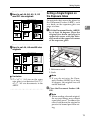
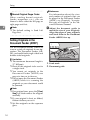
• If you turn the Transmission Result Report (Memory Transmission) off, the Error Report will be
printed when the communication
on fails.
• You can also check the transmission result by examining the TCR.
See Chapter4, “Printing the TCR”
in the Advanced Features manual.
You can either print or scroll
through the TCR on the display.
Se e Ch apte r4, “Ch ec kin g th e
Transmission Result (TX File Status)” in the Advanced Features
manual.
Memory Transmission
- Sending a Fax Message
Immediately
-Checking the Transmission
Progress
To send a fax message immediately,
use Immediate Transmission. If you
have just set up an original for broadcasting, Immediate Transmission will
interrupt the current communication.
Your original will not be sent until
previously queued files have been
sent.
To check which destinations the fax
message has been sent to so far, print
the TX file list.
- Automatic Redial
If a fax message could not be transmitted because the line was busy or
an error occurred during transmission, redialing is done 2 times at 10
minutes intervals (these figures vary
according to which country you are
in).
If redialing fails after two redials, the
machine cancels the transmission and
prints the Transmission Result Report
or Communication Failure Report.
2
-If Memory Runs Out While
Storing an Original
If you run out of memory while storing an original (free space reaches
0%), “Memory full” is displayed.
Press [Exit] to transmit the stored pages only.
Usfax-new18.tif
Note
❒ By default, successfully scanned
pages are sent. If you wish to
change this setting, please contact
your service representative.
- Broadcasting Sequence
If you dial several destinations for the
same message (Broadcasting) the
messages are sent in the order in
which they were dialed. If the fax
message could not be transmitted, the
machine redials that destination after
the last destination specified for
Broadcasting. For example, if you
specify four destinations A through D
for broadcasting, and if the lines to
destinations A and C are busy, the
machine dials the destinations in the
following order: A, B, C, D, A, and C.
21
Faxing
- Batch Transmission
If you send a fax message by Memory
Transmission and there is another fax
message waiting in memory to be
sent to the same destination, that
message is sent along with your original. Several fax messages can be sent
with a single call, thus eliminating the
need for several separate calls. This
helps save communication costs and
reduce transmission time.
Fax messages for which the transmission time has been set in advance are
sent by batch transmission when that
time is reached.
2
Note
❒ By default Batch Transmission is
switched on. You can switch it on
or off with the User Parameters.
- ECM (Error Correction Mode)
This feature automatically sends data
that was not transmitted successfully
using a system that complies with international standards.
ECM requires that the destination
machine has the same feature.
Note
❒ By default ECM is switched on.
You can change this with the Key
Operator Settings. See Chapter6,
“ECM” in the Advanced Features
manual.
22
Canceling a Memory Transmission
Canceling a Memory Transmission
Canceling the Transmission
Before the Original is Scanned
A Press the {Reset}} key.
LTWO103N.eps
Interrupt
Screen Contrast
User Tools Adjustment
Program
Clear Modes Energy Saver
Note
❒ When you set the document in
the Document Feeder (ARDF),
you can cancel the transmission
by just removing it.
Canceling a Transmission
While the Original is Being
Scanned
A Press the {Clear/Stop}} key.
Canceling a Transmission
While the Message is Being
Sent
2
Use this procedure to cancel a transmission after the original has been
scanned.
Limitation
❒ If transmission finishes while you
are carrying out this procedure, it
will not be canceled.
Note
❒ If you cancel a message while it is
being sent, transmission is halted
as soon as you finish this procedure. However, some pages of
your message may have already
been sent and will be received at
the other end.
A Press [Info.].
Us102-1.tif
LTWO271E.eps
Dial
k Dial
The Information menu is shown.
B Enter
the “Check/Cancel TX
Files” function number with the
number keys.
Us111-5.tif
The machine will stop storing the
original and the data will not be
sent.
Note
❒ If “Check/Cancel TX Files” is
not shown, press [↑
↑Prev.] or [↓
↓Next].
23
Faxing
C Press the < or > key until the
file you wish to delete is shown
and press [Delete].
Us110-3.tif
2
D Press [Yes].
Us111-1.tif
The file is erased.
E Press [Exit].
Us111-2.tif
Note
❒ To delete another file, repeat
steps C and D.
F Press [Exit].
Us111-5.tif
the machine will return to standby
mode.
Us28-1.tif
24
Immediate Transmission
Immediate Transmission
With Immediate Transmission, when
you press the {Start} key, the fax
number is dialed immediately. The
message is scanned and transmitted
page by page without being stored in
memory. This contrasts with Memory
Transmission which scans all pages
into memory before dialing the destination.
Immediate Transmission is useful if
you want immediate confirmation
that the message is being sent to the
correct destination (just check the other terminal's RTI or CSI on the operation panel during transmission).
Note
❒ You cannot send the same message
to multiple destinations (Broadcasting). Use Memory Transmission for this purpose.
❒ Place the original on the exposure
glass or in the Document Feeder
(ARDF). To send two or more pages from the exposure glass, set
them one page at a time.
❒ You can scan some pages of your
original from the exposure glass
and the remainder from the Document Feeder (ARDF). When you
have finished scanning from the
exposure glass, place the remainder of the pages in the Document
Feeder (ARDF) and press the
{Start} key within ten seconds.
❒ By default, the transmission mode
selected when the machine is
turned on or when modes are
cleared (transmission mode home
setting) is Memory Transmission.
You can change this with the User
Parameters.
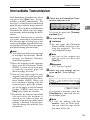
A Check that the Immediate Transmission indicator is lit.
LTWO140E.eps
Communicating
Start
Manual RX
Receive
File
TX File
Status
Confidential
File
TEL
Mode
Standard
Detail
Super Fine
Immediate
Trans.
Memory
Trans.
2
If it is not lit, press the {Transmission Mode } key.
B Set your original.
Limitation
❒ Do not open the Document
Feeder (ARDF) while it is scanning the originals. This can
cause originals to jam.
Note
❒ You can set the original any
time up until you press the
{Start} key.
Reference
P.12 “Setting Originals”
C Select
any scan settings you require. ⇒ P.29 “Scan Settings”
D Dial.
Us35-1.tif
If you make a mistake, press the
{Clear/Stop} key and enter the correct number again.
Note
❒ If you are dialing with the
number keys or Chain Dial,
you can select the type of line
you want (G3 or G4).
25
Faxing
Reference
⇒ P.33 “Dialing”
Sending Originals from the
Exposure Glass
See Chapter1, “Chain Dial” in
the Advanced Features manual.
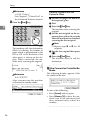
A Set the first page face down on
the exposure glass.
B Dial.
C Press the {Start}
} key.
The machine starts scanning the
original.
D Set the next original on the exposure glass within 10 seconds
after the machine has finished
scanning the first original.
E Press the {Start}} key.
LTWO261E.eps
2
Dial
k Dial
Note
❒ Repeat steps C to D for all
originals.
E Set the last original then press
[#
#].
F Press the {Start}
} key.
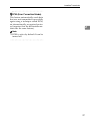
The machine starts to call the
destination.
The machine calls the destination.
While it is dialing, the number or
name which is programmed as the
RTI or CSI in the machine of the
other party is shown on the display. When connected, the machine starts scanning the original.
Us15-6.tif
-If the Connection Could Not Be
Made
Reference
P.41 “RTI/TTI”
The following display appears if the
fax could not be sent:
Us36-1.tif
After transmission the machine
will return to standby mode.
Us28-1.tif
Do one of the following:
• Press [Cancel] and try again.
• Press [Memory TX] to have the machine scan in the document and
then automatically redial the
number.
26
Immediate Transmission
- ECM (Error Correction Mode)
This feature automatically sends data
that was not transmitted successfully
again using a technique called ECM,
an internationally recognized protocol (requires that the destination machine has the same feature).
2
Note
❒ ECM is active by default. It can be
turned off.
27
Faxing
Canceling an Immediate Transmission
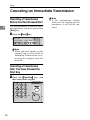
Canceling a Transmission
Before You Have Pressed Start
Use this procedure to cancel a transmission before you have pressed the
{Start} key.
2
A Press the {Reset}} key.
LTWO103N.eps
Interrupt
Screen Contrast
User Tools Adjustment
Program
Clear Modes Energy Saver
Note
❒ When you have already set the
original, you can also cancel an
Immediate Transmission by removing the original from the
machine.
Canceling a Transmission
After You Have Pressed the
Start Key
A Press
the {Clear/Stop}
} key, and
then remove the original.
LTWO271E.eps
Dial
k Dial
28
Note
❒ If the transmission finishes
while you are carrying out this
procedure, it will not be canceled.
Scan Settings
Scan Settings
You may wish to send many different
types of fax messages. Some of these
may be difficult to reproduce at the
other end. However, your machine
has three settings that you can adjust
to help you transmit your document
with the best possible image quality.
❖ Super Fine (optional 400dpi Option required: 16×
×15.4lines/mm, 400×
×400dpi)
Select for originals with very fine
details or when you require the
best possible image clarity. This
resolution is eight times as fine as
Standard.
❖ Resolution:
Standard, Detail, Super Fine (option)
Limitation
❒ If the other party's machine does
not support the resolution at
which you are sending, this machine automatically switches to a
resolution which is supported.
❒ Sending with Super Fine resolution requires that your machine
has the optional Expansion Memory and the other party's machine
has the capability to receive fax
messages at Super Fine resolution.
❒ Note that even if the option is installed on your machine, transmission and reception may take place
using Detail resolution if the other
party's machine does not support
this feature.
❖ Image density:
Auto Image Density, Manual Image Density (5 levels)
❖ Original type:
Text, Text·Photo, Photo
Resolution
Images and text are scanned into the
machine by converting them to sequences of dots. The frequency of
dots determines the quality of the image and how long it takes to transmit.
Therefore, images scanned at high
resolution (Super Fine) have high
quality but transmission takes longer.
Conversely, low resolution (Standard) scanning results in less quality
but your original is sent more quickly. Choose the setting that matches
your needs based upon this trade off
between speed and image clarity.
❖ Standard (8×
×3.85lines/mm, 200×
×100dpi)
Select for originals containing normal sized characters.
❖ Detail (8×
×7.7lines/mm, 200×
×200dpi)
Select for originals containing
small characters or when you require greater clarity. This resolution is twice as fine as Standard.
2
Note
❒ When the machine is turned on or
modes are cleared, the resolution is
set to Standard by default. You can
change this with the User Parameters. See Chapter6, “Changing the
User Parameters (Switch00,
Bit5,4)” in the Advanced Features
manual.
❒ By default, the resolution returns
to the home setting after every
transmission. You can change this
with the User Parameters. See
Chapter6, “Changing the User Parameters (Switch01, Bit7)” in the
Advanced Features manual.
29
Faxing
A Press
the {Resolution}
} key to
switch between resolutions. The
indicators above the key shows
the current selection.
LTWO190E.eps
Communicating
Start
Manual RX
Receive
File
TX File
Status
Confidential
File
TEL
Mode
Standard
Detail
Super Fine
Immediate
Trans.
Memory
Trans.
2
Original Type
If your original contains photographs, illustrations or diagrams with
complex shading patterns or grays,
select the appropriate Original Type
to optimize image clarity.
❖ Text
Select Text to send an original containing a high-contrast black-andwhite image. Use this setting even
if your original contains text and
photographs or if you only want to
send clearer text.
❖ Text·Photo
Select Text·Photo to send an original containing both a high-contrast
black-and-white image, such as
text, and a halftone image such as a
photograph.
❖ Photo
Select Photo to send an original
containing a halftone image such
as a photograph or a color original.
Limitation
❒ If you select Text·Photo or Photo,
resolution is automatically set to
Detail. Even if you select Text
again, the resolution will not return to Text.
30
Note
❒ If you select Text·Photo or Photo,
the transmission will take longer
than when Text is selected.
❒ If you send a fax message with
Text·Photo or Photo and the background of the received image is
dirty, reduce the density setting
and re-send the fax.
❒ When the machine is turned on or
modes are cleared, the Original
Type is set to Text. You can change
this with the Initial Setup TX settings.
❒ By default, the machine returns to
the Original Type home setting after every transmission. You can
change this with the User Parameters.
A Press the [Original Type] key for the
type you require.
LTWO053N.eps
Image Density (Contrast)
The text and diagrams in your original should stand out clearly from the
paper they are written on. If your
original has a darker background
than normal (for example, a newspaper clipping), or if the writing is faint,
adjust the image density.
By default, this machine will automatically select a density setting appropriate to the original (Auto Image
Density). If you wish to set the density yourself, use Manual Image Density.
Scan Settings
Auto Image Density
The machine automatically selects an
image density which is the most appropriate for the original.
By default, Auto Image Density is selected when the machine is turned on
or modes are cleared. You can change
this with the User Parameters.
A If the Auto Image Density indicator is not selected, press [Auto Image Density] to turn it on.
Mixing Scan Settings for a
Multiple Page Original
When sending an original consisting
of several pages, you can select different Image Density, Resolution and
Original Type settings for each page.
Set your original, select the scan settings for the first page, dial and press
the {Start} key as you would normally. Then follow one of the following
two procedures.
2
LTWO050N.eps
When setting originals on the exposure
glass
Manual Image Density
Use the Image Density keys to vary
the image density within 5 levels.
A Make sure that the [Auto Image Den-
sity] is not selected. If it is selected, press [Auto Image Density] to
turn it off.
LTWO050N.eps
While the machine is beeping, you
have about 60 seconds (10 for Immediate Transmission) to select density,
resolution and original type. The remaining time is shown on the display.
A Check which pages you wish to
scan with different settings.
B Remove the previous page and set
the next page.
C Select the Image Density, Resolution and Original Type.
LTWO190E.eps
Communicating
Start
Manual RX
B Press to change the density from
Receive
File
TX File
Status
Confidential
File
TEL
Mode
Standard
Detail
Super Fine
Immediate
Trans.
Memory
Trans.
LTWO054N.eps
five density level.
LTWO051N.eps
Note
❒ Adjust settings for each page
before you press the {Start} key.
31
Faxing
When setting originals in the document
feeder (ARDF)
A Check which pages you wish to
scan with different settings.
B Select the Image Density, Resolu-
2
tion and Original Type before the
next page is scanned.
LTWO190E.eps
Communicating
Start
Manual RX
LTWO054N.eps
32
Receive
File
TX File
Status
Confidential
File
TEL
Mode
Standard
Detail
Super Fine
Immediate
Trans.
Memory
Trans.
Dialing
Dialing
There are three main ways to dial a
number:
❖ Number keys:
Enter numbers directly using the
key pad on the right side of the operation panel.
❖ Quick Dials:
When you have stored a destination's number in a Quick Dial key,
you can dial the number by just
pressing that key. Additionally,
you can store a name that will appear on the display whenever you
press that Quick Dial.
❖ Speed Dials:
If you store a number in a Speed
Dial, when you want to dial it just
press the {Speed Dial} key followed
by a 2 or 3 digit code. Like Quick
Dials, you can store a name along
with the number.
This section covers these features and
others in more detail.
A Set your original and select any
scan settings you require.
Reference
P.12 “Setting Originals”
2
P.29 “Scan Settings”
B Enter
the fax number with the
number keys.
LTWO281E.eps
Dial
k Dial
The digits appear on the display as
you enter them.
Us45-1.tif
Number Keys
Enter numbers directly using the key
pad on the right side of the operation
panel.
Note
❒ Maximum length of a fax number:
254 digits.
❒ You can insert pauses and tones in
a fax number. ⇒ P.34 “Pause”, P.35
“Tone”
❒ If the optional ISDN Unit is installed, you may need to enter a
subaddress.
Note
❒ If you make a mistake, press the
{Clear/Stop} key to erase the
wrong digits and try again.
❒ If you wish to send this message
to more than one destination,
press [Add], then enter the next
destination.
❒ If the optional ISDN Unit is installed, select G3 or G4 before
you go to the next step.
C Press the {Start}} key.
33
Faxing
- Restrictions When Dialing with
the Number Keys
Fax numbers entered with the
number keys are stored in internal
memory (separate from memory for
storing original data). Therefore, you
cannot program more than 99 numbers with the number keys for the following:
• Destinations specified in a Memory Transmission (including Confidential Transmission and Polling
Reception)
• Transfer Stations and End Receivers specified in a Transfer Request
• Destinations and Transfer Stations
specified in a Group
For example, when 90 destinations
are registered in a Group with the
number keys, only 10 destinations
can be dialed for Memory Transmission from the number keys.
2
Note
❒ When this machine is requested to
transfer a call (i.e. becomes a
Transfer Station), 2 fax numbers
are automatically stored. Therefore, the number of destinations
that can be dialed from the number
keys decreases by two whenever
this machine is requested to transfer a call.
❒ When a total of 99 fax numbers is
stored, only Immediate Transmission is allowed.
34
❒ If a memory file is awaiting transmission and the “Memory is full and
you cannot enter with number
keys” message is displayed when
dialing with the number keys, you
cannot dial any more numbers.
That is because the fax numbers
have been dialed with the number
keys for some of the files awaiting
transmission. When these files
have been sent and their fax numbers are deleted from memory, additional fax numbers can be dialed.
❒ The display shows the percentage
of free memory space for storing
originals. Since fax numbers are
stored in separate memory, dialing
fax numbers with the number keys
does not change the percentage on
the display.
Pause
Press the {Pause/Redial} key when dialing or storing a number to insert
about a two-second pause.
LTWO220E.eps
Speed Dial
On Hook Dial
Pause /
Redial
Tone
Limitation
❒ You cannot insert a pause before
the first digit of a fax number.
Note
❒ A pause is shown as a “-” on the
display.
❒ You can insert a pause in numbers
stored in Quick Dials and Speed
Dials.
Dialing
Tone
Quick Dials
This feature allows a machine connected to a pulse dialing line to send
tonal signals (for example if you want
to use a special service on a tone dialing line). When you press the {Tone}
key, the machine dials the number using tonal signals.
When you have stored a destination's
number in a Quick Dial key, you can
dial the number by just pressing that
key.
Additionally, you can store a name
that will appear on the display whenever you press that Quick Dial.⇒ P.45
“Registering Quick Dials”
LTWO210E.eps
Speed Dial
On Hook Dial
Pause /
Redial
Tone
Limitation
❒ You cannot place a tone before the
first digit of a fax number.
❒ Some services may not be available
when using the {Tone} key.
Note
❒ A tone is shown as a “•” on the display.
2
Note
❒ To check the contents of the Quick
dial, print the list.
❒ If a Quick Dial key is currently
used for another function, for example a Group Dial, you cannot
store a number in it.
❒ Flip the Quick Dial plate over to
access Quick Dial keys 01-28 or 2956.
❒ You can have the label stored with
a Quick Dial printed on the first
page received at the other end.
Reference
P.33 “Dialing”
A Set your original and select any
scan settings you require. ⇒ P.29
“Scan Settings”
- Sending Tonal Signals by ISDN
(Optional ISDN Unit Required)
You can still send tone signals to a G3
user even if the machine is only connected to an ISDN line.
Note
❒ This feature can only be used for
Memory or Immediate Transmission. You cannot dial through
ISDN using On-hook Dial or Manual Dial.
35
Faxing
B Press the Quick Dial key in which
the destination's number is programmed.
ND2L05E1.eps
01
2
06
07
A
B
C
D
E
F
G
08
02
01
10
11
12
13
14
H
I
15
16
03
J
17
04
05
K
L
M
N
18
19
20
21
O
P
Q
R
S
T
U
22
23
24
25
26
27
28
X
Y
Z
V
W
ND2L05E1
If the destination's name has been
stored, the name is shown on the
display. If it is not, the fax number
is shown.
❒ If a search letter is registered with
a Speed Dial, you can find this
number quickly using the Telephone Directory feature.
❒ You can have the label stored with
a Speed Dial printed on the first
page received at the other end.
A Place your original and select any
scan settings you require. ⇒ P.29
“Scan Settings”
B Press the {Speed Dial}} key.
LTWO240E.eps
Speed Dial
Us50-1.tif
On Hook Dial
Pause /
Redial
Tone
Note
❒ If you make a mistake, press the
{Clear/Stop} key and try again.
❒ If you wish to dial another destination, press [Add] and dial another fax number.
Us51-1.tif
C Press the {Start}} key.
Speed Dials
If you store a number in a Speed Dial,
when you want to dial it, just press
the {Speed Dial} key followed by a 2 or
3 digit code. ⇒ P.52 “Registering Speed
Dial”
Note
❒ To check the contents of registered
Speed Dials, print the Speed Dial
list.
❒ As standard, you can use codes 0099 for Speed Dials. If the optional
Expansion Memory is installed,
codes 000 to 999 become available.
36
C Enter the two digit code (00 to 99)
or three digit code (000 to 999) for
the destination with the number
keys.
Us51-2.tif
If the destination's name has been
programmed, the name is shown
on the display. Otherwise, the fax
number is shown.
Dialing
Note
❒ If you make a mistake, press the
{Clear/Stop} key and try again.
❒ If you wish to dial another destination, press [Add] and dial another fax number.
D Press the {Start}} key.
Groups
If you frequently send the same message to more than one place, program
these numbers into a Group. Then
you can send the messages to all the
destinations in that Group with just a
few keystrokes. You can also program a name for the Group (for example, “Branch Offices”) which will be
displayed before you press the {Start}
key.
❒ Groups can contain Transfer Station codes, but note that these
Groups cannot be used for normal
transmission because the Transfer
Station codes are not dialable numbers. See Chapter6, “Multistep
Transfer” in the Advanced Features manual.
A Set your original and select any
scan settings you require.
B Press the Quick Dial key in which
the Group is programmed.
ND2L05E1.eps
01
Note
❒ Groups are only available with
Memory Transmission.
❒ To check the contents of the
Groups, print the list.
❒ You can program up to 9 Groups.
❒ You can store up to 200 destinations in a Group. If a Quick Dial or
Speed Dial is registered in two
Groups, it takes up the space of
one destination.
06
07
A
B
C
D
E
F
G
08
01
10
11
12
13
02
14
H
I
15
16
03
J
17
04
05
K
L
M
N
18
19
20
21
O
P
Q
R
S
T
U
22
23
24
25
26
27
28
X
Y
Z
V
W
ND2L05E1
Preparation
You need to program the Groups.
⇒ P.45 “Registering Quick Dials”
Limitation
❒ A Quick Dial programmed for
Group cannot be used for other
functions.
❒ Group Dial can be used only for
Memory Transmission; it cannot
be used for Immediate Transmission.
2
Reference
⇒ P.56 “Registering Groups”
The Group number is shown on
the display. If the Group name is
programmed, the name is also
shown on the display.
Us54-1.tif
Note
❒ If you make a mistake, press the
{Clear/Stop} key and start again.
❒ If you wish to dial another destination, press [Add] and dial another fax number.
C Press the {Start}} key.
37
Faxing
Reference
P.60 “Registering Optional Groups”
Optional Group Dial
2
An Optional Fax Feature Expander is required to use this function.
A Set your original and select any
If the Optional Group Dial function
has been assigned to a User Function
key, dialing is easy. Just press the
User Function key and enter the Optional Group number (10 - 30).
You can use Optional Groups to specify several destinations at a time. You
can program up to 9 Groups and up
to 21 Optional Groups.
You need to program the Groups. ⇒
P.56 “Registering Groups”
B Press the User Function key ({{F1}}
scan settings you require.
through { F5}
} ) in which the optional Group Dial function is registered.
LTWO800E.eps
Communicating
Start
Manual RX
Receive
File
TX File
Status
Confidential
File
TEL
Mode
Standard
Detail
Super Fine
Immediate
Trans.
Memory
Trans.
C Enter an Optional Group number
with the number keys.
Us56-1.tif
Preparation
To use this function, you need to
have programmed a User Function
key as the Optional Group Dial
function in advance. See Chapter5,
"Assigning User Function Keys" in
the Advanced Features manual.
Limitation
❒ Optional Group Dial can only be
used only with Memory Transmission. If you select the Immediate
Transmission mode, it automatically switch to the Memory Transmission mode.
Note
❒ You can include up to 200 destinations in a Group. If a Quick Dial or
Speed Dial is registered in two
Groups, it takes up the space of
one destination.
❒ Groups can contain Transfer Station codes, but note that these
Groups cannot be used for normal
transmission because the Transfer
Station codes are not dialable numbers. See Chapter6, “Multistep
Transfer” in the Advanced Features manual.
38
The Optional Group number is
shown on the display. If you have
previously registered a name with
this group, it is also shown on the
display.
Note
❒ If you make a mistake, press the
{Clear/Stop} key and try again.
❒ If you wish to dial more destinations, press [Add] and dial another number.
D Press the {Start}} key.
Reception
Reception
Selecting the Reception Mode
There are two ways you can set up
your machine to handle incoming
calls:
• Facsimile mode
• Telephone mode (external telephone required)
The default setting is Facsimile mode.
You can change this with the Initial
Setup RX settings.
Facsimile Mode (Auto Reception Mode)
When a telephone call comes in, the
machine receives it automatically as a
fax message. Use this setting for a
dedicated fax line.
Telephone Mode
When a call comes in, you have to
pick up the handset or external telephone and decide whether the call is
a fax message yourself. If you hear a
voice, continue your conversation as
you would using a normal telephone.
If you hear high pitched beeps, instruct the machine to receive the fax
by following the procedure below.
Use this setting if you wish to share
the line between the fax machine and
a telephone.
-Receiving a Fax in Telephone
Mode
This feature needs a User Function
key programmed as Start Manual RX.
By default, {F1} key is already assigned this function.
A When the machine rings, pick up
the handset.
B If you hear beeps, press the User
Function key ({F1}–{F5}) which
has been programmed as the Start
Manual RX key.
C Replace the handset. The machine
will start receiving.
2
-Changing from Facsimile
Mode to Telephone Mode
This function also requires the use of
a User Function key. By default, {F3}
key is assigned as the {TEL Mode} key.
To change the reception mode, press
the User Function key which has been
programmed as the Telephone Mode
key.
39
Faxing
2
40
3. Registering
RTI/TTI
Registering RTI/TTI
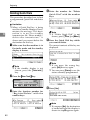
B Press the {User Tools}} key.
LTWO120E.eps
Interrupt
An RTI (Receive Terminal Identification) is passed to a receiver or sender
when you send or receive a fax. When
the RTI is received, it is shown on the
display and printed in a report at the
other end.
The TTI (Transmitter Terminal Identification) is printed on the header of
every fax you send.
You should include your name in
both of these identifications.
Limitation
❒ The RTI does not work unless the
other party has the same machine
make with the RTI feature.
❒ You can program letters, symbols,
number, and spaces in RTI and
TTI.
Note
❒ You can program up to 20 characters in RTI and 32 in TTI.
Screen Contrast
User Tools Adjustment
Program
Clear Modes Energy Saver
C Enter
the function number for
“Key Op. S ettings ” with the
number keys and press the { #}
}
(Enter) key within 3 seconds.
Usfax-new062.tif
Note
❒ If “Key Op. Settings” is not
shown, press [↓
↓Next].
D Enter the “RTI/TTI” code with the
number keys.
Us193-3.tif
A Make sure that the machine is in
Facsimile mode and the standby
display is shown.
Us28-1.tif
E Press the [RTI] key.
Us194-1.tif
Note
❒ If the standby display is not
shown, press the {Facsimile}
key.
41
Registering
F Enter an RTI and press [OK].
Us194-2.tif
Reference
P.65 “Entering Text”
G Press the [TTI] key.
3
Us194-1.tif
H Enter a TTI and press [OK].
Us194-5.tif
Reference
P.65 “Entering Text”
Note
❒ If you press [Cancel], the entered
characters are canceled and the
display shown in step D appears
again.
I Press [OK] to confirm.
J Press [PrevMenu].
K Press the {User Tools}} key.
42
G3 Analog Line
G3 Analog Line
This function must be set up before
you connect the machine to a G3 analog line.
You can register the following items
with a G3 analog Line:
• PSTN Line Type (Dial Pulse/Tone)
• In some countries, the PSTN Line
Selection is not available. For details, please contact your service
representative.
• CSI (up to 20 digits)
• Own Analog Number (up to 16
digits)
Note
❒ A CSI (Called Station Identification) is notified to a receiver or
sender when you send or receive a
fax. When the CSI is received, it is
shown on the display or printed in
a report by the receiver's or sender's machine. The CSI works even
if the receiver or sender uses a different make machine.
❒ The CSI can contain numerals, a
plus sign (+), and spaces. You usually should register your country
code, area code (minus the leading
zero) and your fax number in that
order.
❒ Specify your own analog number
(the telephone number to which
your machine is connected) so that
the transfer station can return the
Transfer Result report to you. You
can program numbers and a pause
in your own number. Be sure to enter a pause after the area code.
A Make sure that the machine is in
Facsimile mode and the standby
display is shown.
Us28-1.tif
3
Note
❒ If the standby display is not
shown, press the {Facsimile}
key.
B Press the {User Tools}} key.
LTWO120E.eps
Interrupt
Screen Contrast
User Tools Adjustment
Program
Clear Modes Energy Saver
C Enter
the function number for
“Key Op. S ettings ” with the
number keys and press the { #}
}
key within 3 seconds.
Usfax-new062.tif
Note
❒ If “Key Op. Settings” is not
shown, press [↓
↓Next].
D Enter
the function number for
“G3 Analog Line” with the
number keys.
Us193-3.tif
43
Registering
Note
❒ If “G3 Analog Line” is not
shown, press [ ↑Prev.] or [↓
↓Next].
To Select the PSTN Line Type
To enter the Own Analog Number
A Enter the function number for
“Own Analog Number” with
the number keys.
Us198-2.tif
A Enter the function number for
“PSTN Line Type” with the
number keys.
Us198-2.tif
3
B Enter
the
Own
Analog
Number and press [OK].
Us199-1.tif
B Select the desired line type and
press [OK].
Us198-3.tif
E Press [PrevMenu] twice.
F Press the {User Tools}} key.
To enter the CSI
A Enter the function number for
“CSI” with the number keys.
Us198-2.tif
B Enter the CSI and press [OK].
Usfax-new003.tif
44
Quick Dial
Quick Dial
Registering Quick Dials
To save time, you can program a fax
number that you use often into a
Quick Dial key. Then, whenever you
are sending a message to that location, just press that Quick Dial key to
dial.
Use the following steps to program a
new Quick Dial or to edit or overwrite
existing Quick Dials. There are 56
Quick Dials available.
You can register the following items
in each key:
• Destination fax number (up to 254
digits)
• Destination name
• Label Insertion (whether to print
the destination name on faxes sent
to this number)
• TTI (which TTI is printed on faxes
sent to this number)
A Make sure that the machine is in
Facsimile mode and the standby
display is shown.
Us28-1.tif
3
Note
❒ If the standby display is not
shown, press the {Facsimile}
key.
B Press the {User Tools}} key.
LTWO120E.eps
Interrupt
Screen Contrast
User Tools Adjustment
Program
Clear Modes Energy Saver
C Enter
the function number for
“Register/Delete” with the
number keys.
Us137-2.tif
Important
❒ We recommend that you print the
Quick Dial list and keep it when
you program or change fax numbers. See Chapter5, “Reports/
Lists” in the Advanced Features
manual.
Limitation
❒ When a registered Quick Dial key
is being used for a standby Memory Transmission, the message
“This destination is in use for
standby transmission file. Please
modify/delete after transmission.” is shown You cannot change
the destination for this key.
D Enter the number for “Reg. Quick
Dial” with the number keys.
Us137-3.tif
Note
❒ If “Reg. Quick Dial” is not
shown, press [↑
↑Prev.] or [↓
↓Next].
45
Registering
E Press the Quick Dial key which
you want to register.
H Enter the destination name.
Us139-2.tif
Us138-2.tif
Note
❒ If a destination name is already
registered in this Quick Dial
key, the name is shown on the
display. If you wish to change
this name, press the {Clear/Stop}
key and enter another name.
Note
❒ If you press a wrong key, press
[PrevMenu] then try again.
3
❒ You can press [Status] to see the
status currently programmed.
Usfax-new044.tif
Reference
P.65 “Entering Text”
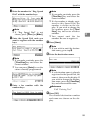
I Press [OK].
The fax number and name are displayed.
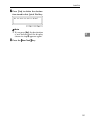
F Enter
a fax number with the
number keys.
Us139-1.tif
J Press [OK] to register the new setting.
Note
Us139-3.tif
Note
❒ If you make a mistake, press the
{Clear/Stop} key and try again.
❒ If a fax number is already registered in this Quick Dial key, the
number and communication
type are shown on the display.
If you wish to change the fax
number, press the {Clear/Stop}
key and enter another number.
❒ You cannot omit the fax number.
G Press [Name] .
Note
❒ If you wish to omit the destination name, go to step J.
46
❒ If you press [Cancel], the entered
values are canceled and the display shown in step G appears
again.
K Press [Exit].
The display shown in step F appears again.
L Press the {User Tools}} key.
Quick Dial
Quick Dial list
Printing the Quick Dial list allows
you to check destinations registered
in Quick Dial keys. See Chapter5,
“Reports/Lists” in the Advanced
Features manual.
Quick Dial Key and Function
Key Label (Dial label)
3
You can print a template that can be
used to make labels for Quick Dial
and User Function keys. The template
will have destination or Group names
programmed in Quick Dials, and the
names of functions assigned to User
Function keys.
Limitation
❒ Set the label paper to landscape in
the Bypass Tray. Portrait position
will print to wrong size.
Note
❒ You can choose whether to print
on transparent or non-transparent
label paper with the User Parameters. By default the setting is “Nontransparent”. See Chapter6,
“Changing the User Parameters
(Switch06 Bit5)” in the Advanced
Features manual.
❒ To print the label template, see
Chapter5, “Reports/Lists” in the
Advanced Features manual.
47
Registering
Non-transparent label paper
zaas310n.eps
3
1. Quick Dial key number
2. Destination name
3. Group name (G)
4. Program name (P)
5. Programmed contents of User
Function keys
48
Quick Dial
Transparent label paper
zaas300n.eps
3
1. Quick Dial key number
2. Destination name
3. Group name (G)
4. Program name (P)
5. Programmed contents of User
Function keys
49
Registering
Deleting Quick Dials
This procedure describes how to find
a programmed Quick Dial and delete
it.
Limitation
❒ When a Quick Dial key is being
used for a standby Memory Transmission, the message “This destination is in use for standby
transmission file. Please modify/
delet e after transm ission.” is
shown and you cannot delete the
destination for this key.
3
D Enter
the number for “Delete
Quick Dial” with the number
keys.
Us137-3.tif
Note
❒ If “Delete Quick Dial” is not
shown, press [↑
↑Prev.] or [↓
↓Next].
E Press the Quick Dial key which
you want to delete.
The current contents of the key are
displayed.
A Make sure that the machine is in
Facsimile mode and the standby
display is shown.
Us140-2.tif
Us28-1.tif
Note
❒ If you press the wrong key,
press [No] then try again.
❒ You can press [Status] to see the
status currently programmed.
Note
❒ If the standby display is not
shown, press the {Facsimile}
key.
B Press the {User Tools}} key.
Usfax-new043.tif
LTWO120E.eps
Interrupt
Screen Contrast
User Tools Adjustment
C Enter
Program
Clear Modes Energy Saver
F Press [Yes].
Us140-4.tif
the function number for
“Register/Delete” with the
number keys.
Us137-2.tif
Note
❒ If you press [No], the destination
is not deleted and the display is
shown in step E appears again.
50
Quick Dial
G Press [Yes] to delete the destination stored in this Quick Dial key.
Us140-5.tif
Note
❒ If you press [No], the destination
is not deleted and the display
shown in step F appears again.
3
H Press the {User Tools}} key.
51
Registering
Speed Dial
Registering Speed Dial
If you register a destination in a
Speed Dial, you can dial that number
by just pressing the {Speed Dial} key
followed by a two or three digit code.
Use these steps to program a new
Speed Dial or overwrite an existing
one. You can register the following
items in a Speed Dial:
• Destination fax number (up to 100
numbers, up to 254 digits for each
number)
• Destination name (up to 20 characters)
• A Telephone Directory search letter (A to Z)
• Label Insertion (whether to print
the destination name on faxes sent
to this number)
• TTI (which TTI is printed on faxes
sent to this number)
3
Important
❒ We recommend that you print the
Speed Dial list and keep it when
you register or change a destination.
Limitation
❒ When a registered Speed Dial is
being used for a standby Memory
Transmission, the message “This
destination is in use for
standby transmission file.
Please modify/delete after
transmission. ” is shown and
you cannot change the destination
for this Quick Dial. See Chapter5,
“Reports/Lists” in the Advanced
Features manual.
52
Note
❒ You can specify codes 00 to 99.
❒ If you install the optional Expansion Memory, you can register up
to 1,000 numbers in Speed Dials. In
this case codes 000 to 999 are used.
A Make sure that the machine is in
Facsimile mode and the standby
display is shown.
Us28-1.tif
Note
❒ If the standby display is not
shown, press the {Facsimile}
key.
B Press the {User Tools}} key.
LTWO120E.eps
Interrupt
Screen Contrast
User Tools Adjustment
C Enter
Program
Clear Modes Energy Saver
the function number for
“Register/Delete” with the
number keys.
Us137-2.tif
Speed Dial
D Enter the number for “ Reg. Speed
Note
❒ If you make a mistake, press the
{Clear/Stop} key and enter the
correct number.
❒ If a fax number is already registered in this Speed Dial, the
number is shown on the display. If you wish to change the
fax number, press the {Clear/
Stop} key and enter another
number.
❒ You cannot omit the fax
number. Be sure to register it.
Dial” with the number keys.
Us146-1.tif
Note
❒ If “Reg. Speed Dial” is not
shown, press [↑
↑Prev.] or [↓
↓Next].
E Enter
the Speed Dial code you
want to register with the number
keys.
Us150-1.tif
3
G Press [Name].
Note
❒ If you wish to omit the destination name, go to step K.
H Enter the destination name.
Us139-2.tif
Note
❒ If you make a mistake, press the
{Clear/Stop}key and enter the
correct number.
❒ You can press [Status] to see the
status currently programmed.
Usfax-new038.tif
F Enter
a fax number with the
number keys.
Us150-3.tif
Note
❒ If a destination name is already
registered in the Speed Dial, the
name is shown on the display. If
you wish to change the destination name, press the {Clear/Stop}
key and enter another name.
Reference
P.65 “Entering Text”
I Press [OK].
The entered destination number
and name are shown on the display.
53
Registering
J Press [Tel.Dir.].
Speed Dial list
Us150-5.tif
Print this list to check which destinations are programmed. See Chapter5,
“Reports/Lists” in the Advanced
Features manual.
K Enter a search letter (A to Z) for
the Telephone Directory.
Deleting Speed Dial
Use this procedure to delete any
Speed Dials you are not using anymore.
Us151-1.tif
3
Reference
P.65 “Entering Text”
Limitation
❒ If a registered Speed Dial is being
used for a standby Memory Transmission, the message “This destination is in use for
standby transmission file.
Please modify/delete after
transmission. ” is shown and
L Press [OK].
The search letter you entered is
shown.
M Press [OK].
The fax number, destination name,
and search letter are registered.
you cannot change the destination
for this Speed Dial.
A Make sure that the machine is in
Facsimile mode and the standby
display is shown.
Us151-2.tif
Us28-1.tif
Note
❒ If you press [Cancel], the Speed
Dial is not registered.
Note
❒ If the standby display is not
shown, press the {Facsimile}
key.
N Press [Exit].
Us139-3.tif
B Press the {User Tools}} key.
LTWO120E.eps
Interrupt
Screen Contrast
User Tools Adjustment
O Press the {User Tools}} key.
54
Program
Clear Modes Energy Saver
Speed Dial
C Enter
the function number for
“Register/Delete” with the
number keys.
F Press [Yes].
Us152-2.tif
Us137-2.tif
Note
❒ If you press [No], the Speed Dial
is not deleted and the display
shown in step F appears again.
D Enter
the number for “Delete
Speed Dial” with the number
keys.
Us146-1.tif
3
G Press [Yes].
Us140-5.tif
Note
❒ If “Delete Speed Dial” is not
shown, press [↑
↑Prev.] or [↓
↓Next].
E Enter
the Speed Dial code you
wish to delete.
Usfax-new037.tif
The Speed Dial is deleted.
Note
❒ If you press [No], the Speed Dial
is not deleted and the display
shown in step F appears again.
H Press the {User Tools}} key.
T he registered destination is
shown on the display.
Note
❒ If you make a mistake before entering the first digit, press the
{Clear/Stop} key and enter the
correct number. If you make a
mistake after entering the last
digit, press [No] and enter the
number again.
❒ You can press [Status] to see the
status currently programmed.
Usfax-new041.tif
55
Registering
Groups
Registering Groups
If you send the same message to several destinations at the same time on a
regular basis, program these destination numbers as a Group. This allows
you to dial these destinations with a
single key press.
Use these steps to program a new
Group or to edit or overwrite an existing Group.
You can register the following items
in a Group:
• Destination fax numbers (up to 200
numbers for each group, up to 254
digits for each number)
• Group name (up to 20 characters)
You can enter destination numbers
with Quick Dial keys, Speed Dials, or
the number keys.
3
Important
❒ It is recommend that you print the
Group Dial list and keep it when
you register or change destinations. See Chapter5, “Reports/
Lists” in the Advanced Features
manual.
Note
❒ The maximum number of Groups
you can register is 9.
❒ The theoretical maximum number
of destinations you can store in a
Group *1 is 200 *2 .
❒ When a lot of destinations are registered in a Group using number
keys, you sometimes cannot enter
a destination for a Memory Transmission with the number keys. ⇒
P.33 “Number Keys”
56
❒ When a registered group is being
used for a standby Memory Transmission, the message “This destination is in use for standby
transmission file. Please modify/
d e l et e a ft e r t r an sm i ss io n ” is
shown and you cannot change destinations for this Group.
*1
*2
If the same number is stored in several
Groups, it will only be counted as a
single item. This applies to numbers
stored using Quick Dials, Speed Dials
or the number keys.
Maximum of 55 Quick Dials, 100
Speed Dials and 98 numbers entered
directly with the number keys.
A Make sure that the machine is in
Facsimile mode and the standby
display is shown.
Us28-1.tif
Note
❒ If the standby display is not
shown, press the {Facsimile}
key.
B Press the {User Tools}} key.
LTWO120E.eps
Interrupt
Screen Contrast
User Tools Adjustment
C Enter
Program
Clear Modes Energy Saver
the function number for
“Register/Delete” with the
number keys.
Us137-2.tif
Groups
D Enter
• Press a Quick Dial key in
which the destination is registered.
• Press the {Speed Dial} key
and enter a Speed Dial code.
❒ If you make a mistake, press the
{Clear/Stop} key and re-enter the
correct Group number.
❒ If destinations are already registered, they are shown on the
display. Press the < or > key
to scroll through the destinations on the display. If you want
to change a destination, select it
and press the {Clear/Stop} key.
Press the {Clear/Stop} key once
to erase a Quick Dial or Speed
Dial number, or press it repeatedly to erase a number entered
with the number keys.
❒ You cannot omit the fax
number.
the number for “Reg.
Group Dial” with the number
keys.
Us137-3.tif
Note
❒ If “Reg. Group Dial” is not
shown, press [↑
↑Prev.] or [↓
↓Next].
E Press the Quick Dial key in which
you want to register the Group.
Usfax-new002.tif
Note
❒ If you make a mistake, press
[Cancel] then try again.
❒ You can press [Status] to see the
status currently programmed.
Usfax-new042.tif
3
G Repeat step F for all the destinations you want registered in the
Group.
H Press [Name].
I Enter the Group name.
Us139-2.tif
F Enter
a fax number then press
[Add].
Us142-4.tif
Note
❒ Enter a destination in any of the
following three ways:
• Enter the fax number with
the number keys.
Note
❒ If the Group name is already
registered, it is shown on the
display. If you wish to change
the Group name, p ress the
{Clear/Stop} key and enter another name.
Reference
P.65 “Entering Text”
57
Registering
J Press [OK].
The entered fax numbers and
Group name are shown on the display.
Note
❒ Press the < or > key to scroll
through the destinations on the
display. If you wish to change a
destination, select it and press
the {Clear/Stop} key. Press the
{Clear/Stop} key once to erase a
Quick Dial or Speed Dial
number, or press it repeatedly
to erase a number entered with
the number keys.
3
K Press [OK] to register the Group.
Deleting Groups
This function deletes all destinations
registered in a Group.
Limitation
❒ When a registered Group is being
used for a Memory Transmission
on standby, the message “ This
destination is in use for
standby transmission file.
Please modify/delete after
transmission.” is displayed and
you cannot delete destinations for
this Group.
A Make sure that the machine is in
Facsimile mode and the standby
display is shown.
Us143-2.tif
Us28-1.tif
Note
❒ If you press [Cancel], the Group
is not programmed and the display shown in step F appears
again.
L Press [Exit].
The display shown in step E appears again.
Note
❒ If the standby display is not
shown, press the {Facsimile}
key.
B Press the {User Tools}} key.
LTWO120E.eps
Interrupt
Screen Contrast
M Press the {User Tools}} key.
Group Dial list
The Group list allows you to print
and check destinations registered in
Groups.
58
User Tools Adjustment
C Enter
Program
Clear Modes Energy Saver
the function number for
“Register/Delete” with the
number keys.
Us137-2.tif
Groups
D Enter
the number for “Delete
Group Dial” with the number
keys.
F Press [Yes].
Us144-4.tif
Us137-3.tif
Note
❒ If “Delete Group Dial” is not
shown, press [↑
↑Prev.] or [↓
↓Next].
E Press the Quick Dial key whose
Group you wish to delete. keys.
Note
❒ If you press [No], the Group is
not deleted and the display is
shown in step F appears again.
3
G Press [Yes].
The Group is deleted.
Us140-5.tif
Us144-2.tif
The registered Group is shown on
the display.
Us144-4.tif
Note
❒ If you press [No], the Group is
not deleted and the display
shown in step F appears again.
H Press the {User Tools}} key.
Note
❒ If you make a mistake, press
[No] and press the correct key.
❒ You can press [Status] to see the
status currently programmed.
Usfax-new047.tif
59
Registering
Registering Optional Groups
An optional Expansion Memory is required to use this function.
Installing the Fax Expansion Memory
option enables you to store more
Groups. These extra Groups are referred to as Optional Groups.
Use these steps to program a new
Group or to edit or overwrite an existing Group.
Use these steps to program a new Optional Group or edit or overwrite an
existing one. You can register the following items in each Optional Group:
• Destination fax numbers (up to 200
numbers for each group, up to 254
digits for each number)
• Group name (up to 20 characters)
To specify destinations you can use
Quick Dial keys, Speed Dials, or the
number keys.
3
Important
❒ We recommend that you print the
Optional Group Dial list and keep
it when you register or change destinations. See chapter5, “Reports/
Lists” in the Advanced Features
manual.
60
Limitation
❒ The maximum number of Optional
Groups you can register is 21.
❒ Before you can use this feature you
must program a User Function
Key with the Optional Group function. See Chapter5, “Assigning
User Function Keys” in the Advanced Features manual.
❒ The maximum number of destinations you can register in Groups is
2000; 56 in quick dial keys, 1000
speed dials, and 999 numbers entered directory with the number
keys.
❒ The number of destinations that
can be registered with the number
keys depends on how the machine
is used. It is possible to register 999
destinations for all the Optional
Groups. If you register 999 destinations with the number keys, however, you cannot perform a
Memory Transmission or specify a
Group. When you register destinations on the number keys, the
number of destinations must be
998 or less. ⇒ P.33 “Number Keys”
❒ If you register an Optional Group
with the number keys when a file
is waiting to be transmitted, the
message “ You have exceeded
the maximum machine specifications. No additional entry
with number keys” is shown and
you sometimes cannot register any
more destinations even when the
number of specified destinations is
998 or less. This is because a fax
number is stored in memory for
the file to be transmitted. When the
file transmission is completed and
the fax number is deleted, you can
register a Group.
❒ When a lot of destinations are registered in the number keys for an
Optional Group, you sometimes
cannot dial a destination for a
Memory Transmission with the
number keys.
❒ When a previously registered Optional Group is being used for a
standby transmission, the message
“This destination is in use
f o r standby transmission
file. Please modify/delete
after transmission” is shown
and you cannot change destinations for this Group.
Groups
A Make sure that the machine is in
E Enter the Optional Group number
Us28-1.tif
Us146-2.tif
Facsimile mode and the standby
display is shown.
(10 to 30) you want to register using the number keys.
Note
❒ If the standby display is not
shown, press the {Facsimile}
key.
Note
❒ If you make a mistake with the
first digit, press the {Clear/Stop}
key and enter a correct number.
If you make a mistake with the
second digit, press [Cancel] and
enter the number again.
❒ You can press [Status] to see the
currently registered Optional
Groups.
B Press the {UserTools}} key.
LTWO120E.eps
Interrupt
Screen Contrast
User Tools Adjustment
Program
Clear Modes Energy Saver
3
Usfax-new039.tif
C Enter
the function number for
“ Re g is te r /D el et e ” u s i n g t h e
number keys.
Us137-2.tif
F Enter
the first destination, then
press [Add] before entering the
next.
Us146-4.tif
D Enter
the function number for
“Reg. Opt. G.Dial” using the
number keys.
Us146-1.tif
Note
❒ You can enter destinations in
any of the following three ways:
• Enter a fax number with the
number keys.
• Press a Quick Dial key in
which a destination is registered.
• Press the {Speed Dial} key
and enter a code.
61
Registering
❒ If destinations are already registered, they are shown on the
display. Press the < or > key
to scroll through the destinations on the display. If you want
to change a destination, select it
and press the {Clear/Stop} key.
Press the {Clear/Stop} key once
to erase a Quick Dial or Speed
Dial number, or press it repeatedly to erase a number entered
with the number keys.
❒ If you make a mistake, press the
{Clear/Stop} key and try again.
3
Note
❒ You cannot omit a fax number.
Note
❒ If destinations are already registered, they are shown on the
display. Press the < or > key
to scroll through the destinations on the display. If you want
to change a destination, select it
and press the {Clear/Stop} key.
Press the {Clear/Stop} key once
to erase a Quick Dial or Speed
Dial number, or press it repeatedly to erase a number entered
with the number keys
K Press [OK] to store the information
you have just entered.
Us147-2.tif
G Repeat step F for all the destina-
tions to be registered in the Optional Group.
H Press [Name].
I Enter the name.
Us139-2.tif
Note
❒ If you press [Cancel], the Optional Group is not registered
and the display shown in step 6
appears again.
L Press [Exit].
Note
❒ If a Group name is already registered, it is shown on the display. If you want to change the
name, press the {Clear/Stop} key
and enter another name.
Reference
P.65 “Entering Text”
J Press [OK].
The entered fax numbers and Optional Group name are shown on
the display.
62
The display shown in 6 appears
again.
M Press the {UserTools}} key.
-Checking the Contents of
Optional Groups
Print the Optional Group dial list. See
Chapter5, “Reports/Lists” in the Advanced Features manual.
Groups
Deleting Optional Groups
This function deletes all destinations
registered in an Optional Group.
Limitation
❒ If a registered Optional Group is
being used for a standby Memory
Transmission, the message “This
destination is in use for a
standby transmission file.
Please modify/delete after
transmission” is shown and you
D Enter
the function number for
“Delete Opt.G.Dial” using the
number keys.
Us146-1.tif
E Enter the Optional Group number
3
(10 to 30) you wish to delete using
the number keys.
Us148-2.tif
cannot change destinations for this
Group.
A Make sure that the machine is in
Facsimile mode and the standby
display is shown.
Note
❒ If you make a mistake with the
first digit, press the {Clear/Stop}
or [Cancel] and enter the correct
number. If you make a mistake
with the second digit, press No
and enter the number again.
❒ You can press [Status] to see
which Optional Groups are programmed.
Us28-1.tif
Note
❒ If the standby display is not
shown, press the {Facsimile} key.
B Press the {UserTools}} key.
Usfax-new041.tif
LTWO120E.eps
Interrupt
Screen Contrast
User Tools Adjustment
Program
Clear Modes Energy Saver
C Enter
the function number for
“ Re g is te r /D el et e ” u s i n g t h e
number keys.
63
Registering
F Press [Yes].
Note
❒ If you press [No], the Optional
Group is not deleted and the
display shown in step 6 appears
again.
❒ The registered destinations are
shown.
Us148-4.tif
3
G Press [Yes] to delete the Optional
Group.
Us140-5.tif
Note
❒ If you press [No], the Optional
Group is not deleted and the
display shown in step F appears
again.
H Press the {UserTools}} key.
64
Entering Text
Entering Text
This section describes how to enter
characters. When you enter a character, it is shown at the position of the
cursor. If there is a character at the
cursor position, the entered character
is shown before the character.
Note
❒ If you wish to enter symbols, press
[ Symbols].
Us213-1.tif
Available Characters
• Alphabetic characters
ABCDEFGHIJKLMNOPQRSTUVWXYZabcdefghijklmnopqrstuvwxyz
• Symbols
• Numerals
0123456789
Keys
❖ Number keys
Use to enter numbers.
❖ Quick Dial 01/29 to Quick Dial 28/56 (A
to Z)
Press these keys to enter upper and
lower case letters.
❖ [A←
←→a]
Use to switch between upper and
lower case.
❖ Quick Dial 27/55
Press to enter a space.
❖ {Clear/Stop}
} key
Deletes a character at the cursor
position. You can delete a character at the right end of a line even if
the cursor is placed to the right of
the character.
❖ < or >
Use to move the cursor left or
right.
3
❒ Flip the plate to access Quick Dial
keys not shown.
❒ Quick Dial 01/29 means Quick
Dial key 01 or 29.
-Wild Cards
When you register RTIs or CSIs for
multiple destinations, you can register a sequence of characters common
to these identifications as a wild card
instead of registering every identification.
If a destination has an RTI or CSI containing a wild card, the machine determines that the destination matches
the registered destination.
❖ Not using a wild card
Destination to be
registered (RTI)
Number of registered identifications
NEW YORK
BRANCH
3
HONG KONG
BRANCH
SYDNEY BRANCH
❖ Using a wild card
Destination to be
registered (RTI)
Number of registered identifications
BRANCH
1
65
Registering
Limitation
❒ You can register up to 30 wild
cards.
Note
❒ Compare identifications by neglecting spaces.
❒ You can use wild cards for the following functions:
• See Chapter6, “Registering
Specified Senders (Special RX
Nos.)” in the Advanced Features manual.
• See Chapter6, “Authorized Reception” in the Advanced Features manual.
• See Chapter6, “Forwarding” in
the Advanced Features manual.
3
B Press a Quick Dial key.
A letter is entered and the cursor
moves.
Note
❒ If you wish to enter another
character continuously, repeat
step B.
❒ If you wish to insert a character,
press the < or > key to move
the cursor to a character you
want to enter.
Us215-2.tif
Entering symbols
How to Enter Text
Entering letters
←→a] to switch between
A Press [A←
Uppercase and Lowercase.
A Press [Symbols].
The available symbols are shown
on the display.
B Select
the desired symbol by
pressing [ ↑Prev.] and [↓
↓Next].
Us214-2.tif
Us139-2.tif
Us214-3.tif
Us214-5.tif
66
Entering Text
C Enter the number of the symbol
you wish to insert with the
number keys.
L2us215-6.tif
Deleting characters
A Press the < or > key to move the
cursor to a character you want to
delete.
L2us215-4.tif
The symbol is entered and the cursor moves.
Note
❒ If you wish to enter another
symbol, repeat steps B and C.
3
B Press the {Clear/Stop}} key.
Us215-3.tif
❒ If you wish to insert a character,
press the < or > key to move
the cursor to a character you
want to enter.
Entering numbers
A Press a number key.
The numeral is entered and the
cursor moves.
The character at the cursor position is deleted .
Note
❒ If you wish to delete another
character, repeat steps A and B.
L2us215-5.tif
Note
❒ If you wish to insert a character,
press the < or > key to move
the cursor to a character you
want to enter.
67
Registering
3
68
4. Troubleshooting
Adjusting Volume
You can change the volume of the following sounds the machine makes.
B Press the {User Tools}} key.
LTWO120E.eps
Interrupt
❖ On Hook
When you press the {On Hook Dial}
key.
❖ Transmission
When the machine send a message.
❖ Reception
When the machine receive a message.
Screen Contrast
User Tools Adjustment
Limitation
❒ Adjusting Volume is not available
with G4.
Clear Modes Energy Saver
C Enter
the function number for
“Key Op. S ettings ” with the
number keys and press the { #}
}
(Enter) key within 3 seconds.
Usfax-new062.tif
❖ Dialing
After pressing the {Start} key, this
sound is output until the line connects to the destination.
❖ Printing
Sounds when a received message
has been printed.
Program
Note
❒ If “Key Op. Settings” is not
shown, press [↓
↓Next].
D Enter the “Monitor Volume” code
with the number keys.
Us178-1.tif
A Make sure that the machine is in
Facsimile mode and the standby
display is shown.
Us28-1.tif
Note
❒ If “Monitor Volume” is not
shown, press [↑
↑Prev.] or [↓
↓Next].
E Select an item you want to adjust
pressing [ ↑Prev.] and [↓
↓Next].
Note
❒ If the standby display is not
shown, press the {Facsimile}
key.
Note
❒ On Hook, Transmission, Reception, Dialing, and Printing are
shown in that order.
69
Troubleshooting
❖ On Hook
Us193-1.tif
❖ Transmission
L2fxex231.tif
4
❖ Reception
L2fxex232.tif
❖ Dialing
L2fxex233.tif
❖ Printing
L2fxex234.tif
F Adjust the volume using the < or
> key and press [OK].
Us193-1.tif
70
Note
❒ When you press [Cancel], the
volume setting is canceled and
the display shown in step E appears again.
❒ Lowest = OFF
G Press [PrevMenu].
H Press the {User Tools}} key.
Error Messages and Their Meanings
Error Messages and Their Meanings
If there is an error, one of the following messages may appear on the display. It
might just flash up briefly, so if you are watching for errors, stay by the machine
and check the display.
Message
Problem and Solution
Clear Misfeed(s)
Original misfeed
Remove originals from the Document Feeder.
Remove originals from Document Feeder.
Set any pages of the original that were not
scanned and send again.
Reset originals and press Start.
Original jammed during Memory Transmission. Reset originals that have not been
scanned.
Error. Transmission has been cancelled.
A document jam occurred during Immediate
Transmission. Press [OK] and resend the page
which has been not sent.
4
An error occurred during Immediate Transmission. Press [OK] and re-send the original.
Note
❒ There may be a problem with the machine
or the telephone line (for example noise or
cross talk). If the error re-occurs frequently,
contact your service representative.
Cannot detect original size. Reset original(s)
and press Start key.
The machine failed to detect the size of the
original. Press the < or > key to select the
size and press the {Start} key three times.
<FAX>
Personal Codes Access is switched on. You
need to enter a previously programmed 4 digit
ID code.
Personal Code Access. Please enter your Personal Code.
See Chapter6, “Personal Codes” in the Advanced Features manual.
LService call
Functional problem with the fax. Please contact your service representative.
Memory is full. Cannot store additional originals. (Stored original(s) will be transmitted.)
There is a problem with the fax function. Contact your service representative and tell the
code number shown in the display. The copier
function will still work normally.
If you press [OK], the machine returns to the
standby mode and start transmitting pages
which has been scanned.
71
Troubleshooting
When the {Fax} key is Lit in Red
If this key is lit, refer to the table below and take the appropriate action.
Problem
Solution
Paper has run out.
Add paper.
The paper output tray is full.
Remove the paper from the tray.
The machine is in RDS (Remote Diagnostic
System) mode.
Wait with the Main Power switch on. Machine
will go to the standby mode after it exits from
the RDS mode.
A facsimile error has occurred.
The facsimile has a problem. Contact a service
representative. The copier will still function
normally.
Toner is empty.
Replace the toner cartridge. See “Adding Toner” in the Copy Reference.
See “Loading Paper” in the Copy Reference.
4
72
Solving Problems
Solving Problems
This table lists some common problems and their solutions.
Problem
Solution
Refer to
Image background appears
dirty when received at the
other end.
Adjust the scan density.
P.30 “Image Density (Contrast)”
Printed or sent image contains
spots.
The Document Feeder (AR--DF) or exposure glass is dirty.
Clean them. See the Copy Reference manual.
Make sure that ink or eraser is
dry before setting the original.
Received image is too light.
Request the sender to increase
the image density.
---
When using moist, rough or
processed paper, the printed
image may be partly invisible.
Only use recommended paper.
See Appendix, “Acceptable
Types of Originals” in the Advanced Features manual.
4
When D appears on the dis- --play, toner is beginning to run
out. Replace the toner cartridge soon. See the Copy Reference manual.
Message appears blank at the
other end.
The original was set upside
down. Set it properly.
P.12 “Setting Originals”
You want to cancel a Memory
Transmission.
If the original is being stored,
press the {Clear/Stop} key.
P.23 “Canceling a Memory
Transmission”〈BASIC FEATURES〉 “Canceling a Memory Transmission”
If the original is being sent,
use “Check/Cancel TX Files”
in the Information menu.
See Chapter4, “Checking and
Canceling Transmission
Files” in the Advanced Features manual.
You want to cancel an Immediate Transmission.
Press the {Clear/Stop} key.
P.4 “Operation Panel”
You cannot add any destination in Group though it does
not reach the maximum
number.
99 destinations have been programmed with the number
keys (999 with the optional
Expansion Memory). Program more numbers with
Quick Dials or Speed Dials.
See Chapter1, “Chain Dial”,
“Redial” or “Subaddress” in
the Advanced Features manual.
73
INDEX
A
Adjusting Volume, 69
Analog Line Connector, 2
Auto Image Density, 31
Automatic Redial, 21
B
Batch Transmission, 22
Broadcasting, 18
Bypass Tray, 2
C
Canceling a Memory Transmission, 23
Canceling an Immediate Transmission, 28
Changing Memory Transmission and
Immediate Transmission, 11
Clear/Stop key, 6
Communicating Indicator, 4
Components, 1
Confidential Reception Indicator, 4
CSI, 43
D
Detail, 29
Dialing, 33
Dial label, 47
Display, 9
Document Feeder (ARDF), 1
E
ECM, 22, 27
Entering letters, 66
Entering numbers, 67
Entering symbols, 66
Entering Text, 65
Error Messages, 71
Exposure Glass, 1
External Telephone Connector, 2
F
Facsimile Error Indicator, 72
Facsimile key, 6
Facsimile Mode (Auto Reception Mode), 39
Faxing, 11
74
G
G3 Analog Line, 43
Group Dial list, 58
Groups, 37, 56
I
Image density, 29
Image Density (Contrast), 30
Image Density key, 6
Immediate Transmission, 10, 11, 25
Interrupt key, 5
ISDN Line Connector, 2
L
letters, 66
M
Main Power Switch, 1
Manual Image Density, 31
Memory Transmission, 10, 11, 18
N
Number keys, 6, 33
numbers, 67
O
On Hook Dial key, 5
Operation Panel, 4
Operation Switch, 2
Optional Group Dial, 38
Optional Groups, 60
Optional Tray Unit, 2
Original Type, 29, 30
Original Type key, 6
P
Pause, 34
Pause/Redial key, 6
Photo, 30
Q
Quick Dial, 33, 35, 45
Quick Dial Flip Plate, 5
Quick Dial keys, 5
Quick Dial List, 47
R
Receive File Indicator, 4
Reception, 39
Registering, 41
Reset, 5
Resolution, 29
Resolution key, 4
RTI/TTI, 41
S
Scan Settings, 29
Selecting the Reception Mode, 39
Setting Originals, 12
Solving Problems, 73
Speed Dial, 33, 36, 52
Speed Dial key, 5
Speed Dial list, 54
Standard, 29
Start key, 6
Super Fine, 29
symbols, 66
T
Telephone Mode, 39
Text, 30
Text·Photo, 30
Tonal Signals, 35
Tone, 35
Tone key, 6
Transmission Mode key, 5
Troubleshooting, 69
U
User Function Keys, 4
User Tools, 5
W
Wild Cards, 65
75
MEMO
76
MEMO
77
78
UE
USA
B383