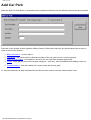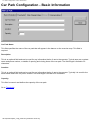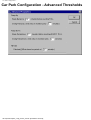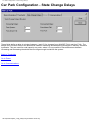
1
SIESPACE Driver Information System
On-Line Help
Introduction
Overview
This is an unpublished work the copyright in which vests in Siemens plc. All rights reserved.
The information contained herein is the property of Siemens plc. and is supplied without liability for errors or
omissions. No part may be reproduced or used except as authorised by contract or other written permission.
The copyright and the foregoing restriction on reproduction and use extend to all media in which the
information may be embodied.
file:///A|/html/siespace_title.htm [27/06/2001 20:44:42]
Introduction
Introduction
The SIESPACE Driver Information System is designed to provide real time information to motorists. When
configured as a Parking Guidance System (PGI) this information could include the availability of car park
spaces within a given area.
Once configured the system is designed to work in a fully automatic mode with only minor attention required
by the operators to clear paper from printers etc. On powerup the system will start automatically.
This help file is split into the following sections:
System Objects
Information about the way that SIESPACE represents the signs, car parks
and count sites under its control
User Interface
Information about how the user interface works
Operational Procedures
Quick reference information and procedures for common tasks performed by
the SIESPACE operator
Maintenance Procedures
Quick reference information and procedures for common tasks performed by
the SIESPACE maintenance engineer
Specifications
Detailed technical specifcations of the equipment in a SIESPACE system
Additional Help & Support
Information about where to get help if this help files doesn't provide the
answers.
file:///A|/html/lert1nzi.htm [27/06/2001 20:44:44]
System Objects
System Objects
SIESPACE uses icons on the map window to respresent equipment in the system. These are sometimes
refered to as objects. Other logical, or conceptual things such as parking zones are known as objects. The
objects current supported by SIESPACE are as follows:
1. Signs
Represent the signs on the street.
2. Physical Signs
More closely represent signs on the street in that there is only one physical sign object for each sign,
whereas there may be more than one sign object - see multi line signs for an explanation. They can
perform a subset of the facilities that are available to the Sign object.
3. Car Parks
Represent the car parks monitored by the system - they may have a related Car Park Count
Outstation hardware, or they may be a logical comination of many count sites.
4. Count Sites
Represent individual loop detection points which can be summed to provide an occupancy value for
a car park.
5. Parking Zones
Represent a logical collection of car parks for the purposes of guiding motorists to regions of an
area, or types of car park
6. Remote Systems
Represent other systems which may share information or control with SIESPACE.
file:///A|/html/system_objects.htm [27/06/2001 20:44:46]
Signs - Overview
Signs - Overview
A Sign is a display device that is capable of displaying variable messages to a motorist or pedestrian. The
messages may simply be fixed strings such as SPACES or CLOSED, or directional arrows, or free text
variable messages allowing any text string to be displayed.
Signs use different techniques to display variable messages, they can be of the rotating prism type, where a
fixed number of faces can be selected to show different messages, or matrix signs, where the characters in
the message are made up from a matrix of dots which can be changed to show different messages.
SIESPACE also supports signs that are owned by another remote system - i.e. a UTC. More about sign
types...
The flexibility and configuribility of the system allows signs of different types to be used with various
communication mechanisms. The communication systems used are, direct via a Radio Modem, PSTN
Modem, Leased Line, or via a remote system such as a UTC System.
The system needs to be configured in order to operate with the specific combination of sign and
communication system.
The sign can be controlled in four ways:
1.
2.
3.
4.
by the output of a parking zone.
by a remote system, such as a UTC or ITMC.
by the operator.
by a scheduled command.
A sign can be added to the system by means of the user interface (see Equipment Definition button).
Regardless of their type and mechanism for communication, each sign in SIESPACE provides a set of
common functions which the operator can use to control the sign, view its status, and change its
configuration.
file:///A|/html/lert00xj.htm [27/06/2001 20:44:47]
Sign Types
Sign Types
SIESPACE currently supports three types of sign:
1. Rotating Prism Signs
2. VMS Signs
3. Remote Signs
Of course within each type of sign, may be signs from different manufacturers, or of different technologies.
Rotating Prism Signs
Rotating prism signs use a electro mechanical technology to display a fixed set of messages. The messages
are attached to the faces of mechanical components which rotate within the sign enclosure. To display a
message the required face is moved into a visible position. The messages available at each site are
determined at installation time and cannot be modified by the SIESPACE instation. At the instation the
configuration of the sign requires the message information to be entered to enable the messages relating to
each face to be shown on the user interface. Typically the interface to this type of sign is a number of
isolated relay contacts, and an OTU is normally used to interface to the communications network and
SIESPACE.
VMS Signs
VMS signs use a matrix of dots, or pixels to construct a message. The techonology to illuminate each pixel
may be LED, flip-dot, hybrid, or fibre-optic. The signs themselves normally have a built in processor which
enables them to connect directly to the communications network and SIESPACE.
Although VMS signs can be configured only to display a small set of stored messages (in a similar way to
Rotating Prism Signs) they are most often used with 'free-text' messages. The SIESPACE instation is
responsible for holding a database of acceptable messages (permitted by the regulatory authority and the
user) which can be displayed on the sign at the request of an operator, parking zone or remote system.
Remote Signs
The concept of a remote sign in SIESPACE allows the use of existing signs connected to existing systems
such as UTC. SIESPACE sends a sign setting request to the remote system, asking it to set a particular
message on a particular sign. The remote system then responds to either confirm or deny that the setting
has worked. In this way a network of existing rotating prism signs can be migrated from a UTC system to a
SIESPACE system as part of an upgrade process.
file:///A|/html/sign_types.htm [27/06/2001 20:44:48]
Parking Zones - Overview
Parking Zones - Overview
A zone is defined as a controlled area composed of one or more car parks and controlling one signs. A zone
provides the link between the status of a car park and the control of the driver information signs. From
information regarding the status of the assigned car parks the zone will determine a status for itself. The
zone will then use its own status to determine the setting for the sign assigned to it.
The status of a Zone can be one of:
●
●
●
●
●
Spaces
Almost Full
Full
Closed
Blank
The zone status is derived from the car park status in one of two ways:
●
●
By a majority 'vote' of the states of all the member car parks.
By using a summed availability of spaces of all the member car parks and a set of thresholds for the
zone.
Depending upon the zone status it will send a message to a configured sign to set an aspect. Each sign
connected to a zone can be configured independently of other signs in the system.
A Zone is configured by selecting the Zone Configuration Button
file:///A|/html/lert3xkj.htm [27/06/2001 20:44:52]
from the main toolbar.
Zones - Configuration
Zones - Configuration
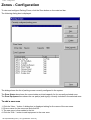
To view and configure Parking Zones, click the Zone button on the main tool bar.
The following dialog box is displayed:
The dialog shows the list of parking zones currently configured in the system.
The Zone Status box shows the current state and total capacity for the currently selected zone.
The Zone Equipment box shows the car park(s) and sign(s) currently included in the selected zone.
To add a new zone
1. Click the 'New...' button. A dialog box is displayed asking for the name of the new zone.
2. Enter a name for the new zone and click OK.
3. The new zone is then added to the list.
4. Click the 'Edit...' button to add equipment to the new zone.
file:///A|/html/lert91gu.htm (1 of 2) [27/06/2001 20:44:55]
Zones - Configuration
To edit a zone
1. In the list of zones, select the zone that you wish to edit.
2. Click the 'Edit...' button.
3. The Define Zone dialog box is then shown, allowing you to edit the zone.
To rename a zone
1. In the list of zones, select the zone that you wish to rename.
2. Click the 'Rename...' button. A dialog box is displayed asking for the new name for the zone.
3. Enter the new name for the zone and click OK.
To delete a zone
1. In the list of zones, select the zone that you wish to delete.
2. Click the 'Delete' button. A dialog box 'Are you sure you want to delete this zone?' is displayed.
3. To delete the zone, select 'Yes', otherwise select 'No'.
To select the sign legends displayed for each zone state
1. Click the 'State Legends...' button. The Zone State Legends dialog box is displayed.
file:///A|/html/lert91gu.htm (2 of 2) [27/06/2001 20:44:55]
Defining a Zone
Defining a Zone
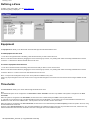
To define a zone, select 'Edit...' from the Zones dialog box.
The following dialog is displayed:
Equipment
The Equipment tab allows you to define which Car Parks and Signs are associated with this zone.
To add equipment to the zone
1. In the list on the right hand side of the dialog, select the devices that you wish to add to the zone.
Note: You can select several devices by dragging the mouse around a group of them, or by holding down CTRL and clicking individual items in the list.
2. Click the '<- Add' button to add the selected devices to the zone.
To remove equipment from the zone
1. In the list on the left hand side of the dialog, select the devices that you wish to remove from the zone.
Note: You can select several devices by dragging the mouse around a group of them, or by holding down CTRL and clicking individual items in the list.
2. Click the 'Remove ->' button to remove the selected devices from the zone.
Note:- A car park can be assigned to many zones. All car parks are available to every zone.
A sign may only be assigned to one zone at a time. Once a sign has been assigned to a zone then it is removed from the list of signs available to other
zones.
Thresholds
The Thresholds tab allows you to set the state-change thresholds for the zone.
Note:
The SIESPACE system can be configured to use Zone States or Zone Threholds. This tab is only available if the system is configured to use Zone
Thresholds.
When the system is configured to use Zone States, the state of the zone is determined by the states of the car parks within it.
i.e. If at least one car park in the zone is in state SPACES, then the zone has SPACES. If no car parks in the zone have SPACES but at least one is
ALMOST FULL then the zone is ALMOST FULL. If all car parks in the zone are FULL then the zone is FULL.
When the system is configured to use Zone Thresholds, the state of the zone is determined by the total occupancy of all the car parks in the zone, using
the thresholds defined on this tab.
Therefore, when Zone Thresholds are in use, the thresholds defined on individual car parks in the zone may cause them to be FULL, but the zone may
still have SPACES because the FULL threshold on the zone is set higher than on the individual car parks.
file:///A|/html/define_zone.htm (1 of 2) [27/06/2001 20:45:00]
Defining a Zone
On this dialog, specify the state thresholds (as percentages of the total capacity) for the zone.
file:///A|/html/define_zone.htm (2 of 2) [27/06/2001 20:45:00]
Zones - States to Sign Legends
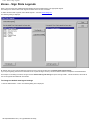
Zones - Sign State Legends
When a zone changes state, SIESPACE automatically sets the associated signs to an appropriate legend.
This dialog box is used to select which legend should be shown for each zone state.
To define the Zone State Legends, select 'State Legends...' from the Zones dialog box.
The following dialog is displayed:
By default, when a zone changes state the legend to be set on the sign is taken from the default state-legend settings.
If you require legend(s) other than the default to be set on particular signs then they should be added to the list of exceptions as described below.
For example: In the dialog box above, all signs use the default state-legend settings except for the sign 'VMS1 - Central Southsea', which has its
own set of legends associated with zone states.
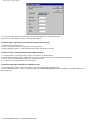
To change the default state-legend settings
1. Click the 'Edit Defaults...' button. The following dialog box is displayed:
file:///A|/html/lert34z7.htm (1 of 2) [27/06/2001 20:45:04]
Zones - States to Sign Legends
2. For each zone state, specify the ID of the legend that should be displayed on the associated signs.
Currently, only numeric legend ID's may be entered in this dialog box.
To specify that a sign should use alternative state-legend settings
1. Select the sign in the left hand list.
2. Click the 'Use Specific' button. The sign moves to the right hand list.
3. Click the 'Edit Sign Legends...' button to associate legends with zone states for the sign.
To return a sign to using the default state-legend settings
1. In the right hand list, select the sign that you wish to revert back to the default settings.
2. Click the 'Revert To Default' button. A dialog box 'Are you sure you want to return this sign to the default?' is displayed.
3. To return the sign to default settings, select 'Yes', otherwise select 'No'.
4. If you select 'Yes' then the sign moves to the left hand list.
To edit the state-legend settings for a particular sign
1. In the right hand list of signs, select the sign that you wish to change the state-legend settings for.
2. Click the 'Edit Sign Legends...' button. A dialog box similar to the default state-legends one above is displayed, except that it applies to the
selected sign only.
file:///A|/html/lert34z7.htm (2 of 2) [27/06/2001 20:45:04]
Remote Systems - Overview
Remote Systems - Overview
In SIESPACE terms, a remote system is any other system which may take an interest in the equipment that
SIESPACE controls, the information it provides, and the facilities it offers. Furthermore SIESPACE may
utilise the faiclities of remote systems to control equipment or gather information.
Examples of remote systems in use with SIESPACE systems are:
●
●
●
●
●
●
Urban Traffic Control Systems (UTCs) to gather car park counts, and share rotating prism signs
Integrated Traffic Management & Control Systems (ITMCs) to display driver information and report
car park information to the ITMC.
Other SIESPACE systems to share Signs
Other Parking Systems to gather count information
SIEMENS' PREFECT Fault Management System to perform maintenance tasks.
Web Servers to provide information to the Internet
The connection between SIESPACE and a Remote System often uses TCP/IP, but could be as simple as a
serial link cable.
file:///A|/html/remote_systems_ov.htm [27/06/2001 20:45:05]
UTC system
UTC system
An external Urban Traffic Control (UTC) system which is linked to the SIESPACE system.
The UTC system can have count sites or signs connected to its own communications system. The
information from these count sites can be passed to the SIESPACE system for the purposes of determining
car park occupancies, SIESPACE can also request that the UTC set signs on its own communications
system.
file:///A|/html/lert9u3x.htm [27/06/2001 20:45:06]
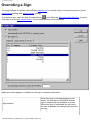
Overriding a Sign
Overriding a Sign
The system allows an operator with sufficient permissions to override a sign, causing the system to ignore
parking zone settings and remote system settings.
To override a sign, select the Sign Override Button
from within the Sign Information Window , or select
"Override" from the sign context menu. The following window is then displayed:
When the window appears, it shows how the sign is currently being driven.
Sign enabled
file:///A|/html/sign_overriding.htm (1 of 3) [27/06/2001 20:45:10]
When this item is checked (displays a tickmark), this indicates to SIESPACE that the
sign is powered up and available to be set.
When this item is unchecked (no tick-mark),
the sign is disabled. No settings will be sent to
the sign.
Overriding a Sign
Automatically set by SIESPACE or a remote
system
The SIESPACE system, (or an external
system such as UTC) sets the sign
automatically.
The SIESPACE system selects the
appropriate legend depending upon the
current state of its associated parking zone.
Overridden
The sign is overridden (forced) to a particular
legend.
Changes in the state of the sign's associated
parking zone (and settings requested by a
remote system) do not affect the legend
displayed on the sign.
To disable sign settings
1. Uncheck the 'Sign enabled' checkbox.
2. Click on the 'OK' button.
This stops SIESPACE from communicating with the sign.
The sign will continue to display whatever setting it last received until it automatically blanks down. The
automatic blanking period is set in the sign hardware and varies depending upon the type of sign.
To be sure that a sign is not displaying out-of-date information, it is advisable to override the sign to a blank
legend (see below), before disabling the sign.
To re-enable a disabled sign
1. Check the 'Sign enabled' checkbox.
2. Click on the 'OK' button.
SIESPACE will send the current setting to the sign. This will either be the most recent automatic setting or
the previous operator override, depending upon which of the 'Automatic' or 'Overridden' radio buttons is
selected.
To override (force) the sign to a particular legend
1. Select the 'Overidden to' radio button.
2. Select the legend that you wish to force the sign to display.
The list contains the legends that are available on this sign. Legends may be added, edited and deleted from
the system using the Legends form. See Assigning Legends for more details.
3. You may click the 'Legend Details' tab to see the comments and lantern settings for the selected legend.
You may also click the 'Preview' tab to see a preview of how the selected legend will appear on the sign.
4. If you would like the override to expire automatically (and revert to parking zone or remote system
settings), select the 'Automatically cancel this override at' checkbox and enter the time at which the override
should be cancelled. At the specified time, the sign will return to automatic settings and a message will be
sent to the Status Panel window informing you of this.
5. Click on the 'OK' button to send the new setting to the sign.
file:///A|/html/sign_overriding.htm (2 of 3) [27/06/2001 20:45:10]
Overriding a Sign
To remove an operator override
1. Select the 'Automatically set by SIESPACE or a remote system' radio button.
2. Click on the 'OK' button.
file:///A|/html/sign_overriding.htm (3 of 3) [27/06/2001 20:45:10]
Security - Permissions
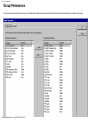
Group Permissions
The group permissions dialog box allows you to defines which operations may be performed and which devices are accessible to members of the group.
file:///A|/html/lert2rqr.htm (1 of 4) [27/06/2001 20:45:17]
Security - Permissions
Permissions
The Permissions tab allows you to define which operations can be performed by members of the group.
To grant permissions to the group
1. In the list on the right hand side of the dialog, select the permissions that you wish to grant to the group.
Note: You can select several permission types by dragging the mouse around a group of them, or by holding down CTRL and clicking individual items in the list.
2. Click the '<- Add' button to grant the selected permissions to the group.
To deny permissions from the group.
1. In the list on the left hand side of the dialog, select the permissions that you wish to revoke from the group.
Note: You can select several permission types by dragging the mouse around a group of them, or by holding down CTRL and clicking individual items in the list.
2. Click the 'Remove ->' button to revoke the selected permissions from the group.
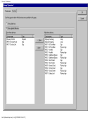
Devices
The Devices tab allows you to define which pieces of equipment are visible to members of the group.
file:///A|/html/lert2rqr.htm (2 of 4) [27/06/2001 20:45:17]
Security - Permissions
file:///A|/html/lert2rqr.htm (3 of 4) [27/06/2001 20:45:17]
Security - Permissions
To allow access to all devices
1. Select the 'Show all devices' radio button.
To allow access to selected devices only
1. Select the 'Show selected devices' radio button.
2. In the list on the right hand side of the dialog, select the devices that you wish to make accessible (visible) to the group.
Note: You can select several devices by dragging the mouse around a group of them, or by holding down CTRL and clicking individual items in the list.
3. Click the '<- Show' button to add the selected devices to the list of devices accessible by the group.
4. In the list on the left hand side of the dialog, select the devices that you wish to make inaccessible (invisible) to the group.
Note: You can select several devices by dragging the mouse around a group of them, or by holding down CTRL and clicking individual items in the list.
5. Click the 'Remove ->' button to remove the selected devices from the list of devices accessible by the group.
file:///A|/html/lert2rqr.htm (4 of 4) [27/06/2001 20:45:17]
Sign Common Functions
Sign - Information Window
Double clicking on the sign icon
on the map will cause the following window to be displayed:
You can also access the sign information window by:
●
●
Single click on the sign's icon to select the sign (and display it's blue selection handles press the return key.
Right click on the sign's icon to get the context-menu and select Information.
), then
The Sign Information Window is used to display the curernt status of the sign, and provide a means of
accessing the signs configuration, or perhaps overriding the current settings. Not all users have the
permissions to change configuration, or perform an override.
The Sign Information Window is the same for all types of sign, be they rotating prism, remote or VMS. Some
information may not be available with some types of sign - for example the luminance settings of a sign
which doesn't support dim and bright characters.
To close the window click on the close icon at the top right hand corner of the window
.
The Sign Information Window is split into two areas: the sign toolbar, and the sign status information.
Sign Toolbar
Operation of the
Sign Override Button brings up the sign override window. From within this window you
(with the correct level of access) can manually set the sign to any of the available messages. The sign will
retain this message until instructed to return to automatic mode by you or another operator. The sign
override may also have an expiry period, after which, the sign will return to automatic operation.
file:///A|/html/sign_common_func.htm (1 of 3) [27/06/2001 20:45:24]
Sign Common Functions
Operation of the
View Sign Details Button provides you with information regarding the current
configuration of the sign. You cannot edit any parameters from this function.
Operation of the
Edit Sign Details Button brings up the sign configuration window. From this menu you
(with the correct level of access) can alter the sign parameters.
Legends Button brings up the legends definition window. From this menu you (with the
Operation of the
correct level of access) can assign which messages are available to be set on the sign. This affects the
messages available to you and other operators in overriding the sign, and also the automatic messages
output in response to an associated parking zone, or remote system.
Operation of the
Delete Sign Button will delete the sign. To perform this function you must have the
correct level of access.
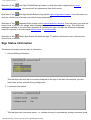
Sign Status Information
The status information has two tabs of information:
1. Current Setting Information
This tab shows the text that is currently displayed on the sign in the dark coloured box, plus the
'bank label' text as entered during configuration.
2. Luminance Information
This tab shows the luminance status - i.e. whether the sign is automatically setting luminance levels,
file:///A|/html/sign_common_func.htm (2 of 3) [27/06/2001 20:45:24]
Sign Common Functions
or being overriden, and whether the current luminance setting is Dim or Bright.
file:///A|/html/sign_common_func.htm (3 of 3) [27/06/2001 20:45:24]
Sign - Context Menu
Sign - Context Menu
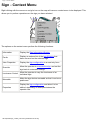
Right clicking with the mouse on a sign's icon on the map will cause a context menu to be displayed. This
allows you to perform operations on the sign you have selected.
The options on the context menu perform the following functions:
Information
Display the Sign Information Window
Faults
Display an ordered list of the last 50 faults that
have occurred on the selected sign.
View Properties
Display the sign configuration in a read only form
Override
Allow the operator to override the sign, and set the
sign back to automatic settings.
Luminance Control
Allow the operator to vary the luminance of an
individual sign.
Moveable
Make the sign device moveable so that it can be repositioned.
Properties
Display the sign configuration and allow it to be
editted, depending on what permissions the
operator has.
file:///A|/html/sign_context_menu.htm [27/06/2001 20:45:26]
Viewing Sign Faults
Viewing Sign Faults
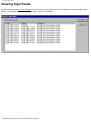
Selecting faults form the sign context menu causes the Device Fault Status window to be displayed. The last 50 faults will be
listed in reverse order. Any outstanding faults will be marked as CURRENT.
file:///A|/html/sign_viewing_faults.htm [27/06/2001 20:45:29]
Sign Configuration
Sign Configuration
Sign configuration details are available from the sign information window or through the sign's context menu.
The details are displayed in the same way as when adding a sign. Not all users have the correct
permissions to be able to modify the sign's configuration.
file:///A|/html/sign_config.htm [27/06/2001 20:45:30]
Add Sign
Add Sign
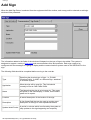
When the Add Sign Button is selected from the equipment definition toolbar, and a map position selected an add sign
window will be presented:
The information added to the fields of the window will depend on the type of sign to be added. The system is
designed to support a variety of sign types and communications links and protocols. Each sign needs to be
configured with the messages it is going to display and the communications system used to link SIESPACE to the
sign.
The following fields should be completed before moving to the next tab:
Type
Describes the physical type of sign - i.e. PLANK
(Rotating Prism), or VMS, or a Remote Sign, attatched
to a remote system
Application
What the sign will be used for. This field should
normally be set to CAR PARK SIGN.
Name
The Name that the sign is to be known by. This name
will apear on the client display, in faults, on the status
panel and in reports.
Location
A textual description of the location of the sign.
Description
A free format field that can be used to contain a text
description of the sign or other operational details.
Update Inhibit Period
A period in minutes which is enforced by the system to
stop updates to the sign happening too frequently.
file:///A|/html/lert46y6.htm (1 of 2) [27/06/2001 20:45:32]
Add Sign
Each type of sign will require different details to complete the configuration:
●
●
●
VMS Signs Details
Rotating Prism Signs Details
Remote Signs Details
When the sign details have been completed it is necessary to complete details of how the sign is to be communicated
with for VMS and Rotating Prism signs.
When all details have been entered the Store button may be used to cause the new sign to be processed, or Close
followed by a confirmation to disregard the changes.
Note: that the sign will have no legends assigned to it when first created, so you will need to assign and possible
create some suitable legends, and possibly configure the sign to be driven from a parking zone or remote system.
file:///A|/html/lert46y6.htm (2 of 2) [27/06/2001 20:45:32]
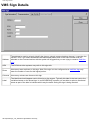
VMS Sign Details
VMS Sign Details
Address
The address is used to uniquely identify the sign on a single communications channel - it can take the
values 1-254. If you select an address that has already been used on the same modem that you
selected on the Communications tab the system will suggest that you are trying to create a multi-line
sign.
SCN
The SCN that other systems may refer to this sign with.
Rows
How many rows are there on this sign. Note if the sign is to be configured as a multi-line sign only
enter the number of rows for this logical portion.
Columns
How many columns are there on this sign.
Label
The label that should appear next to this sign on the screen. Typically this label is the text next to the
variable element on the actual sign. In some SIESPACE systems you are able to select a directional
arrow as part of the label to indicate which way the traffic seeing the sign is being directed.
file:///A|/html/sign_vms_details.htm [27/06/2001 20:45:34]
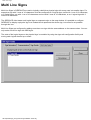
Multi Line Signs
Multi Line Signs
Multi Line Signs in SIESPACE are used to logically subdivide a physical sign with many rows into smaller signs. For
example a sign with 3 rows of 10 characters could be configured as 3 logical signs, each with 1 row of 10 characters,
or 2 logical signs, one with 1 row of 10 characters and one with 2 rows of 10 characters, or as 1 logical sign with 3
rows of 10 characters.
The SIESPACE client treats each logical sign as a seperate sign on the map window. It is possible to configure
SIESPACE to display a physical sign icon instead which represents the whole sign, but control is not possible
through this icon.
Multi Line Signs are configured by adding more than one sign with the same address on the same modem. You can
only make a multi line sign with VMS signs.
The order of the logical signs on the physical sign is controlled by using the signs edit configuration facility and
moving each logical element up or down.
file:///A|/html/sign_multi_lines.htm [27/06/2001 20:45:36]
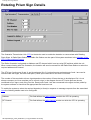
Rotating Prism Sign Details
Rotating Prism Sign Details
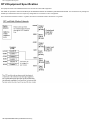
The Outstation Transmission Unit (OTU) is the device used to enable the Instation to communicate with Rotating
Plank Signs. A Radio Base Station and Radio Out Station are also part of this system as shown in the diagram of the
OTU Communications System.
The Radio Outstation is allocated an Address and RF channel which is set up using DIP switches within the unit.
When communicating with The Outstation, the Instation will send a command to the Radio Base Station to select the
required address and channel.
The OTU has 2 write ports (0 and 1) and 4 read ports (0 to 3), both write ports and read ports 0 and 1 are used to
communicate with signs, the other read ports (2 and 3) are reserved for use with Count Sites.
The number of bits required to drive a sign depends on the number of faces that are to be displayed. So it is not
always necessary to use a complete port to control a sign, in the diagram the two OTU write ports are shown
connected to four signs, each using four bits. Read ports 0 and 1 are also connected to the signs and are polled by
the system software to check that the appropriate bits have been set.
To enable the system to select the required legends (or faces) in response to message requests from the associated
zone the following details need to be configured:
Address
This field defines the radio address on which the OTU is operating.
RF Channel
This field defines the radio channel number on which the OTU is operating.
file:///A|/html/sign_prism_details.htm (1 of 2) [27/06/2001 20:45:39]
Rotating Prism Sign Details
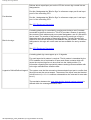
Defines which output/input port on the OTU the current sign control bits are
designated to.
Port No 0 designates the "Bits for Sign" to reference output port 0 and input
port 0 of the controlling OTU
Port Number
Port No 1 designates the "Bits for Sign" to reference output port 1 and input
port 1 of the controlling OTU.
See OTU Equipment Description
Bits for the sign
A rotating plank sign is controlled by opening and closing a set of contacts
connected to the drive electronics. The OTU provides a means of operating
the contacts. Each address and port number designates a set of 8 bits which
can be used. The number of bits actually required for each type of sign is
dependent upon the number of faces being driven. Typically the sign only
requires 4 of the 8 bits defined by that address and port number. The bits not
designated to this sign will not be used and are available for use by another
sign
See OTU Equipment Description
A rotating plank sign can support up to 10 legends.
For each legend a bit pattern is required. The bit pattern is translated by the
OTU hardware into a combination of open and closed contacts which will
cause the required sign face to be moved into the visible position. For
information regarding the required bit patterns and sign faces available refer
to the sign manufacturers interface data.
Legend to Define/Defined Legend
The system uses the bits returned on the associated input port to confirm that
the sign has set the correct aspect. The sense of the inputs must be identical
to that sent out (i.e. if a 1 is used as a demand then the returned bit must also
be a 1).
The translation between the zone state and the legend number selected is
defined within the message definition menu.
file:///A|/html/sign_prism_details.htm (2 of 2) [27/06/2001 20:45:39]
OTU Equipment Description
OTU Equipment Specification
The equipment used is the standard Siemens OTU as used for urban traffic equipment .
Full details are provided in Siemens handbook part No 666/HB/43100/000 and installation guide 666/HE/43100/000. The unit is driven only through the
handset port and therefore does not require any configuration for connection to Tele 12 equipment.
The OTU Firware should be at Issue 7 or greater, and the PLD should be variant 106 at Issue 1 or greater.
file:///A|/html/lert6hm6.htm [27/06/2001 20:45:41]
Radio Modem Setup
RDT Radio Modem Setup
The RDT radio modems are setup to different configurations depending upon which protocol they are
required carry. The protocols currently available are the UVMS protocol, OTU protocol, NMCS2 protocol,
FP2001 protocol. It is not recommended to use the NMCS2 (or 5 byte) protocol over RDT radios unless
signal strength is exceptionally good.
Each protocol requires its own base station radio or channel.
Not all SIESPACE systems will use all the protocols. Systems which do not have any outstation equipment
connected for one of the protocols will not have any associated base station radio modems fitted.
OTU Protocol
To implement the OTU protocol the modems at the base station and the outstations need to be setup as
follows.
OTU Base Station
The base station modem for the OTU protocol requires to be fitted with at least software version "serial
V2.0" This software allows the instation to change the address and channel number of the outstation with
which it is communicating.
Power up the modem
Set all the DIP switches to OFF
Set SW1.1 = ON
Set the following switched as indicated
SW1.2 = OFF : Async Mode
SW1.3 = OFF
SW1.4 = OFF : RS232
SW1.5 = OFF : 500mW
SW1.6 = OFF
SW1.7 = OFF
SW 1.8 = OFF
SW2.1 = OFF :1200 baud
file:///A|/html/lert81m8.htm (1 of 4) [27/06/2001 20:45:43]
Radio Modem Setup
SW2.2 = OFF
SW2.3 = ON
SW2.4 = ON :Parity Enabled
SW2.5 = OFF :Even Parity
SW2.6 = OFF :7 Bits
SW2.7 = ON
SW2.8 = OFF :1 Bit
Set SW1.1 to OFF ( This captures the settings of the other switches into memory).
Without moving SW1.1 set all the other switches to OFF
Without moving SW1.1 set switch SW1.4 to ON. (Default Channel 1 )
OTU Outstation modems
The outstation modems require to be fitted with the standard RDT software version 2.2 or above.
Power up the modem
Set all the DIP switches to OFF
Set SW1.1 = ON
Set the following switched as indicated
SW1.2 = OFF : Async Mode
SW1.3 = OFF
SW1.4 = OFF : RS232
SW1.5 = OFF : 500mW
SW1.6 = OFF
SW1.7 = OFF
SW 1.8 = OFF
file:///A|/html/lert81m8.htm (2 of 4) [27/06/2001 20:45:43]
Radio Modem Setup
SW2.1 = OFF :1200 baud
SW2.2 = OFF
SW2.3 = ON
SW2.4 = OFF :Parity Disable
SW2.5 = OFF
SW2.6 = ON :8 Bits
SW2.7 = OFF
SW2.8 = OFF :1 Bit
Set SW1.1 to OFF (This captures the settings of the other switches into memory).
Without moving SW1.1 set all the other switches to OFF
The modem now requires to have its individual address and channel number set.
This must be done without moving switch SW1.1
RF channels are set on SW1.4 to SW1.8 as a binary code indicating the channel Number. SW1.4 is the
least significant bit. Channel numbers are in the range 0 to 31.
Unit addresses are set on SW2.1 to SW2.8 as a binary code indicating the unit address. SW2.1 is the least
significant bit. Addresses are in the range 0 to 255.
NMCS2 Protocol
For NMCS2 protocol the base station and the outstations are set the same. The Modem software for both
the base station and the outstation is the standard RDT software version 2.2 or above.
Power up the modem
Set all the DIP switches to OFF
Set SW1.1 = ON
Set the following switched as indicated
SW1.2 = OFF : Async Mode
SW1.3 = OFF
file:///A|/html/lert81m8.htm (3 of 4) [27/06/2001 20:45:43]
Radio Modem Setup
SW1.4 = ON : RS485
SW1.5 = OFF : 500mW
SW1.6 = OFF
SW1.7 = OFF
SW 1.8 = OFF
SW2.1 = ON :2400 baud
SW2.2 = ON
SW2.3 = OFF
SW2.4 = OFF :Parity Disable
SW2.5 = OFF
SW2.6 = OFF :9 Bits
SW2.7 = OFF
SW2.8 = OFF :1 Bit
Set SW1.1 to OFF (This captures the settings of the other switches into memory).
Without moving SW1.1 set all the other switches to OFF
The modem now requires to have its individual address and channel number set.
This must be done without moving switch SW1.1
RF channels are set on SW1.4 to SW1.8 as a binary code indicating the channel Number. SW1.4 is the
least significant bit. Channel numbers are in the range 0 to 31.
Unit addresses are set on SW2.1 to SW2.8 as a binary code indicating the unit address. SW2.1 is the least
significant bit. Addresses are in the range 0 to 255.
file:///A|/html/lert81m8.htm (4 of 4) [27/06/2001 20:45:43]
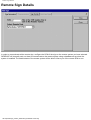
Remote Sign Details
Remote Sign Details
In order to communicate with a remote sign, configure the SCN of the sign on the remote system you have selected.
SIESPACE will internally work out how to communicate to the remote system using a database set up when the
system is installed. The administrator of the remote system will be able to inform you of the correct SCN to use.
file:///A|/html/sign_remote_details.htm [27/06/2001 20:45:45]
Sign Communications Details
Sign Communication Details
Once you have chosen the typs of sign that you are configuring the choice of communications mechanism is
limited by two things:
●
●
The available communication systems for the type of sign
The available modems configured on your system at installation time
When you select the Communications tab for the sign, you will presented with a list of modems to choose
from. A SIESPACE instation can support up to 6 modems or channels without additional hardware. The
modems are configured to run with only one type of protocol, i.e. you cannot run SIEMENS UVMS and
Varitext FP2001 on the same channel - as some devices may not be able to correctly distinguish the
protocols. You should take care when allocating devices to communications modems, as some modems
may have different geogrpahical scope - even if they support the same protocol - this is because they may
be connected to radio base stations miles away from each other.
Available Communication Systems
The current signs and communication systems supported on the system are:
VMS
Communications
SIEMENS
UVMS
NMCS2
5 Byte
Varitext
FP2001
EEV
RDT Radio
Modem
*
* (not
advised)
*
*
Leased Line
*
*
*
*
Hardwire RS485
*
*
*
*
PSTN Modem
*
*
PAKNET Radio
PAD
*
*
Protocol/Interface
Rotating Prism
Communications
Protocol/Interface
SIEMENS OTU
Handset
file:///A|/html/sign_comms.htm (1 of 2) [27/06/2001 20:45:46]
Sign Communications Details
RDT Radio Modem (Serial
Control)
*
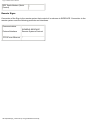
Remote Signs
Connection of the Sign to the remote system that controls it is unknown to SIESPACE. Connection to the
remote system uses the following protocols and interfaces.
Communications
Protocol/Interface
SIEMENS SIESPACE
Remote Systems Protocol
TCP/IP over Ethernet
*
file:///A|/html/sign_comms.htm (2 of 2) [27/06/2001 20:45:46]
How to Assign Legends to Signs
How to Assign Legends to Signs
See Sign Legends
file:///A|/html/how_assign_legends_to_signs.htm [27/06/2001 20:45:48]
Sign - Legends
Sign - Legends
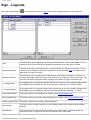
When the Legends Button
is operated from within the signs window the following window will be presented.
SCN
The SCN of the sign is displayed in the title bar of the window - in this case 'VMS2-1'. For a
rotating prism sign the SCN field is assigned automatically when the sign is created.
Legends Assigned
This field shows the messages that are currently available for selection on this sign. The ID
number is the message number that is passed from the associated zone The legend is the
data which is output to the sign.
Legends Available
This field shows the Legends that are defined and currently NOT available for selection on
this sign. Any Legend defined by sign of the same type is visible to all signs of that type. This
removes the need to retype the same message many time into signs of the same type.
<< Assign Button
A message within the Legends Available field can be moved into the Legends Assigned field
by highlighting the message with the mouse and then selecting the "<< Assign" button.
>> Deassign Button
A message within the Legends Assigned field can be moved into the Legends Available field
by highlighting the message with the mouse and then select the "Deassign >>" button.
New Legend Button
This button allows a new legend to be defined. (see Legend Details Form)
Edit Legend Button
This button allows the currently selected legend to be edited. (See Legend Details Form)
Delete Legend Button
This button deletes the currently selected legend(s).
Store Button
The Store button is used to store the current changes made to the assigned and available
legends.
Close Button
The Close button is used to close this window. If the Close button is selected before the
Store button then you will have the option to abandon the current edits.
file:///A|/html/lert9c8e.htm (1 of 2) [27/06/2001 20:45:50]
Sign - Legends
The ID of a legend (or message) defines the message number which is received from the zone. The Legend Assigned
shows the defined legend which will be output to the sign. In the case of a rotating plank sign this legend is expressed as
a number. The number as expressed in the Legend Assigned field is interpreted by the sign control software into a bit
pattern. This bit pattern is used to drive the sign via an OTU.
On a rotating plank sign the legend number is translated into a bit pattern. This bit pattern is defined within the Rotating
Prism Details window.
file:///A|/html/lert9c8e.htm (2 of 2) [27/06/2001 20:45:50]
Sign - Add/Edit Legend - Legend Details
Sign - Add/Edit Legend - Legend Details
Legend ID
The Legend ID is a 4 character alpha numeric string which identifies the message. The Legend ID is
used by the zone to select the message to be output on the sign in response to a zone state change.
Note: When editing an existing legend, the Legend ID cannot be changed and this field is disabled.
Scenarios
This is a free format text field into which information as to the use of the sign can be entered.
For a rotating prism sign the comment entered into this field will be displayed on the sign setting
status window and map when this message is selected.
Comments
For non rotating prism signs this field can be used by the operator to add a comment about the
setting.
See also: Legend Text tab
file:///A|/html/lert2u43.htm [27/06/2001 20:45:52]
Sign - Add/Edit Legend - Legend Details
Sign - Add/Edit Legend - Legend Text
Legend Text
This area shows the text defined for the legend (and any fields which are contained within the
legend).
Note: When adding a new legend, the legend is initially blank. When editing a legend, the
currently defined legend text is shown.
The example shown above contains 4 fields, all of type 'Other Sign Legend'.
Available Fields
Shows the types of fields which can be placed into the legend.
A field is a variable item of information (such as number of available spaces) which is updated
by SIESPACE or an external system such as a UTC.
OK button
Confirms the changes made to the legend text and / or fields.
Note: The new / edited legend is not stored in the database until you select 'Store' in the Sign
Legends form.
Cancel button
Cancels all changes made to the legend text and / or fields.
To edit the legend text
1. Click in the row that you wish to change. The row changes to an edit box.
2. You may then edit the row text.
3. When you have finished editing the text, click elsewhere on the form.
4. The edit box disappears and the legend text is then updated.
file:///A|/html/sign_define_leg_text.htm (1 of 2) [27/06/2001 20:45:55]
Sign - Add/Edit Legend - Legend Details
To add a field to the legend
1. Drag the appropriate field type from the Available Fields section and drop it into the legend text area at the desired
position.
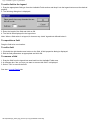
2. The following dialog box is displayed:
3. Enter the length of the field and click on OK.
4. The field is then displayed in the legend text.
Note: When a field exists in a legend, it obscures any 'static' legend text defined below it.
To reposition a field
Drag the field to its new location.
To edit a field
1. Click with the right hand mouse button on the field. A field properties dialog is displayed.
2. Edit the field parameters as appropriate and click OK.
To remove a field
1. Drag the field from the legend text area back into the Available Fields area.
2. A message box "Are you sure you want to remove this field?" is displayed.
3. Select "Yes" to remove the field.
See also: Legend Details tab
file:///A|/html/sign_define_leg_text.htm (2 of 2) [27/06/2001 20:45:55]
How to Define New Legends
How to Define New Legends
See Sign Legends
file:///A|/html/how_define_new_legends.htm [27/06/2001 20:45:56]
Security - Overview
Security - Overview
The system security is controlled by the limiting of the use of the system to defined users. Each user is
required to have a user name and an individual password. The facilities which the user is allowed to access
are also definable.
Throughout SIESPACE, if the currently logged on user does not have permission to carry out a function, the
menu option or button will be disabled and greyed as an indication.
The security functions are accessed from the menu bar which is present when a user is logged on.
The menu presents facilities for the operator to:
●
●
●
Change their Password
Add or Remove Users, or reset their passwords
Assign Access Groups and Permissions
file:///A|/html/lert5vqx.htm [27/06/2001 20:45:58]
Security - Change Password
Security - Changing Your Password
The Change Password option of the Security menu is available to all users. It allows the current user to
change his own password. If selected, the following window is displayed:
Login Name:
This field shows the name of the currently logged on user.
Enter your current or 'old' password here. The user is required to enter their old
password into this field to ensure that an unauthorised user does not maliciously alter
a password.
Old Password:
If your password has never been set or has been reset by an administrator then this
field should be left blank.
New Password:
Enter your newly chosen password here.
Verification:
Enter your newly chosen password here to ensure that a typing error has not occurred
on the first entry.
When you have entered the above information, click on the OK button to cause SIESPACE to update your
password. This change will take effect when you next try to log in. You may choose to verify the change by
logging off and logging on again immediately.
If you decide to abort the change to your password, you may click on the Cancel button instead. Your old
password will remain unchanged.
file:///A|/html/lert19wk.htm [27/06/2001 20:46:00]
Logging On/Off
Logging On & Off
A user must log on using a user name and a password before the facilities of the system can be fully
accessed. The level of access that each operator is allowed is defined when the user account is set up by
the system administrator via the security menu.
SIESPACE can support multiple client PCs. Because the system can only support one user at each client
you cannot log on whilst another user is already logged in at the client PC.
Logging On
To log on to the system, first click the mouse anywhere on the overview map (but not on an icon or its text).
The logon dialog box is then displayed:
In order to enter text into the fields, click the mouse pointer within the white data entry area to the right of the
field.
Name:
Enter your logon name (user name) in this box.
Password:
Enter your password in this box.
Notes:
SIESPACE passwords are not case sensitive.
To prevent your password from being disclosed, it will not
be displayed on the screen as you type it in. Instead, a *
character is displayed for each character typed in the box.
When you have entered your user name and password, click the OK button. SIESPACE will then validate
your security details and either log you in, or inform you that your password or username is incorrect.
If the system will not log you on, and you cannot remember your password or user name, you should
contact the person resonsible for administering the SIESPACE system who should be able to reset your
details.
Should you decide that you do not wish to login in after all, you may click the Cancel button to close the
dialog box.
The dialog box will also automatically cancel itself after a short period if you do not log on.
file:///A|/html/lert0gh2.htm (1 of 2) [27/06/2001 20:46:03]
Logging On/Off
Logging Off
To log off, click the Logoff button
on the menu bar, or select 'Log Out' from the File menu.
Related Topics
To change your password, select 'Change Password' from the Security menu.
SIESPACE has an automatic logout feature which will automatically log off a user who has not used their
SIESPACE client for a configured period. This protects the system and user from unauthorised access.
file:///A|/html/lert0gh2.htm (2 of 2) [27/06/2001 20:46:03]
Automatic Logout
Automatic Logout
The SIESPACE client is often configured to automatically log out the user when they have remained inactive
for a given period.
Inactivity means not moving the mouse, clicking, or typing at the keyboard.
The system will sound an audible alarm for the 30 seconds prior to automatically logging the operator out.
file:///A|/html/automatic_logout.htm [27/06/2001 20:46:04]
Security - Users
Security - Users
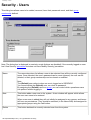
This dialog box allows users to be added, removed, have their passwords reset, and their group
membership defined.
Note: The dialog box is displayed in read-only mode (buttons are disabled) if the currently logged on user
has 'View Security' permission but does not have 'Modify Security' permission.
Name
The name drop down list allows a user to be selected from all the currently configured
users. Once selected, the user's password can be reset (cleared), the user can be
deleted, or their group membership can be viewed or modified.
Note:
The (Default) user refers to when no-one is logged on to SIESPACE.
You cannot delete the (Default) user, nor clear its password.
By assigning the (Default) user to a group, you can control which operations users
can perform without logging in.
New
This button adds a new user to the system. A new window will appear which allows
the new user name to be entered.
When a new user is added they will not initially be assigned to any groups, and hence
will have no permissions. They should be selected (in the Name field) and assigned to
appropriate groups using the Add button.
Delete
This button deletes the currently selected user from the system.
file:///A|/html/lert6pv7.htm (1 of 2) [27/06/2001 20:46:07]
Security - Users
Clear Password
This button clears or resets the password of the currently selected user to be cleared.
The user will now not require a password to log on. This facility can be used when a
user reports that they have forgotten their password.
Close
The Close button closes the window. If changes have been made to the group
membership but not saved (with the Store button), pressing the Close button will
cause a prompt to be displayed asking the user to confirm that the changes are to be
discarded.
The following functions apply to the Group Membership of the currently selected user:
Group Membership
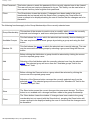
This section of the window is used to view (or modify) which groups the currently
selected user belongs to, and hence what permissions they have.
Available Groups:
This field shows the groups which the selected user currently does not belong to
The user may be added to these groups by selecting a group and using the Add
button.
Member Of:
This field shows the groups to which the selected user currently belongs. The user
may be removed from these groups by selecting a group and using the Remove
button.
Before clicking the Add button a group should be selected by clicking the mouse
over the required group name.
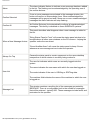
Add
Selection of the Add button adds the currently selected user from the selected
group. The selected group will move from the "Available groups" field to the
"Member of " field.
Before clicking the Remove button a group should be selected by clicking the
mouse over the required group name.
Remove
Selection of the Remove button removes the currently selected user from the
selected group. The selected group will move from the "Members Of" field to the
"Available Groups" field.
Store
The Store button saves the current changes into permanent storage. The Store
button is not enabled until a change has been made to the group membership.
Close
The Close button closes the window. If changes have been made to the group
membership but not saved (with the Store button), pressing the Close button will
cause a prompt to be displayed asking the user to confirm that the changes are to
be discarded.
file:///A|/html/lert6pv7.htm (2 of 2) [27/06/2001 20:46:07]
Security - Groups
Security - Groups
Group membership is used to assign the level of access that users have. A group is defined as a set of
permissions which are then assigned to a set of users. A user may be a member of zero, one or more
groups.
●
●
●
A user who is not a member of any group will have no permissions.
A user who is a member of one group will have the set of permissions assigned to that group.
A user who is a member of more than one group will have a level of access equivalent to the sum of
the access levels of all the groups that they are a member of.
The Groups dialog box allows groups to be added, copied, renamed, deleted and have their permissions
defined.
To add a new group
1. Click the 'New...' button. A dialog box is displayed asking for the name of the new group.
2. Enter a name for the new group and click OK.
3. The permissions dialog box is then shown, allowing you to assign permissions to the new group.
To edit a group's permissions
1. In the list of groups, select the group that you wish to edit.
2. Click the 'Edit...' button.
3. The permissions dialog box is then shown, allowing you to set the group's permissions.
file:///A|/html/lert0nar.htm (1 of 2) [27/06/2001 20:46:09]
Security - Groups
To copy a group
1. In the list of groups, select the group that you wish to copy.
2. Click the 'Copy...' button. A dialog box is displayed asking for the name of the new group.
3. Enter a name for the new group and click OK.
Note: This copies the group permissions to a new group name, it does not copy the members of the group.
The new group will have no members until they have been assigned in the users dialog box.
To rename a group
1. In the list of groups, select the group that you wish to rename.
2. Click the 'Rename...' button. A dialog box is displayed asking for the new name for the group.
3. Enter the new name for the group and click OK.
To delete a group
1. In the list of groups, select the group that you wish to delete.
2. Click the 'Delete' button. A dialog box 'Are you sure you want to delete this group?' is displayed.
3. To delete the group, select 'Yes', otherwise select 'No'.
file:///A|/html/lert0nar.htm (2 of 2) [27/06/2001 20:46:09]
Status Panel
Status Panel
This panel shows the current logged on user, and any recent cleared or uncleared faults.
The status panel is used to indicate live operational status of the system. The panel can be configured to
provide an audible indication when a fault occurs and to automatically appear on the user interface.
SIESPACE reports many types of fault to help diagnose problems with equipment.
The status panel can be made visible from the main toolbar using the status panel button.
file:///A|/html/lert8ncc.htm (1 of 2) [27/06/2001 20:46:13]
Status Panel
Alarm
The alarm indicator flashes to indicate a new message has been added
to the list. The flashing can be acknowledged by the operating one of
the confirm buttons.
Confirm Selected
If one or more messages are selected in the message window, this
button will confirm or acknowledge them. When acknowledged the
messages will be greyed out and if there are no more unacknowledged
messages the Alarm indicator will stop flashing.
Confirm All
As Confirm Selected, but automatically confirms all unacknowledged
messages. This facility is disabled on some SIESPACE systems.
This panel describes what happens when a new message is added to
the list.
When a New Message Arrives:
"Bring Status Panel to Front" will cause the status panel window to be
brought above all other open windows on the PCs screen - helping the
operator notice the new event.
"Sound Audible Alarm" will cause the status panel to beep 3 times
whenever a new message arrives to alert the operator.
Always On Top
Causes the status panel to remain uppermost on the users deskttop
irrespective of which window is currently being worked in.
The user list indicates which users are currently logged onto the
system
The name indicates the user name with which the user has logged on
User List
The mode indicates if the user is VIEWing or EDITting data.
The machine field indicates the name of the machine to which the user
is logged on.
Message List
This window contains a scrolling list of the messages generated by
SIESPACE. There is a configurable limit to the number of messages
that will be retained - typically 200. These messages include faults, and
reminders for the operator.
file:///A|/html/lert8ncc.htm (2 of 2) [27/06/2001 20:46:13]
SIESPACE Reported Faults
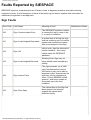
Faults Reported by SIESPACE
SIESPACE reports a comprehensive set of faults in order to diagnose problems and malfunctioning
equipment quickly. A brief description of each of the faults is given below, together with information for
maintenance engineers to aid diagnosis.
Sign Faults
Error Code
Fault Name
Meaning of Fault
Sign: Communication Error
The SIESPACE system is unable
to contact the sign in order to set
it, or verify its condition.
Sign: Invalid Legend Requested
A system that is 'driving' the sign
such as a parking zone or remote
system has requested a legend
that is not assigned to the sign.
102
Sign: OK
Not an error, sign has returned to
normal condition - this is only
visible inside the SIESPACE
database.
103
Sign: Invalid Legend Returned
Rotating Prism Sign may not
have rotated when attempting a
setting
Sign: Internal Fault
The sign processor (on a VMS
sign) has detected an internal
fault which it may not be able to
diagnose further. Alternatively the
sign may only be compliant to
Issue 1 of the SIEMENS UVMS
protocol - and hence unable to
accurately report the fault
condition.
Sign: Door Open
The cabinet door of the Sign has
been opened. Not all signs
support the cabinet door
detection facility.
100
101
104
105
file:///A|/html/reported_faults.htm (1 of 4) [27/06/2001 20:46:16]
Maintenance Notes
SIESPACE Reported Faults
Sign: Power Failed
The sign has detected that the
mains power supply has failed to
the sign. Unless the power has
been restored subsequently the
sign will have been blanked. Not
all signs have a battery backup,
enabling them to inform the
SIESPACE instation of power
failure.
Sign: LED Failure
The sign has detected that one or
more LED characters have failed.
An indication of the number of
failed characters is usually
available. Not all signs are able to
detect this failure condition.
Sign: Lantern Failure
The sign has detected that the
amber lanterns have failed. Not
all signs are able to detect this
failure condition.
109
Sign: Tube Failure
The sign has detected that the
illuminating fluorescent tubes
have failed, where fitted. Not all
signs are able to detect this
failure condition.
110
Sign: Processor Fault
The sign has detected an internal
processing fault.
Sign: LED Communication
Failure
The sign has detected that
communications between the sign
processor and the characters has
failed. Not all signs are able to
detect this failure condition.
112
Sign: Failed to Set Message
The sign was unable to set the
requested message, either due to
a fault at the sign, or because it
contained illegal characters, or
the wrong number of characters.
113
Sign: Invalid Legend Requested
As Error Code 101
106
107
108
111
Car Park Faults
Error Code
Fault Name
Meaning of Fault
file:///A|/html/reported_faults.htm (2 of 4) [27/06/2001 20:46:16]
Maintenance Notes
SIESPACE Reported Faults
400
401
402
403
404
405
Car Park: Overflow
The car park occupancy is currently
higher than the capacity of the car park
allows for. The car park may allow the
occupancy to rise without check, or clip
it at a configured maximum. This can
occur through a large number of cars
circulating inside the car park looking for
a space, or though operator adjustment
of the occupancy, or though double
parking of vehicles within the car park. It
is also worth verifying that the capacity
of the car park is correct.
Car Park: Underflow
The car park occupancy is currently less
than zero. The car park will normally clip
the occupancy at zero to prevent
negative occupancies. This can occur
when more cars are detected leaving
the car park than were detected
entereing it - though operator
adjustment of occupancy, or cars
travelling over the wrong loops at the car
park.
Car Park: Detector Fault
One of the detectors responsible for
counting vehicles into or out of the car
park is faulty. If it is an OTU based count
site, then the fault could be a
communications problem. The
SIESPACE instation will revert to using
historical occupancy data.
Car Park: Ramping Error
The algorithmn used to know when to
report occupancy to the SIESPACE
instation from a Car Park Count
Outstation has failed internally. Please
report this error condition to the
helpdesk
Car Park: Door Open
The cabinet door on the car park
oustation has been opened. Not all
equipment supports this facility.
Car Park: Power Failed
The mains power supply has failed at
the car park outstation. Unless power is
restored, vehicles will not be counted
into and out of the car park, although the
present occupancy will be retained at
the Car Park Count Outstation. The
SIESPACE instation will revert to using
historical occupancy data. Not all
equipment has battery backup to enable
this error condition to be reported.
file:///A|/html/reported_faults.htm (3 of 4) [27/06/2001 20:46:16]
SIESPACE Reported Faults
406
407
408
Car Park: Loop Stuck
One of the detectors responsible for
counting vehicles into or out of the car
park is faulty. The detector is reporting a
vehicle is permentantly being detected this could mean a vehicle parked on an
entrance, or a loop having been
damaged. The SIESPACE instation will
revert to using historical occupancy
data.
Car Park: Loop Not
Detecting
One of the detectors responsible for
counting vehicles into or out of the car
park is faulty. The detector has not
reported a vehicle for a long time - this
could mean the entrance not being
used, or a loop having been damaged.
The SIESPACE instation will revert to
using historical occupancy data.
Car Park: Comms Error
The SIESPACE instation has not
received a status message from the car
park oustation according to the timetable
it is supposed to be using. This indicates
that communication has failed.
SIESPACE will attempt to re-establish
communication, as will the outstation,
but in the meantime, the SIESPACE
instation will revert to using historical
occupancy data.
file:///A|/html/reported_faults.htm (4 of 4) [27/06/2001 20:46:16]
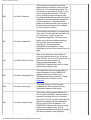
The SIEMENS Helpdesk
Software Support
For customers who have a software support agreement SIEMENS provide support in three ways:
a. Regular Software Updates
b. Fault Fixes or Patches
c. SIESPACE/UTC Customer Support Desk
For full details about what support is provided, and the detailed procedures for obtaining the support, please
refer to your Software Support Agreement Contract.
The Customer Support Desk
The customer support desk (helpdesk) is available during normal working hours:
Monday - Friday
08:30 - 17:00
Friday
08:30 - 15:45
(Public Holidays and the Christmas period from Christmas Eve to New Years Day, or substituted days, are
excluded)
Please note that normal lunch time hours are 12:30 to 13:15 and during this time it may be difficult to contact
the helpdesk by telephone.
Telephone
+44 (01202) 782440
Fax
+44 (01202) 782545
E-Mail
utc [email protected]
file:///A|/html/help_desk.htm [27/06/2001 20:46:16]
Menu & Toolbar Overview
User Interface - Menu & Toolbar Overview
The menu and toolbar are used to access functions which relate to the whole system, such as configuration,
security, and reports. Often, the same functions are found on both the menu and the tool bar.
Main Tool Bar
The main tool bar is displayed when the user interface is not being used to add new devices to the system.
It contains buttons to:
●
●
●
●
●
●
●
●
●
●
●
●
Select the currently active Map View
Define Map Views
Change Operating Mode
1. Switch to information mode - for normal operation
2. Switch to add (or equipment definition) mode - this will display a new Equipment Definition
Toolbar
Schedule Events
Run Reports
Show the Status Panel
Display this Help Information
Display or Modify the Zone Configuration
Blank all Car Park Signs
Reset all Car Park Signs to automatic settings (after a Blank)
Change Sign Luminance (where supported)
Log Off
Equipment Definition Toolbar
The equipment definition toolbar is displayed when the user interface is in add (or equipment definition)
mode. It contains buttons to:
●
●
●
●
●
Add a sign
Add a car park
Add a count site (or loop)
Change Operating Mode - switch to information mode - for normal operation
Display this Help Information
Main Menu
file:///A|/html/menu_tool_ov.htm (1 of 2) [27/06/2001 20:46:20]
Menu & Toolbar Overview
The main menu allows access to most of the functions of the main toolbar with some additional facilities.
Only the additional facilities are described here - refer above for the functions of the main toolbar.
The File Menu
Allows you to Log Off or shutdown the user interface.
The Map Menu
Allows you to:
●
●
Define custom Map Views
Perform functions which manipulate the map, i.e. zoom in or out.
The Tools Menu
Allows you to:
●
●
●
View the list of Current Faults
Generate Reports
Configure Remote Systems
The Security Menu
Allows you to access the security and permissions facilities - assuming you have the correct permissions!
The Help Menu
Allows access to this help file, and the About screen which gives version information.
file:///A|/html/menu_tool_ov.htm (2 of 2) [27/06/2001 20:46:20]
Custom Map Views
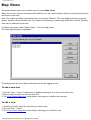
Map Views
The system allows each user to define a set of custom Map Views.
When one or more custom views have been defined, you can switch between them to change which devices
are shown on the map.
Note: The system provides a predefined map view named '(Default)'. This view displays all devices on the
system and you cannot edit this view. If you have not defined any custom map views then only the '(Default)'
view may be selected on the map.
To define map views, select 'Define Views...' from the 'Map' menu.
The following dialog box is displayed:
The dialog shows the list of Map Views that exist for the logged-in user.
To add a new view
1. Click the 'New...' button. A dialog box is displayed asking for the name of the new view.
2. Enter a name for the new view and click OK.
3. The View Details dialog box is then shown, allowing you to define the new view.
To edit a view
1. In the list of views, select the view that you wish to edit.
2. Click the 'Edit...' button.
3. The View Details dialog box is then shown, allowing you to edit the view.
file:///A|/html/map_views.htm (1 of 2) [27/06/2001 20:46:23]
Custom Map Views
To copy a view
1. In the list of views, select the view that you wish to copy.
2. Click the 'Copy...' button. A dialog box is displayed asking for the name of the new view.
3. Enter a name for the new view and click OK.
To rename a view
1. In the list of views, select the view that you wish to rename.
2. Click the 'Rename...' button. A dialog box is displayed asking for the new name for the view.
3. Enter the new name for the view and click OK.
To delete a view
1. In the list of views, select the view that you wish to delete.
2. Click the 'Delete' button. A dialog box 'Are you sure you want to delete this view?' is displayed.
3. To delete the view, select 'Yes', otherwise select 'No'.
file:///A|/html/map_views.htm (2 of 2) [27/06/2001 20:46:23]
Defining a Custom Map View
Defining a Map View
To define a Map View, select 'Edit...' from the Map Views dialog box.
The following dialog is displayed:
View Devices
The View Devices tab allows you to select which devices will be shown on the map when this view is selected.
To add device(s) to the view
1. In the list on the right hand side of the dialog, select the devices that you wish to add to the view.
Note: You can select several devices by dragging the mouse around a group of them, or by holding down CTRL and clicking individual
items in the list.
2. Click the '<< Show' button to add the selected devices to the view.
To remove device(s) from the view.
1. In the list on the left hand side of the dialog, select the devices that you wish to remove from the view.
Note: You can select several devices by dragging the mouse around a group of them, or by holding down CTRL and clicking individual
items in the list.
file:///A|/html/map_view_details.htm (1 of 2) [27/06/2001 20:46:27]
Defining a Custom Map View
2. Click the 'Hide >>' button to remove the selected devices from the view.
View Options
The View Options tab allows you to select the level of detail that will be displayed for each type of device when this view is selected.
For each type of device, the following options are available:
Show location
The object will be visible on the map with a small coloured dot indicating its position. No operator control over the object
will be possible because its icon will not be shown.
Show icon
The equipment's icon or picture will be shown with a 'tie-line' joining the icon to the coloured dot. Operator control of the
equipment will now be possible by clicking on the icon.
Show name
The name of the equipment, as entered at configuration time, will be shown next to the icon, to enable you to identify
the equipment without having to open its information window by clicking on it.
Show status
As well as the name, the current status of the equipment - i.e. sign setting, or car park availability will be displayed next
to the icon. This provides useful 'at a glance' information, but may make the display too cluttered.
file:///A|/html/map_view_details.htm (2 of 2) [27/06/2001 20:46:27]
Operating Modes
Operating Modes
Information Mode
Selecting the information button puts the system in normal operating mode. This allows the system to run
and the operator to carry out various editing and interrogation functions on the equipment. The operator can
also use the system report functions.
Equipment Definition Mode
Selecting the Equipment Definition button allows new equipment (signs, car parks and count sites) to be
defined on the overview map. When the icon is selected, the Equipment Definition tool bar replaces the
main tool bar on the display.
Move Mode
Selecting this button enables the equipment or icons on the overview map to be repositioned. When a piece
of equipment is initially placed, it’s position is indicated by a dot on the overview map, an icon is also shown
to indicate the type of equipment. The equipment appears on the map as an icon with the location dot at the
bottom left hand corner.
If the position of the icon is inconvenient it can be repositioned by selecting the move equipment button,
then selecting the icon for the equipment to be moved. The equipment icon and it’s location dot will both turn
green, if the icon is selected it can be dragged to a new position and a leader line is added from the icon to
the location dot.
If the actual position of the equipment is to be changed, the procedure above is followed, but when the icon
and dot turn green the location dot is selected and dragged to a new position. A window will automatically be
opened to enable a new location to be entered for the equipment.
file:///A|/html/operating_modes.htm [27/06/2001 20:46:28]
User Interface - Equipment Definition
User Interface - Equipment Definition
Selecting the Equipment Definition Toolbar allows new equipment (signs, car parks and count sites) to be
defined on the overview map. When the icon is selected from the main tool bar the Equipment Definition tool
bar replaces the main toolbar on the display.
Add Sign button
When this button is selected, the cursor turns to a cross, and a point can be selected to position a sign on
the map. When a point is selected, the add sign window is opened and details of the sign can be added.
Add Car Park button
When this button is selected, the cursor turns to a cross, and a point can be selected to position a car park
on the map. When a point is selected, the add car park window is opened and details of the car park can be
added.
Add Count Site button
When this button is selected, the cursor turns to a cross, and a point can be selected to position a count site
on the map. When a point is selected, the add count site window is opened and details of the count site can
be added.
file:///A|/html/lert7gha.htm [27/06/2001 20:46:29]
Add Car Park
Add Car Park
When the Add Car Park Button is selected from the equipment definition tool the following window will be presented:
Each tab on the window collects together different facets of information that may be required about the car park in
order to add it to the system.
1.
2.
3.
4.
Basic Information - as seen above
Thresholds - the values used to calculate the state of the car park from its current occupancy
State Change Delays - time delays to use when the car park state changes dynamically
Zones - which parking zones this car park belongs to - read only, and not enabled when adding a new car
park
5. Communications - how the instation will communicate with this car park
To save the data that has been entered select the Store button, and to close the window select close.
file:///A|/html/lert7fu3.htm [27/06/2001 20:46:32]
Car Park Configuration - Basic Information
Car Park Configuration - Basic Information
Car Park Name
This field specifies the name of the car park that will appear in the banner on the overview map. This field is
required.
Description
This is an optional field and can be used for any information that is of use to the operator. Typical uses are a contact
name and phone number, or details of opening and closing times of the car park. The field length is limited to 50
characters.
Location
This is an optional field and can be used for any information that is of use to the operator. Typically it is used for the
street name where the car park is located. The field length is limited to 50 characters.
Capacity
This field is numeric and defines the capacity of the car park.
On to Thresholds
file:///A|/html/carpark_config_basic.htm [27/06/2001 20:46:33]
Car Park Configuration - Thresholds
Car Park Configuration - Thresholds
There are four thresholds which define when the car park changes state. When numbers are increasing, the state is
defined as SPACES until the ALMOST FULL increasing threshold is reached, this state is maintained until the FULL
threshold is reached. When numbers are decreasing from FULL the state changes to ALMOST FULL when the
ALMOST FULL decreasing threshold is reached, then to SPACES when the decreasing SPACES threshold is
reached.
The FULL threshold can be set to any number up to the figure specified as CAPACITY, but it is advisable for it to be
lower to introduce hysteresis into the system so it does not hunt between two states. The ALMOST FULL increasing
threshold must be lower than the ALMOST FULL decreasing threshold also to introduce hysteresis. For obvious
reasons, the decreasing SPACES threshold must be the lowest of the four values.
You can select to display the threshold values as a percentage of the capacity, or as an absolute occupancy value.
This is done with the "Display Thresholds as %" checkbox.
The Overflow Threshold defines a percentage or absolute value which the car park can overflow by before a fault is
raised. This can be used to cope with car parks which have a high degree of internal circulating traffic.
The Advanced button allows you to specify values which are only applicable to the Siemens Car Park Outstation. It
is capable of reporting car park occupancies based on exception, rather than by continuous polling.
Back to Basic Information
On to State Change Delays
file:///A|/html/carpark_config_thresh.htm [27/06/2001 20:46:36]
Car Park Configuration -
Car Park Configuration - Advanced Thresholds
file:///A|/html/carpark_config_thresh_adv.htm [27/06/2001 20:46:38]
Car Park Configuration - State Change Delays
Car Park Configuration - State Change Delays
These fields define a delay in minutes (between 1 and 15) for changes from ALMOST FULL and from FULL. The
delays have a similar effect to the differences between increasing and decreasing thresholds in that they introduce
hysteresis. They are used for small capacity car parks, where it is not possible to have differences between
increasing and decreasing thresholds that are large enough to stabilize the system.
Back to Thresholds
On to Zones
On to Communications
file:///A|/html/carpark_config_delay.htm [27/06/2001 20:46:40]
Car Park Configuration - Zones
Car Park Configuration - Zones
This field shows details of associated zones, but this can not be changed from this window. Once the car park has
been created it will become available to be allocated to zones (see Zones). When the car park has been allocated to
a zone or a number of zones, the references will appear in this field. If you are adding a new car park you will not be
able to access this car park.
Back to State Change Delays
On to Communications
file:///A|/html/carpark_config_zones.htm [27/06/2001 20:46:42]
Car Park Configuration - Communications
Car Park Configuration - Communications
Back to Zones
file:///A|/html/carpark_config_comms.htm [27/06/2001 20:46:44]
Add Count Site
Add Count Site
When the Add Count Site button is selected from the equipment definition tool bar the following window will
be presented.
Descriptions of the fields within this window are shown below:
Loop Name
This is a field that must be completed and defines the name of the count site that will
appear in the banner on the overview map
Description
This is a free format text field into which a short description of the site can be entered.
UTC SCN
If the count site is connected to the local UTC system then the SCN of that site is
entered within this field. If the count site is not connected to a UTC system, this field
must be left blank, as an entry in the SCN field will override entries within the RF
Channel, OTU address and OTU Loop Fields.
Location
This is a free format text field which defines the location of the site.
Car Park
This is an information field which indicates to which car park the site is currently
attached. The field cannot be altered by the user from within this menu. once this site
has been added to the system it will become an available site and can be allocated to a
car park by selecting the Associated Loops button in the carparks view/edit window.
RF Channel
If the count site is not configured as a UTC count site, this field defines the RF channel
on the radio communications system through which the site is accessed.
file:///A|/html/lert73l1.htm (1 of 2) [27/06/2001 20:46:46]
Add Count Site
OTU Address
If the count site is not configured as a UTC count site, this field defines the address on
the RF channel of the OTU through which the site is accessed.
OTU Loop
If the count site is not configured as a UTC count site, this field defines which loop on the
OTU is defined for this site.
Store
This button is used to store the updates done to the form in this edit session. If you wish
to abandon the edits then select "Close" before selecting "Store".
Close
This button is used to close the current form. If this button is operated before the store
button is selected then an option to store the current edits is presented to the operator. If
store is not selected at this point the form will close without storing the current updates.
file:///A|/html/lert73l1.htm (2 of 2) [27/06/2001 20:46:46]
Sheduler
Scheduler
The Scheduler provides a means of programming operator actions into the system ahead of the required time.
The Scheduler also provides for regular events which occur on a weekly cycle to be programmed on a day of
week basis.
The Scheduler function is selected from the overview map menus, or from the main toolbar.
The Scheduler is located on the Tools menu:
Selecting Scheduler from the Tools menu opens the following dialog box:
This dialog displays a list of schedules and the days on which they are active.
Schedules which are defined for a number of specific days appear as an entry for each day. There is, however,
only one schedule - the entry which appears without any date against it should be selected for editing and
viewing.
Schedules run between midnight and midnight.
Only one schedule is ever active on a single day - i.e. if a schedule for a special date is running, it will
override the regular day of week timetable that has been defined. If a schedule has a specific date
associated with it then it will run in preference to any schedule designated to run on a "day of week"
file:///A|/html/lert8jle.htm (1 of 3) [27/06/2001 20:46:51]
Sheduler
basis.
The functional buttons provide the following facilities:
Add
Adds a new schedule.
View
Shows the selected schedule's details, but does not allow the
details to be changed.
Edit
Shows the selected schedule's details, allowing changes to be
made.
Delete
Deletes the selected schedule.
Close
Closes this dialog box.
Schedule Details Form
When Add, View or Edit is selected, the following dialog box is displayed:
This dialog box allows the setting of events at specific times on days of the week or on specific days.
file:///A|/html/lert8jle.htm (2 of 3) [27/06/2001 20:46:51]
Sheduler
Schedules run from midnight to midnight. Only one schedule can run on any day. If a dated schedule is present
then this will be run in preference to a day of week schedule for that day.
The form provides the following fields:
Name
The name of the schedule.
Days
Specifies on which days of the week this schedule will be run.
Only one schedule can be active on any day. If the day has been already specified in
another schedule then the system will not allow you save your changes.
Specific Dates /
Delete Date
This field shows the specific dates that the schedule has been programmed for.
Clicking the 'Delete Date' button removes the currently selected date.
New Date /
Add Date
Clicking the 'Add Date' button adds the date specified in the 'New Date' box.
Time
Shows the time at which the action is to take place.
The time should be entered in hh:mm:ss format.
Command
Shows which command should be run at the specified time.
If a car park control command is selected then the two fields underneath change to reflect
car park parameters.
If a sign command is selected then the two fields underneath change to reflect sign control
parameters.
In both cases, select parameters from the list of options provided.
Add
Adds a new command to the list.
To modify an exisiting command, first select the command to be modified and then alter the
parameters as required. Then select a different command from the list. You will then be
prompted to save the changes you have made.
Delete
Deletes the currently selected event.
Close
Closes the dialog box.
file:///A|/html/lert8jle.htm (3 of 3) [27/06/2001 20:46:51]
Reports
Reports
To produce a Report, first click on the Reports button
The Reports dialog box is displayed:
on the main toolbar.
Some reports apply to the system as a whole, whilst others may apply to an individual car park or sign.
Reports are configured differently depending on the use of the SIESPACE system. Some commonly
available reports are:
Active Faults
These are faults which are currently present (uncleared) on the system.
If no uncleared faults exist on the system then this will produce an empty report.
Car Park States
This log records the changes of state that have occurred on each car park. The
data is held for up to 7 days depending upon the amount of activity on the car
parks.
Fault Log
This log records the occurrences and clearances of faults on the system. The data
is held for up to 7 days depending upon the amount of fault
occurrences/clearances on the system.
Occupancy Data
This data is held on a per car park basis. The information indicates the occupancy
of each car park once an hour on the hour. This data is stored for 7 days and the
current day.
file:///A|/html/lert7tyr.htm (1 of 3) [27/06/2001 20:46:59]
Reports
Operational Log
The operational log records the actions of users on the system, for example:
logging on, logging off, car park or sign overrides, configuration changes, etc.
The log records each action together with the date, time and operator identity.
Sign Settings
The log record setting of signs on an individual sign basis. The data is held for up
to 7 days depending upon activity.
Weighted Averages
Weighted averages files are available on a per car park basis. The information
held in the file indicates an average occupancy value for the car park for each day
of the week. The data is averaged from the previous 6 weeks occupancy data. The
weighted average file data is used to provide a car park state to an associated
zone when a loop fault exists on the selected car park.
Report Format
To generate a report, first select the required report type and then (if applicable) select the required car park
or sign.
Then select the "Preview" button if you wish to view the report, or select "Print" to send the report directly to
the printer.
file:///A|/html/lert7tyr.htm (2 of 3) [27/06/2001 20:46:59]
Reports
Where a report extends onto several pages, the following icons allow the pages to be viewed:-
Click the 'Front' button
to go to the front page of the report.
Click the 'Next page' button
Click the 'Previous page'
Click the 'Back page'
Click the 'Print'
to move to the next page.
button to go to the previous page.
button to go to the last page of the report.
button to send the report to the system printer.
To alter the zoom level of the displayed report, click the 'Zoom' button.
Export
Allows the report to be saved in another file format, such as Microsoft Excel for analysis
elsewhere.
Mail
Cancel
Close
Allows the report to be sent as a mail message attachment.
Allows an action to be terminated before it has completed the operation.
Closes the report.
file:///A|/html/lert7tyr.htm (3 of 3) [27/06/2001 20:46:59]
Changing the Map View
Changing the Map View
The operator's view of the map can be changed from the main menu's Map menu:
The menu selections have the following functions:
Define Views
Allows you to define custom map views, determining which devices are displayed on
the map.
Zoom Controls
Displays a toolbar which allows you to quickly zoom in or out of the map in the same
way that this menu does
Pan View
Provides a quick way to navigate around a large map when viewing it at high detail.
Whole Map
Display the map at minimum detail, and fit as much as possible on the screen.
Large Scale
Display the map at maximum detail, as a result only a small area of the whole map will
be visible.
Zoom In +
Display the map at the next level of increased detail.
Zoom 50%
Display the map at about half way between minimum and maximum detail.
Zoom Out -
Display the map at the next level of decreased detail.
Zoom Controls
The zoom controls toolbar allows you to (from left to right):
file:///A|/html/changing_map_view.htm (1 of 2) [27/06/2001 20:47:03]
Changing the Map View
●
Display the Pan View
●
Zoom In
●
Zoom Out
●
Whole Map
●
Large Scale
●
Zoom 50%
●
Zoom in on the cursor location
Pan View
The pan view allows you to pick up the small inner box - which represents the visible screen area and place
it anywhere on the outer box, which represents the whole map. When you release your mouse the map
window will update to the new view.
file:///A|/html/changing_map_view.htm (2 of 2) [27/06/2001 20:47:03]
Car Parks - Overview
Car Parks - Overview
A car park is defined as an area with entrances and exits monitored by count sites. Data from the count sites
are used to determine the occupancy of the car park.
During normal operation the car park is defined as having one of three states of occupancy:
●
●
●
Spaces
Almost Full
Full
Outside normal operation the car park can have two more states:
●
●
Closed (Set by an operator, or by timetable)
Faulty (Set by the system if a fault is detected in the car park or count site)
The state of a car park is determined by comparing the occupancy state with a set of thresholds:
●
●
●
●
Almost Full Increasing
Full Increasing
Almost Full Decreasing
Spaces Decreasing
The reason for having separate increasing and decreasing thresholds for Almost Full is to introduce
hysteresis into the system so the occupancy does not hunt between Spaces and Almost Full. If possible the
Almost Full increasing threshold is set lower than the Almost Full decreasing threshold to a level where the
system is stable. The capacity of the car park is also defined and for the same reason it is advisable to set
the Full threshold lower than capacity. If it is impossible to stabilise the system using the thresholds, as in
the case of very low capacity carparks, a change of state delay can be introduced. This is a delay specified
in minutes, that can be placed between Full to Almost Full, and Almost Full to Spaces.
The status of the car park is passed to any Zones to which it is assigned. The Zone in turn passes the
information to a Sign so the information can be displayed. The car park can be assigned to more than one
Zone. It may be assigned to a Zone with other car parks, so that the occupancy af an area cotaining several
car parks can be determined and displayed on a sign. An individual car park can also be assigned to a
Zone, in order to display it’s own occupancy (see Zones - Overview).
A car park can be added to the system by means of the user interface (see Equipment Definition button).
The configuration and occupancy details can also be viewed and edited by selecting the appropriate
equipment icon on the overview map (see User Interface/Equipment Icons on the Overview Map).
file:///A|/html/lert573n.htm [27/06/2001 20:47:04]
User Interface
User Interface
The SIESPACE user interface (or client) is divided into two main sections:
1. The Menu and Toolbar
2. The Map Window
file:///A|/html/lert28it.htm (1 of 2) [27/06/2001 20:47:12]
User Interface
The menu and toolbar are used to access system functions such as configuration, reports, and security. They typically affect the user interface (or client), the system as a whole, or all devices in
the system.
The map window is a graphical represenation of the geographical area in which the system operates. The backdrop is typically configured as a plan or map of the region, but could be any
suitable image. Icons are superimposed on the backdrop to represent the Signs and Car Parks in the system. The user can then click on these icons to access functions relating to individual
signs or car parks.
The user interface is designed with the Microsoft Windows standards in mind. This familiar approach to user interface design means that the use of mouse and keyboard to access system
functions should be intuitive and straightforward.
file:///A|/html/lert28it.htm (2 of 2) [27/06/2001 20:47:12]
Map Window Overview
User Interface - Map Window Overview
A VDU displays an overview map of the area being controlled. At the top of the map is a tool bar with
buttons that can be selected by the operator in order to carry out various functions. The equipment used by
the system must initially be defined, the way this is done is explained below. The equipment consists of Car
Parks, Count Sites and Signs. Once allocated, the position of each piece of equipment is shown on the
overview map by a location dot to show the position, an icon to show the type of equipment and a banner
with additional information. When the system is running in information mode, the equipment icons on the
map can be selected in order to view and edit details of the equipment.
Equipment Icons on the Overview Map
The overview map shows an icon at the position of each piece of equipment to indicate the equipment type.
If the icon is selected a window is presented with various options. The icons and associated windows are
described below.
Sign icon
When a Sign icon on the map is selected, a window is opened with options to display, edit and override
various functions of the sign.
Car Park icon
When a Car Park Icon on the map is selected, a window is opened with options to display, edit and override
various functions of the car park.
Count Site icon
When a Count Site Icon on the map is selected, a window is opened with options to display and edit various
functions of the count site.
file:///A|/html/map_ov.htm [27/06/2001 20:47:13]
Car Park - Icon
Car Park - Icon
A car park is defined as an area whose entrances and exits are monitored using count sites
A car park has a defined capacity.
The occupancy of a car park is defined as the number of cars currently parked within the car park and is
determined from the information obtained from the car parks count sites.
Depending upon the occupancy, the car park is determined to be in one of the following states during
normal operation:
●
●
●
Spaces
Almost Full
Full
During abnormal operation the car park can also be set to the following states:
●
●
Closed (Set by an operator or timetable)
Faulty (Set by the system when the car park detects that it has a faulty count site).
The status of the car park is passed to any zones to which the car park is assigned. These in turn provide
the information for the control of the signs
During normal operation the car park states are set automatically in response to the current occupancy
value of the car park and a set of preset occupancy thresholds being passed. The car park has the following
definable change of state thresholds:●
●
●
●
Almost Full Increasing
Full Increasing
Full Decreasing
Almost Full Decreasing
The actual change will occur when the occupancy equals the designated value for increasing thresholds and
equals the designated value for decreasing thresholds. Decreasing thresholds may also have a time delay
of between 1 and 15 minutes programmed to prevent rapid changes between states. The system also
allows an operator to lock the car park into one of the states using a manual override.
Selecting a car park's icon on the map displays the following window:
file:///A|/html/lert1fe6.htm (1 of 2) [27/06/2001 20:47:16]
Car Park - Icon
The window displays the current state, occupancy and fill rate of the car park.
The window's toolbar contains the following buttons:
Clicking the
state
Manual override button will allow you to override (or change) the car park occupancy and
View details button will open a windows showing the current configuration of the car park.
Clicking the
The information contained within this window is the same as the information contained within the Edit
Configuration form.
Edit Configuration button will open a window containing a form showing the current
Clicking the
configuration of the car park. An operator with the correct permissions will be able to edit the configuration of
the car park.
Assign Loops button opens a window which show which loops are currently assigned to
Clicking the
this car park. A user with suitable permissions will be able to edit this assignment.
Clicking the
system.
Delete Car Park button (with the correct permissions) will delete the car park from the
file:///A|/html/lert1fe6.htm (2 of 2) [27/06/2001 20:47:16]
Count Sites - Overview
Count Sites - Overview
A count site is a location on the system at which the number of passing vehicles can be determined. Count
sites are configured to individual car parks.
A count site can be added to the system by means of the user interface (see Equipment Definition).
The configuration details can be viewed and edited by selecting the appropriate equipment icon on the
overview map (see User Interface/Equipment Icons on the Overview Map).
file:///A|/html/lert2jw3.htm [27/06/2001 20:47:18]
Car Parks - Override Status
Overriding a Car Park
This facility is available either through the car park icon's Manual override button
context menu on the car park icon.
, or via the right click
Assuming no previous state override is already in place the following window will appear:
This window allows you to override a car park in two ways:
1. Car Park State Override.
This forces the car park to a fixed state. While the override is in force, the car park's state will not
change irrespective of changes in its occupancy.
2. Car Park Count Override.
This allows you to force the current occupancy of the car park to a specifed value.
Note: If a previous state override is in place, the 'Overridden to' button will be selected and the currently
overridden state will be shown. You may select the 'Automatic' button to revert back to automatic operation.
file:///A|/html/lert52cz.htm [27/06/2001 20:47:20]
Overriding a Car Park State
Overriding a Car Park State
The car park override window allows manual override of the current state of the car park. The override
states available are:
Automatic
No override. The system automatically determines the state of the car park
according to its current occupancy and the state-change thresholds defined for
the car park.
or overridden to:
Spaces
The car park is locked into the Spaces state.
Almost Full
The car park is locked into the Almost Full state.
Full
The car park is locked into the Full state.
Closed
The car park is locked into the Closed state. This state cannot be set
automatically, except through a timetabled close command.
Selection of the override state is made by opening the state menu by clicking the side arrow and then
selecting the required state.
Selecting 'Automatic' will return the car park operation to automatic mode.
During an override condition the car park occupancy continues to be updated, but does not alter the state of
the car park.
The override of a state will remain in force until either:
●
●
another user changes the state back to 'Automatic'
a timetabled open or close occurs, superseeding any previous overrides
file:///A|/html/carpark_ov_state.htm [27/06/2001 20:47:22]
Overriding Car Park Occupancy
Overriding a Car Park's Occupancy
The car park override window allows the current occupancy of the car park to be altered.
To alter the current occupancy of the car park, select the 'Override occupancy to:' checkbox and type the
required occupancy value into the box. Select the 'OK' button to action the override.
This occupancy value will remain in force until either a new count value is received from the car park or, if
the car park becomes faulty, a weighted average is substituted.
file:///A|/html/carpark_ov_occ.htm [27/06/2001 20:47:24]
Car Parks - View/Edit Car Park Details
Car Parks - Viewing or Editing Car Park
Configuration
It is possible to view or edit the configuration of a car park that has previously been added to the system.
This is done with though the view details button
, or the
edit configuration button. Both of these
functions are also available as functions of the car park icon's context menu (View Properties, Properties).
Whichever option is chosen the same window will be displayed. This window provides information as to the
configuration of the car park. The fields are not alterable by the operator when in the View mode. In Edit
mode the fields are alterable by the operator, if the operator has sufficient permissions.
The window used to display this information is the same as that used to add a car park to the system.
file:///A|/html/lert9d6b.htm [27/06/2001 20:47:25]
Car Parks - Associated Count Sites
Car Parks - Associated Count Sites
If a car park count is to be maintained by the summation of a number of count sites, it is necessary to configure which
count sites are 'IN' counts, and which are 'OUT' counts for the car park.
To configure this, click the "Associated Loops..." button on the "Communications" configuration tab of the car park:
The following dialog box is displayed:
Entry loops / Exit loops
Selects whether Entry loops or Exit loops are being displayed/configured.
Assigned Loops
Shows which loops are assigned to this car park.
Available Loops
Shows which loops are not assigned to this car park.
Assign
Assigns the currently selected loop in the "Available Loops" list to this car park.
The loop moves to the "Assigned Loops" list.
file:///A|/html/lert5a5v.htm (1 of 2) [27/06/2001 20:47:28]
Car Parks - Associated Count Sites
Deassign
Deassigns the currently selected loop in the "Assigned Loops" list from this car park.
The loop moves to the "Available Loops" list.
To add an Entry loop to the car park
1. Select the 'Entry Loops' radio button.
2. In the 'Available loops' list, select the loop that you wish to assign to this car park.
3. Click the 'Assign' button.
4. Select 'Store' to save your changes.
To remove an Entry loop from the car park
1. Select the 'Entry Loops' radio button.
2. In the 'Assigned loops' list, select the loop that you wish to remove from this car park.
3. Click the 'Deassign' button.
4. Select 'Store' to save your changes.
To add an Exit loop to the car park
1. Select the 'Exit Loops' radio button.
2. In the 'Available loops' list, select the loop that you wish to assign to this car park.
3. Click the 'Assign' button.
4. Select 'Store' to save your changes.
To remove an Exit loop from the car park
1. Select the 'Exit Loops' radio button.
2. In the 'Assigned loops' list, select the loop that you wish to remove from this car park.
3. Click the 'Deassign' button.
4. Select 'Store' to save your changes.
file:///A|/html/lert5a5v.htm (2 of 2) [27/06/2001 20:47:28]
Count Site - Icon
Count Site - Icon
The parameters provided can be configured by a user with the correct level of privilege by selecting the edit
icon.
Selecting the overview and then the edit icons presents the following form
The form provides the following fields
Loop Name
This field allows the site name to be entered. The text entered within this field will be
used on the overview banner for the site name.
Description
This is a free format text field into which a short description of the site can be entered.
UTC SCN
If the count site is connected to the local UTC system then the SCN of that site is
entered within this field. If the count site is defined as existing then this field must be left
blank. An entry in the SCN field will override entries within the RF Channel, OTU
address and OTU Loop Fields.
Location
This is a free format text field which defines the location of the site.
Car Park
This is an information field which indicates to which car park the site is currently
attached. The field cannot be altered by the user from within this menu.
RF Channel
This field defines the RF channel on the radio communications system through which the
site is accessed.
file:///A|/html/lert1qum.htm (1 of 2) [27/06/2001 20:47:29]
Count Site - Icon
OTU Address
This field defines the address on the RF channel of the OTU through which the site is
accessed.
OTU Loop
This field defines which loop on the OTU is defined for this site.
Store
This button is used to store the updates done to the form in this edit session. If you wish
to abandon the edits then select "Close" before selecting "Store".
Close
This button is used to close the current form. If this button is operated before the store
button is selected then an option to store the current edits is presented to the operator. If
store is not selected at this point the form will close without storing the current updates.
file:///A|/html/lert1qum.htm (2 of 2) [27/06/2001 20:47:29]
Operational Procedures
Operational Procedures
This section of the help file contains procedures that are commonly carried out by SIESPACE operators. Not
all operators will be able to carry out all of these procedures though due to the level of permissions they
have been granted.
Amongst the procedures in this section are:
1.
2.
3.
4.
How to change the occupancy of a car park
How to log in and out
How to back up the system data
How to generate reports
Other procedures can be found by looking in the contents table of this help file.
file:///A|/html/operational_ov.htm [27/06/2001 20:47:30]
Adjusting Car Park Occupancy
Adjusting Car Park Occupancy
It may be necessary to re-align the car park occupancy with a value observed at the car park. This might
happen through counting errors, or special operational circumstances. In this case, a confirmed occupancy
value from the car park operator can be entered into the system to replace the existing occupancy value.
To do this, use the Car Park Override facility which is accessible from the car park icon's right click context
menu.
file:///A|/html/adjusting_occupancy.htm [27/06/2001 20:47:33]
Backup Procedure
SIESPACE Backup Procedure
It is important to back up the SIESPACE system in case any of the computer hardware fails, or system data is accidentally deleted. In addition the system disks
would eventually fill up if historical data about the system was not archived and deleted periodically. This procedure tells you how to go about doing this.
Backup Schedule
A CD backup should be created once a month. It should be stored in a suitable location that is remote from the SIESPACE system, or secure in the event of fire,
theft or other catastorphic damage. It is important that these backups are correctly labelled and securely stored so that a SIEMENS engineer can quickly locate
the correct backup and restore your system should it ever become necessary.
PREFECT
SIEMENS PREFECT Fault Management System may or may not be connected to your SIESPACE system. If it is, you should follow the parts of this procedure
relating to PREFECT, as well as those for SIESPACE. If you do not know whether PREFECT is connected, consult your SIESPACE administrator.
Getting Started
Insert a blank CD-R (CD Recordable) disc (NOT a CD-RW disc) into the CD-RW drive.
. Note that the Windows task bar may be hidden at one edge of the screen, so it may be necessary to move the
Click on the Windows Start button:
mouse to each edge in turn until the taskbar, and start button, become visible.
Select ‘Programs’.
Select ‘Backup System’.
This will connect across the network to the PREFECT computer and open some Explorer windows containing files to be backed up (shown below) and also start
the Easy CD Creator software.
file:///A|/html/backup.htm (1 of 11) [27/06/2001 20:47:47]
Backup Procedure
Selecting the Files to be Backed Up
The following files should be backed up:
file:///A|/html/backup.htm (2 of 11) [27/06/2001 20:47:47]
Backup Procedure
1. PREFECT Database
Assuming you have a connected PREFECT system...
If PREFECT is running, you must shut it down before attempting to back up its database. This ensures that data held in memory is written to the PREFECT
database before you back it up. Don't forget, when you've finished backing up the system, you will need to restart PREFECT.
Shutdown the PREFECT software only. Do NOT shutdown the entire computer. Refer to the PREFECT on-line help and/or printed documentation for
instructions on how to shutdown PREFECT.
The PREFECT Database is the FMSDATA7.MDB file (in the P:\ explorer window, shown above).
Note: Make sure you select the FMSDATA7.MDB file, not the FMSDATA7.LDB file.
2. SIESPACE Database
The SIESPACE Database is archived automatically once a month, and the files are named using the date that the archive ran, with an EXP extension, (2208-1999.EXP, for example).
If your system has advanced Microsoft Excel reporting facilities, the SIESPACE Car Park Occupancy History is archived into an Excel spreadsheet every
night and the files are named using the date that the archive ran, with an XLS extension (22-08-99.XLS, for example)
You should backup the EXP file and all the XLS files for this month.
Adding Files to the CD
Arrange the windows on the screen such that both Explorer windows and the Easy CD Creator window can be seen.
Drag the files to be backed up from the Explorer windows to the bottom-right pane of the CD Writer window (where the yellow box is in the picture below):
file:///A|/html/backup.htm (3 of 11) [27/06/2001 20:47:47]
Backup Procedure
Setting the CD ROM Format
After you have added all the required files to the CD, select "CD Layout Properties" from the "File" menu in the Easy CD Creator software.
file:///A|/html/backup.htm (4 of 11) [27/06/2001 20:47:47]
Backup Procedure
A dialog box is displayed. Select the "Data Settings" tab (shown below).
Ensure the file system is set to "JOLIET". This format allows preserves long file names on the disc (other formats may convert the file names to 8 characters with
a 3 character extension).
Setting the CD ROM’s Label
file:///A|/html/backup.htm (5 of 11) [27/06/2001 20:47:47]
Backup Procedure
In the dialog box above, click the "Properties" button.
The following dialog box appears:
Type a meaningful name for the CD in the "Volume Label" box. You could label the CD with the date that it was created, for example. Note that characters such as
‘-‘ and ‘/’ are not permitted in volume labels. A label such as "Jun 1999" is permitted.
Click OK. This takes you back to the "CD Layout Properties" dialog box.
file:///A|/html/backup.htm (6 of 11) [27/06/2001 20:47:47]
Backup Procedure
Click OK. This takes you back to the main Easy CD Creator window.
Writing the CD
When you are ready to write the CD, click on the "Record" button on the Easy CD Creator toolbar.
The following dialog box is displayed:
file:///A|/html/backup.htm (7 of 11) [27/06/2001 20:47:47]
Backup Procedure
Select the "Advanced" tab (shown below):
file:///A|/html/backup.htm (8 of 11) [27/06/2001 20:47:47]
Backup Procedure
Select the "Close Disc" radio button. This write-protects the disc and allows it to be read back in any standard CD-ROM drive.
The Summary tab provides information about the disc to be written:
file:///A|/html/backup.htm (9 of 11) [27/06/2001 20:47:47]
Backup Procedure
When you are ready to write the CD, select OK.
Checking the CD
Once the CD writing has completed, check that the CD has been written correctly before deleting the archived files from the system.
To check that the CD has written successfully:
Insert the CD into a CD-ROM on another machine (such as a Prefect PC, or other office PC).
file:///A|/html/backup.htm (10 of 11) [27/06/2001 20:47:47]
Backup Procedure
Double-click the "My Computer" icon on the Desktop:
In the window that appears, double-click the CD ROM icon:
Check that a window is opened and the files that you archived are listed.
Finishing Up
Remove the CD ROM and store it in the correct location. Ensure that the CD and Jewel case are correctly labelled.
If necessary restart the PREFECT software.
Close the Easy CD Writer program and any open Explorer Windows.
If necessary bring the SIESPACE client to the front by clicking on its icon in the taskbar.
file:///A|/html/backup.htm (11 of 11) [27/06/2001 20:47:47]
Maintenance Procedures
Maintenance Procedures
This section of the help file contains procedures that are commonly carried out by SIESPACE maintainers
and installers. Most operators will be unable to carry out any of the procedures contained in this section
because they will not have the necessary permissions to do so. Typically a SIEMENS engineer will be
involved in carrying out these procedures.
Amongst the procedures in this section are:
1. How to set up a Multitech Modem for Leased Line Operation
2. How to test a sign
Other procedures can be found by looking in the contents table of this help file.
file:///A|/html/maintenance_ov.htm [27/06/2001 20:47:48]
Multitech Modem Setup and Configuration Instructions
Multitech Modem Setup and Configuration
Instructions
Introduction
This document specifies how Multitech MultiModem II (MT2834BLK) modems can be set up and configured
for a variety of applications. This document focuses on their use over leased lines in Urban Systems'
applications.
References
The following list of references may prove useful if sufficient information is not contained herein.
●
●
●
●
Multitech Home Page
MultiModemII Home Page
Instructions for testing modems using a back to back leased line setup (also included below)
Multitech Support Page
Considerations
Things you should consider before beginning your modem configuration are:
1. What type of leased line will you be using - 2 wire or 4 wire?
2. Will you require a fallback PSTN connection if the leased line fails?
3. Are you using a data stream or protocol that is sensitive to inter-byte delays - UVMS protocol for
example?
4. What serial baud rate will be required at each end?
5. Is the data stream or protocol required to be 8 bit - for example UVMS and EEV?
Before you start Obtain the following:
●
●
●
●
●
●
●
Required modems
Small screwdriver/pen for changing dip settings
RS232 data leads (straight through, with no twist) to connect to your host application
PC with 2 COM ports, suitable for testing purposes
Terminal or Hyperterm software for testing purposes
MultiModemII Owner's Manual
Suitable connecting leads to allow back to back testing (RJ-11 to RJ-11 with pin 1 and 6 straight
through), and connection to BT leased line termination (RJ-11 to BT termination, 2 wire or 4 wire).
Procedure
The procedure outlined below will initially configure and test the modems with a back to back connection, and
then configure them for the final application.
file:///A|/html/multitech_config.htm (1 of 3) [27/06/2001 20:47:50]
Multitech Modem Setup and Configuration Instructions
When the modems are working in a back to back situation, adjust the following settings using a terminal and
the &W command to save settings to modem memory. SW3 UP - Disable Command Responses SW8 UP Disable Command Mode SW16 - according to 2 or 4 wire operation S2=128 - disables on-line escape to
command mode S13=128 - disable remote configuration $SB=9600 - or whatever baud rate is required $BA so that we get a different serial baud rate to connection rate The owner's manual also lists many commands
relating to compression, parity and flow control which should be considered. Typically the block size may be
reduced and compression disabled if inter-byte delays are causing problems.
Back to Back Test Procedure (Multitech) 1-27-99 Technical Support Document #
132211
Back to back testing with Multi-Tech Modems ------------------------------------------Purpose: To verify modems working over a 2 or 4 Wire Leased Line(2WLL or 4WLL).
Equipment needed: 2 Multi-Tech Modems optioned with leased line capabilities : 2 terminals ( for transmitting
and recieving data) : 2 straight thru DB25 25 pin or modem cables : for 2WLL testing a regular RJ-11 cable
will be used : for 4WLL testing a crossed RJ-11 cable will be used : small screwdriver for changing dip
switch's
Procedure:
1) First you must verify your modem is capable of lease line(LL) operation. Some Multi-Tech modems only
work in dialup operation, others do dialup and 2WLL, while others work with dialup, 2WLL, & 4WLL. The
ZDX, ZPX, & BC series only work in dialup operation, the LL option is not available on these models. All
other Multi Tech modems work in dialup & 2WLL. The BL & BLR series work in dialup, 2WLL & 4WLL
modes.
2) Next you will need the use of a terminal or PC and a straight through modem cable to set the serial baud
rates on both modems. The commands will be; AT$SBxxxx&W ( where xxxx= serial baud rate of terminal or
computer)
3) Next, you need to set the proper dip switch's for LL operation. Refer to dip switch settings below:
i) Ideal switch settings for Multi-Tech BL & BLR series modems 1 2 3 4 5 6 7 8 9 10 11 12 13 14 15 16 D U U
U x U U D U D D D U U U U-2WLL D-if Xon/Xoff flow control used D-4WLL x= up on one modem and down
on the other modem for answer or originate mode(doesn't matter which side is which as long as one site has
dip 5 up and the other has dip 5 down). Make sure that both modems have switches 13 and 14 set identical.
ii) Ideal switch settings for Multi-Tech BA & BR series modems The settings are the same as the BL series
but switch 16 has no effect on the BA series. Also on some models, there is a seperate dial/leased toggle
switch located by the other bank of dip switchs, this needs to be toggled into the leased position for this test.
iii) Ideal switch settings for Multi-Tech V32L series modems 1 2 3 4 5 6 7 8 1 2 3 4 D XX D U X U D D D D D
D U-if hardware flow control used
X=up on one modem and down on the other modem for answer or originate mode(doesn't matter which side
is which as long as one site has dip 5 up and the other has dip 5 down). Make sure that the baud rate
switches are set identical between them ( located on the front ).
file:///A|/html/multitech_config.htm (2 of 3) [27/06/2001 20:47:50]
Multitech Modem Setup and Configuration Instructions
XX= U-up for 2 wire leased line mode and D-down for 4 wire leased line mode.
iiii) Ideal switch settings for Multi-Tech V32 series modems The settings are the same as the V32L but dip 2
does not change this modem for 2 or 4 WLL operation, this modem only works in 2WLL mode.
*******If your modem is not listed above, you will need to refer to your owners manual for the proper settings
or call Multi-Tech's Technical Support Proffessionals for further assistance or ideas at 1(800)972-2439
.*******
4) The next step is to make all the physical connections: The terminals need to be connected to the modems
via the DB 25, 25 pin connector, and the modems need to have the RJ-11 cable connected into the Leased
jack or Line jack if there isn't a Leased jack on the back side of the modem.
2 Wire Leased Line testing: The type of RJ-11 cable you need is a regular POTs phone cable that you would
use to connect your telephone to the wall jack.
4 Wire Leased Line testing: This cable is a normal RJ-11 cable at one end but crossed as follows at the other
end --- if you look at the RJ-11 connector, you can see it has up to 6 physical contacts. Normally RJ-11
phone line jacks use only 4 of those contacts, usually the inside 4. If you count all six positions(even the
empty positions) the wires you will cross will be wires 2 & 3 and wires 4 & 5 at one end only. For example, if
you are holding your connectors with the gold contacts facing you with the locking clip down away from you,
your cable reads across each connector as follows -- yellow - green - red - black and the other connector
reads black - red - green - yellow, now after crossing one end the connectors would read as follows yellow green -red - black, and the other would read red - black - yellow - green. That is a 4WLL back to back test
cable.
When the LL cables are connected into the modems and the modems are powered up in about 15 to 30
seconds you should see the following leds on both modems, CD, a baud light(28 or 96 or whatever the
modem supports) TR and possibly EC on or blinking(depending on what you have set in your modem). At
this point you should be able to type on one terminal keyboard and see the typed information come through
on the other terminals monitor .. and do the same on the other keyboard and this screen .... this test shows
that your modem/s does work over a simulated LL circuit that would normally be provided by the phone
company.
5) If the modem connection does not happen, you may have to adjust the dB transmission level by putting
dip number 3 into the up position. If the connection still does not happen then you may have a bad cable or
modem, at this point you may want to contact Mutli-Tech Technical Support at 800-972-2439 for further
assistance.
file:///A|/html/multitech_config.htm (3 of 3) [27/06/2001 20:47:50]
Testing a Sign
Sign Testing
It is sometimes necessary to verify the correct operation of a Sign under the control of SIESPACE. It may be
that we need to know that an infrequently used rotating prism is not stuck, or a particular character in a VMS
is functioning.
Modern VMS signs using the SIEMENS UVMS protocol contain comprehensive internal testing and
verification procedures that check communications to each character of the sign, and that the message
being displayed is indeed what was requested. Even the relatively simple rotating prism signs use a reply bit
pattern to verify the position of the prism - this reply is sent back to SIESPACE for checking against the
requested pattern.
Rotating Prism Signs
The only practical test of a rotating prism sign is to alter its setting and verify the returned reply bit pattern.
This can be done manually by setting the sign to a different prism to that on display and verifying that
SIESPACE does not report an "Invalid Legend Returned" fault which would indicate failure of the prism to
rotate.
It is common practice to insert commands into the scheduler to change the setting of rotating prism signs
during the early hours to cause them to rotate, and hence not stick. An override to an abnormal message
(such as FULL), followed by a cancellation of the override is normally used.
VMS Signs
The ability of a VMS sign to be tested depends on the facilities that it provides. Signs complying with the
SIEMENS UVMS protocol provide return status to SIESPACE indicating error conditions on the sign, and
that the requested message has been set. It is also possible to use a special character in the message
which causes all pixel elements of the character to be illuminated (the configuration of this facility should be
verified with the helpdesk).
Typically if a sign is suspect it is recommended that an engineer be dispatched to the sign in order to
observe its behaviour, and the SIESPACE instation be used to override the sign, or a laptop with VMS
diagnostic software used to modify the sign locally.
file:///A|/html/sign_testing.htm [27/06/2001 20:47:51]
Specifications Overview
Specifications
This section of the help file contains detailed specifications of the equipment used in a SIESPACE system.
file:///A|/html/specific_ov.htm [27/06/2001 20:47:52]
Additional Help and Support
Additional Help and Support
Apart from this help file there are two ways of obatining help and resolving problems:
●
●
If you have a software support agreement, SIEMENS provides a helpdesk
If SIEMENS need to diagnose a problem, update configuration data, or upgrade software, there is a
Remote Diagnostics System as part of SIESPACE.
If SIESPACE detects a problem as part of its self-diagnosis process it may attempt to report the problem to
the SIEMENS helpdesk using the Remote Diagnostics System.
file:///A|/html/additional_help.htm [27/06/2001 20:47:53]
How Remote Diagnostics Work
How Remote Diagnostics Work
The SIESPACE server PC at the instation is normally supplied with a modem to allow it to make and accept
incoming telephone calls. This allows it to report self-diagnosed faults to the SIEMENS helpdesk, and to
allow helpdesk staff to connect to the system and perform diagnostics or maintanence tasks.
The SIEVIEW software package supplied with SIESPACE allows support staff connected via the telephone
line to access the SIESPACE system and view the screen to diagnose problems.
All remote facilities are password protected to ensure system security is maintained.
Resolving Problems with Remote Diagnostics
You may be asked by the helpdesk engineer to ensure that the remote diagnostics system is functional:
1. Verify that the Remote Diagnostics Modem is connected to the telephone line.
2. Verify that the Remote Diagnostics Modem is powered up.
3. Verify that the SIEVIEW Server is running by checking that its icon is visible in the System Tray (see
below).
4. If a Remote Diagnostics connection is still not possible, it may be necessary to check the telephone
number of the line, whether it is working, and whether it is a direct line - i.e. not via a switchboard.
file:///A|/html/how_remote_diag.htm [27/06/2001 20:47:54]
System Overview
System Overview
The object of the system is to assist drivers when entering an urban area, by directing them to the most
convenient car park for their needs that has spaces available. The geographical area containing car parks
monitored by the system is typically divided into regions, so that drivers can first be directed to an area
before selecting a specific car park.
For example a city may be divided into north, south, east and west regions. On entering the city, signs will
indicate the availability of parking spaces in each region and on entering the required region signs will
indicate the occupancy of specific car parks.
The system user interface is located at the SIESPACE Instation. The Instation is used to carry out initial
setting up of equipment within the system. The system will normally run automatically, with no operator
intervention after initial setting up is complete, however it is possible for the operator to manually override
the output to signs and occupancy data of car parks under emergency conditions. It is also possible for the
operator to edit the set-up of the system. Reports can be obtained in various forms, based on data collected
by the system, and a status panel can be displayed to indicate the live operational state of the system.
Logical Elements of the System
The logical elements of the system are Car Parks, Count Sites, Zones and Signs.
Count Sites are positioned at the entrances and exits of Car Parks and pass data to the system which is
used to calculate car park occupancy. The occupancy data for one or more Car Parks is passed to a Zone.
The output from a Zone is used to set the output of a Sign.
If a Zone contains more than one Car Park then the output to the Sign will be a combination of the
occupancies or states of the member Car Parks.
Due to the uniform structure of the system where Signs are always driven by the output from a Zone, in
order to display the occupancy of an individual Car Park, it must be allocated its own Zone.
When configured to provide Driver Information the Sign may be controlled by another system connected to
SIESPACE, such as an Integrated Traffic Management Computer (ITMC) or Urban Traffic Control System
(UTC).
Physical Elements of the System
The physical system may consist of the SIESPACE Instation, Car Park Oustations, Outstation Transmission
Units (OTUs), Signs, Count Sites and Communication Systems. The system is expandable, flexible and
configurable in that different types of Sign and Count Site can be used, also communications can be by
Radio Modem, Leased Line, PSTN, or via an Urban Traffic Control System (UTC). A combination of the
types of communication can also be used in a single system.
file:///A|/html/lert8o53.htm [27/06/2001 20:47:55]