1
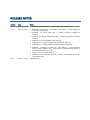
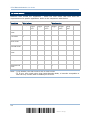
RELEASE NOTES
Version
Date
Notes
1.02
Nov. 29, 2010
Modified: Specifications — Temperature, power adaptor
1.01
Sep. 29, 2010
Modified: 2.3 Direct USB HID — change command 100005 to
100009
Modified: 2.4 Direct USB Virtual COM — change command 100004 to
100008
Modified: 3.13 GS1 DataBar (RSS Family)
New: 5.4.5 Pause Field Setting
1.00
May 12, 2010
Modified: Introduction, Symbologies Supported — add support of
more RSS symbologies
Modified: 3.13.2 GS1 DataBar Omnidirectional (RSS-14)
Modified: 3.13.3 GS1 DataBar Expanded (RSS Expanded)
Modified: 5 Applying Formats for Data Editing — add maximum
output length (4084 bytes; 2042 bytes if Multi-Barcode Mode or
Multi-Barcode Editor is in use)
Modified: 5.5 Configuring Format — Define Transmission Sequence
(add pause field)
Initial Release