1
M. Connecting to Other Equipment
1. AV Out
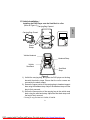
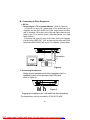
Connecting to a TV or Another Monitor ( Refer to Figure 4)
1) Connect one end (1/8" stereo plug) of the audio cable (not
supplied) into the unit’s AUDIO OUT jack, and connect the other
end (2 terminals, RCA jack) to the Left and Right channel input
jacks on your TV or monitor. (white = left audio channel, red = right
audio channel.)
2) Connect one end(1/8” plug) of the video cable (not supplied)
into the unit’s VIDEO OUT jack, and connect the other end (RCA
jack) to the VIDEO INPUT jack on your TV or Monitor (yellow=video).
AUDIO OUT
VIDEO OUT
D C 9 -12V
NOT SUPPLIED
Figure 4
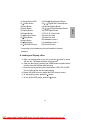
2. Connecting Headphones*
Simply plug the headphones into either Headphone jack 1 or
Headphone jack 2 on the right side of the DVD Player.
(Refer to Figure 5)
AUDIO OUT
VIDEO OUT
D C 9 -12V
Figure 5
Plugging into Headphone jack 1 will disable the internal speakers.
* The headphones are only provided for D710PK,D7104PK.
20
PDF created with FinePrint pdfFactory Pro trial version http://www.fineprint.com