1
MaxAttach NAS 6000 Getting Started
Getting Started with Base Only Systems
15: Complete the O/S First Time Setup Wizard
n
n
3.
15:
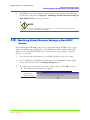
A Status Screen will appear.
Select the “Administer this server appliance.” link.
A second identical login will be required.
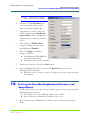
Complete the O/S First Time Setup Wizard
The O/S First Time Setup Wizard will help you set the date and time, assign the
administrator password, setup E-mail alert notifications, and assign a name for your
MaxAttach. The setup wizard takes you through the first necessary steps in configuring
your system.
NOTE
The first-time setup wizard will only appear the first time you log on to your MaxAttach.
After that, you can access all of the necessary administrative functions from the Web
User Interface Navigation Menu Bar.
1.
Enter the date, time, and your time zone. Click NEXT.
2.
Enter the current password (blank for first time setup), the new password, and
confirm the new password. Click NEXT.
3.
Select if you want the alert e-mails enabled. Click NEXT.
n
If enabled, select any combination of alert levels to send.
n
If enabled, enter the Administrator’s email address and SMTP email server
name or IP address.
4.
Enter server appliance identification information. Click NEXT.
n
Enter a server appliance name and, if required, a DNS suffix.
n
Select if the server appliance is a member of either a workgroup or a domain.
Enter the name of the workgroup or domain.
n
If the server is a domain server, enter the name and password of the user who
may join the domain.
5.
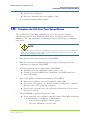
Click on FINISH to complete the first time setup.
n
If you changed the server appliance name (host name), DNS suffix, workgroup
or domain member, or workgroup or domain name:
• A Restart Server Appliance window appears.
• The server will initiate a reboot restart.
Getting Started with Base Only Systems
10/16/01 -- Revision 2.0.03
13
000001630