1
AXIS 241Q/241S - Configuring the video server
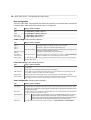
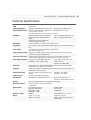
System Options (Administrator)
Tools
Settings / Options / Description
Security
Users
Access to the video server can be restricted to defined users only (maximum of 20). The
administrator has unrestricted access to the Setup tools and determines rights for
users at 3 levels; Administrator, Operator, Viewer.
IP Address Filter
Once enabled, only the IP addresses shown in the list of allowed addresses will be permitted to access the Video Server. All others will be blocked.
HTTPS
The AXIS 241Q/241S can be configured for use over HTTPS which provides encrypted
Web pages.
Date & Time
Define the date and time settings for your Video Server, manually or automatically.
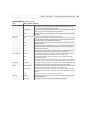
Network
TCP/IP
Specify IP address configuration, DNS configuration, Host Name configuration, Notification of changed IP address. Register/unregister for AXIS Internet Dynamic DNS Service. Specify HTTP port and network traffic preferences.
SOCKS
Specify SOCKS server to use when communicating with hosts on the other side of a
firewall/proxy server.
SMTP
Specify the host names or addresses for your primary and secondary mail servers in the
fields provided to allow the video server to send event and error email messages to
predefined email addresses.
UPnP
The video server includes support for Universal Plug and Play (UPnP). Enable UPnP
(enabled by default) and enter a user friendly name for the video server.
I/O Ports
Configure the Video Server's 4 inputs and 4 outputs. Enter descriptive names for the
ports and specify their Normal state (Open circuit or Grounded circuit).
RS232
Select desired operational mode for the COM port: Generic TCP/IP, Generic HTTP,
Pan/Tilt/Zoom controller.
RS485
Selecting Pan Tilt Zoom enables the port to be used for controlling a connected PTZ
device. Basic serial port settings can be adjusted by clicking the Port Options button.
Maintenance
Video Server
Maintenance functions to restart the video server, restore settings, upgrade the video
server, backup the video server's parameter and restore to previous settings.
Support
Support Overview
Troubleshooting guide, generate server report (always attach the Server Report when
contacting your support channel). Axis Support Services information.
Logs & Reports
Generate Logs (all log information is shown in one file), Reports (important information about the server's status) and a parameter list (the unit's parameters and current
settings).
About
Link to the source code for the Linux kernel, Boa and more.
Scripting
This powerful function allows users to customize and use their own scripts to create
specialized applications.
Plain Config
Plain config allows direct access to all the configurable parameters.
Ports and Devices
Advanced
19