1
V i p e r s a t C o nf i g u r a t i o n
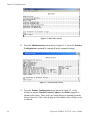
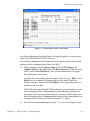
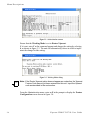
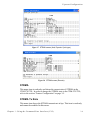
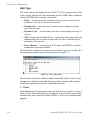
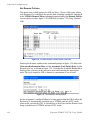
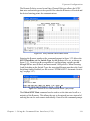
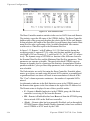
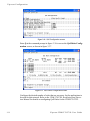
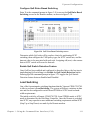
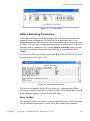
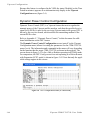
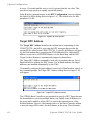
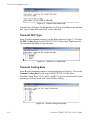
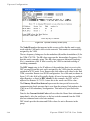
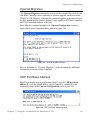
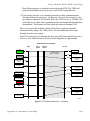
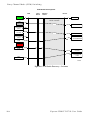
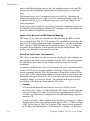
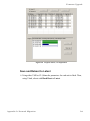
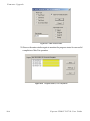
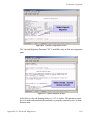
Figure 3-33 Hub Statistics screen
The Burst Controller monitors statistics in the received ACK from each Remote.
The statistics report the fill status of the STDMA buffers. The Burst Controller
builds a table of the group and calculates the relative buffer fill for each Remote.
It then calculates the length of the Data Slot for each Remote based on the Minimum Slot Size plus a percentage of the Available Bandwidth. Idle remotes
would receive a Data Slot equal to the Minimum Slot Size.
In figure 3-33, Remote 1 with IP address 10.1.128.1 had activity during the
averaging period. It captured 37.8% of the total slot time and had an average
slot length of 283 ms. Remotes 2, 3, and 4 had 41.5%, 18.1%, and 7.6% respectively. The dynamic range of STDMA is a function of the difference between
the Nominal Data Slot Size and the Minimum Data Slot Size parameters. These
parameters are operator selectable. The speed with which STDMA reacts to
changes in dynamic load is a function of the Statistics Accumulation Window
parameter and the Cycles per Burst Map parameter, both of which are also operator selectable.
The Hub statistics are useful for tuning the Burst Controller. Preamble adjustments, up or down, are made using the missed ACKs statistic; a preamble and/
or guardband that is too short will result in an accumulation of missed ACKs.
The “Cont” column represents continuous—the number of sequential ACKs
missed.
An informative indicator in the Hub Statistics screen is the STDMA status of
the Remotes that appears in the first column to the right of the IP Address list.
The Remote status is displayed in one of three possible modes:
• E – Remote is Enabled and active in the STDMA group; the Hub burst
controller is receiving ACKs from this Remote.
• ER – Remote is Enabled but has been Removed from the STDMA group
due to missed ACKs at the Hub burst controller.
• (Blank) – Remote either has been manually Disabled, such as through the
STDMA Remotes Menu Enable/Disable command, or has been switched
out of STDMA to SCPC mode by the VMS.
3-26
Vipersat CDM-570/570L User Guide