1
Setting Up and Using Your Hartke
B Series Combo Bass Amplifier
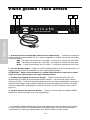
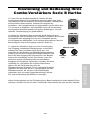
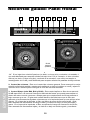
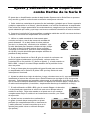
10. If you need to connect the B Series to a PA system or a recording
mixing console, connect a cable between the front-panel Line Out
output and a line-level input on the mixer. (See #7 on page 4 in this
manual for more information on the use of the B Series Line Out).
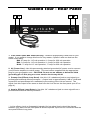
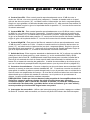
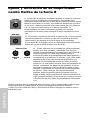
11. If you’re using a professional external signal
processor that has line-level inputs and outputs, turn
your B Series amp off momentarily and then connect a
standard audio cable between the rear panel Preamp
Out jack and your effects processor input and another
standard audio cable between the Amp In jack and your
effects processor output (if required, multiple effects
processors can be daisy-chained together, output to
input). Then turn the B Series amp back on and play
your bass while adjusting the controls of your effects
processor(s). For best results, set both the input and
output gain of all connected effects processor(s) to 0 dB
(unity gain), so that there is no increase or decrease in
level whether the effects are switched in or out.
PHONES
LINE OUT
EFFECTS LOOP
PREAMP
OUT
AMP IN
If you encounter difficulty with any aspect of setting up or using your Hartke B Series Bass
Combo Amplifier, you can call Samson Technical Support (1-800-372-6766) between 9 AM
and 5 PM EST, or contact your local distributor.
9
ENGLISH
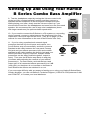
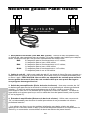
9. Test the headphone output by turning the Volume control to its
minimum (fully counterclockwise) position and then connect a
standard stereo headphone to the front-panel Headphones jack.
While playing your bass, slowly turn the Volume control up—you
should hear sound from the headphones and none from the connected
speaker. We recommend the use of large size headphones (those
with large transducers) for optimum bass reproduction.