1
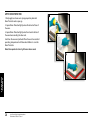
USING A COOKBOOK PROGRAM
1
2
3
4
5
6
WARNING: Ensure there is food
product in the oven before
starting a cooking program.
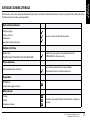
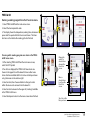
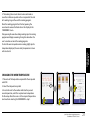
To find the required Program in the cookbook.
1. Select ‘COOKBOOK’ from the main menu screen.
2. Select the ALL MENUS symbol.
3. Use scroll up/down arrows to find the program.
OPERATION &
CONTROLS
NOTE: if an image has a red line around it the oven
temperature is set too high or too low for that recipe. See
‘CHANGING THE OVEN TEMPERATURE’.
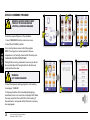
Taking all the necessary precautions to ensure you do not
burn yourself, place the food product into the hot oven
cavity and close the door.
WARNING:
Hot surface Hazard
4. Select the required cooking program to start cooking.
For example, ‘1 BURGER’.
5. The program either starts immediately displaying a
countdown timer, or an instruction is displayed first; follow
the stage instruction then select OK to start cooking. If
the oven door is not opened within 30 seconds a warning
message appears.
20
Quick Service Guide original instructions
Part Number 32Z3802 US Issue 1