1
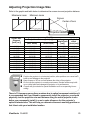
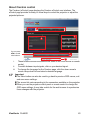
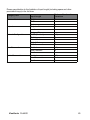
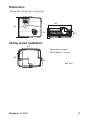
Adjusting Projection Image Size Refer to the graphic and table below to determine the screen size and projection distance. Maximum zoom Minimum zoom Screen Center of lens Vertical offset Projection distance 16 : 9 Screen Projection distance [inch (m)] Screen size Diagonal [inch (cm)] (min. zoom) (max. zoom) 30 (76) 40 (102) 50 (127) 60 (152) 80 (203) 100 (254) 120 (305) 150 (381) 200 (508) 220 (559) 250 (635) 300 (762) 35 (0.89) 48 (1.21) 60 (1.52) 72 (1.83) 97 (2.46) 122 (3.09) 146 (3.72) 183 (4.66) 246 (6.24) 270 (6.87) 307 (7.81) 369 (9.38) 55 (1.39) 74 (1.87) 93 (2.35) 111 (2.83) 149 (3.79) 187 (4.75) 224 (5.7) 281 (7.14) 376 (9.54) 413 (10.5) 470 (11.94) 564 (14.33) Image height [inch (cm)] Vertical offset [inch (cm)] 14.7 (37) 19.6 (50) 24.5 (62) 29.4 (75) 39.2 (100) 49 (125) 58.8 (149) 73.5 (187) 98.1 (249) 107.9 (274) 122.6 (311) 147.1 (374) 5.0 (12.8) 6.7 (17.1) 8.4 (21.4) 10.1 (25.6) 13.5 (34.2) 16.8 (42.7) 20.2 (51.3) 25.2 (64.1) 33.6 (85.4) 37.0 (94.0) 42.0 (106.8) 50.5 (128.2) Position the projector in a horizontal position; other positions can cause heat build-up and damage to the projector. Keep a space of 30 cm or more between the sides of the projector. Do not use the projector in a smoky environment. Smoke residue may buildup on critical parts and damage the projector or its performance/ Consult with your dealer for special installation such as suspending from a ceiling. There is 3% tolerance among these numbers due to optical component variations. It is recommended that if you intend to permanently install the projector, you should physically test the projection size and distance using the actual projector in situ before you permanently install it, so as to make allowance for this projector's optical characteristics. This will help you determine the exact mounting position so that it best suits your installation location. ViewSonic Pro8400 25