1
speaking for more than two seconds, the paging
circuit turns off. Other functions of the unit remain
the same.
Connect the output of a low level music source to the
screw terminals marked "Music" on the input terminal
strip on the V-2001A-E. Adjust music volume control
on the V-2001A-E to the desired level.
Background Music
Background music may be connected to the
2001A-E when using either access method.
Background music mutes on the "page + music"
outputs when a page is made.
Night Ring and Single Tones
V-
Night ringing (Electronic warble tone) over paging is
activated by a common audible contact closure or
90VAC ring voltage.
Volume Adjustments
The page volume is set by the speakers. Adjust
speakers 1/3 to 1/2 volume initially; test and reset, if
necessary, for correct page volume.
A single tone (Time clock) over paging is provided
when the V-2001A-E is connected to a contact
closure.
There are two volume controls for individual
adjustment of:
• Background music
• Tones (Warble/single tone)
Clockwise adjustment increases volume, counter
clockwise decreases volume.
Operation: SW4 enables or disables single and
warble tones on the page with music output. SW2
enables or disables single tones and warble tones on
the page without music output only.
Page Override
TECHNICAL ASSISTANCE
Page override requires the use of a vacant C. O. line
position, vacant loop start trunk port or dedicated
single line telephone set for access (In addition to the
page port, vacant C. O. line position or vacant loop
start trunk port used for primary access of the
V2001A-E).
When trouble is reported, verify power is being
supplied to the unit and there are no broken
connections. Check voltages for proper polarity to
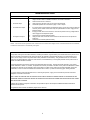
the one-way amplified speakers. Table 1 identifies
symptoms of some possible problems with solutions.
If a spare unit is available, substitute a spare unit for
the suspected defective unit.
Using a modular telephone cord, connect the
V2001A-E RJ11 jack labeled "Tip and Ring OVR" to the
phone system vacant C. O. line position or vacant
loop start trunk port.
Operation: Press line key (Electronic key system)
or dial trunk access code (PABX) for page override
access to connect to paging speakers (Overriding
page in progress). Make announcement. The V2001A-E disconnects when phone is hung up, reestablishing the overridden page announcement.
Assistance in troubleshooting is available from the
factory. When calling, you should have a telephone
test set, several clip leads and a VOM available, and
be calling from the job site. Call (540) 563-2000 and
ask for Technical Support, or call (540) 767-1555 for
Valcom 24-hour Faxback System or visit our website
at http://www.valcom.com.
Should repairs be necessary, contact your local
distributor for instructions.
Connection of One-Way Amplified
Speakers
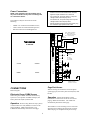
The Valcom V-2001A-E provides external power of 20
power units (1 Amp, -24VDC) to operate one-way
amplified speakers. Additional power supplies are
required for a quantity of speakers using over 20
power units. When using additional power supplies,
make certain:
1)
The -24VDC outputs are not connected to
each other.
2)
Each speaker is connected to only one
power source.
4