1
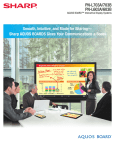
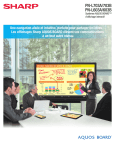
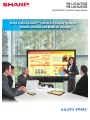
The Sharp AQUOS BOARD™ PN-L703A/703B/603A/603B are designed for smooth and effortless communication in a
wide range of contexts. Their highly responsive touch pens allow several people to write on the same screen at the same
time. And Sharp’s Touch Display Link software enables multifaceted wireless communication. Whether in the boardroom
or the classroom, Sharp changes the way you communicate.
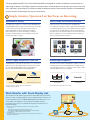
Simple, Intuitive Operation Lets You Focus on Interacting
Simultaneous Writing
User-Friendly Pen Software Interface
Recognizing up to 10 points of contact, the PN-L703A/703B and
PN-L603A/603B multi-touch LCD monitors allow up to four people
to write on the screen at the same time using touch pens or
fingers. Participants can take an active part in meetings,
brainstorming sessions, classroom interactions, and more.
Discussions and presentations become platforms for effective
and lively exchanges of opinions.
Using a touch pen, you can easily launch and display the
Pen Software user interface—a menu comprising smartly arranged
icons that provide easy access to pen settings and functions. Each
touch pen has its own dedicated menu, which can be displayed
even when up to four people are writing on the screen at the same
time. Pen settings such as color and line thickness can be set for
each touch pen (with function buttons).
Smooth, Highly Responsive Touch Pen
Handwriting Recognition
The dedicated touch pen with function buttons 1 is so smooth and
light that using it is like writing on paper. A pressure sensor at the
tip of this slim and lightweight pen lets you write with high
precision and with an effortless and uninterrupted flow.
These LCD monitors feature a handwriting recognition 3 function for
converting selected onscreen handwriting into standard text. This
convenient function allows you to utilize onscreen content to make
neat and legible minutes of your meetings.
Function button
(page up/page down)
Eraser (bundled)
Smooth!
Function button
(right mouse click/
Pen Software link)
Pressure sensor
Touch Pen (with function buttons)1
Touch Pen (w/o function buttons) 2
1 Bundled with PN-L703A/603A; optional for PN-L703B/603B
2 Bundled with PN-L703B/603B
3 Works with languages supported by Pen Software.
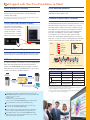
Work Smarter with Touch Display Link
Touch Display Link 2.0 4 software supports effective and multifaceted communication.
Onscreen content—including handwritten notes and drawings made in real time—can
be viewed simultaneously on the AQUOS BOARD display and mobile devices 5 such
as PCs, tablets, and smartphones. Touch Display Link facilitates interactive
presentations, lively discussions, and paperless meetings in both business and
educational settings.
4 Number of connectable mobile devices depends on the following conditions.
• LCD monitors
PN-L703A/603A used with pre-installed software: Max. 20
PN-L703A/603A/703B/603B used with bundled software CD-ROM: Max. 50
• OS — Windows® 7: Max. 20; Windows® 8/8.1: Max. 50
5 OS requirements:
PCs: Windows 7, Windows 8/8.1; Tablets: Windows 7, Windows 8/8.1, Android™, iOS;
Smartphones: Android, iOS
PC
Tablet
Smartphone