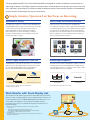
1
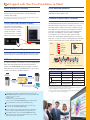
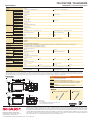
Designed with True User-Friendliness in Mind Quick Startup (PN-L703A/603A) Front-Mounted Speakers The whiteboard function on the PN-L703A/603A can start up quickly at a press of the power button, so that meetings get underway without delay. Two speakers (10W + 10W) are mounted low on the front of the LCD monitor to deliver clearer sound. Note: When booting the LCD monitor from power off status (power turned off using the power button on the monitor or remote control) Touch-Operated Onscreen Display Pressing the Touch Menu button displays an onscreen menu that lets you easily switch input sources, change volume level, or turn the touchscreen function on and off without using a remote controller. A Wealth of Input/Output Terminals The PN-L703A/703B and PN-L603A/603B come standard-equipped with a wealth of input/output terminals—on the side and the bottom of the monitor—to enable easy connection with a wide variety of equipment. This array of terminals includes three HDMI ports, two D-sub ports, two DisplayPort™ terminals (one input, one output), and two touchscreen-supporting USB ports. One of the USB ports can be assigned to a regularly connected PC, such as a host PC used to operate the LCD monitor. The other USB port facilitates temporary connection to another PC, such as one used by a meeting participant. This allows easy PC connection without the need to switch the USB cable. (Side) Power button RS-232C Touch Menu button USB (for PC) Minimize Glare and Fingerprints Protecting the screen is an anti-glare film that helps work to reduce glare and reflections and minimize fingerprint soiling on the glass. USB* PC analog input RGB (D-sub) LAN port PC/AV input (HDMI) Audio input (Bottom) PN-L703A/603A USB (for pen adaptor) Audio output LAN port Option terminal PC/AV input (HDMI) MFP Connectivity Documents and images scanned from a color-scan-capable Sharp MFP can be imported directly to the Sharp Pen Software for display on the AQUOS BOARD system. For added convenience, image data shown onscreen—including notations—can be saved to a PC or sent directly to an MFP for printout. External speakers DisplayPort output USB (for PC) PC analog DisplayPort input (D-sub) input * For connecting keyboard, mouse, or USB flash drive Feature Comparison PN-L703A/603A Scan document with Sharp MFP Write or draw directly on image Quick Startup Print image to display Pen Software Touch Pen Import Save data to PC Audio input 1 with function buttons w/o function buttons Touch Display Link 3 N-L703B/603B − (pre-installed) (bundled; user installed) 2 (optionally available) (1 pen / adaptor set) − pre-installed / ( bundled; user installed ) (1 pen) (bundled; user installed) • Standard feature Feature available under conditions indicated in parentheses. 1 Supports 11 languages (English, German, Spanish, French, Italian, Dutch, Portuguese, Russian, simplified Chinese, traditional Chinese, Japanese) 2 Please check with your local authorized Sharp dealer/representative on availability. 3 For details, see the section on Touch Display Link. Touch Display Link enables the following interactive functions on the AQUOS BOARD display and mobile devices connected via wireless LAN: • sharing of onscreen content • transfer of files • interactive onscreen writing and drawing • remote control of the AQUOS BOARD display from mobile devices Up to 50 mobile devices can be connected simultaneously. Files can be exchanged between mobile devices even if they are not connected to the AQUOS BOARD display. Users can capture onscreen images and save them on their mobile devices to make personally annotated memos (personal memo). Touch Display Link also connects two AQUOS BOARD interactive display systems on the same network (intranet, VPN, etc.) to enable larger-scale interactive communications.