1
3.7 Differences of software
3.7.1 Differences after conversion
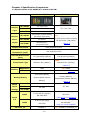
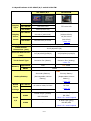
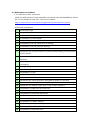
Check the differences of screen data after conversion from GP-PRO/PBIII to GP-Pro
EX. For the details of each item, refer to our website.
http://www.pro-face.com/otasuke/qa/gp3000/replace/soft/conv/care/3/
Differences of Software
1
Touch Panel Type
2
Compatibility of Bit Switch
3
Compatibility of Alarm
4
Compatibility of Trend Graph
5
Compatibility of K tag (Input Order)
6
Compatibility of K tag (difference of Writing)
7
Compatibility of K tag (Indirect Setting)
8
Compatibility of N tag
9
Precautions for using the switch for [History Data Display] of Trend Graph
on the window
10
About window display on a momentary switch during momentary
operation
11
About the performance when a display area of the system window is
overlapping
12
Change of Tag Process
13
About the display when a fixed Draw is placed on a Part
14
Compatibility of Text
15
Compatibility of Fill
16
Compatibility of CF Card Data
17
Precautions for conversion when filing data is saved in a CF card
18
Precautions for setting “Color Settings” to [256 Colors without blinking]
19
Precautions for loading a part with “L Tag (Library Display)”
20
Compatibility of MRK files and CPW files
21
Compatibility of V Tag/v tag and Video Screen
22
Compatibility of Extended SIO Script
23
Compatibility of Sound Data
24
Compatibility of Device Monitor
25
Compatibility of Ladder Monitor
26
Compatibility of J Tag and R Tag
27
Converting Screen Data of DOS
28
Compatibility of Standard Font
35/51