1
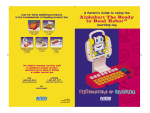
FIVE TWO-SIDED BUILT-IN ACTIVITY CARDS
VOLUME CONTROL SWITCH
ON BUTTON
OFF BUTTON
REPEAT BUTTON
HELP BUTTON
FUN, FLIP
TOP DESIGN
COLOR-CODED VOWEL AND
CONSONANT BUTTONS
ACTIVITY
SELECTOR
TO BEGIN PLAY
1. To begin play, press the ON button (
short tune and an activity instruction.
). You will hear an opening
2. To adjust the volume, slide the VOLUME CONTROL SWITCH to the left for
low volume or to the right for high volume.
3. Slide the activity selector left or right to select one of the ten
activities. A friendly voice will guide you through each of the following activities:
1.
2.
3.
4.
5.
Learning Letters
Alphabet Order
Sounds of Letters
Beginning Sounds
Beginning Letter
6. Vowels
7. Consonants
8. Missing Letter
9. Spelling
10. Melody Maker
4. For a unique learning opportunity, the Braille alphabet is located on
the card for activities 1-5.
5. Press the REPEAT button (
) to repeat the question or instruction.
6. Press the HELP button (
) to repeat an instruction or give
the answer to a question or play a song.
7. To turn the learning toy off, press the OFF button (
).
2
29100 manual
3
3/27/99, 5:23 PM
TO BEGIN
PLAY
FLIP FOR PHONICS™