1
Chapter 2. The Eclipse Integrated Development Environment (IDE)
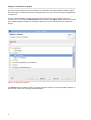
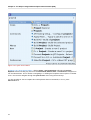
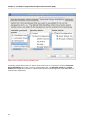
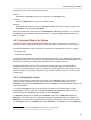
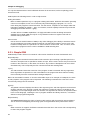
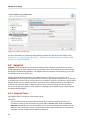
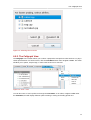
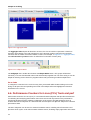
Figure 2.10. Quick Access Menu
In Figure 2.10, “Quick Access Menu”, clicking Views > Project Explorer will select the Project
Explorer window. Clicking any item from the Commands, Menus, New, or Preferences categories to
run the selected item. This is similar to navigating to or clicking the respective menu options or taskbar
icons. You can also navigate through the quick access menu using the arrow keys.
It is also possible to view a complete list of all keyboard shortcut commands; to do so, press
Shift+Ctrl+L.
12