1
Installing and Configuring Linux Guest Operating Systems
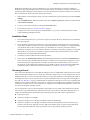
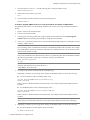
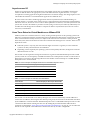
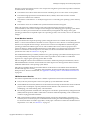
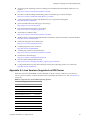
Table 8. Supported Linux and FreeBSD Operating Systems
Guest Operating System
ESX Server
SUSE Linux Enterprise Server 8
2.0–3.5 U2
SUSE Linux 9.3
2.5.2–2.5.5
SUSE Linux 9.2
2.5.1–2.5.5
SUSE Linux 9.1
2.5–2.5.5
SUSE Linux 9.0
2.1–2.5.5
SUSE Linux 8.2
2.0–2.5.5
Ubuntu Linux 8.04
3.5 U2
Ubuntu Linux 7.10
3.5 U1–U2
Ubuntu Linux 7.04
3.0.2–3.5 U2
FreeBSD 4.11
2.5.4–2.5.5
FreeBSD 4.10
2.5–2.5.5
FreeBSD 4.9
2.5
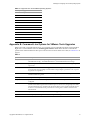
Appendix B: Command-Line Options for VMware Tools Upgrades
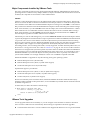
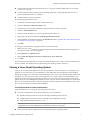
When you install or upgrade VMware Tools, you can enter several command‐line options, listed in Table 9. Right‐click a virtual machine and select Install/Upgrade VMware Tools. Then enter the command‐line options in the Advanced field. See Basic System Administration for more details. For a link, see “Resources” on page 19.
Table 9.
Option
Description
-u user
Specifies a user with sufficient privileges on the target virtual machine, including VirtualMachine.Config.*, VirtualMachine.Interact.*, and VirtualMachine.Provisioning.*
-p password
Specifies a password on the command line. If this is omitted, the tool immediately prompts for a password.
-n vmname
The name of the virtual machine to upgrade. This name corresponds to the display name of a virtual machine. Specify multiple virtual machines using multiple -n parameters. The -n option is ignored if -h is specified.
-h host
Attempts to upgrade all the virtual machines on a particular host. Fails if the specified host is not ESX version 3.0 or greater.
-m maxpowerons
On a particular host, power on only this number of virtual machines at a time.
-o port
Specifies the VirtualCenter Server port, if one other than the default port 902 has been configured.
-t maxpowerontime
After the tools upgrade is scheduled on a virtual machine, the virtual machine is powered on and allowed to run through the tools installation process. In most cases, the guest powers off the machine when the process completes. This parameter allows a user to set the maximum amount of time for a virtual machine to be powered on in case the guest is unable to shut down the machine itself.
-s
Skips the tools and does only the virtual hardware upgrade.
-q
Works quietly. Does not produce status or completion messages on shutdown.
Copyright © 2008 VMware, Inc. All rights reserved.
21