1
NSTS 21000-IDD-760XD
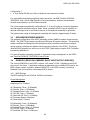
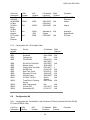
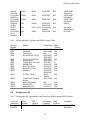
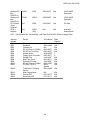
6.4 PGSC FLIGHT LAPTOP MEMORY ADDRESS ALLOCATIONS ......................................................................... 33
6.5 CONFIGURATION #1.................................................................................................................................. 34
6.5.1 Configuration #1 - Standalone with Dual Port RS-422 PC-Card (PCMCIA Card)........................... 34
6.5.2 Configuration #1 - Standalone with RS-422 Usage Table ................................................................ 34
6.6 CONFIGURATION #2.................................................................................................................................. 35
6.6.1 Configuration #2 - SelectaDock I with PC-Decom (AT-Bus) Card and Dual Port RS-422 PC-Card
(PCMCIA Card) .......................................................................................................................................... 35
6.6.2 Configuration #2 - PC-Decom and RS-422 Usage Table ................................................................. 35
6.7 CONFIGURATION #3.................................................................................................................................. 35
6.7.1 Configuration #3 - SelectaDock I with OCA (AT-Bus) Card ............................................................ 35
6.7.2 Configuration #3 - OCA Usage Table ............................................................................................. 36
6.8 CONFIGURATION #4.................................................................................................................................. 36
6.8.1 Configuration #4 - SelectaDock I with Proshare (AT-Bus) Card and Dual Port RS-422 PC-Card
(PCMCIA Card) .......................................................................................................................................... 36
6.8.2 Configuration #4 - Proshare and RS-422 Usage Table.................................................................... 37
6.9 CONFIGURATION #5.................................................................................................................................. 37
6.9.1 Configuration #5 - SelectaDock I with Dual Port RS-422 Sealevel AT-Bus Card............................. 37
6.9.2 Configuration #5 - SelectaDock I with Dual Port RS-422 Sealevel Usage Table ............................. 38
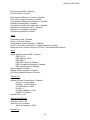
6.10
RS-232C COMMUNICATIONS ......................................................................................................... 39
6.10.1
RS-232C Line Drivers/Receivers................................................................................................. 39
6.11
RS-422A COMMUNICATIONS ......................................................................................................... 39
6.11.1
Quatech PCMCIA RS-422/485 Dual Channel Serial Adapter Card............................................. 39
6.11.2
Sealevel ISA RS-422A Serial I/O ISO Communication Card........................................................ 39
6.11.3
RS-422 Adapter .......................................................................................................................... 39
6.12
ETHERNET COMMUNICATIONS .............................................................................................................. 40
6.12.1
3Com Etherlink III LAN PC Card ............................................................................................... 40
6.13
VIDEO COMMUNICATIONS..................................................................................................................... 40
7.0
INTERFACE CABLES ......................................................................................................................... 41
7.1 POWER CABLES................................................................................................................................... 41
7.1.1 PGSC 28V DC Power Cable (25 feet).............................................................................................. 41
7.1.2 PGSC 28V DC Power Cable (6 feet)................................................................................................ 42
7.1.3 16-20V DC Power Supply Cable (25 feet)........................................................................................ 42
7.1.4 AC Power W-Cables........................................................................................................................ 43
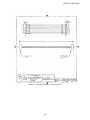
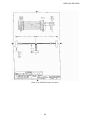
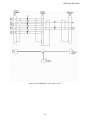
7.2 COMMUNICATION CABLES ............................................................................................................... 45
7.2.1 RS-232C Cables.............................................................................................................................. 45
7.2.2 RS-422A Cables .............................................................................................................................. 48
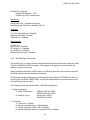
8.0
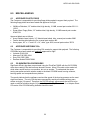
MISCELLANEOUS .............................................................................................................................. 52
8.1 APPROVED FLOPPY DISKS................................................................................................................. 52
8.2 APPROVED WRITABLE CDS ............................................................................................................... 52
8.3 CD GENERATION PROCEDURES ....................................................................................................... 52
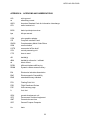
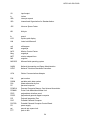
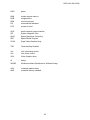
APPENDIX A - ACRONYMS AND ABBREVIATIONS ................................................................................ 53
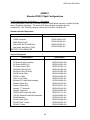
ANNEX 1............................................................................................................................................................ 56
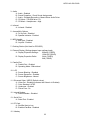
PGSC Flight Computer Configuration 1 - Standalone ................................................................................ 56
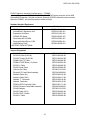
PGSC Expansion Assembly Configuration 2 - PCMMU.............................................................................. 57
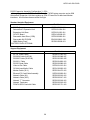
PGSC Expansion Assembly Configuration 3 - OCA ..................................................................................... 58
PGSC Expansion Assembly Configuration 4 - ProShare .............................................................................. 59
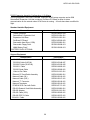
PGSC Expansion Assembly Configuration 5 - RS-422 ................................................................................. 60
4