1
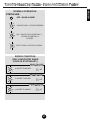
Advanced Features - Auto-Close Selection
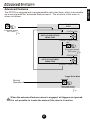
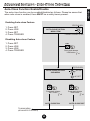
The auto-close function can be enabled/disabled as follows. Please be aware that
when auto-close is enabled, there MUST be a safety beam present.
Enabling Auto-close Feature
STATUS LED:
1. Press SET
2. Press LRN
3. Press SET
4. Press TRIGGER
AUTO-CLOSE OPTION
MENU ITEM
1 SHORT FLASH / 2 sec
Disabling Auto-close Feature
1. Press SET
2. Press LRN
3. Press LRN
4. Press TRIGGER
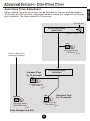
LRN
E
Press and release
LRN button
e x1
STATUS LED:
AC ON
AUTO-CLOSE OPTION
SUB-MENU
AC OFF
SET
E
LRN
Press and release
SET button
e
AUTO-CLOSE ON
TO MAIN MENU
(ADVANCED FEATURES)
42
x2
E
Press and release
LRN button
e x2
AUTO-CLOSE OFF
ENGLISH
Auto-Close Function Enable/Disable