1
S7i Integrated CD Player / Decoding Computer
General Operation
Using the switch located directly above the AC power input, turn the switch to the ON position.
Front Panel Controls
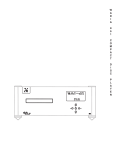
The front panel of the Wadia S7i Integrated CD Player / Decoding Computer features basic controls that allow
you to operate basic functions without using the Remote Control.
Volume Up
Increase the volume by 1/2 dB.
Play/Next Track
This button will cause the unit
to advance to the next track
and begin playing.
Previous Track
This button will cause the unit
to move to the previous track
and begin playing.
Open/Close/Stop
If the drawer is open, pushing this
button will CLOSE the drawer.
If the CD is playing, pushing this
button will STOP playing.
If the unit is not playing, pushing
this button will OPEN the drawer.
Example:
To open the drawer while the unit
is playing, push the button once to
stop and once more to open.
8
Volume Down
Decreases the volume by 1/2 dB.