1
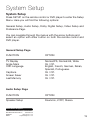
System Setup
System Setup
Press SETUP on the remote control or DVD player to enter the Setup
Menu. Here you will find the following options:
General Setup, Audio Setup, Dolby Digital Setup, Video Setup and
Preference Page.
You can navigate through the menus with the arrow buttons and
select an option with enter button on both the remote control and
DVD player.
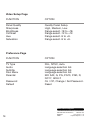
General Setup Page
FUNCTION
OPTION
TV Display
Angle Mark
OSD Language
Normal/PS, Normal/LB, Wide.
On / Off.
English, French, German, Italian,
Spanish, Portuguese.
On / Off.
On / Off.
On / Off.
Captions
Screen Saver
Last Memory
Audio Setup Page
FUNCTION
OPTION
Speaker Setup
Downmix, LT/RT, Stereo.
After Sales Support
UK/N.IRELAND HELPLINE NO: 01270 508538
REP.IRELAND HELPLINE NO:
1800 995 036
WEBSITE:
www.quesh.co.uk
EMAIL:
[email protected]
13