1
.
,
.
SCULPTURA SOUNDPAD MINI V2
POWERED SOUNDSTATION / STATION DE SON
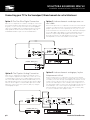
Connecting your Source Directly to the Soundpad
La connexion de votre source directement à la Soundpad
If you prefer, you can also connect your sources (Blu-ray, Satellite, etc.) directly to the Soundpad. Using this method, you will need to select
the proper video input on your TV to match sound. If you are not getting any sound, you might have to set your source to PCM output (shown
below) in their audio menus. The common choices on a source like a DVD or Blu-ray would be some type of Dolby Surround or PCM. / Vous
pouvez également connecter toutes vos sources directement au Soundpad. Comme cela, vous devrez sélectionner l'entrée vidéo appropriée
sur votre téléviseur. Si vous n'obtenez pas tous les sons que vous devrez éventuellement configurer votre source de sortie PCM dans le menu
audio. Les choix communs sur un source comme un DVD ou un Blu-Ray serait un certain type de son surround ou PCM.
.
,
.
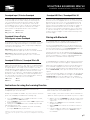
Troubleshooting / Dépannage
While most set-ups should be very simple and work immediately,
there is a chance that additional set-up might be required on
your TV, cable box or other device. If you have no sound you may
want to verify the settings on your TV or source and change the
output to PCM Stereo or Dolby Digital.
POWER
SOUNDPAD MINI V2
Manufactured under license from Dolby
Laboratories. Dolby and the double-D symbol
are trademarks of Dolby Laboratories.
ON
OFF
Alors que la plupart des set-ups devrait être très simple et fonctionner tout de suite, il ya une chance que d'autres set-up peut
être nécessaire sur votre téléviseur, décodeur câble ou un autre
appareil. Si vous n'avez pas de son, vous pouvez vérifier les
paramètres de votre TV ou de la source et de changer la sortie
stéréo PCM ou Dolby Digital.
Soundpad
100 - 240V~,50/60Hz
70 WATTS
SOURCE MENU
POWER
SOUNDPAD MINI V2
Manufactured under license from Dolby
Laboratories. Dolby and the double-D symbol
are trademarks of Dolby Laboratories.
ON
OFF
100 - 240V~,50/60Hz
70 WATTS
Setup
Audio Options
( Satellite, BluRay, etc. )
Display
AUDIO OUT
( Satellite, DVD, etc. )
OPTICAL
SOURCE MENU
PCM Stereo
Dolby Digital
DTS
Power Connection / Branchement de l’alimentation
Once you have connected the soundpad to your TV and sources you can then connect it’s power cord. Une fois la Station de son branchée à
votre téléviseur et aux autres sources, vous pouvez dès lors brancher le cordon d’alimentation.
petit connecteur rond à l’arrière de la barre de son où il est indiqué DC19V. Ensuite, insérez la fiche dans une prise de courant secteur CA
active et non commutée. NE PAS BRANCHER CE CORDON DANS LES SORTIES AUXILIAIRES D’ALIMENTATION QUE L’ON RETROUVE À
L’OCCASION SUR CERTAINS APPAREILS AUDIO. Vous êtes maintenant prêt à mettre sous tension la barre de son ainsi que toutes les
autres composantes de votre chaine.
Step 1 / Étape 1
Step 2 / Étape 2
POWER
SOUNDPAD MINI V2
Manufactured under license from Dolby
Laboratories. Dolby and the double-D symbol
are trademarks of Dolby Laboratories.
ON
OFF
100 - 240V~,50/60Hz
70 WATTS
p.9