1
MODEL
AR-NB2
AR-NB2 N
NETWORK EXPANSION KIT
OPERATION MANUAL
(for network scanner)
Page
2
• INTRODUCTION
• BEFORE USING THE NETWORK
SCANNER FUNCTION
4
• USING THE NETWORK
19
SCANNER FUNCTION
21
• TROUBLESHOOTING
• NETWORK EXPANSION
KIT CD-ROM
• SPECIFICATIONS
25
32
AR-M160/M205
INTRODUCTION
The optional network expansion kit enables the machine to be used as a network scanner.
• To use the network scanner function, the dual function board (AR-EB7) must be installed in the machine.
• Use the USB 2.0 connector on the dual function board to connect the machine to the network expansion kit. The
network scanner function cannot be used if the network expansion kit is connected to the USB 1.1 connector on
the machine.
● This manual only explains features that can be used when the optional network expansion kit is installed. For
information on loading paper, replacing toner cartridges, clearing paper misfeeds, handling peripheral devices,
and other copier-related information, please refer to your operation manual for the machine.
For information on the printer function that can be used when the network expansion kit is installed, see the online
manual for the network printer that accompanies the network expansion kit.
● The explanations in this manual assume that the person who will install the product and the users of the product
have a working knowledge of Microsoft Windows.
● This manual refers to the digital multifunctional system AR-M160/M205 as "the machine".
● For information on the operating system, please refer to your operating system manual or the online Help function.
● The explanations of screens and procedures in this manual are for Windows XP. The screens may vary
depending on your Windows version and settings.
● This manual refers to the Single Pass Feeder as the "SPF", and the Reversing Single Pass Feeder as the
"RSPF".
● Wherever "AR-XXXX" appears in this manual, please substitute your model name for "XXXX". For information on
your model name, see "DIFFERENCES BETWEEN MODELS" in the operation manual.
The display screens, messages, and key names shown in the manual may differ from those on the actual machine
due to product improvements and modifications.
Warranty
While every effort has been made to make this operation manual as accurate and helpful as possible, SHARP
Corporation makes no warranty of any kind with regard to its content. All information included herein is subject to
change without notice. SHARP is not responsible for any loss or damages, direct or indirect, arising from or related
to the use of this operation manual.
Trademark Acknowledgments
• Sharpdesk LT is a trademark of Sharp Corporation.
• Microsoft® Windows® operating system is a trademark or copyright of Microsoft Corporation in the U.S.A. and
other countries.
• Windows® 95, Windows® 98, Windows® Me, Windows NT® 4.0, Windows® 2000, and Windows® XP are
trademarks or copyrights of Microsoft Corporation in the U.S.A. and other countries.
• Netscape Navigator is a trademark of Netscape Communications Corporation.
• Acrobat® Reader Copyright© 1987- 2002 Adobe Systems Incorporated. All rights reserved. Adobe, the Adobe
logo, Acrobat, and the Acrobat logo are trademarks of Adobe Systems Incorporated.
• All other trademarks and copyrights are the property of their respective owners.
-2-
CONTENTS
INTRODUCTION ............................................... 2
1
4
BEFORE USING THE NETWORK SCANNER FUNCTION
NETWORK EXPANSION KIT CD-ROM
ABOUT THE NETWORK SCANNER FUNCTION.... 4
SOFTWARE PROGRAMS...............................25
SETTINGS AND PROGRAMMING REQUIRED
FOR THE NETWORK SCANNER FEATURE .. 5
● HARDWARE AND SOFTWARE REQUIREMENTS ..... 25
● USER'S GUIDES FOR SOFTWARE PROGRAMS ...... 26
● SETTINGS REQUIRED FOR THE NETWORK
SCANNER FUNCTION....................................5
● ACCESSING WEB PAGES .............................6
● CHANGING THE WEB PAGE LANGUAGE .......6
● ABOUT THE WEB PAGE ................................7
● BASIC SETTINGS FOR NETWORK SCANNING.....8
● SMTP SERVER AND DNS SERVER SETTINGS.....9
● CONFIGURING LDAP SERVER SETTINGS
(WHEN USING AN LDAP SERVER) .............10
● STORING SCANNING SETTINGS................11
● STORING DESTINATIONS ...........................12
● ASSIGNING DESTINATIONS TO THE SCAN
MENU KEYS ON THE MACHINE..................17
● PROTECTING INFORMATION
PROGRAMMED IN THE WEB PAGE
("Passwords") ................................................18
INSTALLING THE SOFTWARE PROGRAM ..27
2
● INSTALLING SHARPDESK LT AND
NETWORK SCANNER TOOL ...................... 27
● SETTING UP NETWORK SCANNER TOOL ........ 28
● INSTALLING SHARP TWAIN AR/DM.................. 30
● INSTALLING TypeReader Professional 5.0
(Trial version) ................................................ 30
● UNINSTALLING THE SOFTWARE PROGRAM ...... 31
5
USING THE NETWORK SCANNER FUNCTION
BASIC TRANSMISSION PROCEDURE......... 19
● EDITING THE SETTINGS IN A [SCAN MENU]
KEY................................................................19
● IMAGE ORIENTATION AND STANDARD
ORIGINAL LOADING ORIENTATION ...........20
3
TROUBLESHOOTING
TROUBLESHOOTING .................................... 21
● DISPLAY MESSAGES...................................22
● IF YOUR E-MAIL IS RETURNED ..................22
● IMPORTANT POINTS WHEN USING SCAN TO
E-MAIL ...........................................................23
CHECKING THE IP ADDRESS ...................... 24
-3-
SPECIFICATIONS
1
Chapter 1
BEFORE USING THE NETWORK SCANNER FUNCTION
ABOUT THE NETWORK SCANNER
FUNCTION
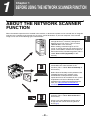
When the network expansion kit is installed in the machine, a document or photo can be scanned into an image file
and sent over a network or the Internet to a file server, e-mail destination, or your own computer. The scanned
image can be sent to the following types of destinations:
1. The scanned image can be sent to a memory
storage device on a network (a designated
directory on an FTP server). (This is called
"Scan to FTP" in this manual.)
When sending scanned image to an FTP
server, an e-mail message can also be sent to a
preset e-mail address to inform the recipient of
the location of the scanned image data. (This is
called "Scan to FTP (Hyperlink)" in this
manual.)
2. A scanned image can be sent to a computer
connected to the same network as the
machine. (This is called "Scan to Desktop" in
this manual.)
* Before Scan to Desktop can be performed, the
"Network Scanner Tool" software in the
CD-ROM that accompanied the network
expansion kit must be installed. For the system
requirements for Scan to Desktop and the
procedure for installing the Network Scanner
Tool, see "NETWORK EXPANSION KIT
CD-ROM" (p.25).
3. The scanned image can be sent to an e-mail
recipient. (This is called "Scan to E-mail" in
this manual.)
* A limit is set in the Web page for the size of
image files that can be sent using Scan to
E-mail (p.8).
-4-
1
SETTINGS AND PROGRAMMING
REQUIRED FOR THE NETWORK
SCANNER FEATURE
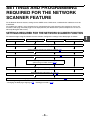
To the Network Scanner feature, settings for the SMTP server, DNS server, and destination addresses must be
established.
To establish the settings, use a computer that is connected to the same network as the machine to access the
machine's Web page. The Web page can be displayed with your Web browser (Internet Explorer 5.5 or later, or
Netscape Navigator 6.0 or later).
SETTINGS REQUIRED FOR THE NETWORK SCANNER FUNCTION
To transmit images using the network scanner function, configure the settings in the Web pages as follows:
Scan to FTP
Scan to FTP (Hyperlink)
Scan to E-mail
Scan to Desktop
Access the Web pages (p.6)
Configure basic settings for network scanning (p.8)
Configure your SMTP and DNS server settings (p.9)
Configure LDAP server settings
(when using an LDAP server) (p.10)
Storing scanning settings (p.11)
Store destination information (p.12 to 15)
Assigning destinations to the scan menu keys on the machine (p.17)
The following settings can also be configured to enable convenient use of the network scanner function:
• Changing the Web page language (p.6) • Setting passwords. (p.18)
-5-
1
BEFORE USING THE NETWORK SCANNER FUNCTION
ACCESSING WEB PAGES
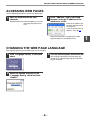
Use the following procedure to access the Web pages.
1
2
Open the Web browser on your
computer.
Supported browsers: Internet Explorer 5.5 or later
Netscape Navigator 6.0 or
later
In the "Address" field of your Web
browser, enter the IP address of the
machine as a URL.
Enter the IP address that
has been programmed in
the machine.
If you do not know the IP
address, see page 24.
When the connection is completed, the Web
page will appear in your Web browser.
CHANGING THE WEB PAGE LANGUAGE
The language appearing in the Web page can be changed.
1
Click "Language Setting" in the menu
frame.
2
Select the desired language in the
"Language Setting" menu and click
"Submit".
3
-6-
Turn the machine power off and then on.
The language appearing in the Web page will
change to the selected language when the Web
page is refreshed.
1
BEFORE USING THE NETWORK SCANNER FUNCTION
ABOUT THE WEB PAGE
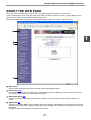
When you access the Web page in the machine, the following page will appear in your browser.
A menu frame appears on the left side of the page. When you click an item in the menu, a screen appears in the
right frame that allows you to establish settings for that item.
For detailed explanations of the procedures for establishing settings, click "Help" in the menu frame.
1
1
2
3
4
1
Menu frame
Click the menu items displayed here to configure the corresponding settings.
2
Destination (p.12)
Set up destinations for Scan to FTP, Scan to FTP (Hyperlink), Scan to Desktop, and Scan to E-mail. You can
also edit or delete previously set destination information.
3
Network Scanning (p.8)
This lets you select transmission methods for the network scanner function, configure settings for Scan to
E-mail.
4
Application (p.9)
This lets you establish SMTP server settings, DNS server settings, and WINS server settings for Scan to E-mail
and Scan to FTP (Hyperlink), and for entering a host name instead of an IP address when storing a transmission
destination.
Configure LDAP server settings if an LDAP server is used.
-7-
BEFORE USING THE NETWORK SCANNER FUNCTION
BASIC SETTINGS FOR NETWORK SCANNING
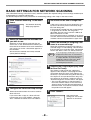
Click "Network Scanning" in the menu frame, and then establish the required settings. These settings should only be
established by the network administrator.
For detailed explanations of the procedures for establishing settings, click "Help" in the menu frame.
1
4
Click "Network Scanning" in the menu
frame.
A limit can be set for the size of image files sent
by Scan to E-mail to prevent excessively large
files from being sent.
If the image file created from the scanned image
is larger than the set limit, the image file is
discarded. The limit can be set from 1 MB to 10
MB in increments of 1 MB.
The factory default setting is "Unlimited". If you wish to
set a limit, remove the checkmark from the "Unlimited"
checkbox and enter the desired limit in "Upper Limit".
The Network Scanning
Setup page appears.
2
Select the transmission methods that
you wish to use.
5
Select the scanner delivery methods that you
want to use. In the "Enable Scanner Delivery to:"
field, click the checkbox next to each method that
you want to use so that a checkmark appears in
the checkbox.
All transmission methods are initially selected
(factory default settings).
Select the method for assigning a file
name to a scanned image.
Select the method for assigning a file name to a
scanned image. In "File Naming", click the items
that you wish to use in the file name. "Destination
Name" and "Date & Time" are initially selected.
Note
6
3
Set a limit for the size of image files.
Selecting an e-mail subject (only used
for Scan to E-mail).
The setting is used to enter the subject that
appears in the recipient's e-mail program when
you perform Scan to E-mail. (This setting is not
necessary if you will not be using Scan to E-mail.)
The subject can be up to 80 characters long. Only
one subject can be entered. If nothing is entered,
"Scanned image from <Device Name>" will appear.
* The name that appears in <Device Name> is
the name stored in "Name" in the screen that
appears when you click "System Information" in
the menu frame. If a name has not been stored,
the product name will appear.
Configure the Advanced Setup settings.
7
Select advanced functions that can be used for
Scan to E-mail.
If you wish to Bcc a copy of a Scan to E-mail
transmission to an e-mail address, select the
"Bcc:" checkbox and enter the e-mail address.
If you are going to send images to the same
recipient more than once, we recommend
that you also select "Session Page Counter"
or "Unique Identifier" to prevent sending
multiple files with the same name, which
would result in each successive file
overwriting the previous file.
Click "Submit".
After entering the
settings, be sure to click
"Submit" to store them.
-8-
1
BEFORE USING THE NETWORK SCANNER FUNCTION
SMTP SERVER AND DNS SERVER SETTINGS
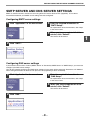
SMTP is used to transmit e-mail that is sent using Scan to E-mail or Scan to FTP (Hyperlink). To use these
transmission methods, your SMTP server settings must be configured.
Configuring SMTP server settings
1
Click "Application" in the menu frame.
3
Enter the required information in
"SMTP Setup".
For explanations of each of the items, click "Help"
in the menu frame.
4
When you have completed all of the
entries, click "Submit".
The entries will be stored.
2
Click "SMTP".
Configuring DNS server settings
If you entered a host name in "Primary SMTP Server" or "Secondary SMTP Server" of "SMTP Setup", you must also
configure your DNS server settings.
You will also need to configure your DNS server settings if host names will be entered in "Hostname or IP Address"
when storing destinations for Scan to FTP (Scan to FTP (Hyperlink)) or Scan to Desktop.
1
Click "Application" in the menu frame.
3
Enter the required information in
"DNS Setup".
For explanations of each of the items, click "Help"
in the menu frame.
4
When you have completed all of the
entries, click "Submit".
The entries will be stored.
2
Click "DNS".
-9-
1
BEFORE USING THE NETWORK SCANNER FUNCTION
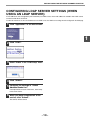
CONFIGURING LDAP SERVER SETTINGS (WHEN
USING AN LDAP SERVER)
If mail addresses are managed on your network by an LDAP server, the e-mail addresses stored in the LDAP server
can be used for Scan to E-mail.
To allow the machine to use the e-mail addresses in the LDAP server, the LDAP server settings must be configured in the Web page.
1
Click "Application" in the menu frame.
1
2
Click "LDAP".
3
Select "Enable" in the "LDAP Setup" menu.
4
Click "Submit".
5
Configure the settings in "Global
Address Books List".
For explanations of each of the items, click "Help"
in the menu frame.
6
When you have completed all of the
entries, click "Submit".
The entries will be stored.
- 10 -
BEFORE USING THE NETWORK SCANNER FUNCTION
STORING SCANNING SETTINGS
Sets of scan settings (scan size, color mode, resolution, file type, etc.) can be stored for use in various scanning applications.
Each set of settings is called a "Scan Mode". When storing a destination, you can select one of the stored scanned modes.
The settings of the selected scan mode will be used when you scan an image and send it to that destination (p.12 to 15).
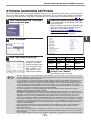
1
Click "Network Scanning" in the menu
frame of the Web page.
2
Click "Scan Mode".
4
Select the desired scanning settings.
To view explanations of the settings, click "Help"
in the menu frame.
When an original is scanned using the document
glass, the scanning area is determined by the
"Scan Size" setting. Read "IMAGE
ORIENTATION AND STANDARD ORIGINAL
LOADING ORIENTATION" (p.20) and make sure
that the correct scan size is selected.
1
The default settings are shown in the following table:
3
Click "Add" below the scan list.
If you need to change the
settings in a previously
stored scan mode, select
the scan mode and click
"Edit". To delete a scan
mode, select the scan
mode and click "Delete".
Item
Scan Size
Color Mode
Resolution
Void Area
5
Default setting
Item
Letter
Light Source
Full Color
File Type
Compression
75 dpi
Mode
Pages Per File
Off
Default setting
White
TIFF
MMR(G4)
All
When you have finished selecting the
settings, click "Submit".
The selected settings are stored.
Note
• When the original size is automatically detected in the SPF/RSPF, the detected size is used instead of the scanning
size set in "Scan Size". For this reason, if the original is larger than the size set in "Scan Size", it may be scanned at a
lower resolution than the selected resolution.
• To scan a ledger, A3, or other large original at a high resolution setting such as 600 dpi, the machine memory
or network expansion kit memory must be expanded. (A high resolution setting can be selected with only
standard memory, however, the machine will scan the original at a lower resolution and enhance the image.)
To scan large originals at high resolution when the color mode is set to "mono 2 gradation", the network
expansion kit memory must be expanded. To scan large originals at high resolution when the color mode is set
to full color or grayscale, the machine memory must be expanded.
• For normal text originals, a sufficiently legible image is produced when the color mode is set to "Mono 2
gradation" and the resolution is 200 dpi or 300 dpi.
The 600 dpi setting should only be used in cases where high-clarity image reproduction is required, such as a
photograph or an illustration. Note that a high resolution setting will result in a larger file size, and transmission
may not be successful if there is insufficient disk capacity in the server to which the image is sent (or if the
administrator of the server has restricted the file size). If transmission is not successful, you can try such
measures as reducing the number of scanned pages in the file or reducing the scan size setting for the original.
• The resolution settings that can be selected vary depending on the scan size, color mode, and light source settings.
• To open the scanned image without using the software program in the CD-ROM that accompanies the network
expansion kit, the recipient must have a viewer program that can open the image format (file type) that was
selected as explained above.
• The factory default setting for the image format produces the smallest file (File Type: TIFF, Compression
Mode: MMR (G4)). If the recipient cannot open the image, try sending the image in a different format.
• Number of pages per file
If the number of scanned originals is not divisible by the number set in "Pages Per File", the last file will have less pages.
• If you wish to use a scan mode as the default scan mode when storing destinations, select the "Default Scan
Mode" checkbox.
• The scan settings stored in a scan mode cannot be edited or deleted if the scan mode has been selected for a destination.
- 11 -
BEFORE USING THE NETWORK SCANNER FUNCTION
STORING DESTINATIONS
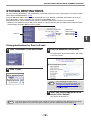
To store scanning destinations, click "Destination" in the Web page menu frame. "Destination" can also be used to
edit or clear stored destinations. (p.16)
A total of 200 destinations* can be stored, including E-mail, FTP, Desktop, and Group destinations. Up to six of
these destinations can be assigned to the machine's [SCAN MENU] keys.
Stored destinations can be selected in the machine's operation panel when transmission is performed.
* Multiple e-mail addresses (up to 100) can be stored as a group. Note that this may reduce the maximum number
of destinations (normally 200) that can be stored.
E-mail:
FTP:
Desktop:
Group:
Click here.
See below
Refer to page 13.
Refer to page 14.
Refer to page 15.
1
Storing destinations for Scan to E-mail
1
Click "Destination" in the menu frame.
3
Enter the destination information.
For explanations of each of the items, click "Help"
in the menu frame.
2
Click "E-mail".
Note
4
Use "Scan Mode" to select a set of
previously stored scanning settings (see
"STORING SCANNING SETTINGS" on
page 11). The list shows the names of the
stored scan modes.
When you have completed all of the
entries, click "Submit".
The entries will be stored.
Note
To perform Scan to E-mail, the SMTP server settings must first be established. Click "Application" in the Web
page, click "SMTP" in the screen that appears, and then enter the settings under "SMTP Setup" (p.9).
- 12 -
BEFORE USING THE NETWORK SCANNER FUNCTION
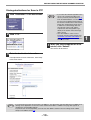
Storing destinations for Scan to FTP
1
Click "Destination" in the menu frame.
2
Click "FTP".
Note
4
• If you select the "Enable Hyperlink to FTP
server to be e-mailed" checkbox and
select a previously stored recipient (p.12)
from "E-mail Destination", an e-mail will
be sent to the recipient informing them of
the file format and location of the scanned
image data. A hyperlink to the file server
to which the scanned image data was
sent appears in the e-mail, and the
recipient can click the hyperlink to go
directly to the location where the image
data is stored.
• Use "Scan Mode" to select a set of
previously stored scanning settings (see
"STORING SCANNING SETTINGS" on
page 11). The list shows the names of the
stored scan modes.
When you have completed all of the
entries, click "Submit".
The entries will be stored.
3
Enter the destination information.
For explanations of each of the items, click "Help"
in the menu frame.
Note
If you entered a host name in "Hostname or IP Address", you will need to enter the DNS server or WINS server
settings. Click "Application" in the menu frame and then click "DNS" or "WINS" in the page that appears to
configure the corresponding settings.
To perform Scan to FTP (Hyperlink), you must also click "SMTP" and then enter the settings under "SMTP
Setup" for the SMTP server (p.9).
- 13 -
1
BEFORE USING THE NETWORK SCANNER FUNCTION
Storing destinations for Scan to Desktop
The destination for Scan to Desktop is stored by the Sharp Network Scanner Tool Setup Wizard when "Network
Scanner Tool" is installed in your computer. For this reason, there is no need to store the Scan to Desktop
destination in the Web page. (The Network Scanner Tool is on the "Sharpdesk LT" CD-ROM that accompanied the
Network Expansion Kit .)
For information on Scan to Desktop system requirements, installing the Network Scanner Tool, and storing the
destination, see "NETWORK EXPANSION KIT CD-ROM" (p.25).
Normally your computer is stored as the destination by the method indicated above.
The following page for storing Scan to Desktop destination information appears when "Destination" is selected in the
menu frame, followed by "Desktop". This page is used mainly by the system administrator in the following
circumstance.
• When another machine with the network scanner function has been added to the same network, and you wish to
perform Scan to Desktop from the added machine to a destination programmed in the previously existing machine.
Refer to "Editing and deleting programmed transmission destinations" (p.16), and select the Scan to Desktop
destination information that you wish to transfer to the new machine. Enter the displayed information in the same
setting screen of the new machine. (When all information has been entered, click "Submit".)
If there are additional destinations that you want to transfer to the new machine, repeat this procedure for each
destination.
Note that if there are any discrepancies between the newly programmed information and the information in the host
computer, transmission and reception may not be possible.
Note
• For explanations of each of the items, click "Help" in the menu frame.
• The default scan mode (the scan mode for which the "Default Scan Mode" checkbox was selected when the
settings were stored) is automatically used as the scan mode for the Scan to Desktop destination stored by the
Network Scanner Tool. To use a different scan mode, see "Editing and deleting programmed transmission
destinations" (p.16).
• If you entered a host name in "Hostname or IP Address", you will need to enter the DNS server or WINS server
settings. Click "Application" in the menu frame and then click "DNS" or "WINS" in the page that appears to
configure the corresponding settings.
- 14 -
1
BEFORE USING THE NETWORK SCANNER FUNCTION
Storing Groups (Scan to E-mail)
If you are using Scan to E-mail, a scanned image can be sent to multiple destinations in a single operation.
Note
1
Up to 100 destinations can be stored in one group.
Click "Destination" in the menu frame.
3
Enter the destination information.
For explanations of each of the items, click "Help"
in the menu frame.
2
1
Click "Group".
Note
4
Use "Scan Mode" to select a set of
previously stored scanning settings (see
"STORING SCANNING SETTINGS" on
page 11). The list shows the names of the
stored scan modes.
When you have completed all of the
entries, click "Submit".
The entries will be stored.
- 15 -
BEFORE USING THE NETWORK SCANNER FUNCTION
Editing and deleting programmed transmission destinations
To edit or delete programmed destinations, click "Destination" in the menu frame of the Web page.
1
Click "Destination" in the menu frame
of the Web page.
3
To edit the selected destination, click
"Edit" under the Destinations List.
The programming screen
of the destination
selected in step 2
appears. Edit the
information in the same
way as you initially stored
it.
2
In the Destinations List, click the
checkbox of the destination that you
want to edit or delete.
When finished, be sure to click "Submit" to save
your changes.
4
To delete the selected destination,
click "Delete" under the Destinations
List.
A message appears
asking you to confirm the
deletion. Click "Yes" to
delete.
Note
If you attempt to delete a programmed destination in the following situations, a warning message will appear and
deletion will not be possible.
• The destination that you are attempting to delete is assigned to a [SCAN MENU] key.
• The destination is included in a group.
If the destination has been assigned to a [SCAN MENU] key, delete the assignment and then delete the
destination. If the destination is included in a group, delete the destination from the group and then delete the
destination.
- 16 -
1
BEFORE USING THE NETWORK SCANNER FUNCTION
ASSIGNING DESTINATIONS TO THE SCAN MENU
KEYS ON THE MACHINE
Stored destinations (p.12 to 15) can be assigned to the six scan menu keys on the machine. This lets you use a
menu key to send a scanned image to the assigned destination.
1
2
Click "Network Scanning" in the menu
frame of the Web page.
4
Select the destination that you wish to
assign to each scan menu key.
1
Click "Button Manager".
5
Click "Submit".
The selected destination information is assigned
to the scan menu key.
3
Click the checkboxes of the scan
menu keys to which you wish to
assign destinations, and then click
"Edit" below the button list.
Editing or deleting a [SCAN MENU] key assignment
To change a destination assigned to a [SCAN MENU] key, perform the above procedure.
To delete a [SCAN MENU] key assignment, click "Delete" in step 3.
- 17 -
BEFORE USING THE NETWORK SCANNER FUNCTION
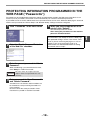
PROTECTING INFORMATION PROGRAMMED IN THE
WEB PAGE ("Passwords")
Passwords can be established to protect the settings and information stored in the Web page. Note that it is not
necessary to set passwords; the network scanner functionality can also be used without passwords.
A password can be set for the administrator and a password can be set for users. When the Web page is accessed
with the user password, the "Device Setup" and "Network Setup" settings cannot be configured.
1
Click "Passwords" in the menu frame.
5
When you have completed all of the
entries, click "Submit".
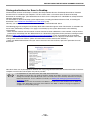
The entered password is stored.
After setting the password, turn the machine
power off and then back on.
2
Select the "Enable Password Protection
of this Web Site" checkbox.
3
Enter the current password in "Admin
Password".
When a password is set, you will be prompted for the
password when you attempt to access a Web page
with protected settings. For the "User name", enter
"user" if you are accessing the page as a user, or
"admin" if you are accessing the page as an
administrator. For detailed information on setting
passwords, refer to "Help".
When establishing a password for the first time,
enter "Sharp" in "Admin Password".
Caution
4
Be sure to enter "S" in upper case and
"harp" in lower case (passwords are case
sensitive).
Enter passwords in "User Password"
and "Admin Password".
A maximum of 7 characters and/or numbers can
be entered for each password (passwords are
case sensitive).
Be sure to enter the same password in "New
Password" as you did in "Confirm Password".
- 18 -
1
2
Chapter 2
USING THE NETWORK SCANNER FUNCTION
This section explains the procedure for scanning from the machine after the network scanner settings have been
configured in the Web page.
For the names and functions of the parts of the machine and operation panel that are used for network scanning,
see the operation manual for the machine.
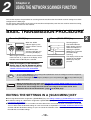
BASIC TRANSMISSION PROCEDURE
1
3
Press the [SCAN] key.
SCAN
When the SCAN
indicator lights up, the
machine enters scanner
mode.
The interface port
changes each time you
press the [SCAN] key.
When using the machine's network scanner function,
make sure that "U_2" appears in the display, which
indicates that the USB 2.0 port is selected.
2
1
2
Press a [SCAN MENU] key.
1
2
Scanning begins.
The SCAN indicator
blinks during scanning.
While the indicator is
blinking, the [SCAN
MENU] keys cannot be
pressed to begin
scanning.
The display will show the
number of the [SCAN
MENU] key that you
pressed.
Place the original in the document
feeder tray or on the document glass.
For information on how to place the original, see
"IMAGE ORIENTATION AND STANDARD
ORIGINAL LOADING ORIENTATION" (p.20).
Note
Caution
• To use a [SCAN MENU] key, the scanning method (destination and scan settings) must first be assigned to
the key using the Web page (p.17).
• To cancel a scanning job after pressing the [SCAN] key, press the [CLEAR] key (
) or the [CLEAR ALL] key
(
) on the machine.
• Before performing Scan to E-mail, read "IMPORTANT POINTS WHEN USING SCAN TO E-MAIL"
and take care that the image file is not too large.
• A limit for the size of image files that can be sent using Scan to E-mail can be set in
"Maximum Size of E-mail Attachments" (page 8) of the Web page.
EDITING THE SETTINGS IN A [SCAN MENU] KEY
● To change the destination assigned to a [SCAN MENU] key, see "Editing or deleting a [SCAN MENU] key assignment".
● To edit the settings of a destination assigned to a [SCAN MENU] key, see "Editing and deleting programmed
transmission destinations".
● The scan settings stored in a scan mode cannot be edited if the scan mode has been selected for a destination.
You can either store the desired settings in a new scan mode as explained in "STORING SCANNING SETTINGS"
and then edit the destination settings, or you can cancel the selection of the scan mode for the destination and
then edit the scan mode settings.
- 19 -
2
USING THE NETWORK SCANNER FUNCTION
IMAGE ORIENTATION AND STANDARD ORIGINAL
LOADING ORIENTATION
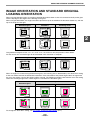
When using the document glass, the original should be placed face down so that it is centered vertically on the glass
with the top edge of the original at the left edge of the glass.
When using the SPF/RSPF, the original should be placed face up in the middle of the document feeder tray, with the
top of the original to the right.
Document glass
SPF/RSPF
Scanning result
2
Long horizontal originals of size 11" x 17", 8-1/2" x 14", A3, or B4 can only be placed as shown below.
For this reason, the scanned image will be rotated 90° when viewed on a computer.
Document glass
SPF/RSPF
Scanning result
When an original is scanned using the document glass, the scanning area is determined by the "Scan Size" setting
of the scan mode stored in the destination information. If the orientation of the placed original does not agree with
the scan size setting, not all of the original will be scanned. The following examples show how the scan size setting
affects the resulting image when a letter original is scanned on the document glass.
Document glass
Scanning result
Scan size = Letter
Scan size = Letter-R
To change the "Scan Size" setting, see "STORING SCANNING SETTINGS" (p.11).
- 20 -
3
Chapter 3
TROUBLESHOOTING
TROUBLESHOOTING
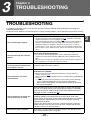
If a problem or question arises, try to solve the situation using the following information before contacting your
authorized SHARP dealer.
Image transmission problems are explained here. For image scanning problems, see the operation manual for the machine.
Problem
Cause and solution
The selected "Scan Size" setting is smaller than the actual original size.
The scanned image is clipped.
→ Set the "Scan Size" to the actual original size (p.11) and make sure that the
original is placed in the correct orientation (p.20).
If you intentionally selected a size setting smaller than the actual original size,
take into consideration the part of the original that you wish to scan when
placing the original. For example, if the actual size is 8-1/2" x 11" and you
selected 5-1/2" x 8-1/2" for the size setting, place the original so that the part
that you wish to scan is within the 5-1/2" x 8-1/2" area at the left, center of the
glass.
The viewer program used by the recipient does not support the
format of the received image data.
The received image data cannot be
opened.
When the same file name is used for two
successive Scan to FTP transmissions,
the second file is not sent.
→ Try selecting a different file type (TIFF / PDF / JPEG) and/or a different
compression format (None, MH (G3), MMR (G4)) when sending the image
data.
Otherwise, have the recipient use Sharpdesk LT or a viewer program that supports the
above combinations of file types and compression formats.
The first file may still remain in the cache of the file server client. Disable
use of the cache in the client software.
There is a mistake in the stored destination information or the wrong
destination was selected.
The recipient does not receive
transmitted data.
→ Make sure that the correct destination information is stored. If there is a
mistake, correct it (p.16).
Make sure that the correct destination has been assigned to the [SCAN MENU]
key (p.17).
* If delivery by e-mail (Scan to E-mail) is unsuccessful, an error message
such as "Undelivered Message" may be sent to the designated
administrator's e-mail address. This information may help you determine
the cause of the problem.
Check the Web page to see if a limit has been set for the size of image
files sent using Scan to E-mail (the factory default setting is "Unlimited").
A limit can be set from 1 MB to 10 MB. Consult the administrator of the
Web page to select a suitable limit (p.8).
The recipient does not receive data
sent by e-mail (Scan to E-mail).
Transmission takes a long time.
The amount of data that can be sent in one e-mail transmission is
sometimes limited by the administrator of the mail server. Even if the
amount of data sent is within the limit setting explained above, if it exceeds
the limit set by the administrator of the mail server, the data will not be
delivered to the recipient.
Decrease the amount of data sent in the e-mail transmission (reduce the
number of pages scanned). (Ask your mail server administrator what the
data limit is for one e-mail transmission.)
When there is a large amount of image information, the data file is also
large and transmission takes a long time.
- 21 -
3
TROUBLESHOOTING
Caution
Pay attention to the following points when selecting scan settings to ensure that an image file
is created that suits the purpose of transmission in terms of image quality and file size.
Scan settings are configured in the Web page.
• Color mode
Select a color mode that is appropriate for the use of the document to be scanned so that the file size will not
be larger than necessary.
Scanning a document with the color mode set to gray scale or black and white will yield a smaller file size than
scanning in color.
• Resolution
For normal text originals, a sufficiently legible image is produced when the color mode is set to "Mono 2
gradation" and the resolution is 200 dpi or 300 dpi.
The 600 dpi setting should only be used in cases where high-clarity image reproduction is required, such as an
original that includes photographs or illustrations. Note that a high-resolution setting will result in a larger file
size and transmission may not be successful if there is insufficient disk capacity in the server to which the
image is sent (or if the administrator of the server has restricted the file size). If transmission is not successful,
you can try such measures as reducing the number of scanned pages in the file or reducing the scan size
setting for the original.
3
DISPLAY MESSAGES
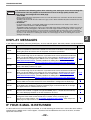
If "CE" blinks in the display, press the [START] key. An error code will appear. Solve the problem as explained below.
Error Code
Solution
Page
CE-00
CE-01
Turn off the power and turn it back on. Consult with your network administrator to make
sure that no problems exist on the network or in the server. If the error is not cleared after
turning the power off and on, turn off the power and contact your dealer.
—
CE-02
Server access denied.
The scanned image was not sent because a connection to the server could not be established.
Make sure that the SMTP server settings or FTP server settings in the Web page are correct.
The procedure for configuring the SMTP server is explained in "SMTP SERVER AND
DNS SERVER SETTINGS", and the procedure for editing Scan to FTP destination
information is explained in "Editing and deleting programmed transmission destinations".
9, 16
CE-03
The scanned image was not sent because the server was busy or there was too much
traffic. Wait briefly and then try again.
CE-04
Server access denied.
The scanned image was not sent because a connection to the server could not be established.
Make sure that the SMTP server settings or FTP server settings in the Web page are correct.
The procedure for configuring the SMTP server is explained in "SMTP SERVER AND
DNS SERVER SETTINGS", and the procedure for editing Scan to FTP destination
information is explained in "Editing and deleting programmed transmission destinations".
9, 16
CE-05
The scanned image was not sent because the directory of the destination FTP server was not
correct. Make sure that the correct FTP server information is configured in the Web page.
16
CE-09
The size of the scanned image file exceeds the upper limit set in "Maximum Size of File"
in the Web page. Reduce the number of original pages scanned into the file, or change
the upper limit set in "Maximum Size of File".
8
CE-10
A transmission method assigned to a [SCAN MENU] key cannot be used. Check the
transmission methods assigned to the [SCAN MENU] keys in "Enable Scanner Delivery
to:" in the Web page whether or not the method can be used.
8
CE-11
The memory became full during scanning. Scan less pages, lower the resolution, or
change the color mode so that the file size is smaller, and try scanning again.
For the scan mode settings, see "STORING SCANNING SETTINGS". (See Help in the
Web page for explanations of each of the settings.)
11
—
IF YOUR E-MAIL IS RETURNED
If a Scan to E-mail is not successfully transmitted, an e-mail informing you of this fact is sent to the return address
configured in the SMTP server. If this happens, read the e-mail and determine the cause of the error, and then
repeat the transmission.
- 22 -
TROUBLESHOOTING
IMPORTANT POINTS WHEN USING SCAN TO E-MAIL
Be very careful not to send image data files that are too large.
Your mail server's system administrator may have placed a limit on the amount of data that can be sent in one e-mail
transmission. If this limit is exceeded, the e-mail will not be delivered to the recipient. Even if there is no limit and
your e-mail is successfully delivered, a large data file may take a long time to be received and place a heavy burden
on the recipient's network, depending on the recipient's network (Internet) connection environment.
If large image data files are repeatedly sent, the resulting burden on the network may slow down the speed of other,
unrelated data transmissions and in some cases, may even cause the mail server or network to go down.
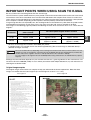
The images on the following page will produce the following file sizes when scanned as 8-1/2" x 11" size or A4 size
originals:
Resolution
File size of text original A
when scanned
File size of photo original B when scanned
Mono 2 gradation
Grayscale
Full Color
75 dpi
Approx. 10 KB
Approx. 125 KB
Approx. 140 KB
300 dpi
Approx. 34 KB
Approx. 1430 KB
(Approx. 1.43 MB)
Approx. 1440 KB
(Approx. 1.44 MB)
* All sizes are for image files created in TIFF MMR (G4) format.
If multiple images are scanned, the file size will be approximately (Size of each image as indicated above) x
(Number of images scanned).
Caution
The scan resolution will vary depending on the scanning area and how much memory in the machine is free. For
example, if a letter or A4 original is scanned in full color at 300 dpi with only the standard memory installed, the
machine will scan the original in full color at 150 dpi and enhance the resolution to 300 dpi.
To scan a ledger or A3 original in full color at 600 dpi without using enhancement, the 256 MB memory option is
required.
Although the actual limitation depends on your network environment, a general guideline for the maximum file size
for Scan to E-mail is 2000 KB (2 MB). In cases where you need to send multiple documents, try such measures as
lowering the resolution mode.
Original image samples
The original images shown below are samples to help you understand the above explanations. Note that these
images are smaller than the actual originals (the actual originals are 8-1/2" x 11" size).
Text original A
Photo original B
- 23 -
3
CHECKING THE IP ADDRESS
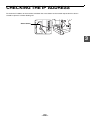
To check the IP address of the machine, hold down the status button on the network expansion kit at least 2
seconds to print out a Printer Setting List.
Status button
3
- 24 -
4
Chapter 4
NETWORK EXPANSION KIT CD-ROM
SOFTWARE PROGRAMS
The "Sharpdesk LT" CD-ROM included in the network expansion kit contains the following software programs.
For information on the software programs, see the user's guides on the CD-ROM.
• Sharpdesk LT (Desktop Document Management Software)
Sharpdesk LT is used to manage images scanned on the machine and files created in various software programs.
* Sharpdesk LT can be installed and used in 3 computers. If you need to install Sharpdesk LT in more than 3
computers, please contact your authorized Sharp dealer.
Caution
The Sharpdesk program on the "AR-M160/M205/5220 Series Software" CD-ROM that accompanied the
machine cannot be used for the network scanner function (Scan to Desktop).
To use the Scan to Desktop function, be sure to install Sharpdesk LT (Network Scanner Tool) from the
"Sharpdesk LT" CD-ROM that accompanied the network expansion kit.
If Sharpdesk LT is already installed, the new installation will overwrite the old installation.
• Network Scanner Tool
This is a utility that helps you use Scan to Desktop (p.4). This utility must be installed to use Scan to Desktop.
(p.27)
• SHARP TWAIN AR/DM
This is used to acquire black and white images from a TWAIN interface into TWAIN-compliant software
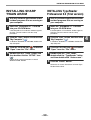
applications.
• TypeReader Professional 5.0 trial (ExperVision, inc.)
This is used to scan text printed on paper and convert the image data into text data by means of OCR (Optical
Character Recognition).
HARDWARE AND SOFTWARE REQUIREMENTS
To install the above software programs, your computer must meet the following system requirements.
Computer type
IBM PC/AT or compatible computer equipped with a 10Base-T/100Base-TX LAN
board
Operating system
Windows 95, Windows 98, Windows Me,
Windows NT Workstation 4.0 (Service Pack 4 or later)*,
Windows 2000 Professional*, Windows XP Professional*,
Windows XP Home Edition*
Display
800 x 600 dots (SVGA) display with 256 colors (or better)
Hard disk free space
110 MB or more
Other hardware
requirements
An environment on which any of the operating systems listed above can fully operate
* Administrator's rights are required to install the software.
- 25 -
4
NETWORK EXPANSION KIT CD-ROM
USER'S GUIDES FOR SOFTWARE PROGRAMS
The Manual folder in the "Sharpdesk LT" CD-ROM contains user's guides (in PDF format) for each of the software
programs.
• Sharpdesk User's Guide
• Network Scanner Tool User's Guide
• SHARP TWAIN AR/DM User's Guide
The user's guides provide detailed explanations of installing, setting up, and using each of the software programs.
Be sure to read the user's guides before installing the software.
4
- 26 -
INSTALLING THE SOFTWARE PROGRAM
Note the following when installing the software program from the "Sharpdesk LT" CD-ROM:
● Be sure to check the system requirements for installation of each of the software programs in the user's guides
and on the information screen during installation.
● The user's guides give detailed instructions for installing and setting up the programs. Be sure to read the user's
guides before installing the programs. In particular, if you are going to use Network Scanner Tool, be sure to
carefully read the instructions regarding network preparation and setup procedures before installing the program.
The network administrator should verify that network preparation has been carried out correctly.
● If you are going to send an original scanned on the machine to a computer (Scan to Desktop), Network Scanner
Tool must be installed.
● If you perform a standard installation of Sharpdesk LT (select "Typical" in the Setup Type selection screen),
Network Scanner Tool will be simultaneously installed. You can also select "Custom" installation and install only
Network Scanner Tool.
● If your computer does not currently have Internet Explorer version 5.0 or later installed, The Sharpdesk LT
installer will install a minimal version of Internet Explorer 5.01 on your computer.
● If you intend to install SHARP TWAIN AR/DM, install Network Scanner Tool first. SHARP TWAIN AR/DM cannot
be installed alone.
● The contents of the information screens that appear during installation can also be found in the ReadMe files on
the same CD-ROM. The ReadMe file for Sharpdesk LT is located in the root directory of the CD-ROM, and the
ReadMe file for SHARP TWAIN AR/DM is located in the Twain folder.
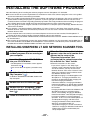
INSTALLING SHARPDESK LT AND NETWORK SCANNER TOOL
1
Quit any software applications and/or
resident programs that are running on
your computer.
2
Insert the "Sharpdesk LT" CD-ROM
into your CD-ROM drive.
7
• The Sharpdesk LT installation screen appears.
Proceed to step 6.
• If the screen does not appear, proceed to step
3.
3
Click the "start" button, and then click
"My Computer" ( ).
In Windows 95/98/Me/NT 4.0/2000, double-click
"My Computer".
4
Double-click the CD-ROM icon (
5
Double-click the "Sharpdesk" folder,
and then double-click the "SETUP"
icon ( ).
6
Follow the instructions on the screen.
).
- 27 -
When the "User Information" window
appears, enter the serial number that
appears on the cover of the
"Important Information" that
accompanied the network expansion
kit, and click the "Next" button.
Follow the instructions on the screen.
• If you select "Typical" in the Setup Type
selection screen, Network Scanner Tool will
also be installed. If you only wish to install
Network Scanner Tool, select "Custom" in the
Setup Type selection screen and then check
only Network Scanner Tool.
• Sharpdesk Imaging* is installed together with
Sharpdesk LT. If Imaging for Windows was
previously installed, Sharpdesk Imaging will
overwrite Imaging for Windows.
If Eastman Software's "Imaging for Windows
Professional Edition" has already been installed
on your computer, Sharpdesk Imaging will not
be installed.
• "Imaging for Windows Professional Edition" and
Sharpdesk Imaging use common registry
entries, and installing "Imaging for Windows
Professional Edition" after Sharpdesk lmaging
has been installed may result in abnormal
operation. In this case, uninstall Sharpdesk LT
and Sharpdesk Imaging, and then install
"Imaging for Windows Professional Edition".
After that, reinstall Sharpdesk LT.
* Sharpdesk Imaging is a version of Eastman
Software's Imaging for Windows Professional
Edition that has been customized by the
Sharp Corporation.
4
NETWORK EXPANSION KIT CD-ROM
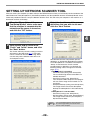
SETTING UP NETWORK SCANNER TOOL
After you restart your computer (or select startup of the Network Scanner Tool) as instructed by the final window of the
Network Scanner Tool (Sharpdesk LT) installation procedure, the "Sharp Network Scanner Tool Setup Wizard" starts.
Follow the procedure below to set up the Network Scanner Tool. This will store your computer in the machine as a
destination for Scan to Desktop.
1
When the "Sharp Network Scanner
Tool Setup Wizard" starts, make sure
that the machine is connected to the
network and the power is turned on,
and click the "OK" button.
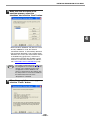
3
Select the checkboxes of the process
definitions that you wish to use and
click the "Next" button.
4
2
Enter a prefix and an initial in the
"Prefix" and "Initial" boxes, and click
the "Next" button.
The "Prefix" will form part of the setting name that
will appear in the Web page (p.17). The prefix
can be a maximum of 6 characters long. Make
sure that the prefix is different from other user
and computer names.
The Network Scanner Tool provides process
definitions as appropriate depending on whether
or not Sharpdesk LT is installed. For example, if
"Sharp" is entered for the "Prefix" and the
provided process definitions are selected, the
following setting names will appear in the Web
page. (p.17)
• If Sharpdesk LT is installed:
- Convert By OCR (setting name: Sharp-OCR)
The scanned image will be converted to an
editable document.
- Send Email (setting name: Sharp-Email)
Your computer's MAPI-compliant e-mail program
will start and the image will be inserted as a file
attachment.
- Sharpdesk Desktop (setting name: Sharp-Desk)
The image will be saved in the Sharpdesk
Desktop and Sharpdesk LT will automatically
start.
• If Sharpdesk LT is not installed:
- Send Email (setting name: Sharp-Email)
- My Documents (setting name: Sharp-MyDocs)
The image will be saved in your computer's
My Documents folder.
Note
- 28 -
Process Definition defines the instruction for
how the image will be processed once it
arrives at the computer.
NETWORK EXPANSION KIT CD-ROM
4
Make sure that the name of the
machine appears, select the
checkbox, and click the "Next" button.
4
• When Windows 98/Me/NT 4.0 (Service Pack 4
or later) /2000/XP is used, the network
connected machine is automatically detected.
• The automatic detection is not available when
Windows 95 is used. (The "Auto Detect" button
is disabled being grayed out.) Click on the
"New" button and enter the IP address of the
machine. To check the machine's IP address,
see "CHECKING THE IP ADDRESS" (p.24).
Note
5
The settings configured in steps 3 and 4 can
be changed later as needed. To change the
settings, select "Network Scanner Tool
Configuration" from the Windows start
menu. For information on the settings, click
the "Help" button or see the User's Guide for
the Network Scanner Tool on the
"Sharpdesk LT" CD-ROM.
When the completion screen appears,
click the "Finish" button.
- 29 -
NETWORK EXPANSION KIT CD-ROM
INSTALLING SHARP
TWAIN AR/DM
INSTALLING TypeReader
Professional 5.0 (Trial version)
1
Quit any software applications and/or
resident programs that are running on
your computer.
1
Quit any software applications and/or
resident programs that are running on
your computer.
2
Insert the "Sharpdesk LT" CD-ROM
into your CD-ROM drive.
2
Insert the "Sharpdesk LT" CD-ROM
into your CD-ROM drive.
If the Sharpdesk LT installation window appears,
click the "Cancel" button to exit the setup
procedure.
3
Click the "start" button, and then click
"My Computer" ( ).
If the Sharpdesk LT installation window appears,
click the "Cancel" button to exit the setup
procedure.
3
In Windows 95/98/Me/NT 4.0/2000, double-click
"My Computer".
Click the "start" button, and then click
"My Computer" ( ).
In Windows 95/98/Me/NT 4.0/2000, double-click
"My Computer".
4
Click the CD-ROM icon ( ) and select
"Open" from the "File" menu.
4
Click the CD-ROM icon ( ) and select
"Open" from the "File" menu.
5
Double-click the "Twain" folder, and
then double-click the "SETUP" icon
( ).
5
Double-click the "Trial" folder,
double-click the "TypeReader" folder,
and then double-click "Autorun.exe".
6
Click the "Install" button.
Follow the on-screen instructions to install
SHARP TWAIN AR/DM.
Follow the on-screen instructions to install Type
Reader Professional.
- 30 -
4
NETWORK EXPANSION KIT CD-ROM
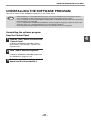
UNINSTALLING THE SOFTWARE PROGRAM
Uninstall the software with "Add/Remove Programs" in the Control Panel.
Note
• When Sharpdesk LT is uninstalled, Network Scanner Tool is also uninstalled. Note that if Network Scanner
Tool is uninstalled, you will no longer be able to directly receive image data from the machine.
• If a user-created file is saved in the Sharpdesk desktop folder, the Sharpdesk desktop folder will not be deleted
when Sharpdesk LT is uninstalled.
• If you are using Windows 95/98/Me/NT 4.0/2000 and uninstall Sharpdesk Imaging, you will not be able to open
image files unless you re-install the Windows accessory Imaging for Windows.
• Removing SHARP TWAIN AR/DM will not delete the spooler folder which stores image data.
Uninstalling the software program
from the Control Panel
1
Click the "start" button, and then click
"Control Panel".
In Windows 95/98/Me/NT 4.0/2000, click the
"Start" button, select "Settings", and then click
"Control Panel".
2
Click "Add or Remove Programs".
In Windows 95/98/Me/NT 4.0/2000, double-click
the "Add/Remove Programs" icon.
3
Select the application that you wish to
delete from the list and delete it.
- 31 -
4
5
Chapter 5
SPECIFICATIONS
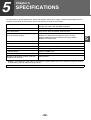
For information on power requirements, power consumption, dimensions, weight, and other specifications that are
common to all features of the machine, refer to the operation manual for the machine.
File format
File type: TIFF/PDF/JPEG
Compression mode: MH (G3)/MMR (G4)/None
File creation method
One file for all pages/One file per each 1 to 6 pages
Scan destinations
Scan to FTP, Scan to Desktop, Scan to E-mail
Supported client PC operating systems (for
Scan to Desktop function)
Windows 95, Windows 98, Windows Me,
Windows NT Workstation 4.0 (Service Pack 4 or later),
Windows 2000 Professional, Windows XP Home Edition,
Windows XP Professional
Web browser
Internet Explorer 5.5 or later, Netscape Navigator 6.0 or later
Management system
Uses built-in Web server
Network protocol
TCP/IP, SMTP, LDAP, FTP
Supported mail system
Mail servers supporting SMTP
LAN connectivity
10Base-T/100Base-TX
Number of destinations
200 maximum
Number of destinations for Scan To E-mail
broadcast transmission
100 maximum*
* Multiple e-mail addresses (up to 100) can be stored as a group. Note that this may reduce the maximum number
of destinations (normally 200) that can be stored.
Some discrepancies may exist in the illustrations and content due to improvements to the machine.
- 32 -
5
AR-NB2/AR-NB2 N (for network scanner)
SHARP CORPORATION