1
INSTALLATION
Wiring Extension Sockets
•
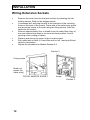
Remove the cover from the line jack sockets by releasing the two
holding screws. Refer to the diagram below.
If necessary drill and plug the wall at the positions of the mounting
holes on the back of the socket. Pierce one of the cable entry points
and screw the socket to the wall using two fixing screws. Feed the
cable into the socket .
Remove approximately 5cm of sheath from the cable. Bare 5mm of
wire and connect the wires to the terminal block position 2 and 5,
ignoring colour coding of cables.
Replace and secure the cover of the line jack socket.
Run cable back to Multi 4 Control Box and cut off, leaving sufficient
cable for termination
Repeat the procedure for Master Sockets 2-4.
•
•
•
•
•
Position 5
Fixing screws
Break-out
panels (for
cable entry)
TYPICAL MASTER SOCKET
Screw
Position 2
12