1
R2 May. 2002
R2 May. 2002
lamps simultaneously to assure the lamps (internal and external) are in
working order. TST does not activate MM sense output.
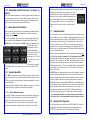
Pressing the marker mode select down (to “T/M”) will cause the marker
audio to mute for that beacon. The next beacon received will re-activate the
audio.
1 OPERATION
GENERAL INFORMATION
1.1
SCOPE
1.10 Internal Recorder System (Option 1 only)
This section provides detailed operating instructions for the PS Engineering
PMA7000MS-CD, and PMA7000S-CD Audio Selector Panel/Intercom
Systems. Please read it carefully before using the equipment so that you can
take full advantage of its capabilities.
This chapter is divided into four sections covering the basic operating areas
of the PMA7000MS-CD systems. They are Audio Selector, Transceiver
Selection, Intercom, and Marker Beacon Receiver (7000M-S only).
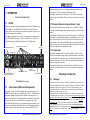
CD
CONTROLS
RECEIVE AUDIO SELECTORS
MARKER INDICATOR LAMPS
The Intercom Recording System (referred to here as the IRS) is a digital
recording system allowing automatic storage and playback of aircraft radio
traffic.
Operating as a continuous loop recorder, (first message received will be the
last heard), the recorder has one minute of recording time or up to 16 messages. With its own built in VOX circuit, there are no buttons to press to
start recording. The system automatically begins to record the instant the
radio becomes active. Only aircraft radio audio in pilots headset is recorded
and only the pilot will hear the playback audio.
1.10.1 Operation
MARKER MODE
IINTERCOM MODE
TRANSMIT SELECTORS
INTERCOM VOLUME (INNER)
MUSIC VOLUME (OUTER)
CREW ICS
CD MUTE CONTROL
Recording is automatic; there is no action required by the pilot. To play
back the last recorded message, simply press the momentary switch associated with the IRS. Each additional press of the button will play the preceding recorded message. You must wait for the message to finish playing before accessing the prior message.
To cancel the playback, press and hold the playback button for two seconds. The next time the button is pressed, the next earlier message will be
heard.
Warranty and Service
SPEAKER CONTROL
2.1
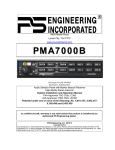
PMA7000MS-CD controls
1.2
Power Switch (EMG-Fail Safe Operation)
Unit power is turned on and off by pushing the volume knob. In the OFF or
"EMG" position, the pilot is connected directly to Com 1. This allows communication capability regardless of unit condition. Any time power is removed or turned OFF, the audio selector will be placed in the fail-safe mode.
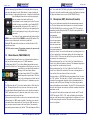
The power for the CD player (PCD7100-R) is controlled by the audio
panel. When the audio panel is on, it automatically activates the player. If it
is necessary to disable the CD player, hold the two CD buttons (far right) in
for more than 2 seconds. This removes power from the PCD7100-R cir-
2
PMA7000MS-Option CD Pilot Guide
Warranty
In order for the factory warranty to be valid, the installations in a certified aircraft
must be accomplished by an FAA-(or other ICAO agency) certified avionics shop
and authorized PS Engineering dealer. If the unit is being installed by a noncertified individual in an experimental aircraft, a factory-made intercom harness
must be used for the warranty to be valid.
PS Engineering, Inc. warrants this product to be free from defect in material and
workmanship for a period of three (3) years from the date of installation as recorded
in aircraft logbook and/or on FAA Form 337. During the first twelve (12) months
of the three-year warranty period, PS Engineering, Inc., at its option, will send a
replacement unit at our expense if the unit should be determined to be defective
after consultation with a factory technician. For the remaining twenty-four (24)
months of the three-year warranty period, the unit must be returned to PS Engineering, Inc., or an authorized warranty service facility, for no-cost repair.
PMA7000MS Option CD Pilot Guide
11