1
Adding Effects to a Sound
The Avista contains two effects that can greatly enhance sounds:
•
Reverb makes your sounds seem as if they’re playing in a large
room or concert hall.
•
Chorus adds a lovely swirling shimmer to your sounds.
Either of these effects can be turned on or off at any time. They can be
used alone or together. You can also adjust the volume of the reverb
and/or chorus.
To Turn the Reverb or Chorus Effects On
•
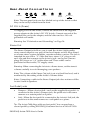
To activate the reverb effect, press the Reverb
button so that its LED lights.
•
To activate the chorus effect, press the Chorus
button so that its LED lights.
Reverb
Chorus
To Adjust the Volume of an Effect
If the desired effect is not currently active, click its button once to
activate it. The Avista’s display will show “REVERB DEPTH” or
“CHORUS DEPTH.”
To decrease or increase an effect’s volume:
1.
Press and release the desired effect’s button.
2.
Press the minus button to decrease the effect’s volume, or the plus
button to increase it.
Note: If both effects are turned on, the display will show “CHOVERB
DEPTH,” allowing you to adjust their volumes simultaneously.
ENSONIQ Avista 7600 User’s Guide
13