1
WT-2232 32 Channel GSM VOIP Gateway
WT-2232 32 Channel GSM VOIP Gateway
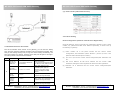
(2). Point to Point (without SIP account)
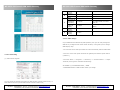
4.2.7 Phone Setting
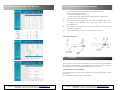
Phone Configuration (Instance of SIP Protocol Registration)
Using SIP platform, there’re generally four parameters allotted to users: phone
number, a/c, password and SIP server address. Specifically, it needs to set up
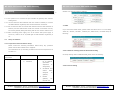
3.3 Parameter Directive And Format
the following in gateway:
Pick off the handset which connect to the gateway, you can hear the dialing
tone ,and then input the following command code via telephone keyboard, after
that you will hearing warning tone, a long tone means setting successfully, two
short tone means error setting, hang the phone and pick off again to set again.
The setting directive and format is as follows:
Type
A
Describe
Setting
To Set the
call time of
SIM Card
***22*XXXXX*XXXXX*XX
XXX*XXXXX#
To Show
IMEI Number
***06*# or ***07*#
To check
signal
strength
To check the
software
version
number
To check the
date of
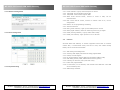
Configuration /Port Parameter /Phone Number”. (Fill the a/c here if the
platform doesn’t allocate phone number).
(2)
Remark
Means the times use call for 4 SIM
Card. For Example:
***22*00010*00020*00000*0005
0#. SIM1=10 calls, SIM2=20 calls,
SIM3=SKIP, SIM4=50 calls
Hanging up the telephone
immediately after type the
command, the phone will be
ringing and display the IMEI
Number.
***01*#
Hang up after input command, the
telephone will ring and display
***98*#
Hang up after input command, the
telephone will ring and display
***99*#
Hang up after input command, the
telephone will ring and display
WT-2232 – USER MANUAL – Rev1.0 – Technical Support: [email protected]
COPYRIGHT ©2011 WITURA CORPORATION SDN BHD
(1) Phone number: fill in the phone number into the column “Phone
8
A/C: fill in a/c into the column “Phone Configuration/Port Parameter Port
ID”.
(3)
SIP server address: fill SIP server address into the column “VOIP
Parameter /SIP Agent IP and registered IP and choose SIP registration.
(4) Password: fill in Password into the column “Phone Configuration/Port
Password”.
WT-2232 – USER MANUAL – Rev1.0 – Technical Support: [email protected]
COPYRIGHT ©2011 WITURA CORPORATION SDN BHD
17